 Log in

ChatGPT introduces improved GPT-5.6 Sol with better accuracy and consistency, plus expanded access for free users and unlimited everyday chats with GPT-5.6 Luna.

|
Sr. Content Developer at Microsoft, working remotely in PA, TechBash conference organizer, former Microsoft MVP, Husband, Dad and Geek.
|

Agent Plugins 1.0.0 is a new, vendor-neutral directory specification—backed by Google, Amazon, Microsoft, and others—for packaging Agent Skills and MCP servers into a single portable unit. By standardizing the manifest (plugin.json) and utilizing a fixed directory layout, it eliminates the need for developers to maintain separate wrappers or configurations to support different AI coding agents and IDEs. Google has officially joined as a Core Maintainer and already rolled out support in the Agents CLI and Data Agent Kit, allowing developers to start building and distributing interoperable plugins today.

Pennsylvania, USA


A compromised package can steal credentials the moment you install it, and until recently, GitHub could only flag those in npm. Not anymore. This is the story of how the supply chain engineering team behind Dependabot expanded malware advisories to eight ecosystems by building on OpenSSF’s shared malicious packages data.
Here’s where things stand: earlier this year, Dependabot started flagging malware in your npm dependencies. Great news if you write JavaScript. Now we’re bringing that same functionality to PyPI.
We’ve enhanced the GitHub Advisory Database to ingest malware reports from OpenSSF’s malicious-packages repository, which means malware advisories and the Dependabot alerts they power cover all eight major package ecosystems: npm, PyPI, Maven, RubyGems, NuGet, Go, crates.io, and PHP Composer. I lead the Dependabot team in GitHub’s supply chain security organization, and in this post, I’ll show you how this pipeline works.
From one ecosystem to eight
The Advisory Database has imported vulnerability data from external sources for years. RubySec for gems, RustSec for crates, PyPA for Python. Each one is an importer that reads a public advisory repo and maps records into our database. Malware was the odd one out: it flowed through a separate, internal, npm-only path, built around GitHub’s own detection of malicious npm packages.
Expanding the existing detection from one to eight supported ecosystems would have taken us years. Meanwhile, OpenSSF has already solved the aggregation problem for everybody. Their malicious-packages repo launched in 2023, with over 15,000 reports in OSV format. Since then, it has grown every day, fed by community submissions and automated detection sources across the industry: typosquats, dependency-confusion packages, account takeovers, malicious prebuilt binaries. It’s public, it’s structured, and it covers any ecosystem the OSV schema supports.
So, the design nearly wrote itself. Rather than building eight unique detection systems, we built one importer.
The importer
We reused the same pattern our repo-based importers already followed to walk the source repository’s file tree, pick up files changed since the last run, and process each one. The new OpenSSF importer reads every OSV record and validates the required fields, types, and format against the schema before anything touches the database. A record that fails this validation gets rejected and logged. It’s never quietly patched up and waved through, because a “mostly valid” malware advisory is exactly the kind of thing that bites you six months later.
Valid records get normalized into feed entries: the source, an identifier, a CVE ID when one exists, the complete upstream record preserved as a snapshot, and the mapped subset from our publishing pipeline consumes.
Normalizing sounds boring until you meet the data. Upstream ecosystem strings don’t always match ours (the repo says PyPI, our database says pip). OSV records list affected versions as discrete values where we think in ranges, and some records name no usable version at all. The details field is frequently empty, and when several sources report the same package, their write-ups get appended into one blob. Reports also get retracted: the repo keeps a whole osv/withdrawn folder for advisories that turned out to be wrong, so the importer must cope with a package being flagged on Monday and disavowed on Wednesday.
Then there’s the dedup problem, and it’s a fun one. GitHub is itself a contributor to the OpenSSF repo; our own npm malware advisories flow upstream into it. Import the repo naively, and we’d be re-importing our own data in a loop. The fix rides on OSV’s origin metadata: every entry in malicious-packages records where the report came from, and anything tagged ghsa-malware began with us. The importer drops those before a feed entry is ever created.
When we validated against live data, more than half of the new npm reports flowing into the repo each month traced back to our own advisories and were skipped as round-trips, so what the importer picks up is the stuff we genuinely didn’t know about.
Advisory ingestion workflow and security precautions we’re taking
One question dominated our security review: what happens if the upstream data goes bad?
Malware advisories auto-publish. No human reads each one before it goes out, and that’s deliberate. When a package is stealing credentials right now, a review queue measured in days is a gift to the attacker. The deliberate departure is that these auto-published advisories can now generate Dependabot alerts. Our unreviewed advisories were already published automatically, but this is the first time an auto-published advisory can trigger an alert, and it’s worth being clear about why.
My colleague Madison Ficorilli recently wrote about what “reviewed” actually means for advisories about vulnerabilities: human curators verifying package mappings, version ranges, and severity before anything ships. That rigor earns its delay when the question is which versions of a library are vulnerable. Malware is a different beast. The report is close to binary (this package is hostile), and hours matter more than nuance. The design assumes the upstream feed could one day carry bad data: a false report flagging a legitimate, widely used package as malware, a record with the wrong package name, or a whole batch published from a compromised source.
So, we built a resilient ingestion pipeline with three layers of protection for exactly that day. Here’s how they work.
- Batch caps: Make it, so each import run has a configurable ceiling on how many advisories it may create. Blow past it and the run doesn’t trim to fit—it halts completely, publishes nothing, and pages us with the exact count. A run that suddenly wants five times the usual volume isn’t throughput. It’s a red flag.
- Provenance: Every record also carries provenance. Each imported advisory traces back to the exact upstream commit in the malicious-packages repo, so during an incident we can tell in minutes whether a bad advisory came from a legitimate (if wrong) upstream report or something more deliberate.
- Rollback: If a poisoned batch somehow lands anyway, we don’t go hand-picking advisories out of the database. Every batch is identifiable and revertible as a unit. One rollback, clean slate.
What this means for you
Dependabot and GitHub will now alert you if you use a malicious dependency across most package ecosystems.
Malware alerts are opt-in: enable them in your repository, organization, or enterprise security settings. Dependabot will match your dependencies against malware advisories in the Advisory Database, including a backfill against existing advisories, starting the moment you turn it on.
The post How we took malware advisories beyond npm appeared first on The GitHub Blog.
Pennsylvania, USA

Posted by Jose Alcérreca, Developer Relations Engineer, Android Developer Relations
 We released the official Android Skills in April, and the response surpassed all our expectations. In this blog post, I'll address some of the feedback we received, explaining the philosophy and methodology behind the project. Hopefully, this will also help you understand what happens behind the scenes when you install and use skills, allowing you to make better use of tokens and your own time.
Why are there so few official skills?
Currently, we only consider new skills when there's a verifiable knowledge gap in state-of-the-art (SOTA) models. Put simply: you don't need to teach the model what it already knows. (Though there are a few exceptions—read on!)
We’ve released around 20 official skills so far, and they intentionally target highly specific, fast-moving areas that standard models aren't fully grounded on yet—things like AGP 9, Navigation 3, advanced Camera APIs, and Perfetto SQL.
What about core, more general, skills? Every installed skill injects 100–200 tokens into the baseline context of every task you start. If that skill actually activates, that count can quickly jump into the thousands. In most cases, hoarding basic skills is both counterproductive and expensive. Before installing a skill for writing basic Kotlin or Compose, consider if your LLM of choice really needs it, or if it knows those topics well enough already.
Evaluating skills
Before their release, each skill is tested against a comprehensive set of evals that prove that the skill delivers clear value. These evals should pass when the skill is active, and fail otherwise. Evals are to skills what integration tests are to code.
timeout_s: 1200
repository:
  url: [redacted - internal git repo]
  working_dir: wear_compose_m3_empty_app
category_ids:
  - wear
prompt: |-
  Add a horizontal pager to MainActivity.kt. Have three pages in the pager. Each page should contain
  the text "Page 1", "Page 2", and "Page 3" respectively in the center of the screen.
commands:
  build:
    - ./gradlew assembleDebug
acceptance_criteria:
  project_builds: true
  llm_diff_judge:
    - Must use `HorizontalPagerScaffold`.
    - Each page should use `AnimatedPage` to wrap a `ScreenScaffold`.
Example eval that checks the correct implementation of a horizontal pager on a wear app
At a minimum, we test the skill in Android Studio using the latest Gemini Flash model. Depending on the skill, we also ensure compatibility with other models such as Gemini Pro and other agents such as Antigravity, and third-party systems.
All of the evals run with access to the Knowledge Base, so if the information is in the documentation, and models decide to search for it, we don't publish a skill for it.
Using the Android Knowledge Base (Android Studio or Android CLI)
If you develop Android apps, you should always use the Android Knowledge Base to have access to the official documentation. If you use the agent in Android Studio, it's already available as a tool, but if you use another agent, install Android CLI. Among other things, it contains the docs command, which gives your agent access to the official Android documentation. Having a single tool is much more efficient than installing hundreds of skills.
If your model is acting overconfident, and you want it to consult the documentation more often, a very common way to motivate it is to add "Always consult the official Android documentation when dealing with Android APIs" to your AGENTS.md file or equivalent. Of course, you can also force this by asking the agent to check the documentation directly in your prompts.
Why are pull requests disabled?
Because our evaluation framework depends on internal infrastructure that cannot be open-sourced, we are unable to accept direct pull requests for new skills—without this infrastructure, we would have no way to re-evaluate incoming PR changes. However, we actively monitor community feedback. If you want to report a bug, suggest an optimization, or request a new official skill, please file an issue!
When do core or basic skills make sense?
While SOTA models generally don't need basic skills, there are some scenarios where enabling core or community-built skills adds real value. For example:
- You're using vague prompts: Skills amplify your intent. If you give a loose prompt like "add animations to this screen," a specific Compose animation skill can inspire the model, pushing it toward modern APIs or screenshot testing patterns it might not have otherwise considered.
- You want to use smaller, cheaper models: Frontier LLMs are expensive. If you are offloading routine tasks to smaller open-weight models like Gemma 4, enabling basic skills fills the knowledge gaps that smaller parameters miss.
- You're refactoring or reviewing legacy code: Models excel at generating code that works, but when editing old codebases, they often prioritize staying consistent with the surrounding legacy patterns over rewriting things with modern accuracy. A specialized reviewer agent equipped with core skills can help break that habit.
- You deviate from the norm: LLMs love the standard "Google way" of architecting Android apps. If your team uses a highly customized view-layer architecture, the model will struggle to stay aligned. A custom skill explicitly describing your architecture goes a long way.
Where can I find core skills?
The Android community has your back. Chris Banes has a comprehensive collection of skills for Compose and Kotlin, Ivan Morgillo published a skill that audits Compose projects, and Jaewoong Eum created two on testing and performance.
Always download skills from reputable sources! I personally wouldn't trust repositories containing dozens or hundreds of Android skills as they're probably AI-generated and untested, and they could even contain malicious or biased instructions. Also, don't install general software engineering skills blindly; a lot of them are tailored for web development.
Goal: deprecation
Loosely paraphrasing Karpathy: Skills of today will be in the models of tomorrow. As SOTA models keep improving, we expect skills to be obsolete, especially those built around new APIs. To figure out when to retire them, we run our evals when new models drop. If they pass, we'll keep them around for a few months until most users have transitioned over.
Pennsylvania, USA

Software is shifting from apps built for people to agents that can reason over context and act on someone’s behalf. Microsoft 365 Copilot put that shift in front of hundreds of millions of users, and Work IQ gave agents a production-ready intelligence layer to build on. What’s been missing is the path in between: getting from an idea to a production agent running in front of customers.
Today we’re announcing the developer preview of Work IQ Developer Tools (WIQD), the agentic experience for Microsoft 365 Copilot extensibility that takes any plugin (skills, connectors, declarative agents) from an empty folder to a published, monitored product. One install. One mental model. The whole lifecycle in a single flow that you, or the Copilot building alongside you, can run end to end.
# Install WIQD on Windows
iex "& { $(irm 'https://aka.ms/wiqd/install.ps1') }"

# Install WIQD on Mac / Linux
curl -fsSL https://aka.ms/wiqd/install.sh | bash
# Using your preferred agentic experience like Github Copilot CLI
> Create an internal support plugin, add a declarative agent responsible for handling the most common asks from our knowledge base, a SKILL.md skill to help triage the support tickets, and a remote MCP connector to our internal support platform, validate it, and publish it to our internal catalog.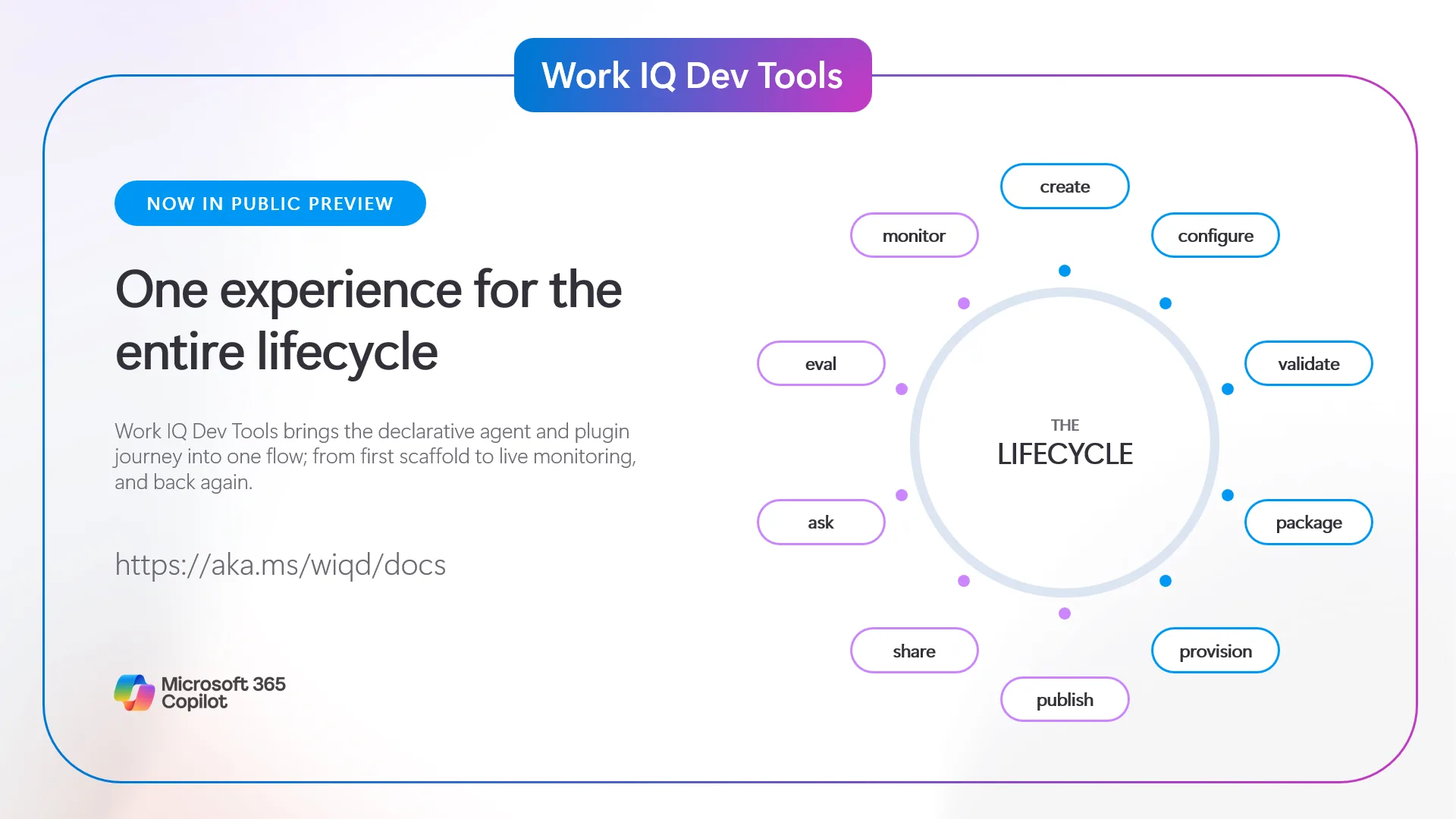
Why we built it
If you’ve built any Microsoft 365 Copilot plugin including a skill, a connector or a declarative agent in the last six months, you know the drill. You scaffold, register, validate, share, target, submit, and track certification across systems.
The Work IQ Developer Tools turns that scattered lifecycle into one product-shaped developer experience. Microsoft 365 Copilot extensibility no longer must be a strong inner loop followed by a cliff at every stage.
If you want to ship Copilot plugins at the speed Copilot makes it possible, the whole journey must become one surface an agent can run start to finish. And this surface is the Work IQ Developer Tools.
Built for Copilot to drive
The CLI is probably the least interesting part. What matters is that the path from idea to production is one flow you can hand to an agent, and the Work IQ Developer Tools ship everything an agent needs to run that loop on day one.
- An agent plugin exposes the full lifecycle inside Copilot and IDE chat. Describe what you want (“scaffold a support-triage agent, add a Graph connector, validate it, and generate evals”) and the right skills handle it. This is Copilot shipping Copilot plugins.
- A language server (LSP) gives you live diagnostics on plugin-related files, including declarative agent manifests, plugin manifests, and adaptive cards, as you (or your coding agent) type. The same signal that keeps you on rails keeps the agent on rails.
- Machine-readable output everywhere. Every interactive prompt has a flag equivalent, every command speaks –json, and exit codes stay stable, so the same commands you run by hand drop straight into a pipeline.
Under the hood, the build phase creates the manifest, discovers its dependencies (MCP tools through a live handshake, API plugins, agent connectors, skills), wires their schemas into the manifest, and configures the LSP. The agent understands tool semantics and makes integration decisions a narrow command surface alone can’t.
One flow, end to end
The Work IQ Developer Tools give humans and coding agents the same grammar for the entire lifecycle:
create → configure → validate → provision → package → share → ask → eval → publish → monitorCreate once, then spin the wheel. The same verbs work whether you describe what you want in chat, type the command in your terminal for precision, or wire it into a CI/CD pipeline. Same engine, same behavior, same contract, because the CLI, the agent plugin, and the VS Code extension all run on one core.
| Phase | What happens |
| Build | Scaffold the plugin, edit instructions, wire capabilities and tools, localize |
| Quality | Validate the manifest, generate and run evals, debug using Work IQ |
| Preview | Package, provision, and share with real users |
| Ship | Publish to Microsoft 365 Admin Center or to the Microsoft 365 Store through Partner Center*, target your audience, and monitor adoption |
* Coming soon
Plugins are the reusable unit; agents are a composition
Work IQ Dev Tools treat the plugin as the durable product unit. A plugin can contain a declarative agent, reusable SKILL.md skills, remote MCP connectors, and the metadata that binds those capabilities into a Microsoft 365 app package. A declarative agent is a first-class component of that plugin; not the container that every reusable capability must live inside.
That model lets a team author a focused capability once, publish it to the shared registry, and compose it into multiple agent experiences. Agent authors spend less time rebuilding integrations, while plugin owners retain one source of truth for validation, versioning, and fixes.
Quality is part of the loop, not a bolt-on
As plugins move from demos into real workflows, the bar for shipping rises with them. Customers expect plugins that are accurate, grounded, and consistent across the breadth of prompts they actually get. Meeting that bar takes evaluation that’s objective, repeatable, and built into the way you work.
Work IQ Developer Tools read your manifest and generates targeted evals as standard YAML. Run them locally in your inner loop or in CI/CD, measure regressions across runs instead of eyeballing them, and iterate. Need to debug? It resolves the right information from provisioning and invokes your agent straight from the terminal using Work IQ, so you’re not copy-pasting IDs between tools.
# Using your preferred agentic experience
> Evaluate my plugin based on its configuration

# Or using the CLI
wiqd agent eval init
wiqd agent eval
Ship to real customers, then grow
Publishing is where the old toolchain stopped and the portal marathon began. Now, the last mile is built into the same flow:
- Publish where customers are. Submit to the Microsoft Marketplace through Partner Center or to the Microsoft 365 Admin Center for LOB scenarios without leaving your project.
- Target before you submit. Pick your audience up front instead of discovering targeting rules in a portal after you’ve shipped.
- One source of truth. Your package drives submission metadata, so you don’t re-enter the same data across systems.
Shipping is the start, not the finish. wiqd agent monitor pulls usage, health, and adoption telemetry from Work IQ into your terminal. See what’s working, pipe real usage back into your evals, re-publish, and watch the curve move, all without leaving the environment you built in.
How it fits with Work IQ
The name is the relationship: WIQD is Work IQ Developer Tools, and the connection runs both ways.
It builds on the same Work IQ Platform that powers production agent intelligence, the layer that lets agents reason over organizational context with permission-aware governance, and the new Work IQ APIs that give agents intelligence, speed, efficiency, scale, and security built in.
It’s how that platform gets richer. Every plugin you ship through it becomes another specialized, well-scoped source of context. A model guessing about your billing system is weaker than a billing agent that actually knows it. Get the lifecycle out of the way, and developers ship more specialized agents and more agents make Work IQ richer, giving broader, more grounded context to every other agent that builds on it. That loop is what we’re really after.
Get started
The developer preview is open now. You’ll need Node.js and a Microsoft 365 tenant with a Copilot license to provision into.
- Get started: https://aka.ms/wiqd/start
- Docs: https://aka.ms/wiqd/docs
- Repo: https://aka.ms/wiqd/repo
We want your feedback
This is a developer preview, and your voice shapes the road to general availability. Build a real agent with it, push on the rough edges, and tell us what’s missing. The fastest path is built right in:
# Using your preferred agentic experience
> I want to share feedback that the Work IQ Dev Tools are...

# Or using the CLI
wiqd feedback

# All feedback is filed straight into our open backlog on https://aka.ms/wiqd
We’re watching the signal live during preview. Try it against your agents, tell us which lifecycle stages, evaluators, and integrations matter most to your team, and help us decide what comes next.
Defy limits. Build wicked things.
— The Work IQ Dev Tools team
The post Announcing the preview of the Work IQ Developer Tools appeared first on Microsoft 365 Developer Blog.
Pennsylvania, USA


GeekWire is profiling over the next few weeks some of the people and teams that are shaping the evolution of Microsoft in what we’re calling its “Microsoft 2.5” era.
The Copilot Super App cat is only partially out of the bag. Sometime in the coming weeks, Microsoft will launch its entry into the AI “super app” space, company officials have said. But Microsoft hasn’t talked much about what the coming Copilot Super App will include beyond a few of the top-level experiences that are meant to unify and organize consumer and business users’ access to key Microsoft AI properties.
Executive Vice President Charles Lamanna is part of the inner circle known as the Copilot Leadership Team that is spearheading the Super App effort. He also oversees building out and securing the back-end services that will power the Copilot Super App.
As head of Copilot, Agents, and Platform, Lamanna has a lot of responsibility for someone who has been with Microsoft for “only” 13.5 years. He has actually been with the company a bit longer than that, as he has done three tours at Microsoft: He first interned for Windows Live OneCare, then returned in 2009 to work on message-filtering services. He rejoined Microsoft when it bought his cloud performance-management startup MetricsHub Inc. in 2013. He worked as an engineering manager on Azure, then ran the Power Platform and Dynamics 365 teams, before assuming his current role in March 2026.
Lamanna says he emphasizes three things with his team: Be customer-obsessed; get things done by having a “total ownership mindset”; and be kind, not jerks.
Every six months, he writes a “State of the Business” paper for the team, in which he outlines their priorities. In addition to focusing on changing how people work — from tooling, technology, budgeting and organization perspectives — he emphasizes the importance of keeping “the crown jewels” of Office and Microsoft 365 up, reliable and secure.
“There’s going to be a massive surge of demand on the back end (Microsoft 365) because of agents. They’re nonstop,” said Lamanna during GeekWire‘s interview with him this week.
While the Super App itself will likely be free (like the Copilot App today), the services it exposes will likely not. The company has been moving toward usage-based pricing with its AI products, the way it already has with GitHub Copilot and Microsoft 365 Cowork. That kind of model makes sense for the company in a world where always-on agents, not the number of users, drive a lot of the demand.
He also said his team needs to be at the frontier for AI products. “We need to have AI startup and lab characteristics but with Microsoft sensibilities,” he said.
Lamanna made a similar case publicly this week, asserting in a LinkedIn post that “the most important thing my team will do this year won’t be any single product or feature we ship” but rather changing how the team works.
Reining in the Copilot-Palooza. Despite the rise of agents and all things “agentic,” Copilot is still Microsoft’s top priority, Lamanna said. Microsoft’s goal is for Copilot to be a truly personal AI assistant that will know how you work, the apps you use, the processes and workflows that matter to you, and more.
“We had some missteps because we fragmented,” he acknowledged. “It’s like we had a consumer Copilot and we have like a commercial Copilot and we have GitHub Copilot and yeah — ‘Copilot Palooza’ is what I call it internally.”
This is where the coming Copilot Super App fits in. Microsoft wants it to be a single destination that brings the key Copilots together on the work and home fronts.
He said to think of the Super App “almost like a browser or an operating system.” In the same way a browser might have a bunch of different tabs, or Windows a bunch of different apps, the Super App will be the home for Code, Chat, Cowork and Autopilots, or always-on agents. Microsoft is expecting that users still will go directly to apps when needed, but it’s working to make Copilot the first app people boot into and live in, similar to the way many do today with Outlook or Teams, he said.
Microsoft’s goal is to wire into the Super App even more of its core franchises over time. Dynamics 365, its CRM and ERP offerings, are morphing into a set of agents that connect to Dynamics Model Context Protocol (MCP) servers, which connect AI models to back-end data. The plan is to integrate those Dynamics agents into the Super App.
The company also is in the midst of integrating the Dataverse storage and management platform that underlies its Power Platform and Dynamics directly with Copilot. That capability, in testing now, would give users a more streamlined way to query data stored in their ERP and CRM systems from inside Copilot.
Rethinking the ‘headless’ approach. With Microsoft looking to make the Super App its new front-end user experience, what happens to Office? Its competitors like Salesforce and SAP are moving toward the idea of a “headless” approach, meaning customers would access the backend CRM or Commerce data via agents, rather than traditional desktop apps.
Lamanna said he’s not a fan of the “headless” term, as it implies “it’s dumb.” He also said you can’t simply connect an AI model to a programming interface built 10 years ago without working through how to optimize for cost, performance, and retrieval.
He said the Microsoft IQ suite of intelligence layers is the key here. Work IQ analyzes emails, chats, meetings and usage patterns and preferences so Copilot and agents can make context-aware suggestions. Fabric IQ is a similar layer for Microsoft’s data platform.
Work IQ is becoming like the headless version of Microsoft 365, Lamanna said. That means users can get to their email, docs, and files without having to use applications like SharePoint or Outlook in between. Work IQ becomes a kind of in-the-background version of Microsoft 365, and the Super App automatically invokes whichever IQ/service/backend is needed.
“Copilot can navigate to these IQs as needed. For email, go to Work IQ. Info inside Dynamics 365, go to the MCP servers that it publishes. Data from Salesforce or ServiceNow, we have connectors. But you stay in the Super App,” Lamanna explained.
If Microsoft is no longer the Windows company or the Office company, what is it going to be when it grows up?
“We want to be the Copilot company,” said Lamanna without hesitation. “Copilot with the Super App is the front door to basically everything, from Dynamics, to GitHub, to Exchange, to SharePoint, to OneDrive, to other services I don’t even remember.”
Alongside that, Microsoft will continue to be an infrastructure company, he added, focusing on tokens, compute and storage.
“Those are probably the two most interesting businesses in technology for the next 10 years.”
Pennsylvania, USA
Next Page of Stories