Bill Gates said an AI "kill switch" alone would be insufficient to address the technology's risks. "The kill switch is, that's kind of a weird thing. It's not enough to have a kill switch," the Microsoft co-founder said in an interview that aired Sunday on NBC's "Meet the Press." He said the more immediate concern is people using AI for cyberattacks or bioterrorism rather than systems acting autonomously. "We're not yet at the point where they autonomously grab computers and, you know, can't be shut down," he said, adding that the public discussion "just sort of shows how nontechnical various people are." Politico reports: Gates said he was not opposed to a kill switch but argued that companies should monitor sophisticated AI models and keep records of "exactly what's being done" to help guard against people using the systems for cyberattacks or bioterrorism. "The United States ought to make sure this is done. China will want to do this," he continued.
[...] Gates also called for legislation requiring safeguards and monitoring, saying voluntary measures by AI companies were insufficient. "No one thinks self-regulation is enough," he said. He argued that the more immediate danger was people using AI to cause harm rather than AI systems acting on their own. "The thing that's urgent has to do with bad people using AI, not the AI going off on its own," he added.
In a widely expected move, Volkswagen announced Monday that it will replace the recently retired ID.4 crossover with the upcoming ID.Tiguan. The decision is an acknowledgment by the German automaker that its more recognizable nameplates like Tiguan are likely an easier sell with consumers, especially when it comes to EVs.
When it lands in Europe in early 2027, the ID. Tiguan will join the ID.Polo and ID.Cross to round out Volkswagen's new-and-improved electric lineup. VW also confirmed that the ID.Tiguan will come to the US, where the ID.4 was previously manufactured, "at a later date." Design details remain under wraps, as the ID.Tiguan i …
In the most recent episode of Zero to Agent in 30 Minutes, AI engineer Sajal Sharma showed how to use a remote sandbox to let your agents install software, run commands, and control a browser without endangering your everyday machine. In effect, you’re giving your agents a computer of their own.
Sajal demonstrated both approaches with E2B. In one example, an agent downloaded a dataset, installed the packages it needed, analyzed the data, and produced a report inside the sandbox. In another, an agent opened a browser on a remote desktop and searched IKEA for furniture. The demos put both command-line and GUI-based computer use to work on a separate machine.
If you want to follow along or try the same setup, Sajal shared the demo code in his GitHub repo.
How to give an agent its own computer, step-by-step
Choose how the agent will use the computer. Sajal demoed two ways to work with a remote machine. In the first, the agent used shell commands and files to install packages and process data. In the second, it worked through the graphical interface by reading screenshots and sending mouse and keyboard actions.
Create an isolated sandbox. For the first demo, Sajal created an E2B sandbox before starting the agent loop. He configured LangChain Deep Agents to send command execution to that remote environment. The agent still did its reasoning locally, but package checks, installs, and data processing ran inside the sandbox.
Transfer the files you need. Files on your local machine aren’t available in a remote sandbox unless you move them there. Sajal’s agent downloaded the dataset it needed inside the sandbox, created its report there, and then transferred the finished report back to the local machine.
Map the agent’s actions to the remote desktop. In the GUI demo, Sajal used the OpenAI Agents SDK and built an E2B computer class that connected model actions to the desktop. He mapped screenshots, clicks, keystrokes, and scrolling to the corresponding E2B operations. An early version of the demo crashed because one of those actions wasn’t mapped, so he had to add the missing behavior before the demo could run without crashing.
Tell the agent what environment it has. Sajal gave the agent basic operating instructions, including which browser was installed. That kept it from spending tokens figuring out how to use the machine. He also recommended giving agents their own task-specific credentials or secrets instead of reusing a person’s authentication profile.
A separate computer also helps when multiple agents need to work at the same time. Sajal used frontend development as an example. Two agents making UI changes might otherwise try to start development servers on the same port or inspect the wrong running instance. With a sandbox for each agent, they can start their own servers and test their own changes. Each run can also start on a fresh machine that gets deleted when the task is done.
Coming next week
Next week, author and AI innovator Bruce Hopkins will show how to build your first agent with the Model Context Protocol (MCP). He’ll demonstrate how to take existing HTTP REST APIs and make them available through MCP so an agent can use those services as tools.
Follow along with Zero to Agent in 30 Minutes onRadar, or watch the latest episode onYouTube,Spotify,Apple, or wherever you get your podcasts. If you’re an O’Reilly member, you can watch live.Save your seat.
Today, we’re introducing JetBrains Air Teams – the team layer for agentic development. It gives humans and agents the shared context, environments, tools, and instructions they need to work effectively together across the full development lifecycle.
Air Teams is already available to JetBrains business customers, with plans to expand access to individual customers later.
The new chapter: From individual developers to teams
We introduced the Air app several months ago as our first step into agentic development. Since then, we’ve learned a lot and seen real productivity gains for developers working with agents.
As we developed Air further, two things became increasingly clear. First, developers don’t need another standalone app – tools and agents should be integrated into the environment where they already work. Second, as individual developers became more productive with agents, the real bottleneck started shifting to the team level.
That’s why we’re expanding Air beyond a standalone desktop app into a broader system. Air now supports agentic development at three levels: individual developers, teams, and organizations. Let’s take a closer look at what Air Teams brings to engineering teams.
What is Air Teams?
Air Teams is a shared workspace where engineering teams run coding agents and reuse what works. Today, most agentic work happens on individual laptops: Each developer has their own setup and prompts, and what works for one person doesn’t easily spread to the rest of the team. Air Teams brings your agentic workflows into one place: what one developer figures out, everyone can use.
Air Teams has four parts:
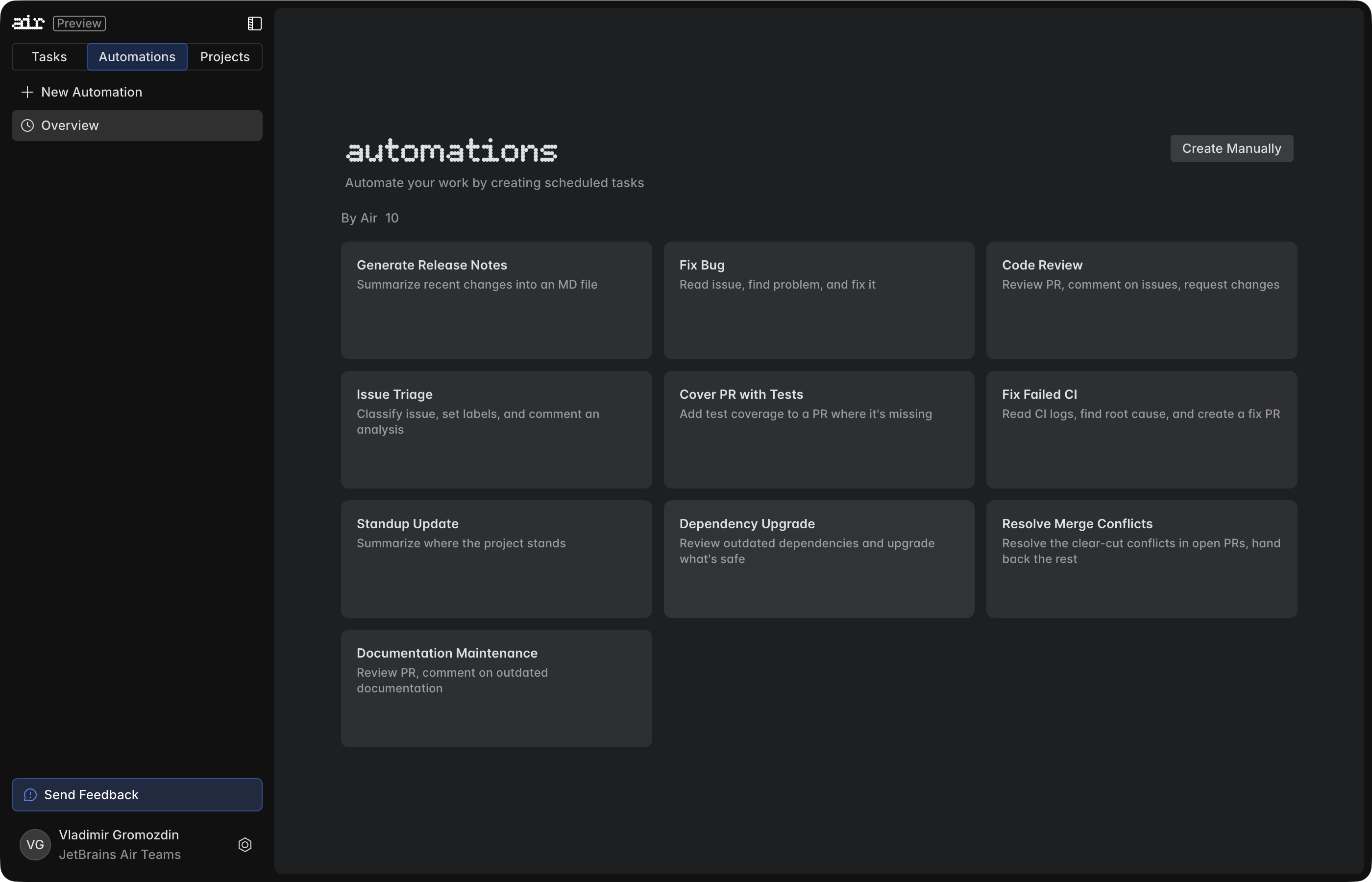
Automations handle recurring work on their own, such as code reviews, issue fixes, and dependency updates. An event or a schedule starts each run.
Shared cloud environments give agents the tools, dependencies, and credentials they need to build and test the code. The team sets an environment up once, and everyone reuses it.
Cloud tasks run in those environments, in parallel, without tying up anyone’s laptop. You can start and follow them from your IDE or browser, and soon also from your phone.
Projects tie it all together, with shared credits, clear roles, and Automations that don’t depend on any one person.
Let’s walk through each part.
Automations: No more babysitting agents
Agents can work fast, but they still wait for humans to start tasks, provide instructions, and proceed to the next step. At some point, manually orchestrating every run becomes the bottleneck.
Air Automations are agentic workflows that run on their own, in the cloud, triggered by an event or a schedule instead of a person. They are shared team assets: One developer can build an automation, and the whole team can run, reuse, and improve it. What works well for one person can become part of how the entire team works. For example, an Automation can review every new pull request the moment it opens, or update dependencies twice a week.
Air Teams comes with 10 Automation templates, including code review, bug fixes, dependency upgrades, and documentation maintenance. Use one as is, or adapt it to how your team works.
How Automations work
Automations are for recurring work that follows a pattern: a pull request needs reviewing, a labeled issue needs investigating, or dependencies need checking every week.
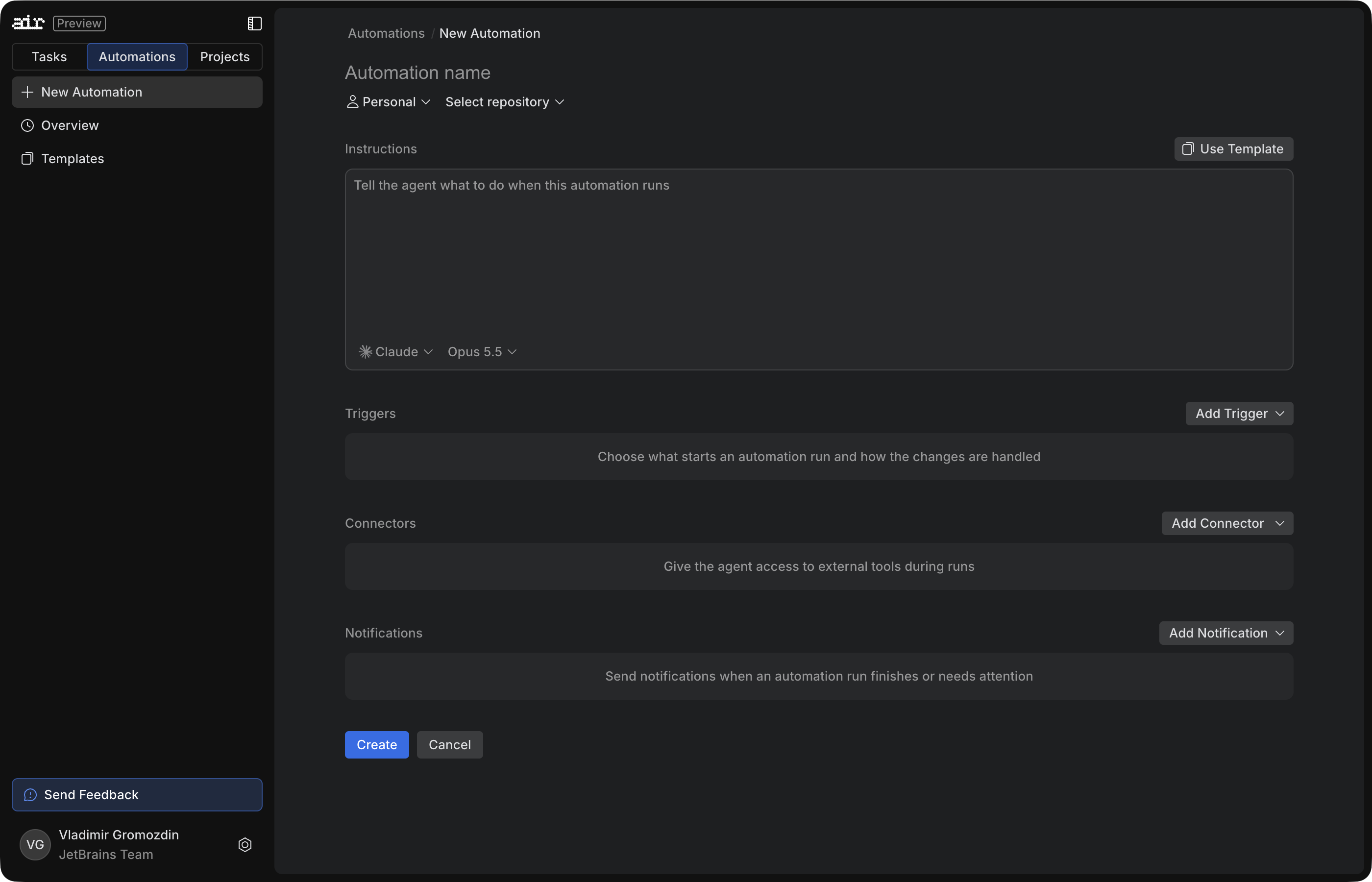
You set up four things once, and the Automation reuses them on every run:
Instructions: what the agent should do.
Environment: where the agent runs.
Tools: what the agent can use, including Jira, Figma, and Linear through connectors.
Trigger: when the agent starts, whether that’s a GitHub or Jira event, a webhook, or a schedule, with more trigger types on the way.
Here’s an example: an Automation triggered by a label. When someone adds the Bug label, the Automation starts an agent. The agent reads the issue and the linked Jira ticket, finds the cause in the code, and opens a pull request with a proposed fix for an engineer to review.
Automations belong to a team project, so the whole team uses the same Automation instead of each person building their own. Once an Automation proves itself, it can go beyond the project: the team can reuse it on another repository or save it as a template that anyone in the organization can use as-is or adapt.
An Automation is instructions, an agent, and a trigger. Set them up once, and every run reuses them.
Automations examples
Here are three Automations we run on our own team:
Code reviews. When a pull request opens, an agent reads the relevant code and discussion, posts inline comments and a summary, and can approve the pull request or request changes. Each new commit starts another run: The agent reads its previous review and any replies, notes which issues were fixed and which remain, and collapses its old reviews so only the latest one stays visible. An AI agent should assist your workflow, not block it. When you decide to handle an issue in a separate pull request, the agent respects your choice and completes its check.
Issue fixes. When a teammate tags a small, well-scoped issue in YouTrack, an agent gathers context, attempts a fix, and opens a pull request for review. The same Automation also handles review feedback. When a pull request opened by an Automation gets review comments from a teammate or from the code review Automation, the agent picks them up and fixes them.
Dependency updates. Twice a week, an agent upgrades the project’s dependencies, skipping any that its instructions say to leave alone. It builds the project and runs the tests. When an upgrade breaks something, the agent fixes the affected code without changing its behavior, or reverts the upgrade if a fix can’t be found. It then opens a pull request listing which upgrades were applied, skipped, or reverted. If the previous pull request is still unmerged, the agent closes it, so the team always has one up-to-date pull request to merge when it’s ready.
We’ll cover more Automations in upcoming posts, including how we set up and use them.
Stay in control
A valid concern with AI agents is noise: comments nobody reads and pull requests nobody asked for. Automations keep the decisions with the team. Engineers choose what an agent works on, and its instructions can keep the output small, as in the examples above: one open pull request for dependency updates, one current review per pull request. Each run also keeps the agent’s full conversation and tool calls, so when a result looks wrong, the team can see why. Every code change arrives as a pull request, and an engineer decides whether to merge it.
Shared cloud environments: A setup your team and agents can reuse
Every Automation, like every cloud task, runs in an environment, and an agent can perform only as well as its environment allows. Before it can build or test anything, it requires what a new engineer needs on day one: the right tools, dependencies, credentials, and network access. A small project may run on the defaults, but most codebases need more, such as a private package registry, pinned toolchain versions, or an internal issue tracker that the agent must reach. Someone has to set that up, and once should be enough.
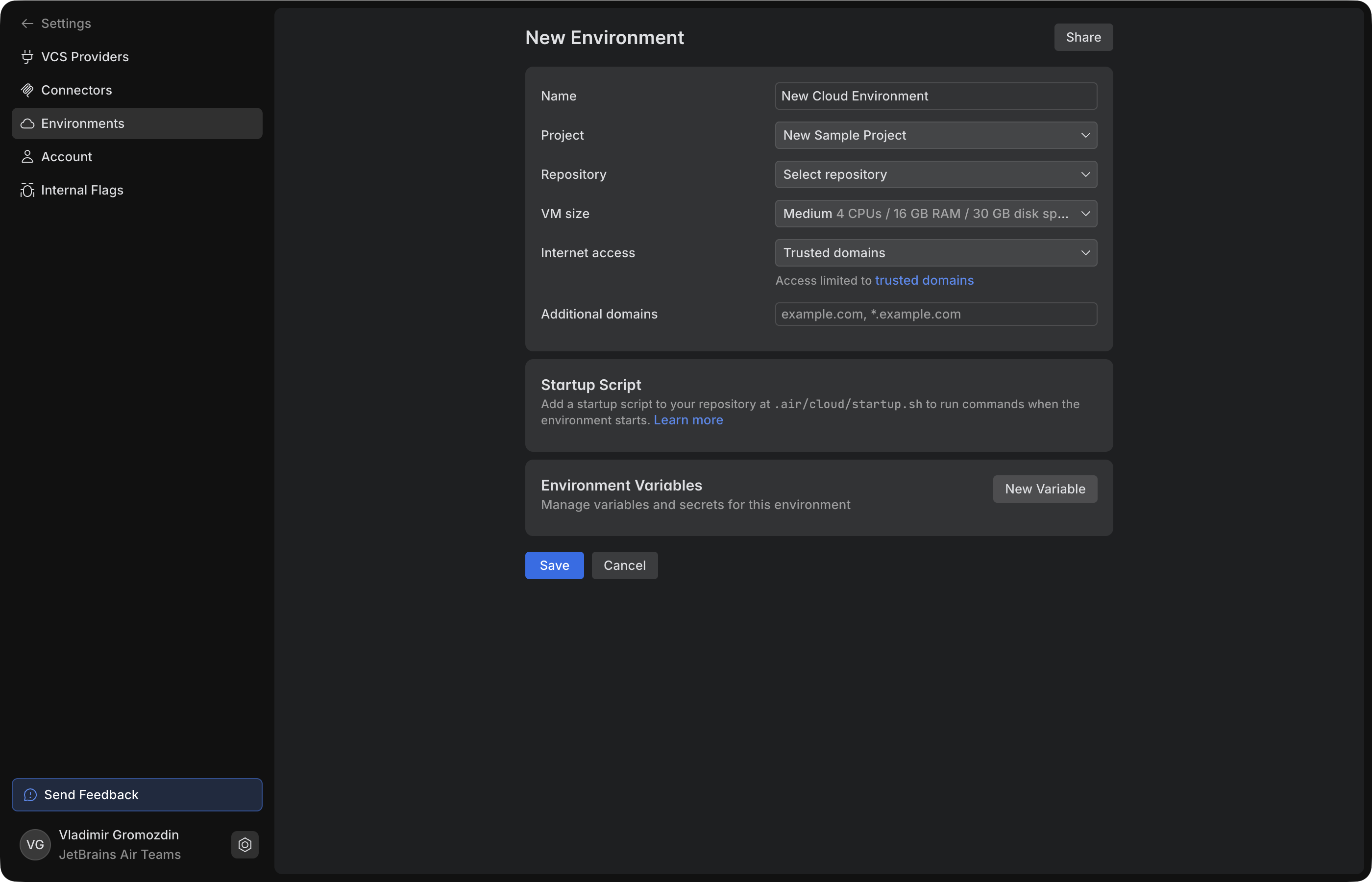
Set up an environment by hand, or let an agent do the first pass and commit a tested startup script for you to review. Either way, you set it up once, and the whole team reuses it.
In Air Teams, that setup lives in a shareable cloud environment. You create one for a repository in your team project. Pick the VM size, decide which domains the machine can reach, and add the variables and secrets the build needs. The setup itself lives in your repository at .air/cloud/startup.sh, so your team versions and reviews it with the rest of the code.
You can also hand the first pass to an agent. It inspects the repository, runs the real install and build, asks for any missing secrets, and commits a tested startup script to a separate branch. You review it like any other change.
When the environment is ready, Air saves it as a snapshot, and you share it with the team. Sharing the setup doesn’t mean sharing credentials. Shared secrets let your teammates and Automations use a value without seeing it, while personal secrets and repository access stay with each person.
From then on, teammates pick the environment for their cloud tasks, and the project’s Automations run on it. No agent spends time and tokens rediscovering how to build the repository. Every task starts on the actual work.
With environments set up, you can start giving agents work. Choose an environment and an agent, then describe the task. If your repository doesn’t need a custom setup, use the default environment.
You can run a task locally or in the cloud. The right choice depends on the task, the setup it needs, and how closely you want to work with the agent.
Local agent
Cloud agent
Getting started
An existing workspace is ready immediately. A new worktree or container may need to be set up first.
The environment has to start and copy the repository first. Configuring it in advance and saving it as a shareable environment with a cached state will shorten the wait.
Machine resources
Builds and tests share your machine’s CPU and memory with your other work.
Builds and tests run on a cloud machine, preserving local resources.
Files and tools
The agent works with your local tools and your working copy, including uncommitted changes.
The agent works from a remote branch, with the tools, dependencies, and credentials configured for the environment.
Agents and accounts
You can use any supported or ACP-compatible agent you’ve installed, with an account it supports.
You can use the supported cloud agents your organization has enabled.
Reusing the setup
Teammates can share setup scripts, but each person still prepares their own machine.
Teammates share one environment, and each task runs in its own copy of it.
Following up
Your machine has to stay on. Remote access depends on your own tools.
The task keeps running even if your machine is off. You can follow up through Air in JetBrains IDEs or on the web, and soon also on mobile.
The key difference is that cloud tasks aren’t tied to the device you started them on. You can start a task in your IDE and pick it up later on the web. The agent keeps working even after you close your laptop.
A team project is a shared home for a team’s agentic work. It brings together members, environments, connectors, and Automations.
Two roles define who can do what. Project admins manage membership, environments, connectors, and Automations. They can also let specific members edit an environment. Members use the shared environments, create their own Automations, and see the results of every run.
Automations don’t have to depend on the person who created them. Each project has its own service account and AI credits, and a project admin decides whether the project’s Automations spend those credits or their creators’ own. On project credits, Automations run under the project’s account and keep running after their creator leaves.
With Air Teams, agentic work becomes something the whole team shares. Automations handle recurring work, shared environments give every task the same setup, cloud tasks keep running after you close your laptop, and team projects make sure none of it depends on one person.
Try Air Teams at air.jetbrains.cloud. Everything above is built to be shared, so invite your teammates from the start.
I’ve been thinking about a gap in the way we discuss graphs in AI. Most of the conversation starts after the graph already exists. We talk about graph neural networks, GraphRAG, graph agents, and graph foundation models. We spend much less time on the step that determines what all of them can do: turning raw data into the right graph.
Suppose an organization has customer records in tables, support conversations in documents, product telemetry in event streams, and incident histories in tickets. Before any of this can be used as a graph, someone has to decide what counts as an entity, what a relationship means, how time is represented, and which source to trust when records disagree. These choices shape every prediction, retrieval result, and agent decision that follows.
This is what I mean by graph-native AI. It’s an approach that treats graph modeling as a first-class stage between raw data and the different systems that may use it. The graph isn’t simply an input to one model. It becomes a shared representation that can support queries, prediction, retrieval, agents, and, potentially, foundation models.1
A graph is a model of the data
At its simplest, a graph consists of nodes and edges, which may also carry features. Real systems also need types, timestamps, provenance, confidence, permissions, and other context. Describing the finished graph tells us very little about how we should get there.
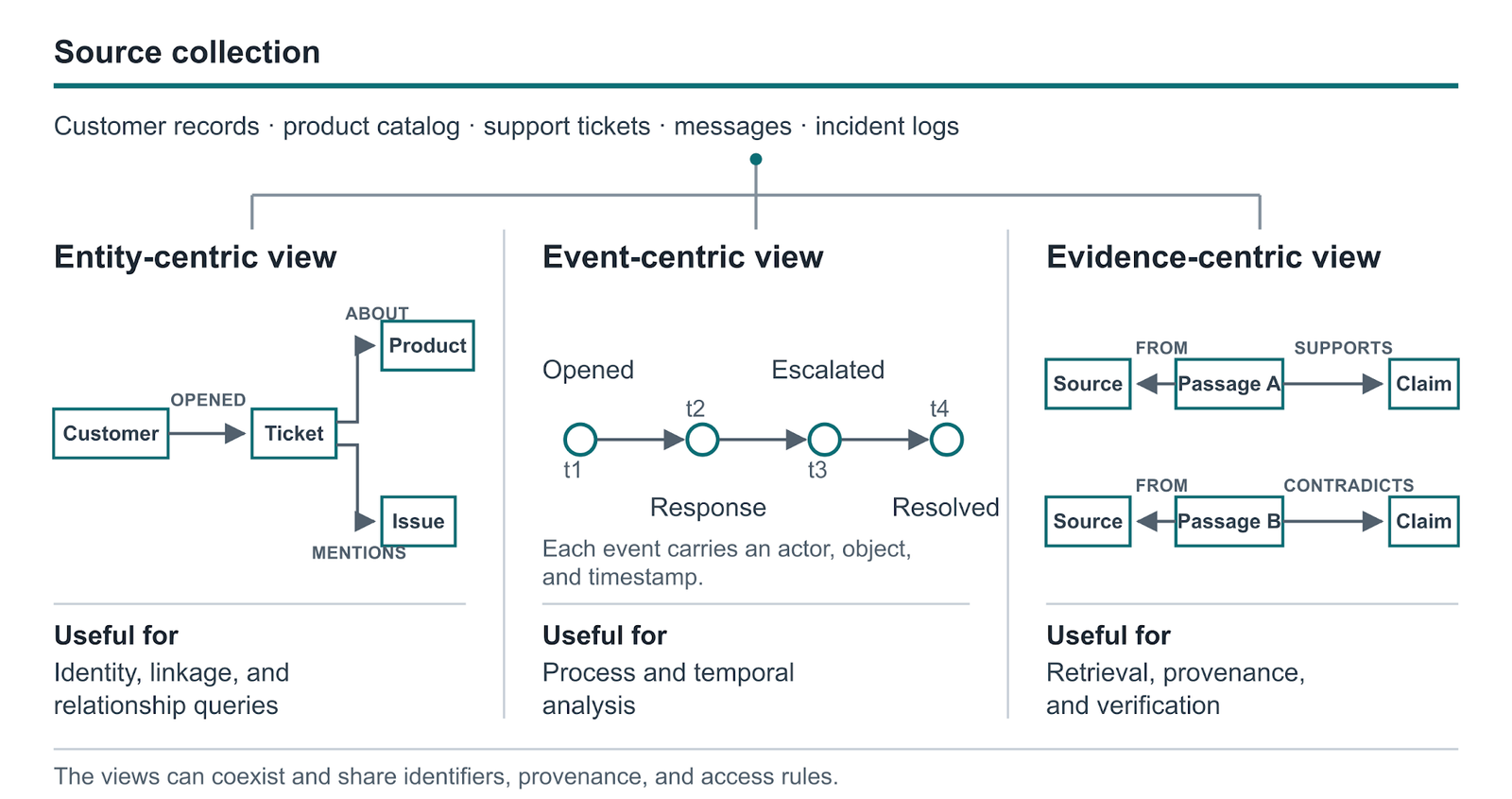
Take customer-support data as a simple example. Should a company be represented as one node or as a set of legal entities that changes over time? Should an email be an edge between two people, a document node connected to its authors, or evidence for claims extracted from the text? Is a purchase an ongoing relationship or an event with a timestamp? If two records refer to the same customer, should we merge them, link them as possible matches, or keep them separate?
There’s no single answer. An entity graph may be useful for identity and relationships. An event graph may be better for process and temporal analysis. An evidence graph may be better for retrieval and provenance. The right choice depends on what we want the system to do.
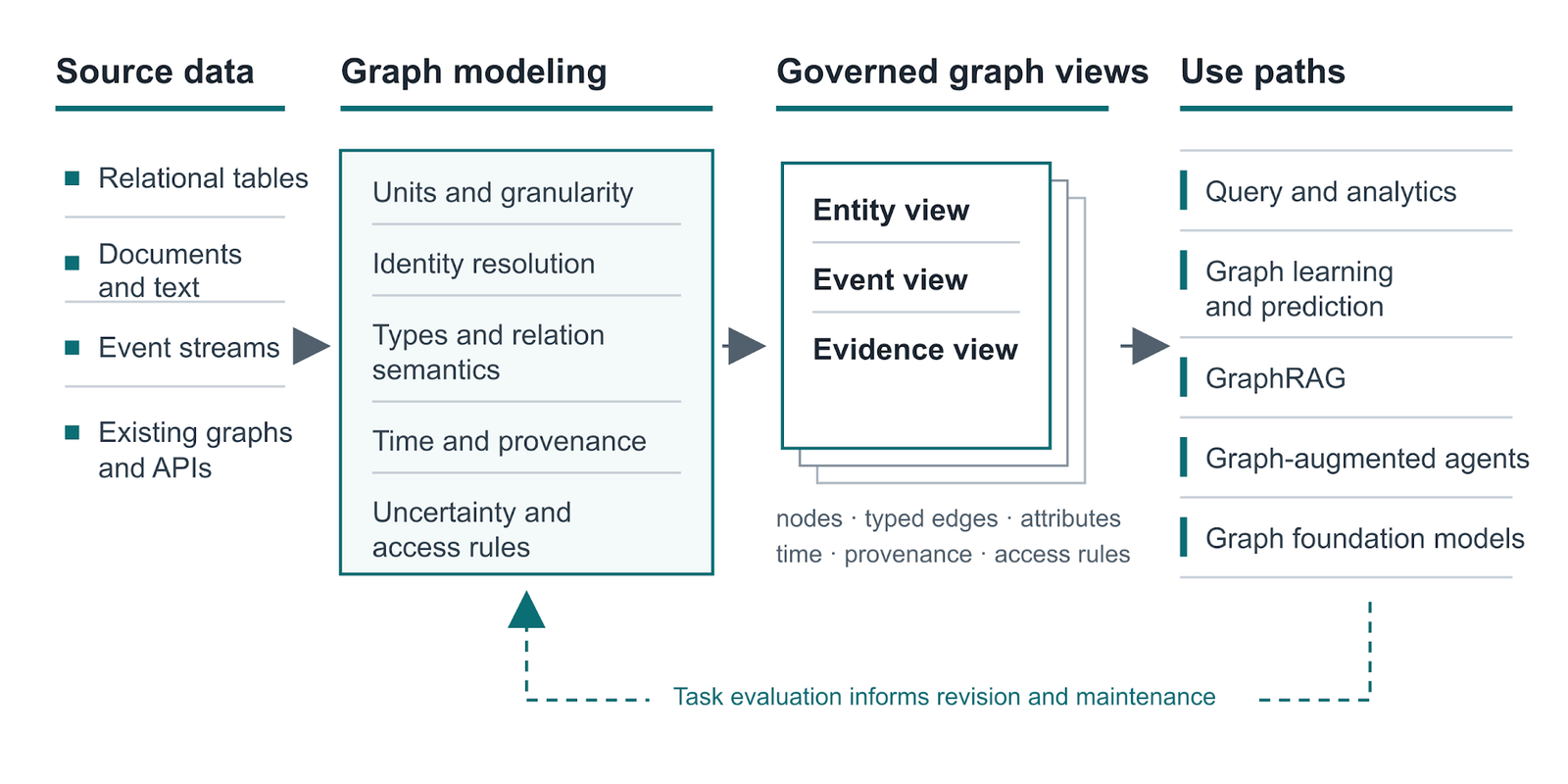
Figure 1. Raw data is modeled into one or more governed graph views, which different systems use in different ways.
The step before graph learning
Graph representation learning normally starts with an existing adjacency structure. Embeddings learn vectors for nodes. Graph neural networks pass information across neighborhoods. Autoencoders reconstruct structure or attributes. Graph transformers combine local graph structure with longer-range attention. These methods ask: Given this graph, how should we learn from it?2 Graph modeling asks the question before that: What should the nodes and edges be?
Relational deep learning makes this distinction concrete. It maps rows in relational tables to nodes and primary-foreign-key links to edges, producing a temporal heterogeneous graph that a GNN can learn from. This can remove a good deal of manual joining and feature engineering. It also makes an assumption that deserves attention: A database schema designed for storage and transactions is also a useful graph for machine learning.3
Recent work tests that assumption across 26 relational tasks. Graphs derived directly from database schemas sometimes suffered from information overload and semantic fragmentation. The authors improved performance by adapting the structure: removing distracting connections and adding dependencies that the original schema did not capture. I find this result important because it makes the graph itself part of the learning problem. Adding more edges is not always helpful. What matters is whether the structure supports the reasoning required by the task.4
Graph construction therefore needs its own evaluation loop. We can generate a few plausible graph views, test them against the downstream task, inspect failures, and revise the structure. We should also keep provenance and uncertainty so that we know where an edge came from and how confident we are in it. The first graph we can extract is rarely the only graph worth considering.
Figure 2. The same source data can support entity-, event-, and evidence-centric views; each preserves different relationships.
What the graph can support
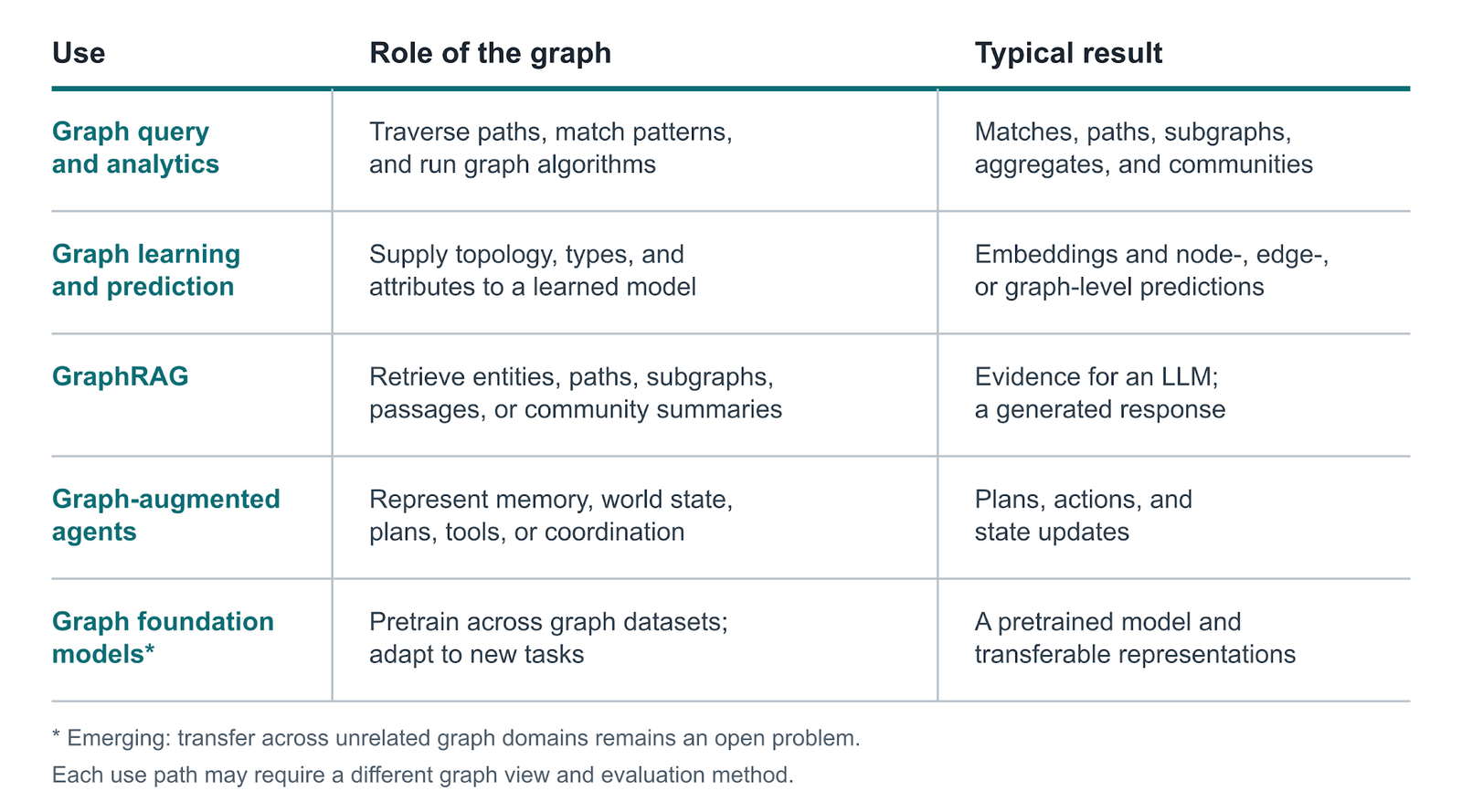
Once the graph has been modeled and checked, several paths open. I don’t think this means every application should use one enormous universal graph. A more practical design is to build several governed views from the same modeled data while keeping identity, evidence, time, and access rules consistent underneath. Here are five ways to use graphs in an AI application.
Query and analytics: A graph database and ordinary graph algorithms may already be enough. Traversals, path queries, neighborhood aggregation, centrality, and community detection can reveal relationships that are awkward to see once the data is flattened into rows. This is also a useful baseline: If a deterministic query answers the question, there is no need to start with an LLM.
Prediction and graph representation learning: Embeddings, GNNs, graph autoencoders, and graph transformers can make predictions at the node, edge, subgraph, or whole-graph level. Common examples include fraud detection, recommendation, molecular-property prediction, and link prediction. Here, the graph gives the model an explicit view of which entities are related and how information should move between them.
Retrieval and GraphRAG: In this case, the graph is used as an index rather than as training data. Microsoft’s GraphRAG work builds an entity graph and community summaries to answer broad questions over a corpus that ordinary chunk retrieval may handle poorly.5 Other approaches retrieve a task-specific subgraph and pass it to an LLM. This can be useful, but the extra graph pipeline has to improve the final result. Recent benchmarking found cases where GraphRAG underperformed vanilla RAG and argued that graph construction, retrieval, and generation should be evaluated together.6
Graph-augmented agents: Agents have memory, plans, tools, state transitions, and sometimes relationships with other agents. Some of this state is naturally relational. A graph can make it persistent, inspectable, and easier to update across turns. The emerging literature organizes these uses around planning, memory, tool use, and multi-agent coordination. The practical design question is which parts of an agent’s state benefit from being represented as a graph.7
Graph foundation models: The goal here is to pretrain a model that can transfer across graph tasks, datasets, or domains. Current work combines graph backbones, self-supervised objectives, adaptation mechanisms, and sometimes language models. The difficult part is that graph semantics vary widely. Nodes and edges can represent very different things across molecular, transaction, and knowledge graphs. Transfer across these domains requires methods that bridge differences in structure and semantics, supported by suitable training data.8
Figure 3. Five ways to use a modeled graph, from deterministic analysis to learned and generative systems.
What better graph modeling would look like
When I say that we need to crack graph modeling, I don’t mean a universal converter that produces one correct graph. The more useful goal is a system that can propose, test, and maintain several graph views of the same raw data.
Such a system would need to do a few things well. It should identify possible entities and relationships in tables, text, events, images, and existing schemas. It should retain type, time, provenance, confidence, and permissions. It should be able to suggest alternatives instead of quietly committing to one structure. It should compare those alternatives using downstream quality, cost, stability, and human constraints. And it should keep the graph current as the source data and the organization’s understanding of it change.
The downstream applications provide useful feedback. Prediction errors can point to missing relationships. Retrieval failures can expose poor granularity or disconnected evidence. Agent failures can show that important state transitions are absent. Weak transfer across datasets can reveal schemas that do not align. In this view, the graph is evaluated by what it helps the system do.
Today, a team will often build a graph for one application: a fraud graph, a recommendation graph, or a knowledge graph for a chatbot. I think there is a larger opportunity. If the underlying graph modeling is done carefully, the same raw data can support several graph views and several applications without rebuilding identity, provenance, and governance each time.
We already have strong methods for learning from graphs. The harder and less settled problem is deciding which graph we should build. If we make that step systematic and measurable, graph modeling can become a field in its own right and a shared foundation for analytics, prediction, retrieval, agents, and foundation models.
Is Jev actually a leap forward for classification or just hype and fake demos? We dig in, plus Claude Code’s new AGENTS.md support, TinyCast (the free, open-source Raycast alternative), an iPhone Fold simulator in Xcode, and a stack of dev tools you’ll want to try
 Log in






 ︎
︎
