In this episode of the Azure Essential show, Aaron Stark is joined by Haishi Bai, Principal Software Architect at Microsoft, for an exploration of Adaptive Applications, an architectural approach that separates what an application needs from how those capabilities are delivered. Learn how capability-based abstractions enable developers to build applications once and run them across Azure, sovereign, edge, and on-premises environments while addressing requirements such as data residency, compliance, business continuity, and AI portability.
In this episode, you will learn - How Adaptive Applications use capability-based abstractions to decouple application code from underlying infrastructure and services - Why organizations need architectures that support sovereignty, compliance, data residency, business continuity, and hybrid deployment requirements. - How to build AI-powered applications that can seamlessly switch between cloud-based services and local models without changing application code
Schools and universities are failing to adapt to our modern world, in which AI is becoming increasingly pervasive in all aspects of life and work. In fact, AI may be changing what should be considered foundational knowledge that all students must learn.
In this Fully Connected episode, Daniel and Chris explore the role of AI in education and the future of learning. They note the bureaucratic inhibitors to educational reform, and the fact that classroom teachers don’t have the authority to innovate and personalize the learning process for their students, and discuss how AI tools can support personalized learning while preserving critical thinking, creativity, and problem-solving skills.
SerpAPI: A Web Search API that gives developers real-time, structured access to search engine results. Visit serpapi.com/practicalai to get started for free and get 250 searches every month.
Chris’s new book The Art of Swarming will be published soon, written to be the seminal foundational book for the fledgling swarming industry, defining the principles and architecture that enable autonomous agentic UxS swarms with emergent unified embodied intelligence.
I’ve been a software developer for 20 years, and for about 15 of those years, I’ve worked in secure government facilities or with other large, security-conscious organizations. I used to have to deposit my cell phone in a locker, walk through a metal detector, and swipe my badge multiple times just to get to my workstation. Over the years, most of the developers I’ve worked with have been hard workers who just wanted to build good software. They love solving interesting problems, and working with cutting edge technologies to build applications that allow their users to focus more on what they need to do and worry less about how they’ll do it. But throughout most of my career, my development objectives have invariably run up against the dreaded roadblock of cybersecurity.
“No, this library hasn’t been officially vetted by security, but it’s the most widely used message broker on the market. It’s fine.”
“I can’t give you a finalized architecture diagram until you let me install this software so that I can prove that my architecture will work.”
“Why do I have to talk to 7 different people just to get a port opened in the firewall?”
I’ve worked with many solid developers who described the places we worked as simply, “The place where progress goes to die.” It can definitely be disheartening, to say the least. But still, you have to ask yourself, why does all this security red tape exist? And hopefully, in most cases, there’s a good answer.
If you’re building a website for your daughter’s Girl Scout troop to sell more cookies, then sure, there probably isn’t a need for a ton of security. Not ZERO security, but you don’t have to code Fort Knox. On the other hand, if you work for a bank, the power company, or the Department of Defense, then obviously there should be more security in place, because the penalties for failure are so much higher. If you wake up one morning to find that your slap-dash code allowed a hacker to post porn ads on your daughter’s Girl Scout site, well yeah, that sucks. You may have some explaining to do to some angry parents. But if you come in to work to find that a foreign adversary compromised your server full of classified mission briefs, and as a result, last night’s “door-kicking” raid put one of our soldiers in a wheelchair, you’ll be explaining yourself to more than your daughter’s Troop Leader.
Ok, maybe that’s a little extreme. Let’s take it down a notch. Clearly, in matters of life and death, the utmost in security protection is warranted. But that’s not the average situation. Sometimes it feels like cyber is just issuing blanket rejections to your requests for no good reason. Why is that? Well, one (overly-simplistic) reason might be:
Security breaches happen
In the aftermath, there’s a lot of finger pointing
We live in a litigious society, and when the time comes to assign blame, there is a long tradition of looking for the scapegoat. If you are the developer that wrote the code that introduced the vulnerability, well you’re a great candidate to take the fall. But, if you work in an organization that has a full-fledged security team in place, it might be the cyber analysts on the front-lines defending their actions leading up to the breach. “Hey, I’m just a developer. You hired me to write the code to make it work, not to keep it secure.” That is often the prevailing climate in some of these institutions. And if you were a security professional in one of these organizations, wouldn’t you tend toward saying “No” first, rather than potentially hanging yourself out to dry?
Consider the 2017 data breach at Equifax. Somebody failed to patch a critical Apache vulnerability, resulting in the theft of the personal data of 143 million people. It’s hard to know how many individual security worker-bees were let go, but that one went all the way to the top, ending in the forced retirement of the CIO and CISO. If I were an incoming cyber analyst that was shown that brief on day one, you better believe that on two I’d be busting out that big “DENIED” stamp and putting it to good use.
I said at the outset that I’m a software developer. In some ways, that’s the “team I play for.” And I have to admit that I’ve spent my fair share of time griping about all the security overhead that keeps me from doing my best work. But in my case, it’s not quite so simple. The DoD contracts that I worked on required technical staff to have some sort of bonafide security certificate to even lay hands on a keyboard in those facilities. And my manager at the time, in an effort to maintain a competitive advantage in contract negotiations, insisted that I study for and sit the CISSP exam. I didn’t want it. It meant a lot of work studying an almost 2,000-page book filled with all sorts of security minutiae, in which I was only mildly interested. I never wanted an actual security job. I knew that even having those five letters attached to my name might put me in front of the bright lights of the Whodunit Squad in the days after a security incident. But I did as I was told. I studied hard, sat the exam, and earned my little gold CISSP tie tack. And then I proceeded to keep my head down and act like just another developer who doesn’t have a certificate that would indicate that maybe he should’ve known better.
But, the fact is, I do have that certificate. I guess technically that means you could also call me a “Security Professional.” Heck, it’s right there in the last two letters of that credential I hold. So I do sort of see myself as a card-carrying member of both of these warring tribes. I really did wade through those 2,000 pages. I saw the sheer volume of information that a supposed “certified security professional” was supposed to know (and guard against). Occasionally, when I am commiserating with my development team over the latest cyber rejection or delay, I find myself saying things like, “Well, but let’s try to put ourselves in their shoes…”
Lest you surmise, from that description of the Equifax breach, that it’s only the security folks that get sacked in the aftermath, there are plenty of published security incidents that can be tied directly to the developer. Often it’s due to negligence (Hello, hard-coded credentials!), especially when tied with efforts to shortcut or bypass known security controls. And while, for legal reasons, it’s uncommon for companies to publish lists of individual personnel who were disciplined or let go after these incidents, someone is eventually going to run a git blame on the code. If your name comes up, you’ll likely find that command’s name to be uncomfortably literal.
So, what’s the solution? Well for starters, you could look for a different job. Let’s face it, software development and security can be exciting, challenging, and highly rewarding careers, but they’re not without risk. There are safer alternatives out there.
Another solution: the Bugout Bag. I used to work with a systems administrator that managed all of our Linux servers. I asked him one day what he would do if he messed up and lost the whole database, with no possibility of recovery. He said, without missing a beat, “I’d just go home and not come back. Probably move.” I laughed and waited for him to crack a similar smile. He didn’t. He meant it. He had thought about it and that was his strategy. This was a middle aged guy with a wife and two kids. And his solution to the security perils of his job was to keep a bag packed, stuff cash in his mattress, and not sign any long term leases (so to speak). That’s bananas! Who wants to live like that? Not me.
So, what about a third option? What if we tried to work with each other, instead of glaring at each other across the security breach demilitarized zone? We don’t need to always assume the worst of the other team. “Oh man, that guy’s gonna get me fired.” “Dude, if they ever got off their butts and let us DO anything, then maybe we’d meet our deadlines!” Sometimes it seems like we’re just gladiators competing for the coveted prize of “least responsibility.”
Part of the problem may be that we tend to introduce security at exactly the wrong time. If the first time the cybersecurity team gets a good look at your application is two weeks before you’re planning to deploy it, you’re setting everybody up for a bad time. By then, the developer has deadlines to meet, management is expecting delivery, and decisions that were easy to change six months ago are now buried under 40,000 lines of code. Cyber finds a problem, development sees a roadblock, and everybody retreats to their respective corners.
What if instead we brought security into the conversation while we were still drawing boxes and arrows on a whiteboard? If Cyber tells me early that the clever new technology I want to use is going to be a non-starter, I might grumble about it, but at least I haven’t spent three months building around it. Better yet, maybe instead of telling me “No,” they can explain the risk they’re worried about. Now we have an engineering problem to solve, and engineers tend to be pretty good at those.
Maybe we can isolate the component. Maybe we can change the authentication mechanism, restrict the firewall rules, encrypt something we weren’t encrypting before, or redesign the data flow. Maybe the answer really is “No, you absolutely cannot do that.” Fine. Sometimes it is. But if we have that conversation early enough, we still have time to find another way. In fact, let’s have those conversations early and often. Regular security reviews can be helpful checkpoints instead of crushing roadblocks.
None of these things eliminate security requirements. That isn’t the point. They make the requirements visible earlier, when they’re cheaper and easier to deal with.
There’s an organizational component to this too. If development is rewarded entirely for delivering features quickly while Cybersecurity is rewarded entirely for preventing risk, we probably shouldn’t be surprised when they behave like opposing teams. One group is stepping on the accelerator while the other is standing on the brake. Maybe the better goal is one that both groups can share: deliver useful software as quickly as we reasonably can, at a level of risk the organization is willing to accept.
Hey developers, how about we try to do less griping when security policy invariably puts the brakes on our otherwise flawless sprint cadence? There might just be a good reason for the detour, and it might just save our hides. Better yet, let’s invite those security folks along for the ride at the get go.
And security folks, why don’t we maybe put that “DENIED” stamp back in its quick-draw holster and tell us what you’re actually worried about? Give us the constraint and let’s see if we can solve it together. Developers spend their careers finding creative ways around technical obstacles. Let’s point that instinct at the security problem instead of making security itself the obstacle.
Mistakes happen on both sides of the dividing line. A little grace for our counterparts—and a little more communication before the deadline is breathing down our necks—could allow us both to trade our bugout bag for a carryon filled with swimwear and sunscreen, so we can go kick back on a beach, knowing that our teammates are keeping an eye on things back home.
Bottom line: Life is hard. Work is hard. If we can work to shift the Venn diagram a bit, so that the development and cybersecurity teams are both in the overlapping intersection, well, that’s a team I’d sign up for. Because, in the end, there are only two types of people in the workplace:
A group of highly-fallible, flawed individuals who nevertheless try to do the right thing, play nice with others, and own the mistakes they make
A project fails to compile, but the solution build keeps going. You already have an error to fix, while other projects continue using build time to tell you the solution still doesn’t build.
Visual Studio 2026 version 18.11 adds an opt-in way to stop a solution build after the first project failure. If your next step is to fix that failure and try again, you can make the build stop there too.
Choose when the build should stop
Open Tools > Options > Projects and Solutions > Build and Run and enable Stop solution build after first failure.
When a project fails, Visual Studio stops starting queued projects and safely stops projects already building. It still reports the build as failed, not canceled. You don’t have to watch for the first error and manually cancel the remaining work.
This stops the solution build, not only the projects that depend on the failed project. That’s an important choice: you get back to the first problem sooner, but you don’t collect the results of every remaining project in that build.
If you prefer to see those results before you start fixing errors, leave the setting disabled. That preserves the existing behavior. You can also turn it off again on the same settings page.
Measure the wait after a failure
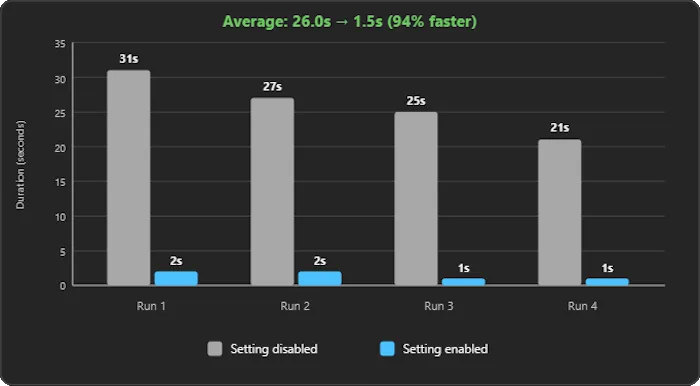
In four test builds, post-failure completion time averaged 26 seconds with the setting disabled and 1.5 seconds with it enabled. That’s about a 94% reduction in the wait after a failure, not a claim that successful builds run 94% faster.
Your results depend on the solution and where a failure occurs. A solution with a long dependency chain or substantial parallel work can have more remaining work to stop than a small solution that finishes almost immediately anyway.
The Developer Community request describes a concrete version of this problem: a packaging project kept trying to build even after a dependency failed. The new option gives you a solution-wide stopping policy rather than requiring you to interrupt the build yourself.
Keep the two decisions separate
This setting answers when should a failed build stop? It doesn’t decide which projects you build in the first place. Existing Build and Run options cover choices such as building only startup projects and dependencies when you run or debug.
Try stop-on-failure on a solution where you normally cancel the build after seeing an error. Compare that post-failure wait, then keep the policy that fits how you troubleshoot.
A 2025 empirical study analyzing more than 500,000 Android APKs found that 92.5% of the top 1,000 Google Play apps in its 2023 dataset used some form of code obfuscation. Among apps ranked outside the top 30,000, that figure was 61.9%.
The findings suggest that widely used applications are more likely to include obfuscation and multiple obfuscation techniques. However, the researchers also caution that developers should not treat obfuscation as a complete security solution.
Android applications are often susceptible to reverse engineering because APKs contain compiled code and resources that attackers can inspect with readily available tools. Decompilers can transform DEX bytecode into a readable approximation of Java or Kotlin source code, though the output is not identical to the original.
Without protection, attackers may be able to inspect proprietary algorithms, licensing logic, application workflows, endpoint information, and security controls. They may also modify the package, bypass client-side restrictions, or repackage the application.
Android app obfuscation makes this analysis more difficult. A layered approach combines basic identifier renaming with control-flow transformations, selected string and resource encryption, and runtime checks.
This article explains why baseline renaming is not enough and how layered application protection addresses both static and runtime analysis.
How attackers reverse-engineer unprotected Android apps
An Android APK is a ZIP-based package that can contain DEX bytecode, resources, a manifest, certificates, and native libraries.
Attackers can use decompilers, disassemblers, and package-analysis tools to examine these components. Depending on how the application was built and protected, they may be able to:
Generate a readable approximation of Java or Kotlin source code
Inspect application resources and configuration
Locate API endpoints and feature logic
Analyze authentication and licensing workflows
Copy proprietary algorithms
Patch client-side conditions
Add or modify application behavior
Repackage and redistribute the application
Obfuscation does not make these activities impossible. Its purpose is to increase the time, expertise, and effort required to understand or modify the application.
Applications that process financial information, health data, proprietary logic, credentials, licensing controls, or premium features may face greater consequences if an attacker successfully analyzes or modifies them. However, any distributed application can be inspected once it reaches a user-controlled device.
Developers should also avoid treating obfuscation as a way to secure permanent API keys or privileged credentials. Secrets embedded in a distributed application should be considered recoverable. Keep privileged credentials and sensitive authorization decisions on a trusted server.
A layered mobile app security strategy combines application hardening with secure coding, server-side authorization, dependency management, signing, testing, and platform security controls.
Why R8 and ProGuard-compatible rules are only a baseline
Android teams often assume that enabling minification in a release build provides all the protection an application needs.
R8 is the optimizer included with the Android build system. Depending on the Android Gradle Plugin version and build configuration, teams enable it through the release build’s optimization or minification settings. R8 uses ProGuard-compatible configuration rules, but R8 and ProGuard are not the same tool.
R8 performs several valuable operations:
Code shrinking to remove unreachable code
Resource optimization and shrinking in supported configurations
Logical optimizations such as method inlining and class merging
Identifier renaming, also known as minification or obfuscation
These capabilities can reduce application size, improve performance, and make decompiled code less readable. R8 is therefore an important part of a release build.
However, R8 is not intended to prevent every form of static or dynamic analysis. Identifier renaming may replace meaningful class, field, and method names with shorter identifiers, but the application’s behavior must remain executable. Attackers may continue to analyze control flow, data usage, resources, strings, and runtime behavior.
Dynamic instrumentation tools create another challenge. Instead of relying solely on decompiled output, an attacker may observe a running application, hook methods, intercept calls, alter values, or inspect in-memory data. Identifier renaming alone does not address these runtime techniques.
A layered Android protection strategy may therefore include:
R8 renaming, shrinking, and optimization
Control-flow obfuscation to make decompiled logic harder to follow
String encryption to make selected strings harder to locate through static searches
Resource encryption for selected assets and raw resources
Runtime checks for debugging, hooking, tampering, rooted devices, and emulators
Each layer addresses a different analysis or attack technique. No individual layer guarantees that an application cannot be reverse-engineered or modified.
Layered obfuscation: Renaming, control flow, encryption, and runtime defense
A layered approach combines multiple protections rather than relying on identifier renaming alone.
Make decompiled output harder to interpret with renaming and control flow
Identifier renaming replaces meaningful class, method, and field names with shorter or less descriptive names. This removes some of the context that helps an attacker understand what the code does.
In the recommended DashO Android Gradle integration, R8 handles renaming, removal, and optimization. DashO Android Mode works alongside R8 and adds protections that R8 does not provide, including control-flow obfuscation, selected string and resource encryption, and runtime checks.
Control-flow obfuscation changes the structure of compiled methods while preserving their intended behavior. It can make decompiled logic more difficult to follow and reduce the usefulness of automatically reconstructed source code.
DashO protection features include configurable control-flow transformations for compiled Java, Kotlin, and Android code. These transformations are intended to increase the effort required to understand application logic.
Control-flow obfuscation does not make analysis impossible. Teams should treat it as a single layer that delays and complicates reverse engineering, rather than as a guarantee that no attacker can reconstruct the application’s behavior.
Protection strength and compatibility can vary by application, platform, DashO version, and configuration. Teams should test protected builds carefully, especially when applications use reflection, serialization, generated code, dependency injection, or other dynamic behavior.
Use string and resource encryption selectively
Attackers frequently search compiled applications for readable strings that reveal useful context. These strings may include:
API and service URLs
File paths
Error messages
Feature names
Licensing messages
Query fragments
Internal commands
Configuration values
Readable strings can help an attacker locate relevant code paths even when identifiers have been renamed.
String encryption transforms selected strings in compiled code and injects the logic required to decrypt them at runtime. This makes the protected values more difficult to locate through a basic static search.
DashO applies String Encryption broadly by default, but teams can use include and exclude rules to target specific methods, classes, or packages. Teams should determine where string encryption provides meaningful protection value and test the resulting application. String encryption can interact with reflection and other features that rely on class names stored as strings, so appropriate R8 keep rules or DashO exclusions may be required.
String encryption also does not make an embedded credential permanently secure. If an application can decrypt and use a value, an attacker controlling the device may eventually be able to observe it. Permanent secrets should remain on a trusted server.
DashO also supports encryption for selected Android assets and raw resources through Android Mode and the DashO Gradle Plugin for Android. The application decrypts protected resources when they are accessed at runtime.
Resource Encryption is configurable and disabled by default. Because it may affect resource access and runtime performance, teams should run functional and performance tests after enabling it, particularly on lower-powered supported devices.
A thorough application security risk assessment can help teams determine which strings, resources, and code paths warrant additional protection.
Detect tampering, debugging, and unsafe runtime environments
Static obfuscation makes compiled code more difficult to understand, but it does not detect activity that occurs while the application is running.
Runtime checks can identify configured conditions associated with dynamic analysis or unsafe environments. DashO supports checks for conditions, including:
Debugging
Hooking
Tampering
Rooted Android devices
Android emulators
Application expiration
When a check detects a configured condition, the application can respond according to the selected settings. Responses may include notifying application logic, terminating execution, or triggering another configured action.
Runtime checks do not automatically guarantee that every debugger, hook, emulator, rooted device, or modification will be detected. Attackers may attempt to bypass or turn off the checks themselves. For this reason, checks should be distributed thoughtfully and combined with static protections.
Teams should also consider the user impact of defensive responses. For example, legitimate users may run applications on rooted devices or approved emulators. An immediate application exit may not be appropriate for every product or risk level.
Test both the normal and detected conditions before release. Runtime checks may introduce overhead or unexpected behavior depending on their number, placement, frequency, and response configuration.
Together, static obfuscation and runtime checks provide stronger protection than identifier renaming alone. They should still complement—not replace—secure architecture, authentication, authorization, dependency scanning, signing, and security testing.
How DashO works with R8 to protect Android applications
DashO is an application-hardening and obfuscation tool for Android, Java, and Kotlin applications.
For current Android Gradle projects, the recommended integration is to use DashO Android Mode alongside R8. The responsibilities are divided between the two tools:
Protection
R8
DashO Android Mode
Identifier renaming
Yes
Handled by R8
Code removal
Yes
Handled by R8
Build optimization
Yes
Handled by R8
Control-flow obfuscation
No
Yes
Selected string encryption
No
Yes
Selected Android resource encryption
No
Yes
Runtime checks
No
Yes
This division is important. DashO does not replace R8 in the recommended Android Gradle integration. R8 should remain enabled to handle renaming, removal, and optimization, while DashO provides additional layers of protection.
DashO processes compiled code during the build rather than modifying the application’s source files. This allows developers to continue working with readable Java or Kotlin source while generating protected release artifacts.
The DashO Gradle Plugin for Android integrates protection into the Android build process. It manages the inputs and outputs passed to DashO and can apply protection automatically to selected build variants.
DashO can also post-process APKs and Android App Bundles in supported configurations, although PreEmptive recommends integrating DashO directly into the Gradle project when possible. Build integration provides greater control and makes it easier to apply protection consistently.
PreEmptive was founded in 1996 and currently reports more than 5,000 corporate clients across 101 countries. Teams should still evaluate DashO using their own code, supported Android versions, build configuration, performance requirements, and threat model.
Feature availability and behavior may vary by DashO version, integration mode, application type, and configuration. Review the current product documentation before selecting protections for a production build.
How to add Android app obfuscation to your build
The recommended Android workflow integrates DashO with Gradle and keeps R8 enabled.
1. Enable R8 for the release build
Confirm that R8 optimization or minification is enabled for the release variant. R8 will handle renaming, removal, and optimization when used with DashO Android Mode.
Review existing ProGuard-compatible rules and remove overly broad keep rules where possible. Broad rules can prevent R8 from renaming, shrinking, or optimizing significant portions of the application.
2. Add the DashO Gradle Plugin for Android
Use the DashO project wizard or follow PreEmptive’s current integration instructions to add the plugin to the Android project.
The wizard updates the Gradle configuration and creates a DashO project file. It does not overwrite the application’s source files.
Confirm that the versions of DashO, the DashO Gradle Plugin for Android, the Android Gradle Plugin, Gradle, Java, and Kotlin are compatible.
3. Start with the default protected release build
Generate a protected release build using the default Android Mode configuration. Control Flow and String Encryption are enabled by default with relatively conservative settings, while Resource Encryption is disabled.
Test this initial build before changing the protection settings. This establishes a working baseline and helps teams determine whether an issue comes from the integration or a later configuration change.
4. Configure protection layers incrementally
Based on the application’s risks, review, tune, or enable protections such as:
Stronger control-flow settings
String Encryption include and exclude rules
Selected resource encryption
Debug checks
Hook checks
Tamper checks
Root checks
Emulator checks
Shelf Life checks for time-limited builds
Not every application needs every protection. Select and configure controls according to the application’s threat model and user requirements, testing after each meaningful change.
5. Configure keep rules and exclusions
Applications that use reflection, generated code, serialization, dependency injection, or string-based class loading may need additional R8 keep rules or DashO exclusions.
Avoid excluding more code than necessary. Excessively broad exclusions reduce the amount of code that can be protected.
6. Test the final protected application
Run functional, regression, performance, and security tests against the protected release artifact.
Testing should cover:
Startup and common workflows
Reflection and dependency injection
Authentication and authorization
Resource loading
Application performance
Crash reporting and protected stack traces
Tamper, debug, hook, root, and emulator responses
Upgrades and migrations
Supported Android versions and devices
Test both normal execution and the configured detection conditions.
7. Automate protection in CI/CD
Run DashO and R8 as part of the controlled release pipeline so that every production artifact receives the approved protection configuration.
Retain the DashO configuration, R8 rules, mapping information, build logs, and other required release artifacts. Restrict access to files that could make protected builds easier to analyze.
Confirm that the artifact tested by the team is the same artifact signed and published to users.
Android app obfuscation checklist
Build configuration
Enable R8 for the release build.
Review ProGuard-compatible rules.
Remove unnecessarily broad keep rules.
Confirm DashO and Android build-tool compatibility.
Apply protection only to intended build variants.
Static protection
Enable appropriate control-flow obfuscation.
Encrypt selected sensitive strings.
Encrypt selected assets or raw resources where appropriate.
Keep permanent secrets out of the application.
Configure narrow exclusions for dynamic code behavior.
Runtime protection
Select runtime checks based on the threat model.
Configure appropriate defensive responses.
Test normal and detected conditions.
Account for legitimate use of rooted devices or emulators.
Measure runtime overhead.
Release validation
Test the final protected build.
Run regression and performance tests.
Verify application signing.
Securely retain the required mapping and configuration files.
Publish the same artifact that was tested.
Apply multiple protection layers to Android applications
R8 provides important shrinking, optimization, and baseline obfuscation for Android release builds. Applications with greater exposure may benefit from additional control-flow transformations, selected string and resource encryption, and runtime checks.
DashO Android Mode works alongside R8 to add these protection layers without modifying the original source files. The appropriate configuration depends on the application’s architecture, performance requirements, supported devices, and threat model.
No individual protection makes an application immune to reverse engineering or tampering. A stronger Android security strategy combines application hardening with secure coding, server-side controls, dependency management, signing, and testing.
Start a free DashO trial to test layered Android protection against your own application and build process.
Protect your applications with PreEmptive
Add layered obfuscation and runtime protection to your .NET, Java, Android, and JavaScript applications. Start a free PreEmptive trial to test the right protection tools against your own code and build process.
Frequently asked questions about Android app obfuscation
What is Android app obfuscation?
Android app obfuscation transforms compiled code and other application components to make them more difficult to understand or modify while preserving the application’s intended behavior.
Does R8 obfuscate Android applications?
Yes. R8 can rename classes, fields, and methods in addition to shrinking and optimizing application code. However, R8 does not provide all the protections associated with application hardening, such as DashO’s control-flow obfuscation, selected string and resource encryption, and runtime checks.
Is R8 enough to prevent reverse engineering?
No. R8 is a valuable baseline, but it does not prevent every form of static or dynamic analysis. Teams with higher-risk applications may add other protections based on their threat model.
Can obfuscation make an Android application impossible to reverse-engineer?
No. Obfuscation increases the time and effort required to analyze an application, but no client-side protection makes reverse engineering impossible. Obfuscation should complement secure design, backend authorization, signing, testing, and dependency management.
How does DashO work with R8?
In the recommended Android Gradle integration, R8 handles renaming, removal, and optimization. DashO Android Mode adds control-flow obfuscation, selected string and resource encryption, and runtime checks. R8 should remain enabled when using this integration.
Does DashO modify an application’s source code?
No. DashO works with compiled application code during the build process. Developers continue working with readable source files while the build pipeline produces protected release artifacts.
 Log in