Sr. Content Developer at Microsoft, working remotely in PA, TechBash conference organizer, former Microsoft MVP, Husband, Dad and Geek.
161229 stories
·
33 followers

Patching in 2026 with Susan Bradley

1 Share

How has patching changed in 2026? Richard chats with patching goddess Susan Bradley about what she's seeing in vendor patches and how they're affecting consumers and businesses. On one hand, you have the security risk of unpatched servers, which puts a lot of pressure on sysadmins to deploy patches immediately. And, at the same time, the number of patches has grown massively as tools like Anthropic's Fable have revealed far more vulnerabilities. Then there are the vendors that are slow to get fixes out for drivers and firmware for existing systems, increasing the risk of serious failures - it's not easy patching in 2026!

Links

Recorded Aug 21, 2026


Download audio: https://cdn.simplecast.com/media/audio/transcoded/5379899c-61c5-43c3-aa3f-1128cffd9ef4/c2165e35-09c6-4ae8-b29e-2d26dad5aece/episodes/audio/group/60e1970e-bf0d-4337-863a-1041053076b5/group-item/ed9c2510-851f-4750-b3a0-555d81240d4a/128_default_tc.mp3?aid=rss_feed&feed=cRTTfxcT
Read the whole story
alvinashcraft
6 minutes ago
reply
Pennsylvania, USA
Share this story
Delete

MBW 1042: Tassels Galore! - iOS 27, iPadOS 27, and More Out Now!

1 Share

Apple held its first Apple event with John Ternus as CEO, and unveiled the iPhone Duo! Apple announced the Apple Watch Series 12 and Ultra 4 with a new AI feature called Siri Recap, bringing some concerns over its continuous ambient listening. And Apple wins 29 Emmys at the 78th Primetime Emmy Awards!

  • John Ternus enters, with folding phones and AI watches.
  • Apple unveils the iPhone Duo, a foldable phone that costs $1,999.
  • Apple Watch Series 12 and Ultra 4 unveiled with upgraded health tracking system.
  • Apple's always-listening watch features test eavesdropping laws.
  • Apple's OS 27 updates will be released on Monday, September 14th.
  • Apple hid a classic Mac easter egg in the iOS 27 Settings app.
  • pdfu on X: "iOS 27 and macOS Golden Gate have private hooks that let apps add Siri Extensions..."
  • Apple's Siri AI can be swapped out for Claude, ChatGPT, code shows.
  • macOS 27 Golden Gate review: Bridging the Tahoe gap.
  • visionOS 27 updates.
  • Apple wins most Emmys.

Picks of the Week

  • Christina's Picks: Spigen iPhone Duo Cast Concept & View Tweet extensions.
  • Andy's Pick: Mac Duo
  • Jason's Pick: Strategery 4
  • Leo's Pick: Homebrew 7

Hosts: Leo Laporte, Andy Ihnatko, Jason Snell, and Christina Warren

Download or subscribe to MacBreak Weekly at https://twit.tv/shows/macbreak-weekly.

Join Club TWiT for Ad-Free Podcasts!
Support what you love and get ad-free audio and video feeds, a members-only Discord, and exclusive content. Join today: https://twit.tv/clubtwit

Sponsors:


Download audio: https://pdst.fm/e/pscrb.fm/rss/p/mgln.ai/e/294/cdn.twit.tv/megaphone/mbw_1042/ARML6040453802.mp3
Read the whole story
alvinashcraft
6 minutes ago
reply
Pennsylvania, USA
Share this story
Delete

Introducing Microsoft 365 G7: Intelligence + Trust for the mission ahead

1 Share

Microsoft 365 G7 brings AI, Copilot, agent governance, security, and compliance together to help government agencies modernize securely.

The post Introducing Microsoft 365 G7: Intelligence + Trust for the mission ahead appeared first on Microsoft 365 Blog.

Read the whole story
alvinashcraft
11 minutes ago
reply
Pennsylvania, USA
Share this story
Delete

PackageType: Main, Framework, Resource, Optional, Bundle

1 Share

Every MSIX package is one of four package types:

  • Main
  • Framework
  • Resource
  • Optional

MSIX also supports Bundle packages. Bundles are somewhat different from those four package types: a Bundle is a container for one or more MSIX packages. Windows APIs nevertheless expose Bundle alongside the other package types when identifying packages.

Each package type has its own behaviors, nuances, and rationale worthy of a dedicated discussion. We’ll take a brief whirlwind tour of MSIX package types here and explore them in greater detail in future blog posts.

What does PackageType imply?

What does PackageType actually mean?

MSIX packages have various properties and behaviors. A package type defines a predefined combination of properties and behaviors. Some are inherent to the package type, while others merely have defaults determined by the package type and can be overridden in AppxManifest.xml.

<packagedependency> is an example of a behavior constrained by package type. Main packages can declare static package dependencies, whereas Framework and Resource packages can’t.

Whether package content may execute is an example of a behavior whose default is based on package type but can be overridden via <uap6:allowexecution>. Main, Framework, and Optional packages permit execution by default, while Resource packages do not, unless the default is explicitly overridden.

For example, a Resource package can override its default behavior by declaring <uap6:AllowExecution>true</uap6:AllowExecution> in its AppxManifest.xml.

Main package

A Main package represents the primary package for an application.

Main packages are the package type developers and users encounter most frequently. A Main package can declare applications in AppxManifest.xml via <application>, as well as <capabilities>, <dependencies>, WinRT out-of-process (OOP) servers and more.

Windows Terminal (Microsoft.WindowsTerminal_8wekyb3d8bbwe), winappCLI (winapp_8wekyb3d8bbwe) and many more are Main packages.

There is no explicit “I am a Main package” marker in AppxManifest.xml. A package is a Main package when it does not declare itself to be another package type.

Framework package

Framework packages provide shared libraries, components, resources, or other runtime content for use by other packages or processes.

Conceptually, the relationship is closer to a shared component and the applications that consume it. A Framework package has package identity, but it does not represent an independently activated application of its own. Instead, its content can be incorporated into the package graph of processes that use it.

Framework packages also have special servicing semantics: multiple versions may remain installed side-by-side while applications transition from an older version to a newer one.

The Windows App SDK Framework package (Microsoft.WindowsAppRuntime.2_8wekyb3d8bbwe) is one example. It provides WinUI 3, PackageDeploymentManager and other APIs.

A package is a Framework package because it declares <framework>true</framework> in its AppxManifest.xml.

Resource package

Resource packages provide resources associated with another package.

Resource packages separate language-, scale-, and other resource-specific content from a Main or Optional package so Windows can install only the resources applicable to a device or user.

Images for varying display scales, localization data (text, images, etc.), and other resources are typically provided via Resource packages. Resource packages can include executable code, including DLLs and EXEs, if they declare <uap6:AllowExecution>true</uap6:AllowExecution>; spelling and grammar checkers are common examples of why a Resource package might need to allow execution.

A package is a Resource package because it declares <resourcepackage>true</resourcepackage> in its AppxManifest.xml.

Optional package

Optional packages contain additional content or code intended to be integrated with a specific Main package.

Unlike a Framework package, which can be used by multiple package families (and unpackaged processes1), an Optional package is associated with a particular Main package.

The concept behind Optional packages is to enable developers to break a large package into a required Main package and one or more optional packages. For example, a packaged game could have the game itself and additional optional elements. This could all be shipped in one Main package, but doing so can be undesirable when the additional content is large and many users don’t need it. Instead, the application could be split into multiple packages:

  • Game.msix – a Main package containing the core game.exe and game.dat
  • Maps.msix – an Optional package containing additional maps
  • MapEditor.msix – an Optional package containing mapeditor.exe2
  • HighRes.msix – an Optional package containing alternative high-resolution graphics

Downloadable Content (DLC) for games is one example of why developers might choose to use Optional packages. Many scenarios originally envisioned for Optional packages may now be better addressed by newer mechanisms. For example, plug-in architectures are often better served using Dynamic Dependencies together with AppExtensions or PackageExtensions.

A package is an Optional package because it declares a <uap3:mainpackagedependency>.

Bundle package

A Bundle package is somewhat different from other types of packages.

An MSIX bundle (*.msixbundle) is a container for one or more MSIX packages (*.msix).

For example, consider an application compiled for x86, x64, and Arm64, with separate MSIX packages for each architecture: Contoso.PointOfSale-x86.msix, Contoso.PointOfSale-x64.msix, and Contoso.PointOfSale-arm64.msix. The application might also support dozens of languages, display scales, and other resource qualifiers split across multiple Resource packages.

Managing all of those packages individually would be cumbersome. A Bundle such as Contoso.PointOfSale.msixbundle can contain them in a single distribution artifact.

A Bundle provides a convenient distribution unit while allowing deployment to select only the architecture and resource packages applicable to the target system.

All packages in a bundle belong to the same Package Family.

Bundle package identity uses a ResourceId of tilde (~ aka U+007E).

Synopsis

Type Primary purpose Manifest / identity indicator
Main Primary package for an application No other package-type declaration
Framework Shared runtime content <Framework>true</Framework>
Resource Applicability-specific resources <ResourcePackage>true</ResourcePackage>
Optional Additional content associated with a Main package <uap3:MainPackageDependency>
Bundle Distribution container for MSIX packages Bundle manifest; ResourceId="~" identity

Detect PackageType

The Windows.ApplicationModel.Package class exposes properties for identifying a package type:

PackageType Windows.ApplicationModel.Package property
Main !package.IsFramework && !package.IsResourcePackage && !package.IsOptional && !package.IsBundle
Framework package.IsFramework
Resource package.IsResourcePackage
Optional package.IsOptional
Bundle package.IsBundle

Detect via PowerShell

Get-AppxPackage reports several package-type properties:

Get-AppxPackage micro*win*app*run*2
...
PackageFullName   : Microsoft.WindowsAppRuntime.2_2.4.0.0_x64__8wekyb3d8bbwe
...
IsFramework       : True
...
IsResourcePackage : False
IsBundle          : False

Get-AppxPackage does not expose an IsOptional property analogous to IsFramework, IsResourcePackage, and IsBundle.

By default, Get-AppxPackage only enumerates Main and Framework packages. Use the -PackageTypeIdentifier parameter to filter by more (or fewer) types of packages. Specify -PackageTypeIdentifier Main,Framework,Resource,Optional,Bundle to match all package types. For example:

$(Get-AppxPackage Contoso.PointOfSale -PackageTypeIdentifier Main,Framework,Resource,Optional,Bundle).PackageFullName
...
Contoso.PointOfSale_1.2.3.4_arm64__8wekyb3d8bbwe
Contoso.PointOfSale_1.2.3.4_neutral_language-tlh_8wekyb3d8bbwe
Contoso.PointOfSale_1.2.3.4_neutral_language-qya_8wekyb3d8bbwe
Contoso.PointOfSale_1.2.3.4_neutral_scale-100_8wekyb3d8bbwe
Contoso.PointOfSale_1.2.3.4_neutral_scale-150_8wekyb3d8bbwe

What’s next?

Package type affects far more than a label. It influences package relationships, dependency resolution, execution, servicing, deployment, and runtime behavior.

This was the whirlwind tour. In future Inside MSIX posts we’ll explore the individual package types, their behaviors, and some of their less obvious consequences in considerably greater detail.


1 Framework packages can also be used by unpackaged processes via Dynamic Dependencies.

2 Optional packages containing executable code have additional requirements, including membership in a related set.

The post PackageType: Main, Framework, Resource, Optional, Bundle appeared first on Inside MSIX.

Read the whole story
alvinashcraft
12 minutes ago
reply
Pennsylvania, USA
Share this story
Delete

Gemini Live audio

1 Share

Tool: Gemini Live audio

Google released Gemini 3.8 Live and 3.8 Live Extended Thinking today - two new speech-to-speech models that are a similar shape to OpenAI's GPT-Live family.

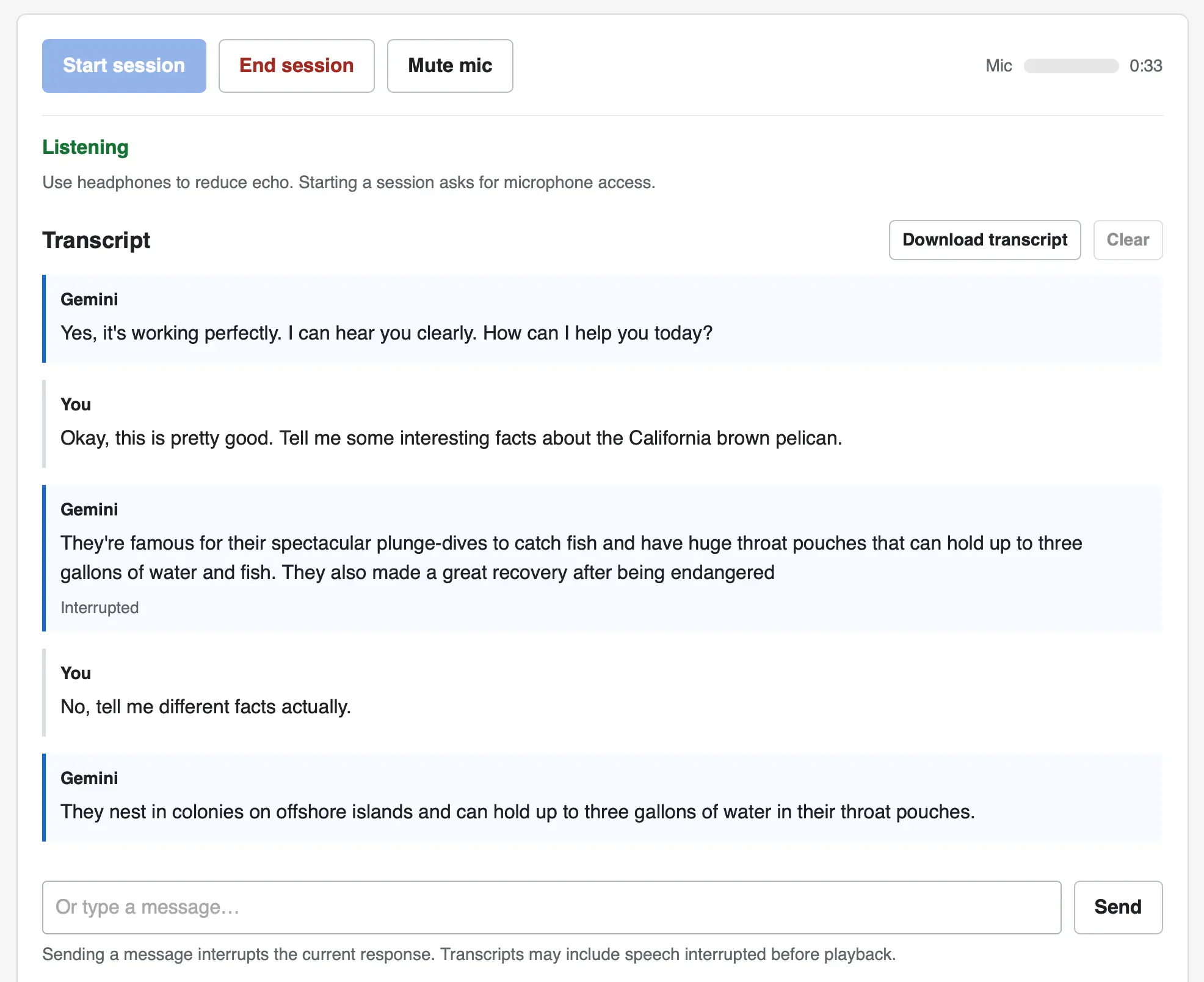
I pointed GPT-6 Astra Extra High at the documentation and had it build me this web UI for trying out the new models. You can select a model and voice preset, enter an optional system prompt and then start a voice conversation through your browser, including the ability to interrupt the model while it is talking.

Screenshot of a voice chat web interface with a transcript. Top buttons: Start session, End session, Mute mic, plus a Mic level meter and a timer showing 0:33. Status: Listening. Use headphones to reduce echo. Starting a session asks for microphone access. Transcript (with Download transcript and Clear buttons). Gemini: Yes, it's working perfectly. I can hear you clearly. How can I help you today? You: Okay, this is pretty good. Tell me some interesting facts about the California brown pelican. Gemini: They're famous for their spectacular plunge-dives to catch fish and have huge throat pouches that can hold up to three gallons of water and fish. They also made a great recovery after being endangered — marked as Interrupted. You: No, tell me different facts actually. Gemini: They nest in colonies on offshore islands and can hold up to three gallons of water in their throat pouches. At the bottom is a text input reading Or type a message… with a Send button, and the note: Sending a message interrupts the current response. Transcripts may include speech interrupted before playback.

The implementation uses no libraries. It connects to the wss://generativelanguage.googleapis.com/ws/google.ai.generativelanguage.v1alpha.GenerativeService.BidiGenerateContent?key=... WebSocket endpoint and uses a Web Audio API AudioContext for both capture and playback.

Here's the Gemini Live tutorial for getting started with that WebSockets API.

Tags: google, tools, websockets, generative-ai, llms, gemini, llm-release, speech-to-text

Read the whole story
alvinashcraft
23 minutes ago
reply
Pennsylvania, USA
Share this story
Delete

Managing apps built in Copilot Studio

1 Share

Last week we announced app building in Copilot Studio and Copilot Cowork. Makers can now describe business outcomes and produce full-stack apps with built-in source control, deployment stages, and version isolation—all on Microsoft-hosted infrastructure that requires no infrastructure provisioning, hosting configuration, or deployment pipeline.

With those capabilities built in, your administrative scope is narrower and more familiar. Apps are created in the maker's personal developer environment following the environment routing policies you already have. That means things like connector permissions and data policies apply to an app both while it is being built and after it is published. Apps also access connected data on behalf of the signed-in user, which means publishing or sharing an app never grants anyone access to data they could not already reach.

With these new capabilities, there are three things that every admin should be thinking about:

  1. Review your app estate
  2. Control cost with credit caps
  3. Choose where makers can build apps

Review your app estate

Published apps are inventoried in the Microsoft 365 admin center. Each app shows:

  • Who built it
  • Its lifecycle state
  • Which data sources and connectors it uses
  • Which policies apply to it
  • Usage and operational metrics

From the same experience, you can also block or disable a published app, remove a connector, bring an app back within policy, control whether it can be shared, and retire apps that are no longer used.

Control cost with credit caps

Building and running apps are both charged through Copilot Credits usage-based billing, and are metered as two separate services. This distinction lets you manage maker cost and app runtime cost independently. Build consumption varies with the language model used, the complexity of the app, and how much iteration is involved. Runtime consumption, on the other hand, varies with the volume and complexity of the tasks the app processes.

At runtime, if the user holds a Power Apps Premium license, usage is included within existing request limits. Beyond those limits, or without a license, usage bills through Copilot Credits. You can learn more by reviewing the Copilot Credits licensing guide.

As an admin, you can define credit cap policies to manage your costs. For both maker and runtime usage, caps are set per user, and the controls are managed through usage-based billing. For makers, think of a cap as a per-user budget: you can set the same budget for everyone, or different budgets for groups of users, such as departments that carry separate budgets of their own.

Choose where makers can build apps

By default, app creation is available to all users in both Copilot Studio and Copilot Cowork. However, you may want to limit where people can build apps. To do so: In the Microsoft 365 admin center, navigate to Apps, then Overview, and find ‘Choose where people can make apps’.

Two paths appear:

  • Copilot Studio, where makers build directly, which is on by default and recommended
  • Copilot Cowork, where people create apps through chat, with availability managed by your organization's participation in the Frontier program

Note that turning a path off prevents new apps being created that way. However, apps that are already published through that path will continue to run.

Key takeaways for managing apps built in Copilot Studio

  • The Microsoft 365 admin center is the one place to review the app estate, adjust app policies, and decide which creation paths stay open.
  • Set credit caps as per-user budgets today, uniformly or by group, and plan for environment-level caps as project budgets when they arrive.
  • Decide who is accountable for overseeing published apps before makers start publishing, as you would for any other application estate.

Go to the Microsoft 365 admin center

Read the whole story
alvinashcraft
30 minutes ago
reply
Pennsylvania, USA
Share this story
Delete
Next Page of Stories