Sr. Content Developer at Microsoft, working remotely in PA, TechBash conference organizer, former Microsoft MVP, Husband, Dad and Geek.
156933 stories
·
33 followers

Azure landing zone (ALZ) enters its next chapter

1 Share

Hey all 👋

I’ve got a genuinely exciting update to share today, and it’s one that’s been a long time coming: Azure landing zone (ALZ) is now an official Microsoft product, owned by the Azure Migrate product team.

A bit of history first

For the past five or so years, ALZ has been built completely in the open, in the open source repos, in community calls, in issues, in PRs, together with an incredible group of customers, partners, and Microsoft folks who cared enough to keep showing up and making it better. That community effort is the entire reason ALZ is what it is today, and it deserves a moment of recognition before we talk about what’s changing.

So, what’s actually changing?

ALZ is graduating from a community-driven, open-source initiative into a fully-fledged, officially owned Microsoft product, with a dedicated product team behind it in the Azure Migrate team.

For you, practically? Nothing changes. The GitHub repos, the modules, the way you consume ALZ today all stay exactly as they are. What’s changing is who’s steering the ship, and that it now has the backing, investment, and roadmap of an official product team. If you’ve got an issue to raise, that still happens exactly where it always has, over at aka.ms/alz/issues.

What about us?

I want to be upfront about this part: myself (Jack Tracey), Matt White, Jared Holgate, and Zach Trocinski are no longer involved in the day-to-day of ALZ. No more issue triage, no more day-to-day operations from us. That responsibility now sits with the Azure Migrate team.

We’re not disappearing entirely, though. Over the last couple of months we’ve been running a proper handover, and we’ll continue to be around behind the scenes for those moments when the Azure Migrate team needs a bit of extra context we didn’t manage to pass on during that process.

And honestly? You’re in great hands. The Azure Migrate team already know ALZ inside and out. They’ve been working alongside us building the Azure Migrate agent’s platform landing zone creation experience, which uses ALZ under the hood. This isn’t a handover to strangers, it’s a handover to people who’ve already been in the engine room with us.

What can you expect from the Azure Migrate team?

The Azure Migrate team are keen to keep the community engagement up and active, just as we did in the ALZ team of old. They want to run community calls and be just as visible and active as we’ve always tried to be.

So, keep an eye out for blog posts and announcements from them over the coming months. This is very much a “watch this space” moment, and we’re confident you’ll see the same energy and openness from them that you’ve come to expect from ALZ.

A personal thank you

Before I move on, I wanted to add something a bit more personal.

ALZ is one of the things I’m proudest of from my time at Microsoft so far. I’ve built and led it over the past five or six years, surrounded by genuinely great people who helped shape it, and backed by an amazing community, customer, and partner base who supported us every step of the way to make it the success it is today.

So, while I’m stepping away and I’m no longer involved in the day-to-day, ALZ will always hold a special place for me. I’ll forever be happy to chat about it socially. It’s something I still have real passion for, and that’s not going away just because my day job has moved on.

That said, I’m taking those learnings and that passion into other things at Microsoft, including now focusing on AVM (Azure Verified Modules) alongside Jared and several other great folks. We’ll have some announcements of a similar nature to share on that front soon, so watch this space 😁

Thank you 🙌

And finally, the wider thanks. Alongside Matt White, Jared Holgate, and Zach Trocinski, huge thanks to: Paul Grimley, Rob Kuehfus, Sacha Narinx, Seif Bassem, Arjen Huitema, Nelson Pereira, Paulo Alves Oliveira Jr., Vishal Mehrotra, Charlie Grabiaud, Simona Tarantola, Bruno Gabrielli, Luke Taylor, Adam Tuckwell, and Kevin Rowlandson.

A special shout-out too to Remo Leone Laudo, Rhys Ash, Jamie Pla, Igor Jovovic, and Haflidi Fridthjofsson, who will continue to contribute to the ALZ IaC modules alongside their day jobs as CSAs, as and when they can 🙂

And to everyone else who’s contributed to ALZ over the past five years or so, through code, issues, feedback, conversations, or just using it and telling us what worked and what didn’t, thank you. This milestone is yours as much as anyone’s.

Here’s to the next chapter for ALZ. 🎉

Read the whole story
alvinashcraft
33 minutes ago
reply
Pennsylvania, USA
Share this story
Delete

Ex-Microsoft engineer rebuilds Notepad in 2.5KB using nothing but stuff Windows already had

1 Share

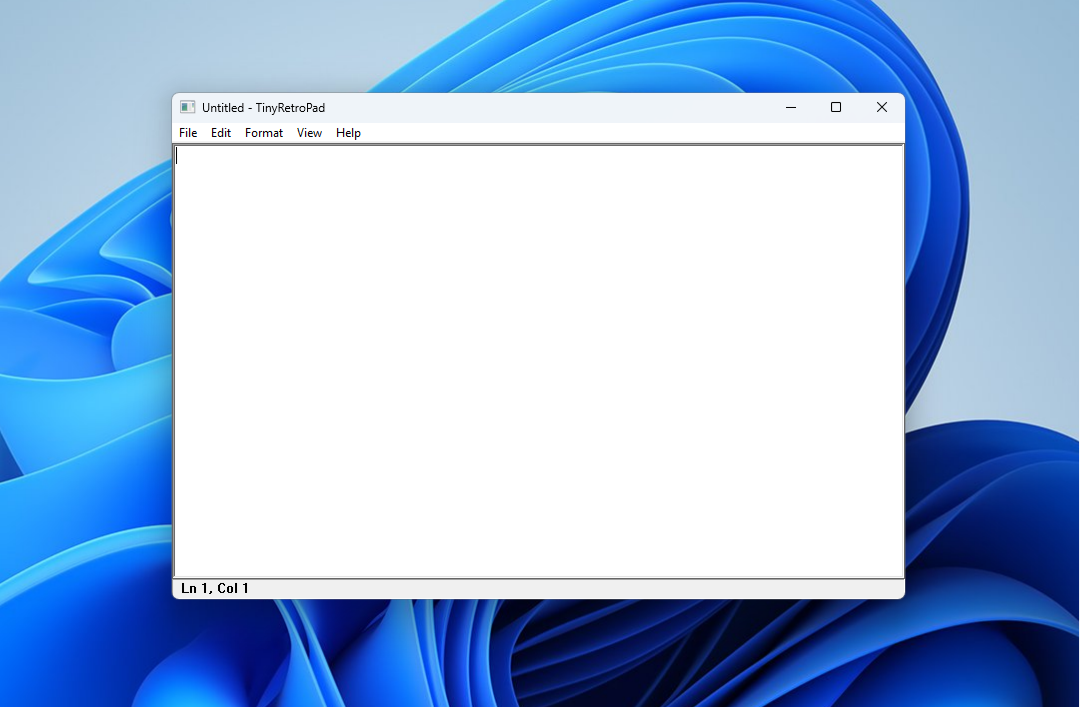
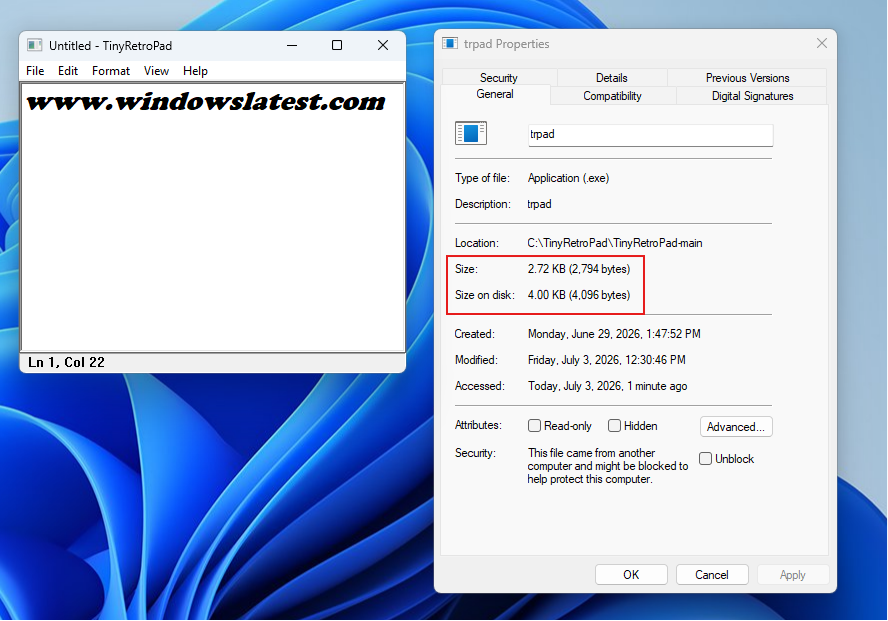
Dave Plummer, the retired Microsoft engineer who built Task Manager and helped ship Space Cadet Pinball, has recreated Notepad in roughly 2.5 kilobytes. The project is called TinyRetroPad, and despite the size (or lack of it), it still has Open, Save, Find and Replace, printing, font selection, word wrap, and the unsaved changes prompt, packed into an executable that is significantly smaller than the featured image above this paragraph.

TinyRetroPad by Dave Plummer
Credit: WindowsLatest.com

Plummer has spent recent months telling Microsoft what they do not want to hear about Windows 11. He argued the OS needs its own Windows XP SP2 moment, a stretch where Microsoft drops new features and only fixes what is broken. He has also said Windows 11 has turned into a sales channel for Microsoft’s other products, nudging users toward Edge, OneDrive, and Copilot.

At a time when Memory and storage cost a fortune, what we’re interested in is how an app was created with an install size that mocks the entire fabric of software development.

TinyRetroPad in action

How does TinyRetroPad fit an entire Notepad into 2.5KB?

Plummer explains this isn’t really a magic trick. Windows already contains most of what makes up a Windows application: a window manager, menus, common dialogues, clipboard handling, edit controls, font selection, and file open and save dialogues, along with printing infrastructure. A tiny native Windows program doesn’t have to bring along its own entire civilization.

Size of TinyRetroPad
Credit: WindowsLatest.com

As Plummer puts it, “it arrives with a lunchbox and a map of the city.” A mature operating system is also a giant library of already solved problems, and because that machinery is already installed on the machine, a tiny executable can call into it and appear to perform miracles.

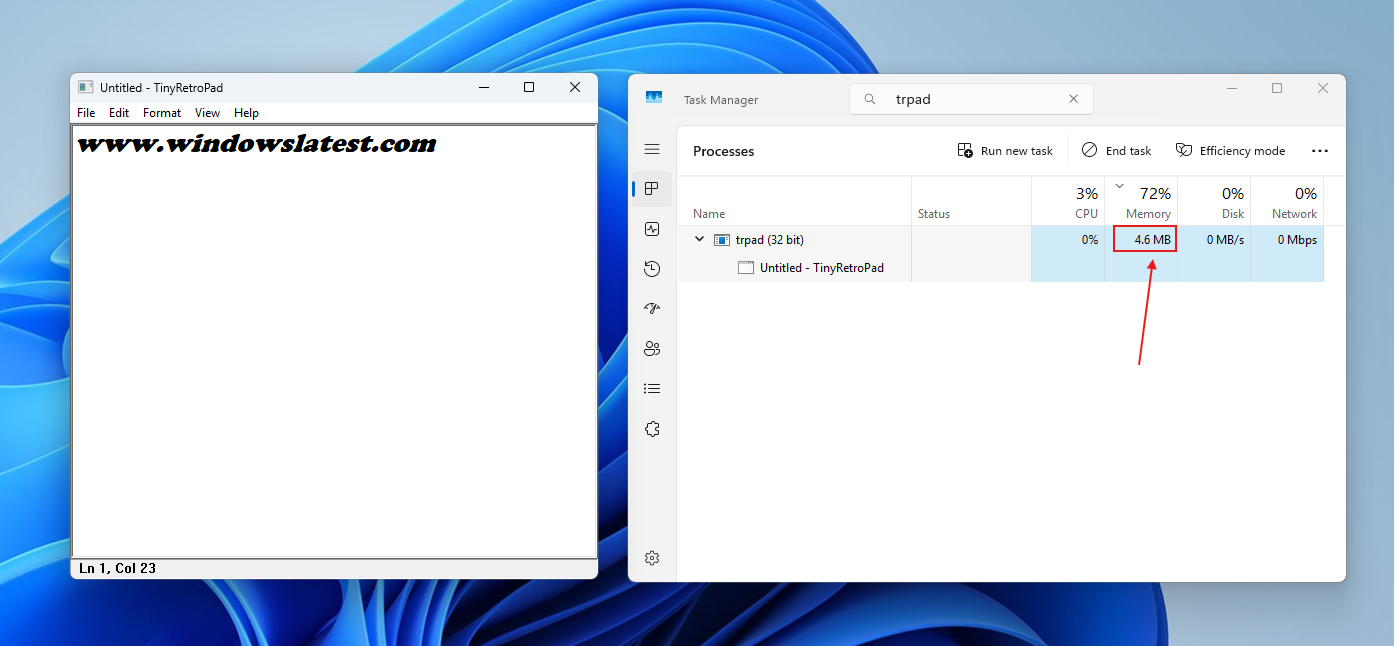
RAM usage in TinyRetroPad
Credit: WindowsLatest.com

TinyRetroPad is a fork of Matt Power’s Dave’s Tiny Editor, itself built on tiny.asm, a project Plummer wrote years ago to prove what the smallest complete Windows application could look like. It’s a thin wrapper around RICHEDIT50W, the rich text control Windows has carried for decades. Drawing characters, managing the cursor, handling selection, cut, copy, paste, undo history,

Windows already does all of it inside that one control. Early versions used the plainer EDIT control and got down to 890 bytes, though Windows Defender wasn’t a fan of how aggressively that build was compressed. Later versions moved to RICHEDIT for cheap access to the Courier font and bigger file support, settling at 981 bytes before a single menu existed.

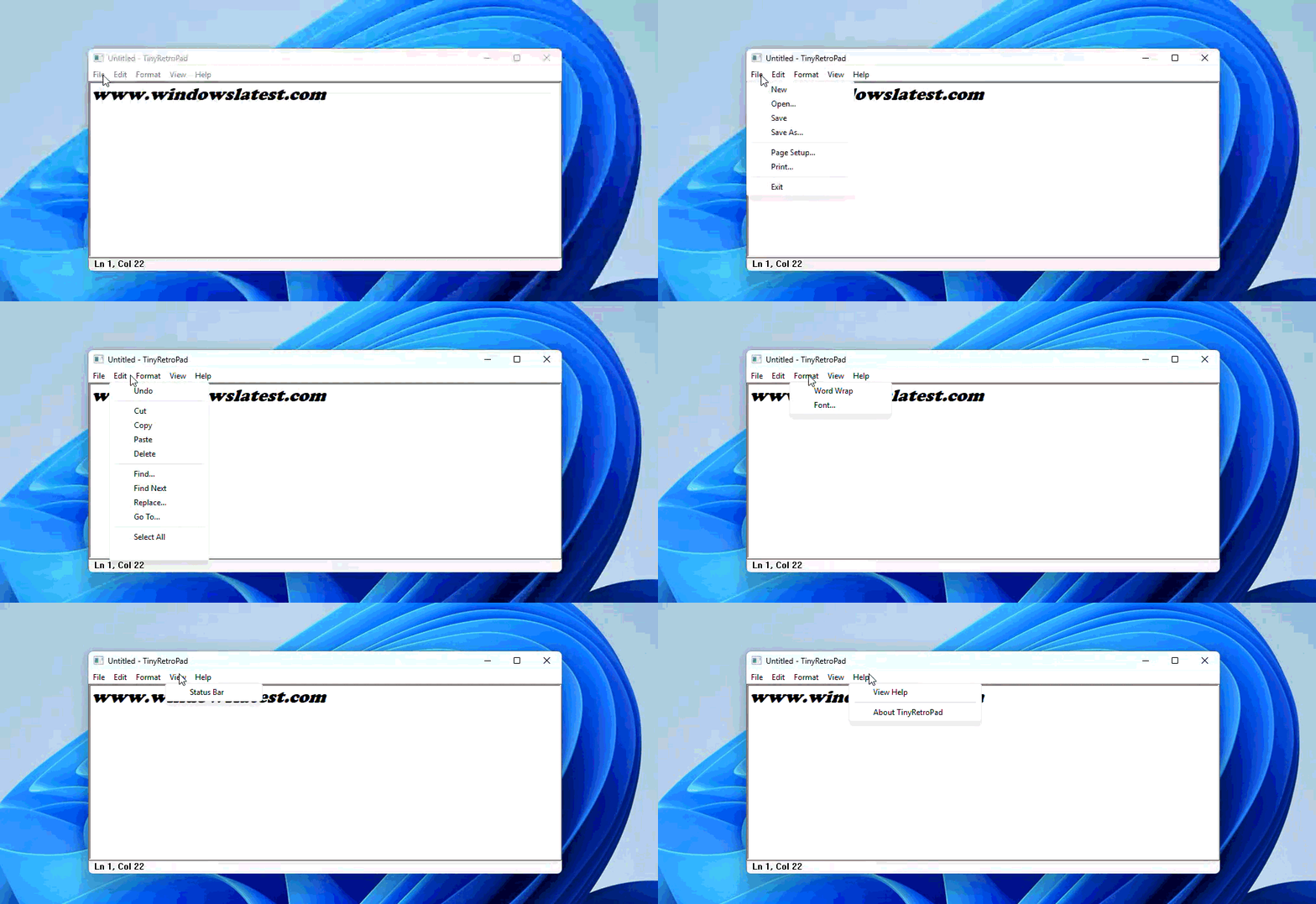
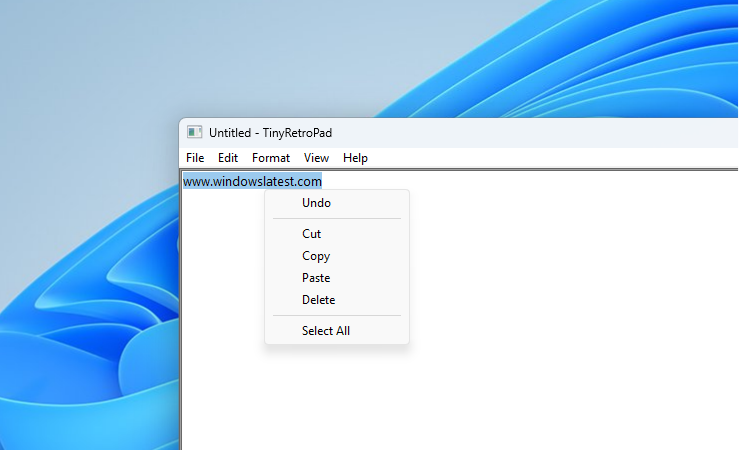
Context menu in TinyRetroPad
Credit: WindowsLatest.com

The growth log Plummer kept shows what each addition cost:

  • The File menu brought it to 1,375 bytes.
  • The unsaved changes prompt, which needed a real dirty flag and a close, pushed it to 1,622 bytes.
  • Find and Replace came at 2,143 bytes
  • Printing was the biggest single jump, getting the whole thing at 2,476 bytes.
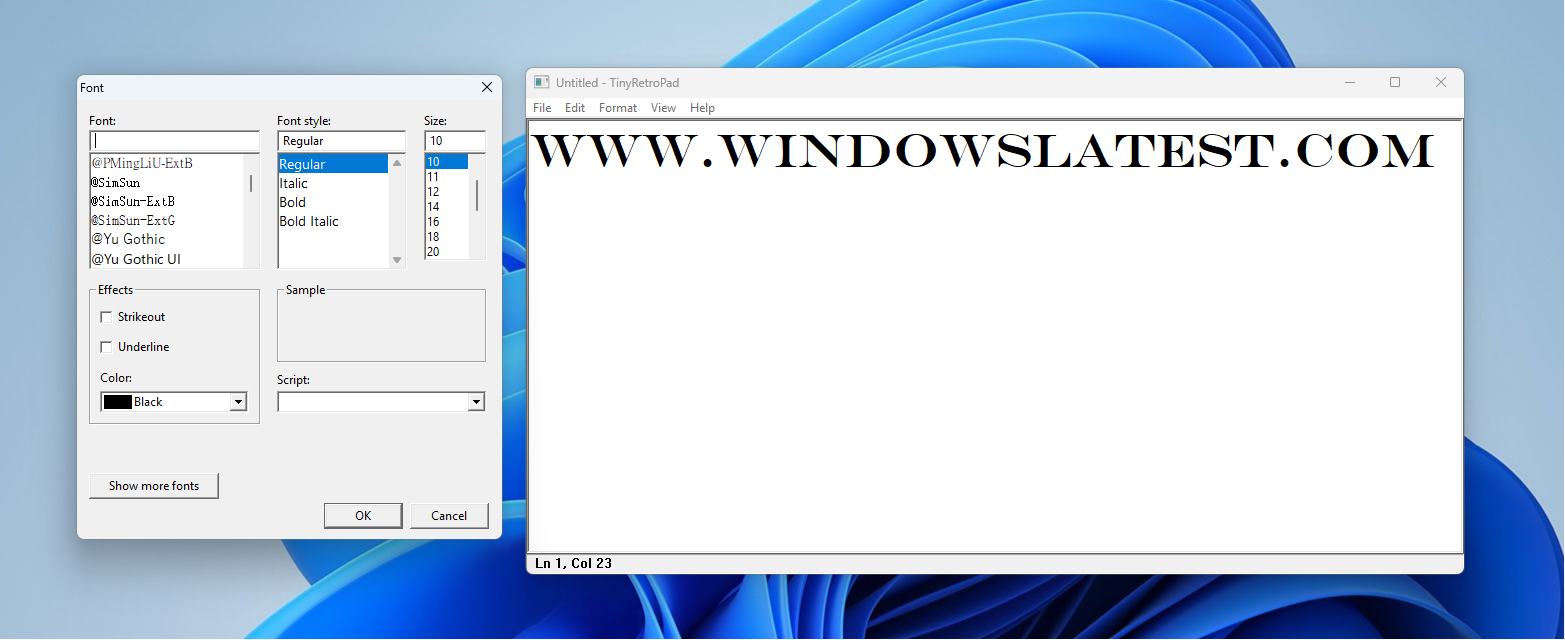
fonts in TinyRetroPad
Credit: WindowsLatest.com

None of this works without Crinkler, a compression linker built for the demoscene that squeezes and rearranges the executable instead of just linking it. Sometimes a whole feature adds nothing to the file size because the code happens to compress well. Sometimes a clean function ends up bigger than an ugly, repetitive one, since Crinkler compresses repetition far more efficiently than a lookup table full of branches.

It’s also not a finished product. There’s no Releases page for some reason, and Crinkler-built executables may trigger antivirus false positives. The open GitHub issues read like a list of what a 2.5KB program gives up. One user reported it chewing through around 500MB of RAM on 64-bit Windows 7, and others found it won’t run on Windows XP SP3 at all.

Why the internet keeps calling Windows 11’s Notepad bloated

Modern Notepad has spent the last couple of years turning into a case study in feature creep. The notepad.exe on a typical Windows 11 install comes in at around 352KB, with an install size closer to 808KB, because that exe is really a stub pointing at a UWP and WinUI app adding up to roughly 5MB on disk. The original XP-era Notepad was about 65KB in total.

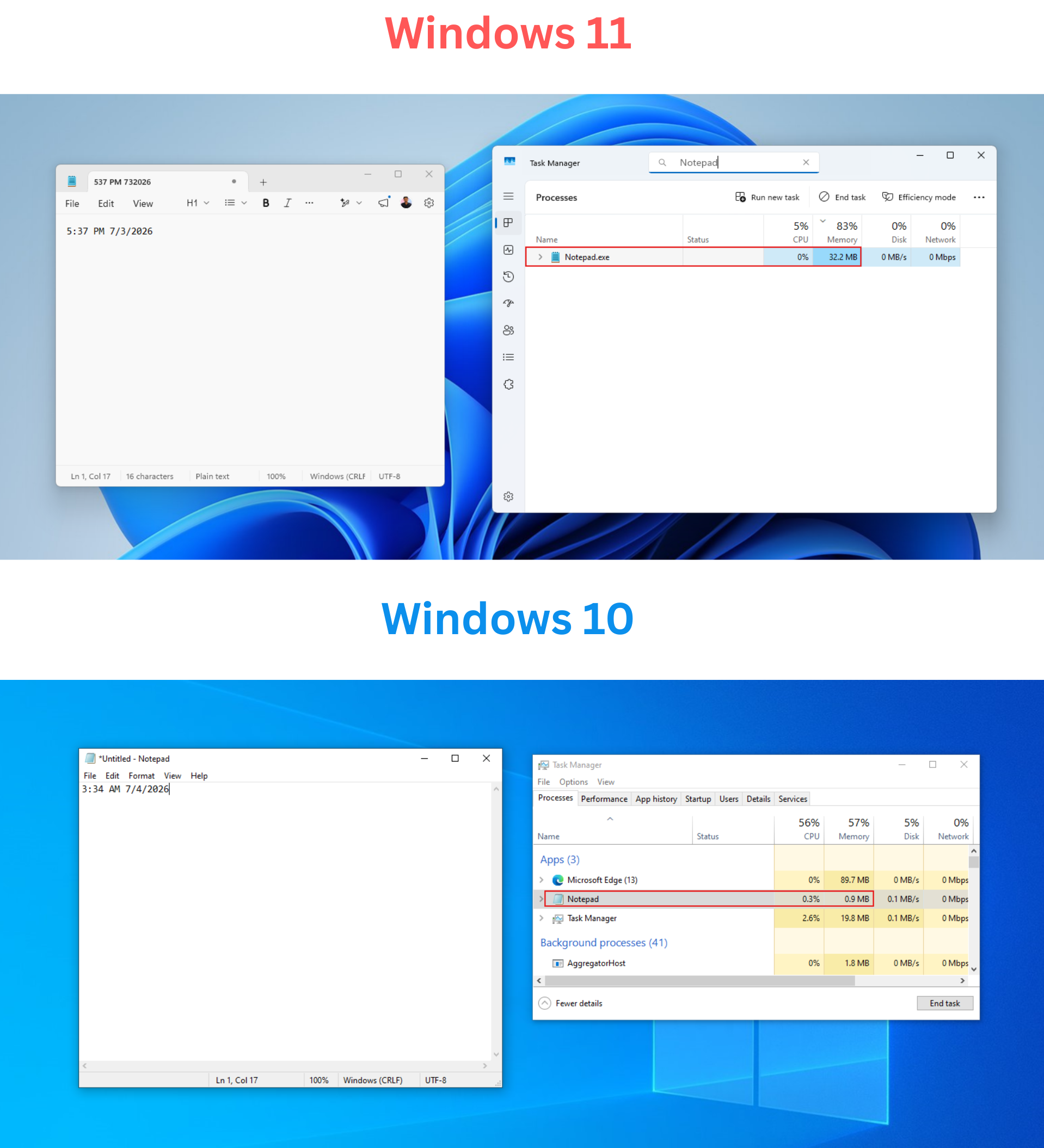
Windows 11 Notepad vs Windows 10 Notepad RAM comparison

Of course, you’re not losing any precious memory because of the bloated Notepad, but the way Microsoft deviated it from being a simple text editor is what created all this backlash.

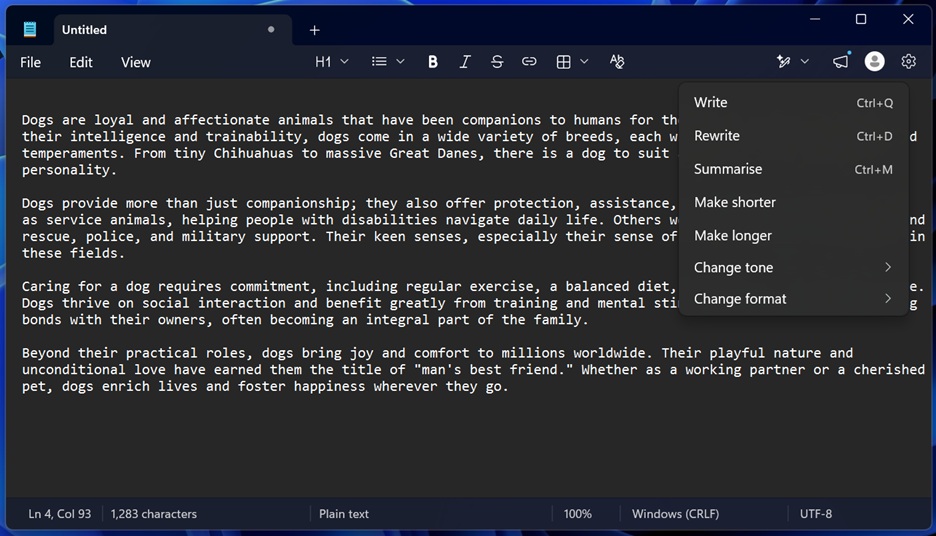
Tabs and autosave were welcome additions, and now I can’t think of Notepad without these. But in June 2025, Notepad gained Markdown formatting, and users pointed out that Windows already had WordPad for that job before Microsoft killed it off.

By August, the right-click menu had grown so cluttered with Copilot options that Microsoft had to redesign it just to make cut and paste findable again. A Create a table tool arrived in January 2026, and image support followed in February, built on that same Markdown engine.

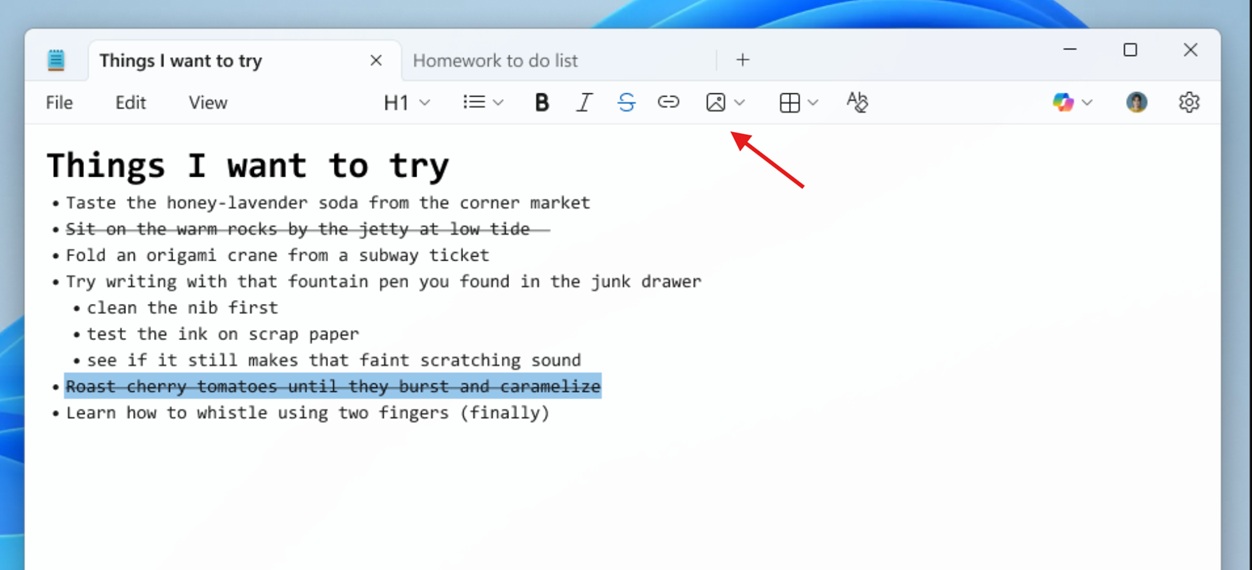
Notepad image insert

That month gave us proof that this feature creep costs something real. Microsoft confirmed an 8.8 rated remote code execution flaw, tracked as CVE-2026-20841, where a malicious Markdown link could let an attacker run code with the victim’s own permissions just by getting them to click it inside Notepad. A plain text editor with no link handling could never have that problem.

By March, Microsoft scaled back Copilot branding across several apps, and by April, Microsoft mostly just renamed Copilot to Writing Tools in Notepad instead of pulling the AI features out.

New AI tools in Notepad

The real argument is about Windows, not Notepad

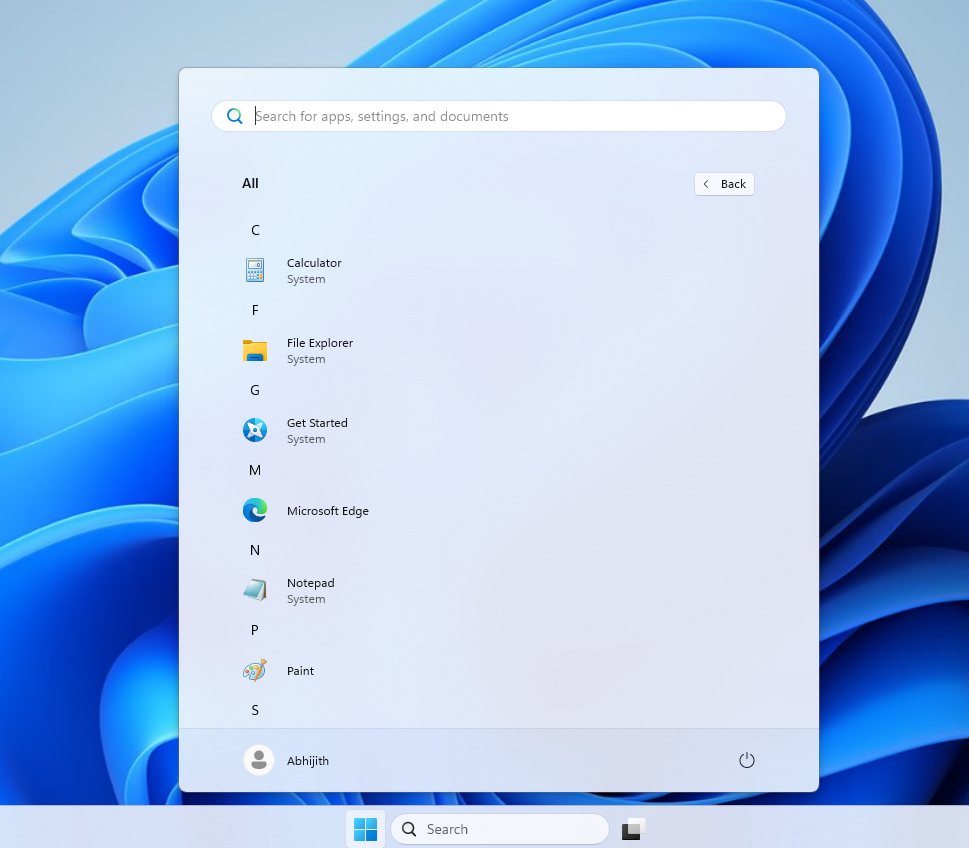
Windows 11 LTSC, the long-term servicing edition Microsoft builds for enterprises that can’t tolerate constant change, still ships the classic Notepad with no Copilot and no Markdown, and neither does Windows 10’s. The plain Notepad TinyRetroPad is recreating what was never deleted. Microsoft just quietly retired it from Windows 11.

Windows 11 LTSC has only Microsoft Edge as a modern app

Plummer has said the point was never to get anyone to use a hand-assembled 2.5KB editor. It’s to show how much untapped potential already sits inside Windows, because modern app development defaults to bundling everything an app might need instead of asking what the OS already provides.

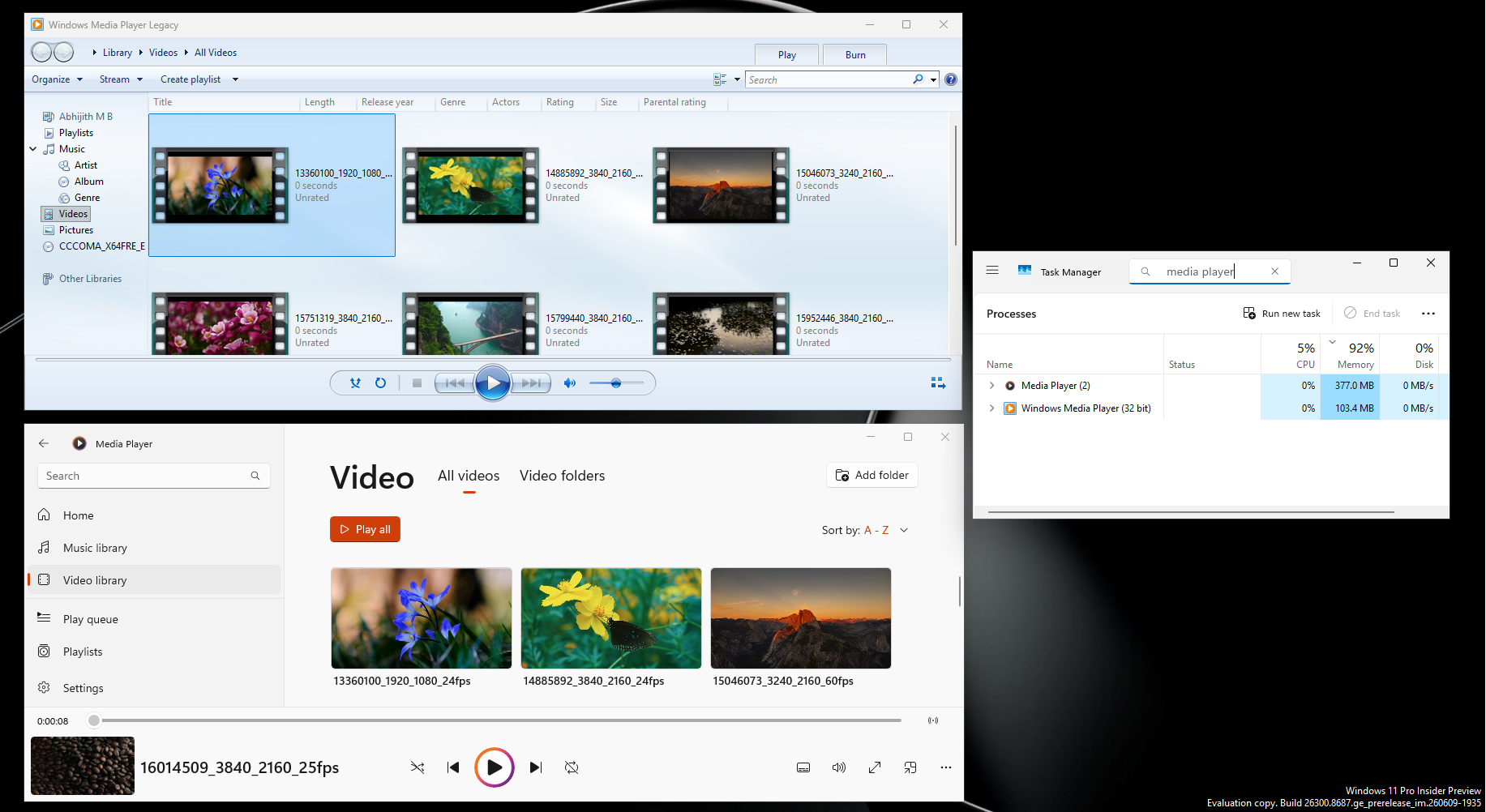
In a recent test, Windows Latest found that Windows 11’s Media Player, takes a few seconds to open a video and uses 377MB idle, against 103.4MB and instant playback on the legacy version, one that predates HEVC yet plays it better than the modern app does without a $0.99 Store add-on.

Windows Media Player RAM usage when compared with Legacy

Sure, we need modern-looking apps in Windows 11, but that mustn’t come at the cost of efficiency and control. We’re not saying that Microsoft isn’t allowed to bundle subscription plans in their inbox apps, but Windows 11 itself isn’t free. It’s paid software. Microsoft’s decades-old classic apps still look good and are robust. Also, the software giant built Calculator, Notepad, and Media Player decades ago without today’s tools and infrastructure. What needs to change isn’t the hardware. It’s the mindset that every rewrite needs to be as efficient as possible, just for the sake of it being possible.

The post Ex-Microsoft engineer rebuilds Notepad in 2.5KB using nothing but stuff Windows already had appeared first on Windows Latest

Read the whole story
alvinashcraft
35 minutes ago
reply
Pennsylvania, USA
Share this story
Delete

Valve Open-Sources Steam Machine's E-Ink Display

1 Share
Valve has open-sourced the design for a customizable e-ink front panel for the Steam Machine, dubbed the "Inkterface." "All of it is available on their GitLab under the MIT license, which goes over everything you need to make your own and stick it on the front of your fancy new Steam Machine," reports GamingOnLinux. From the report: They're now calling it the "Inkterface" and there's a good few things you'll need to make it including: 1 x Adafruit ESP32 Feather with 2MB PSRAM. 1 x Adafruit eInk Breakout Friend. 1 x Adafruit 5.83" Monochrome eInk Panel. 13 x M2.5 x 5mm Pan Head Machine Screws. 4 x 1/4" x 1/4" x 3/16" Stepped Magnet SB443-OUT. Valve even provided a video on the GitLab showing it being put together [...].

Read more of this story at Slashdot.

Read the whole story
alvinashcraft
35 minutes ago
reply
Pennsylvania, USA
Share this story
Delete

Chevy built an All-American EV truck. Why is nobody buying it?

1 Share
The Chevy Silverado EV is a solid first draft of an EV pickup truck. Here's what could make it better.
Read the whole story
alvinashcraft
35 minutes ago
reply
Pennsylvania, USA
Share this story
Delete

Meta releases new coding app called Pocket

1 Share
Following the acquisition of e vibe-coded gaming platform Gizmo earlier this year, Meta has released its own-brand version of the original app. Called Pocket, the app is described as a “creative platform for making and sharing gizmos”. Just what are “gizmos”? They can be considered apps or games, and are small interactive toys and, of course, they can be created using AI. Meta describes a gizmo as “a small interactive thing you can tap and play with… and you can make a gizmo just by describing it”. This is not just vibe-coding, it is social coding, and almost a social… [Continue Reading]
Read the whole story
alvinashcraft
36 minutes ago
reply
Pennsylvania, USA
Share this story
Delete

I finally got my Trump phone

1 Share
Photo of Trump Mobile T1 Phone with included accessories
Unlike most phones, the T1 still ships with a charger. Trump Mobile seemingly isn’t too worried about e-waste.

Where's the Trump phone? We're going to keep talking about it every week. One year on, our phones have finally arrived.

12 months, 16 days, 21 hours, and 54 minutes after I first heard about Trump Mobile's T1 Phone 8002 (gold version), I'm finally holding one in my own hands.

That's right, The Verge's Trump phones have arrived. And yes, I do mean phones - we have three of them: We ordered two, paid for two, and received three, all of which were sent to the wrong address. You can't beat service like that.

My phone came with a free Trump Mobile SIM card, even though I've not signed up to the company's mobile plan, plus an A4 quick start gui …

Read the full story at The Verge.

Read the whole story
alvinashcraft
36 minutes ago
reply
Pennsylvania, USA
Share this story
Delete
Next Page of Stories