In this post I describe some of the recent updates added in version 1.0.0-beta19 of my source generator NuGet package NetEscapades.EnumGenerators which you can use to add fast methods for working with enums. I start by briefly describing why the package exists and what you can use it for, then I walk through some of the changes in the latest release.
NetEscapades.EnumGenerators provides a source generator that is designed to work around an annoying characteristic of working with enums: some operations are surprisingly slow.
As an example, let's say you have the following enum:
public enum Colour
{
    Red = 0,
    Blue = 1,
}
At some point, you want to print the name of a Color variable, so you create this helper method:
public void PrintColour(Colour colour)
{
Console.WriteLine("You chose "+ colour.ToString());
}
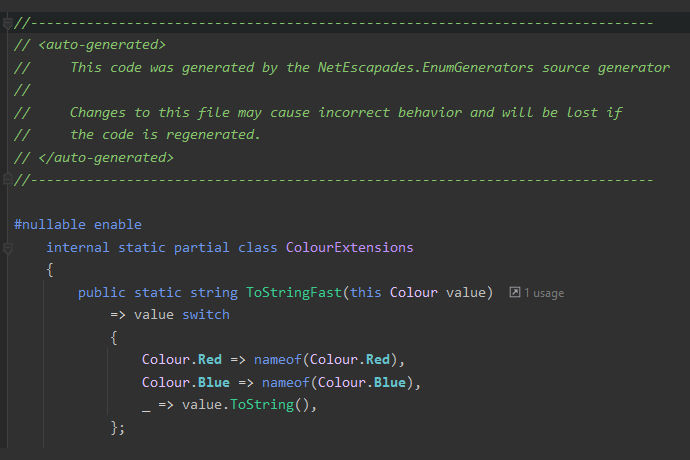
While this looks like it should be fast, it's really not. NetEscapades.EnumGenerators works by automatically generating an implementation that is fast. It generates a ToStringFast() method that looks something like this:
public static class ColourExtensions
{
    public string ToStringFast(this Colour colour)
        => colour switch
        {
            Colour.Red => nameof(Colour.Red),
            Colour.Blue => nameof(Colour.Blue),
            _ => colour.ToString(),
        }
    }
}
This simple switch statement checks for each of the known values of Colour and uses nameof to return the textual representation of the enum. If it's an unknown value, then it falls back to the built-in ToString() implementation for simplicity of handling of unknown values (for example this is valid C#: PrintColour((Colour)123)).
If we compare these two implementations using BenchmarkDotNet for a known colour, you can see how much faster the ToStringFast() implementation is, even in .NET 10
| Method | Mean | Error | StdDev | Median | Gen0 | Allocated |
|---|
| ToString | 6.4389 ns | 0.1038 ns | 0.0971 ns | 6.4567 ns | 0.0038 | 24 B |
| ToStringFast | 0.0050 ns | 0.0202 ns | 0.0189 ns | 0.0000 ns | - | - |
Obviously your mileage may vary and the results will depend on the specific enum and which of the generated methods you're using, but in general, using the source generator should give you a free performance boost!
If you want to learn more about all the features the package provides, check my previous blog posts or see the project README.
That's the basics of why I think you should take a look at the source generator. Now let's take a look at the latest features added.
Version 1.0.0-beta19 of NetEscapades.EnumGenerators was released to nuget.org recently and includes a number of new features. I'll describe each of the updates in more detail below, covering the following:
- Support for disabling number parsing.
- Support for automatically calling
ToLowerInvariant() or ToUpperInvariant() on the serialized enum. - Add support for
ReadOnlySpan<T> APIs when using the System.Memory NuGet package.
There are other fixes and features in 1.0.0-beta19, but these are the ones I'm focusing on in this post. I'll show some of the other features in the next post!
The first feature addresses a long-standing request, disabling the fallback "number parsing" implemented in Parse() and TryParse(). For clarity I'll provide a brief example. Let's take the Color example again:
[EnumExtensions]
public enum Colour
{
    Red = 0,
    Blue = 1,
}
As well as ToStringFast(), we generate similar "fast" Parse(), TryParse(), and most of the other System.Enum static methods that you might expect. The TryParse() method for the above code looks something like this:
public static bool TryParse(string? name, out Colour value)
{
    switch (name)
    {
        case nameof(Colour.Red):
            value = Colour.Red;
            return true;
        case nameof(Colour.Blue):
            value = Colour.Blue;
            return true;
        case string s when int.TryParse(name, out var val):
            value = (Colour)val;
            return true;
        default:
            value = default;
            return false;
    }
}
The first two branches in this example are what you might expect; the source generator generates an explicit switch statement for the Colour enum. However, the third case may look a little odd. The problem is that enums in C# are not a closed list of values, you can always do something like this:
Colour valid = (Colour)123;
string stillValid = valid.ToString();
Colour parsed = Enum.Parse<Colour>(stillValid);
Console.WriteLine(valid == parsed);
Essentially, you can pretty much parse any integer that has been ToString()ed as any enum. That's why the source generated code includes the case statement to try parsing as an integer—it's to ensure compatibility with the "built-in" Enum.Parse() and TryParse() behaviour.
However, that behaviour isn't always what you want. Arguably, it's rarely what you want, hence the request to allow disabling it.
Given it makes so much sense to allow disabling it, it's perhaps a little embarrassing that it took so long to address. I dragged my feet on it for several reasons:
- The built-in
System.Enum works like this, and I want to be as drop-in compatible as possible. - There's a trivial "fix" by checking first that the first digit is not a number. e.g.
if (!char.IsDigit(text[0]) && ColourExtensions.TryParse(text, out var value)) - It's another configuration switch that would need to be added to
Parse and TryParse
Of all the reasons, that latter point is the one that vexed me. There were already two configuration knobs for Parse and TryParse, as well as versions that accept both string and ReadOnlySpan<char>:
public static partial class ColourExtensions
{
    public static Colour Parse(string? name);
    public static Colour Parse(string? name, bool ignoreCase);
    public static Colour Parse(string? name, bool ignoreCase, bool allowMatchingMetadataAttribute);

    public static Colour Parse(ReadOnlySpan<char> name);
    public static Colour Parse(ReadOnlySpan<char> name, bool ignoreCase);
    public static Colour Parse(ReadOnlySpan<char> name, bool ignoreCase, bool allowMatchingMetadataAttribute);
}
My concern was adding more and more parameters or overloads would make the generated API harder to understand. The simple answer was to take the classic approach of introducing an "options" object. This encapsulates all the available options in a single parameter, and can be extended without increasing the complexity of the generated APIs:
public static partial class ColourExtensions
{
    public static Colour Parse(string? name, EnumParseOptions options);
    public static Colour Parse(ReadOnlySpan<char> name, EnumParseOptions options);
}
The EnumParseOptions object is defined in the source generator dll that's referenced by your application, so it becomes part of the public API. It's defined as a readonly struct to avoid allocating an object on the heap just to call Parse (which would negate some of the benefits of these APIs).
public readonly struct EnumParseOptions
{
    private readonly StringComparison? _comparisonType;
    private readonly bool _blockNumberParsing;

    public EnumParseOptions(
        StringComparison comparisonType = StringComparison.Ordinal,
        bool allowMatchingMetadataAttribute = false,
        bool enableNumberParsing = true)
    {
        _comparisonType = comparisonType;
        AllowMatchingMetadataAttribute = allowMatchingMetadataAttribute;
        _blockNumberParsing = !enableNumberParsing;
    }

    public StringComparison ComparisonType => _comparisonType ?? StringComparison.Ordinal;
    public bool AllowMatchingMetadataAttribute { get; }
    public bool EnableNumberParsing => !_blockNumberParsing;
}
The main difficulty in designing this object was that the default values (i.e. (EnumParseOptions)default) had to match the "default" values used in other APIs, i.e.
- Not case sensitive
- Number parsing enabled
- Don't match metadata attributes (see my previous post about recent changes to metadata attributes!).
The final object ticks all those boxes, and it means you can now disable number parsing, using code like this:
string someNumber = "123";
ColourExtensions.Parse(someNumer, new EnumParseOptions(enableNumberParsing: false));
As well as introducing number parsing, this also provided a way to sneak in the ability to use any type of StringComparison during Parse or TryParse methods, instead of only supporting Ordinal and OrdinalIgnoreCase.
The next feature was also a feature request that's been around for a long time, the ability to do the equivalent of ToString().ToLowerInvariant() but without the intermediate allocation, and with the transformation done at compile time, essentially generating something similar to these:
public static class ColourExtensions
{
    public static string ToStringLowerInvariant(this Colour colour) => colour switch
    {
        Colour.Red => "red",
        Colour.Blue => "blue",
        _ => colour.ToString().ToLowerInvariant(),
    };

    public static string ToStringUpperInvariant(this Colour colour) => colour switch
    {
        Colour.Red => "RED",
        Colour.Blue => "BLUE",
        _ => colour.ToString().ToUpperInvariant(),
    }
}
There are various reasons you might want to do that, for example if third-party APIs require that you use upper/lower for your enums, but you want to keep your definitions as canonical C# naming. This was another case where I could see the value, but I didn't really want to add it, as it looked like it would be a headache. ToStringLower() is kind of ugly, and there would be a bunch of extra overloads required again.
Just as for the number parsing scenario, the solution I settled on was to add a SerializationOptions object that supports a SerializationTransform, which can potentially be extended in the future if required (though I'm not chomping at the bit to add more options right now!)
public readonly struct SerializationOptions
{
    public SerializationOptions(
        bool useMetadataAttributes = false,
        SerializationTransform transform = SerializationTransform.None)
    {
        UseMetadataAttributes = useMetadataAttributes;
        Transform = transform;
    }

    public bool UseMetadataAttributes { get; }
    public SerializationTransform Transform { get; }
}

public enum SerializationTransform
{
    None,
    LowerInvariant,
    UpperInvariant,
}
You can then use the ToStringFast() overload that takes a SerializationOptions object, and it will output the lower version of your enum, without needing the intermediate ToStringFast call:
var colour = Colour.Red;
Console.WriteLine(colour.ToStringFast(new(transform: SerializationTransform.LowerInvariant)));
It's not the tersest of syntax, but there's ways to clean that up, and it means that adding additional options later if required should be less of an issue, but we shall see. In the short-term, it means that you can now use this feature if you find yourself needing to call ToLowerInvariant() or ToUpperInvariant() on your enums.
From the start, NetEscapades.EnumGenerators has had support for parsing values from ReadOnlySpan<char>, just like the modern APIs in System.Enum do (but faster 😉). However, these APIs have always been guarded by a pre-processor directive; if you're using .NET Core 2.1+ or .NET Standard 2.1 then they're available, but if you're using .NET Framework, or .NET Standard 2.0, then they're not available.
#if NETCOREAPP2_1_OR_GREATER || NETSTANDARD2_1_OR_GREATER
public static bool IsDefined(in ReadOnlySpan<char> name);
public static bool IsDefined(in ReadOnlySpan<char> name, bool allowMatchingMetadataAttribute);
public static Colour Parse(in ReadOnlySpan<char> name);
public static bool TryParse(in ReadOnlySpan<char> name, out Colour colour);
#endif
In my experience, this isn't a massive problem these days. If you're targeting any version of .NET Core or modern .NET, then you have the APIs. If, on the other hand, you're on .NET Framework, then the speed of Enum.ToString() will really be the least of your performance worries, and the lack of the APIs probably don't matter that much.
Where it could still be an issue is .NET Standard 2.0. It's not recommended to use this target if you're creating libraries for .NET Core or modern .NET, but if you need to target both .NET Core and .NET Framework, then you don't necessarily have a lot of choice, you need to use .NET Standard.
What's more, there's a System.Memory NuGet package that provides polyfills for many of the APIs, in particular ReadOnlySpan<char>.
As I understand it the polyfill implementation isn't generally as fast as the built-in version, but it's still something of an improvement!
So the new feature in 1.0.0-beta19 of NetEscapades.EnumGenerators is that you can define an MSBuild property, EnumGenerator_UseSystemMemory=true, and the ReadOnlySpan<char> APIs will be available where previously they wouldn't be. Note that you only need to define this if you're targeting .NET Framework or .NET Standard 2.0 and want the ReadOnlySpan<char> APIs.
<Project Sdk="Microsoft.NET.Sdk">
<PropertyGroup>
<TargetFrameworks>netstandard2.0</TargetFrameworks>
<EnumGenerator_UseSystemMemory>true</EnumGenerator_UseSystemMemory>
</PropertyGroup>
<ItemGroup>
<PackageReference Include="NetEscapades.EnumGenerators" Version="1.0.0-beta19" />
<PackageReference Include="System.Memory" Version="4.6.3" />
</ItemGroup>
</Project>
Setting this property defines a constant, NETESCAPADES_ENUMGENERATORS_SYSTEM_MEMORY, which the updated generated code similarly predicates on:
#if NETCOREAPP2_1_OR_GREATER || NETSTANDARD2_1_OR_GREATER || NETESCAPADES_ENUMGENERATORS_SYSTEM_MEMORY
public static bool IsDefined(in ReadOnlySpan<char> name);
public static bool IsDefined(in ReadOnlySpan<char> name, bool allowMatchingMetadataAttribute);
public static Colour Parse(in ReadOnlySpan<char> name);
public static bool TryParse(in ReadOnlySpan<char> name, out Colour colour);
#endif
There are some caveats:
- The System.Memory package doesn't provide an implementation of
int.TryParse() that works with ReadOnlySpan<char>, so: - If you're attempting to parse a
ReadOnlySpan<char>, - and the
ReadOnlySpan<char> doesn't represent one of your enum types - and you haven't disabled number parsing
- then the APIs will potentially allocate, so that they can call
int.TryParse(string).
- Additional warnings are included in the XML docs to warn about the above scenario
- If you set the variable, and haven't added a reference to System.Memory, you'll get compilation warnings.
As part of shipping the feature, I've also tentatively added "detection" of referencing the System.Memory NuGet package in the package .targets file, so that EnumGenerator_UseSystemMemory=true should be automatically set, simply by referencing System.Memory. However, I consider this part somewhat experimental, as it's not something I've tried to do before, I'm not sure it's something you should do, and I'm a long way from thinking it'll work 100% of the time 😅 I'd be interested in feedback on how I should do this, and/or whether it works for you!
I also experimented with a variety of other approaches. Instead of using a defined constant, you could also detect the availability of ReadOnlySpan<char> in the generator itself, and emit different code entirely. But you'd still need to detect whether the int.TryParse() overloads are available (i.e. is ReadOnlySpan<char> "built in" or package-provided), and overall it seemed way more complex to handle than the approach I settled on. I'm still somewhat torn though, and maye revert to this approach in the future. And I'm open to other suggestions!
So in summary, if you're using NetEscapades.EnumGenerators in a netstandard2.0 or .NET Framework package, and you're already referencing System.Memory, then in theory you should magically get additional ReadOnlySpan<char> APIs by updating to 1.0.0-beta19. If that's not the case, then I'd love if you could raise an issue so we can understand why, but you can also simply set EnumGenerator_UseSystemMemory=true to get all that performance goodness guaranteed.
Before I close, I'd like to say a big thank you to everyone who has raised issues and PRs for the project, especially Paulo Morgado for his discussion and work around the System.Memory feature! All feedback is greatly appreciated, so do raise an issue if you have any problems.
Soon. I promise 😅 So give the new version a try and flag any issues so they can be fixed before we settle on the final API for once and for all! 😀
In this post I walked through some of the recent updates to NetEscapades.EnumGenerators shipped in version 1.0.0-beta18. I showed how introducing options objects for both the Parse()/TryParse() and ToString() methods allowed introducing new features such as disabling number parsing and serializing directly with ToLowerInvariant(). Finally, I showed the new support for ReadOnlySpan<char> APIs when using .NET Framework or .NET Standard 2.0 with the System.Memory NuGet package If you haven't already, I recommend updating and giving it a try! If you run into any problems, please do log an issue on GitHub.🙂
 Log in



