TL;DR: The Syncfusion Toolkit for .NET MAUI continues to grow with its fifth open-source release, introducing the Grid Splitter and the Interactive Viewer to build resizable layouts and rich content-viewing experiences. The release also includes performance improvements, stability enhancements, and bug fixes to help developers create more responsive and maintainable cross-platform applications.
Since launching the Syncfusion®Toolkit for .NET MAUI, we’ve continued expanding the collection with new controls driven by common developer needs. Today, we’re excited to introduce the fifth set of open-source controls for .NET MAUI, adding Grid Splitter and Interactive Viewer to the Toolkit.
This release also includes quality improvements, performance enhancements, and bug fixes across existing controls.
Grid Splitter
Many desktop-style applications need resizable layouts that let users adjust the space allocated to different content areas. Whether you’re building a file explorer, dashboard, editor, or management application, users often expect to resize panels based on their workflow.
The new .NET MAUI Grid Splitter makes this easy by allowing users to resize, expand, and collapse adjacent layout regions using touch, mouse, or pointer interactions.
Key features
Resize neighboring panes with simple drag interactions.
Expand or collapse panels using built-in controls.
Support both horizontal and vertical layouts.
Set minimum and maximum pane sizes to maintain consistent layouts.
Add, remove, collapse, or expand panes programmatically at runtime.
Customize separator size, color, icons, and templates to match your application’s design.
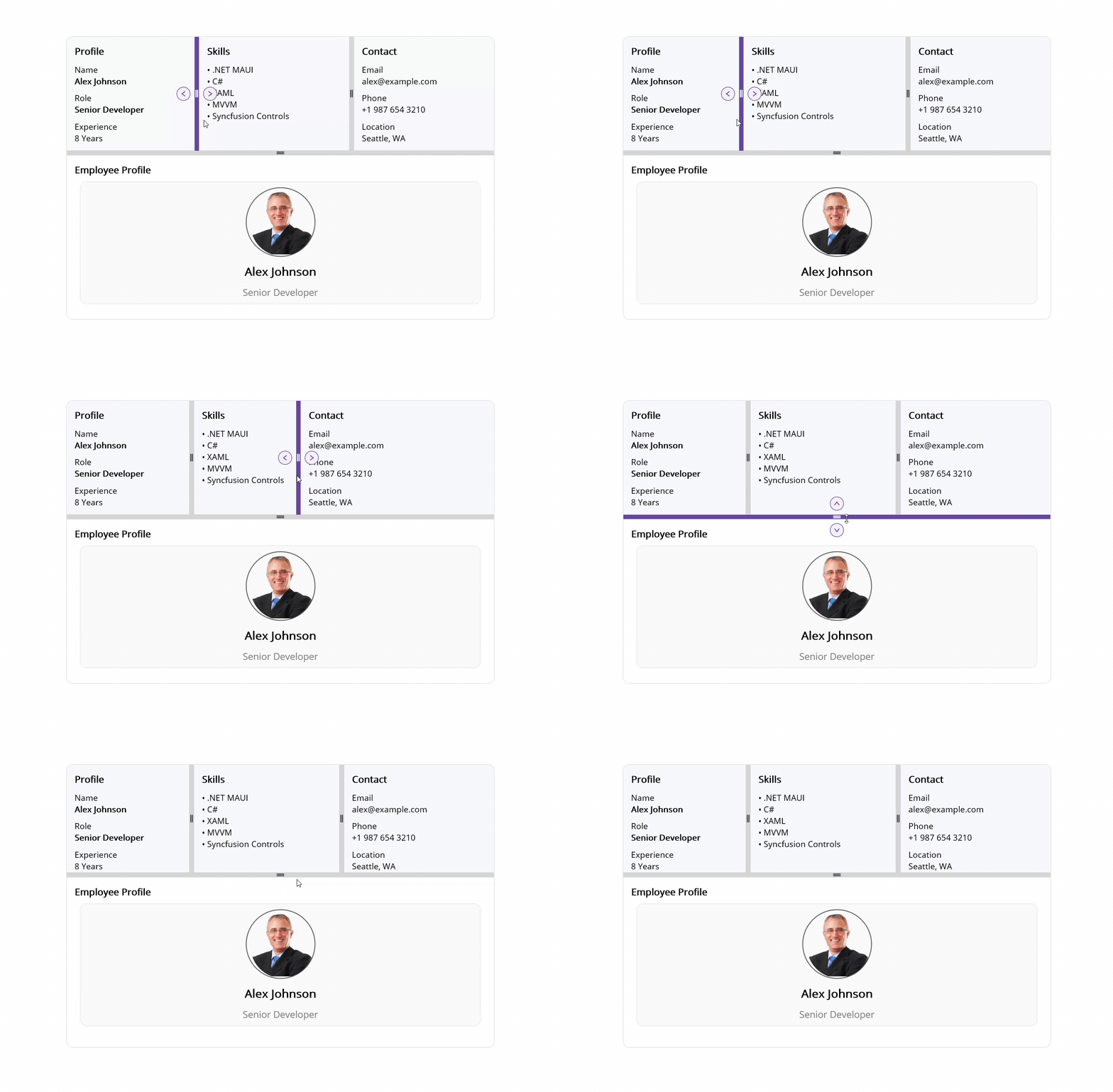
The following image shows the Grid Splitter in action.
.NET MAUI Grid Splitter in action
Interactive Viewer
Displaying large images, diagrams, maps, or technical drawings often requires more than a standard image control can provide. Users need a smooth way to zoom in, move around, and inspect details without sacrificing usability.
The new .NET MAUI Interactive Viewer provides built-in zooming, panning, and rotation capabilities, making it easier to create rich viewing experiences across both desktop and mobile platforms.
Key features
Smooth zooming and panning for exploring visual content.
Rotate content to view it from different angles.
Quickly return to the original view with a reset option.
Control the viewing experience with configurable minimum and maximum zoom levels.
The following image demonstrates the Interactive Viewer.
.NET MAUI Interactive Viewer in action
Performance and quality updates
Alongside these new controls, we’ve continued improving the overall Toolkit experience with performance optimizations, stability enhancements, and bug fixes across existing controls.
These updates help ensure a more reliable and consistent experience when building .NET MAUI applications with the Syncfusion Toolkit.
Whether you’re creating resizable workspaces, dashboard-style layouts, image inspection tools, map-based applications, or technical viewers, these controls can help you deliver richer user experiences while reducing the amount of custom code you need to maintain.
Both controls are available through the Syncfusion .NET MAUI Toolkit on NuGet and GitHub, along with documentation and sample projects to help you get started quickly.
If you’re looking for a broader set of enterprise-grade UI components, be sure to explore Essential Studio for .NET MAUI, which includes advanced controls such as DataGrid, ListView, Scheduler, Charts, and more.
We’d love to hear your feedback as we continue to enhance the Toolkit and expand its open-source offerings. If you have any questions, feedback, or need assistance, reach out through our support portal, support forum, or feedback portal where our team will be happy to help.
This past week has been monumental in the realm of artificial intelligence, reflecting the bubbling tech advancements that have been taking shape over the last six months. Significant launches, such as Fable 5.1 and Mythos from Anthropic, alongside GPT-6 Astra, signify a rapid progression towards artificial general intelligence (AGI) and perhaps even artificial superintelligence (ASI). While these innovations have garnered extensive attention, NVIDIA has unveiled something that is bound to reshape the AI landscape: the NVIDIA PAIR.
NVIDIA PAIR, or Personal AI Router, represents a bold leap into the world of local AI. The concept aligns seamlessly with NVIDIA’s broader strategy to democratize AI technologies and embrace the ethos of open AI models, open weights, and open datasets. This blog will explore how NVIDIA’s PAIR could be a game-changer, particularly emphasizing their acquisition of Hugging Face and the implications of this move.
The Significance of Open Weights and Hugging Face Acquisition
NVIDIA has established itself as a leader in AI by not only releasing open-weight models but also by accompanying them with comprehensive training recipes and datasets. This strategic approach has made NVIDIA the top contributor of repositories on Hugging Face, overtaking other enterprise players. Their recent acquisition of Hugging Face, valued at just under $13 billion, marks a significant investment in open-weight models, further solidifying NVIDIA’s commitment to open AI.
Contrary to concerns about this acquisition harming the open community, many view it as a protective move, preventing other companies from making restrictive changes that could stifle innovation. Hugging Face has become a hub of local AI, an ecosystem that NVIDIA is eager to integrate with its own technologies, thereby harnessing the full potential of AI hitting mass adoption.
NVIDIA PAIR: The Future of Local AI Networking
The introduction of NVIDIA PAIR marks an innovative step towards seamlessly integrating multiple AI-capable devices within a single network. As households and workplaces increasingly deploy AI-driven technologies, NVIDIA anticipates an environment where devices with GPUs or accelerators work in tandem for optimal performance. PAIR aims to act as a personal inference traffic director within your local network, managing the distribution of AI tasks across various devices without any additional modification required from the user’s perspective.
Unlike SwitchYard, which manages model selection across different API-hosted environments, PAIR focuses on hardware you directly control. It supports agentic software capable of delegating tasks amongst parallel sub-agents, maximizing resource utilization without the typical bottleneck of queued requests waiting for a single GPU.
Open Source Vision and Community Involvement
Underscoring its commitment to open-source initiatives, NVIDIA has released PAIR under the Apache 2 license, inviting the community to contribute, fork, and modify. This proactive move ensures adaptability, community-driven enhancements, and extended support beyond NVIDIA’s original architecture. Current supported environments include Windows, Linux, and macOS, and future expansions seem inevitable as pull requests start rolling in from innovative developers around the globe.
PAIR does not amalgamate your hardware into a Mega-GPU, but it offers the tantalizing capacity of handling more parallel requests—a feature which underlines its essence as a key player in local AI development. This forward-thinking approach invites us to ponder whether future integrations might see PAIR coalesce with other technologies like SwitchYard.
Early Days: Setting the Pace for AI’s Local Future
Despite its fresh release, PAIR is adaptable for various applications and provides a glimpse into the eventual direction local AI could take, potentially integrating more sophisticated functionalities or even encompassing cloud networks. Whether in deploying LLMs or managing everyday tasks, NVIDIA’s latest pioneering product lays down a strong foundation for innovations yet to come.
As NVIDIA forges pathways into the future with PAIR, one can only imagine where the realm of local and personal AI networking will take us. Amidst an era where AI technologies are increasingly becoming omnipresent in personal and professional domains, NVIDIA is at the forefront, ready to navigate the intricate waters of innovation and community collaboration.
Like me, Sumeet Gayathri Moghe is tired of poor
presentations with bad slide decks. He's started to write a series of
posts on how to avoid these calamities, beginning with a post that questions
whether a presentation is needed at all.
AI agents make telemetry costs harder to predict. This post compares the three pillars against the wide event model, and explains why wide events keep AI observability costs predictable without sacrificing the context engineers need.
Access control belongs on the same day-zero checklist as networking and storage.
On most on-prem clusters, it never makes the list.
The Identity Gap
Managed cloud Kubernetes ships IAM or SSO integration out of the box. Self-hosted clusters don’t. Access defaults to a static client certificate or a long-lived token, issued once and rarely revisited. That certificate keeps working long after the person it was issued to has left, changed roles, or lost the device it lives on. Nothing in the cluster’s authentication path checks whether they should still have access. Revoking it means finding every copy of a file, and in practice, that doesn’t happen completely. The moment more than one or two people need different levels of access, managing that per person, per file, becomes its own ongoing job.
Put an identity provider (Keycloak or any OIDC-compliant provider) in front of the cluster instead. Access should follow an account and its group membership, not a certificate file. Configure it with a public OIDC client using PKCE, not a confidential client with a secret. Access changes become identity operations: add someone to a group, remove someone from a group. No file distribution required.
Architecture: three moving parts
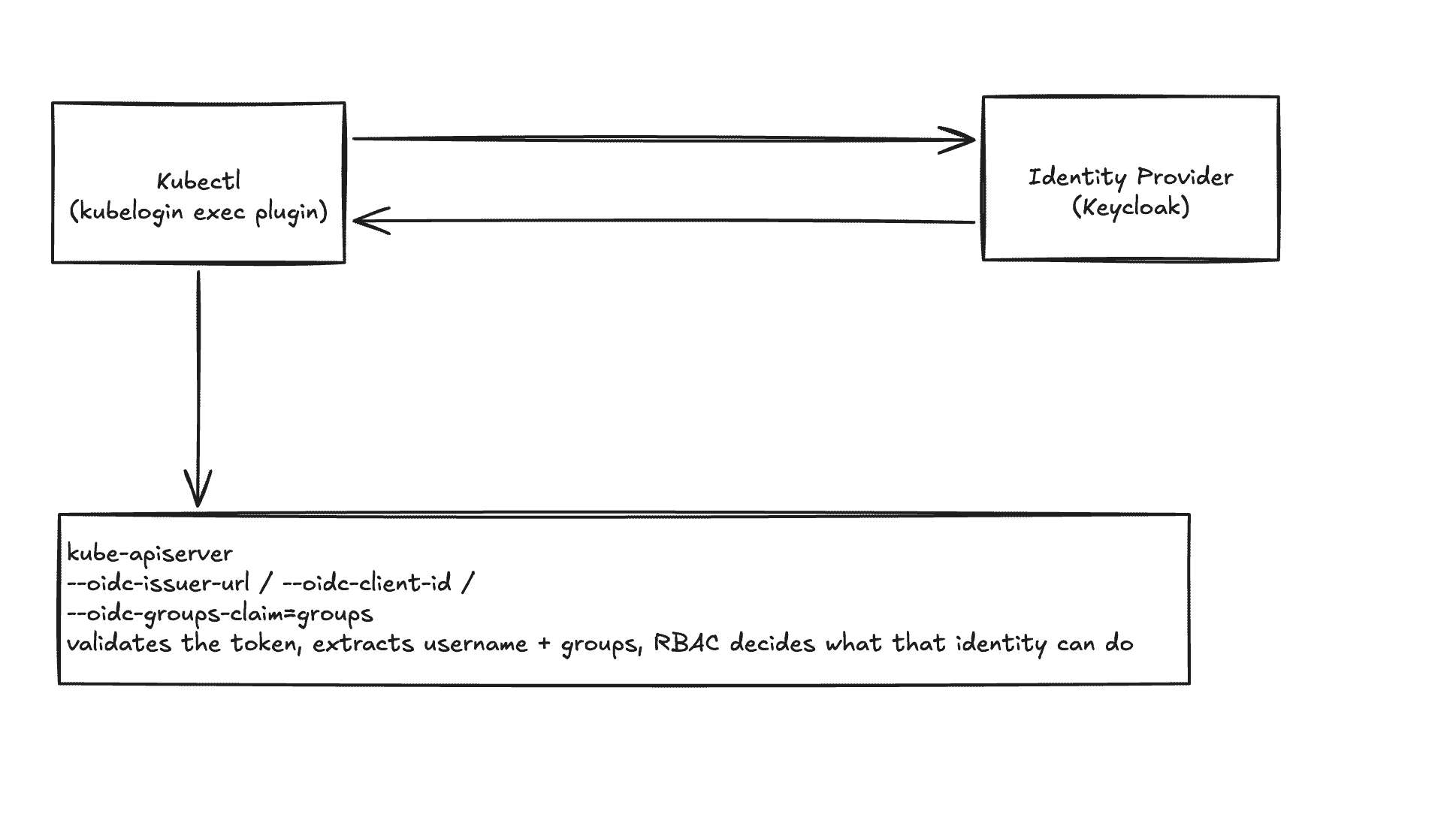
The integration has three components that need to agree with each other:
kubectl, with the kubelogin exec plugin. Starts the login, gets a token from the identity provider, and attaches it to every API request.
The identity provider (Keycloak). Authenticates the user and issues an ID token carrying their username and group membership.
kube-apiserver, configured with --oidc-issuer-url, --oidc-client-id, and --oidc-groups-claim. Validates the token, extracts username and groups, and lets RBAC decide what that identity can do.
kubectl authenticates against the identity provider, then presents the resulting token to kube-apiserver, which validates it and hands it off to RBAC.
kubectl never talks to the API server first. A kubectl exec-credential plugin (kubelogin, also distributed as “kubectl oidc-login”) intercepts the request, drives the browser-based login against the IdP, and hands the resulting ID token back to kubectl as a bearer credential. The API server validates that token directly against the IdP’s public signing keys. It never needs network access to the IdP itself beyond fetching those keys once.
The client configuration decision that matters
Configure this client as public, not confidential. A confidential client issues a client secret, which then gets pasted into the kubelogin plugin config, and ships to every machine that needs cluster access.
A secret that has to be distributed to every client that uses it isn’t functioning as a secret. It’s a shared static credential with extra steps, and rotating it means a coordinated config push to every machine rather than disabling one compromised identity.
OAuth 2.1 already settles this for native and command-line applications. Make the client public. Issue no secret at all. Use PKCE (Proof Key for Code Exchange) instead, which stops anyone who intercepts the authorization code from redeeming it. PKCE works by having the client generate a random value locally, send a hash of it with the initial login request, then prove possession of the original value when exchanging the code for a token. An interceptor holding only the code can’t complete that proof.
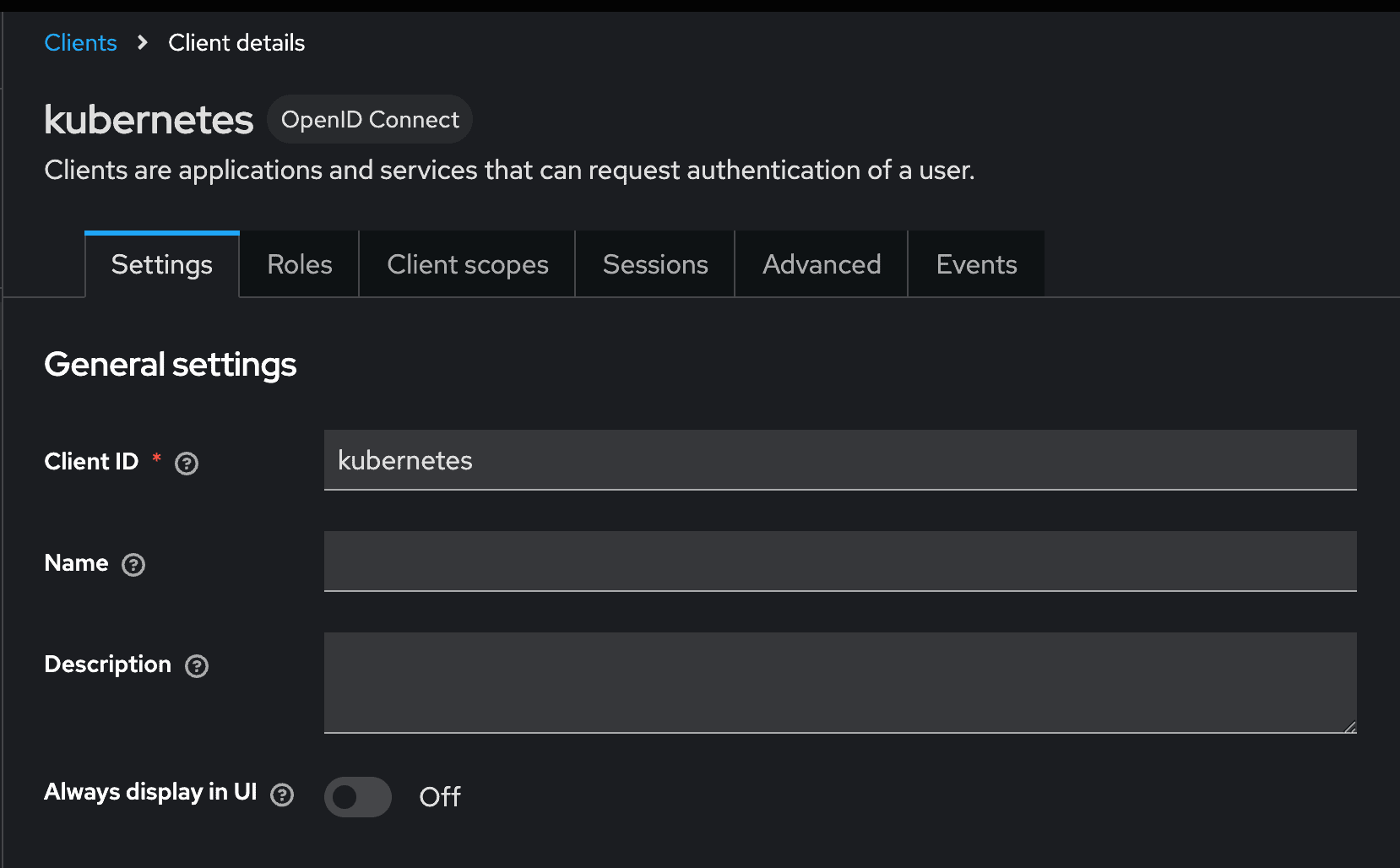
The client, in Keycloak’s admin console, ends up configured as:
Client ID: kubernetes
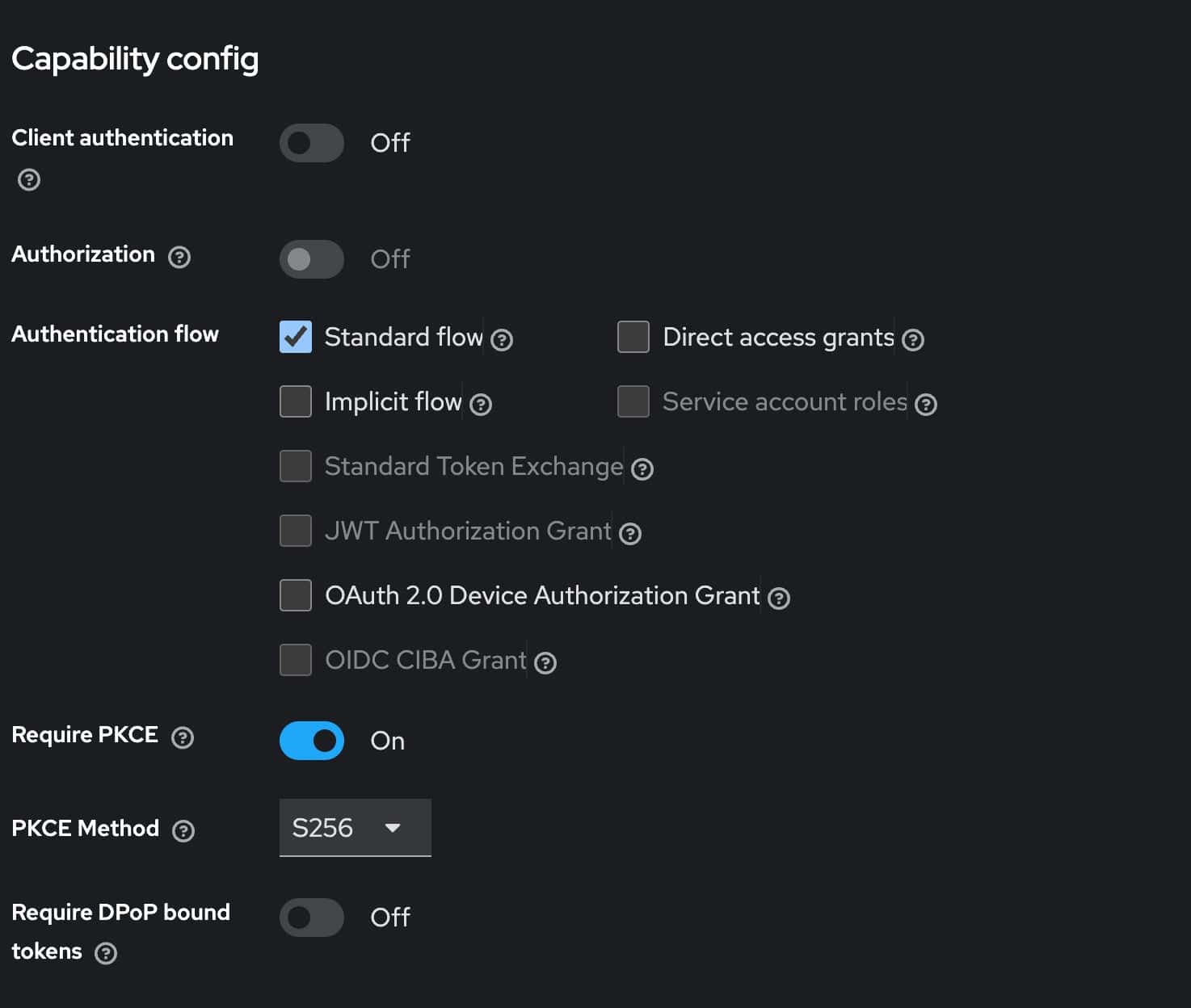
Client authentication: Off (public client, no secret issued)
Standard flow: On
Direct access grants: Off
Require PKCE: On, method S256
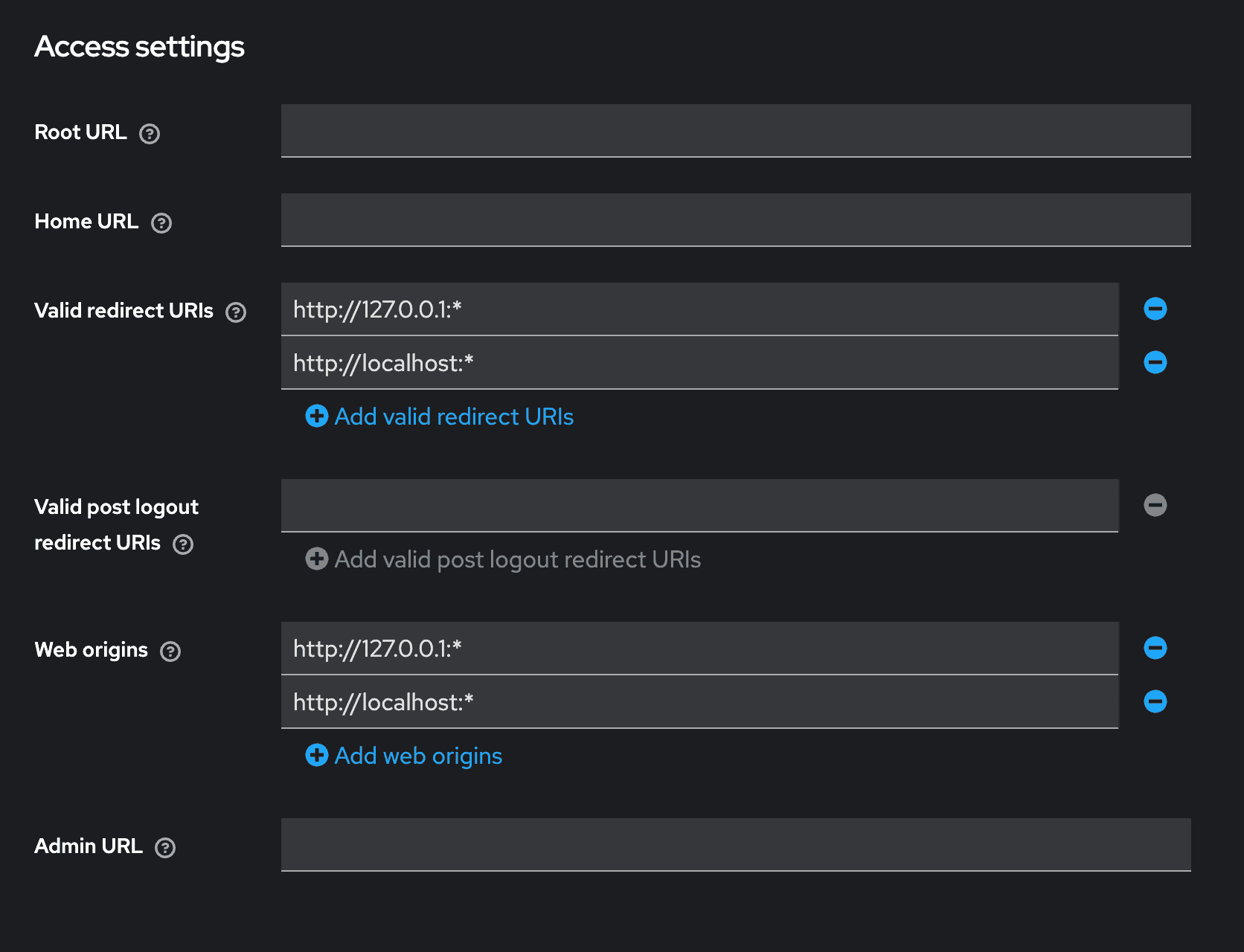
Valid redirect URIs: http://127.0.0.1:* and http://localhost:* (loopback only, nothing external)
Web origins: http://127.0.0.1:* and http://localhost:*
Client scopes: openid, profile, email, groups
General settings: the Kubernetes client, registered as OpenID Connect
Access settings: redirect URIs and web origins locked to loopback only
Capability config: Client authentication Off, Standard flow, Require PKCE On (S256)
Deployment walkthrough
1. Add the groups claim mapper
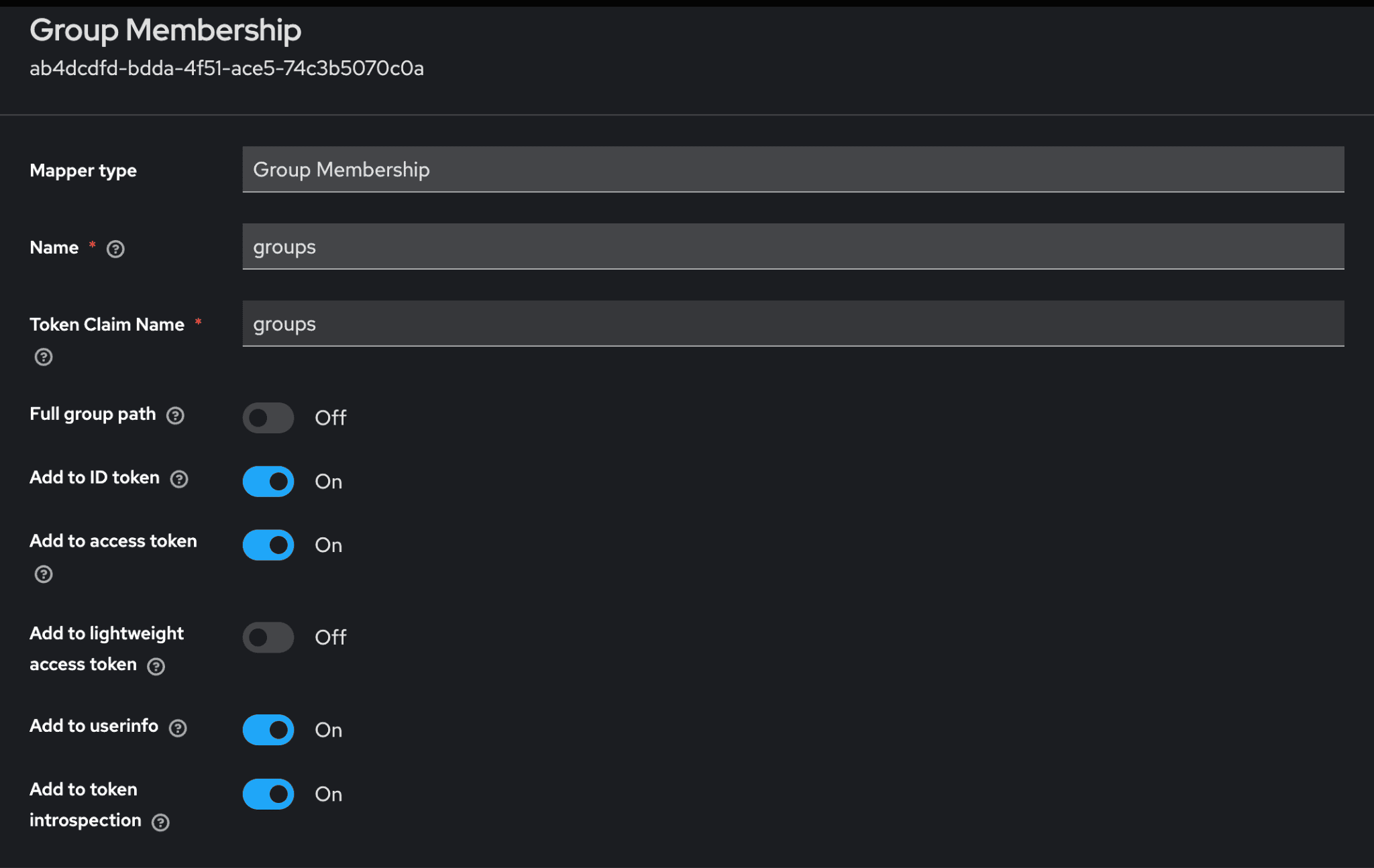
Kubernetes has no concept of “users” as a first-class object. RBAC binds to usernames and groups asserted by the token, so the IdP needs to actually put group membership into the ID token. “In Keycloak”is a protocol mapper on the client scope, of type Group Membership, mapped to the claim name groups.
Group Membership mapper on the realm-level ‘groups’ client scope: Token Claim Name ‘groups’, Add to ID token On
If Keycloak’s certificate isn’t signed by a publicly trusted CA (the common case for a self-hosted) on-prem identity provider, add one more flag pointing at that CA’s certificate:
--oidc-ca-file=/etc/kubernetes/pki/oidc-ca.crt
The API server needs to trust this connection to fetch the issuer’s signing keys. Without it, OIDC authentication fails with a TLS verification error that has nothing to do with the login flow itself, which makes it a confusing one to debug the first time you hit it.
3. Configure the kubectl side
kubeconfig gets an exec-credential entry instead of embedded certs or a static token:
Access changes now happen entirely in the IdP. Add someone to the platform-viewer group, and the next token they mint carries that group. The binding above applies immediately. No cluster-side change. No new kubeconfig to distribute.
Try it out
Using kubelogin as the exec plugin, a first login looks like this from the terminal:
$ kubectl get pods
 Opening in existing browser session.
 NAME                    	READY   STATUS    RESTARTS   AGE
 web-7f9c9c4d8-2xk9p     	1/1 	Running   0      	3d
The first call opens a browser window against the IdP; every call after that reuses the cached token until it expires, at which point kubelogin silently uses the refresh token to get a new one without another browser round-trip.
To confirm what identity and groups actually landed in the token:
$ kubectl auth whoami
ATTRIBUTE   VALUE
 Username	jane.doe@example.com
 Groups  	[platform-viewer system:authenticated]
The bottom line
None of this requires reworking how the cluster runs. It is a public OIDC client, one group membership mapper, a handful of RBAC bindings, and a kubectl plugin many engineers already have installed for other clusters. The setup cost is a single afternoon, not a platform migration.
What changes is what the cluster gets in return. Access follows group membership in the identity provider instead of a certificate file, so granting or revoking a level of access becomes a group change, not a search for every copy of a file across every laptop. There is a deeper benefit too. Kubernetes can log every request that hits its API server, but that audit trail is only as useful as the identity attached to each entry. A shared kubeconfig authenticating everyone as the same generic identity, often literally ‘cluster-admin’ means every audit log entry says the same thing no matter who actually ran the command. Federate identity through an OIDC provider instead, and every request the API server logs carries the person who actually made it. The audit trail stops being a list of anonymous actions and becomes an actual record of who did what, and it costs far less to set up than most teams assume.
TypeScript 7 is a real game-changer, and its new Go-based language engine fundamentally alters how IDEs integrate with TypeScript. And what’s more, WebStorm 2026.2 ships stable support for it, including for Angular and React projects.
No migration is required – if your team is locked on an older TypeScript version for infrastructure reasons, your project constraints stay exactly where they are. What changes is the speed and quality of coding assistance you get in WebStorm.
This post walks through what TypeScript 7 support means in practice for Angular and React users.
Under the hood: Why the Go-based engine changes things
TypeScript 7 replaces the Node.js-based language service with a new engine written in Go. The result is a faster compiler that does less work to deliver the same or better coding assistance.
For WebStorm, this meant rethinking how the IDE integrates with TypeScript at the language-service level. Rather than relying on the existing plugin layer, we built native support for the Go-based engine, so it can power coding assistance directly. The difference is most apparent in larger codebases, where the old engine’s overhead was most visible.
Angular: Full TypeScript 7 support before anyone else
TypeScript 7 support for Angular projects is fully stable in WebStorm 2026.2.2. You can switch to the Go-based engine in WebStorm in your preferences with no changes to your project required.
According to official Microsoft publications, the new compiler is up to 10x faster than its Node.js-based predecessor. We ran TypeScript 7 on the Kibana codebase and saw project load times drop from around 12 seconds to 3 seconds. Kibana is one of the largest open-source TypeScript codebases out there, so that’s a meaningful result and a good proxy for what large Angular monorepos can expect.
You can choose TypeScript 7.0 for coding assistance in the WebStorm preferences for your Angular project to benefit from the improved performance.
You may wonder how that is possible when neither the Angular compiler nor VS Code’s coding assistance supports TypeScript 7.0. WebStorm ships with its own Angular template transpiler ported from the Angular compiler to Kotlin, which gives us a lot of flexibility. For Node.js-based TypeScript, we have developed a Volar plugin to support source mapping in the TypeScript compiler. For Go-based TypeScript, we have implemented a similar solution by porting parts of Volar to Koltin and adapting it to our infrastructure.
The general idea is that there is a layer that collects transpiled code and mappings, and translates IDE requests from coordinates in the original source code to the generated code. The TypeScript compiler, on the other hand, sees only the generated code and receives requests with translated coordinates. This solution allows us to transpile TypeScript files and provide code assistance in inline Angular templates. The TypeScript-Go content-mappers feature is currently limited to non-TypeScript files, and it appears it will not support Angular use cases.
We’re looking forward to seeing how the Angular compiler will be redesigned for TypeScript 7.0. But even now, you can already enjoy better performance in your Angular projects with WebStorm!
React and Vue updates
Already using TypeScript 7 in your React project? WebStorm has you covered. The Go-based engine powers coding assistance out of the box. Update WebStorm, select TypeScript 7 in your preferences, and you’re good to go.
We are also working on porting the Vue transpiler to Kotlin and Kolar (coming soon), and we are actively working to find the best solution to support Vue with TypeScript 7. All we need to do is evaluate whether it will be done through the official content-mappers solution or using our Kotlin transpiler and Kolar.
What’s next
For React, TypeScript 7 support is stable and ready to use today. For Angular, we’re continuing to refine the integration and watching how the Angular compiler evolves to natively support TypeScript 7. If you run into anything unexpected in your projects, we’d love to hear from you. Feedback from real codebases shapes what comes next!
 Log in