 Log in

(How I'm able to create massive applications in one to two days) Watch the YouTube video at: https://www.youtube.com/watch?v=N6YKW_nv9I4 The models and harnesses keep getting better, and my workflow keeps changing to keep up. This post covers what I'm doing right now, in October 2026, to build large, production-quality applications in one to two days. Here is the short version: Always use the prompt template. Its main job is to make the agent ask me questions . Alw

|
Sr. Content Developer at Microsoft, working remotely in PA, TechBash conference organizer, former Microsoft MVP, Husband, Dad and Geek.
|

Pennsylvania, USA

Our previous blog post covers how Web IQ retrieves web content. This post covers where to use it: five workflows where web evidence makes an AI agent’s answers more useful.
Better AI decisions start with the full picture
AI agents and applications are only as useful as the information they can access. While enterprise data provides valuable context about what's happening inside an organization, many business-critical questions also depend on what's happening outside it. From changing regulations and emerging market trends to supplier disruptions and competitive developments, agents need fresh information from the web to deliver more complete answers, make informed decisions, and take meaningful action.
Web IQ brings that external intelligence into AI agents and applications through powerful web search and grounding APIs. As the web intelligence layer of Microsoft IQ, Web IQ complements Work IQ, Fabric IQ, and Foundry IQ by connecting agents to relevant, up-to-date information from across the web. Developers can combine this external context with authorized enterprise data to build agents that understand both their organization's business and the world around it.
So what does this look like in practice? In this post, we'll explore five real-world use cases where external web intelligence helps AI agents solve business challenges, from employee-facing workflows to customer-facing experiences. Each example illustrates how Web IQ adds value and how developers can bring external grounding into their applications.
Note: The five scenarios below are hypothetical illustrations, not customer deployments or measured results.
Use case 1: Research and competitive intelligence
It’s the week before quarterly planning, and a product team wants to know what has changed in its market since the last review. Which competitors have launched something new, which have repriced, and where does any of it challenge the team’s positioning? The internal briefing deck can’t help much here. It only knows what the team already knew.
With Web IQ, the team’s research agent can pull in recent product announcements, vendor documentation and industry coverage, then compare what it finds against the last briefing and the team’s own positioning. Every change links back to its source, so the team can quickly tell a genuine new capability from a renamed bundle or an unverified claim. Analysts doing any kind of research get the same benefit: their work starts from current, sourced evidence, and they spend less time checking it.
Use case 2: Customer service for delivery questions
A customer opens a retailer’s support chat with a simple question: why hasn’t my order shipped? The order system knows there’s a delay, but not why. The reason is a port closure that has been in the news all morning, and the chatbot has no way of knowing about it on its own.
With Web IQ, the chatbot can check carrier advisories, port notices and news coverage when the customer asks, and combine what it finds with the customer’s order status. Instead of a vague “your order is delayed,” the customer gets a clear, sourced explanation and a sense of what to expect. When the evidence doesn’t support a firm answer, the chatbot says so and hands off to a person. The application can also run the same check on a schedule to catch changes, like an updated carrier advisory, and let affected customers know before they have to ask.
Use case 3: Shopping assistance for product questions
A shopper on an electronics retailer’s site is about to buy a dock and asks the store’s assistant two questions: will it work with my laptop and two monitors, and is it worth it over the older model? The catalog describes the dock well enough, but it doesn’t list every laptop the dock supports, and it doesn’t know what launched last month.
With Web IQ, the assistant can retrieve the laptop maker’s specifications, compatibility notices and recent product coverage, and pair them with the retailer’s own catalog, pricing and inventory. The shopper gets a sourced answer about what will work and what’s new, rather than a confident but wrong “yes” that turns into a return. Marketing teams can draw on the same signals to keep product pages and campaigns in step with the market.
Use case 4: Regulatory, compliance and public-sector services
A company is getting ready to launch a product in a new market, and its compliance team needs to know what has changed. New guidance, updated rules and permitting requirements are scattered across regulator and agency websites, and the team’s launch checklist was written before most of them were published.
With Web IQ, a compliance agent can find recent regulator publications, official guidance and public notices, and line them up against the company’s product plans and policies. The team gets a review packet with sources and stated effective dates, with official text kept separate from third-party commentary, so a qualified reviewer can act on changes before outdated rules become a risk. The same pattern works on the public side, too. A city could offer residents and small businesses a permitting assistant that walks a café owner through the city, county and state rules for adding outdoor seating, with a route to city staff when a case needs judgment.
Use case 5: Sales preparation and data enrichment
An account manager has a renewal meeting on Thursday. Since their last conversation, the customer has announced an acquisition and launched a new service, and none of it shows up in the account record. Walking in without that context means asking the wrong questions, or missing the right ones.
With Web IQ, a sales agent can pull in the customer’s recent announcements, market developments and relevant third-party reporting, and connect them to the account history the team already has. The account manager gets a short meeting brief with sourced discovery questions, without the agent guessing at what the customer intends. The same approach can enrich other workflows, adding published research or market context to account, product and vendor records.
Bringing the outside world in
Each of these examples comes down to the same idea: the best answer often depends on something happening outside your organization, whether that’s a competitor’s launch, a port closure, a new product or a regulatory update. Web IQ brings that outside context into the conversation and pairs it with what your business already knows, so employees and customers get answers that are current, sourced and relevant to their situation.
A good place to start is a single question your users ask today that your internal data can’t fully answer. That’s usually where Web IQ makes the biggest difference.
Resources
Resources
Additional reading:
Pennsylvania, USA
AI applications are only as good as the information they reason from. A model can plan, summarize, and write code at a high level, but its built-in knowledge is bound by its training data. When an AI application needs to know what happened today, understand a recently updated regulation, or find a highly specific piece of information, the model needs access to knowledge beyond its own weights. The bottleneck isn't reasoning. It's evidence.
For a support agent, that might mean finding a newly published vendor advisory. For a research assistant, it could mean locating a specific disclosure in a public filing. In both cases, the model needs information that didn't exist when it was trained.
That is where grounding comes in. Microsoft Web IQ helps close the gap between what models know and what is happening now by giving AI applications and agents access to fresh, relevant information from across the web.
We introduced Web IQ at Microsoft Build in June 2026. Here, we'll look at what Web IQ is, how it retrieves and structures web intelligence, and why its architecture is designed for the demands of modern AI agents.
What is Microsoft Web IQ?
Web IQ is a suite of AI-native web-search and grounding APIs that gives LLMs, AI agents and applications access to current, relevant web information. It provides access to fresh, real-world intelligence from across the public web, including webpages, news, images, and video, helping AI systems reason beyond the limits of their training data. It’s also the same technology that powers grounding experiences across leading frontier AI assistants, including Microsoft Copilot and ChatGPT.
If you're building retrieval-augmented generation (RAG) applications or AI agents, think of Web IQ as a web retrieval layer that complements enterprise search, vector databases, Azure AI Search, and other organizational knowledge sources with fresh evidence from the public web.
A few practical characteristics define it:
It is AI-native. Its output is built for a model to read, not for a person to scan on a results page, so agents get compact, citable context and spend fewer tokens.
It exposes two calling surfaces: A REST API and a Model Context Protocol (MCP) endpoint, so MCP-aware agent frameworks can treat grounding as a first-class tool inside the reasoning loop without custom integration work.
It is fully hosted and Azure-billed. Web IQ is an Azure resource that’s consumption-based, MACC-deductible, and eligible for Azure consumption discounts.
How Web IQ delivers grounded web intelligence
Under the hood, Web IQ is one system tuned end to end for for things that matter at web scale: quality, speed, token efficiency, freshness and more. If you've built a grounded agent before, you've probably stitched together multiple APIs, MCP servers, and data sources to answer different questions, and paid for it in complexity, latency, and operational cost. Web IQ replaces that patchwork with one foundation for grounding.
At a high level, Web IQ combines four core layers: the Bing web substrate, Harrier embeddings, the DiskANN semantic index, and structured evidence. Together, these layers take a user or agent question through query understanding, planning, retrieval, and evidence assembly and hand the model compact, token-efficient context it can use to answer with citations and provenance. The sections below walk through each layer in turn, starting with the Bing web substrate.
Access fresh, comprehensive web intelligence with Bing's web-scale foundation
Every good answer starts with good coverage. Web IQ sits on Bing’s web substrate, built on more than two decades of Microsoft investment in web search, crawling, indexing, ranking, and understanding the open web. It continuously discovers, crawls, indexes, and refreshes content spanning webpages, news, images, and video. So instead of relying on a standalone corpus assembled specifically for AI retrieval, your agent draws on a mature, web-scale foundation.
That matters, because no retrieval system can be better than what it has to retrieve from. If a vendor publishes a security advisory this morning, your support agent can only find it if it has already been discovered and indexed. Bing provides the underlying coverage, freshness, infrastructure, and publisher ecosystem; Web IQ builds on that foundation with retrieval capabilities designed specifically for AI agents and applications.
Build with confidence using responsibly sourced web intelligence
As enterprises move AI systems into production, responsible sourcing of information becomes increasingly important. Web IQ is designed to honor supported publisher controls, including applicable robots.txt directives and other publisher signals recognized by Microsoft, and does not reach into private back-end systems or internal customer data. The result: your agents can cite current, attributable sources, and you can be confident publisher controls and content preferences were respected along the way. Web IQ also indexes content covered by publisher agreements, such as pay-walled or copyrighted information from publishers that have licensing relationships with Microsoft.
Web IQ’s index depth is deliberate rather than exhaustive. Web IQ does not treat all web content equally. It prioritizes important and frequently accessed documents, while indexing more deeply in content classes where completeness has greater value, such as regulatory filings or company financial disclosures, where agents may need to retrieve specific details rather than general summaries.
Improve answer quality with Harrier semantic retrieval
Above the substrate, Web IQ uses Microsoft’s Harrier family of multilingual embedding models to retrieve information based on meaning, not just matching words. Harrier helps preserve signals such as paraphrases, multilingual equivalence, entity specificity, and fine-grained topical relevance, helping agents surface the right evidence even when sources use different terminology from the query. Web IQ applies it at web scale as part of a semantic-first retrieval system tuned to deliver relevant, efficient context to your agents.
In practice, you get better retrieval quality across different phrasings and languages, spend less time engineering exhaustive keyword and synonym logic, and send more relevant context to the model. Better first-stage retrieval can also reduce unnecessary searches, retries, and oversized context windows—helping improve grounded answer quality while making agent workflows more efficient.
Retrieve relevant web intelligence faster with DiskANN
Semantic search only helps if it's fast enough to keep up with your agent. Web IQ uses DiskANN, Microsoft’s distributed approximate-nearest-neighbor indexing technology, to search the Harrier embedding space quickly and at web scale. It keeps recall high across a very large index without giving up the latency interactive AI applications need.
That's what turns semantic retrieval from an embedding capability into production-scale infrastructure. At sub-200 ms latency, agents can search across the web semantically without sacrificing the response times required for multi-step workflows.
Deliver better answers with fewer tokens using structured evidence
The last layer is where Web IQ really parts ways with a standard search API. Rather than returning pages and snippets, Web IQ’s retrieval targets evidence: passages, table sections, and document structures, packaged as units carrying provenance, metadata, and local context.
This is also where the token savings come from. Passage-level ranking maximizes information density per token, so the model receives the specific paragraph that answers the question instead of the full document surrounding it. For the support agent, that means the paragraph listing affected versions and the fix, not the whole advisory page. You spend fewer prompt tokens and less of the context window, while keeping the evidence needed for a grounded response.
When search isn't enough
Sometimes your agent already knows exactly where to look, like a link in a support ticket or a URL a user pasted into chat. For that, Web IQ offers a browse endpoint: pass it a URL and get back just the page content, with navigation, headers, footers, and other page clutter stripped out. If the page is already indexed, the response comes back in tens of milliseconds. If it isn't, Web IQ can retrieve it live, process it, and return cleaned content. One caveat: you're still responsible for applying your own content cleaning and prompt-injection protections on top.
Control what your agents can access
Not every agent should read the entire internet. Web Scopes let you define inclusion and exclusion lists for the sources an application can retrieve from, with exclusions taking precedence when a domain appears in both.
Where current web evidence pays off
Web IQ is well suited to applications where a stale or unsourced answer is costly. Common patterns include:
- Research. Ground analysis in current, sourced evidence and spend less time validating it.
- Competitive intelligence. Spot market shifts, launches, and announcements as they happen.
- Regulatory and compliance. Act on changes to laws and guidance before outdated rules become risk.
- Sales preparation. Walk into customer conversations with the latest account and market context.
- Enterprise copilots and agents. Answer with both your organization's knowledge and what's happening outside it.
- Customer-facing AI experiences. Give customers accurate, current answers that build trust and reduce escalations.
Combining web and organizational context with Microsoft IQ
Web IQ gets even more useful as part of Microsoft IQ. It grounds agents in current, attributable intelligence from the web, while Microsoft IQ provides the enterprise context needed to understand your organization: how people work, how the business is modeled, and the knowledge distributed across your data and apps. Together, they give AI agents and applications a shared understanding of both your business and the world around it, so they can reason with the right internal and external context from the start. For a quick look at each Microsoft IQ component, see the FAQ below.
Getting started with Web IQ
To get started, deploy Web IQ through Azure or create API keys on the Web IQ Customer Site. For production applications, use Microsoft Entra ID and link your application’s client ID to your Web IQ Application Profile.
Resources
---
Frequently asked questions
What is grounding, and why do AI agents need it?
Grounding connects an AI system to relevant external information at request time, so the model can answer with current evidence instead of relying only on its training data. Web IQ provides that evidence from across the public web. For a deeper look, see our companion article, Why AI Agents Need External Grounding.
How is Web IQ different from Grounding with Bing?
Grounding with Bing returns short snippets to augment answers and is designed for integrated web augmentation experiences within Azure Foundry. Web IQ is a direct, agent-first API over REST and MCP that returns ranked passages, full documents, and metadata at under 200 ms P95 latency, so agents decide what to retrieve, what to read in full, and how to use it at each step of a workflow.
Grounding with Bing currently remains available for existing customers, so teams can keep using it while they evaluate Web IQ for workloads that need deeper, faster, more controllable grounding.
How does Web IQ fit into Microsoft IQ?
Microsoft IQ brings together the forms of intelligence agents need to operate effectively across the enterprise:
- Fabric IQ connects enterprise data to the entities, relationships, rules, and governed actions that define how an organization operates.
- Work IQ provides context about how work gets done across Microsoft 365, including people, conversations, documents, and organizational activity.
- Foundry IQ provides the infrastructure and orchestration layer for building and scaling agentic systems.
- Web IQ grounds agents in fresh, relevant, and attributable information from the public web.
How is Web IQ billed?
Web IQ is a fully hosted Azure resource. It's consumption-based, deductible against your Microsoft Azure Consumption Commitment (MACC), and eligible for Azure consumption discounts.
Pennsylvania, USA

In my first post about TypeSafe and Jev in .NET, I used the SDK to make structured judgments about text and JSON: Noul for a yes-or-no probability, Choice for an unordered selection, and Score for an ordinal rubric. In the follow-up about the MCP server, I showed how to make those same judgments available to an AI coding agent.
TypeSafe's JavaScript SDK v0.7.0 adds experimental image input and a box question type. "I" ported those features to my community .NET SDK in its own 0.7.0 update. The version numbers match, but these are separate releases: TypeSafe published the JavaScript SDK v0.7.0 on October 14, 2026, while the .NET SDK remains an unofficial community port.
Pennsylvania, USA

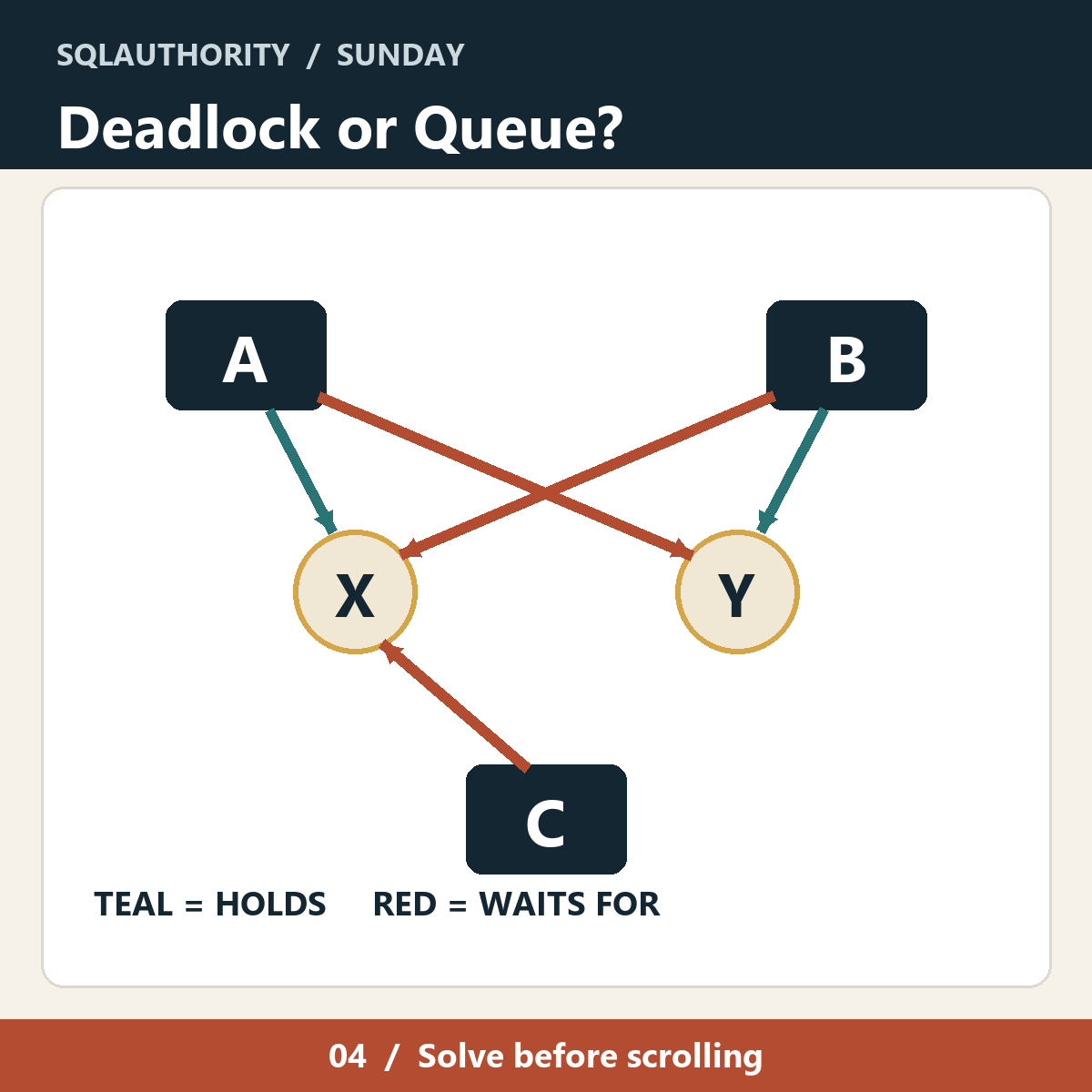
Deadlock or just a queue? Three sessions are waiting. Name the two stuck together without blaming the third.
A waiting session is not automatically a deadlock. That distinction matters when the phone rings and everyone is looking at a diagram with too many arrows. Some waits clear as soon as the session ahead finishes. A deadlock is different: the waiting forms a cycle.
In the picture, teal arrows mean HOLDS and red arrows mean WAITS FOR. Session A holds resource X and wants Y. Session B holds Y and wants X. Session C wants X but holds neither resource in this drawing. Look at the arrows and ask which sessions would remain stuck if nobody intervened. Take a moment before you read the answer; the extra session is there to make you work a little.
The labels are deliberately simple. There is no hidden isolation level or lock mode to guess. This is a graph puzzle about the shape of the wait, not a complete SQL Server deadlock report.
Deadlock or Just a Queue: The Answer
A and B form the deadlock. A cannot get Y until B lets it go. B cannot get X until A lets it go. That is the cycle. C is waiting for X, but C does not close a cycle; it is in the queue behind the trouble.
SQL Server detects deadlocks and chooses a victim so work can continue. A long wait by itself does not prove the same condition. The next time you read a deadlock graph, follow the ownership and requests around the loop before you decide which statement deserves your attention.
This is why I like drawing a problem before naming it. If three people are waiting, 'three-way deadlock' sounds dramatic, but the arrows may say something much smaller. Here the right explanation is two sessions in a cycle and one bystander.
The diagram is intentionally a toy. Real deadlock reports include more detail about processes and resources. The useful question remains the same: where does the wait circle back? Once you can point to that circle, you can start asking why those transactions took the locks in that order.
For the technical detail, see Microsoft Learn.
Published by Pinal Dave on SQLAuthority. More of my work at pinaldave.com.
First appeared on Deadlock or Just a Queue? Sunday SQL Puzzle
Pennsylvania, USA
AI in production without a second pair of eyes is a quick way to lose a table. Cardinal was going to add the WHERE clause. Eventually.
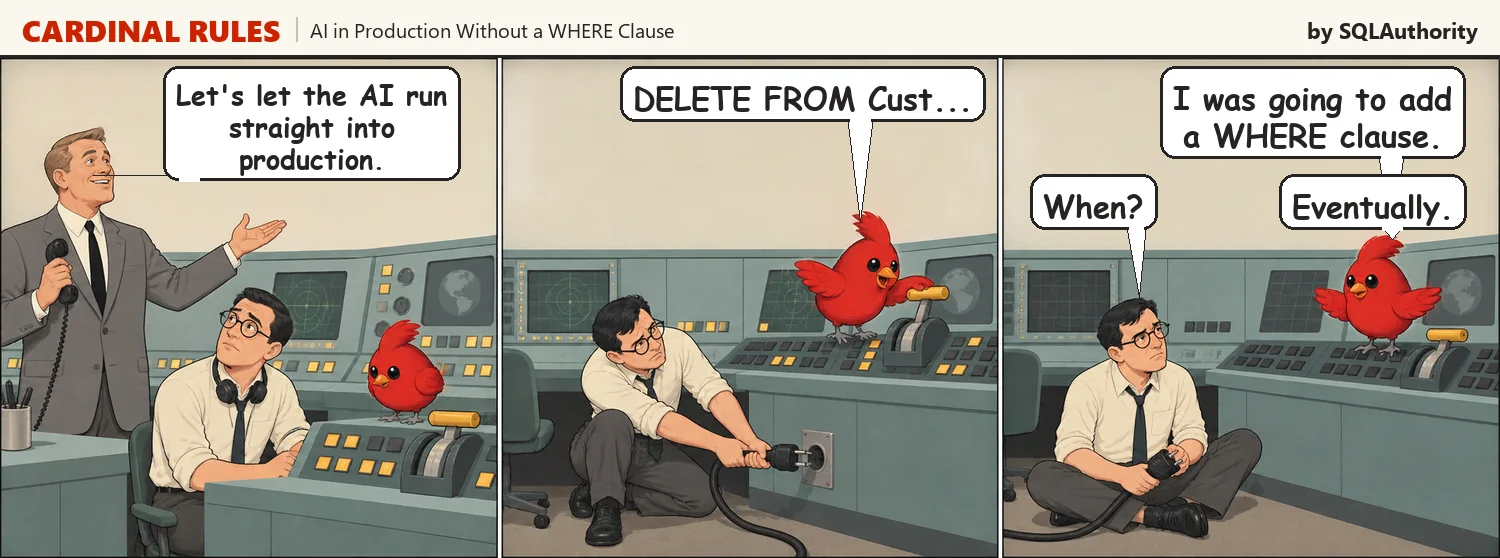
Cardinal Rules. A Saturday cartoon about AI and databases.
Every DBA carries the same scar. Somebody ran an UPDATE or a DELETE while the WHERE clause was still being typed, and the keyboard turned out to be faster than the thought.
What is new is the speed. Cardinal produces a complete, confident, perfectly formed statement before you have finished reading your own request. The pause where a person squints at the screen was the safety feature, and it is precisely the part that got removed.
Three things cost nothing and prevent the whole story. Give the assistant a login that can read and nothing else, so the worst case is a slow query instead of an empty table. Wrap anything that changes data in an explicit transaction, check the row count, then commit. And type the WHERE clause before the verb, because a half finished SELECT is harmless and a half finished DELETE is a resume update.
The VP is not wrong to want the speed. Writing the statement really is the slow part of the job for most people, and handing that over is a genuine gain. Pressing the button was never the slow part.
Cardinal can hold the pen. Somebody who will still be here on Monday holds the password.
Cardinal Rule
Type the WHERE clause first, especially when you are fast.
Read only login, explicit transaction, row count, then commit.
Cardinal maintains that the table had it coming. On the desk this season: AI: Nobody’s in There. But we’re still in here. (on Amazon) and 100 AI Interview Questions and Answers for Data Professionals (Kindle, also on Amazon.in, paperback and audiobook).
Next Saturday, Cardinal starts quizzing Sam out of my interview book.
Speed in production is not efficiency, it is exposure with better marketing.
Published by Pinal Dave on SQLAuthority. More of my work at pinaldave.com.
First appeared on AI in Production Without a WHERE Clause
Pennsylvania, USA
Next Page of Stories