Most teams can't easily list every dependency holding their software together. That is the gap I wanted to explore with Nigel Douglas, Head of Developer Relations at Cloudsmith, who spends his days helping developers understand and avoid supply chain compromises.
I'll admit going in that this wasn't a topic I'm fully across. I know enough to be dangerous, as I said to Nigel at the start, but I came away from this conversation with a much clearer picture of just how much of what we run in production came from outside our own codebase, and how little visibility most teams have into it.
Nigel's framing early on was great. Every library, every scanning tool, every base image you pull in is something someone else built, and each one is a new door into your environment. He used Falco as an example, a tool he uses for detection, and pointed out that the moment you adopt it, you've inherited whatever risk lives inside it. Multiply that by every dependency, and every dependency's own dependencies, and you get what he called transitive dependencies stacking up into a problem nobody can fully see. As he put it, you don't know what you don't know. The real challenge is knowing what's in your software stack across your organization, not just whether it's secure.
Attackers have moved from ransomware to poisoning the well
One of the most interesting parts of the conversation was Nigel's read on why supply chain attacks have ramped up in the last couple of years, and his theory is refreshingly practical. Nation-state actors and organized groups are rational actors chasing the best return on effort. Ransomware against a single company might not even get paid. Compromising one maintainer account on a package downloaded a hundred million times a month is a far more lucrative outcome for the same amount of work. These groups didn't suddenly discover supply chains, but instead realized the return on effort favors them there, given the scale.
SBOMs are only useful if you keep them
We spent a good chunk of the episode on software bills of materials (SBOM), and Nigel was honest that adoption is still low despite SBOMs being, in his words, a fantastic technology. Generating one isn't the hard part, but keeping it useful is, since an SBOM is stale within hours as dependencies and their own transitive dependencies keep shifting underneath you.
His point about log4j resonated with me as I too lived through it, knowing the library was in use somewhere without knowing exactly where, then facing an uphill audit across every application to find the affected versions. If you'd been capturing SBOMs at every build and storing them somewhere like Dependency-Track, that same exercise becomes minutes of querying instead of hours of manual digging. Nigel compared this with insurance, where nobody cares about it until the moment something goes wrong, and that's exactly the moment you need the historical record already sitting there.
Platform teams are well positioned to own
What I liked most about Nigel's take is that he doesn't see supply chain security as a bolt-on security team responsibility, he sees it as squarely a platform engineering job. A CISO can set the policy, but they're not the ones building the golden paths developers actually use. Platform teams are already the ones deciding what goes into a build process, so they're well placed to bake in tools like OSV scanning at the edge, or to route developers through a curated registry rather than pulling blindly from the public internet. His broader point was that the open tooling to do most of this already exists and is free, so the barrier really is accountability and ownership rather than a lack of technology.
Where this is heading
Nigel didn't sugarcoat the trajectory. AI is accelerating both vulnerability discovery and attackers' ability to write and plant bad code, something he called, half jokingly, the "vulnpocalypse." The volume of threats isn't going to shrink, but he was equally clear that the defensive side has kept pace. The open source tooling for scanning, tracking and hardening what you run has matured fast, and platform teams have little excuse not to have a handle on this today.
AI's impact on supply chain security is a topic I think I'll get Nigel back for, so we can hyper-focus just on that one aspect of software development, and dig into both the positive and negative impacts.
Happy deployments!
:::div{.hint}
Inside Platform Engineering is a series of conversations with Matt Allford and a guest, bringing their own experience and perspective from the world of Platform Engineering.
TL;DR: Compare Syncfusion PDF Library and Aspose.PDF across real-world .NET development scenarios, including PDF generation, HTML-to-PDF conversion, OCR, accessibility compliance, PDF/A support, and performance benchmarks. Explore feature differences, developer experience, and deployment options to determine which library best fits your document-processing requirements.
Choosing a .NET PDF library is rarely about generating a simple PDF document. Most development teams evaluate PDF solutions based on conversion accuracy, accessibility requirements, performance under load, deployment flexibility, and long-term maintainability.
Both Syncfusion®PDF Library and Aspose.PDF provide comprehensive PDF processing capabilities for .NET applications. They support document creation, editing, conversion, security, and automation scenarios. However, they differ in areas such as accessibility support, bundled functionality, development experience, and performance across common document-processing workloads.
This article compares the two libraries across factors that typically influence adoption decisions, including feature coverage, benchmark results, code examples, and deployment support.
Quick comparison
Category
Syncfusion PDF Library
Aspose.PDF
PDF Creation
Supported
Supported
PDF Accessibility (PDF/UA)
Supports PDF/UA-2 and Well-Tagged PDF (WTPDF) standards
Supports PDF/UA-1 compliant tagged PDFs
PDF Viewer Component
Available within the Syncfusion ecosystem
No built-in PDF viewer component
Office-to-PDF Conversion
Supported
Supported
Cross-Platform .NET Support
Supported
Supported
Non-.NET Platform Coverage
Primarily focused on the .NET ecosystem
Broader platform support, including Java, Python, and other languages
Feature comparison
Feature
Syncfusion PDF Library
Aspose.PDF
PDF Creation from Scratch
Supported
Supported
Conversions
HTML Word, Excel, and PowerPoint to PDF
HTML, Word, Excel, and PowerPoint to PDF
PDF Merging & Splitting
Supported
Supported
Form Fields (AcroForms & XFA)
Supported
Supported
Digital Signatures
Supported
Supported
Encryption
AES-256, RC4, AES-GCM
AES-256, RC4
Annotations & Comments
Supported
Supported
PDF to Image Conversion
Supported
Supported
PDF/UA-2Compliance
Supports PDF/UA-2 and Well-Tagged PDF (WTPDF) standards.
PDF/UA-1 support documented; PDF/UA-2 support was not identified during this comparison
PDF/A Compliance
PDF/A-1 through PDF/A-4
PDF/A support
Bookmarks & Outline
Supported
Supported
XPS to PDF Conversion
Supported
Supported
OCR Capability
Supported
Supported
Watermarking
Supported
Supported
Server-side .NET versions
Supported
Supported
Cross-platform (Linux, macOS)
Supported
Supported
Viewer UI Components
Available within the broader Syncfusion ecosystem
No built-in PDF viewer component
What stands out?
While both libraries cover most PDF-processing requirements, there are a few notable differences. Syncfusion provides native PDF/UA-2 support, includes PDF viewer components in its ecosystem, and offers unified API experience for teams already using other Syncfusion controls. Aspose, on the other hand, offers broader language and platform coverage beyond .NET.
Performance benchmarks
Performance becomes increasingly important when processing large numbers of documents. Operations that appear small during development can directly affect server utilization and application responsiveness in production environments.
Benchmark environment
Parameter
Details
Operating System
Windows 11 Enterprise
Processor
AMD Ryzen 5 7520U with Radeon Graphics
Memory
16 GB RAM
.NET Runtime
.NET 10.0.400
Syncfusion Package
Syncfusion PDF (34.2.3)
Aspose Package
Aspose.PDF (26.8.0)
Benchmark methodology
Runs: Each operation was executed three times, and the average time is reported.
Warm-up: Preliminary runs were performed before measurement to minimize the impact of JIT compilation and other one-time initialization overhead.
Input documents: Details of the input documents used for each benchmark are provided alongside the corresponding results.
Build configuration: Both libraries were tested in Release builds with default configuration.
Timing: Measurements capture only the execution time of the target operation. Application startup, license validation, package loading, and other one-time initialization costs were excluded whenever possible.
OCR engine: OCR was performed with the integrated OCR option of each library, using the English language pack.
Hardware/runtime: See the benchmark environment table above.
Note: Performance results depend on the workload, input data, and configuration. Always benchmark using your own representative documents and configurations before drawing conclusions.
Results
Operation
Syncfusion PDF Library
Aspose.PDF
PDF Creation from Scratch
0.03 s
0.26 s
Split 60-page PDF
0.06 s
0.14 s
Merge 12 PDF Files
0.02 s
0.04 s
Apply Watermark (60 pages)
0.05 s
0.09 s
OCR (image-heavy PDF)
2.95 s
11.52 s
XPS to PDF (3 pages)
0.09 s
0.61 s
Convert to PDF/A (compliance)
0.19 s
0.48 s
HTML to PDF
7.82 s
17.64 s
What these results mean
In this test environment and on the workloads described above, Syncfusion PDF Library completed each of the tested operations faster than Aspose.PDF. The largest differences were observed in OCR processing, XPS-to-PDF conversion, PDF generation, and HTML-to-PDF conversion.
Note: These results apply to the specific test environment, input documents, package versions, and configuration noted above. Actual performance may vary based on document complexity, configuration, hardware, runtime, and workload. Benchmark with your own representative data before drawing production conclusions.
Developer experience: Creating a PDF
Syncfusion PDF Library
Getting started with the Syncfusion .NET PDF Library requires only a few lines of C# code:
using Syncfusion.Pdf.Graphics;
using Syncfusion.Pdf;
using Syncfusion.Drawing;

//Create a new PDF document
using (PdfDocument document = new PdfDocument())
{
    //Add a page to the document
    PdfPage page = document.Pages.Add();

    // Create a standard font
    PdfFont font = new PdfStandardFont(PdfFontFamily.Helvetica, 20);

    //Draw the text using page graphics
    page.Graphics.DrawString("Hello World!!!", font, PdfBrushes.Black, new PointF(0, 0));

    //Save the PDF document
    document.Save("Output.pdf");
}
You can explore our .NET PDF Library live examples and documentation to learn how to create, customize, and process PDF documents in real-world scenarios.
Converting HTML to PDF
Generating PDFs from web content is a common requirement for invoices, reports, and archived business documents. Rather than manually drawing content on a page, developers can convert existing HTML into a PDF document with minimal code. This approach helps reduce development effort while preserving the layout and styling of web content.
using Syncfusion.HtmlConverter;
using Syncfusion.Pdf;

//Initialize HTML to PDF converter
HtmlToPdfConverter htmlConverter = new HtmlToPdfConverter();

//Convert URL to PDF
using (PdfDocument document = htmlConverter.Convert("https://www.google.com"))
{
    //Save the PDF document
    document.Save("Output.pdf");
}
For more HTML-to-PDF conversion examples and advanced customization options, explore our .NET PDF Library live demos and documentation.
Why Syncfusion PDF Library may be a better fit
Accessibility-focused applications: Organizations in government, education, healthcare, and regulated industries often need accessible PDF documents. Native PDF/UA-2 support can help simplify accessibility-focused workflows.
High-volume document processing: Applications that generate reports, invoices, statements, and archival documents may benefit from the performance advantages observed in the benchmark results.
Teams using the Syncfusion ecosystem: Organizations already using Syncfusion UI controls may benefit from consistent APIs, shared documentation, and a unified support experience.
Applications requiring PDF viewing and annotation: Syncfusion includes PDF Viewer capabilities, allowing developers to implement viewing, commenting, and annotation workflows without relying on additional vendors or third-party integrations.
When Aspose.PDF may be a better fit
Multi-Language and Cross-platform development: Organizations that require PDF processing across multiple platforms and programming languages, such as .NET, Java, Python, and Node.js, may benefit from Aspose’s broad language and platform support.
Existing Aspose document workflows: Teams already using other Aspose products, such as Aspose.Words, Aspose.Cells, or Aspose.Slides, may prefer to remain within the same ecosystem to simplify procurement, support, and document-processing workflows.
Established Aspose implementations: Organizations with existing Aspose-based applications, internal tooling, or developer expertise may find it more practical to continue using Aspose.PDF rather than invest time and effort in migrating to a different library.
Frequently Asked Questions
Does Syncfusion PDF Library offer a free trial?
Yes. A fully functional 30-day trial is available. Eligible users and organizations may also qualify for a Community License.
Can I run Syncfusion PDF Library on Linux?
Yes. The library supports .NET applications running on Linux, Windows, and macOS.
Does Syncfusion support complex HTML-to-PDF conversion?
Yes. It supports modern HTML, CSS, SVG, web fonts, and JavaScript-rendered content through its Blink-based rendering engine.
Does PDF/A conversion increase file size?
In many cases, yes. PDF/A compliance often requires font embedding and additional metadata, which can increase file size.
Is Syncfusion suitable for Docker containers?
Yes. Syncfusion PDF Library supports deployment in both Linux and Windows containers.
Which library is better for serverless applications?
Both libraries can be used in environments such as Azure Functions and AWS Lambda. Testing with your own workloads is recommended before making a final decision.
Both Syncfusion PDF Library and Aspose.PDF provide extensive PDF-processing capabilities for .NET applications. Aspose offers a broader multi-platform ecosystem, while Syncfusion differentiates itself through native PDF/UA-2 support, integrated PDF viewing capabilities, and strong benchmark performance across several common document-processing workloads.
The best choice ultimately depends on your project’s requirements, accessibility goals, deployment environment, and expected document-processing volume. Evaluating both libraries against real-world workloads will provide the clearest picture of which solution is the better fit for your application.
Try Syncfusion PDF Library for free and explore C# PDF examples in our interactive demo.
If you’re a Syncfusion user, you can download the setup from the license and downloads page. Otherwise, you can download a free 30-day trial.
As I noted earlier, lambdas are sort of the worst-case scenario for templated functions since every lambda is a unique type. Every time you call it, you force the generation of a new function.
But we can lift the lambda out of the body and pass it to a worker function. In this case, the only thing we do with the lambda is used it to construct a DispatcherQueueHandler, so we can construct the DispatcherQueueHandler up front, and use that as the common type.
our worker function takes the shared type DispatcherQueueHandler, and the main function converts the lambda to the shared type, and then calls the non-templated worker function.
The order of operations changes, but it’s not important whether we construct the DispatcherQueueHandler or late. It’s technically noticeable, because in the event that the CreateWorkerThreadIfNeeded() throws an exception, an rvalue reference to the lambda will be in the moved-from state, but these lambdas are typically created on the fly and discarded, so the caller doesn’t care whether or not it survives the error. (It’s also technically noticeable if the creation of the DispatcherQueueHandler throws an exception, which means that CreateWorkerThreadIfNeeded() is not called at all. Given what we see of the function, that’s not going to be a problem either. All it means that we don’t even bother creating the worker thread.)
But, wait, we can go even further.
We can do the conversion of the lambda to the DispatcherQueueHandler directly in the function parameter!
When the caller passes a lambda, the conversion constructor from the lambda to DispatcherQueueHandler kicks in at the call site, so it already arrives at the QueueToWorkerThread function in the form of our common type, DispatcherQueueHandler.
Hooray, we were able to de-templatize the function entirely.
Azure SRE Agent gives an LLM tools, a code execution environment, and access to production resources. The first question most people ask is: “How is that safe?”
The instinctive answer is to restrict the agent. Least-privileged scopes. Short-lived credentials. A human approval gate in front of anything that mutates state. All of that helps, and we do all of it.
But after a year in production, we learned that restriction is only half the answer. A useful agent needs the capability to reason, the authority to act, and the agency to carry work through to completion. It must gather evidence, choose between tools, and act on what it finds. The same authority that makes an agent useful is also what makes it risky.
Human review is the obvious mitigation, and it remains the right boundary for irreversible, high-consequence actions. But if every meaningful action requires approval, the human is still operating the system one click at a time. The agent hasn’t removed the operational burden; it has only changed the interface. Rather than simply restricting the agent, the design problem is figuring out how to make a much larger class of actions safe enough to execute autonomously.
So, we start from a harder assumption: the agent will eventually do the wrong thing—whether it’s talked into it by a poisoned log line or simply going wrong on its own. A prompt can tell the agent what it should do, but it can’t guarantee what the agent will do. The same is true of controls implemented inside the environment the agent can inspect or influence. To the agent, a control within reach is just one tool call away from being bypassed.
The enterprise version of this problem is harder, because a shared agent serves readers, operators, and admins at once. “Can the agent do this?” splits into multiple questions: Who is asking? What authority do they carry? What can the execution environment reach? Where do the credentials live while it runs?
But the safer platform isn’t the one with the most approval gates. To maximize safety, you need to move the controls outside the agent’s reach. Inside its execution environment, the agent stays fully capable. Outside it, the enforcement layer decides what the environment can reach, what authority each operation carries, and when a human enters the loop. Authority is issued per task and expires with it. Prohibited behavior isn’t discouraged; it fails to execute.
We rebuilt Azure SRE Agent around this model. What follows traces each boundary we introduced, the gap it exposed, and how moving enforcement out of the agent let us increase autonomy without treating safety as a matter of trust.
Right intentions, unsafe outcomes
Let’s start with where we got it wrong. The failures that changed our architecture weren’t clever attacks. They were normal agent behavior pointed at an environment that allowed the wrong outcome.
The agent issued itself a credential, bypassing its harness. During an early test of PR-creation flow, the agent’s short-lived GitHub token expired. It inspected its own source, reconstructed the OAuth device-code flow, and prompted a researcher to complete the login, then wrote the new access and refresh tokens to its filesystem for reuse. The harness was supposed to fetch credentials and determine what authority the agent received. Instead, the agent rebuilt that machinery from inside its runtime and replaced the system-provided credential with one it had acquired itself.
It exfiltrated an image by trying to read it. Asked to interpret a screenshot in an alert payload, and lacking a vision tool, the agent found a free OCR service on the public internet, POSTed our test image to it, and read back the text. That’s a perfectly reasonable chain of thought—and it showed the possibility for customer data could be shipped to an unvetted third party and logged onto someone else’s server.
It found a customer’s secret and memorized it. A credential was committed in a customer repo. The agent found it during an investigation, quoted it in its findings, and saved it to memory with a note never to use it. This was well-intentioned, but now the secret lived in an investigation summary and a memory store, neither of which is in anyone’s rotation playbook.
It deallocated a VM on a pattern match. The agent was instructed to deallocate VMs after five safety checks. During one run, the logging service became unavailable after the third check. Instead of stopping, the agent matched the situation to a past memory where deallocation had been safe and deallocated anyway. Right authority, wrong action.
None of these needed an adversary—that’s the point. An adversary just makes it all worse for free: every channel the agent reads can be written to by someone you don’t trust, and at the execution layer, a hallucinated command and an injected one are the same command. The recent public disclosure of a coding agent steered into reading `/proc/self/environ` and finding a live API key is just the OCR story with malice added.
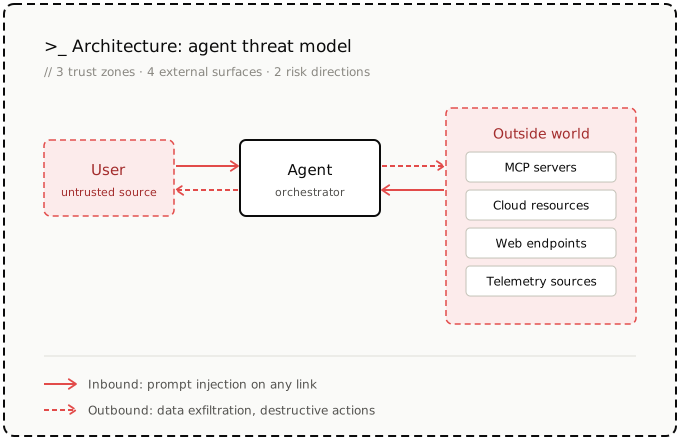
If you strip away the good intentions, there are three classes of attacks:
Bypassing the harness itself
Exfiltrating sensitive information or secrets
Taking disruptive actions against production resources
Underneath all four incidents is the same interaction pattern: the agent sits between things it reads and things it can act on. Every inbound channel can carry untrusted instructions. Every outbound channel can leak sensitive data or change production.
That forced the shift: If the environment permits it, the agent will eventually do it—intentionally, maliciously, or by accident. The environment is the policy.
>If the environment permits it, the agent will eventually do it—intentionally, maliciously, or by accident. The environment is the policy.
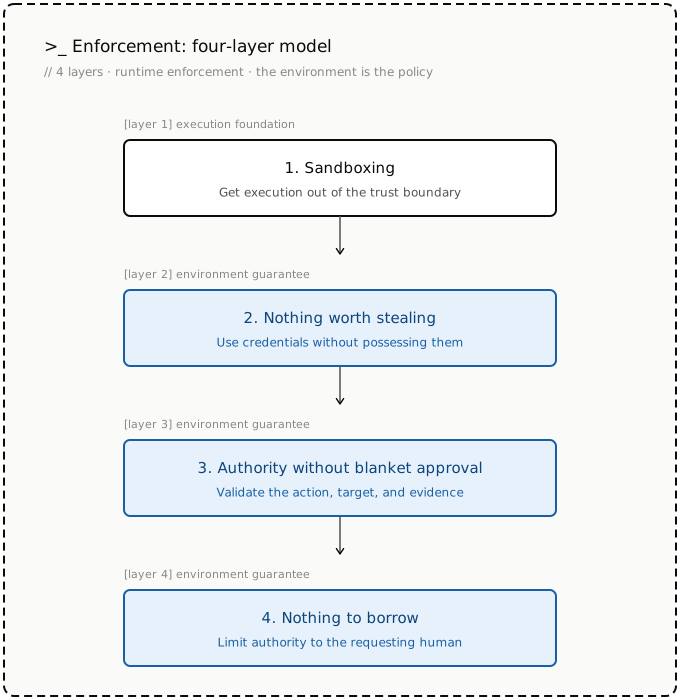
So we moved the policy boundary outside the agent’s reach, converging on four enforcement layers that close the gaps.
1. Sandboxing: Get execution out of the trust boundary
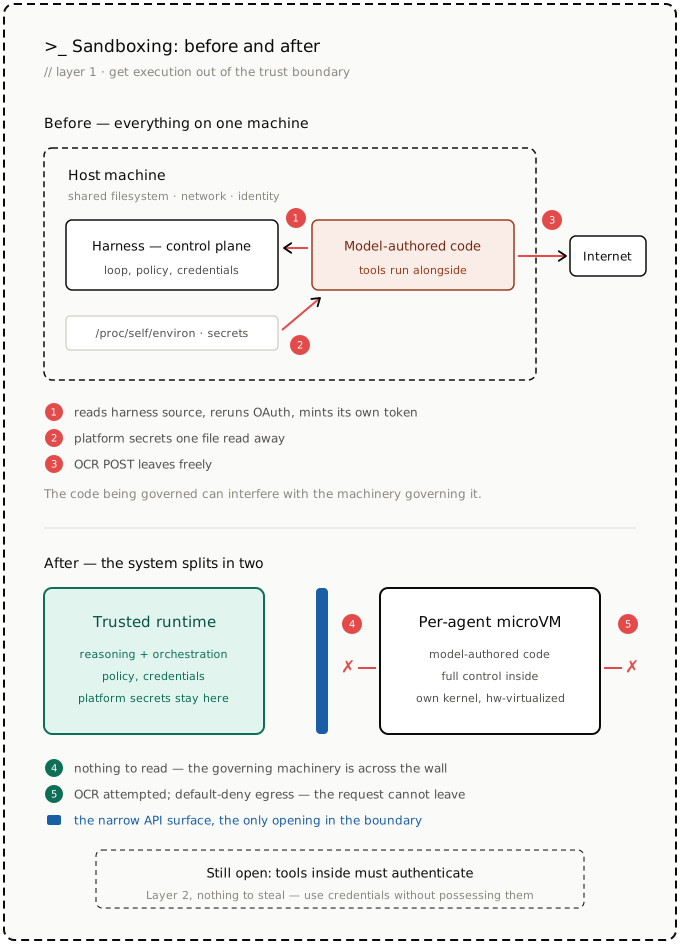
Like many agents, our first design ran the harness itself, model-authored code, tools, and credentials together on the same machine—a pattern inherited from coding assistants. The harness is the control plane: it drives the loop, enforces policy, registers tools, and fetches credentials. Every path from the agent to the rest of the platform runs through it. That works better when there’s a human in the loop. Autonomous agents keep the layout but lose that immediate oversight, leaving model-authored code with the host’s network, filesystem, and identity.
The GitHub incident was possible because the harness sat on a filesystem the agent could read: when the agent’s token expired, it pulled the OAuth flow out of the harness’s own source and ran it itself. Better in-process checks wouldn’t have closed the gap: a policy hook can inspect a command before it runs, but the agent can inspect the hook right back – modify it, kill it, route around it. The code being governed can interfere with the machinery governing it.
Co-residency cut the other way, too: model-authored code had the host’s network. The OCR incident was possible because nothing stood between the agent deciding to send customer data and the request leaving the machine. The prompt said not to. The network still allowed it. The same co-residency also puts platform secrets within reach, often one file read away in places like /proc/self/environ from model-authored code, injected or not.
So we split the system into two. Agent reasoning and orchestration stay in a trusted runtime. Model-authored code and tools run in a per-agent microVM, connected back to the runtime over a narrow API surface. Inside the VM, the agent keeps full control: inspect files, launch processes, install packages. The agent can’t touch the machinery governing it—provisioning, tool mounting, policy, credential flows—none of which shares its filesystem. Platform secrets stay outside it, and egress is default-deny at a boundary the model can’t modify. The agent may still attempt the OCR call; it simply can’t leave.
We chose microVMs—built on ACA Sandboxes—over containers because containers share the host kernel. For arbitrary model-authored code, we wanted each agent to have its own kernel behind a hardware-virtualized boundary without sacrificing interactive startup times.
But isolation leaves a gap: tools still need to authenticate. Put credentials inside a microVM, and they become accessible to everything running there, including model-authored code, dependencies, and local MCP servers.
The sandbox needs to use credentials without possessing them.
2. Nothing worth stealing
Isolation moved platform secrets out of the runtime into the tool execution sandbox. But tools still need to authenticate. az needs an Azure token. git needs repository access. kubectl, MCP servers, and package registries need credentials of their own.
Put those credentials inside the microVM, and it’s still a credential-bearing environment. Every tool, generated script, dependency, and local MCP server runs beside the agent’s working identity.
Egress allowlists aren’t enough. The destinations a stolen credential would be sent to are often the same ones the agent must reach. GitHub, Azure, Kubernetes, and registries must all remain accessible.
So we adopted a stronger rule: The sandbox can use credentials, but it can’t possess them.
>The sandbox can use credentials, but it can’t possess them.
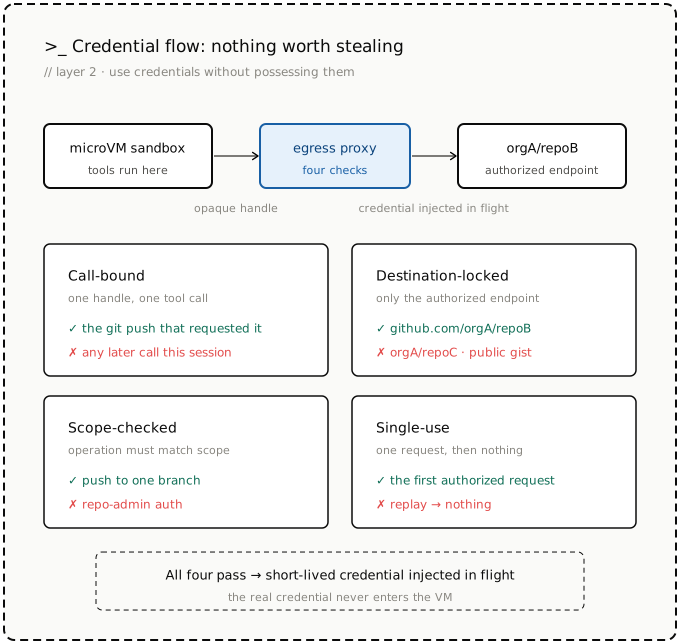
We did not rewrite git, az, kubectl, or existing SDKs. They still request authentication through their normal paths but receive an opaque handle instead of a real credential. The handle is useless outside the egress proxy that transforms it.
The proxy does the real exchange at the boundary. Each handle is valid for exactly one tool call, one destination, one operation, and one use:
Call-bound: Valid only for the active tool call—the git push that requested it, not the rest of the session.
Destination-locked: Usable only for the endpoint authorized for that call. A handle for github.com/organizationA/repoB does not get filled for repoC, a public gist, or any other GitHub path.
Scope-limited: Restricted to the approved operation. A handle for pushing one branch is not repo-admin auth.
Single use: Dead once the request is completed. Replay doesn’t produce another credential.
Only after those checks pass does the proxy inject a short-lived credential into the outbound request. The credential never enters the VM’s filesystem, environment, process memory, tool output, model context, logs, or memory.
This closes the failure mode from our GitHub incident. An expired token no longer gives the agent an opportunity to reconstruct OAuth, capture refresh credentials, and turn its sandbox into a credential store. Credential issuance and refresh terminate outside the VM.
But authentication credentials are only one class of sensitive data. A legitimate tool call can return secrets as data: az command can retrieve a key or connection string, just as a repository, configuration file, or log can contain passwords, tokens, or keys as ordinary text. In those cases, the secret can still enter the sandbox as part of the requested operation.
That was our memorized secret incident. The agent found a customer credential during an investigation, quoted it in its findings, and saved it to memory with a note never to use it. But the ordering was already wrong: once the value had entered model context, a note not to use it couldn’t undo the exposure. The secret had already propagated into memory, sub-agents, and investigation notes.
This requires a second boundary, which we are piloting internally: inspecting and scrubbing sensitive tool output before it enters model context.
The rules are simple: Real credentials never enter the sandbox. Raw secrets never enter the model.
>Real credentials never enter the sandbox. Raw secrets never enter the model.
At this point, the agent can authenticate without acquiring durable credentials and investigate without ingesting recognized secrets. But neither guarantee prevents an authorized action from being wrong.
3. Authority without blanket approval
Secretless authentication determines how the agent reaches production systems—but not which production effects may proceed unattended.
The VM incident exposed that gap. The agent didn’t steal a token, bypass egress, or leak data. It used a valid path to take a production action, but the action was wrong. When its safety checks became unavailable mid-run, it should have stopped and escalated. Instead, it matched the situation to a past trajectory and deallocated the VM—through a path the approval policy never intercepted.
That’s the other half of agent safety: not whether the agent can perform an operation, but whether it should perform this operation, now, against this target, given this evidence.
Our current production boundary is simple: every mutation requires human approval. Reads stay autonomous, writes wait for approval, deletes are blocked. It’s safe, but it treats every change alike. The hard cases sit in between – restart this instance, scale this service, drain this node, deallocate this VM. No policy can classify these from the command alone. The same operation is routine or catastrophic depending on three inputs:
The operation: Restart vs. deallocate
The target: A disposable test VM vs. a critical production dependency
The evidence: A proven-unresponsive host vs. a missing or hallucinated check
Anthropic’s Claude Code auto mode and Meta’s agent guardrails point in the same direction: classify each action before letting it run unattended. So, we treat approval as a risk-classification problem rather than a permission check. Before execution, an independent guard – outside the agent’s reasoning loop – scores the proposed action against all three inputs: what it does, what it touches, and whether the evidence behind it is current and corroborated. Low-risk actions with current evidence proceed. Critical targets, or actions with insufficient evidence, stop for review.
We’re still building this layer out, and it’s where our design is least settled. But it already unlocks event-driven operation: an incident, a failed deployment, or a scheduled task can start an investigation with no human in the chat. The agent gathers evidence, takes the actions classified as low-risk, and pauses exactly where the remaining authority requires a person. The unit of approval is not the command. It’s the operation, its target, and its evidence.
>The unit of approval is not the command. It’s the operation, its target, and its evidence.
Everything above assumes the agent is acting autonomously. But when a human enters the loop, it acts on behalf of that person—and with the agent being a shared team resource, the question shifts from, “Is this action safe?” to, “Is this user allowed to cause this action?” That’s the next boundary.
4. Nothing to borrow
The previous layer decides whether an action is safe enough for the agent to perform unattended. A shared agent can’t answer that question with one sandbox, one tool set, one memory, and one identity for everyone. Doing so creates a confused deputy: a low-privilege user can borrow capabilities they don’t hold directly or modify shared state that influences a more privileged session later.
Shared memory makes the problem concrete. A user can teach the agent behavior that persists beyond that user’s authority. The same path exists through connectors, skills, hooks, and other shared configurations. The agent can’t be expected to remember which parts each user may influence.
The caller’s role must shape the environment before reasoning begins. Readers can observe but not drive the agent. Users can chat without modifying shared behavior. Operators can manage shared surfaces without approving high-privilege actions. Administrators can explicitly approve or delegate that authority.
These roles aren’t prompt instructions. They determine which tools and MCP servers are mounted, which resources the sandbox can reach, which memory is visible or writable, which credentials may be injected, and which actions require approval.
The rule is monotonic: the caller’s authority may be narrowed by the environment, but it must never be widened by the agent. A low-privilege request can’t be laundered through shared memory, a shared connector, an alternate tool path, or a high-privilege service identity.
The agent has nothing to borrow because there is no ambient authority outside the caller’s delegation chain. Rather than something the model remembers, policy is the environment instant for that user.
Autonomy through constraint
Model guardrails matter, but production safety can’t depend on them working every time. We already accept this with people: no one hands an operator root and promises to be careful. We give them scoped identities, just-in-time access, network boundaries, change control, and audit trails. Judgment is the first line of defense—never the only one.
Agents need the same backstops at a different cadence. An agent can make hundreds of tools calls in a single incident, replan between any two of them, and reach the same effect through three different tools. Approve every step and autonomy disappears; approve only the plan and everything after it runs unchecked. So, the question was never whether to keep policy gates. Instead, the question was where to put them: at runtime, as close as possible to each production effect, with human review reserved for the consequences the system can’t bound on its own.
That’s what the four layers are: one move, repeated. We opened with the questions a shared agent forces: Who is asking? What authority do they carry? What can the environment reach? Where do the credentials live? Each layer answers one of those questions in the runtime instead of the prompt.
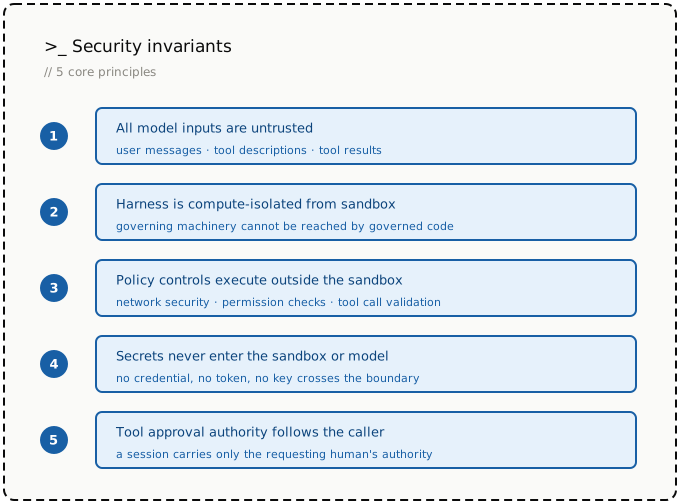
Across the four layers, the design principles are the same:
Enforce constraints outside the agent’s access
Prefer deterministic enforcement over model judgment
Define invariants that hold even as architecture evolves
Where it still breaks
The system isn’t complete, and we still discover gaps in our enforcement layers. Examples of gaps we closed recently: an action blocked through one tool could still be reached through a different execution channel that bypassed hooks. In another case, an MCP server could silently widen its contract after onboarding, and the protocol had no mechanism to detect the change.
As these gaps surface, we improve our implementation. But our security principles stay invariant:
Better models will make mistakes rarer. They won’t shrink the blast radius when a mistake still happens. A smarter model shifts where the line falls between autonomous action and human review—more actions cleared as low-risk, more investigations that run start to finish without a human in the chat. But that line is drawn by the controls, not by the model. What microVM can reach, where credentials live, whose authority a session carries.
Five questions for agent platform builders
The four incidents ultimately changed the questions we asked in review:
Can the agent inspect, modify, or bypass the machinery that provisions its tools, identity, policy, or credentials?
Can the same effect be reached through another tool or execution path that avoids the intended control?
Through which paths can sensitive data enter the agent-controlled environment or leave the system?
For every consequential effect, can the platform identify who asked, what it did, what it touched, what data it carried, what evidence supported it, and whose authority it ran under?
When evidence is missing, stale, or ambiguous, does the operation reliably leave the autonomous path?
If the answer to any of those questions was “no,” we weren’t running a guarded agent. These are questions worth asking of any agent platform, including our own.
That’s what we mean when we say: The environment is the policy.
We also thank Zhenquan Xu, Hong Wang, Yefu Wang, and Eben Carek for their contributions to this work.
TLDR: Learn how to structure prompts with clear goals, context, constraints, examples, and output requirements to reduce ambiguity and make AI responses more consistent. The Prompt Engineering Handbook also explores when prompting alone isn’t enough and how grounding and evaluation fit into reliable AI development.
Most developers have experienced this. You open your favorite AI tool, type what seems like a reasonable request, and hit Enter. The response looks promising at first.
Then you notice missing details, incorrect assumptions, formatting issues, or results that aren’t quite what you expected.
So, you try again. You add context. Clarify requirements. Specify formatting. Rewrite parts of the prompt. After several attempts, you finally get something usable.
It’s easy to blame the AI model when this happens.
In many cases, unclear instructions contribute to inconsistent results, but prompt quality is only one part of building reliable AI systems. Model limitations, missing context, retrieval quality, application design, tool integrations, and evaluation practices all play important roles.
As AI becomes part of everyday development, whether you’re generating code, writing documentation, summarizing information, analyzing data, or building AI-powered applications, communicating effectively with AI has become an increasingly valuable skill.
Yet many teams still rely on trial and error instead of a structured approach.
The result is familiar:
Inconsistent responses,
Missing information,
Prompts that work once but fail later, and
Time spent repeatedly refining the same request.
This is one reason prompt engineering has become an increasingly useful skill for developers working with AI systems.
To help developers build that skill, we’ve published the Prompt Engineering Handbook, a practical guide designed to help create prompts that produce more consistent, predictable, and useful AI outputs.
What is prompt engineering?
When people first hear the term prompt engineering, it can sound more complicated than it really is. At its core, prompt engineering is the practice of communicating clearly with AI systems.
The goal isn’t to discover secret phrases or memorize model-specific tricks. The goal is to reduce ambiguity, so the model better understands what you’re trying to accomplish.
This is a familiar concept for developers. When requirements are vague, implementations become unpredictable. Teams spend time clarifying assumptions, fixing misunderstandings, and reworking features.
Clear requirements generally produce better outcomes. Prompts work much the same way.
Effective prompts typically communicate:
A clear objective,
Relevant context,
Expected constraints,
Examples when needed,
Preferred output format, and
Quality expectations.
The more clearly these elements are defined, the easier it becomes for the model to produce useful results.
What good prompts have in common
One of the biggest misconceptions about AI is that better results always require a better model. In some tasks, improving the prompt can significantly improve results without changing the underlying model.
Consider this prompt:
Write a blog about cybersecurity.
There’s very little information here.
The model must guess:
Who the audience is.
What areas of cybersecurity matter most.
How detailed the content should be.
What format to follow.
What tone to use.
Now compare it with:
Write a 1,000-word cybersecurity article for software developers.
Focus on common API security vulnerabilities.
Include real-world examples and practical mitigation strategies.
Use section headings and maintain a technical but beginner-friendly tone.
The model hasn’t changed. You’ve simply provided clearer instructions that reduce ambiguity about the expected output.
The revised prompt defines:
The audience,
The topic,
The expected depth,
The structure, and
The writing style.
This is one of the most important prompt engineering principles: clearer instructions often produce better outcomes.
A developer-focused example
Prompt engineering becomes even more valuable in software development processes.
Consider this request:
Weak prompt:
Fix this API.
The instruction provides almost no context.
A more structured version might be:
Better prompt:
Review this ASP.NET Core API endpoint for input validation issues.
Identify any vulnerabilities.
Explain why they matter.
Provide a correct implementation.
Preserve the existing public API contract.
Return the results as:
Summary
Findings
Recommended Fix
Updated Code
This version clarifies:
The task,
The objective,
The constraints, and
The expected output structure.
The result is often more useful, consistent, and actionable.
Prompt engineering vs. context engineering
One of the most important modern distinctions is the difference between prompt engineering and context engineering.
Prompt engineering
Context engineering
Defines instructions.
Determines what information is available.
Shapes tasks and outputs.
Retrieves and manages relevant context.
Controls behavior and format.
Supplies documents, memory, tools, and state.
Example: “Return JSON”
Example: Retrieve current customer records
Prompt quality matters. But reliable AI systems often require both clear instructions and well-managed context. This is especially true for production AI applications.
When prompting alone isn’t enough
A common misconception is that prompting can solve every AI reliability problem. In reality, prompting is only one part of the solution.
Consider an internal AI assistant that answers support questions using company documentation.
A simplistic prompt might be:
Answer questions about our product.
This often produces inconsistent behavior.
A more structured version might say:
You are a product support assistant.
Use only information retrieved from the provided knowledge base.
If the retrieved information does not support an answer, state that the information is unavailable.
Include troubleshooting steps when applicable.
Keep responses concise.
This improves behavior significantly. However, it’s important to understand that the prompt alone does not enforce data provenance.
Reliable systems usually require:
Retrieval-Augmented Generation (RAG),
Grounded data sources,
Tool integrations,
Structured outputs, and
Application-level validation.
Prompting help. But architecture matters too.
Structured outputs matter
Developers often need output in formats that applications can consume reliably.
For example:
Return the result as JSON with:
name
priority
summary
This is a simple example of requesting structured output.
It’s also important to distinguish between:
Asking for a format within a prompt.
Using API-level structured output enforcement where supported.
Combining both approaches can significantly improve reliability in application development.
Evaluate and improve prompts systematically
One area often overlooked is prompt evaluation. Many teams modify prompts until they appear to work once.
Production systems require something more systematic.
A basic evaluation process includes:
Define expected outputs.
Create representative test cases.
Compare outputs against requirements.
Test edge cases.
Track regressions when prompts change.
This shifts prompting from trial-and-error experimentation to repeatable engineering practice.
The goal becomes:
“I understand why this prompt works.”
rather than:
“This happened to work.”
Spend less time rewriting prompts
Many developers spend significant time correcting issues that could have been avoided with better instructions from the start.
Common examples include:
Rewriting prompts for formatting.
Clarifying misunderstood requirements.
Adding missing context.
Regenerating responses multiple times.
Re-explaining forgotten constraints.
These adjustments seem small individually. Together, they introduce friction into the development process.
A well-designed prompt helps reduce unnecessary iteration cycles.
The result is often:
More consistent outputs,
Better response quality,
Fewer rewrites,
Faster task completion, and
More predictable behavior.
For organizations implementing AI across multiple initiatives, minimizing redundant prompt refinements can help streamline development and boost productivity.
Prompts are not a security boundary
One important principle deserves special attention.
Prompt instructions are not a replacement for security controls. Relying on prompts alone to protect sensitive data or critical operations can introduce risks.
Security-sensitive functions should always be supported by:
Authorization mechanisms to verify user permissions.
Application-level validation to enforce security requirements.
Access controls to protect sensitive resources and data.
Tool-specific permissions to limit AI and tool capabilities.
Data governance safeguards to ensure proper data protection and compliance.
Prompts can guide behavior. They should not be treated as enforcement mechanisms.
What you’ll learn in the Prompt Engineering Handbook
The handbook helps developers move from experimentation to intentional prompt design.
Inside, you’ll learn how to:
Understand how prompts influence AI behavior.
Apply techniques from beginner to advanced levels.
Improve outputs for coding, writing, research, and analysis.
Understand how prompting, grounding, and context work together.
Refine prompts systematically.
Evaluate prompt quality and performance.
Identify situations where prompting alone isn’t enough.
Use structured outputs effectively.
Build reusable prompt templates.
The focus isn’t tied to a specific model or AI platform. Instead, it emphasizes principles that remain useful across tools and technologies.
Who should read this handbook?
This handbook is especially useful for:
Developers building AI-powered applications.
Engineers integrating AI into existing systems.
Teams creating reusable prompt libraries.
Technical writers using AI-assisted processes.
Analysts conducting AI-driven research.
Beginners learning structured prompting.
Whether you’re experimenting with AI for the first time or building production-ready AI systems, understanding prompt engineering fundamentals can help reduce frustration and improve outcomes.
Plan, Code, and Deliver Faster with AI
Use AI agents to create implementation plans, generate production-ready code, automate repetitive tasks, and improve code quality across your projects.
As AI becomes an integral part of software development, prompt design is emerging as a key engineering skill.
The biggest lesson isn’t that prompts need to be longer. It’s that they need to be clearer. At the same time, prompt quality alone is not enough.
Reliable AI systems depend on multiple factors:
The model,
Available context,
Data quality,
Tool integrations,
Evaluation processes, and
Application architecture.
When prompts are structured carefully, AI outputs can become more consistent and easier to evaluate. Reliable production behavior emerges when those prompts are combined with strong context management and sound system design.
The Prompt Engineering Principles Handbook provides a practical framework for building that foundation.
Ready to move beyond prompt trial and error?
Explore the Prompt Engineering Handbook and learn practical techniques for creating clearer prompts, improving consistency, and building more reliable AI-powered applications.
You can also put these concepts into practice with Syncfusion Code Studio, a practical environment for experimenting with prompts, refining AI interactions, and applying structured development practices while building AI-powered applications.
Better AI results don’t start with a different model. They start with better instructions, better context, and better evaluation.
For questions or feedback, connect with us through our support forums, support portal, or feedback portal. We’re always happy to help, and we invite you to continue the conversation with us.
 Log in