As digital sovereignty becomes a strategic requirement, organizations are rethinking how they deploy critical infrastructure and AI capabilities under tighter regulatory expectations and higher risk conditions. Microsoft’s approach to sovereignty is grounded in enabling enterprises, public sectors and regulated industries to participate in the digital economy securely, independently and on their own terms. The Microsoft Sovereign Cloud brings together productivity, security and cloud workloads to span both public and private environments.Customers can choose the right control posture for each workload, through a continuum of sovereign options protecting against fragmenting their architecture or increasing operational risk. Trust is built on confidence: confidence that data stays protected, controls are enforceable and operations can continue under real-world conditions.
To support these confidential environments, Microsoft offers full stack capabilities that support customers across connected, intermittently connected and fully disconnected modes. Today’s expansion of capabilities includes three major updates:
Azure Local disconnected operations (now available) – Organizations can now run mission-critical infrastructure with Azure governance and policy control, with no cloud connectivity, optimizing continuity for sovereign, classified or isolated environments.
Microsoft 365 Local disconnected (now available) – Core productivity workloads, Exchange Server, SharePoint Server and Skype for Business Server can run fully inside the customer’s sovereign operational boundary on Azure Local, keeping teams productive even when disconnected from the cloud.
Foundry Local adds modern infrastructure capabilities and support for large AI models – Organizations can now bring large AI models into fully disconnected, sovereign environments with Foundry Local. Using modern infrastructure from partners like NVIDIA, customers with sovereign needs will now be able to run multimodal models locally on their own hardware, inside strict sovereign boundaries enabling powerful, local AI inferencing in fully disconnected environments.
Run connected or fully disconnected. Sovereign Private Cloud unifies Azure Local, Microsoft 365 Local and Foundry Local, bringing modern infrastructure, productivity and support for large AI models to any operational boundary.
This delivers a truly localized full stack experiencebuilt on Azure Local infrastructure and Microsoft 365 Local workloads,designed to stay resilient across any connectivity condition, with large models being part of Foundry Local extending the stack to run advanced multimodal models locally, securely, even when fully disconnected. Customers can now helpmaintain uninterrupted operations,keep mission critical workloadsprotected and apply consistent governance and policy enforcement, while keeping data, identities and operations within their sovereign boundaries.
Azure Local runs critical infrastructure locally, even when disconnected
For workloads with specialized requirements, Azure Local provides the on-premises foundation with consistent Azure governance and policy controls. With Azure Local disconnected operations, management, policy and workload execution stay within the customer-operated environments, so services continue running securely even when environments must be isolated or connectivity is not available. Using familiar Azure experiences and consistent policies, organizations can deploy and govern workloads locally without depending on continuous connection to public cloud services. Azure Local is designed to scale with mission-critical needs from smaller deployments to larger footprints that support data-intensive and AI-driven workloads. Customers can start fast, expand over time and maintain a unified operational model, all within their sovereign boundary.
Operating in disconnected environments surfaces constraints that go beyond traditional cloud assumptions: External dependencies may be unacceptable, connectivity may be intentionally restricted and operational continuity is a business imperative.
“The availability of Azure Local disconnected operations represents a breakthrough for organizations that need control over their data without sacrificing the power of the Microsoft Cloud. For Luxembourg, where digital sovereignty is not just a principle but a strategic necessity, this model offers the resilience, autonomy and trust our market expects. By combining Microsoft’s technological leadership with Proximus NXT’s sovereign cloud expertise, we are enabling our customers to innovate confidently — even in fully disconnected mode,”said Gerard Hoffmann, CEO Proximus Luxembourg.
Microsoft 365 Local keeps productivity and collaboration available in fully disconnected environments
As sovereign environments move into disconnected environments, keeping people productive becomes just as critical as keeping infrastructure online. Building on more than a decade of delivering and supporting these services, Microsoft 365 Local disconnected brings that continuity to the productivity layer, delivering Microsoft’s core server workloads — Exchange Server, SharePoint Server and Skype for Business Server supported through at least 2035 — directly into the customer’s sovereign private cloud.
With Microsoft 365 Local, teams can communicate, share information and collaborate securely within the same controlled boundary as their infrastructure and AI workloads. Everything runs locally, under customer-owned policies, with full control of data resiliency, access and compliance. By operating with Azure-consistent management and governance, customers get the productivity experience they rely on, designed to stay resilient and secure even when offline.
Bringing large models and modern infrastructure to Foundry Local
With the availability of larger models and modern infrastructure as part of the Foundry Local portfolio, Microsoft is enabling customers with highly secure environments the ability to run multimodal, large models directly inside their sovereign private cloud environments. This brings the richness of Microsoft’s enterprise AI capabilities to on-premises systems, complete with local inferencing and APIs that operate completely within customer-controlled data boundaries.
Expanding beyond small models, the integration of Foundry Local with Azure Local is specifically designed to support large-scale models utilizing the latest GPUs from partners such as NVIDIA. Microsoft will provide comprehensive support for deployments, updates and operational health. Even as inferencing demands increase over time, customers retain complete control over their data and hardware.
Choice and control without added complexity
Customers facing strict sovereignty and regulatory requirements are clear that a fully disconnected sovereign private cloud is a key business need. Microsoft Sovereign Private Cloud is designed to meet these needs head-on, enabling secure, compliant operations even in environments with no external connectivity. At the same time, we recognize that disconnected environments are not one-size-fits-all; some customers operate across connected, hybrid and disconnected modes based on mission, risk and regulation. Our approach helps customers to meet strict sovereign requirements in fully disconnected scenarios without compromising simplicity, while retaining flexibility where connectivity is possible. Together, Azure Local disconnected operations, Microsoft 365 Local and Foundry Local help organizations choose where workloads run and how environments are managed, while standardizing governance and operational practices across connected and disconnected deployments.
Get started
Azure Local disconnected operations and Microsoft 365 Local disconnected are now available worldwide, and large models on Foundry Local are available to qualified customers.
Douglas Phillips leads global engineering efforts for Microsoft’s specialized, sovereign, and private clouds. He is responsible for Microsoft’s global strategy, products and operations that bring Microsoft’s industry-leading solutions, including Azure, our adaptive cloud portfolio and Microsoft 365 collaboration suite, to customers with additional sovereignty, security, edge and compliance requirements.
In this episode of Smooth Scaling, José Quaresma speaks with Hans Skovgaard, Chief Technology and Product Officer at Queue-it, about a shift that is already underway and accelerating fast: the internet now carries more automated bot traffic than human traffic — and agentic AI is about to make that gap much wider.
Hans explains why the old model of "bots versus humans" is fundamentally broken, and why the real question is no longer who is visiting your site, but what their intent is. The conversation covers why autoscaling can no longer protect against the extreme traffic bursts that AI agents will generate, how to make bot attacks economically unviable, and what a future of AI agents buying concert tickets on your behalf actually looks like in practice. Hans also unpacks the evolving landscape of digital identity — from payment certificates to the EU Digital Identity Wallet — and what it means to build systems that can tell a genuine buyer from a scalper running 100,000 simultaneous requests.
(01:19) - The Internet Just Changed — More Bots Than Humans Online
(03:51) - The New Threat Isn't Bots vs. Humans. It's Intent.
(06:06) - Why Autoscaling Can't Save You in the Agentic Age
(09:00) - Making Attacks Expensive — The Economics of Bot Defence
(11:02) - What Does the Future Actually Look Like? The AI Agent Buying Your Tickets
(14:30) - The Next Generation of Challenges — Easy for Humans, Costly for Bots
(18:53) - The Deeper Problem: Volatility Is Going Out of Control
(20:24) - Can We Prove You're Human? Identity, Trust & the EU Wallet
(25:45) - Rapid Fire
(30:07) - Outro
Hans J. Skovgaard is Chief Technology and Product Officer at Queue-it, the Copenhagen-founded SaaS company whose virtual waiting room technology helps the world's biggest brands manage traffic surges and prevent bot abuse during high-demand online events. With over two decades of experience leading engineering and product organisations in Nordic software companies, Hans has built a career at the intersection of deep technical expertise and strategic leadership. Before Queue-it, he served as CTPO at Penneo, a Nasdaq Copenhagen-listed RegTech company, and as CTO and VP of R&D at Capture One, where he led the company's spin-off from Phase One, launched its first SaaS product, and shipped Capture One for iPad. Earlier, he held engineering leadership roles at Milestone Systems and Microsoft. He holds an M.Sc. in Artificial Intelligence from the University of Edinburgh and an MBA from IMD, and has published research at AAAI, IEEE, and ACM. This podcast is hosted by José Quaresma, researched by Joseph Thwaites and produced by Perseu Mandillo.
Today, we are tackling the natural tension between the desire to make more money—getting a raise, finding financial stability—and the desire to have meaningful, purpose-driven work.
We are diving into a fantastic listener question from Abdul, a front-end engineer with 10 years of experience who has hit a salary ceiling. He is trying to figure out how to pivot into higher-paying domains like backend or AI without making a risky leap that forces him to start over at the bottom rung.
🎧 Episode Notes: Balancing Money, Meaning, and Skill Transitions
When you hit a wall in your career, it often feels like you have to trade away the work you love just to achieve your financial goals. In this coaching-style episode, we break down Abdul's situation to help you rethink how you navigate financial constraints and career transitions.
• Question Your Assumptions About Money: Discover why "making more money" isn't inherently a bad or vague goal. If your intent is to provide for your family, help elderly parents, and build a risk-mitigating financial buffer, your goal is actually highly instructive and values-driven.
• The Illusion of Static Roles: Learn why job descriptions exist primarily as "skill buckets" to help companies hire. Once you are inside the company, your role is not concrete—it is a fluid spectrum that can shift as you adapt to new technologies.
• Grow Where You Are Planted: Instead of making a massive, unrealistic leap to a completely new role, learn how to organically expand your skill set. Talk to your manager about taking on backend or AI tickets, or trading tasks with coworkers to build new skills without uprooting your career.
• Redefining Financial Necessity: Understand how to evaluate the timeline and "shape" of your financial constraints. If financial necessity is your absolute dominant constraint, you must optimize your strategy specifically for stability and risk mitigation.
📮 Ask a Question
If you enjoyed this episode and would like me to discuss a question that you have on the show, drop it over at: developertea.com.
📮 Join the
If you want to be a part of a supportive community of engineers (non-engineers welcome!) working to improve their lives and careers, join us on the Developer Tea Discord community by visiting developertea.com/discord today!.
🧡 Leave a Review
If you're enjoying the show and want to support the content, head over to iTunes and leave a review! It helps other developers discover the show and keeps us focused on what matters to you.
Blazorise 2.0.1 delivers important fixes across NumericPicker, DatePicker, DataGrid, Collapse, and Charts, refining the 2.0 experience based on early production feedback.
Every web developer has uttered the phrase: "It's probably DNS!" It's a common refrain because issues with the Domain Name System are among the most frequent—and frustrating—roadblocks to hosting web applications, especially those building enterprise mission-critical applications.
DNS is the Internet's phone book. It translates human-readable domain names (such as www.example.com) into machine-readable IP addresses (such as 192.0.2.1). When this translation fails, your users can't reach your application. Regarding Duende IdentityServer customers, DNS failures can leave users unable to log in and complete their work, or clients unable to retrieve essential OAuth 2.0 tokens to communicate securely with other services. When DNS goes wrong, everything breaks.
Database schema and entity design are the pavement of most applications. If the entities are paved well, the application can provide great performance. Otherwise, it can lead to pitfalls. One key aspect of entity design is dealing with polymorphic relationships. EF Core supports several ways to implement inheritance, so in this post, I will explore the best ways to handle these relationships.
To see these concepts in action, we need to look at the specific implementation strategies EF Core offers. We will start with the most common approach, which maps an entire class hierarchy to a single database table.
One polymorphic relationship EF Core provides is Table-per-Hierarchy (TPH). A single table stores data for all inherited types, differentiated by a discriminator column. I will use an enum for the discriminator. In fact, TPH is the default mapping of EF Core. Let us create a project to showcase TPH.
public abstract class Employee
{
    public int Id { get; set; }
    public string Name { get; set; } = string.Empty;
    public string Email { get; set; } = string.Empty;
    public DateTime HireDate { get; set; } = DateTime.UtcNow.Date;
    public decimal BaseSalary { get; set; }
}
I've made it abstract to function as a base class. Next, add the Contractor sub-class:
public class Contractor: Employee
{
    public DateTime ContractEndDate { get; set; }
    public string AgencyName { get; set; } = string.Empty;
}
And add another subclass named FullTimeEmployee:
public class FullTimeEmployee: Employee
{
    public decimal AnnualBonus { get; set; }
    public int VacationDays { get; set; }
}
And finally, add the PartTimeEmployee subclass:
public class PartTimeEmployee: Employee
{
    public decimal HourlyRate { get; set; }
    public int WeeklyHours { get; set; }
}
Step 4: Set up DbContext
As a decisive step, I will specify how I want to handle relationships.
using Microsoft.EntityFrameworkCore;

public class ApplicationDbContext: DbContext
{
    public DbSet<Employee> Employees => Set<Employee>();

    protected override void OnConfiguring(DbContextOptionsBuilder options)
    {
        options.UseNpgsql(
            "Connection string with db name tphDb");
    }

    protected override void OnModelCreating(ModelBuilder modelBuilder)
    {
        modelBuilder.Entity<Employee>()
            .HasDiscriminator<EmployeeTypeEnum>("EmployeeType")
            .HasValue<FullTimeEmployee>(EmployeeTypeEnum.FullTimeEmployee)
            .HasValue<PartTimeEmployee>(EmployeeTypeEnum.PartTimeEmployee)
            .HasValue<Contractor>(EmployeeTypeEnum.Contractor);
    }
}
Inside the OnModelCreating method, I configure EF Core to store all derived types in a single table and use a column to indicate which CLR type each row represents, following TPH. That discriminator is EmployeeType, which in this case is an enum.
Step 5: Configure Program.cs
using Microsoft.EntityFrameworkCore;

using var db = new ApplicationDbContext();

var fullTime = new FullTimeEmployee
{
    Name = "Ali Hamza",
    Email = "ali@company.com",
    HireDate = DateTime.UtcNow.AddYears(-2),
    BaseSalary = 150000,
    AnnualBonus = 30000,
    VacationDays = 25
};

var partTime = new PartTimeEmployee
{
    Name = "James Anderson",
    Email = "james@anderson.com",
    HireDate = DateTime.UtcNow.AddMonths(-6),
    BaseSalary = 0,
    HourlyRate = 1200,
    WeeklyHours = 20
};

var contractor = new Contractor
{
    Name = "Frank Doe",
    Email = "Frank@agency.com",
    HireDate = DateTime.UtcNow.AddMonths(-3),
    BaseSalary = 0,
    ContractEndDate = DateTime.UtcNow.AddMonths(9),
    AgencyName = "TechStaff Ltd"
};

db.Employees.AddRange(fullTime, partTime, contractor);
db.SaveChanges();

Console.WriteLine("Employees inserted.");

var partTimers =
    await db.Employees.OfType<PartTimeEmployee>().ToListAsync();

foreach (var item in partTimers)
{
    Console.WriteLine(item.Name);
    Console.WriteLine(item.Email);
    Console.WriteLine(item.HireDate);
    Console.WriteLine(item.BaseSalary);
    Console.WriteLine(item.WeeklyHours);
    Console.WriteLine(item.HourlyRate);
}

var employees = await db.Employees.ToListAsync();

foreach (var emp in employees)
{
    Console.WriteLine($"[{emp.GetType().Name}] {emp.Name}");

    if (emp is FullTimeEmployee fte)
    {
        Console.WriteLine($"  Bonus: {fte.AnnualBonus}");
    }
    else if (emp is PartTimeEmployee pte)
    {
        Console.WriteLine($"  Hourly Rate: {pte.HourlyRate}");
    }
    else if (emp is Contractor c)
    {
        Console.WriteLine($"  Agency: {c.AgencyName}");
    }
}
We can fetch records either by a specific type, like PartTimeEmployee or with Employees using the polymorphic nature.
Step 6: Run migration
Migrate the database with all of the changes:
dotnet ef migrations add InitialDb
dotnet ef database update
Let us look inside the InitialDb migration to see the generated code:
A single table is created, with all common properties non-nullable and type-specific properties nullable.
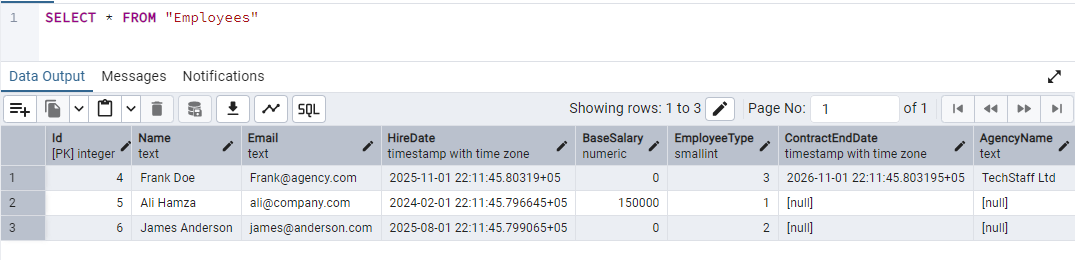
The table and seed data in the database look like this:
We observe that type-specific columns are null for records of other types.
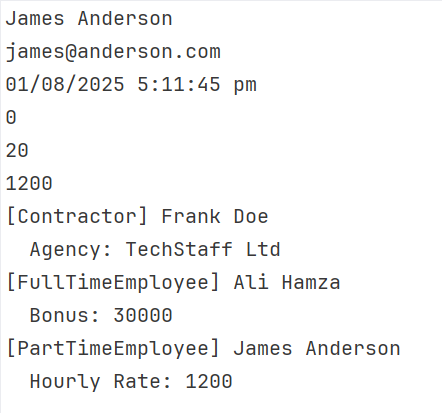
Step 7: Run and test the application
Let's run the project:
dotnet run
When is TPH best
For domain-driven design, TPH is best suited to lower complexity and is fully supported by EF Core.
It offers the least complexity, and LINQ works naturally.
Optimal when types are closely related, and there are fewer chances of null values.
When to avoid TPH
Sometimes strength becomes a liability. So is the case with TPH. If your entities are unrelated, then a single table can be overwhelmed by null values.
Due to null columns, TPH can be inefficient if you have too many derived entities.
Table-Per-Type (TPT) EF core polymorphic relationship implementation
Another type of relationship EF offers is Table-Per-Type (TPT). As the name suggests, parent and child entities contain their own table joined via foreign keys. Let's check how we can do it with a new sample project.
We will create the same models as in the sample above.
Step 4: Set up DbContext
using Microsoft.EntityFrameworkCore;

namespace EfCoreTpt.Data;

public class ApplicationDbContext: DbContext
{
    public DbSet<Employee> Employees => Set<Employee>();

    protected override void OnConfiguring(DbContextOptionsBuilder options)
    {
        options.UseNpgsql(
            "connection string with db name tptDb");
    }

    protected override void OnModelCreating(ModelBuilder modelBuilder)
    {
        modelBuilder.Entity<Employee>().UseTptMappingStrategy();

        modelBuilder.Entity<FullTimeEmployee>().ToTable("FullTimeEmployees");
        modelBuilder.Entity<PartTimeEmployee>().ToTable("PartTimeEmployees");
        modelBuilder.Entity<Contractor>().ToTable("Contractors");
    }
}
Here, with UseTptMappingStrategy I have to specify the base type of Employee with TPT mapping. You can see that other types are also mapped to their table.
Step 5: Configure Program.cs
using var db = new ApplicationDbContext();

var fullTime = new FullTimeEmployee
{
    Name = "Ali Hamza",
    Email = "ali@company.com",
    HireDate = DateTime.UtcNow.AddYears(-2),
    BaseSalary = 150000,
    AnnualBonus = 30000,
    VacationDays = 25
};

var partTime = new PartTimeEmployee
{
    Name = "James Anderson",
    Email = "james@anderson.com",
    HireDate = DateTime.UtcNow.AddMonths(-6),
    BaseSalary = 0,
    HourlyRate = 1200,
    WeeklyHours = 20
};

var contractor = new Contractor
{
    Name = "Frank Doe",
    Email = "Frank@agency.com",
    HireDate = DateTime.UtcNow.AddMonths(-3),
    BaseSalary = 0,
    ContractEndDate = DateTime.UtcNow.AddMonths(9),
    AgencyName = "TechStaff Ltd"
};

db.Employees.AddRange(fullTime, partTime, contractor);
db.SaveChanges();

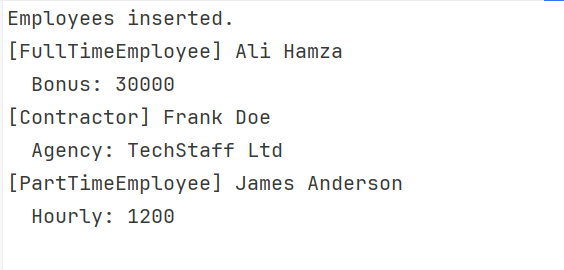
Console.WriteLine("Employees inserted.");

var employees = db.Employees.ToList();

foreach (var emp in employees)
{
    Console.WriteLine($"[{emp.GetType().Name}] {emp.Name}");

    switch (emp)
    {
        case FullTimeEmployee f:
            Console.WriteLine($"  Bonus: {f.AnnualBonus}");
            break;

        case PartTimeEmployee p:
            Console.WriteLine($"  Hourly: {p.HourlyRate}");
            break;

        case Contractor c:
            Console.WriteLine($"  Agency: {c.AgencyName}");
            break;
    }
}
One notable aspect here is the use of foreign keys to link tables. TPT is the only one that uses foreign keys to represent the inheritance itself. Other strategies can still use FKs for normal relationships (like Employee has a Laptop).
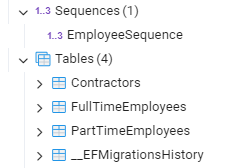
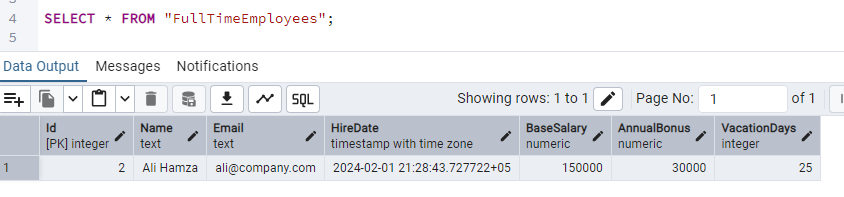
The database and data now look like this:
Although I added records using the base class, they are written into their respective tables.
Step 7: Run and test the application
dotnet run
EF Core generates joins in every query, such as:
SELECT ...
FROM Employees e
LEFT JOIN FullTimeEmployees f ON e.Id = f.Id
LEFT JOIN PartTimeEmployees p ON e.Id = p.Id
LEFT JOIN Contractors c ON e.Id = c.Id
When is TPT best
With each type having its own table, the database schema remained clean.
The database is inherently well normalized.
Records contain minimal nulls. TPT is optimal when your application has big inheritance trees.
When to avoid TPT
TPT can be problematic in performance-critical systems, potentially slowing data reading.
Queries heavily rely on joins.
Table-Per-Concrete (TPC) EF Core polymorphic relationship implementation
The last approach in EF Core polymorphic relationships is Table-Per-Concrete-Class (TPC). The parent class has no table, while each concrete class contains its own table. Each table repeats inherited fields as its columns. Like with the previous types, let us create a sample project to show how it works.
We will use the same models as in the sample above.
Step 4: Set up DbContext
This is the most crucial step, as with the others. Here, I will specify how I want to deal with relationships:
using Microsoft.EntityFrameworkCore;

public class ApplicationDbContext: DbContext
{
    public DbSet<Employee> Employees => Set<Employee>();
    public DbSet<FullTimeEmployee> FullTimeEmployees => Set<FullTimeEmployee>();
    public DbSet<PartTimeEmployee> PartTimeEmployees => Set<PartTimeEmployee>();
    public DbSet<Contractor> Contractors => Set<Contractor>();

    protected override void OnConfiguring(DbContextOptionsBuilder options)
    {
        options.UseNpgsql(
            "Connectionstring with db name tpcDb");
    }

    protected override void OnModelCreating(ModelBuilder modelBuilder)
    {
        modelBuilder.Entity<Employee>()
            .UseTpcMappingStrategy();
    }
}
The code modelBuilder.Entity().UseTpcMappingStrategy() instructs EF Core to use TPC mappings.
Step 5: Configure Program.cs
using var db = new ApplicationDbContext();

var fullTime = new FullTimeEmployee
{
    Name = "Ali Hamza",
    Email = "ali@company.com",
    HireDate = DateTime.UtcNow.AddYears(-2),
    BaseSalary = 150000,
    AnnualBonus = 30000,
    VacationDays = 25
};

var partTime = new PartTimeEmployee
{
    Name = "James Anderson",
    Email = "james@anderson.com",
    HireDate = DateTime.UtcNow.AddMonths(-6),
    BaseSalary = 0,
    HourlyRate = 1200,
    WeeklyHours = 20
};

var contractor = new Contractor
{
    Name = "Frank Doe",
    Email = "Frank@agency.com",
    HireDate = DateTime.UtcNow.AddMonths(-3),
    BaseSalary = 0,
    ContractEndDate = DateTime.UtcNow.AddMonths(9),
    AgencyName = "TechStaff Ltd"
};

db.Employees.AddRange(fullTime, partTime, contractor);
db.SaveChanges();

Console.WriteLine("Employees inserted.");

var employees = db.Employees.ToList();

foreach (var emp in employees)
{
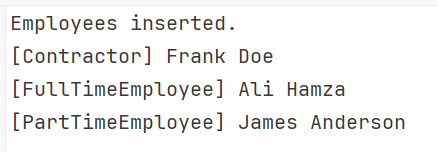
    Console.WriteLine($"[{emp.GetType().Name}] {emp.Name}");
}
Here, I am leveraging polymorphic behaviour by inserting records into the Employees data set.
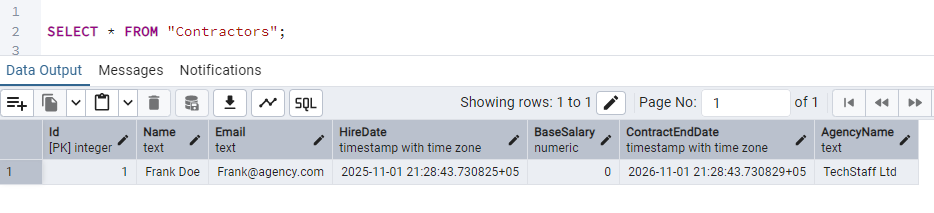
The code migrationBuilder.CreateSequence(name: "EmployeeSequence") specifies global ID generation across the hierarchy. Instead of independent identity generators, EF Core uses one shared sequence.
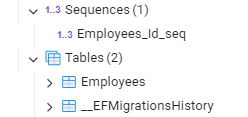
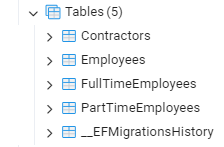
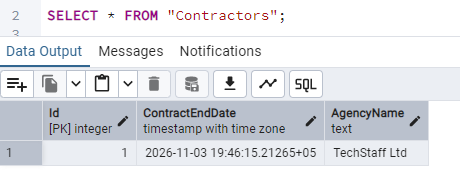
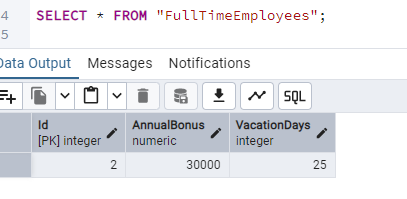
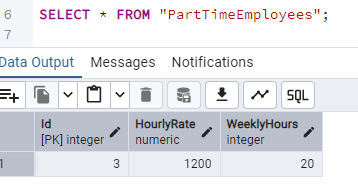
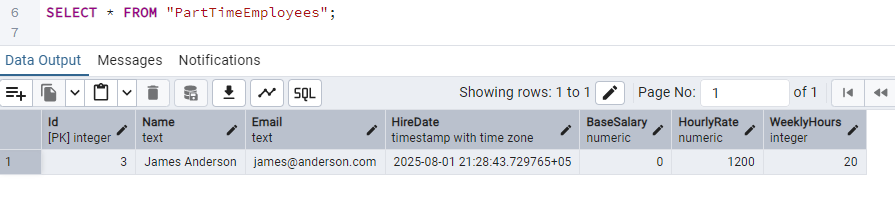
The database now looks like this:
Step 7: Run and test the application
dotnet run
A high-level view of the generated query is:
SELECT ... FROM FullTimeEmployees
UNION ALL
SELECT ... FROM PartTimeEmployees
UNION ALL
SELECT ... FROM Contractors
And the rows returned look like in the following screenshots:
When is TPC best
TPC applies when the application requires performing extensive queries on concrete types.
When you are designing a fast read-heavy system.
When you want to keep clean tables with no nulls.
When to avoid TPC
TPC can slow down when the application has many polymorphic queries.
Do not use with large inheritance trees.
Not optimal, frequent schema changes.
Duplicated columns can be problematic for some users.
Conclusion
Entity Framework provides different ways to design entities. They are not fixed for any use, but we tried to see by example how each one creates tables and how its internal relationships work. A quick summary of the types and features can be seen here:
Feature
TPH (Hierarchy)
TPT (Type)
TPC (Concrete)
Tables
One single table
One base + One per type
One per concrete type
Performance
Fastest (No joins)
Slowest (Many joins)
Fast for specific types
Nullability
Many nullable columns
No nulls (normalized)
No nulls (denormalized)
Best For
Simple hierarchies
Complex, strict schemas
Large sets, specific queries
In this blog post, I delved deeper into TPH, TPT, and TPC. I hope it helps you decide on which strategy to use for your database design.
 Log in