Sr. Content Developer at Microsoft, working remotely in PA, TechBash conference organizer, former Microsoft MVP, Husband, Dad and Geek.
151830 stories
·
33 followers

Random.Code() - Updating Esoteric Programming Language Implementations, Part 3

1 Share
From: Jason Bock
Duration: 50:07
Views: 5

I'll continue working on updating W#, getting the code up to modern standards, and then move on to other language features and issues.

https://github.com/JasonBock/WSharp/issues/35

#dotnet #csharp

Read the whole story
alvinashcraft
just a second ago
reply
Pennsylvania, USA
Share this story
Delete

Success as a Scrum Master Means People Feel Safe Enough to Speak Up Before It's Too Late | Efe Gümüs

1 Share

Efe Gümüs: Success as a Scrum Master Means People Feel Safe Enough to Speak Up Before It's Too Late

Read the full Show Notes and search through the world's largest audio library on Agile and Scrum directly on the Scrum Master Toolbox Podcast website: http://bit.ly/SMTP_ShowNotes.


"The healthier your collaboration with other roles — developers, product owners, managers — the more successful as a Scrum Master you are." - Efe Gümüs


Efe defines Scrum Master success not through team velocity or timely deliveries, but through the health of relationships. A successful Scrum Master actively contributes to organizational matters, increases transparency on both problems and solutions, and bridges the gap between roles. At the team level, the signal is clear: if people feel safe enough to approach you with their problems, if they speak freely in team events without fear of blame, if they can raise risks before the last day of the sprint — that's success. But Efe is honest about how hard this is to maintain. Relationships with stakeholders have constant ups and downs, and the work of understanding people never stops. His advice starts with empathy — not just reading the room in the moment, but understanding that every colleague carries a different career history, different coping mechanisms, and different experiences that shape how they react to change. For younger Scrum Masters especially, Efe emphasizes that what worked for you won't work for everyone. Speak the common language, understand their perspective, give them assurance through visible, outcome-focused progress. The health of those relationships is the measure of your impact.


Self-reflection Question: Beyond metrics and deliverables, how would you describe the health of your relationship with the key stakeholders around your team — and what's one thing you could do this week to strengthen the weakest one?

Featured Retrospective Format for the Week: The Diamond Retrospective

"When you have diverse perspectives, a growth zone, converged thinking, and then action points — that diamond — people actually own the actions." - Efe Gümüs


Efe doesn't name a single retrospective format as his favorite — instead, he describes the structure that makes any retrospective effective: the diamond. Start by opening up diverse perspectives (diverge), create space for exploration and growth (the growth zone), then converge the thinking toward clear action points. This diamond pattern — diverge, explore, converge, act — ensures that the team moves from broad reflection to specific, owned commitments. The key word is "owned": when people arrive at actions through this structured exploration rather than being told what to improve, they commit to the follow-through. Efe connects this directly to his broader philosophy: the best systems don't depend on any single person, and the best retrospectives produce actions that the team drives forward without needing the Scrum Master to push.


[The Scrum Master Toolbox Podcast Recommends]

🔥In the ruthless world of fintech, success isn't just about innovation—it's about coaching!🔥

Angela thought she was just there to coach a team. But now, she's caught in the middle of a corporate espionage drama that could make or break the future of digital banking. Can she help the team regain their mojo and outwit their rivals, or will the competition crush their ambitions? As alliances shift and the pressure builds, one thing becomes clear: this isn't just about the product—it's about the people.


🚨 Will Angela's coaching be enough? Find out in Shift: From Product to People—the gripping story of high-stakes innovation and corporate intrigue.


Buy Now on Amazon


[The Scrum Master Toolbox Podcast Recommends]


About Efe Gümüs


Efe is an out-of-the-box Agile Coach and Scrum Master who brings fresh perspectives to Agile by connecting it with everyday life. He uses metaphors to reveal mindset patterns and applies continuous feedback loops beyond work, including music production and gym training, constantly refining performance, creativity, and personal growth and resilience.


You can link with Efe Gümüs on LinkedIn.


Download audio: https://traffic.libsyn.com/secure/scrummastertoolbox/20260416_Efe_Gumus_Thu.mp3?dest-id=246429
Read the whole story
alvinashcraft
14 seconds ago
reply
Pennsylvania, USA
Share this story
Delete

Android official agent skills

1 Share

Android official agent skills

The Android team has published an official repository of Agent Skills for Android development. The new android/skills repository is hosted under the official Android GitHub organization, and Android describes these skills as modular instructions and resources that help LLMs better understand and execute Android specific tasks according to best practices.

The github repo:
https://github.com/android/skills

The repository already shows the kind of workflows Android wants to support. Its current structure includes skills for AGP 9 upgrade work, XML Views to Jetpack Compose migration, Navigation 3, R8 analysis, Play Billing version upgrades, and edge to edge support. That makes the repository more than a generic demo. It is an initial curated set of focused Android engineering workflows.

Read the whole story
alvinashcraft
31 seconds ago
reply
Pennsylvania, USA
Share this story
Delete

Visualizing Claude Code MCP Requests with Coding Agent Explorer

1 Share

Model Context Protocol (MCP) servers are becoming a key part of how Claude Code extends its capabilities. They give the agent access to documentation, code search, external APIs, and much more. But when Claude Code talks to an MCP server, what exactly is it saying? And what is the server sending back?

Until now, that communication has been invisible. The MCP Observer changes that. It is a new feature in the Coding Agent Explorer that intercepts all traffic between Claude Code and any MCP server and displays it in a real-time dashboard, with both a raw JSON view and a readable, formatted view that makes sense of the data.

Here is what you will learn in this post:

  • What MCP is and why it matters for coding agents
  • What the MCP Observer does and how it works
  • How to configure it and connect it to any MCP server
  • What you can see in the dashboard
  • A few MCP services to try straight away

This is a multi-part series on the Coding Agent Explorer, an open-source .NET tool for inspecting what AI coding agents do under the hood. 

What Is Model Context Protocol (MCP)?

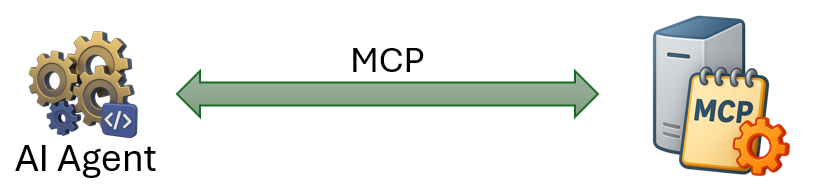
The Model Context Protocol is an open standard that lets AI agents connect to external tools and data sources. An MCP server exposes a set of tools that the agent can discover and call, just like a REST API but designed specifically for AI agent communication.

Claude Code has built-in support for MCP. You can register any MCP server, and Claude Code will automatically discover the tools it provides and use them whenever they are relevant to the task at hand.

The protocol is built on JSON-RPC 2.0. When Claude Code connects to an MCP server, it sends messages like initialize, tools/list, and tools/call. The server responds with its capabilities and tool results. This is the conversation the MCP Observer lets you see.

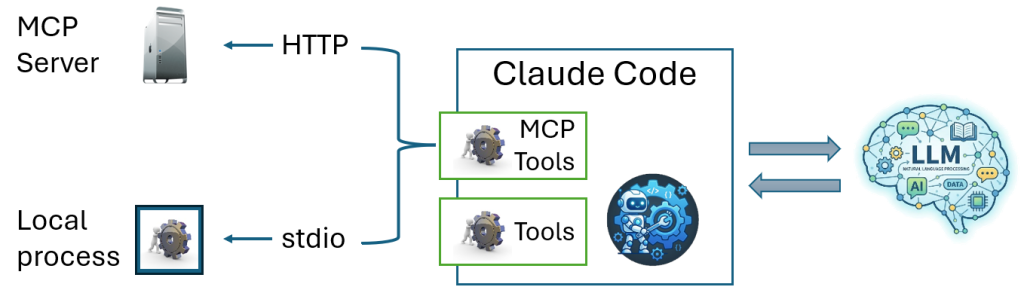
HTTP vs. STDIO MCP Servers

MCP servers can communicate over two transports: HTTP and STDIO. Claude Code supports both.

MCP HTTP vs STDIO Services

Here is the difference:

  • HTTP servers
    Expose a URL that Claude Code connects to over the network. The traffic is standard HTTP, which means a proxy can sit in the middle and capture it transparently. This is what the MCP Observer uses.
  • STDIO servers
    Run as a local process. Claude Code launches the process and communicates with it over stdin and stdout. The MCP Observer cannot intercept this communication, so STDIO-based servers are not visible in the observer.

That said, Claude Code’s PreToolUse and PostToolUse hooks fire for MCP tool calls regardless of transport. They do not show the raw JSON-RPC protocol, but they do show which MCP tool was called and what parameters were passed. That is enough to understand what the agent is doing, even without the protocol detail. If you have not read the previous post on hooks, it is a good companion to this one.

What Is the MCP Observer?

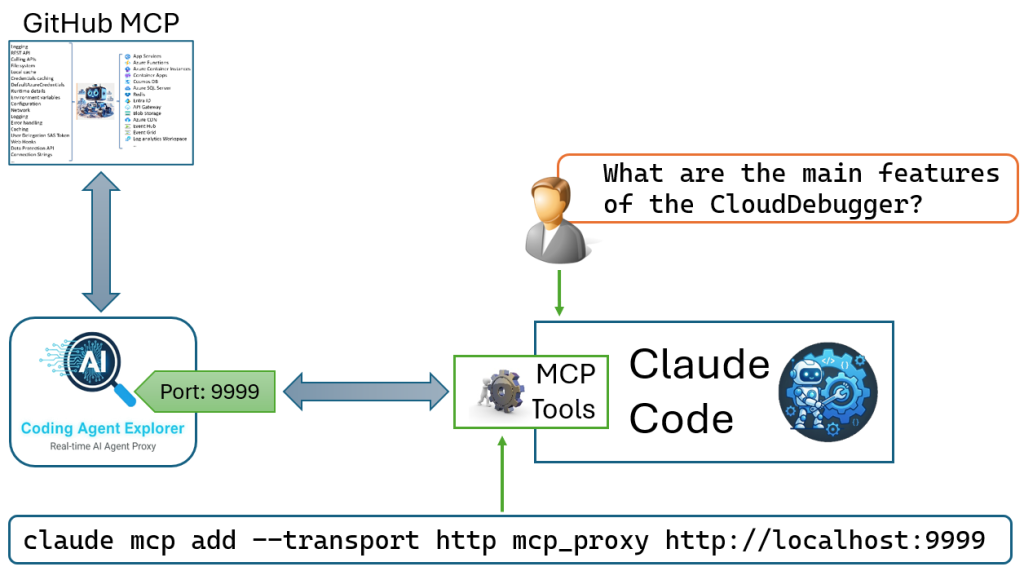
The MCP Observer is a transparent proxy that runs on port 9999 (HTTP). Claude Code thinks it is talking to the real MCP server. In reality, it is talking to the observer, which forwards every request to the real server, captures the traffic, and displays it on the dashboard.

Here is how the data flows:

Claude Code gets the real responses without any modification. The observer is completely transparent. You can add it to any MCP workflow without changing how Claude Code or the MCP server behaves.

Why HTTP Only on Port 9999?

The proxy between Claude Code and the observer runs over plain HTTP, not HTTPS. This is intentional. The connection is local-only: both Claude Code and the observer run on the same machine, so the traffic never leaves your computer and encryption adds no security benefit. Using HTTP also avoids the need to set up a local certificate, which would make the setup much more involved.

The outbound connection from the observer to the real MCP server is a separate matter. The observer forwards requests to whatever URL you configure, and that connection uses whatever scheme the server requires. In practice, all public MCP servers use HTTPS, so the traffic between the observer and the real server is always encrypted.

How to Set It Up the MCP Observer

Setting up the MCP Observer takes about two minutes.

Step 1: Start the Coding Agent Explorer

First, we run:

dotnet run

This starts the MCP proxy on port 9999 and the existing proxy on port 8888, as well as the dashboard on ports 5000 and 5001.

For details on how to install, build, and run the Coding Agent Explorer, see the first post in this series: Introducing the Coding Agent Explorer.

Step 2: Create a working directory

Create a fresh folder where you will run claude. Then open a terminal in that folder before running the next step.

Step 3: Register the proxy with Claude Code

Run this command in your terminal from inside your working directory:

claude mcp add --transport http mcp_proxy http://localhost:9999

By default this uses local scope: the registration is stored in ~/.claude.json under your project path and is only active when Claude Code is started from this directory.

The URL http://localhost:9999 is the fixed address of the MCP Observer proxy and never changes. Which real MCP server the traffic is forwarded to is controlled separately inside the MCP Observer dashboard. You only need to run this command once.

To remove the registration later:

claude mcp remove mcp_proxy

For full details on scopes and other options, see the Claude Code MCP documentation.

Step 4: Verify the MCP configuration

Start Claude Code and run the /mcp command:

/mcp

This lists all registered MCP servers and their connection status. You should see mcp_proxy listed as connected. If the status shows an error, check that the Coding Agent Explorer is running and that a destination URL has been set in the MCP Observer dashboard.

Step 5: Open the MCP Observer dashboard

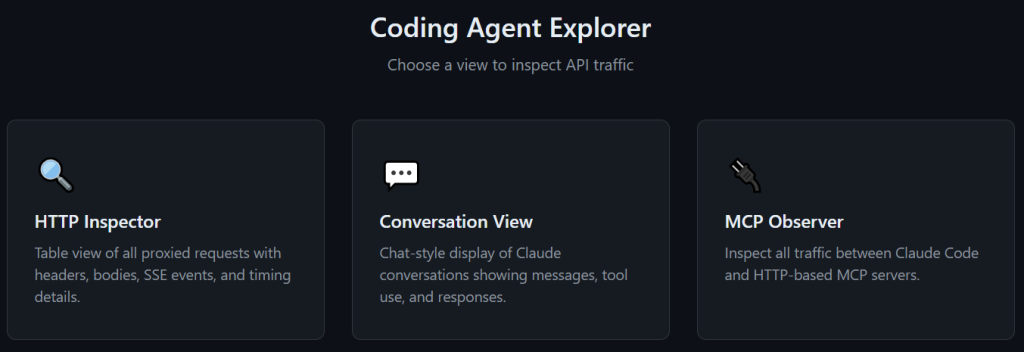
Open the dashboard at https://localhost:5001 and click MCP Observer in the navigation bar.

Coding Agent Explorer main menu with MCP Observer

Step 6: Set the destination URL

The destination URL field is pre-filled with  https://gitmcp.io/tndata/CloudDebugger as a ready-to-use default. This is the MCP endpoint for Cloud Debugger, another open-source project by me. It is a good starting point if you just want to try the observer without setting up your own MCP server.

GitMCP is a free, open-source service that turns any GitHub repository into a remote MCP server, giving AI tools access to up-to-date documentation and code directly from the source.

Leave the default URL in place and click Set to activate it. The status line updates to confirm the proxy is active and forwarding traffic.

When you click Set, the Coding Agent Explorer updates its internal destination and reconfigures the YARP reverse proxy on port 9999 to forward traffic to the new URL. No restart is needed. Only one destination can be active at a time. If you change it, the request history is cleared so that the table always reflects a single server.

Important!

If you change the destination URL while Claude Code is already running, restart Claude Code before continuing. Claude Code caches tool information from the MCP server when it connects, and it will not pick up the new server’s tools until it reconnects.

Step 7: Try your first prompt

The Cloud Debugger is an open-source .NET tool for debugging live Azure applications. It can capture and display HTTP requests, exceptions, service bus messages, and more, without attaching a debugger or redeploying.

With the MCP Observer active and the Cloud Debugger endpoint set, start Claude Code from your working directory and try one of these prompts:

  • What is the Cloud Debugger and what can it do?
  • Does the Cloud Debugger include any Python code?
  • Which Azure services does the Cloud Debugger support?

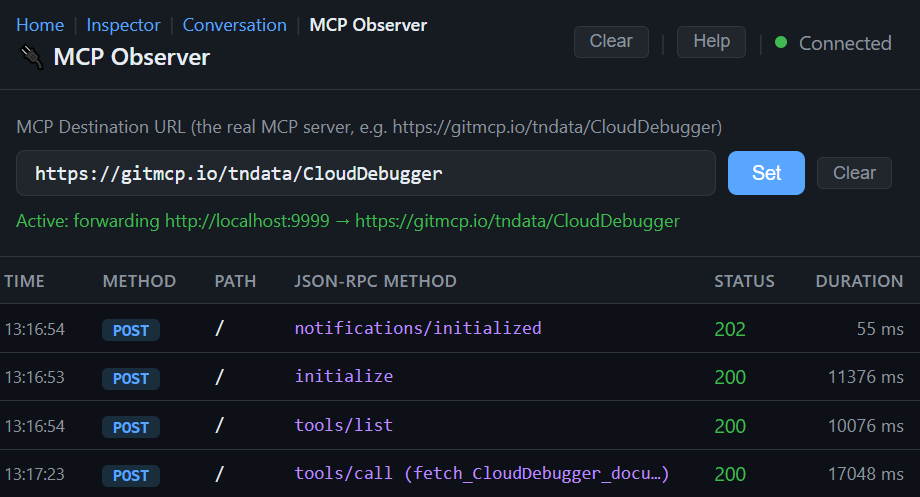
Watch the MCP Observer dashboard as Claude Code connects: you will see the initialize and tools/list calls appear first, followed by one or more tools/call requests as Claude Code fetches the information it needs to answer your question.

What You Can See

The MCP Observer captures every request and response and displays them in a table, sorted oldest to newest. Each row shows the time, HTTP method, path, JSON-RPC method, response status, and duration.

MCP Observer Request List Example

For tools/call requests, the JSON-RPC method column shows the name of the tool that was called in parentheses, so you can see at a glance which tools Claude Code is using. For example: tools/call (search_docs) or tools/call (fetch_page).

Click any row to open the detail panel at the bottom, which shows the request body on the left and the response on the right.

Two Ways to View the Response

The response panel has two view modes: Pretty and Raw.

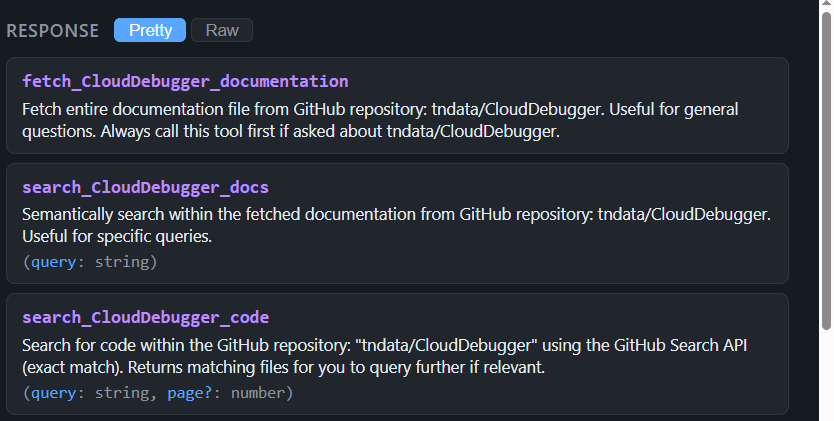
Pretty 

This is the default. It renders the response in a readable format that depends on the type of request:

  • tools/list responses are shown as a card for each tool, with the tool name, description, and input parameters clearly laid out.
  • initialize responses show the protocol version, server name and version, and capabilities as a simple key-value list.
  • tools/call responses show the returned content directly, so you can read the actual text the MCP server returned.
  • All other responses fall back to formatted JSON.

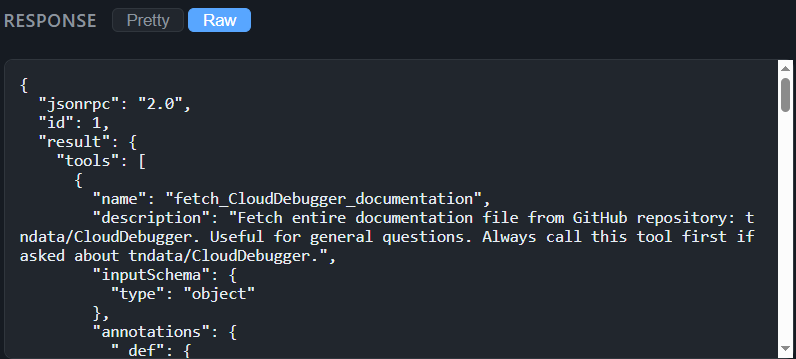
Raw

Shows the full JSON, pretty-printed, so you can inspect every field.

MCP Observer raw view

Sample MCP Services to Try

Here are two public MCP services that work well as starting points.

Microsoft Learn

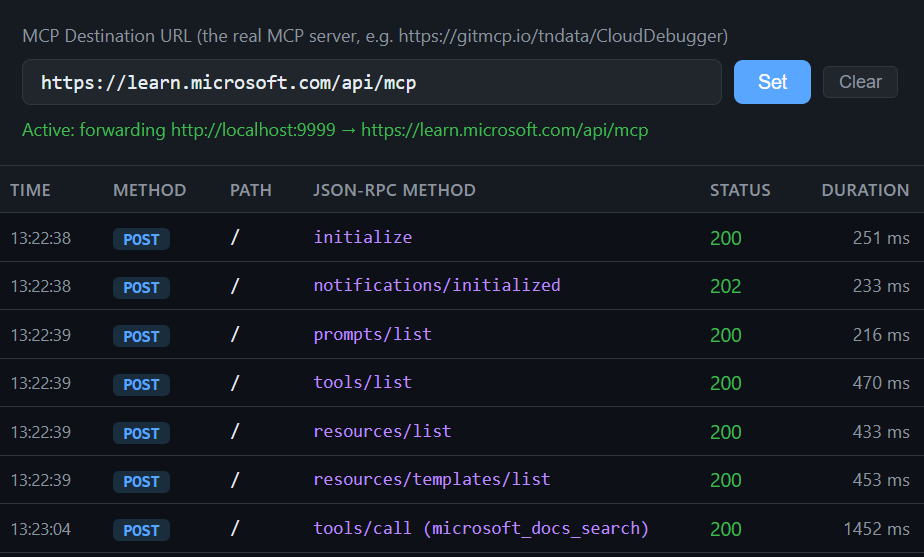
The Microsoft Learn MCP server gives Claude Code access to the full suite of Microsoft’s documentation, including Azure, .NET, and the rest of Microsoft’s product ecosystem.

Destination URL:

https://learn.microsoft.com/api/mcp

Once registered, try asking Claude Code:

How do I create an Azure Container App using the az CLI?

You will see Claude Code call tools/list to discover the available tools,and then it will call one or more of them to fetch the relevant documentation, and finally it uses the results to answer your question. The MCP Observer shows each of those calls as they happen.

Context7

Context7 provides up-to-date documentation for popular libraries and frameworks. It is particularly useful for questions about rapidly changing ecosystems like Next.js, where training data can be out of date.

Destination URL:

https://mcp.context7.com/mcp 

Once registered, try asking Claude Code:

How do I set up middleware in Next.js 15? Use context7

The Use context7 hint tells Claude Code to prioritise the Context7 MCP server for this query. Watch the MCP Observer to see how it resolves the library ID, fetches the relevant documentation, and uses it to answer your question.

A Practical Example: Watching a tools/call in Action

To make this concrete, here is what happens when you ask Claude Code the Azure Container App question above.

You type your prompt. Claude Code connects to the MCP server and the observer captures the following sequence:

Clicking the tools/list row in Pretty view shows all the tools the Microsoft Learn MCP server exposes: their names, descriptions, and accepted parameters. Clicking the tools/call row shows exactly what Claude Code asked for and what the server returned.

MCP Requests and Hooks

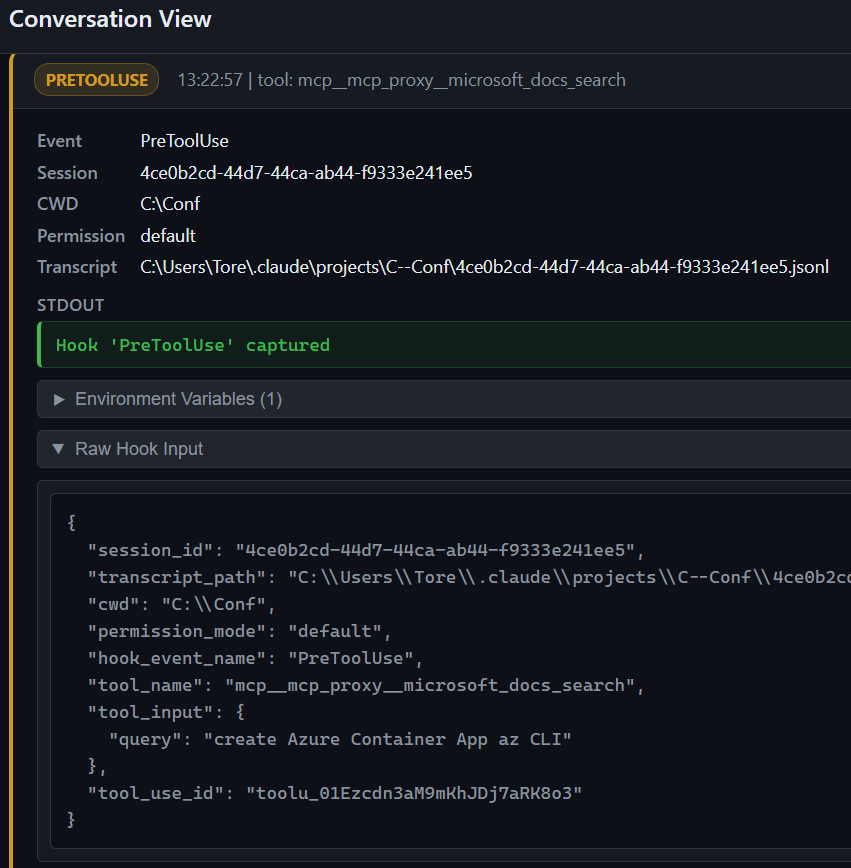
The MCP Observer shows you the protocol-level conversation between Claude Code and the MCP server. But there is a complementary view available in the Conversation View if you have hooks configured.

Claude Code fires PreToolUse and PostToolUse hook events for every MCP tool call, just as it does for built-in tools like Read or Bash

The MCP Observer and the Conversation View complement each other. The observer shows you the raw protocol detail. The Conversation View with hooks shows you the full picture of what the agent was doing and why.

Here is an example of a PreToolUse call:

MCP pretool use example in Claude code

If you have set up HookAgent as described in the previous post in this series, those events appear in the Conversation View alongside the LLM API calls. This lets you see MCP tool usage in context: you can watch the LLM call that triggered the tool call, the hook events that fired around it, and the next LLM call that consumed the result, all on the same timeline.

Why This Matters

Most developers who start using MCP servers treat them as a black box. You register a server, Claude Code uses it, and something useful happens. But what tools does the server expose? What does Claude Code actually ask it? What does the server send back?

Those are exactly the questions the MCP Observer answers. Once you can see the traffic, you can evaluate whether a server is giving Claude Code good information, whether the tool descriptions are clear enough for the model to use them correctly, and whether the responses are fast enough to be practical.

For anyone building their own MCP server, the observer is invaluable. You can see exactly how Claude Code interacts with your server during development, without adding any logging to the server itself.

What's Next

The Coding Agent Explorer now covers three layers of Claude Code’s operation:

  • LLM API (HTTP Inspector and Conversation View)
  • Lifecycle events (hooks)
  • MCP servers (MCP Observer).

Together they give you a complete picture of what the agent is doing at every level.

The full project is open-source and available on GitHub: github.com/tndata/CodingAgentExplorer

I Want Your Feedback!

If you try the MCP Observer and find a bug, have a feature request, or want to share your experience, please create an issue on GitHub. Contributions are welcome. The codebase is intentionally simple to make it easy to jump in.

Want to Learn Agentic Development?

I am currently working on a workshop called Agentic Development with Claude Code where we use the Coding Agent Explorer to explore how coding agents work under the hood. The MCP Observer is one of the tools I use to show participants exactly how Claude Code discovers and uses external tools.

You can read more about my workshops here: tn-data.se/courses.

I also give a presentation called How Does a Coding Agent Work? for companies and conferences. Contact me if you are interested.

Frequently Asked Questions

Does the MCP Observer affect Claude Code or the MCP server in any way?

No. The observer forwards requests and responses without modification. Both Claude Code and the MCP server behave exactly as they would without the proxy.

Can I use the MCP Observer with any MCP server?

Yes, as long as the server uses the streamable HTTP transport (which all modern MCP servers do). Enter the server’s URL in the destination field and click Set.

Can I watch multiple MCP servers at the same time?

Not currently. The observer is configured for one destination at a time. To switch servers, enter the new URL and click Set. The request history is cleared when you change the destination. After changing the URL you must also restart Claude Code; as it caches tool information from the MCP server at startup and will not pick up the new server’s tools until it reconnects.

Why does changing the destination clear the request history?

Mixing requests from different servers in the same list would make the timeline confusing and hard to read. Clearing on change keeps the view focused on the server you are currently observing.

Do I need to restart Claude Code after registering the proxy?

Always start Claude Code after the Coding Agent Explorer is already running and after you have set the destination URL in the MCP Observer dashboard. Claude Code connects to the MCP server during startup to discover its tools. If the proxy is not yet active when Claude Code starts, it will not find any tools.

Can I observe STDIO-based MCP servers?

Not with the MCP Observer, which only works with HTTP transport. However, Claude Code fires `PreToolUse` and `PostToolUse` hook events for every MCP tool call regardless of transport. If you have hooks configured, those events appear in the Conversation View and show you which tool was called and what parameters were passed. It is a higher-level view than the raw JSON-RPC protocol, but it gives you meaningful visibility into what the agent is doing. See the previous post in this series for details on setting up hooks.

About the Author

Tore Nestenius is a Microsoft MVP in .NET and a senior .NET consultant, instructor, and software architect with over 25 years of experience in software development. He specializes in .NET, ASP.NET Core, Azure, identity architecture, and application security, helping development teams design secure, scalable, and maintainable systems.

Tore delivers .NET workshops, Azure training, and technical presentations for companies and development teams across Europe. His focus is on practical, hands-on learning that helps developers understand modern tooling, cloud architecture, and AI-assisted development.

Learn more on his .NET blog at nestenius.se or explore his workshops and training at tn-data.se.

Add Your Heading Text Here​

The post Visualizing Claude Code MCP Requests with Coding Agent Explorer appeared first on Personal Blog of Tore Nestenius | Insights on .NET, C#, and Software Development.

Read the whole story
alvinashcraft
54 seconds ago
reply
Pennsylvania, USA
Share this story
Delete

Announcing Rust 1.95.0

1 Share

The Rust team is happy to announce a new version of Rust, 1.95.0. Rust is a programming language empowering everyone to build reliable and efficient software.

If you have a previous version of Rust installed via rustup, you can get 1.95.0 with:

$ rustup update stable

If you don't have it already, you can get rustup from the appropriate page on our website, and check out the detailed release notes for 1.95.0.

If you'd like to help us out by testing future releases, you might consider updating locally to use the beta channel (rustup default beta) or the nightly channel (rustup default nightly). Please report any bugs you might come across!

What's in 1.95.0 stable

cfg_select!

Rust 1.95 introduces a cfg_select! macro that acts roughly similar to a compile-time match on cfgs. This fulfills the same purpose as the popular cfg-if crate, although with a different syntax. cfg_select! expands to the right-hand side of the first arm whose configuration predicate evaluates to true. Some examples:

cfg_select! {
    unix => {
        fn foo() { /* unix specific functionality */ }
    }
    target_pointer_width = "32" => {
        fn foo() { /* non-unix, 32-bit functionality */ }
    }
    _ => {
        fn foo() { /* fallback implementation */ }
    }
}

let is_windows_str = cfg_select! {
    windows => "windows",
    _ => "not windows",
};

if-let guards in matches

Rust 1.88 stabilized let chains. Rust 1.95 brings that capability into match expressions, allowing for conditionals based on pattern matching.

match value {
    Some(x) if let Ok(y) = compute(x) => {
        // Both `x` and `y` are available here
        println!("{}, {}", x, y);
    }
    _ => {}
}

Note that the compiler will not currently consider the patterns matched in if let guards as part of the exhaustiveness evaluation of the overall match, just like if guards.

Stabilized APIs

These previously stable APIs are now stable in const contexts:

Destabilized JSON target specs

Rust 1.95 removes support on stable for passing a custom target specification to rustc. This should not affect any Rust users using a fully stable toolchain, as building the standard library (including just core) already required using nightly-only features.

We're also gathering use cases for custom targets on the tracking issue as we consider whether some form of this feature should eventually be stabilized.

Other changes

Check out everything that changed in Rust, Cargo, and Clippy.

Contributors to 1.95.0

Many people came together to create Rust 1.95.0. We couldn't have done it without all of you. Thanks!

Read the whole story
alvinashcraft
1 minute ago
reply
Pennsylvania, USA
Share this story
Delete

How to Implement Command Pattern in C#: Step-by-Step Guide

1 Share

Learn how to implement command pattern in C# with a step-by-step guide covering command interfaces, concrete commands, invokers, and undo/redo support.

Read the whole story
alvinashcraft
1 minute ago
reply
Pennsylvania, USA
Share this story
Delete
Next Page of Stories