Reuters reports that a former Google DeepMind employee "became the latest AI researcher to warn that the technology could 'kill all humans', saying time could be running out to avoid the outcome:
Public alarm about the potential danger posed by AI is growing, after Anthropic researcher Jacob Coxon said last week he had resigned, in part because the "people building AI earnestly believe that it could kill us all by the end of the decade." Anthropic scientist Evan Hubinger then responded to Coxon's comments, saying he was correct and that he believed there was a greater than 10% chance that AI could kill all humans within the next decade.
"I recently resigned from Google DeepMind, where I worked on AGI safety and alignment research," Bilal Chughtai wrote on X. "I earnestly believe that AI has the potential to kill us all, and that we might be running out of time to avoid this outcome." Chughtai, who co-authored research papers while at Google DeepMind, worked there as a research engineer and left the company in July 2026, according to his LinkedIn profile.
Meanwhile, Meta CEO Mark Zuckerberg "said it's up to each AI company to make sure its technology is safe," reports the Associated Press, "distancing himself from calls by rival companies for a coordinated slowdown in the development of advanced artificial intelligence.
AI companies are already motivated to develop their models in a safe way and face "significant liability" to prevent them from causing harm, Zuckerberg said. "Every lab has the responsibility and incentive to move at the pace required to train its models safely, and the ability to take its own actions to ensure that happens," he wrote on X... Zuckerberg said Meta delayed releasing its Muse AI agent for several months to ensure its safety and security. "We didn't call for everyone else to do this before we would," he said.
Companies should prioritize building safe AI models instead of systems that can automatically improve themselves, a function known as recursive self-improvement, Zuckerberg wrote. "Committing the significant majority of compute towards serving people rather than racing towards recursive self-improvement is one of the best ways to ensure we develop this technology safely."
But Zuckerberg also agreed that engaging independent evaluators and advisors "is industry best practice," adding that Meta Superintelligence Labs "already does this today in several areas because it helps produce better work...
"I believe the key to building a positive future for everyone is maintaining the right balance of power. This is within our power to do."
Google has partnered with Speakeasy to open-source their OpenAPI code generation suite under the AGPLv3 license, a strategic move prompted by the sudden shutdown of Google's previous proprietary SDK provider. The newly open-sourced suite equips developers with deterministic, multi-language SDK generators that natively support strict typing and SSE streaming, alongside tools for compiling agent-native CLIs and documentation MCP servers. Engineering teams can now safely integrate this robust tooling directly into their CI pipelines to automatically generate reliable client libraries for their own APIs, all while retaining complete licensing control over the output code.
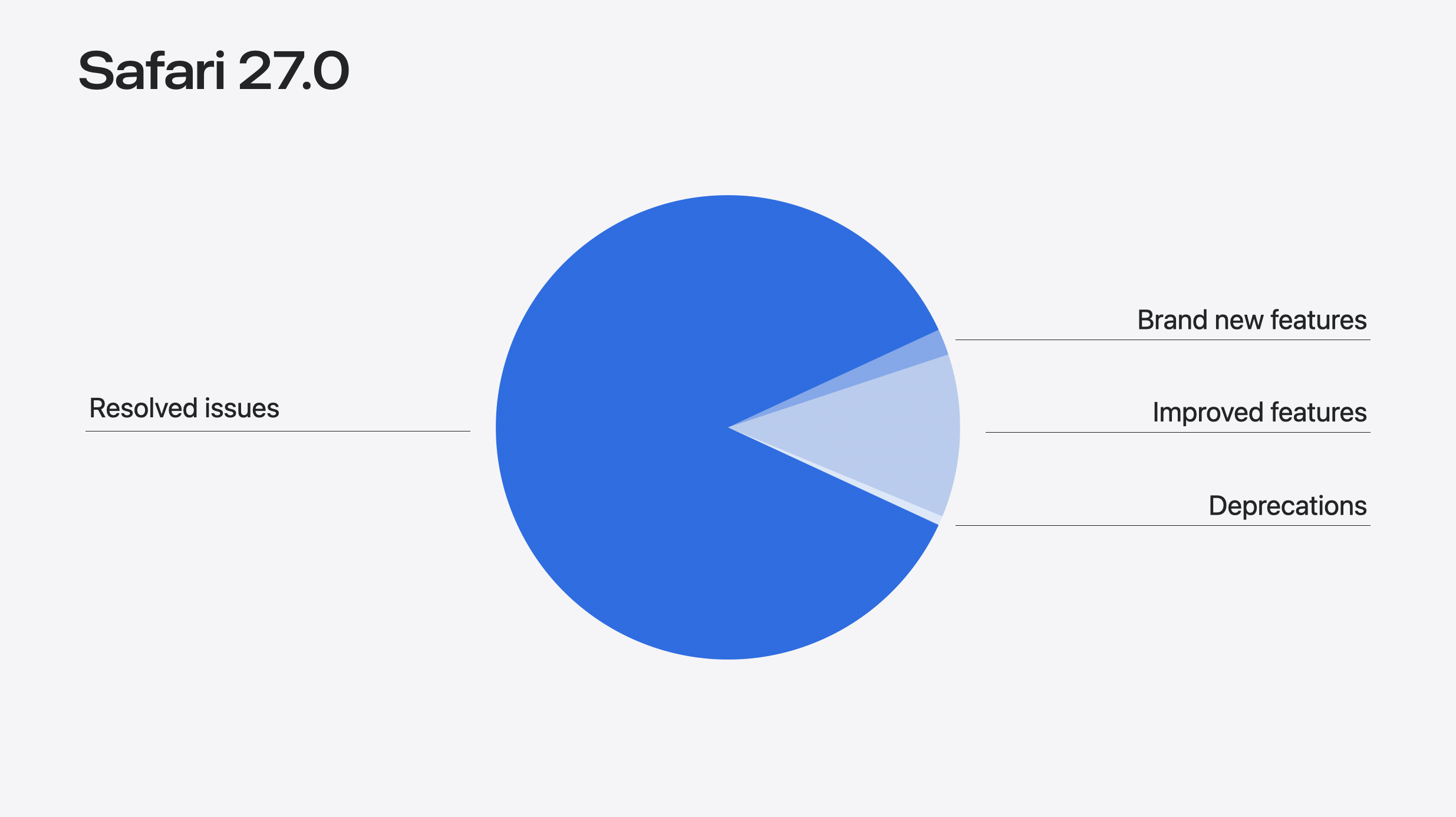
Our Safari release notes have never been as long as they are for this version. The number of features alone rose from 58 to 83 since the first beta in June.
Safari MCP makes working with coding agents dramatically easier. Customizable select turns the real <select> element into something you can fully restyle — now with new UA default styles that provide an even-better starting place. Scroll anchoring stops content from jumping when something loads in above. The <model> element comes to iOS, iPadOS, and macOS, giving 3D a powerful HTML element. Websites can now provide immersive environments on visionOS. And much more.
Safari MCP
Are you developing websites using coding agents? The Safari MCP server, now available in Safari 27.0 will make your workflow faster and more powerful. Give Claude Code, Codex, or the agent of your choice control over the browser window so it can see how your code renders. Safari MCP provides access to the DOM, network requests, screenshots, and console output. Your agent can do more on its own while you do less hopping between windows, less dropping screenshots in your terminal, and less typing prompts to describe what’s not working.
The Safari MCP server enables your agent to:
see how your code renders in Safari
verify user states in forms, checkout flows, selections & more
compare computed styles and layout to results in other browsers
test for accessibility issues like missing labels, improper ARIA attributes, and poor contrast
analyze performance with navigation timing and resource load times
And much more. The MCP server runs entirely on your local machine. It makes no network calls of its own. It does not have access to your personal information in Safari. And any captured data goes directly to the agent you’re running, not to Apple.
To give it a try, go to Safari > Settings > Developer > check “Allow remote automation and external agents.” (If the Developer pane is not available, first go to Advanced, and check “Show features for web developers”.)
If you’re using Claude:
claude mcp add safari-mcp -- "/usr/bin/safaridriver" --mcp
The biggest feature of Safari 27.0 isn’t a feature at all. It’s the tremendous effort that went into improving the quality of existing features. At WWDC, we were proud to announce 525 fixes. Then we added 60% more, reaching a total of 844. Plus the majority of feature work improves existing features.
When we look at the efforts we made to improve quality, the story can be seen in several themes.
Compatibility. Our team made many changes to help make specific websites work correctly for their users. For example, Hindi InScript typing in an online document editor, images vanishing from search results on a restaurant reservation site, and Pahawh Hmong text misrendering in an online encyclopedia.
Foundations. Sometimes the best way to improve quality is to start over. Safari 27.0 has an all-new ES module loader. We rebuilt CSS Zoom. And now inline layout places elements with subpixel precision.
Depth. We got deep into specific technologies. There are 66 fixes to SVG in this release alone, including an end-to-end review of the SMIL animation engine. HTML tables got a systematic pass, with absolutely positioned tables now handling percentage-sized children, min-height, and max-height correctly. Plus deep work on Media Source Extensions (MSE) and Encrypted Media Extensions (EME). And much more.
Alignment. Much of the work is to better match exactly what web standards prescribe. For example, we corrected the MathML Core operator dictionary and its spacing values across several fixes. Fixes to innerText bring Safari’s rendered-text output better in line with standards for display, visibility, white-space, and form controls. And we improved how HTTP cache obeys Cache-Control.
Integration. Sometimes two features each work perfectly alone, but combined, something starts to go wrong. We fixed a lot of these this year. For example, -webkit-line-clamp shipped in WebKit in 2010, while text-wrap: balance arrived in 2024. Before Safari 27.0, if you applied both to the same element, the balancing simply didn’t happen. Now that’s fixed.
We truly hope all of these efforts throughout the last year make your work as a web developer a little easier. Read through the resolved issues at the end of this article to see specifics. And learn more about what we are doing to raise the quality of WebKit by watching What’s new in WebKit for Safari 27.
Customizable Select
The <select> element has been part of the web since the very beginning of HTML. But until recently, there wasn’t a lot you could to do style it or fill it with custom content. Customizable Select changes that. Now in Safari 27.0, it lets you build a fully custom drop-down menu to match the look and feel of your website or web app, without reaching for JavaScript or a pile of <div>. You can even push far beyond a typical drop-down menu to a very different UI. Because it’s a real form control, you get automatic, reliable support for keyboard navigation, screen readers, form submission, validation, change events and more.
Start by applying appearance: base-select in your CSS. This immediately switches to the look and feel provided by new UA styles, and enables the new powers in HTML.
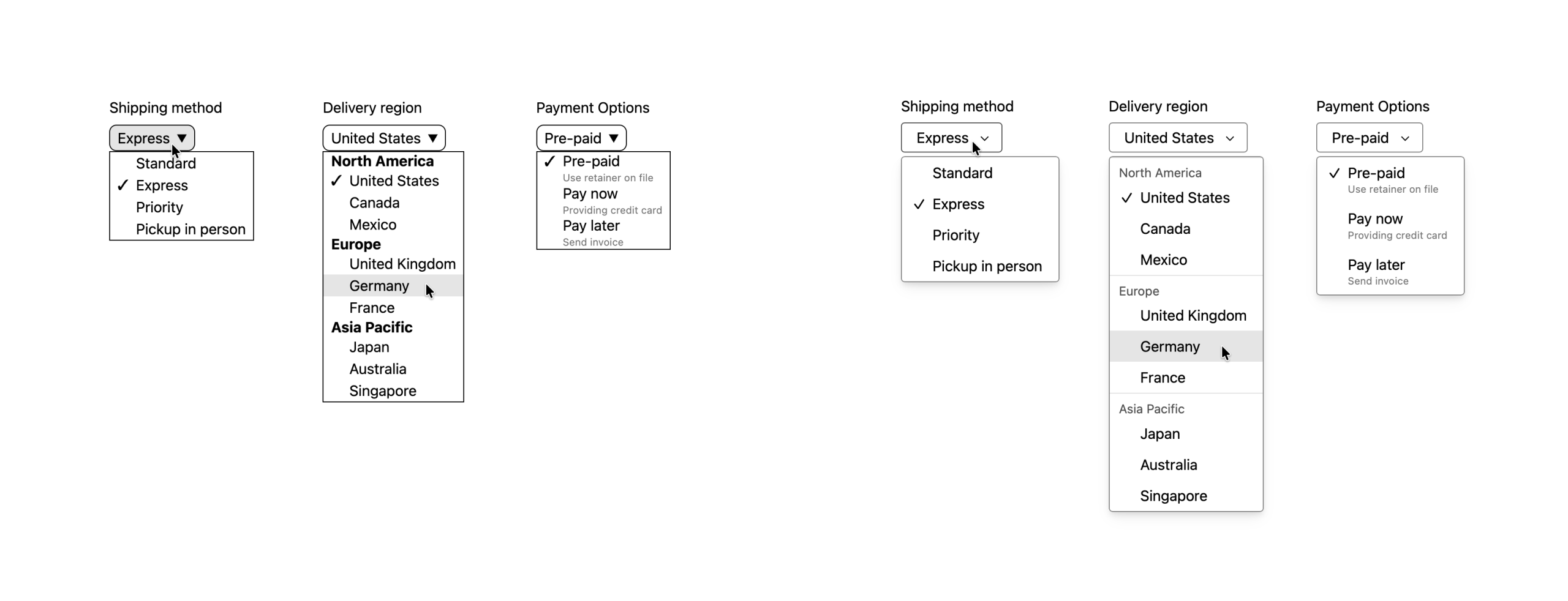
You might notice that the default UA styles in Safari 27.0 are different than they were for the first beta back in June. The summer gave us the opportunity to reflect on what it will be like for web developers to write custom styles on top of the new defaults. We realized after 30 years of web developers struggling with form control styling, we wanted to provide something even better.
Previous default UA styles for Customizable Select on the left, with the new design on the right.
These defaults set you up with all the basics. You won’t be left with homework to do to get the select into a usable state. You can simply switch to the new control with appearance: base-select, and apply as little or as much additional code as you’d like. Don’t like the new defaults? You are in luck, it’s very easy to override them. Feel fine keeping any of these pieces like the new drop shadow, 4px rounded corners, touch-friendly line height, cleaner hover states, user-ready chevron & checkmark, subtle opt group styling, etc? Great! It’s already done for you, with support for all the variations like light & dark modes, forced color mode, disabled states and more.
We brought this new design to the CSS Working Group, where it’s being further discussed and refined. Once other browsers update their implementations, we will together reach our shared commitment for all browsers to support an identically interoperable starting place.
New pseudo-elements like ::picker-icon and ::checkmark let you easily target parts of the control that were previously unstylable. Plus, you can now insert HTML elements inside each <option> to add more detail. The new <selectedcontent> element can be used to adjust what gets displayed as the currently-selected option’s content. Learn more watching Rediscover the HTML Select Element from WWDC26.
HTML
Model
Originally shipped a year ago in visionOS, the HTML <model> element is now also available in Safari on iOS, iPadOS, and macOS. This new element is a lot like video, audio, and img — this time embedding a 3D model in the page.
<modelsrc="mallet.usdz"></model>
Just like the other HTML elements for media, you can link to multiple source files, including a fallback.
<model><sourcesrc="boot.usdz"type="model/vnd.usdz+zip"><sourcesrc="boot.glb"type="model/gltf-binary"><imgsrc="boot.png"alt="workboot in light tan leather"></model>
You can optionally include attributes like environmentmap to provide custom lighting for your model. Or stagemode, which sets the default interaction behavior. Target your model with JavaScript and open up a wide range of possibilities.
Learn all about it, including where to get a 3D model, how to optimize it for the web, and what can be done with JavaScript by watching Get started with the HTML Model Element from WWDC26. And check out these demos in Safari.
Safari 27.0 also adds support so the CSS dynamic-range-limit property can be applied to the <model> element, giving you control over HDR tone mapping and rendering range for 3D content on iOS and macOS.
Responsive images
Responsive image techniques get easier with the auto keyword for sizes.
Using sizes="auto" on an image with loading="lazy" tells the browser to automatically calculate the size based on the actual layout width once it’s known. This means you don’t have to predict the rendered layout width ahead of time.
Web Components
Safari 27.0 adds support for the shadowrootslotassignment attribute on declarative shadow roots. This lets you configure the slot assignment mode (named or manual) directly in HTML when defining a shadow root declaratively, matching the JavaScript attachShadow({ slotAssignment: "manual" }) option.
Spatial Web
Immersive environments
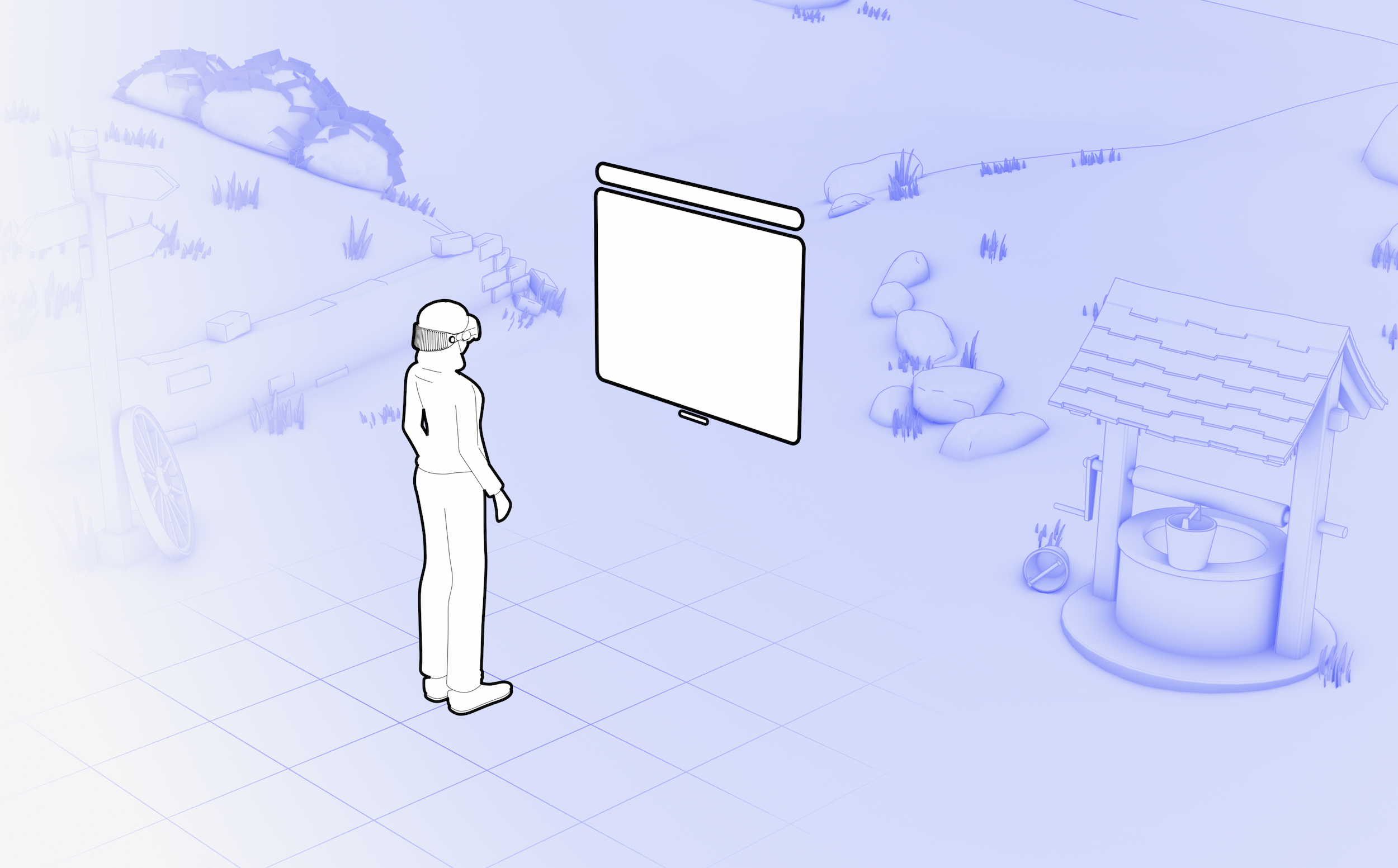
Environments in visionOS are an incredible part of the experience of Vision Pro. They let you transform your physical surroundings into a different place—like Yosemite, Mount Hood, or the Moon. It’s been possible for Apple developers creating immersive apps for visionOS to provide custom environments with their app. Now in Safari 27.0, environments can be provided as part of a website.
You can provide an immersive environment with a simple <model> element and one JavaScript API call. The Immersive API on the model element works similarly to how the Fullscreen API does on video elements. Learn all about it in Explore immersive website environments in visionOS.
By the way, this new Immersive API replaces the developer preview originally called Spatial Backdrop. If you built anything using Spatial Backdrop, migrate it to the Immersive API on the <model> element.
Image controls
Now the <img> element has a controls attribute in HTML. It works just like the controls attribute on the video and audio elements. When present, the browser offers controls to allow the user to adjust or more fully experience the media.
<imgcontrolssrc="panorama.jpg"alt="A panorama of the Dolomites" >
In Safari 27.0 in visionOS when the controls attribute is present, Safari provides a user interface for interacting with spatial and panorama photos. This gives users an easy and consistent mechanism to view photos spatially or immersively, and eliminates the need for web developers to build their own UI.
WebXR
Safari 27.0 adds support for texture array projection layers in WebXR Layers. When creating a projection layer with XRWebGLBinding.createProjectionLayer(), you can now request textureType: "texture-array" so each eye’s view renders into its own layer of a single texture array.
Scroll Anchoring
Many websites inject content into the page as the user is reading or viewing that content. The new content often appears above where the user is currently looking — like images, ads, or comments being injected into the page. In the past, this caused the content the user was reading to be suddenly pushed down, causing a disorienting jump to a random place on the page.
Now with support for Scroll Anchoring, Safari 27.0 instead adjusts the scroll position and keeps the content exactly where it was before the content insertion. As a web developer, you don’t have to do anything to enable this on your site. It just works.
Scroll anchoring is controlled by the overflow-anchor CSS property, which defaults to auto. If you have a specific need where you need to opt out of scroll anchoring, you can use overflow-anchor: none.
CSS
The stretch keyword for sizing
Safari 27.0 adds support for using stretch with the properties width, height, min-width, max-width, min-height, max-height, and flex-basis. The stretch keyword tells an element to fill the available space in the relevant axis.
.card {
    width: stretch;
}
It’s just like using width: 100% — but this time accounting for margins, which prevents overflow. If you’ve been using -webkit-fill-available to solve this need, now is a good time to switch.
Anchor positioning improvements
Safari 27.0 makes three updates to anchor positioning, as the web standard evolves and the tool becomes more powerful.
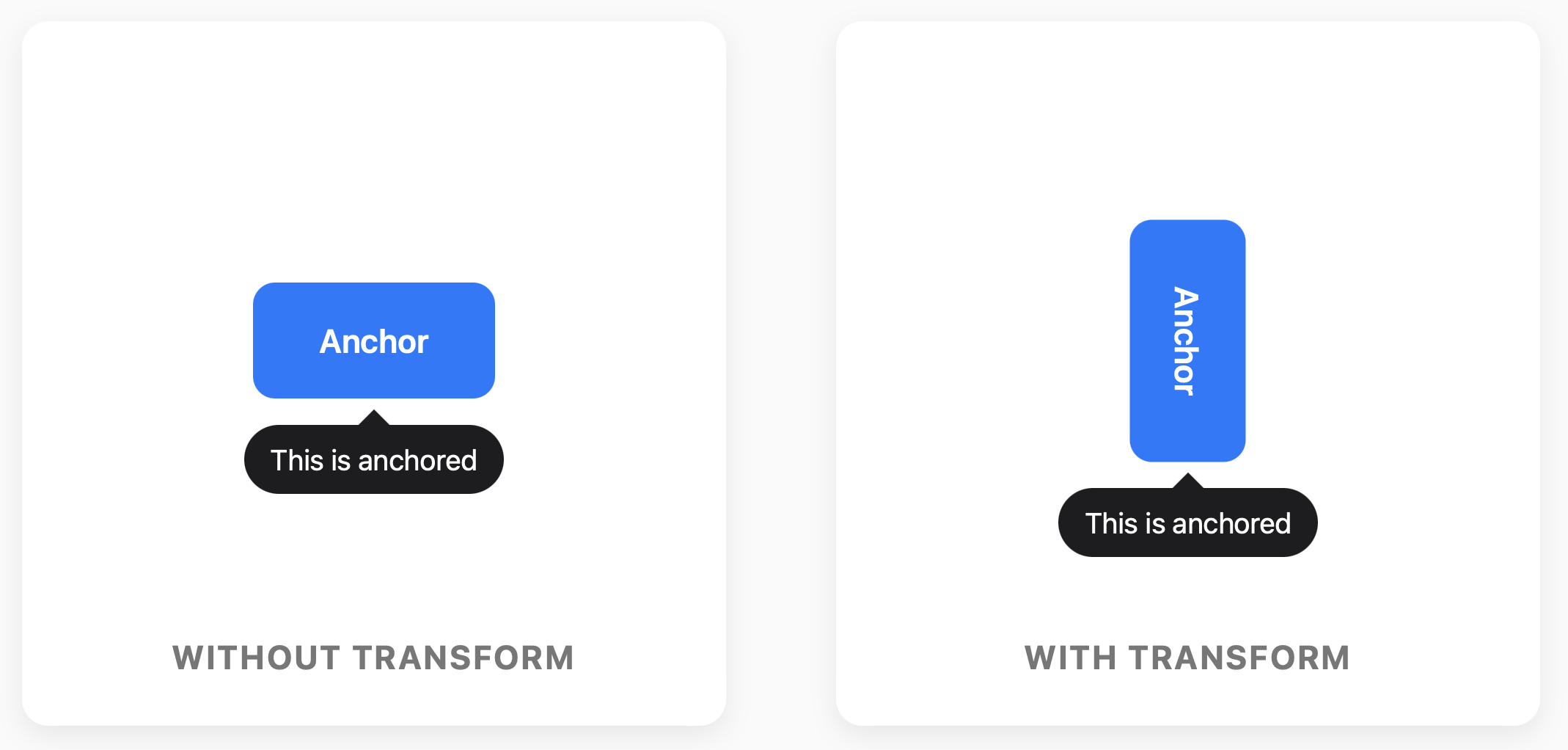
First, we added support for transform-aware anchor positioning. Now, when an anchor element has a CSS transform applied — scale, rotate, translate, or any combination — elements positioned relative to that anchor follow its transformed position instead of its pre-transform layout position. This works for transforms applied via the transform property as well as through the individual translate, rotate, and scale properties. If you use anchor positioning to attach a tooltip, popover, or annotation to a transformed element, it now tracks correctly, even with animated transforms.
Second, the default value for position-anchor changes from auto to normal, fixing a potential side effect where the positioning behavior of elements that don’t even use Anchor Positioning could be impacted. The new value none opts out entirely. The new default, normal, behaves the same as none unless position-area is also set, in which case it behaves like auto did, as originally intended.
And third, Safari 27.0 also adds support for anchor-valid and anchor-visible . Originally, position-visibility: anchors-valid hid an element if any of its required anchor references couldn’t be resolved. However, it wasn’t clear what constituted “required anchor references”. So the CSS Working Group changed the behavior to only look at the default anchor box. To match, some keywords were renamed to drop the plurality. The anchors-valid value is now anchor-valid , while anchors-visible is now anchor-visible. Safari 27.0 aligns with the new behavior, and temporarily supports the old keywords for compatibility.
Color improvements
The new alpha() relative color function is a shorthand for adjusting just the alpha channel of an existing color, without repeating the rest of its channels: alpha(from var(--mycolor) / 80%). It keeps the origin color in its own color space and only changes the alpha value — useful when you want a more transparent or more opaque version of a color you already have, without writing out the full relative color syntax.
The color-mix() function now accepts more than two colors, so you can blend several colors together at once, like color-mix(in oklab, teal 20%, olive 30%, blue 50%). If you leave out the percentages, each color contributes equally.
The image(<color>) function lets you use a solid color anywhere an <image> value is expected. Unlike background-color, which sits underneath all background layers, image(<color>) behaves like a real image layer — it can stack above other background images, get sized with background-size, and be positioned and clipped like any image.
Safari 27.0 also adds support for forwarding missing color components when interpolating between analogous color spaces. Previously, a color with an intentionally missing component (none), like an achromatic gray with no meaningful hue, could get incorrectly assigned a hard 0 when converted into an analogous space for interpolation, producing a subtly wrong blended color. Now the missing component is carried forward as missing instead, so interpolation behaves the way you’d expect.
And more CSS
The light-dark() function now accepts <image> values, not just colors, so you can specify different images for light and dark color schemes in a single declaration: background-image: light-dark(url(day.png), url(night.png)). Gradients work here too.
Safari 27.0 adds support for the :heading pseudo-class, which matches any heading element — <h1> through <h6>. Instead of writing h1, h2, h3, h4, h5, h6 in your selector list, you can just write :heading. Plus, :heading also has a functional form for targeting specific levels, for example, :heading(1, 2) matches only <h1> and <h2>.
The revert-rule keyword is now supported in Safari 27.0. Like revert and revert-layer, revert-rule rolls back the cascade — but specifically to the state as if the current style rule had not been present. It gives you a more precise tool for working with overrides, especially in component libraries and design systems where you want to selectively undo declarations within a rule without losing the rest.
The CSS progress() function now supports a no-clamp option in Safari 27.0. By default, progress() returns how far a value sits between two bounds as a ratio from 0 to 1, clamped to that range. Adding no-clamp removes the clamp, so the result can fall below 0 or above 1, which is useful when you want an effect to keep scaling past its defined bounds instead of flattening out at the edges.
Safari 27.0 adds support for contain: style applying to CSS quotes. This allows you to scope effects of quotes to a certain subtree.
Safari 18.4 added support for text-autospace to control spacing between Chinese/Japanese/Korean (CJK) and non-CJK characters. Safari 27.0 now adds the insert keyword, making text-autospace: ideograph-alpha ideograph-numeric and text-autospace: ideograph-alpha ideograph-numeric insert equivalent.
The Dutch IJ digraph is now supported in Safari 27.0. When the content language is Dutch (lang="nl"), text-transform: capitalize and ::first-letter now correctly titlecase “ij” to “IJ” at the start of words.
Safari 27.0 adds support for the case-sensitive s modifier in CSS attribute selectors. Adding s after the value forces a case-sensitive match — for example, a[href$=".PDF" s] matches only a literal uppercase .PDF. This is the counterpart to the i modifier you may already be using to force case-insensitive matching (a[href$=".pdf" i] matches .pdf, .PDF, .Pdf, and so on); s lets you go the other way when you need an exact-case match on an attribute HTML would otherwise treat as case-insensitive.
Safari 27.0 also adds support for the :host:has() compound selector, letting a shadow host style itself based on what’s inside its own shadow tree. Because :has() can compound onto any selector, :host:has(:checked) or :host:has(::slotted(img)) let a custom element’s host change its own appearance depending on the state of its shadow content — useful for web component authors who want the host to react to what’s inside it without reaching for JavaScript.
Animations
Safari 27.0 adds the animation property to the AnimationEvent and TransitionEvent interfaces, letting event handlers directly access the Animation object associated with the event.
SVG
Safari 27.0 adds quite a few improvements to SVG.
Now the lang and xml:lang attributes are supported inside SVG. Use it to specify the language of text content to ensure correctness of both text rendering and accessibility announcements.
Safari 27.0 adds support for <use> referencing an external SVG file without a # fragment identifier. Previously, in order to point <use href="…"> at another SVG document, you had to name a specific element inside it with a fragment but now <use> can reference the external file on its own. There’s also a fix so <a> elements in SVG are treated consistently with HTML <a> elements for origin/security checks.
Several non-standard and legacy SVG interfaces have been removed to better align with the SVG 2 specification:
SVGLocatable and SVGTransformable interfaces
nearestViewportElement and farthestViewportElement properties on SVGGraphicsElement
viewTarget property on SVGViewSpec
glyph-orientation-horizontal property
Plus, there are a huge number of SVG fixes shipping this year. See the list below for what’s improved in Safari 27.0.
WebAssembly
Safari 27.0 adds support for WebAssembly JavaScript Promise Integration (JSPI). JSPI lets synchronous-looking WebAssembly code suspend and wait for JavaScript Promises, making it much easier to port existing C, C++, Rust, and other language code to the web where that code expects synchronous I/O.
Before JSPI, porting code that called synchronous APIs to Wasm required rewriting everything on top of a callback or async state machine. With JSPI, the Wasm module can suspend at a call site and resume when the Promise resolves — the rest of the module sees straight-line synchronous code. This is a significant capability for the Wasm ecosystem.
JavaScript
Top-Level Await
Safari 27.0 includes a complete standards-compliant rewrite of the ECMAScript module (ESM) loader. The new loader is implemented in native C++ and conforms directly to the ECMAScript specification’s module loading algorithms, replacing an earlier implementation based on an abandoned 2016 WHATWG Loader proposal that predated top-level await entirely.
The rewrite fixes module execution ordering and initialization issues that could cause imports to access exports before they were fully evaluated. It was validated against test262, the Web Platform Tests, and additional test cases.
Top-level await is a foundational feature of modern JavaScript module authoring, and it’s been a real pain point in Safari for a while — a known source of cross-browser bugs that developers building module-based apps had to work around. This fix closes that gap. To learn more, read Fixing Top-Level Await in Safari.
BigInt Math
Safari 27.0 adds support for the TC39 BigInt Math proposal, which brings Math-equivalent operations to BigInt as static functions on the BigInt constructor: BigInt.abs, BigInt.sign, BigInt.sqrt, BigInt.cbrt, BigInt.pow, BigInt.min, and BigInt.max. Like the existing BigInt.asIntN(), they’re called directly on BigInt rather than as instance methods, since BigInts are primitives.
This fills a real gap: Math.sqrt() and friends only accept Number, and routing a BigInt through Number to use them loses precision above 2^53. BigInt.sqrt() and BigInt.cbrt() truncate toward zero, so BigInt.sqrt(16n) returns 4n and BigInt.sqrt(17n) also returns 4n — there’s no ceil, floor, or round variant, since there’s no fractional BigInt to round in the first place. The proposal is still at TC39 Stage 1, so treat the exact API as early and possibly still changing.
import defer
Safari 27.0 adds support for import defer, a TC39 Stage 3 proposal that lets you import a module without evaluating it right away. The module and its dependencies are still loaded and linked up front, as part of the normal module graph — only execution is deferred, until the first time you access a property on the imported namespace:
importdefer*asnsfrom"./big-library.js";
// big-library.js hasn't run yet — no top-level side effects,
// no cost beyond parsing and linking.
ns.doSomething(); // first property access triggers evaluation, synchronously
import defer only works with the namespace form (import defer * as ns) — there’s no equivalent yet for named imports like import defer { x } from "…", and modules that use top-level await can’t be deferred, since evaluation has to stay synchronous when you access the namespace.
This builds on the ECMAScript module loader rewrite described above: it gives you a standards-based way to keep expensive module initialization out of your startup path — large libraries, polyfills, or platform-detection branches where you import several possible modules but only end up needing one.
Web API
Safari 27.0 adds support for the Service Worker static routing API. This lets a service worker declare routing rules that the browser can use to bypass the service worker entirely for certain requests, reducing overhead for high-performance PWAs.
Safari 27.0 adds three improvements to ReadableStream. First, the async iteration with for await...of:
Second, the ReadableStream.from() static method for creating a stream from any async iterable or iterable:
constvegetables= ["Carrot", "Broccoli", "Tomato", "Spinach"];
constasyncIterator= (asyncfunction* () {
yield1;
yield2;
yield3;
})();
// Create ReadableStream from the array
constmyReadableStream=ReadableStream.from(vegetables);
// Create ReadableStream from async iterator
constasyncReadableStream=ReadableStream.from(asyncIterator);
And third, the ability to transfer a ReadableStream , WritableStream and TransformStream across contexts via postMessage().
Web Inspector
Several Web Inspector updates in Safari 27.0 make common debugging tasks easier.
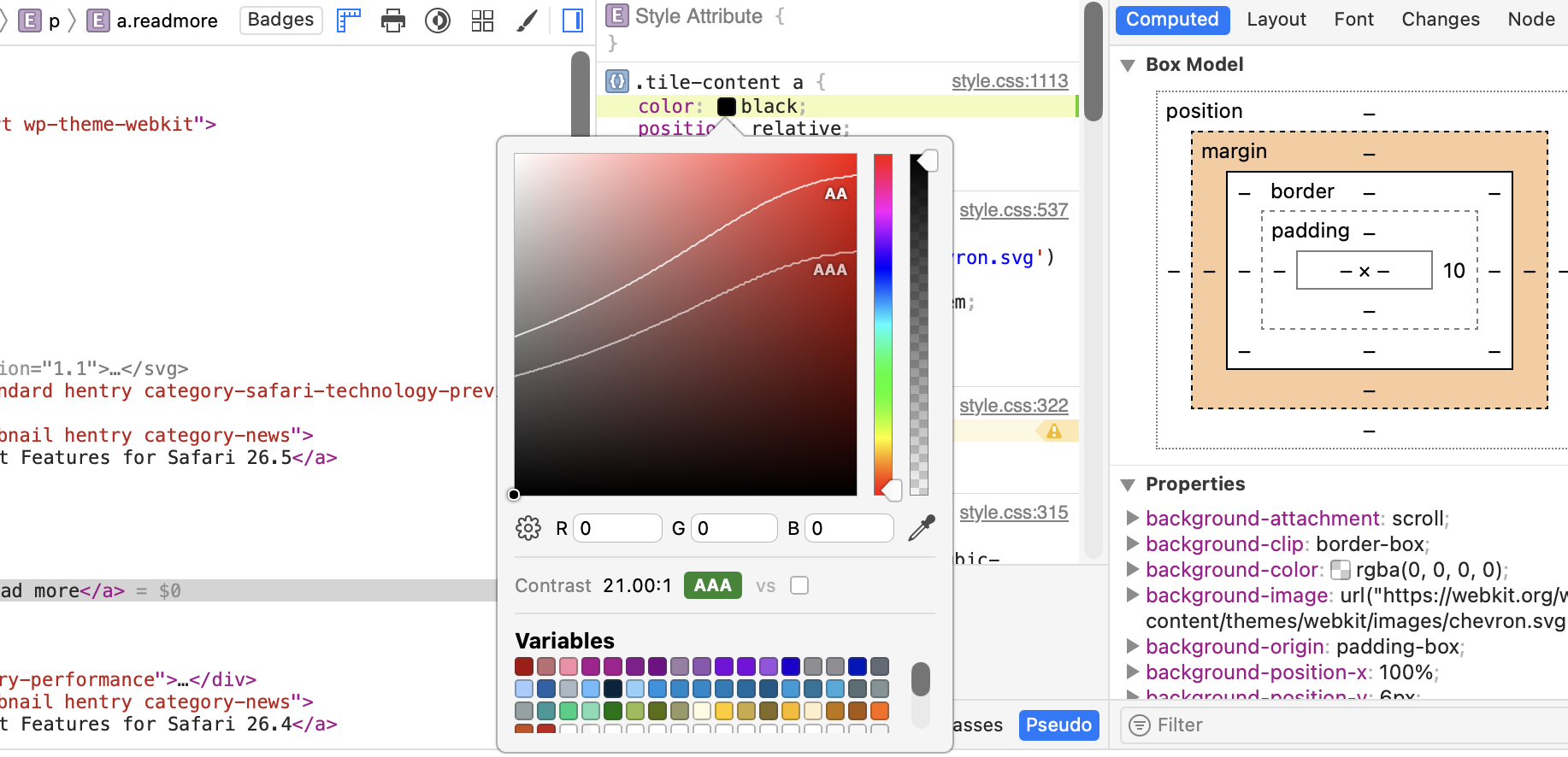
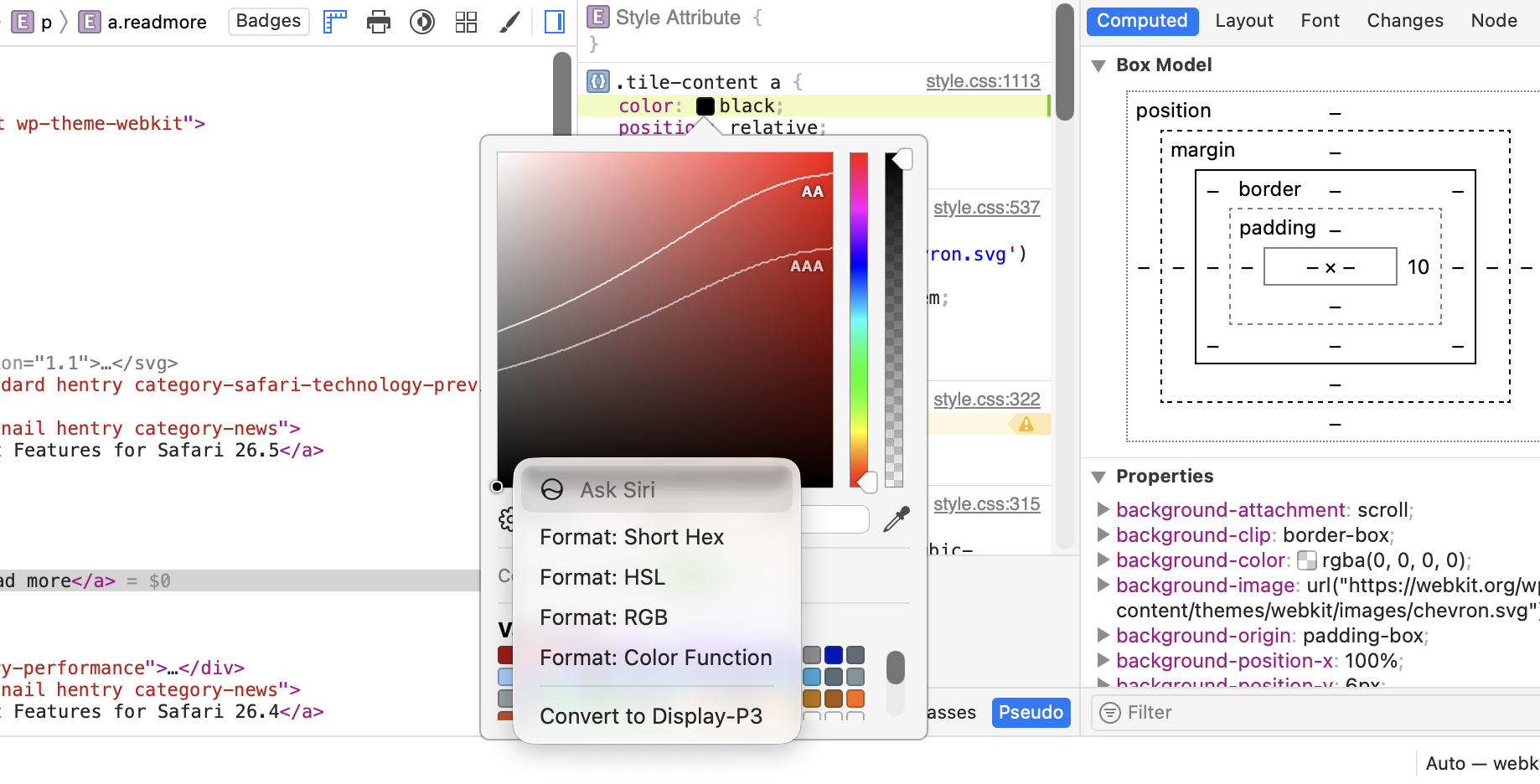
The Color Picker now shows color contrast information inline as you edit. No more switching tools mid-decision to check whether a color combination is accessible. This works when you’re editing both foreground and background colors at the same time.
The Color Picker’s format and gamut controls are also now visible upfront instead of hidden. If you’ve ever gone hunting for those options, this will help.
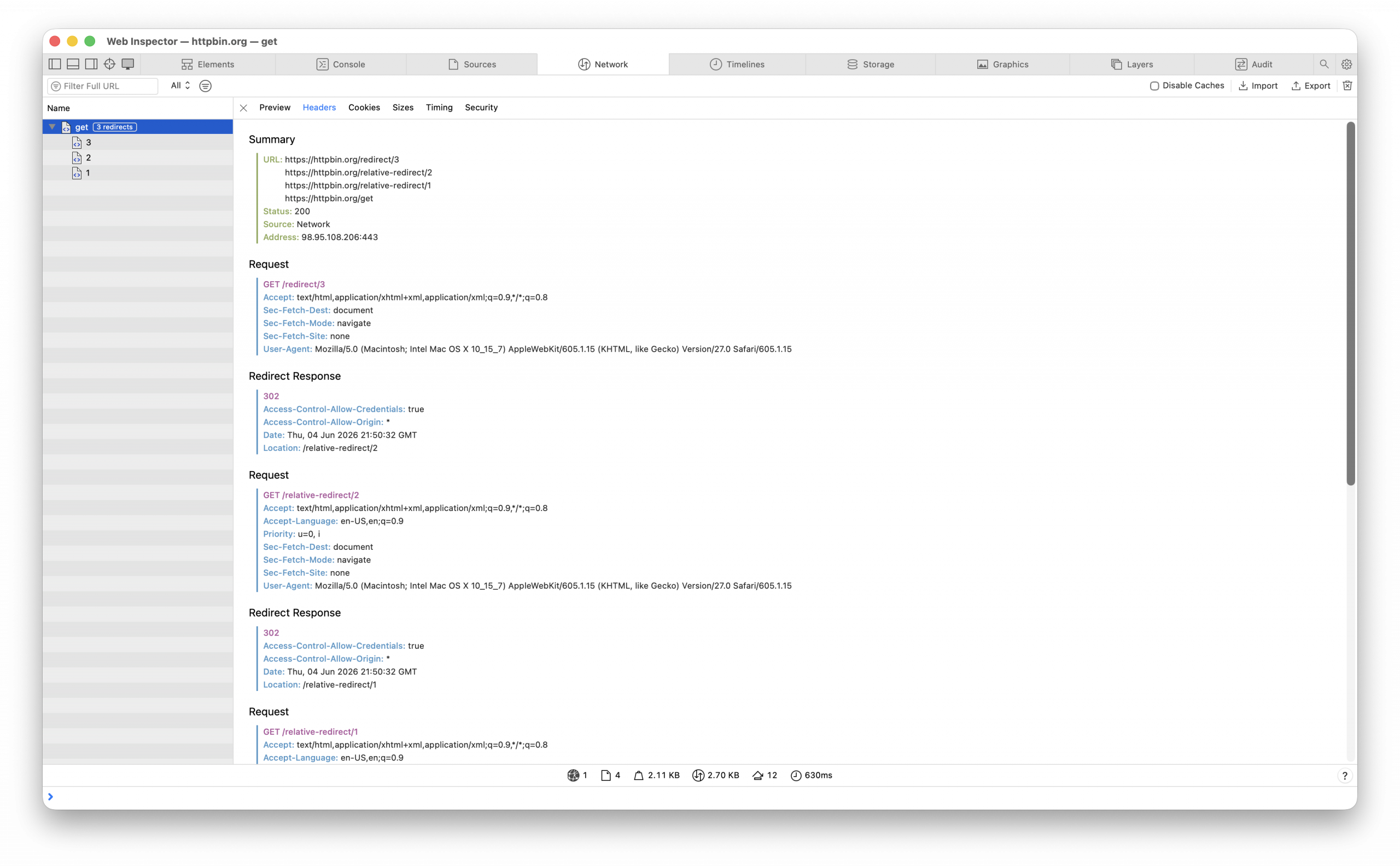
In the Network tab, when a resource redirects, you can now see every request in the chain rather than just the final destination. It’s much easier to figure out what’s actually happening.
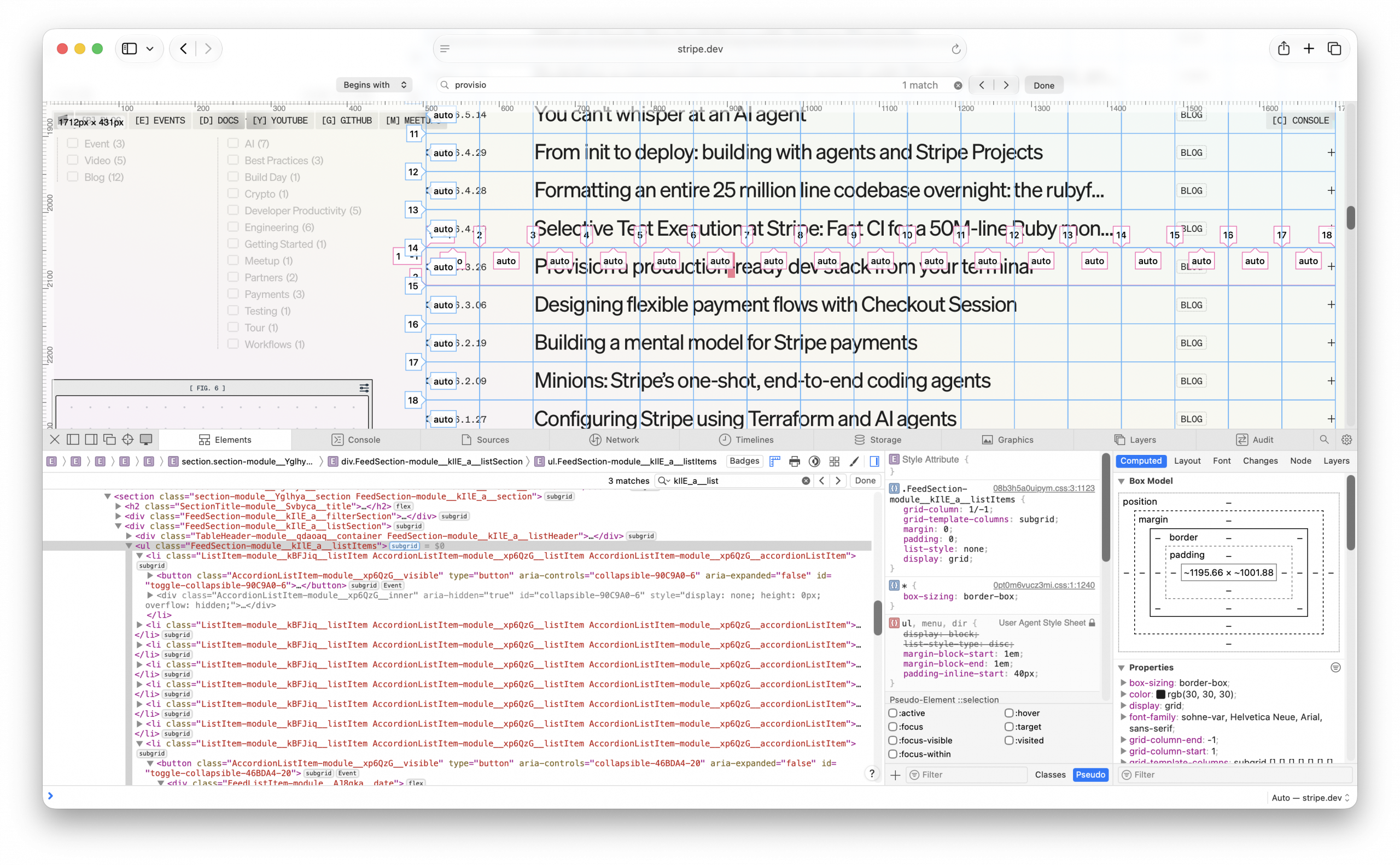
The Elements tab adds Subgrid and Grid-Lanes badges that make it easy to identify subgrid and grid-lanes layout contexts as you explore a page.
The Timeline tab now includes the layout root element in Layout event details, so you can see which element triggered a layout pass. The Timeline view also uses distinct colors for style events like “Style Invalidated” and “Style Recalculated”, making them easy to tell apart from layout events at a glance, and adds a separate column showing the node associated with each layout and rendering event.
Media
Safari 27.0 supports setting TextTrackCue.endTime to Infinity to represent an unbounded cue duration. It’s useful for captions or data cues of live streams.
Safari 27.0 adds support for synchronized video playback on macOS displays using genlock. Genlock synchronizes the timing signal across multiple displays or capture devices, which is important for broadcast, live-event, and multi-display installation setups. Even a few frames of misalignment between screens is visible. When genlock is available, video played in Safari stays in lockstep with the rest of the signal chain instead of drifting on its own clock.
Safari 27.0 improves how HDR images with gain maps are decoded and rendered, decoding them into accelerated backing stores in the GPU process. This is a rendering-pipeline improvement rather than a new API — HDR photos with gain maps (the format used by iPhone’s Adaptive HDR photos) should render more correctly and efficiently, building on gain-map rendering fixes from recent releases.
Safari 27.0 lets you override the color space a hardware VideoDecoder uses when decoding video with WebCodecs. This helps when a stream’s embedded color space metadata is missing or wrong. Now, you can tell the decoder which color space to interpret the frames in instead of being stuck with an incorrect result.
Safari 27.0 adds support for the nextslide and previousslide MediaSession actions, mapping them to the platform’s nexttrack and previoustrack commands, which are the hardware and remotes people already use to skip tracks. If a page hasn’t registered a nexttrack or previoustrack handler but has registered nextslide or previousslide, pressing next or previous invokes the slide handler instead. This lets presentation and slideshow web apps respond to the same physical controls as music and video apps.
Networking
Safari 27.0 adds support for Secure cookies on loopback hosts. For loopback hosts using plaintext HTTP, cookies marked Secure can now be set via JavaScript and Set-Cookie headers, matching the behavior of other browsers, simplifying local development and testing with Secure cookies.
WebGPU
Safari 27.0 now supports the clip_distances built-in value in WGSL shaders. Clip distances are a WebGPU feature that allows vertex shaders to define custom clipping planes, enabling you to discard geometry on one side of an arbitrary plane before rasterization occurs.
Canvas
The radii argument of CanvasPath.roundRect() is now optional in Safari 27.0. Calling roundRect(x, y, width, height) without radii draws a plain rectangle with square corners which is the same as calling rect() , matching the behavior of other browsers.
Rendering
Safari 27.0 adds srgb-linear and display-p3-linear to predefined color spaces, making these linear-light color spaces available in Canvas, WebGL, and other APIs.
MathML
Safari 27.0 updates its MathML operator dictionary to match the MathML Core specification, adding support for multi-character operators (like ++, :=, and /=). This improves spacing and layout for these operators in complex mathematical notation.
In addition, Safari 27.0 supports tabindex, focus(), blur(), and autofocus on MathML elements, improving MathML feature parity with HTML. This makes math content fully participate in keyboard navigation and focus management, which supports interactive educational content and accessibility.
Safari 27.0 also adds support for detecting embellished operators through <mrow> for underover layout. In MathML, an operator wrapped in a grouping element like <mrow> — for example, <mrow><mo>∑</mo></mrow> used as the base of a <munder> or <munderover> — still counts as that operator for layout purposes.
And the href attribute is now deprecated on all MathML elements except <a>, matching how HTML already restricts href to elements built for navigation rather than treating it as a global attribute.
WebRTC
Safari 27.0 adds support for the targetLatency attribute in WebRTC, for specifying a target latency on a receiver. It adds support for the RTCRtpCodec dictionary and related constructs, improving the ability to inspect and configure codecs. It adds support for RTCRtpReceiver.jitterBufferTarget, for tuning the jitter buffer. And it adds video source width and height to RTC stats.
Storage
Safari 27.0 now supports specifying maxAge when setting a cookie via the Cookie Store API.
awaitcookieStore.set({
name:"session",
value:"abc123",
maxAge:60*60*24*7, // one week, in seconds
});
Editing
Safari 27.0 now supports menu items that convert editable text between Simplified and Traditional Chinese characters. It’s available in the “Transformations” submenu of the context menu for relevant text selections.
WebDriver
Safari 27.0 adds WebDriver support for the Digital Credentials API, with commands that let automated tests simulate wallet payloads, wait indefinitely for a credential response, and simulate a user rejecting the request. This lets you write end-to-end tests for Digital Credentials flows without needing a real wallet or person to drive the interaction.
Web Extensions
The runtime.getDocumentId() Web Extension API now has support in Safari 27.0. It adds reporting of uncaught JavaScript exceptions and unhandled promise rejections in Web Extension scripts, making extensions easier to debug. It adds support for propagating user gestures through sendMessage(), connect(), postMessage(), and executeScript() — so extensions can reliably perform actions like media playback that require user activation. And it adds support for the tabId key in chrome.windows.create(), letting an extension move an existing tab into a newly created window instead of only creating new tabs from scratch.
WKWebView
Safari 27.0 helps native app developers do even more using the WKWebView public API for native app developers. Build advanced browser and web-hosting experiences on top of WebKit more easily with the following new features:
WKJSHandle — use JavaScript object references from native code.
WKContentWorldConfiguration — configure content world properties such as autofill scripting, shadow root access, and inspectability when creating a WKContentWorld.
alternateRequest and overrideReferrerForAllRequests on WKWebpagePreferences — modify the main resource request during navigation and apply custom referrer headers across all resource loads.
willSubmitForm callback on WKNavigationDelegate — receive notification of HTML form submissions via a new WKFormInfo object.
mainFrameNavigation on WKNavigationAction and mainFrameNavigation on WKNavigationResponse — correlate navigation actions and responses with each other and their originating loads.
WKWebView.load(_ url:) — load a URL directly without wrapping it in an NSURLRequest.
WKDOMNodeSnapshot — clone DOM nodes, including shadow roots, between different WKWebView instances.
WKHTTPCookieStore.cookies(for:) — retrieve cookies matching a specific URL without fetching the entire cookie store.
WKWebpagePreferences.globalPrivacyControlEnabled — let a native app enable or disable sending the Global Privacy Control (GPC) Sec-GPC HTTP header on outgoing requests for a given page load.
Resolved issues
Accessibility
Fixed an issue where calling speechSynthesis.cancel() removed utterances queued by subsequent speechSynthesis.speak() calls. (46151521)
Fixed an issue where SVG <use> elements referencing <symbol> elements inside an <img> were incorrectly included as unnamed images in VoiceOver’s Images rotor. (98999595)
Fixed an issue where changing the id attribute of an element targeted by aria-owns did not update the accessibility tree. (107644248)
Fixed slot elements referenced by aria-labelledby to correctly use their assigned slotted content for accessible names and ignore hidden slotted nodes. (114500560)
Fixed <meter> element to have consistent labels between aria-label and title attributes. (127460695)
Fixed elements with display: contents and content in a shadow root to have their content properly read when referenced by aria-labelledby. (129361833)
Fixed aria-labelledby to use the checkbox name instead of its value when the checkbox name comes from an associated <label> element. (141564913)
Fixed VoiceOver cursor positioning for elements focused via the drawFocusIfNeeded() canvas API. (146323788)
Fixed grid elements with child rows in a shadow root to properly work with VoiceOver. (153134654)
Fixed an issue where VoiceOver read text within images that have role="presentation". (159304061)
Fixed an issue where content within dynamically expanded <details> elements was not exposed in the accessibility tree. (159865815)
Fixed an issue where the contextmenu event was not fired for elements inside iframes when triggered by keyboard or assistive technology actions such as VoiceOver’s VO+Shift+M. (164128676)
Fixed an issue where changes to <input type="button"> elements inside live regions were not announced by assistive technologies. (168200460)
Fixed ::first-letter text not being exposed in the accessibility tree when no other text accompanies it. (168458291)
Fixed an issue where VoiceOver was unable to access aria-owned rows and their cells in grids and tables. (168770938)
Fixed an issue where VoiceOver could not find focusable splitter elements when navigating to the next or previous form control. (170187464)
Fixed an issue where color picker inputs could not be activated using VoiceOver’s press action. (172218114)
Fixed an issue where interactive elements containing an <svg> named by a child <title> element did not expose an accessible name. (172559238)
Fixed an issue where incorrect bounding boxes were computed for MathML table rows and cells. (172851295)
Fixed an issue where comboboxes did not forward focus to their aria-activedescendant, preventing assistive technologies from interacting with list items. (172931277)
Fixed VoiceOver on Safari unable to navigate to content revealed by disclosure widgets using hidden="until-found". (173228707)
Fixed an issue where aria-owns was not respected when computing the accessible name from element content. (173249317)
Fixed VoiceOver line-by-line reading skipping content in read-only documents. (174349841)
Fixed invalidation of aria-hidden=”true” when focus lands inside the aria-hidden subtree. (174449524)
Fixed VoiceOver’s “Skip redundant labels” setting not being respected on certain web pages. (176297111)
Fixed an issue preventing VoiceOver from following focus() calls for newly added elements. (177167634)
Fixed role computation for elements with prefixes. (178399441)
Fixed VoiceOver jumping to the top of the page when navigating to an element that immediately becomes accessibility-ignored via JavaScript. (179065364)
Fixed VoiceOver reporting the Recent Events table on parks.wa.gov as empty. (179156593)
Fixed an <a> element with a click handler but no href not being exposed as a link. (179398579)
Fixed VoiceOver not announcing the selected state of the day-of-month button when configuring a monthly notification. (180294912)
Fixed stale aria-labelledby when the referenced element dynamically changes its aria-label. (180319221)
Animations
Fixed an issue where animation-fill-mode did not correctly apply viewport-based units after the viewport was resized. (80075191)
Fixed an issue where !important declarations did not override CSS animation values when CSS transitions were also running on the same property. (174367827)
Fixed an issue where identity matrix decomposition generated invalid quaternions, resulting in incorrect transform animations. (174813328)
CSS
Fixed an issue where -webkit-text-fill-color incorrectly overrode text-decoration-color. (47010945)
Fixed shape-outside computing incorrect text wrapping in RTL writing modes. (56890238)
Fixed aspect-ratio intrinsic-size handling in flex layout to align with the specification. (83240099)
Fixed flex layout to use the used flex-basis instead of the specified value for definiteness evaluation. (85707621)
Fixed an issue where the outline offset was too large for outline: auto on macOS. (94116168)
Fixed an issue where element positioning was incorrect when the containing block was an anonymous block. (96548847)
Fixed an issue where box-shadow did not work on display: table-row elements. (96914376)
Fixed text-indent with calc() containing percentages to correctly treat percentage components as zero for intrinsic size contributions. (97025949)
Fixed an issue where out-of-flow content had an incorrect height when set to fit-content. (97492632)
Fixed an issue with percentage size resolution in flex items in quirks mode. (100183902)
Fixed an issue where clip-path: inset() border-radius values did not render correctly at certain element and clip-path sizes. (110847266)
Fixed text-decoration-thickness propagation to inner spans with non-inline style. (111015539)
Fixed -webkit-box flexbox emulation not sizing children correctly inside <fieldset> elements. (114094538)
Fixed: Improved performance on pages using :where and :is selectors. (114904007)
Fixed an issue where elements with display: table could have incorrect layout when borders were present. (116110440)
Fixed aspect-ratio not being respected on flex children when the flex container has position: absolute. (117807518)
Fixed aspect-ratio not working correctly on flex children that also have overflow set. (118926827)
Fixed font-family serialization to preserve quotes around family names that match CSS-wide keywords or generic families. (125334960)
Fixed an issue where elements with border, position: absolute, and aspect-ratio: 1 were not rendered as squares. (126292577)
Fixed an issue where perspective-origin failed to resolve var() references when used as the second value, preventing animations from being applied. (131288246)
Fixed :focus-visible incorrectly matching after a programmatic focus() call triggered by clicking a button with child elements. (134337357)
Fixed an issue where the bottom margin of a last child element collapsed out of a parent with min-height. (134356544)
Fixed a performance issue where pages with many DOM manipulations and complex :has() selectors could freeze. (138431700)
Fixed an issue where a font was downloaded despite no characters in the document falling within its unicode-range. (140674753)
Fixed an issue where @media (prefers-color-scheme: dark) inside an iframe did not match when the iframe’s color-scheme was set to dark. (142072593)
Fixed an issue where background-clip: text did not work on table header elements. (142812484)
Fixed an issue where width: 0 did not collapse a table cell to its minimum size. (142814603)
Fixed an issue where :has(:empty) continued to match after the targeted element’s content was dynamically changed to no longer be empty. (143864358)
Fixed an issue where floats and out-of-flow objects could be incorrectly adjacent to anonymous blocks. (144481961)
Fixed an issue where text gradually disappeared when toggling text-transform on elements with ::first-letter styling. (145550507)
Fixed an issue where height: max-content resolved to zero on absolutely positioned elements when a child had max-height: 100%. (147333178)
Fixed unnecessary text truncation that could occur with always-on scrollbars. (148428628)
Fixed an issue where tables with collapsed borders incorrectly calculated the first row width, causing excess border width to spill into the table’s margin area. (149675907)
Fixed an issue where an inline-flex container with flex-direction: column did not update its width to match the intrinsic size of a child image when the image was not cached. (150260401)
Fixed CSS zoom interacting incorrectly with font-weight, font-style, and font-variant on iPad. (152173269)
Fixed an issue where non-replaced elements with aspect-ratio enforced the automatic minimum size even when min-width was explicitly set to 0. (156837730)
Fixed image aspect-ratio not being preserved when width: 100% and height: 100% are set but no ancestor has a defined width. (162373271)
Fixed an issue where an element can’t anchor to its previous sibling. (162903640)
Fixed :has() style invalidation performance for selectors where :has() is in non-subject position. (163512170)
Fixed CSS Container Style Queries to work when the container has display: contents. (164414720)
Fixed CSS Style Container Query to recognize the default value of a custom property in multiline cases. (165627262)
Fixed an issue where RTL grid scrollable areas did not correctly account for grid layout and scrollbars. (167792896)
Fixed pixel snapping to be applied consistently for all border-width value types. (168240347)
Fixed rendering of linear gradients when all color stops are at the same position. (169063497)
Fixed an issue where insetbox-shadow was incorrectly positioned on table cells with collapsed borders. (169254286)
Fixed position-try-order to interpret logical axis values using the containing block’s writing mode instead of the element’s own writing mode. (169501069)
Fixed CSS Anchor Positioning so that absolutely positioned elements no longer anchor to viewport-fixed-position elements unexpectedly. (170323196)
Fixed an issue where children with percentage heights inside absolutely positioned elements using intrinsic height values (fit-content, min-content, max-content) incorrectly resolved against the containing block’s height instead of being treated as auto. (171179193)
Fixed an issue where percent-height replaced elements computed stale preferred widths in shrink-to-fit containers. (171184282)
Fixed a regression where @scope styles did not apply to slotted elements in web components. (171383788)
Fixed an issue where the table cell nowrap minimum width calculation quirk was applied outside of quirks mode. (171410252)
Fixed an issue where display property transitions caused popovers and <dialog> elements to animate incorrectly when closing. (171454696)
Fixed a performance issue where contain: layout caused significantly slower forced layouts when all siblings created their own formatting context. (171545381)
Fixed an issue where dynamically inserting text before existing content did not update ::first-letter styling. (171649994)
Fixed an issue where underlines were split when a ruby base was expanded due to long ruby text. (171653095)
Fixed an issue where changing color-scheme did not repaint iframe background. (171658244)
Fixed an issue where nested children of a popover element failed to render when using position: absolute. (171735933)
Fixed an issue where color: initial resolved to the wrong color when the system is in dark mode. (172320282)
Fixed an issue where an element with display: contents did not establish an anchor scope when using anchor-scope. (172355302)
Fixed an issue where ordered list numbers with large starting values were clipped off-screen. (172515216)
Fixed <general-enclosed> in media queries to reject content with unmatched close brackets per the <any-value> grammar. (172575115)
Fixed an issue where the rlh unit was double-zoomed with evaluation-time CSS zoom. (172798163)
Fixed an issue where anchor-positioned elements anchored to children of sticky-positioned boxes did not stick correctly. (172884148)
Fixed an issue where pseudo-elements were not sorted correctly when sorting anchor elements by tree order. (173032203)
Fixed outline: auto to correctly respect zoom. (173068660)
Fixed transferred min/max block-size constraints not being applied for intrinsic keyword widths on replaced elements. (173128588)
Fixed outline-offset to work correctly with outline: auto on iOS. (173130230)
Fixed :active, :focus-within, and :hover pseudo-classes to correctly account for elements in the top layer. (173145294)
Fixed a regression where the ic length unit was incorrectly affected by page scaling. (173198587)
Fixed the shape() function to omit default control point anchors in computed value serialization per the CSS Shapes specification. (173233716)
Fixed: Updated SVG and MathML user agent style sheets to use :focus-visible instead of :focus. (173321368)
Fixed an issue where lh and rlh units resolved with double-zoom when line-height was a number value. (173448638)
Fixed outline-width to be ignored when outline-style is auto, matching the specification. (173567890)
Fixed :in-range and :out-of-range pseudo-classes for time inputs with reversed ranges. (173589851)
Fixed :placeholder-shown to correctly match input elements that have an empty placeholder attribute. (173604635)
Fixed an issue where ligatures caused a non-zero layout width for text with font-size: 0. (173840866)
Fixed computed value of auto insets or margins as returned by getComputedStyle() to be zero, if the element uses position-area or anchor-center. (173885561)
Fixed position-area not being able to anchor to an element positioned using anchor functions. (173964030)
Fixed :in-range and :out-of-range pseudo-classes to correctly update when the readonly attribute changes. (173978657)
Fixed scroll overcompensation of fixed, nested anchor-positioned elements, so they no longer lose their position when scrolling. (174010503)
Fixed an issue where view-timeline-inset serialization failed to coalesce identical values. (174096313)
Fixed CSS variable cycle detection to match the CSS Values Level 5 specification. (174105259)
Fixed url() token serialization in CSS custom properties. (174144616)
Fixed text-autospace to correctly handle supplementary Unicode characters. (174148315)
Fixed an issue where flex items with different order values caused incorrect baseline alignment. (174241817)
Fixed an issue where hovering over ::first-letter text showed a pointer cursor instead of the expected I-beam cursor. (174258447)
Fixed an issue where display: grid on a <fieldset> element added extra unnecessary space below its content. (174301311)
Fixed outline radii rendering for elements with a non-auto outline-style. (174328839)
Fixed an issue where aspect-ratio was not honored when the page was zoomed in. (174361289)
Fixed replaced elements to use the transferred size through intrinsic aspect ratio for min-content and max-content sizing. (174386310)
Fixed an issue where height: 100% on a child element altered the layout when the parent’s height was defined via aspect-ratio. (174448267)
Fixed margin collapse to be allowed when the preferred block size behaves as auto, per the CSS Sizing specification. (174547610)
Fixed an issue where document.styleSheets and shadowRoot.styleSheets incorrectly included adopted style sheets, which per the CSSOM specification should only appear in the final CSS style sheets list used for style resolution. (174583340)
Fixed the CSSOM preferred style sheet set name to be established at sheet creation time based on insertion order rather than tree order. (174586058)
Fixed -webkit-box-pack to account for -webkit-box-direction and to handle overflow repositioning correctly. (174588996)
Fixed highlight pseudo-elements such as ::selection and ::highlight to disallow vendor-prefixed properties, aligning with the CSS Pseudo-Elements specification. (174590593)
Fixed cycle detection and nested function call handling in CSS custom functions. (174609179)
Fixed FontFace.loaded to reject when a local() font source fails to load. (174631384)
Fixed an issue where word-break: break-all incorrectly allowed CJK close punctuation to appear at the start of a line. (174656971)
Fixed an issue where word-break: keep-all incorrectly suppressed line break opportunities at CJK punctuation characters. (174658701)
Fixed the FontFace constructor to reject with a SyntaxError instead of a NetworkError when a BufferSource fails to parse, per the CSS Font Loading specification. (174669738)
Fixed the FontFacefamily attribute to return the serialization of the parsed value. (174698351)
Fixed grid layout to correctly handle percentage and calc() values for the specified size suggestion. (174863227)
Fixed :has() sibling invalidation issues related to relation forwarding. (175006235)
Fixed an issue where min-width: auto was not correctly computed for flex items. (175157619)
Fixed an issue where percentage heights inside flex items did not resolve correctly in quirks mode. (175158571)
Fixed an issue where margin-trim: block-start did not apply to blocks nested inside inline boxes. (175162899)
Fixed an issue where dynamically changing display: contents on a <fieldset> legend caused incorrect rendering. (175163337)
Fixed: Improved :has() invalidation performance by including the full selector context in invalidation selectors. (175177078)
Fixed :hover state to repaint correctly on the customizable <select> element. (175273152)
Fixed the CSS preload scanner to resolve relative @import URLs against the <base> element URL. (175305190)
Fixed -webkit-box flex distribution for children with orthogonal writing modes. (175323734)
Fixed calc(infinity) as a flex-grow factor not stretching a flex item to 100% width. (175431146)
Fixed :has() sibling invalidation failing due to an internal bitfield overflow, causing stale styles when siblings are added or removed. (175433733)
Fixed :has() invalidation for sibling combinators when elements are inserted or removed from the DOM. (175441568)
Fixed transition-property not preserving the specified case of <custom-ident> values during serialization. (175467206)
Fixed the will-change property not serializing correctly when used with non-property identifiers or identifiers in a non-standard case. (175482352)
Fixed percentage top and bottom values on relatively positioned elements not resolving when the containing block has aspect-ratio. (175502356)
Fixed: Updated the enhanced <select> element to use self-keywords for anchor positioning. (175505107)
Fixed serialization of multi-word font family names that were always incorrectly quoted due to treating the full string as a single identifier. (175522811)
Fixed text-indent computation when tab stop positions are involved. (175529961)
Fixed calc() margin computations in flex layout. (175532405)
Fixed calc() margin computations for block, fieldset, and table caption layouts. (175548980)
Fixed handling of <li>value attributes in reversed ordered lists. (175558324)
Fixed CSS trigonometric functions to correctly convert degrees to radians. (175575617)
Fixed sibling-index() and sibling-count() inside calc() functions to be correctly simplified. (175590806)
Fixed sibling-index() and sibling-count()to correctly return 0 when used in cross-tree ::part() styling. (175592607)
Fixed the CSS resize handle not working on an element when the handle overlaps a child iframe. (175621855)
Fixed flex container baseline alignment being incorrectly computed for scroll containers by clamping to the border edge. (175631095)
Fixed an issue where inline-level boxes with calc() margins or padding lost the fixed component during intrinsic width computation. (175669222)
Fixed floats with margin-start incorrectly overlapping adjacent floats. (175669464)
Fixed aspect-ratio calculations for block-level elements with size constraints. (175669713)
Fixed aspect-ratio calculations for flex items with percentage cross-size constraints. (175669774)
Fixed aspect-ratio calculations for flex items with definite cross-size values. (175690028)
Fixed revert-layer computing incorrectly when there is a leading empty or space substitution value. (175729680)
Fixed text in nested CSS Subgrid with overflow: hidden clipping content on subsequent items. (175877530)
Fixed CSSStyleDeclaration.setProperty() failing to apply !important priority to an existing inline style property when the value was an integer of 255 or lower. (176099619)
Fixed an issue where flex items with explicit min-height: min-content were incorrectly treated as scrollable, zeroing out their minimum size. (176173688)
Fixed :has() invalidation performance when used inside nested :is() selectors. (176354723)
Fixed sibling-count() & sibling-index() used in @keyframes to re-resolve when siblings change. (176531901)
Fixed -webkit-perspective not establishing a containing block for fixed-positioned descendants. (176729670)
Fixed nested multi-column layouts with three or more levels failing to paginate content across pages. (176741498)
Fixed :has() selector performance by using scope selectors to limit style invalidation traversal for class, attribute, and pseudo-class changes. (176771971)
Fixed non-replaced blocks with aspect-ratio and a percentage max-width collapsing to zero width during intrinsic sizing. (176873776)
Fixed percentage max-width on elements with aspect-ratio resolving against the wrong axis in perpendicular writing modes. (176879597)
Fixed z-index not applying to statically-positioned display: -webkit-box items to align with Firefox and Chrome behavior. (176886461)
Fixed an interaction between an img with max-width and surrounding elements that caused the parent’s layout to compute incorrectly. (176889859)
Fixed flex containers using box-sizing: border-box providing the wrong cross size to stretched flex items. (176989934)
Fixed flex containers with aspect-ratio-derived height not providing a definite cross size to their flex items. (177085129)
Fixed SVG images with no intrinsic dimensions collapsing to zero height inside column flex containers. (177086497)
Fixed incorrect margin offsets for inline <div> positioning to fix the broken layout of paragraph spacing on some sites. (177139092)
Fixed shrink-to-fit boxes to update their width when they gain or lose a scrollbar. (177172896)
Fixed CSS zoom to be animatable by the computed value. (177411607)
Fixed preferred width to trim trailing whitespace before a preserved newline. (177426037)
Fixed inline layout to apply margins of preceding block content at the line start eagerly when block-in-inline content is involved. (177438841)
Fixed CSS attr() to align with disallowing the <url> type. (177540489)
Fixed CSS attribute selector case-insensitivity handling for HTML attributes. (177547701)
Fixed ::first-letter to use the correct definition of punctuation. (177599506)
Fixed offset-path to respect <coord-box> when blending shape() and basic-shape paths. (177685457)
Fixed stretch-fit width with aspect-ratio providing a definite cross size to flex items when it should not. (177705930)
Fixed an aspect-ratio flex container resolving descendant percentage heights against a stale logical height. (177711905)
Fixed inline-block baseline to fall back to the bottom margin edge when the content has no in-flow line boxes. (177753094)
Fixed programmatic focus after keyboard interaction to match :focus-visible. (177850766)
Fixed @font-facefont-style to serialize ‘oblique 0deg’ as ‘normal’. (178185291)
Fixed serialization of explicit font-variant longhands set after a system font. (178251443)
Fixed CSSFontFeatureValuesRule.fontFamily to be settable rather than readonly. (178323504)
Fixed font-style: oblique to be clamped against the font’s slant range rather than the @font-face weight range. (178324521)
Fixed font-style: oblique angle being applied to the variable font ‘slnt’ axis with the wrong sign. (178326843)
Fixed background and mask coordinated property list resolved values to match the specification. (178378309)
Fixed longer hue interpolation when one input is none. (178476769)
Fixed serialization of @font-facefont-weight, font-width, and font-style oblique descriptor ranges with equal bounds to collapse to a single value, per CSSOM. (178517226)
Fixed line-through to render with the correct thickness over a descendant inline box. (178547557)
Fixed font-synthesis to avoid synthesizing styles outside of a font’s variable axis range. (178550149)
Fixed font-style: italic to slant a variable font whose @font-face uses an oblique angle. (178566326)
Fixed an issue where font-synthesis incorrectly applied synthetic oblique to variable fonts declared with @font-face. (178698772)
Fixed SVG intrinsic sizing so that height: max-content uses the used width rather than the default width. (178712792)
Fixed serialization of various CSS at-rules not escaping identifiers. (178750383)
Fixed color-mix() to allow percentages that sum to zero. (178758710)
Fixed color-mix() resolution for the new 0% rules. (178921722)
Fixed a flex item with min-width: min-content being clamped to a smaller max-width. (178777567)
Fixed :last-child and related selectors incorrectly gating on parser state outside of style resolution. (178879939)
Fixed synthetic bold not being applied for a variable font whose @font-facefont-weight descriptor explicitly restricts it to normal. (179001275)
Fixed changing the color-scheme of an <iframe> not invalidating the appearance of the embedded document. (179177141)
Fixed an issue where CSS math functions produced an incorrect signed zero for subtraction, min(), max(), clamp(), and mod(). (179534440)
Fixed serialization of hsl() and hwb() colors that contain at least one none component value so they preserve their hsl()/hwb() function rather than converting to rgb(). (179854247)
Fixed CSS scroll snap re-snap to prefer the fragment-targeted (:target) snap area over other aligned snap targets. (180108825)
Fixed an issue where input[type=hidden] was not set to display: none !important in the user-agent stylesheet. (180137214)
Fixed the CSS preload scanner failing to preload @import rules that follow an @layer statement rule. (180170656)
Fixed serialization of CSSViewTransitionRule. (180170814)
Fixed MediaList.deleteMedium() to parse its argument as a media query and remove all matching queries. (180270019)
Fixed MediaList.appendMedium() to parse its argument as a single media query and suppress duplicates. (180291283)
Fixed grid items with stretch or fit-content preferred sizes computing incorrect minimum-content contributions when sizing tracks. (180748205)
Fixed inserting a CSS rule while a view transition is active causing the group animation to snap to its final state. (181100818)
Fixed CSS var() to only resolve its fallback when the first argument resolves to the guaranteed-invalid value. (181114298)
Fixed navigating away from a render-blocked document before its first rendering opportunity incorrectly firing pagereveal and starting an outbound cross-document view transition. (181191512)
Fixed anchor-center in vertical writing modes not being scroll-adjusted along the block axis. (181413103)
Canvas
Fixed an issue where a 2D canvas element unnecessarily forced a compositing layer. (172864747)
Fixed canvas 2D context to set the origin-clean flag when reset. (177858398)
Fixed canvas fillText with textAlign=center misplacing complex-shaped text. (178682402)
Editing
Fixed an issue where characters styled with ::first-letter were not selectable. (5688237)
Fixed an issue where explicitly setting a font size that matched a legacy <font> size would be incorrectly substituted with the legacy size, causing inconsistent rendering across different default font size configurations. (15292320)
Fixed drag images of DOM elements with CSS transforms not rendering correctly. (99614217)
Fixed an issue where the Font Picker style selection became unusable after changing fonts when editing multiple lines of text. (110651645)
Fixed an issue where adjusting text selection with touch handles was prevented by JavaScript touch event handling on some websites. (151851274)
Fixed an issue where execCommand('FormatBlock') did not preserve inline styles of replaced block elements, causing text formatting to be lost when pasting content. (157657531)
Fixed opaque DOM mutations coming from dictation on iOS. (163454428)
Fixed an issue where text-indent flickered or was ignored on contenteditable elements while typing. (170280101)
Fixed an issue where text selection would jump unexpectedly when selecting absolutely-positioned content inside an element with user-select: none. (170475401)
Fixed an issue where text selection was lost when focus transitioned from a contentEditable element to a non-editable target. (171221909)
Fixed an issue where composition events were dispatched in the wrong order during IME input, causing incorrect character rendering with Devanagari and other input methods. (174330850)
Fixed the Edit menu’s Copy item being incorrectly enabled when there was no selection in the web page. (176061974)
Fixed a regression where Vietnamese and Korean keyboard input methods incorrectly exited modeless composition mode, requiring a double spacebar press to complete each word. (176847897)
Fixed a recent regression that “Zhuyin – Traditional” input method stalling for multiple seconds when composing Chinese text. (177042301)
Fixed typing Hindi (InScript) input on Google Docs. (177643899)
Fixed iOS selection behavior so that selection is now possible while focus is inside editable content. (178846185)
Fixed deletion in an editable table leaving an empty trailing table row behind. (180877315)
Fixed vertical caret movement in editable content ignoring the requested editable-type parameter. (181000174)
Fixed the page scrolling on its own while adjusting a text selection inside a fixed-position element, such as a search field pinned to the top of the page. (182770935)
Encoding
Fixed an issue where CJK encoding state was not reset appropriately during text decoding. (174649963)
Fonts
Fixed an issue where synthetic bold incorrectly added advance width to zero-advance glyphs. (179418570)
Forms
Fixed an issue where keyboard commands such as paste did not work in form fields that restrict input to numbers. (4360235)
Fixed an issue where keyboard tabbing position was lost when a focused button became disabled, causing focus to jump to the beginning of the page. (120676409)
Fixed an issue where a positive margin-top on a <legend> element inside a <fieldset> did not shift the fieldset down. (141267953)
Fixed an issue where small range input slider thumbs were difficult to interact with on iPadOS and visionOS by expanding their touch hit area. (147428926)
Fixed <datalist> suggestions appearing with white text on a white background in dark mode after typing. (168676757)
Fixed an issue on iOS where typing into an <input> element associated with a <datalist> was intercepted by type-to-select behavior. (173346270)
Fixed: Made the <input type="checkbox" switch> control behave more like other controls with regards to native appearance CSS properties. (173487610)
Fixed identically sized buttons to render with consistent corner radius. (173786057)
Fixed an issue where <select multiple> did not always fire onchange when the mouse button was released far outside the element. (173882861)
Fixed an issue where <select> control rendering was broken in vertical writing mode. (174068353)
Fixed a performance issue where parsing <select> elements with thousands of <option> children via innerHTML caused O(n²) overhead due to repeated list recalculation. (174244946)
Fixed an issue where date and time input types without min or max attributes incorrectly matched the :in-range pseudo-class. (174829899)
Fixed an issue where cloned <input> and <textarea> elements did not preserve their user-modified state. (174892989)
Fixed <option> elements to correctly implement the HTML specification’s dirtiness concept for tracking user-modified selected state. (175306111)
Fixed the select picker appearing at an incorrect position when the <select> element is anchor positioned. (175454476)
Fixed the default display value for <optgroup> and <option> elements to block, matching the behavior of other browsers. (175473184)
Fixed field-sizing: content clipping the placeholder on number inputs that have no value. (175883299)
Fixed <option> and <optgroup> elements to match the :disabled pseudo-class when inside a disabled <select>. (176559708)
Fixed a box with percentage offset (e.g. top: 100%) being mispositioned when its containing block is out-of-flow with percentage height. (177181803)
Fixed the concentric inner-button corner radius on horizontal text form controls incorrectly ignoring the bottom inset. (180869927)
Fixed a number of issues with the default styles for customizable <select> with appearance: base-select, including spacing, borders, border-radius, overflow, cursors, optgroup styling, picker dialog shadow, and increased contrast colors. (183345556)
HTML
Fixed an issue where an HTML map element without a name attribute did not match its associated image using the id attribute. (12359382)
Fixed sequential focus navigation to skip elements that do not meet the specification’s focusability requirements. (103370883)
Fixed viewport <meta> parsing to correctly treat form feed as ASCII whitespace per the HTML specification. (108440799)
Fixed parsing of javascript: URLs to align with the specification. (147612682)
Fixed a severe performance regression causing dynamic insertion of <img> elements with a src attribute to be dramatically slower than other browsers. (166201075)
Fixed an issue where a third nested <iframe> using the srcdoc attribute did not render. (167917471)
Fixed incorrect parsing of pixel-length margin attributes on <body>, <iframe>, and <frame> elements. (171240848)
Fixed popover light dismiss to account for input buttons. (171352032)
Fixed popover light dismiss to account for disabled command buttons. (171358576)
Fixed an issue where replaceWith() stopped processing remaining nodes if a script in the replacement removed a sibling. (172753019)
Fixed an issue where HEIC images were incorrectly converted to JPEG when uploaded via drag-and-drop or file input. (173206598)
Fixed the HTML preload scanner to skip preloading stylesheets that have the disabled attribute. (173378582)
Fixed an issue where setting the rel attribute on an <a> element multiple times did not clear prior link relations. (173567839)
Fixed the HTML parser fast path to correctly process escaped attribute values longer than one character. (173673581)
Fixed the HTML parser fast path to correctly detect nested <li> elements. (173983892)
Fixed the HTML parser fast path to use the adjusted current node for MathML and SVG integration point checks. (174096305)
Fixed document named item collection to include all <object> elements, aligning with other browser engines. (174537345)
Fixed window.open() to correctly consume user activation when creating a new browsing context, aligning with the HTML specification. (174587258)
Fixed remaining issues with <img sizes="auto"> to fully align with the specification. (174684058)
Fixed nested calls to requestClose() incorrectly firing multiple cancel events and causing a stack overflow. (174850509)
Fixed requestClose() incorrectly removing the open attribute when called on a disconnected dialog element. (174855725)
Fixed an issue where dir=auto on <slot> elements did not update when slotted content changed. (174871706)
Fixed an issue where <option> elements rendered incorrectly when the label attribute was empty. (174979446)
Fixed an issue where the preload scanner incorrectly skipped <source> elements with an empty type attribute inside <picture>. (175094037)
Fixed innerText to emit a newline for empty <option> or <optgroup> inside <select>. (175245381)
Fixed HTML floating-point number parsing to correctly handle values with a leading + sign. (175300431)
Fixed innerText to no longer emit newlines for visibility: hidden block elements. (175569426)
Fixed innerText to correctly emit blank lines around <p> elements regardless of their CSS display value. (175729427)
Fixed the speculative preload scanner to no longer incorrectly preload scripts inside SVG elements. (175800116)
Fixed <a rel="ar"> elements wrapping <model> elements to correctly enter ARQL without extra steps and to display the AR badge. (176410897)
Fixed innerText on tables to no longer emit spurious trailing newlines and to preserve row-exit newlines after empty rows. (176635985)
Fixed the HTML preload scanner not preloading resources referenced by legacy <image> tags. (176712749)
Fixed a regression that broke pushState with custom application URL schemes. (177547157)
Fixed outerHTML setter to align with the HTML standard. (177788638)
Fixed fragment parsing of xmlns="" inheritance and annotation-xml encoding. (177808494)
Fixed createHTMLDocument() to no longer leave the body in a parsing state. (178440940)
Fixed text fragment matching so that a prefix is no longer matched outside of a word boundary near the start of the document. (178467104)
Fixed an issue where <link rel=preload as=json> incorrectly triggered a preload. (179843455)
Fixed an issue where the deprecated align="center" attribute was not treated as identical to align="middle" per spec. (180128710)
Images
Fixed an issue where inserting an image with a srcset attribute into a dynamically created iframe resulted in an invisible image. (66849050)
Fixed naturalWidth and naturalHeight returning incorrect values for SVG images without intrinsic dimensions. (141196049)
Fixed an issue where HDR images would flicker and lose their HDR appearance when overlapping layers animate. (163382580)
Fixed an issue where adopting a standalone img element did not update its image data. (172856773)
Fixed images appearing then quickly disappearing on OpenTable search results. (176275269)
Fixed rendering performance of HDR images that have gain-maps by using GPU-backed surfaces. (176605566)
Fixed <picture><source> candidates being speculatively preloaded even when the inner <img> has loading=lazy. (177833110)
Fixed HTMLImageElement.decode() to no longer resolve spuriously after adoption, src change, or cached-image reuse. (178118012)
Fixed a regression where RGB gain map images were decoded to 8 bits per channel, causing a color shift and incorrect brightness. (179152566)
Fixed handling of the gain-map target pixel format when decoding HDR images to fall back safely when the format cannot be parsed. (181180757)
JavaScript
Fixed multiple top-level await correctness bugs with a rewrite of the ES module loader for standards compliance. (97370038)
Fixed regular expressions in Unicode mode to not count non-capturing groups and modifiers toward the number of available backreferences. (167746769)
Fixed %TypedArray%.prototype.subarray to calculate beginByteOffset correctly to align with ECMA-262. (168143600)
Fixed the trace behavior of RegExp.prototype[Symbol.split] to align with ECMA-262. (168288878)
Fixed Array.prototype.concat to correctly handle arrays with indexed accessors, preventing getter reentry from bypassing Symbol.isConcatSpreadable checks. (172237596)
Fixed an issue where a greedy or non-greedy non-BMP character class in a regular expression could advance the index past the end of input. (172978772)
Fixed an issue where class instance field initializers did not have the correct evaluation context when used inside arrow functions and nested scopes. (173296563)
Fixed TypedArray [[Set]] to check the receiver before writing to the typed array. (173386404)
Fixed %ArrayIteratorPrototype%.next() to return { done: true } instead of throwing a TypeError when the source TypedArray is detached and the iterator has already completed. (173759106)
Fixed an issue where a fixed-count mixed-width character class in a regular expression did not correctly restore the index on backtrack. (173972458)
Fixed an issue where regular expressions with non-BMP characters could skip valid match positions when alternating between patterns. (174200307)
Fixed an issue where regular expression captures were not properly cleared when backtracking out of fixed-count parenthesized groups and negative lookaheads. (174201284)
Fixed an issue where import { “``" as x } was incorrectly treated as a namespace import instead of a named import using the string “" as a ModuleExportName. (174314099)
Fixed an issue where RegExp.prototype.exec and RegExp.prototype.test could match against a stale pattern if lastIndex has a valueOf that calls RegExp.prototype.compile. (174461752)
Fixed an issue where async functions using module-scoped variables could fail when the DFG JIT optimized scope resolution. (174626957)
Fixed an issue where Intl.Segmenter with granularity: "word" incorrectly reported isWordLike: false for numeric segments. (175057894)
Fixed Object.defineProperties to call Proxy traps in the correct order. (175068687)
Fixed an issue where Intl.Locale did not canonicalize before overriding the language. (175092327)
Fixed time zone identifiers to return primary IANA time zone IDs instead of legacy ICU identifiers. (175098682)
Fixed the ArrayToPrimitive fast path incorrectly ignoring overrides of Object.prototype.valueOf. (175122250)
Fixed input position corruption in regular expression backward matching when rewinding over a surrogate pair. (175122467)
Fixed Intl.DateTimeFormat to preserve the original legacy timezone identifier instead of replacing it with the primary IANA ID. (175206605)
Fixed Promise.prototype.finally to throw a TypeError when @@species is not a constructor, matching the behavior of other browsers. (175290627)
Fixed the regular expression engine to reject dangling hyphens in character class syntax when using the /v flag. (175559808)
Fixed a performance issue with module resolution by limiting cache population to star-resolution and indirect-resolution cases. (175826413)
Fixed a performance issue with TypedArray.prototype.lastIndexOf by adding SIMD-accelerated reverse search for numeric types. (175904377)
Fixed a performance issue where building a module namespace with many export statements was significantly slower than necessary. (175949532)
Fixed DataView constructor to match specification-defined argument validation order and error throwing behavior. (176110210)
Fixed an issue where Array.prototype.concat could produce incorrect results when combining arrays with incompatible indexing types. (176219964)
Fixed multiple TypedArray constructor edge cases involving buffer sequences to align with the specification. (176724918)
Fixed WebAssembly.Memory and WebAssembly.Module to align their cloning and transferring behavior with SharedArrayBuffer. (176792374)
Fixed Array.prototype.join to include prototype elements added during element toString invocation. (178055452)
Fixed an issue where Temporal.Instant operations were not aligned with the spec’s abstract operations. (179844859)
MathML
Fixed the MathML operator dictionary to correct the stretchy property for several operators, resolving Web Platform Test failures. (170901728)
Fixed an issue where symmetric non-stretchy large operators were not centered around the math axis. (170905663)
Fixed an issue where dynamic changes to <mo> element attributes did not trigger a relayout. (170907029)
Fixed an issue where minsize and maxsize defaults and percentages did not use the unstretched size as specified. (170908253)
Fixed positioning of the <mprescripts> element within <mmultiscripts> layout. (170909975)
Fixed an issue where the MathML fraction bar was not painted when its thickness was equal to its width. (170934351)
Fixed an issue where <none> and <mprescripts> elements were not laid out as <mrow> elements in MathML. (170940035)
Fixed an issue where MathML token elements ignored -webkit-text-fill-color when painting math variant glyphs. (172020318)
Fixed padding and border rendering on <msqrt> and <mroot> elements and corrected token sizing for mathvariant. (173081436)
Fixed absolute positioning of elements inside MathML by ensuring logical height is updated. (173088146)
Fixed tabIndex values not being set correctly for MathML elements. (174734133)
Fixed spacing values for prefix operators +, −, ±, ∓, ∇, and infix operator ⋉ in the MathML Core operator dictionary. (176652211)
Fixed the operator dictionary entry for the ∂ prefix operator to use the correct spacing values (3, 0) instead of (2, 1). (176693587)
Fixed nonce-hiding support for MathML elements to align with the HTML specification. (176875058)
Fixed MathML operators routed through MathOperator being invisible when their glyph only exists in a fallback font. (178096170)
Fixed MathML to use MathML Core fallback values for script layout constants. (179177178)
Media
Fixed <audio> and <video> controls rendering incorrectly when rotated via CSS transform. (37516619)
Fixed an issue where decoding WebM audio files with more than two channels would fail. (82160691)
Fixed an issue where preservesPitch and playbackRate were not correctly handled on an HTMLMediaElement connected to an AudioContext via createMediaElementSource. (93275149)
Fixed MediaCapabilities.decodingInfo() incorrectly reporting VP8 in WebM as not supported. (127339546)
Fixed WebVTT to not display cues that are larger than the viewport. (136809012)
Fixed an issue on iPad where exiting fullscreen on a media document incorrectly navigated back to the previous page instead of returning to the inline view. (137220651)
Fixed an issue where the WebCodecs VideoDecoder API output frames in an incorrect order for videos containing B-frames. (145093697)
Fixed an issue where the darkening overlay on inline video controls made accurate scrubbing difficult and displayed video content incorrectly on macOS. (161271114)
Fixed an issue where WebM with VP9/Vorbis fallback would not play. (164053503)
Fixed video playback failing when the declared MIME type in a <source> element does not match the actual content type served by the server. (166181001)
Fixed an issue where text selection was broken after pausing a video when the media player ran in the content process. (167727538)
Fixed HTMLMediaElement.currentTime to report smoothly progressing values instead of updating only at fixed intervals. (170115677)
Fixed an issue where MP4 files containing Opus audio tracks could not be decoded with decodeAudioData. (170196423)
Fixed an issue where the VideoFrame constructor did not handle the video color range correctly for NV12 (I420 BT601) video frames. (170299037)
Fixed an issue where Live Text selection was unavailable on paused fullscreen videos. (170817667)
Fixed an issue where FairPlay-protected VP9 content failed to play via MediaSource. (171210968)
Fixed media controls not appearing when tapping videos in the LinkedIn feed on iPad. (171231918)
Fixed an issue where autoplay would proceed before default text tracks finished loading. (171699293)
Fixed the currentTime getter to return defaultPlaybackStartPosition when no media player exists. (171722368)
Fixed HTMLMediaElement to fire a timeupdate event when resetting the playback position during media load as required by the specification. (171785463)
Fixed an issue where the media player preload attribute was not properly updated when the autoplay attribute was set. (171883159)
Fixed an issue where seeking in a WebM video did not work correctly while content was still loading. (172473039)
Fixed an issue where media playback could not move to the next item in a playlist when the tab was in the background. (172676372)
Fixed an issue where scrubbing a video in full-screen mode could cause it to exit full-screen. (172682230)
Fixed an issue where HDR video content appeared washed out due to colorspace information being lost during processing. (172721079)
Fixed Encrypted Media Extensions to check support for the full content type including codecs, rather than only the MIME type. (173852931)
Fixed an issue where setting HTMLMediaElement.volume had no effect when the element was connected to an AudioContext. (174278899)
Fixed ImageCapture to correctly queue takePhoto() and applyConstraints() requests to avoid concurrent capture session reconfiguration. (174950018)
Fixed a regression where videos would stop playing and lose audio after a few seconds on some websites. (174966899)
Fixed an issue where U+0000 (NULL) characters were not allowed in VTTCue text content. (175084171)
Fixed video content disappearing after switching to another tab and back. (175257980)
Fixed WebVTT cue settings line parsing failures. (175296476)
Fixed subtitles and closed captions not appearing in fullscreen video on iOS. (175298523)
Fixed <audio controls> to not show the “Subtitles” option when no subtitle track is present. (175357130)
Fixed ::cue() selectors to correctly match the WebVTT root object in addition to child nodes. (175550173)
Fixed currentTime on iOS to update more frequently during media playback. (175774587)
Fixed Media Source Extensions readyState not being updated immediately when playback stalls due to a gap in buffered data. (176330683)
Fixed timeupdate events being fired during seeking before the seek operation completes. (176861767)
Fixed the ended event not always firing when the MediaSource duration is changed to match the current playback position. (176863546)
Fixed a MediaSource issue where the decode-key cleanup in coded frame processing was incorrectly removing non-orphaned samples. (176971800)
Fixed currentTime() returning a stale value after the playback rate was changed from zero to a non-zero value. (177046564)
Fixed MSE SourceBuffer.remove() to no longer remove an extra sample, and fixed buffered ranges to cover the correct ranges. (177065364)
Fixed an HTMLMediaElement that doesn’t display in an infinite scrolling webpage to use a viewport listener that notifies the media player about the visibility of the element. (177081214)
Fixed EME to use a 10 second key wait timeout. (177936893)
Fixed EME OCDM to prevent a spurious keystatuses event when all keys have expired. (177939767)
Fixed getSupportedCapabilitiesForAudioVideoType (EME) to no longer include unsupported capabilities. (178142768)
Fixed MediaSession.setActionHandler to not throw an exception when called. (178167294)
Fixed AudioData.copyTo to throw RangeError when frameOffset equals numberOfFrames. (178609688)
Fixed MIDI and AVI MIME signature matching due to a typo in MIME sniffing. (178661530)
Fixed PannerNode to no longer produce non-finite samples for edge-case distance parameters. (178784571)
Fixed the VP codec parameters string to no longer zero-pad bitDepth based on transferCharacteristics. (179210193)
Fixed an issue where the MediaSource text-track removal loop always processed only the last track. (179508398)
Fixed an issue where isValidVideoFrameBufferInit() tested displayWidth and displayHeight presence against themselves instead of the correct properties. (179514279)
Fixed an issue where MediaMetadata artwork sizes parsing read the wrong substring for the height value. (179523057)
Fixed an issue where the pictureInPictureElement getter inverted the shadow-host connectivity check. (179675087)
Fixed ArrayBuffer-backed YUV VideoFrame with a visibleRect rendering with offset chroma channels. (180202939)
Fixed video playback of streams from certain sources such as security cameras not working. (180411019)
Fixed transient device rotation resulting in captured video frames having the wrong orientation. (180429147)
Fixed Media Source Extensions playback and seek by loosening the gap tolerance between buffered ranges. (180439090)
Fixed being unable to enter Picture-in-Picture again after navigating to another video. (182971786)
Fixed video showing a black screen while audio continued to play after the video decoder was invalidated. (184041554)
Model Element
Fixed setting the entityTransform on a <model> element while the model is unloaded or hidden. (179114750)
Fixed <model> elements losing gesture interactivity after the model player is reloaded (for example, when the model scrolls out of and back into the viewport). (179249565)
Navigation
Fixed a <meta http-equiv="refresh"> to a URL differing only in fragment identifier being incorrectly treated as a page reload. (176933795)
Networking
Fixed redirects to data: URLs to be blocked for subresources such as images and scripts, aligning with the Fetch specification. (74165956)
Fixed XMLHttpRequest incorrectly dropping the request body during redirects. (98459882)
Fixed X-Frame-Options to only strip tab or space characters, not vertical tabs. (126915315)
Fixed an issue where Safari’s address bar could display an internationalized domain name (IDN) homograph as a visually identical legitimate Latin domain, enabling potential phishing attacks. (166796168)
Fixed an issue where the preload scanner did not include integrity metadata in requests, causing incorrect Integrity-Policy violation reports. (168280745)
Fixed range request validation to properly handle HTTP 416 (Requested Range Not Satisfiable) responses. (168487440)
Fixed a regression where the referrer could be missing after a process-swap navigation. (169006635)
Fixed incorrect URL query percent-encoding when using non-UTF-8 character encodings such as iso-8859-2, windows-1250, and gbk. (169566553)
Fixed an issue where the multipart form data parser incorrectly required CRLF after the closing delimiter, causing some web applications to fail to render correctly. (174348783)
Fixed an issue where partitioned cookies could not be deleted via WKHTTPCookieStore. (174557252)
Fixed URL parsing for sendBeacon() and the Media Session API. (177330315)
Fixed an issue where WebKit refused to load valid ASCII domains starting with xn-- that did not pass strict IDNA 2008 validation, aligning behavior with the WHATWG URL Standard. xn-- is the prefix of a punycode-encoded non-ASCII domain. (177686282)
Fixed an issue where arbitrary Content-* headers from 304 responses were not used to update cached entries. (179864251)
Fixed an issue where the Cache-Control request directives max-age, min-fresh, and no-store were not honored. (179865576)
Fixed an issue where Cache-Control: public was not honored on responses with unknown status codes. (179870099)
Fixed an issue where the HTTP cache did not store responses with explicit freshness for all status codes. (179871690)
Fixed URL path separators being encoded as %2F following a percent-encoded Armenian path segment. (180067095)
PDF
Fixed an issue where panning a zoomed-in PDF on iOS would frequently rubber band back to the starting position. (156854435)
Fixed broken text underlines in PDFs created by WKWebView‘s PDF export API. (180631575)
Fixed only one PDF HUD responding to mouse clicks on pages with multiple embedded PDFs. (183273642)
Performance
Fixed an extremely slow page load on iPhone caused by blur filters with large radii (172480480)
Printing
Fixed an issue where animations were ignored during print, causing missing content on animated pages. (36901701)
Fixed an issue where printing light text on a dark background with backgrounds disabled could result in invisible text. (170070133)
Fixed a regression where printing a WebView embedded in an enclosing NSPrintOperation dropped all text. (174756900)
Rendering
Fixed an issue where table cells with rowspan values exceeding the actual number of rows were incorrectly computing heights. (3209126)
Fixed changes to a filter: drop-shadow() not repainting the area outside the element’s boundaries. (49387957)
Fixed an issue where ::first-letter styles caused Range.getClientRects() and Range.getBoundingClientRect() to return incorrect dimensions. (71546397)
Fixed incorrect distributed height in table rows when a <td> element has an explicit height set. (78549188)
Fixed an issue where U+2028 LINE SEPARATOR was not rendered as a forced line break. (88470339)
Fixed an issue where a block formatting context with margin-start could overlap an adjacent float. (93187697)
Fixed position: relative on table rows (<tr>) to correctly establish a containing block for absolutely positioned descendants. (94294819)
Fixed <marquee> elements causing incorrect table width calculations. (99826593)
Fixed Google search-suggestion font sizes increasing on rotation from portrait to landscape. (113801810)
Fixed boxes in the top layer to use the initial containing block as their static-position rectangle. (155495104)
Fixed an issue where a flex item containing a percentage-height image did not shrink correctly around the image. (156902823)
Fixed an issue where form controls with height: 100% in auto-height containers incorrectly resolved to zero height. (161699543)
Fixed incorrect box sizing on inline elements when they have no siblings and their padding-left plus margin-left equals zero. (162376969)
Fixed a regression where an element inside an iframe gaining its own compositing layer could cause an iframe’s semi-transparent background to appear darker.(163509267)
Fixed an issue where space-taking scrollbars did not trigger a proper re-layout when the box size depends on content size. (166836126)
Fixed misrendering of Pahawh Hmong text on Wikipedia. (167446860)
Fixed an issue where View Transition snapshots were incorrectly stored in sRGB, causing rendering issues with non-sRGB colors. (167634138)
Fixed an issue where font subpixel quantization was unnecessarily disabled in some cases, improving text rendering quality. (168088611)
Fixed table layout to properly handle visibility: collapse on columns. (168556786)
Fixed intrinsic sizing for absolutely positioned replaced elements. (168815514)
Fixed text being incorrectly truncated in RTL containers when combined with text-overflow: ellipsis and an inline-block pseudo-element. (168875614)
Fixed percentage padding in table cells to resolve against column widths. (168940907)
Fixed a regression where hovering over elements could leave repaint artifacts on the page. (169112402)
Fixed table height distribution to apply to tbody sections instead of only the first section. (169154677)
Fixed an issue where table sections with explicit heights did not properly constrain and distribute space among contained rows. (169235210)
Fixed an issue where images with min-width: fit-content rendered at an incorrect width. (169359566)
Fixed an issue where height: 100% was incorrectly calculated for replaced elements like images serving as grid items nested inside a flexbox. (169431440)
Fixed an issue where images were incorrectly stretched in certain page layouts. (170270187)
Fixed an issue where Find in Page scrolled to the wrong location when matching text inside elements with user-select: none. (170477571)
Fixed the baseline calculation for inline-block elements so that when overflow is not visible, the baseline is correctly set to the bottom margin edge. (170575015)
Fixed an issue where replaced elements did not correctly apply min-height and min-width constraints in certain configurations. (170765025)
Fixed an issue where overlay backgrounds would briefly dim incorrectly when de-compositing in a scrollable container. (171024685)
Fixed a regression where sticky-positioned elements inside overflow containers could appear in front of content that should overlap them. (171179878)
Fixed an issue where auto table layout did not honor max-width on table cells when distributing width between them. (171459245)
Fixed an issue where border-spacing incorrectly included collapsed columns in auto table layout calculations. (171468102)
Fixed an issue where percentage-height children of table cells with unresolvable percentage heights were not sized intrinsically. (171469500)
Fixed an issue where cell backgrounds in collapsed-border tables extended into adjacent cells’ border space at table edges. (172068907)
Fixed an issue where if a document in an iframe uses @prefers-color-scheme, it does not follow the color-scheme set by grandparents of the iframe. (172229372)
Fixed an issue where list item margins were computed incorrectly when the page was zoomed in or out. (172312498)
Fixed an issue where about:blank iframes did not always have a transparent background. (172400258)
Fixed an issue where a right-floated table could overlap another table. (172655655)
Fixed an issue where grid containers failed to avoid float boxes. (172655720)
Fixed an issue where an anonymous block created for list markers was not properly collapsed when block content prevented line-box parenting. (172686060)
Fixed text-wrap: balance not being applied to content with -webkit-line-clamp. (172715503)
Fixed an issue where checkboxes could overlap with adjacent text. (172741572)
Fixed an issue where checkbox outlines appeared misaligned. (172742551)
Fixed an issue where list markers rendered on the wrong line when list items started with empty inline elements. (172762578)
Fixed an issue where U+2029 PARAGRAPH SEPARATOR was not treated as a forced line break. (173106856)
Fixed a black region appearing on the right side of swift.org when the sidebar is open. (173191807)
Fixed an issue where tiles were missing after navigating back in history. (173288233)
Fixed an issue where view transition snapshots could capture stale transform values for accelerated CSS transform animations. (173323193)
Fixed an issue with outside list markers when blockification prevents line-box parenting. (173417560)
Fixed a regression where nested empty inline boxes accumulated an incorrect vertical offset, causing inline elements to stack as block-level elements. (173723162)
Fixed an issue where pseudo-elements were incorrectly included in outline rect collection. (174033087)
Fixed an inverted Y-axis comparison that could cause incorrect caret positioning. (174144220)
Fixed <legend> to mask the <fieldset>‘s border correctly when it has a negative left margin. (174185071)
Fixed an issue where <br> elements with line-height: 0 still created extra vertical space, failing to respect the declared line height. (174400946)
Fixed auto outlines to more closely follow the border radii of elements. (174466854)
Fixed how gradients are rendered to improve performance. (174880197)
Fixed image-orientation being ignored for background-image, border-image, and list-style-image. (174894122)
Fixed a white-space: pre-wrap layout issue with justified text. (174937310)
Fixed an image with min-height: min-content inside a column flex container not shrinking to preserve its aspect ratio. (174999995)
Fixed an issue with flex-wrap and flex factor computation for wrapping flex items. (175012395)
Fixed vertical writing-mode content incorrectly wrapping when the parent has auto height. (175123356)
Fixed a column-wrap flex container with flex-basis: 0 wrapping items into extra columns instead of stacking them when nested inside another column flex container. (175195518)
Fixed incorrect bounding box position for newline characters. (175243361)
Fixed an issue where a child element with filter: blur() ignored border-radius overflow clipping from its parent. (175519148)
Fixed an issue where absolutely positioned tables with content exceeding their declared width were incorrectly positioned. (175755871)
Fixed height calculations for absolutely positioned tables with percentage-sized children. (175762381)
Fixed an issue where containers with block-in-inline content did not expand when max-height was removed. (175799547)
Fixed an issue where absolutely positioned tables with explicit percentage or fixed heights did not resolve correctly against their containing block. (175852400)
Fixed always-on scrollbar thumbs not rendering on the root element of nested documents with display: flex. (175866046)
Fixed absolutely positioned tables ignoring min-height and shrinking below their content height. (175883577)
Fixed drop-shadow filters and transform: translate() incorrectly clipping nested elements after a regression. (175905543)
Fixed scrollbar-gutter placement on the root element in RTL layouts. (175939512)
Fixed an issue where a flex item with aspect-ratio and content-box padding computed the wrong height in a column flex container. (176033726)
Fixed a repaint issue where table rows did not repaint their previous position after a preceding row changed size, causing content to appear at both the old and new locations. (176172404)
Fixed an issue where block-level boxes nested within inline elements were not properly aligned when using align-content: center. (176173122)
Fixed a regression that caused incorrect layout in some content using stretch. (176398251)
Fixed intrinsic sizing for non-replaced elements with percentage dimensions. (176493856)
Fixed justification expansion to apply around CJK Unified Ideographs Extensions E, F, G, and H. (176759766)
Fixed RTL position-fixed elements losing their contents when the document is scrolled on iOS. (177454608)
Fixed the background of a composited <html> element not being repainted when the <body> background changed. (177975964)
Fixed an issue where text changes that did not modify the text element’s size in a flex layout on a new compositing layer did not trigger re-rendering. (179292409)
Fixed an issue where an underline was drawn twice on <sup> elements. (179537119)
Fixed an issue where an underline under a <sup> element was offset by one device pixel from the rest of the line on subpixel displays. (179586525)
Fixed an issue where the ex unit in text-box-edge misplaced the propagated underline, causing it to be painted twice. (179769451)
Fixed an issue where min-width was not honored over max-width when sizing a shrink-to-fit container around a replaced element. (179935558)
Fixed an issue where an <img> embedding an SVG with a near-integral intrinsic width rendered one device pixel narrower than expected. (180490343)
Fixed elements with filter: drop-shadow() not being fully repainted when a child is resized. (181284741)
SVG
Fixed SVG applying text-decoration to elements with display: contents. (85691104)
Fixed SVG <text> with textLength scaling each glyph separately when x or y is a list. (94161279)
Fixed an issue where backslash-escaped dot characters in SVG animation timing attribute ID references were not parsed correctly. (94260935)
Fixed an issue where SMIL animations of href or xlink:href on SVG <image> elements had no visual effect. (96316808)
Fixed the resolved value for the width and height properties on SVG <rect>, <image>, <svg>, and other elements. (96320059)
Fixed an animated GIF freezing when referenced by SVG <use> and the opacity was adjusted. (96837306)
Fixed an issue where SVG animation did not clear the animated CSS property when attributeName was dynamically changed. (97097883)
Fixed an issue where box-shadow was not drawn on fixed-positioned SVG elements. (97098951)
Fixed :visited link color to properly propagate to SVG through currentColor. (98776770)
Fixed an issue where a CSS filter referencing an SVG filter via url(#id) was not invalidated when the filter content changed. (101870430)
Fixed vector-effect to apply a transform to path geometry rather than to stroke geometry. (103573160)
Fixed negative stroke-dashoffset values rendering with incorrect offsets when stroke-dasharray has an odd number of values. (103596361)
Fixed <animateMotion> non-path animations to apply the rotate attribute. (110915794)
Fixed SVG2 systemLanguage attribute to improve parsing and compliance with the specification. (116427520)
Fixed removing an item from SVGTransformList to properly allow attribute removal. (117840533)
Fixed SVG SMIL length animations to reject invalid to, from, and by values such as those with leading whitespace. (118537155)
Fixed Unicode text with complex scripts not rendering correctly along a curved <textPath>. (120284006)
Fixed an issue where the XML document parser did not defer inline script execution until pending stylesheets had loaded. (122574381)
Fixed an issue where animated SVG images referenced via an <img> tag did not animate correctly due to repaint artifacts with object-fit. (141815698)
Fixed SVG elements with display: contents being visually hidden. (141825746)
Fixed an SVG <tspan> positioning bug with xml:space="preserve" that caused multi-line text to render incorrectly. (143722975)
Fixed an issue where SVG elements referencing non-existent filter IDs were not rendered. (164046592)
Fixed SVGPathElement.getTotalLength() and . SVGPathElement.getTotalLength.getPointAtLength() to respect the CSS d property. (167195297)
Fixed offsetX and offsetY for SVG elements to use the outermost SVG as the base for coordinate calculation. (168548585)
Fixed an issue where URL fragments were not percent-decoded before being used for SVG references. (169582378)
Fixed: Updated the default values of fx and fy attributes on SVGRadialGradientElement to 50% to align with the SVG2 specification. (169645572)
Fixed SVGAnimatedRect.baseVal to ignore invalid values set on the viewBox attribute, such as negative width or height, aligning with Firefox and Chrome. (170214971)
Fixed SVG length attributes to reset to their default values when removed, rather than retaining previously set values. (170360351)
Fixed an issue where getScreenCTM() did not include CSS transforms and zoom contributions in the legacy SVG rendering path. (171525696)
Fixed a rounding issue for SVG rect height with em and percentage values. (171587382)
Fixed SVGLength.convertToSpecifiedUnits() failing when converting from px to %, em, or ex. (172056830)
Fixed an issue where an SVG <image> element was not repainted when the href attribute was removed. (172530834)
Fixed an issue where an invalid attribute type in one SVG animation group prevented all subsequent animation groups from running. (172593109)
Fixed a regression where wheel events were not dispatched to an empty <svg> root element. (172909441)
Fixed an issue where SMIL parseClockValue did not reject out-of-range minutes and seconds values per the SMIL timing specification. (173577212)
Fixed the SMIL values attribute to preserve empty values and handle trailing semicolons. (173594455)
Fixed SMIL repeat(n) event conditions not triggering animations. (173599629)
Fixed SVG2 getStartPositionOfChar and getEndPositionOfChar to be more compliant with the specification. (174145885)
Fixed SVG intrinsic sizing so that max-content and min-content use the viewBox aspect ratio when intrinsic sizes are missing. (174568894)
Fixed glyph-orientation-vertical: auto to use UTR#50 Vertical Orientation properties for correct character orientation in vertical text. (175064567)
Fixed SVG intrinsic aspect ratio being incorrectly suppressed when preserveAspectRatio is set to none. (175173375)
Fixed SVG images without complete intrinsic dimensions incorrectly using ratio-based scaling for background-size. (175345107)
Fixed glyph-orientation-vertical: auto to decode surrogate pairs for UTR#50 lookup. (175570881)
Fixed the SMIL clock value parser to accept hours greater than 99 and reject malformed seconds values. (175593583)
Fixed stroke-dasharray interpolation to use least common multiple for list length matching and corrected composition behavior. (175598175)
Fixed SVG geometry presentation attributes like cx, cy, r, rx, ry, x, y, width, and height being incorrectly applied to elements such as <g> on which they are not permitted. (175672111)
Fixed handling of pathLength="0" and negative pathLength for stroke dashing. (175928827)
Fixed an issue where @prefers-color-scheme in an SVG image will sometimes not follow the system color appearance. (176413340)
Fixed getScreenCTM() returning an incorrect matrix when the document is scrolled under a CSS-transformed ancestor. (176814876)
Fixed an issue where an SVG filter applied via CSS to an element positioned below the viewport rendered a spurious black square at the viewport origin. (177482001)
Fixed hit-testing of clip-path with nested objectBoundingBox<clipPath> to use the correct reference box. (177605894)
Fixed SVG overflowing edges when offset by a fractional value. (177630386)
Fixed IntersectionObserver not computing intersections for SVG element roots. (177807041)
Fixed feGaussianBlur not applying when stdDeviation contains a 0 in the second component. (177906905)
Fixed SVG vertical <text> to honor the CSS text-orientation property instead of only the deprecated glyph-orientation-vertical presentation attribute. (178044217)
Fixed an issue where the per-character rotate attribute was discarded on a <textPath>, so it now composes with the path tangent angle. (178044478)
Fixed an issue where getRotationOfChar() returned approximately 360° instead of 0° for full-turn rotations after normalisation into the [0°, 360°) range. (178044934)
Fixed an issue where a non-BMP character before a <tspan> boundary shifted the x and y value lists by one position. (178360036)
Fixed interpolation of arc flags in the d property to treat them as non-zero booleans. (178950624)
Fixed pathFromEllipseElement to honor auto values for rx and ry, so APIs such as getTotalLength() return the correct length for ellipses. (178959205)
Fixed animated GIFs freezing when presentation attributes are changed on an SVG image referenced by a <use> element. (179414226)
Fixed an issue where getBoundingClientRect() on an SVG <tspan> element returned the bounds of the entire <text> element instead of the <tspan>‘s own area. (179626476)
Fixed an issue where a nested clip-path on a <clipPath> element ignored css zoom. (180162723)
Fixed several SVG styling spec-compliance failures. (181052042)
Fixed dynamic changes to orient and markerUnits on <marker> not repainting elements that reference it. (181106538)
Fixed SVG SMIL number, integer-optional-integer, number-optional-number, and path animations to not apply when their from, to, or by values fail to parse. (181308150)
Scrolling
Fixed an issue on iOS where calling scrollTo during a momentum scroll incorrectly interrupted the scroll, ensuring that momentum scrolling continues as expected and smooth scrolling behaves properly. (41949531)
Fixed scrolling of the “Add Contacts” drop-down on outlook.live.com by narrowing the scope of a quirk. (48008837)
Fixed an issue on iOS where programmatic smooth scrolling with scroll-snap-type: mandatory failed after the browser chrome was hidden. (100727098)
Fixed an issue where scrollIntoView with nearest alignment incorrectly aligned to the far edge for an oversized target positioned before the scrollport. (106356373)
Fixed an issue where interrupting scroll momentum caused the scrolling container to stop rendering and hit-testing to be misplaced. (116205365)
Fixed an issue on iOS where restored scroll position was incorrect after relaunching Safari. (127308062)
Fixed a passive: false wheel event listener combined with overscroll-behavior: contain preventing scrolling. (137757208)
Fixed an issue where tabbing in a scroll container with scroll-padding did not scroll the focused element into view. (147513379)
Fixed pan gestures incorrectly passing through scroll containers laid over vertical-rl body text. (160788907)
Fixed a regression on macOS 26 where horizontal rubber-banding interfered with vertical scrolling. (165449829)
Fixed an issue on macOS where custom CSS scrollbars could be cut off and the scrollbar corner rect was sized incorrectly. (168566468)
Fixed rubberbanding behaving incorrectly when a site triggers a smooth scroll to the top during a rubberband. (170705188)
Fixed an issue where pages could become blank and jump to the top after dynamically loading new content when scroll anchoring was enabled. (170889205)
Fixed an issue where scroll anchoring could cause pages to scroll to negative offsets. (171221075)
Fixed an issue where pages using the Navigation API could have offset hit test locations, making elements unclickable. (171752650)
Fixed CSS scroll snap points inside zero-sized elements not working correctly. (172863699)
Fixed an issue on iOS where composited layers would briefly flash blank when window.scrollTo() was called synchronously with a DOM layout change. (173197381)
Fixed occasional flashes of an incorrect scroll position when scroll anchoring adjusts content while scrolling. (173456210)
Fixed an issue where sticky-positioned elements could flicker rapidly after scrolling. (173680821)
Fixed an issue where scroll anchoring could cause a page to scroll to the top or bottom automatically. (173885027)
Fixed an issue where calling scrollIntoView() on a scrollable element incorrectly scrolled the element’s own contents. (174173683)
Fixed scroll anchoring interfering with rubberbanding on some websites. (175195943)
Fixed an issue on iOS where scroll position was not preserved correctly when rotating the device on right-to-left pages. (175910769)
Fixed top and bottom fixed-position elements flickering during rubber-band scrolling. (176226179)
Fixed the scroll anchoring behavior so that the comments panel on Quip is no longer blank when expanded. (178255628)
Fixed an issue where scroll snapping selected a snap point that overshot the destination instead of the closest one in the scroll direction. (179549119)
Fixed an issue where interrupting a smooth scroll with a new scrollTo() call to a different target fired the scrollend event at the wrong position. (179551854)
Fixed an issue where re-snapping after a layout change moved away from a valid scroll position when the snap area was larger than the snapport. (179553122)
Fixed CSS scroll snap re-snap to prefer a snap area that contains the focused or fragment-targeted element. (180707984)
Fixed the scroll position jumping when a page changes scroll-padding while scroll anchoring is active. (183145868)
Security
Fixed an issue where Content Security Policy 'self' did not match script sources in opaque-origin HTTP(S) documents. (178638597)
Fixed <object> elements that load images being incorrectly blocked by the img-src Content Security Policy directive. (178772677)
Fixed a regression where some websites failed to display and logged Content Security Policy errors in the console. (179684592)
Fixed an issue where Content Security Policy incorrectly applied script-src to JSON module imports instead of connect-src. (180006320)
Fixed same-page navigations being incorrectly checked against Content Security Policy. (180342503)
Fixed Content Security Policy frame-ancestors violations in report-only policies being ignored instead of reported. (180447621)
Fixed Content Security Policy parsing to reject trailing characters after the closing quote on nonce-source and hash-source values. (180903857)
Fixed Content Security Policy trusted-types expressions to reject trailing characters after keywords and the wildcard. (180973793)
Spatial Web
Fixed spatial and panoramic image controls to support RTL language layout and localization of type labels. (161690817)
Fixed <model> elements displaying at 100x the expected size for assets authored in tools that use centimeter units. (167805672)
Fixed an issue where WebXR viewports did not get an initial value until getViewport() was called. (168125694)
Fixed an issue where the <model> element stagemode orbit physics behaved differently between iOS and visionOS. (172189776)
Fixed an issue on visionOS where fullscreen video would sometimes jump when exiting fullscreen if the browser window was narrower than the video. (174454557)
Fixed an issue where removing all text from the URL bar on Safari in visionOS showed an empty completion list. (176499710)
Fixed XRProjectionLayer to return correct values for width, height, and layer count. (178444052)
Fixed an issue where transforming the camera instead of the model in a <model> element led to undesirable lighting effects. (179522538)
Storage
Fixed an issue where IndexedDB could incorrectly return a version 0 database after an abort during the initial onupgradeneeded event. (176195526)
Fixed IndexedDB connections in workers to recover after a network process crash. (177219395)
Fixed an issue where IndexedDB transactions could be blocked for an extended period before starting when another page’s transaction was suspended in the background. (178769599)
Tables
Fixed an issue with a collapsed border color mismatch when the table cell has a different writing-mode. (173655092)
Text
Fixed a line break appearing after a U+201D Right Double Quotation Mark. (177952069)
UI Events
Fixed boundary events not being dispatched when a hovered element is removed from the DOM, so the Full Screen button on bsky.app no longer remains stuck in a hover state. (176507648)
Web API
Fixed the parent window’s history.state being set to null when history.pushState is called from a child iframe. (50019069)
Fixed the Async Clipboard API to request paste access asynchronously. (75969974)
Fixed clicking on a scrollbar of an overflow container blurring the current activeElement. (92367314)
Fixed an issue where the change event was not fired on <input> and <textarea> elements when they lost focus while another application was in the foreground. (98526540)
Fixed Web IDL bindings to correctly reject SharedArrayBuffer where [AllowShared] is not specified. (107786134)
Fixed Content Security Policy to only recognize ASCII whitespace excluding vertical tabs to align with the specification. (108559413)
Fixed emoji input on Google Docs and similar web applications by suppressing keypress events for supplementary characters. (122678873)
Fixed an issue where MouseEvent.offsetX and MouseEvent.offsetY were not relative to the padding edge as specified. (125763807)
Fixed an issue on visionOS where the gamepadconnected event did not fire unless gamepad permission had already been granted. (141623162)
Fixed an issue where CSPViolationReportBody did not include the source line number in Content Security Policy violation reports. (152607402)
Fixed IntersectionObserver to no longer notify targets in detached documents. (162699098)
Fixed an issue where selecting credentials in the Digital Credentials API sometimes required a second click to trigger verification. (163295172)
Fixed window bar visibility properties (toolbar.visible, statusbar.visible, menubar.visible) to return static values per the HTML specification for privacy and interoperability. (166554327)
Fixed handling of unknown DigitalCredential protocols by gracefully filtering them out and showing a console warning instead of throwing an error. (166673454)
Fixed: Updated the Digital Credentials API to rename DigitalCredentialRequest to DigitalCredentialGetRequest per the latest specification. (167115220)
Fixed an issue where Service Worker routes were not matched when no fetch event handler was set. (167753466)
Fixed spec conformance issues in the Streams API piping and abort behavior. (167841090)
Fixed Service Worker static routing rules to enforce limitation checks as required by the specification. (167977145)
Fixed layerX and layerY to return correct values with CSS transforms. (168968832)
Fixed location.ancestorOrigins returning stale origins after an iframe is removed from the document. (169097730)
Fixed NavigateEvent.canIntercept to correctly return false when navigating to a URL with a different port, aligning with the Navigation API specification. (169845691)
Fixed NavigateEvent.navigationType to return "replace" when navigating to a URL that matches the active document’s URL. (169999046)
Fixed an issue where the dragend event had incorrect coordinates when dragging within a nested <iframe>. (170750013)
Fixed an issue where navigation.currentEntry.key did not change in private browsing windows after calling history.pushState(). (171147417)
Fixed an issue where touch event properties values were sometimes swapped with neighboring values. (171567543)
Fixed a performance issue where ResizeObserver callbacks became increasingly sluggish over time. (172718139)
Fixed a performance issue where IntersectionObserver became sluggish over time when observing many elements due to O(n²) iteration. (172727210)
Fixed an issue where navigation.currentEntry.id did not change in private browsing windows after calling history.replaceState(). (172897962)
Fixed an issue where document.open() incorrectly aliased the caller’s security origin. (173369038)
Fixed an issue where history.replaceState() on a traversed history entry incorrectly changed navigation.currentEntry.key to a new UUID instead of preserving the original key. (173388766)
Fixed an issue where Object.prototype could not be serialized by structuredClone(). (173728983)
Fixed an issue where backslashes were not handled correctly in non-special URLs. (173757759)
Fixed a URL parsing bug in the special relative or authority state. (173772241)
Fixed an issue where event listener once and passive flags were not preserved when copying listeners between elements. (173834642)
Fixed: Preserved existing listener options (such as passive defaulting) when overwriting event handler attributes. (173842822)
Fixed the Credential Management API to properly define which credential types are allowed in the same get() request. (173918198)
Fixed an issue where event.target was not set after dispatching an event in a shadow tree with no listeners. (174136382)
Fixed an issue where navigator.credentials.create() and navigator.credentials.get() discarded the AbortSignal reason and always rejected with a generic AbortError. (174220589)
Fixed Range.extractContents() to not extract out-of-bounds nodes when the end container is removed during extraction. (174307275)
Fixed Digital Credentials to surface OperationError for platform-cancellation and unknown errors instead of AbortError or UnknownError. (174308268)
Fixed document.createEvent() to throw an exception for "MutationEvents", "MutationEvent", "PopStateEvent", and "WheelEvent", aligning with other browser engines. (174339775)
Fixed ParentNode.append() to correctly de-duplicate nodes when the same node is passed multiple times. (174365465)
Fixed an issue where MutationObserver delivered childList records in the wrong order when script ran during node insertion. (174368989)
Fixed an issue where setting a URL object’s port property to whitespace behaved incorrectly. (174484035)
Fixed a missing return in the Navigation API’s performTraversal that caused incorrect behavior when traversing to an unknown key. (174513305)
Fixed Blob.slice() to correctly clamp fractional start and end parameters using round-half-to-even rounding per the File API specification, which may change how edge-case fractional values like 0.5 are rounded. (174555334)
Fixed postMessage() to validate transferable object states after serialization, aligning with the HTML specification. (174558047)
Fixed structuredClone() and window.postMessage() to correctly throw a DataCloneError when serializing a SharedArrayBuffer outside of cross-origin isolated contexts. (174562553)
Fixed an issue where calling Element.blur() on an <iframe> did not reset document.activeElement to <body>. (174591529)
Fixed document.styleSheets to be accessible on documents created by DOMParser. (174625774)
Fixed innerText getter to correctly handle trailing newlines and blank lines for <p> elements and headings. (174642704)
Fixed innerText whitespace handling at inline-block boundaries. (174713114)
Fixed XMLSerializer namespace handling to correctly serialize elements with namespace prefixes. (174726401)
Fixed the innerText getter to preserve newlines for elements with white-space: pre-line. (174727341)
Fixed service worker registrations to be unregistered when the main script is missing. (174755909)
Fixed innerText handling of replaced elements at block boundaries. (174816319)
Fixed EventSource to be closed when window.stop() is called. (174830925)
Fixed service worker registrations to be unregistered when failing to retrieve stored imported scripts. (174833692)
Fixed calling preventDefault() during a pointerdown event to correctly suppress mousedown and mouseup events on iOS. (174864309)
Fixed innerText to not fall back to textContent for elements with display: contents. (174883499)
Fixed Digital Credentials rejecting with the wrong error code and synchronously; rejections are now queued as a task with the correct error. (174895437)
Fixed innerText to preserve the contents of <option> elements inside <select>. (175006854)
Fixed Element.innerText to collect option text when called directly on a <select> element. (175156630)
Fixed worker scripts to always be decoded as UTF-8, as per the specification. (175327455)
Fixed an issue where an Event object’s target property could lose its JavaScript wrapper due to premature garbage collection. (175439759)
Fixed an issue where ancestors of TreeWalker.currentNode could be prematurely garbage collected. (175442228)
Fixed FileSystemDirectoryHandle.resolve() to return the correct path array for child entries. (175645387)
Fixed PerformanceNavigationTiming.domInteractive and domContentLoadedEventEnd incorrectly returning 0 instead of the correct timestamps. (175739835)
Fixed FileSystemDirectoryHandle.removeEntry() to correctly remove entries. (175745157)
Fixed CryptoKey to correctly remain associated with its secure context. (176157712)
Fixed: Improved cross-origin isolation enforcement for workers. (176175488)
Fixed SharedArrayBuffer cloning and agent cluster ID assignment. (176465817)
Fixed missing custom element callbacks for the role attribute. (176713992)
Fixed incorrect URL parser invocation on the Notification object. (176762955)
Fixed requestAnimationFrame() not providing sub-millisecond timestamp precision in cross-origin isolated contexts. (176967366)
Fixed IntersectionObserverEntry.boundingClientRect to honor CSS zoom aware getBoundingClientRect. (177250323)
Fixed IntersectionObserver to report correct bounds for SVG element targets. (177260411)
Fixed Web Locks API to remove the AbortSignal abort algorithm after a lock request settles. (178589067)
Fixed an issue where the URL Pattern tokenizer emitted a spurious zero-length Regexp token for empty regexp groups. (179452346)
Fixed KeyboardEvent.getModifierState("AltGraph") and MouseEvent.getModifierState("AltGraph") always returning false. (180597374)
Fixed Credential.type returning "digital-credential" instead of "digital" for digital credentials. (180618646)
Fixed aborting navigator.credentials.get() leaving the digital-credentials document picker stuck on screen. (180812397)
Fixed FileReader.readAsText() ignoring the charset parameter of the Blob‘s MIME type. (180890703)
Fixed DOMMatrix and IntersectionObserver correctly enforcing absolute-length unit requirements when parsing values. (181453666)
Web Audio
Fixed Web Audio PannerNode orientation-only changes not updating the directional cone gain. (181413407)
Web Extensions
Fixed cross-origin XMLHttpRequest from a Safari Web Extension to no longer trigger an additional permissions request. (154866064)
Fixed browser.i18n.getMessage() to correctly substitute named placeholders when they appear adjacent to non-space characters. (169146196)
Fixed browser.i18n.getMessage() to correctly substitute two adjacent named placeholders. (175315700)
Fixed an issue where web extension service worker registration database files accumulated on each Safari launch, causing performance degradation. (175484888)
Fixed loading Web Extensions breaking Cloudflare bot challenge pages. (176618014)
Web Inspector
Fixed hovering over a node in a preview for a collection to highlight the node in the inspected page. (20341722)
Fixed showing ES2022 class private fields, methods, and accessors when inspecting object instances in the Console. (88527162)
Fixed an issue where CSS properties added to new rules were not applied and were marked as invalid. (103548968)
Fixed an issue in the Network panel where the Request / Response menu did not remember the user’s previously selected value. (108231795)
Fixed a JavaScript breakpoint on a line containing only a semicolon not being triggered. (126707973)
Fixed the Console REPL to allow redefinition of variables declared with let and const. (143140659)
Fixed the Timeline exporting and importing the wrong timestamp for performance.mark() records. (145226764)
Fixed editing inline style attribute values in the Elements panel resulting in truncated or malformed content. (149523483)
Fixed local response overrides mapped to a file being interpreted as Latin-1 (ISO-8859-1) instead of their actual encoding. (149847746)
Fixed the Media Logging setting not persisting across page loads. (154766890)
Fixed symbolic breakpoints to work with native constructors such as Array, Date, EventTarget, and Worker. (157178256)
Fixed an issue where the input field for recording canvas frames in the Graphics tab was sometimes too small to type in and only allowed typing one character at a time. (157787230)
Fixed the Network tab filtering by resource type not working after clearing a filter that had no matches. (161570940)
Fixed an issue where CSS rules added via the “Add New Rule” button in the Styles panel were intermittently not applied or would vanish after entering a property. (164971557)
Fixed the Status column in the Network tab to be visible by default. (167348733)
Fixed missing stack traces for MIME type errors when importing modules. (169396940)
Fixed an issue where tree outlines in Web Inspector would intermittently show blank content while scrolling when a filter was active. (169502061)
Fixed an issue where an active recording in the Timelines tab would stop when navigating or reloading the current page even when the setting to stop recording once the page loads was turned off. (169732727)
Fixed an issue in the Timelines tab where rows containing object previews were sometimes not visible in the heap snapshot data grid. (170164522)
Fixed context menu items in the Elements tab to only display relevant options when multiple DOM nodes are selected. (170307979)
Fixed an issue where previewing resources in the Network tab displayed an error upon navigating away and Preserve Log was enabled. (171216835)
Fixed an issue where selected DOM node keys in a Map in the Scope Chain sidebar had unreadable white text on a light background. (171840122)
Fixed the Safari Develop menu and WebDriver to launch Device Hub instead of Simulator when available in Xcode. (174276041)
Fixed the Layers 3D view to correctly map textures to composited bounds and use proper selection highlighting instead of tinting textures. (174355052)
Fixed the Layers 3D view to re-snapshot preserved layers after a repaint instead of displaying stale textures. (174358757)
Fixed an issue where the WebAssembly debugger had no source bytes for modules compiled via WebAssembly.instantiateStreaming, preventing source-level debugging in LLDB. (174362152)
Fixed the WebAssembly debugger to generate human-readable module names from the WebAssembly name section and fetch URL, replacing bare address-based fallback names in LLDB’s image list. (174465437)
Fixed an issue where all folder tree elements were expanded after filtering for a resource in the Sources panel. (175009135)
Fixed an erroneous “There are unread messages that have been filtered” banner appearing in the Console when console.groupCollapsed() is used. (175279759)
Fixed an issue in the Storage tab where filtering by storage type did not reveal the popup with options. (175444192)
Fixed clearing the Console tab search field to dismiss the Clear Filters button. (176388155)
Fixed Web Inspector toolbar buttons rendering at incorrect sizes. (176508343)
Fixed the Event Listeners sidebar to populate for cross-origin iframe nodes. (177011541)
Fixed properties added to an element’s Style Attribute sometimes disappearing momentarily. (178053421)
Fixed the Accessibility sidebar being empty for nodes inside cross-origin iframes. (178562336)
Fixed inline style invalidation to batch DOM.getAttributes commands per tick in cross-origin iframes instead of issuing one command per node. (178830496)
Fixed DOM Storage read and write commands to resolve against the frame’s own origin in cross-origin iframes. (179249711)
Fixed a moved breakpoint reverting to its original location after closing and reopening Web Inspector. (180083858)
Fixed showing the formatted parameters string for prototype objects such as Map.prototype. (180298712)
Fixed missing formatted parameter strings for object shorthand methods and arrow functions. (180466459)
Fixed an unnecessary colon appearing in front of non-class function properties. (180476445)
Fixed a self-canceling ternary that produced an incorrect cross-axis direction in the flex overlay. (181198803)
Fixed the color picker force-converting picked colors to Display P3. (181201503)
Fixed Page.searchInResources silently omitting cache-backed resources from search results. (181202027)
Fixed duplicate invalid CSS declarations both incorrectly displaying as Active in the Styles sidebar. (181203080)
Fixed adopted constructable stylesheets being misclassified as User Agent stylesheets in cross-origin iframes. (181204768)
Fixed an unsigned underflow that caused the DOM agent to spuriously report power-efficient playback. (181205602)
Fixed Network.setExtraHTTPHeaders to replace previously set headers instead of accumulating them. (181282814)
Fixed zero-width joiners and other hidden Unicode characters not being displayed in text nodes. (182968570)
WebAssembly
Fixed WebAssembly.Suspending and WebAssembly.SuspendError to be data properties instead of getter functions, aligning with other WebAssembly attributes like WebAssembly.Module. (170155726)
Fixed incorrect IntegerOverflow exceptions thrown by i32.rem_s, i64.rem_s, i32.div_u, i64.div_u, i32.rem_u, and i64.rem_u when both operands are constants. (175122462)
Fixed a regression where RegisterSet::normalizeWidths() lost vector-width information, causing v128 argument corruption in WebAssembly SIMD thunks. (176035764)
WebDriver
Fixed an issue where the WebDriver full page screenshot was clipped to the viewport dimensions instead of the full page. (179840186)
WebGL
Fixed a regression where a WebGL canvas was filled with opaque content that hid stacked canvases beneath it. (175352260)
Fixed compressedTexImage not validating whether the compressed texture format extension has been enabled. (175652171)
Fixed some texImage functions reporting errors with incorrect function names. (175652807)
Fixed some WebGL context state properties not being correctly reset on context loss. (176190808)
WebGPU
Fixed GPUDevice.onuncapturederror event handler attribute not working. (149577124)
Fixed: Restored maxStorageBuffersInFragmentStage and related WebGPU limits. (160800947)
Fixed rendering failing when using direct GPUTexture objects instead of GPUTextureView with multisampled resolve targets in render passes. (175452924)
Fixed a WGSL shader validation failure in binary arithmetic expressions. (176473479)
Fixed WGSL parser handling of identifiers per the latest specification. (177008615)
Fixed WebRTC media capabilities to report power-efficient AV1 decoding when supported. (174686183)
Fixed a regression where RTCPeerConnection with iceTransportPolicy: "relay" failed to gather ICE candidates. (174794660)
Fixed RTCInboundRtpStreamStats.trackIdentifier to match MediaStreamTrack.id. (174938984)
Fixed audio issues when joining Cisco Meeting Server meetings using Safari. (175260977)
Fixed screen sharing via getDisplayMedia() starting at extremely low quality and taking up to 30 seconds to become legible for remote participants. (175425085)
Fixed the WebProcess AudioSession to remain active while microphone capture is live. (180505014)
Fixed OverconstrainedError to inherit from DOMException and expose a code attribute per the Media Capture spec. (180728516)
Fixed the configurationchange event being dropped when a source-side change occurred while a MediaStreamTrack was muted; the event is now deferred until unmute. (180728609)
Updating to Safari 27
Safari 27.0 comes automatically with macOS 27 Golden Gate, iOS 27, iPadOS27 and visionOS 27. Plus, you can update to Safari 27.0 on macOS 26 Tahoe and macOS 15 Sequoia, separate from macOS.
Feedback
We love hearing from you. To share your thoughts, find our web evangelists online: Jen Simmons on Bluesky / Mastodon, Saron Yitbarek on Bluesky, and Jon Davis on Bluesky / Mastodon. You can follow WebKit on LinkedIn. If you run into any issues, we welcome your feedback on Safari UI (learn more about filing Feedback), or your WebKit bug report about web technologies or Web Inspector. If you run into a website that isn’t working as expected, please file a report at webcompat.com. Filing issues really does make a difference.
I recently installed Ubuntu 26.04.1 on one of my laptops and wanted to add the GitHub CLI. I followed the official installation instructions and ran sudo apt install gh in the terminal.
But, of course there is a but; otherwise I wouldn’t be writing this post. The version installed was nowhere near the latest version from GitHub. I ran gh --version and got this:
gh version 2.46.0 (2026-06-18 Ubuntu 2.46.0-4ubuntu0.26.04.1~esm1)https://github.com/cli/cli/releases/tag/v2.46.0
I went through the instructions again, purged the package, and reinstalled it. The same result.
Note how the output refers to 2.46.0-4ubuntu0.26.04.1~esm1. gh is not being installed from the GitHub repository, but from the Ubuntu repository.
To confirm this, run apt-cache policy gh and you will see something like this:
Lines 5 and 6: Even though I have added the GitHub repository, it is at a lower priority (500) than the Ubuntu repository (510).
Lines 7 and 8: The Ubuntu repository is the one that is being used to install gh.
I need to make the GitHub repository a higher priority. To do this, add a file called /etc/apt/preferences.d/github-cli with the following:
 Log in