Sr. Content Developer at Microsoft, working remotely in PA, TechBash conference organizer, former Microsoft MVP, Husband, Dad and Geek.
150749 stories
·
33 followers

In 2026, AI will outwrite humans

1 Share

In 2026, AI-written content will outpace what humans produce — not just in spammy corners of the web, but across the mainstream channels where people search, scroll, and learn. This isn’t a story about technological capability. We already know machines can generate limitless words. It’s a story about volume, value, and what journalism becomes when “content” grows functionally infinite.

Publishers have spent years worrying about shrinking attention spans. In 2026, the bigger problem will be attention spread thin across an overwhelming surplus of AI-generated media. AI may guzzle water, electricity, and money at industrial scale, yet it still costs users virtually nothing to produce endless content; companies are subsidizing that output to build habits and lock in dominance before the bills come due. As those incentives play out, our feeds are already being reshaped — human work increasingly receding as a tide of machine-generated content rises. And as AI begins training on its own output, distortions will only compound, creating an internet that feels more synthetic by the day.

You can already see the consequences. Google’s move toward AI-powered search has upended its once-delicate relationship with online publishers, where if businesses create good content, Google sends them traffic — from small site owners blindsided by the shift, to others who feel forced to share data simply to stay visible, even as Google offers publishers limited choice in how their work is used in AI search. This isn’t just a Google story, either. Content grounded in lived experience, tested knowledge, and the responsibility of real-world work is being buried under an AI flood across Facebook, Pinterest, and beyond.

Platforms say they value accuracy and depth. Often, they do — in principle. But when algorithms are tuned to optimize for attention above all else, even well-intentioned systems end up favoring content that’s fast, sticky, or politically convenient rather than well-reported. Add in the way enforcement quietly shifts depending on who holds power, and you get an ecosystem where truth must fight harder than ever against noise just to be seen.

So, yes, the human-written word will become scarcer online. But scarcity alone won’t save news. What is scarce only has value if people can recognize it, and believe it’s worth seeking out. The threat ahead isn’t merely that AI will outwrite us. It’s that the flood of machine-made text will flatten everything unless news organizations and independent creators can articulate — and demonstrate — the worth of human reporting.

At its core, journalism is a promise that someone actually went out into the world and checked. A person witnessed, verified, contextualized. They asked questions. They faced an editor and a critical audience. Reporting, attribution, accountability, discernment — these are human tasks, and they only grow more valuable as the web fills with indistinguishable machine-made filler.

This year alone, my colleagues and I reviewed more than 2,000 YouTube videos to map how the country’s most influential podcasters pushed millions of young men to the political right, and analyzed nearly 1,000 episodes and 188 advertisers to show how major political podcasts monetized identity. AI could summarize our findings after the fact. But it couldn’t ask the right questions, collect the data, or confront the sources.

Journalism’s value has never been in the quantity of our output, but in the rigor behind it. Machines can predict, remix, and regenerate. Only humans can report. Journalism can thrive if it demonstrates, story by story, what a machine cannot: the courage to look directly at the world, the judgment to interpret it, and the willingness to stand behind every word. That is a value worth defending, because no algorithm can recreate it, and no amount of automated text can replace it.

Davey Alba is a technology reporter at Bloomberg News.

Read the whole story
alvinashcraft
just a second ago
reply
Pennsylvania, USA
Share this story
Delete

Architecting Intelligence: A Complete LLM-Powered Pipeline for Unstructured Document Analytics

1 Share

Unstructured documents remain one of the most difficult sources of truth for enterprises to operationalize. Whether it's compliance teams flooded with scanned contracts, engineering departments dealing with decades of legacy PDFs, or operations teams handling invoices and reports from heterogeneous systems, organizations continue to struggle with making these documents searchable, analyzable, and reliable. Traditional OCR workflows and keyword search engines were never built to interpret context, identify risk, or extract meaning. The emergence of LLMs, multimodal OCR engines, and vector databases has finally created a practical path toward intelligent end-to-end document understanding, moving beyond raw extraction into actual reasoning and insight generation.

In this article, I outline a modern, production-ready unstructured document analytics process, built from real-world deployment across compliance, tax, operations, and engineering functions.

The Challenge of Heterogeneous Document Ecosystems

Unstructured documents introduce complexity long before the first line of text is extracted. A single enterprise repository can contain digital PDFs, scanned images, email attachments, handwritten notes, multi-column layouts, or low-resolution files produced by outdated hardware. Each format demands a different extraction strategy, and treating them uniformly invites failure. OCR engines misinterpret characters, tables become distorted, numerical formats drift, and crucial metadata is lost in translation.

Read the whole story
alvinashcraft
40 seconds ago
reply
Pennsylvania, USA
Share this story
Delete

Build AI Agents with Langbase

1 Share

Learn to build AI agents with Langbase.

We just posted a course on the freeCodeCamp.org YouTube channel that will teach you how to create context-engineered agents that use memory and AI primitives to take action and deliver accurate, production-ready results using Langbase.

Langbase is a powerful serverless AI cloud for building and deploying AI agents. A great alternative to bloated frameworks, Langbase gives you simple AI primitives including Pipes, Memory (RAG), Workflows, and Tools, allowing you to easily build, deploy, and scale serverless AI agents.

Context-engineered agents are AI agents powered by LLMs and enhanced with tools and long-term memory (Agentic RAG). Instead of only responding to prompts, they can also:

  • Retrieve knowledge from documents and data.

  • Take real-world actions with tools.

  • Maintain workflows and context across conversations.

In this course, you’ll:

  • Create your first Agentic RAG system using Langbase Pipes and memory agents.

  • Deploy and scale serverless agents in Langbase Studio.

  • Vibe code AI agents using Command.new.

The course covers cover:

  • Explaining context engineering and the agentic RAG pipeline.

  • Building memory agents.

  • Using Langbase AI primitives including Workflow, Parser, Chunker, Embed, and Memory to build any type of AI agent.

  • Deploying and scale serverless AI agents without frameworks.

Watch the full course on the freeCodeCamp.org YouTube channel (1-hour watch).


Read the whole story
alvinashcraft
53 seconds ago
reply
Pennsylvania, USA
Share this story
Delete

How to Reduce Latency in Your Generative AI Apps with Gemini and Cloud Run

1 Share

You've built your first Generative AI feature. Now what? When deploying AI, the challenge is no longer if the model can answer, but how fast it can answer for a user halfway across the globe. Low latency is not a luxury, it's a requirement for good user experience.

Today, we’ve moved beyond simple container deployments and into building Global AI Architectures. This setup leverages Google’s infrastructure to deliver context-aware, instant Gen AI responses anywhere in the world. If you're ready to get your hands dirty, let's build the future of global, intelligent features.

In this article, you’re not just going to deploy a container, you’ll be building a global AI architecture.

A global AI architecture is a design pattern that leverages a worldwide network to deploy and manage AI services, ensuring the fastest possible response time (low latency) for users, no matter where they are located. Instead of deploying a feature to a single region, this architecture distributes the service across multiple continents.

Most people may deploy a service to a single region. That’s fine for a local user, but physical distance, and the speed of light, creates terrible latency for everyone else. We are going to eliminate this problem by leveraging Google’s global network to deploy the service in a "triangle" of locations.

The generative AI service you’ll be building is a "Local Guide." This application will be designed to be deeply hyper-personalized, changing its personality and providing recommendations based on the user's detected geographical context. For example, if a user is in Paris, the guide will greet them warmly, mentioning their city and suggesting a local activity.

You’re going to build this service to achieve three critical goals:

  • Lives Almost Everywhere: Deployed to three continents simultaneously (USA, Europe, and Asia).

  • Feels Instant: Uses Google's global fiber network and Anycast IP to route users to the nearest server, ensuring the lowest possible latency.

  • Knows Where You Are: Automatically detects the user's location (without relying on client-side GPS permissions) to provide deeply personalized, location-aware suggestions.

Table of Contents

Prerequisites

To follow along, you need:

  1. A Google Cloud Project (with billing enabled).

  2. Google Cloud Shell (Recommended! No local setup required). Click the icon in the top right of the GCP Console that looks like a terminal prompt >_.

Note: The project utilizes various Google Cloud services (Cloud Run, Artifact Registry, Load Balancer, Vertex AI), all of which require a Google Cloud Project with billing enabled to function. While many of these services offer a free tier, you must link a billing account to your project. Although a billing account is required, new Google Cloud users may be eligible for a free trial credit that should cover the cost of this lab. See credit program eligibility and coverage

Phase 1: The "Location-Aware" Code

We don’t want to build a generic chatbot, so we’ll be building a "Local Guide" that changes its personality based on where the request comes from.

Enable the APIs

To wake up the services, run this in your terminal:

gcloud services enable \
  run.googleapis.com \
  artifactregistry.googleapis.com \
  compute.googleapis.com \
  aiplatform.googleapis.com \
  cloudbuild.googleapis.com

This command enables the necessary Google Cloud APIs for the project:

Enabling them ensures that the services we need are ready to be used.

Screenshot showing the Google Cloud APIs being successfully completed

Create and Populate main.py

This is the brain of our service. In your Cloud Shell terminal, create a file named main.py and paste the following code into it:

import os
import logging
from flask import Flask, request, jsonify
import vertexai
from vertexai.generative_models import GenerativeModel

app = Flask(__name__)

# Initialize Vertex AI
PROJECT_ID = os.environ.get("GOOGLE_CLOUD_PROJECT")
vertexai.init(project=PROJECT_ID)

@app.route("/", methods=["GET", "POST"])
def generate():
    # 1. Identify where the code is physically running (We set this ENV var later)
    service_region = os.environ.get("SERVICE_REGION", "unknown-region")

    # 2. Identify where the user is (Header comes from Global Load Balancer)
    # Format typically: "City,State,Country"
    user_location = request.headers.get("X-Client-Geo-Location", "Unknown Location")

    model = GenerativeModel("gemini-2.5-flash")

    # 3. Construct a location-aware prompt
    prompt = (
        f"You are a helpful local guide. The user is currently in {user_location}. "
        "Greet them warmly mentioning their city, and suggest one "
        "hidden gem activity to do nearby right now. Keep it under 50 words."
    )

    try:
        response = model.generate_content(prompt)
        return jsonify({
            "ai_response": response.text,
            "meta": {
                "served_from_region": service_region,
                "user_detected_location": user_location
            }
        })
    except Exception as e:
        return jsonify({"error": str(e)}), 500

if __name__ == "__main__":
    app.run(debug=True, host="0.0.0.0", port=int(os.environ.get("PORT", 8080)))

It’s a simple Flask web application that relies entirely on a specific HTTP header (X-Client-Geo-Location) that the global load balancer will inject later in the process. This design choice keeps the Python code clean, fast, and focused on using the context that the powerful Google Cloud infrastructure provides. The script uses Vertex AI and the high-performance Gemini 2.5 Flash generative model.

This core logic of the application is a simple Flask web service. It does the following:

  • Initialization: Sets up the Flask app, logging, and initializes the Vertex AI client using the project ID.

  • Context: It extracts two critical pieces of information: the SERVICE_REGION (where the code is physically running) from the environment variable, and the X-Client-Geo-Location (the user's detected location) from the request header, which will be injected by the global load balancer.

  • AI Generation: It uses the high-performance gemini-2.5-flash model.

  • Prompt Construction: A dynamic, location-aware prompt is built using the detected city to instruct Gemini to act as a helpful local guide and provide a personalized suggestion.

  • Response: The response includes the AI's generated text and a meta section containing both the serving region and the user's detected location, which helps in verification.

Create the Dockerfile

This Dockerfile tells Cloud Run how to build the Python application into a container image. Create a file named Dockerfile in the same directory as main.py and paste the following content into it:

FROM python:3.9-slim

WORKDIR /app
COPY main.py .

# Install Flask and Vertex AI SDK
RUN pip install flask google-cloud-aiplatform

CMD ["python", "main.py"]

Here’s what the code does:

  • Starts with a lightweight Python base image python:3.9-slim.

  • Sets the working directory inside the container WORKDIR /app.

  • Copies your application code into the container.

  • RUN pip install... installs the required Python packages: Flask for the web server and google-cloud-aiplatform for accessing the Gemini model.

  • CMD specifies the command to run when the container starts.

Phase 2: Build & Push

Let's package this up. For efficiency and consistency, we’ll follow the best practice of Build Once, Deploy Many. We’ll build the container image once using Cloud Build and store it in Google's Artifact Registry. This guarantees that the same tested application code runs in New York, Belgium, and Tokyo.

First, sets an environment variable for your Google Cloud Project ID to simplify later commands.

# 1. Set your Project ID variable
export PROJECT_ID=$(gcloud config get-value project)

Then create a new Docker repository named gemini-global-repo in the us-central1 region to store the application container image:

# 2. Create the repository
gcloud artifacts repositories create gemini-global-repo \
    --repository-format=docker \
    --location=us-central1 \
    --description="Repo for Global Gemini App"

Using the mkdir gemini-app command, create and navigate into a directory where you should place your main.py and Dockerfile:

# 3. Prepare the Build Environment (Crucial Step! 💡). To ensure the build process only includes our necessary code and avoids including temporary files from Cloud Shell's home directory 
mkdir gemini-app
cd gemini-app

Next, use gcloud builds submit --tag to build the container image from the files in the current directory and push the resulting image to the newly created Artifact Registry repository:

# 4. Build the image (This takes about 2 minutes)
gcloud builds submit --tag us-central1-docker.pkg.dev/$PROJECT_ID/gemini-global-repo/region-ai:v

Screenshot of Cloud Shell Editor showing Dockerfile and terminal build output.

NOTE: You might notice that we created the Artifact Registry repository (gemini-global-repo) in the us-central1 region. This choice is purely for management and storage of the container image. When you create an image and push it to a regional Artifact Registry, the resulting image is still accessible globally. For this lab, us-central1 serves as a reliable, central location for our single, canonical container image, the single source of truth, which is then pulled by Cloud Run in the three separate global regions.

Phase 3: The "Triangle" Deployment

Diagram of the Global AI Architecture Triangle Deployment.

We’ll deploy the same image to three corners of the world, forming our "Triangle". This ensures that whether a user is in Lagos, London, or Tokyo, they’ll be geographically close to a server. This is the low-latency core of our architecture.

We’ll use Cloud Run to deploy our services. Cloud Run is a fully managed serverless platform on Google Cloud that enables you to run stateless containers via web requests or events. Crucially, it is serverless, meaning you don't manage any virtual machines, operating system updates, or scaling infrastructure. You provide a container image, and Cloud Run automatically scales it up (and down to zero) in the region you specify.

For this project, we’ll use its regional deployment capability to easily and consistently deploy the exact same container image to New York, Belgium, and Tokyo.

Note: Setting it up primarily involves enabling the API (done in Phase 1) and using the gcloud run deploy command, which handles provisioning and managing the service in the specified region.

Now, we’ll proceed to deploy the single, canonical container image to three separate Cloud Run regions, forming the "Triangle Deployment".

First, set a variable for the image path, pointing to the image stored in Artifact Registry.

# Define our image URL
export IMAGE_URL=us-central1-docker.pkg.dev/$PROJECT_ID/gemini-global-repo/region-ai:v1

# 1. Deploy to USA (New York)
gcloud run deploy gemini-service \
    --image $IMAGE_URL \
    --region us-east4 \
    --set-env-vars SERVICE_REGION=us-east4 \
    --allow-unauthenticated

# 2. Deploy to Europe (Belgium)
gcloud run deploy gemini-service \
    --image $IMAGE_URL \
    --region europe-west1 \
    --set-env-vars SERVICE_REGION=europe-west1 \
    --allow-unauthenticated

# 3. Deploy to Asia (Tokyo)
gcloud run deploy gemini-service \
    --image $IMAGE_URL \
    --region asia-northeast1 \
    --set-env-vars SERVICE_REGION=asia-northeast1 \
    --allow-unauthenticated

gcloud run deploy gemini-service... deploys the service. Key flags:

  • --image \$IMAGE_URL specifies the container image to use.

  • --region specifies the deployment region (for example, us-east4 for New York).

  • --set-env-vars SERVICE_REGION=... injects an environment variable into the running container to let the main.py code know its own physical region.

  • --allow-unauthenticated makes the service publicly accessible, as required for the Load Balancer to connect.

Note: The commands are repeated for Europe (europe-west1) and Asia (asia-northeast1) regions.

Screenshot of Cloud Shell terminal showing the execution of the cloud run services.

Cloud run Service Url (asia region) terminal screenshot showing the successful execution of the service

Cloud run Service Url (europe region) terminal screenshot showing the successful execution of the service

Cloud run Service Url (us-east region) terminal screenshot showing the successful execution of the service

user_detected_location is always "Unknown Location". This is expected. You are accessing the Cloud Run URLs directly, not via the global load balancer, so the X-Client-Geo-Location header is not yet being injected.

Phase 4: The Global Network (The Glue)

You are now ready to execute the steps to create the Global External HTTP Load Balancer infrastructure. This is the "magic" that stitches the three regional services together behind a single Anycast IP Address. The load balancer performs two critical functions:

  1. Global Routing: It uses Google’s high-speed network to automatically route the user to the closest available region (for example, Tokyo user → Asia service).

  2. Context Injection: It dynamically adds the X-Client-Geo-Location header to the request, telling your code exactly where the user is.

The Global IP

gcloud compute addresses create... creates a single, global, static Anycast IP address (gemini-global-ip) that will serve as the single public entry point for users worldwide. That is

gcloud compute addresses create gemini-global-ip \
    --global \
    --ip-version IPV4

The Network Endpoint Groups (NEGs)

gcloud compute network-endpoint-groups create... creates a Serverless Network Endpoint Group (NEG) for each regional Cloud Run deployment. For example, neg-us is created in us-east4 and points to the gemini-service in that region. These map your Cloud Run services to the Load Balancer's backend service:

# USA NEG
gcloud compute network-endpoint-groups create neg-us \
    --region=us-east4 \
    --network-endpoint-type=serverless  \
    --cloud-run-service=gemini-service

# Europe NEG
gcloud compute network-endpoint-groups create neg-eu \
    --region=europe-west1 \
    --network-endpoint-type=serverless \
    --cloud-run-service=gemini-service

# Asia NEG
gcloud compute network-endpoint-groups create neg-asia \
    --region=asia-northeast1 \
    --network-endpoint-type=serverless \
    --cloud-run-service=gemini-service

Screenshot of Cloud Shell terminal showing the execution of global load balancer setup commands.

The Backend Service & Routing

This is the load balancer's core, distributing traffic across your regions. Connect the NEGs to a global backend.

gcloud compute backend-services create... creates the global backend service (gemini-backend-global), which is the core component that manages traffic distribution:

# Create the backend service
gcloud compute backend-services create gemini-backend-global \
    --global \
    --protocol=HTTP

gcloud compute backend-services add-backend... adds all three regional NEGs (neg-us, neg-eu, neg-asia) as backends to the global service. This tells the load balancer where all the services are located:

# Add the 3 regions to the backend
gcloud compute backend-services add-backend gemini-backend-global \
    --global --network-endpoint-group=neg-us --network-endpoint-group-region=us-east4
gcloud compute backend-services add-backend gemini-backend-global \
    --global --network-endpoint-group=neg-eu --network-endpoint-group-region=europe-west1
gcloud compute backend-services add-backend gemini-backend-global \
    --global --network-endpoint-group=neg-asia --network-endpoint-group-region=asia-northeast1

The URL Map & Frontend

Now we can finalize the connection.

gcloud compute url-maps create... creates a URL Map (gemini-url-map) to direct all incoming traffic to the Backend Service:

# Create URL Map (Maps incoming requests to the backend service)
gcloud compute url-maps create gemini-url-map \
    --default-service gemini-backend-global

gcloud compute target-http-proxies create... creates an HTTP Proxy (gemini-http-proxy) that inspects the request and directs it based on the URL map.

# Create HTTP Proxy (The component that inspects the request headers)
gcloud compute target-http-proxies create gemini-http-proxy \
    --url-map gemini-url-map

export VIP=... retrieves the final, public IP address of the newly created Global IP and stores it in the VIP environment variable.

# Get your IP Address variable
export VIP=$(gcloud compute addresses describe gemini-global-ip --global --format="value(address)")

gcloud compute forwarding-rules create... creates the final global Forwarding Rule (gemini-forwarding-rule). This links the Global IP ($VIP) to the HTTP Proxy and opens port 80 for public traffic.

# Create Forwarding Rule (Open port 80)
gcloud compute forwarding-rules create gemini-forwarding-rule \
    --address=$VIP \
    --global \
    --target-http-proxy=gemini-http-proxy \
    --ports=80

Cloud Shell terminal screenshot showing the successful execution of commands to create the gemini-backend-global service

Phase 5: Testing (Teleportation Time)

Global load balancers take about 5-7 minutes to propagate worldwide. This is how you verify that the global load balancer is working correctly:

  • Using the single VIP (Virtual IP) address.

  • Routing traffic to the nearest server.

  • Injecting the X-Client-Geo-Location header to tell your code where the user is.

1. Get your Global IP

First, ensure your VIP variable is set and retrieve the final address:

echo "http://$VIP/"

The output will be your single point of entry for the entire global architecture.

2. Test "Teleportation"

These curl commands simulate a user requesting the service from different geographical locations by manually injecting the X-Client-Geo-Location header. This bypasses the need to be physically in those locations for testing.

Simulate Europe (Paris)

We expect this to be served by the europe-west1 region because it's the closest server.

curl -H "X-Client-Geo-Location: Paris,France" http://$VIP/

Expected Output: Gemini should say "Bonjour" and mention Paris. The served_from_region should be europe-west1.

Simulate Asia (Tokyo)

We expect this to be served by the asia-northeast1 region.

curl -H "X-Client-Geo-Location: Tokyo,Japan" http://$VIP/

Expected Output: Gemini should mention Tokyo. The served_from_region should be asia-northeast1.

Simulate USA (New York)

We expect this to be served by the us-east4 region.

curl -s -H "X-Client-Geo-Location: New York,USA" http://$VIP/ | jq .

Expected Output: Gemini should mention USA. The served_from_region should be us-east4.

Cloud Shell terminal screenshot showing the results of curl commands simulating users in Paris, Tokyo, and New York.

Note: The | jq . part is optional, but highly recommended as it formats the JSON output, making it much easier to read the served_from_region and ai_response details. If jq isn't available, you can just run curl ... without it.

Conclusion: The Global AI Edge

Congratulations! You have successfully built a sophisticated, global AI architecture that solves the challenges of latency and personalization for generative AI features. By combining the following technologies, you achieved two critical outcomes:

  • Guaranteed Low Latency: By deploying the Cloud Run service to a "Triangle" of global regions (USA, Europe, Asia) and using the Global External HTTP Load Balancer's Anycast IP, your users are automatically routed across Google’s private fiber network to the closest available server.

  • Hyper-Personalization: The global load balancer was configured to dynamically inject the user's geographical location via the X-Client-Geo-Location header. This context was passed directly to the Gemini 2.5 Flash model, allowing it to act as a truly location-aware "Local Guide".

This pattern allows you to scale intelligent features globally and is immediately applicable to any application where speed and context are essential, from real-time translations to hyper-local recommendations.

Cleanup

Don't leave the meter running! Remember to execute the cleanup commands to ensure you don't incur unnecessary charges

gcloud run services delete gemini-service --region us-east4 --quiet
gcloud run services delete gemini-service --region europe-west1 --quiet
gcloud run services delete gemini-service --region asia-northeast1 --quiet
gcloud compute forwarding-rules delete gemini-forwarding-rule --global --quiet
gcloud compute addresses delete gemini-global-ip --global --quiet
gcloud compute backend-services delete gemini-backend-global --global --quiet
gcloud compute url-maps delete gemini-url-map --global --quiet
gcloud compute target-http-proxies delete gemini-http-proxy --global --quiet

Resources


Read the whole story
alvinashcraft
58 seconds ago
reply
Pennsylvania, USA
Share this story
Delete

Capella AI Services: Build Enterprise-Grade Agents

1 Share

Production-Ready AI Agents

Building agentic AI applications that can make real business decisions is a complex undertaking. Developers often find themselves juggling multiple disparate tools to manage different data types, ensure data privacy, and maintain control over a rapidly evolving AI stack. This fragmentation creates significant operational and financial risk and architectural complexity, keeping powerful AI applications stuck in the prototype phase.

Today, we are excited to announce the availability of Capella AI Services, a suite of capabilities that extend our database platform and are designed to solve these challenges. Capella with AI Services creates a single unified AI database platform enabling enterprises to build, deploy, and govern agentic AI applications with the security, performance, and reliability required for production environments. By integrating data management, model integration, agentic operations and governance within our core database platform, Couchbase streamlines the entire AI application data life cycle.

This post will explore how Capella AI Services empower you to move beyond experimentation and deploy intelligent, trustworthy agents at scale.

From Experiment to Enterprise: A Unified Database Platform for AI

Developers struggle to move agentic applications into production for several reasons. Privacy concerns with third-party LLMs, hallucinations from general-purpose models lacking enterprise context, the mysterious costs of running models in production, and the sheer complexity of managing AI tools are compounding challenges. Also, integrating diverse knowledge stores, data types and unstructured data across multiple systems is a major hurdle in offering usable context information to models.

Couchbase addresses these issues with a unified platform that handles operational, vector, caching, analytic, and agent governance data all at once, and at scale. This approach eliminates the need for fragmented, frail, and expensive architectures with more tools than you can count using both hands. The benefits include reduced latency, improved system trustworthiness, a streamlined Retrieval-Augmented Generation (RAG) data life cycle, improved agent governance, and better cost transparency. 

Everything Developers Need in One Place

Capella AI Services provide a complete toolkit to simplify and accelerate the development of agentic applications. Let’s look at the core components that make this possible.

Model Service

Security and performance are paramount when deploying AI models. Our Model Service allows for the secure deployment of embedding and large language models. Through our partnership with NVIDIA AI Enterprise, you can leverage GPU-accelerated, low-latency inference that keeps models co-located with your data. This architecture minimizes security exposure and maximizes performance. Furthermore, our built-in semantic caching and async processing options improve the performance and efficiency of the LLM. Deployments are also streamlined with a few clicks. Additionally, developers can create “guardrails” around AI interactions, verifying outputs against enterprise data and business rules before any subsequent action is executed, reducing risks of unexpected behaviors.

Data Processing Service

Preparing contextual enterprise data for AI interactions is often complex. The Data Processing Service provides native support for structured, semi-structured, and unstructured data. It includes built-in RAG pipeline capabilities for preprocessing, chunking, and vectorization, removing a significant layer of complexity from your development workflow. Teams no longer need to write and maintain custom code for data ingestion. Now it can be automated in minutes. 

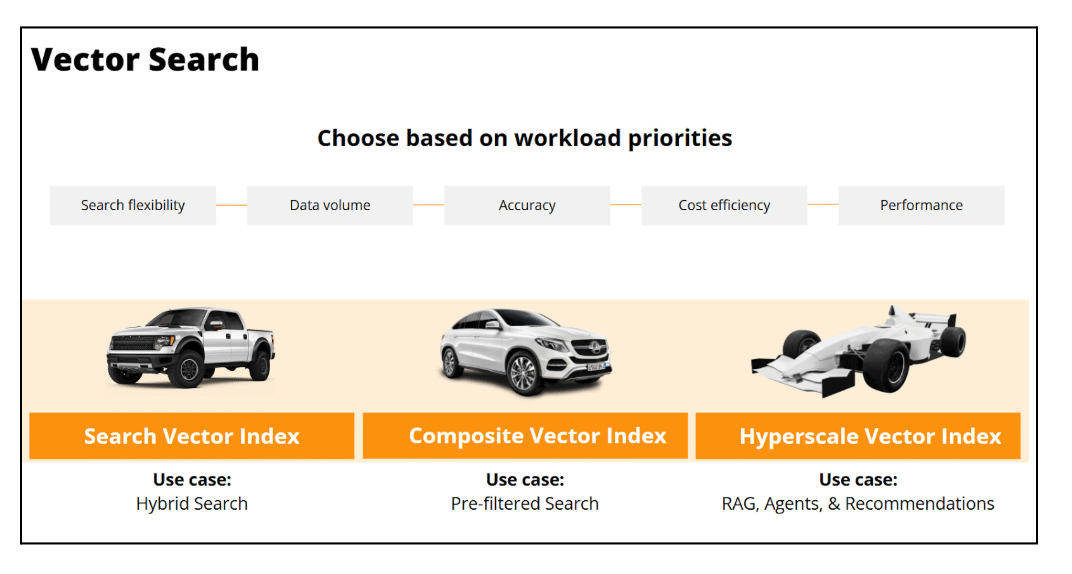
Contextually accurate AI responses depend on effective vector search. Our Vectorization Service automates the creation of vectors and their indexes directly from your operational data, ensuring your AI agents have fast access to the right information. As data changes, vectors and indexes are automatically updated. We offer three styles of vector indexing, to support a variety of RAG and agentic use cases. 

  • The Search Vector Index is used when vectors are included inline within a query that contains other predicates such as search keywords or geographic coordinates. 
  • The Composite Vector Index is useful when your developers control all prompt and context variables. 
  • The Hyperscale Vector Index is a record-setting, billion-scale vector index for supporting wide use cases such as knowledge chat-bots where prompt questions are difficult to anticipate, and therefore a giant corpus of contextual data must be vectorized.  

These three vector indexing features are already built into the Couchbase database, and can be utilized with AI Services. 

Agent Catalog

Governance is key to building trustworthy AI. The Agent Catalog offers a Tool Hub, Prompt Hub, and Agent Tracer to make agents easier to build, and easier to manage. These features provide visibility, control, and traceability for agent development and deployment. Your teams can build agents with confidence, knowing they can be audited and managed effectively.  

Without the ability to back-trace agent behavior, it becomes impossible to automate the ongoing trust, validation and corroboration of the autonomous decisions made by agents. In the Agent Catalog, this is performed by evaluating both the agentic code and its conversation transcript with its LLM to assess the appropriateness of its pending decision or MCP tool lookup.  

AI Functions

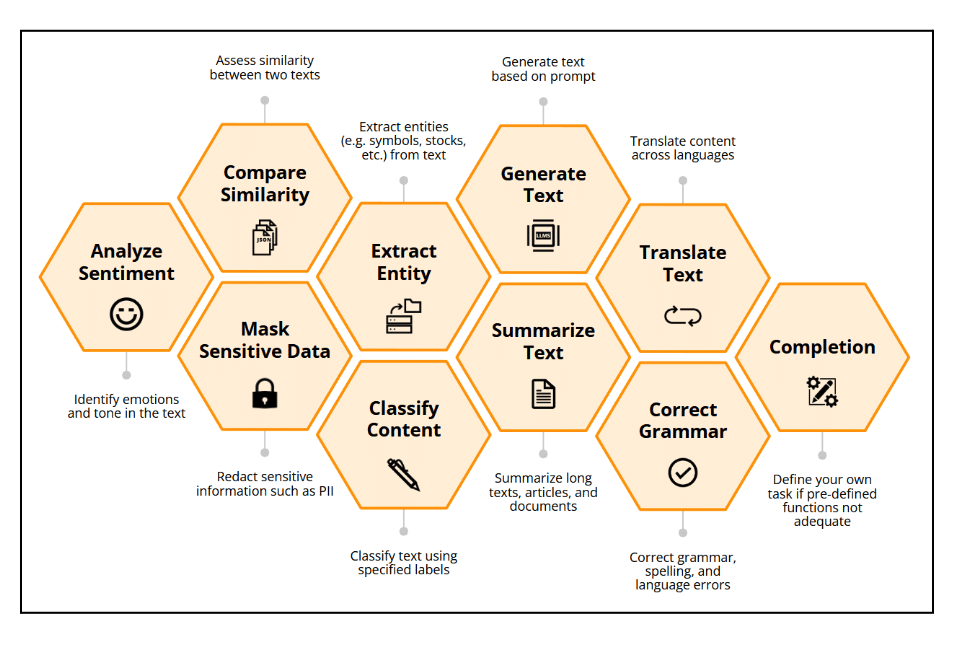
Embedding AI-driven analysis of text directly into your application workflows accelerates developer productivity. Our AI Functions work by using simple SQL++ statements and eliminate the need for external tooling and custom coding. You can perform transformations, execute complex analysis, and gain insights regarding LLM conversations using familiar query language constructs, right within the database.

Building Trust into Every AI Interaction

For organizations to deploy autonomous agents, they need assurance that these agents will make reliable decisions with sensitive data. Capella AI Services are built to help organizations build trustable GenAI at scale. Our Agent catalog allows you to deploy AI agents confidently, knowing detailed interactions can be traced and audited. By keeping your data and models within your environment, you maintain complete control over your most sensitive information while still leveraging the power of generative AI.

Get Started with Capella and AI Services

The path from AI prototype to a production-ready agentic application no longer needs to be a complex and fragmented journey. Couchbase Capella provides a unified, secure, and high-performance platform to build the next generation of intelligent applications. By simplifying the AI development lifecycle and integrating powerful governance capabilities, we empower you to innovate faster and deploy AI with confidence.

Explore the documentation and see how you can start building production agentic applications on a platform designed for the demands of GenAI.

Check out these related resources:


The post Capella AI Services: Build Enterprise-Grade Agents appeared first on The Couchbase Blog.

Read the whole story
alvinashcraft
1 minute ago
reply
Pennsylvania, USA
Share this story
Delete

Enterprise AI: The Ecosystem Behind Couchbase AI Services

1 Share

Powering Enterprise-Ready Agentic AI with Security, Governance, and End-to-End Innovation

As we announce the General Availability of Couchbase AI Services, we’re also taking a significant step toward enabling enterprise-grade agentic AI by growing and developing the Couchbase AI Partner Ecosystem. Enterprises know that building AI agents is no longer just about choosing a LLM. Delivering production-grade agentic AI requires secure access to high-quality data, the ability to process both structured and unstructured information, continuous evaluation and observability, and scalable orchestration across events, applications, and devices. It also demands strong governance to meet regulatory, privacy, and compliance requirements.

This is why an ecosystem matters. No single vendor can deliver all the capabilities needed to build, deploy, and manage enterprise AI agents. Couchbase AI Services provides the foundation by co-locating models and operational data, delivering millisecond-level retrieval, and offering built-in vector search, semantic caching, and model hosting. Our ecosystem partners extend this foundation with specialized capabilities across the agentic AI lifecycle. Today we’re highlighting five launch partners, NVIDIA, Unstructured, Confluent, Arize, and K2view, each playing an essential role in enabling secure, scalable, and trustworthy agentic AI systems.

NVIDIA: Bringing Enterprise-Grade Inference to Your Data with NIM Microservices

Couchbase AI Services integrates directly with NVIDIA NIM inference microservices, allowing enterprises to run high-performance LLMs inside their own VPC, right next to their operational and vector data. This co-location eliminates data movement over public networks and provides:

  • Low-latency inference for real-time agents
  • Strong data security, with models and data protected inside customer environments
  • Optimized GPU performance using NVIDIA’s validated NIM containers
  • Choice and flexibility, with support for models such as Llama 3.1, Nemotron, and domain-specific NIMs

By combining NVIDIA’s accelerated inference platform with Couchbase’s distributed database and vector store, customers can build agents that reason, retrieve, and act at production scale.

Unstructured: Turning Documents, Files, and Web Content into LLM-Ready Context

Most enterprise AI challenges begin with the ingestion of unstructured data such as PDFs, Office files, HTML, emails, regulatory documents, logs, and more. Unstructured solves this problem efficiently and accurately. With Unstructured’s document processing and extraction pipeline integrated with Couchbase AI Services:

  • Customers can ingest large volumes of unstructured content with automated parsing and cleansing
  • Domain-relevant text is chunked, normalized, and prepared for embedding
  • Embeddings are stored directly in the Couchbase vector store, creating a unified context layer for RAG and agentic workflows

This makes Couchbase the context platform for enterprise AI applications, enabling agents to recall information across every modality while eliminating the complexity of building or maintaining custom ETL code. For step-by-step instructions on how to setup the Couchbase connector with Unstructured click here.

Confluent: Streaming Agents Powered by Real-Time Context from Couchbase

Agentic AI is increasingly event-driven. Enterprises want agents that react to customer actions, operational events, and system signals in real time. Confluent’s recently introduced Streaming Agents, built on managed Apache Kafka® and Apache Flink®, provides a powerful foundation for this new architectural pattern.

Couchbase plays a key role by serving as both:

  • The real-time context platform, providing fresh operational and vector data to agents
  • A stateful memory layer, ensuring agents can reason over historical context
  • One of the vector databases Confluent Cloud can query through read-only external tables

Together, Couchbase and Confluent enable developers to orchestrate event-driven agents that respond to dynamic inputs, enrich messages with contextual grounding, and maintain consistent state across an entire multi-agent workflow. To know more about real-time agentic AI with Streaming Agents on Confluent Cloud and Couchbase click here.

Arize: Observability, Evaluation, and Trust for Agentic AI

As enterprises scale AI agents into production, evaluation and observability become critical. Without visibility into model behavior, drift, hallucinations, tool-use failures, or retrieval quality, agentic systems cannot meet enterprise trust and governance requirements.

With Arize, organizations gain:

  • Automated evaluation pipelines for agentic tasks
  • Trace-level visibility into model decisions and tool invocations
  • Monitoring for embedding quality, RAG recall, hallucination rates, and response fidelity
  • Governance and scoring frameworks aligned with enterprise AI standards

Arize complements Couchbase’s memory and context layer by helping teams verify that their agents behave as intended and proving it with measurable evidence. To learn more about trustworthy, production-ready AI agent applications click here.

K2view: Synthetic Data Generation to Accelerate the AI Lifecycle

Synthetic data is becoming essential for enterprise AI, especially when real data is limited, sensitive, or imbalanced. K2view brings advanced synthetic data generation powered by the operational data already stored in Couchbase.

Enterprises can use this synthetic data to:

  • Create high-quality training sets while masking sensitive fields
  • Produce balanced evaluation datasets to rigorously test agents
  • Generate domain-specific ground truth for fine-tuning LLMs
  • Accelerate experimentation without risking exposure of real customer data

Synthetic data is rapidly becoming a foundational building block for responsible AI. By integrating with Couchbase, K2view ensures customers can generate this data securely, privately, and continuously throughout the agentic lifecycle. For more information on how to use synthetic data to build AI applications click here.

Powering the Future of Enterprise Agentic AI

The continued growth of the Couchbase AI Partner Ecosystem is key to bringing agentic AI to the enterprise. Alongside these partners, Couchbase AI Services is supported by robust integrations with top cloud AI platforms and developer tools. Customers can integrate seamlessly with AWS Bedrock and Google Vertex AI, and developers on Google Cloud can take advantage of the new Google MCP Toolbox integration to accelerate agent development using Model Context Protocol. Couchbase also supports popular AI application development frameworks, including LangChain, LlamaIndex, and CrewAI, ensuring developers can build with the tools and frameworks they already know. For a full overview of supported integrations across frameworks, cloud platforms, and developer tools, visit the Couchbase Developer Integrations page.

This ecosystem reflects our commitment to empowering developers and enterprises with the tools they need to turn AI concepts into real, high-impact applications.

Additional Resources


The post Enterprise AI: The Ecosystem Behind Couchbase AI Services appeared first on The Couchbase Blog.

Read the whole story
alvinashcraft
1 minute ago
reply
Pennsylvania, USA
Share this story
Delete
Next Page of Stories