Sr. Content Developer at Microsoft, working remotely in PA, TechBash conference organizer, former Microsoft MVP, Husband, Dad and Geek.
147773 stories
·
33 followers

Making music with MIDI just got a real boost in Windows 11

1 Share

MIDI 2.0 (and enhanced MIDI 1.0!) comes to Windows 11

Non-musicians sometimes associate MIDI only with .mid music files, or with the late 80’s General MIDI sound sets. But it is so much more than that. For musicians, MIDI is essential to everything from instrument synchronization to stage lighting and effects control, to sequencing, beat making and more. MIDI is the glue that helps make electronic music possible.

MIDI 1.0

At the 1983 NAMM Show, Roland and Sequential Circuits showcased a new open cross-company digital standard for connecting two or more musical instruments together, ushering in an era of electronic music production using MIDI as we have now known and loved it for decades. The initial MIDI specification was quite simple: short 1-3 byte messages over a DIN serial cable, running at a speed of about one millisecond per message, chained together so that a five note chord would take approximately 5ms to send – a perfectly acceptable speed given the low-cost technology available at the time. Over the years, MIDI has been extended to include features like the General MIDI standard for deterministic instruments in music playback, SMF (the Standard MIDI File, or “.mid” music file), richer expression using the MPE (MIDI Polyphonic Expression) standard, basic device identity over SysEx, new transports like USB, Bluetooth LE, RTP and even TRS (Tip-ring-sleeve audio cables). Despite the ubiquity of MIDI 1.0, MIDI can be even better given everything we’ve learned since 1983. MIDI 1.0 lacks good standardized bidirectional discovery mechanisms for helpful functions like discovering the capabilities and patches available in a MIDI device. Note velocity and many other control parameters are limited to a range of 0-127 without the use of RPN/NRPN or SysEx. MIDI 1.0 doesn’t fully support rich note expression without using most or all of the available channels for MPE. It doesn’t contain good provisions for orchestral articulation. And MIDI 1.0 lacks good standards for identifying a MIDI controller or sound source as, for example, a piano or organ, and providing standard controller mappings and velocity curves that just work. And, of course, it sometimes has real-world speed caps largely inherited from the original DIN cable 31,250 bits per second standard. Any musician who has used a MIDI controller or MIDI-aware software is well-aware of these features and limitations in MIDI 1.0.

Enter MIDI 2.0

In 2020, the MIDI Association published the first version of the UMP (Universal MIDI Packet) and MIDI 2.0 Protocol specification. The specification had some key updates made in 2022/2023 to better support discovery and fallback approaches, and also to include recommendations from Microsoft and other member companies. MIDI 2.0 natively offers bidirectional communication, automatic device discovery and protocol setup, uncapped speeds, intentional high-resolution controllers (no 0-127 limitation or multi-message workarounds for larger values), per-note articulation, self-describing devices, and a decoupling of the protocol from the transports enabling easier adoption of new transports like Network MIDI 2.0 as they emerge. Despite the limitations in MIDI 1.0, and all the plugin and other workarounds in digital audio workstations (DAWs) to get around them, MIDI 1.0 has become the single most important standard in music production, and is not going away. In a MIDI 2.0 future, it’s still incredibly important for each operating system to have robust and stable MIDI 1.0 support.

Announcing General Availability of Windows MIDI Services, with support for MIDI 1.0 and 2.0

We’re excited to announce that Windows 11 now supports both MIDI 1.0 and MIDI 2.0 through Windows MIDI Services! We’ve been working on MIDI over the past several years, completely rewriting decades of MIDI 1.0 code on Windows to both support MIDI 2.0 and make MIDI 1.0 amazing. This new combined stack is called “Windows MIDI Services.” The Windows MIDI Services core components are built into Windows 11, rolling out through a phased enablement process now to in-support retail releases of Windows 11. This includes all the infrastructure needed to bring more features to existing MIDI 1.0 apps, and also support apps using MIDI 2.0 through our new Windows MIDI Services App SDK. All of your existing MIDI 1.0-aware software just got even better, without needing any app updates!

New Windows MIDI Services core features

Windows MIDI Services provides a lot of requested features, and importantly, sets us up to provide even more of what you want in the future. This release is focused on ensuring MIDI 1.0 runs smoothly on Windows, while baking in the infrastructure for MIDI 2.0.

Use a MIDI device from multiple apps

The No. 1 request for MIDI in Windows has been to allow multiple apps to use the same MIDI port/device at the same time. We call that “multi-client.” Until now, this was only possible with custom vendor drivers. Now, every MIDI 1.0 port and MIDI 2.0 endpoint is multi-client, regardless of the driver or API used. In most cases, vendor-specific MIDI drivers are no longer needed or recommended, although they will still work if they are kernel streaming drivers. Multi-client is available for all MIDI 1.0 and MIDI 2.0 apps and devices.

Cubase 15, Pocket MIDI, MIDI-OX and the Windows MIDI Services console all receiving notes from the same MIDI 2.0 device.Customize your MIDI endpoints

The second biggest request for MIDI was to provide better MIDI 1.0 port names. With this release, you have control over the names:
  • Use classic API names, providing backwards compatibility with port names stored in DAWs and music files. This is the default, and avoids you from having to reconnect ports in apps and DAWs.
  • Use new-style names, often provided by devices which enable renaming MIDI ports on-board or with settings software. (These names use the USB iJack strings when provided.)
  • Provide completely custom names for MIDI 1.0 ports and MIDI 2.0 endpoints.
We’ve taken the customization even further, by adding additional metadata for endpoints, including custom images and descriptions, all set through the MIDI Settings app, available soon as part of an optional download. Finally, for apps using WinRT MIDI 1.0, the MIDI 1.0 API introduced with Windows 10, the names returned for devices through that API now reflect the names chosen for the classic “WinMM” (or “MME”) MIDI API -- a top request since the introduction of this API.

Using the MIDI Settings app to customize the port names, image, and description for a Continuumini controller.Connect apps with built-in loopback and app-to-app MIDI

Another piece of feedback we’ve heard is that app-to-app MIDI should just be built-in, and should be supported on x64 as well as Arm64 PCs. Windows MIDI Services now includes built-in loopback support, so that apps can communicate with each other, regardless of which API or SDK they use. Even WebMIDI pages in the browser can work with your loopback endpoints, all without any additional drivers or installs. When you first run the MIDI and Musician Settings app, you’ll be prompted to complete your MIDI setup, including optionally adding a set of standard loopback endpoints. Taking it beyond simple loopbacks, we also natively include the ability for an application to be a full MIDI 2.0 “device,” complete with support for MIDI 2.0 concepts, protocol negotiation and discovery. Like other MIDI 2.0 endpoints, these are automatically translated and made available to classic MIDI 1.0 APIs at a MIDI 1.0 level. You can create your own loopback endpoints using the MIDI Settings app in the upcoming Windows MIDI Services Tools download. The loopbacks are available to all MIDI 1.0 and MIDI 2.0 applications, without any additional drivers.

The loopback endpoint creation page of the MIDI Settings app, where the customer has created a new loopback endpoint pair.Use any device with any app with automatic MIDI 2.0 translation and scaling

High-resolution MIDI 2.0 UMP devices like the Yamaha Montage M and MODX, Roland A88 mk2, Waldorf Quantum and Iridium, Studiologic SL mk2, and more in MIDI 2.0 mode can be used by any MIDI 1.0 or MIDI 2.0-aware app on Windows, with apps using the new SDK having access to high resolution data, new message types, incoming and outgoing timestamps/scheduling, and other MIDI 2.0 features, and MIDI 1.0-aware apps seeing the downscaled values. We handle all the required protocol translation and value scaling inside the MIDI Service so you don’t need to think about the type of device you connect to, or what its capabilities or protocols are. Translation and scaling is an automatic process in the service, and is available to all MIDI 1.0 and MIDI 2.0 applications. https://www.youtube.com/watch?v=Oa6_pVveqPI

Get tighter message timing with timestamps and scheduled messages

Tight timing of MIDI messages has always been a priority for MIDI users. To enable apps to provide better timing when sending messages, we now support timestamps for both incoming and outgoing messages, accurate to under a microsecond (1/1,000,000 of a second). In addition, outgoing messages may be scheduled for sending to the driver at a specific time dictated by the timestamp. We will continue to tune the algorithm for this feature through subsequent updates, with the goal of making the timing as tight and deterministic as possible, across all MIDI devices. Timestamps and message scheduling are both available to apps using the new Windows MIDI Services app SDK.

Use new devices with the new MIDI 1.0 and MIDI 2.0 USB class driver

We’ve kept the older usbaudio.sys driver and fixed some small bugs in it to make it even better. At the same time, we’ve pulled in the AmeNote-developed and AMEI-provided USB MIDI 2.0 class driver usbmidi2.sys. This new driver, developed with Microsoft guidance, follows best practices for power management, has a faster communication channel to the new MIDI service, and supports both MIDI 1.0 and MIDI 2.0 devices. By default, most MIDI 1.0 devices will continue to use the older driver, to ensure compatibility, but can be manually assigned to the new driver if/when desired. All of these new features combined give Windows 11 a fantastic unified MIDI 1.0 and MIDI 2.0 stack that is great for musicians today, and for the next 40+ years.

Tools and MIDI scripting

In the coming months, we’ll release the updated MIDI App SDK Runtime and Tools package, which includes the MIDI Console, MIDI Settings app, PowerShell projections for scripting MIDI and much more. These tools make it easy for you to create loopback endpoints, customize your MIDI endpoint and port names, and much more. Several instances of the MIDI console showing that you can list devices, monitor MIDI sources, create loopback endpoints, and list all applications with open MIDI ports.If you are adventurous and want preview versions of these tools today, they are available on our GitHub repo and also through WinGet. `winget install Microsoft.WindowsMIDIServicesSDK` Once Windows MIDI Services is enabled on your PC, you only need to install the SDK Runtime and Tools package for your CPU. For everyone else, look for an announcement at https://aka.ms/midi.

Developed in the open, with partners and the community

With Windows MIDI Services, we took an open approach to development, with work happening on GitHub, with a permissive open source license. This enabled the community of developers and musicians to follow along and contribute, and ensured the entire process has been transparent. We could not have done this without the direct input and involvement of our partners and customers, especially on GitHub and Discord. Partner hardware and software companies, and interested members of the community, all contributed to the device and software testing, prototyping, bug fixing and feature enhancements. In-particular, we’d like to call out AMEI (Association of Musical Electronics Industry Japan) for their incredible work in testing, and for their donation of the AmeNote-developed USB MIDI 2.0 driver. We’d also like to thank all the other partners involved in development and testing, including Yamaha, Roland, Steinberg, Bremmers Audio, PACE/JUCE and many more.

How to provide feedback

We’d love to continue to hear from you.

What’s next?

We’re excited to level-up music creation on Windows in 2026 and beyond, and to help further the adoption of MIDI 2.0.

More MIDI

We have more we plan to do for musicians and pro audio users, starting with the in-box low-latency USB Audio driver with ASIO support in preview later this year (and also fully open source), new transports for MIDI 1.0 and MIDI 2.0 like BLE MIDI 1.0, BLE MIDI 2.0, Network MIDI 2.0, a virtual patch bay for enhanced MIDI routing, and more. These are all on our backlog. Check GitHub and Discord to follow along and be alerted when these roll out.

Network MIDI 2.0

At Music China last year, the MIDI Association talked about one of the new transports we’re furthest along with: Network MIDI 2.0. Windows 11 PCs with preview Network MIDI 2.0 support were on the demo tables there, at SuperBooth in Berlin and at the NAMM Show 2026. https://www.youtube.com/watch?v=nRJybRqgCQI

Follow along

You can follow along with the progress on our Discord server and the public GitHub repo, where these features are all developed. Thank you for coming along this journey with us, and for helping make Windows amazing for musicians! -- Pete Brown is Chair of the Executive Board of the MIDI Association (the MIDI Standards Body), and co-developed Windows MIDI Services with Gary. Gary Daniels is lead architect and developer of Windows MIDI Services, and works on the Core OS Audio Team.
Read the whole story
alvinashcraft
3 hours ago
reply
Pennsylvania, USA
Share this story
Delete

Sharp Economy Becomes Official Sponsor of HackIndia 2026

1 Share
Sharp Economy becomes the official sponsor of HackIndia 2026, transforming hackathons into a national AI and Web3 innovation engine. Learn how HackIndia is empowering India’s youth, scaling AI and Web3 education across colleges, and creating 50,000 real builders through hands on learning, startups, and token powered incentives.
Read the whole story
alvinashcraft
3 hours ago
reply
Pennsylvania, USA
Share this story
Delete

The uncomfortable truth about vibe coding

1 Share

We're living through a strange moment in software development. Anyone with an internet connection and a credit card can spin up an AI coding assistant and start building applications. You describe what you want in plain English, hit enter, and watch code materialize on your screen. It feels like magic. And honestly? It kind of is.

This is vibe coding—the practice of building software by conversing with AI rather than writing every line yourself. Andrej Karpathy coined the term earlier this year, and it's stuck because it captures something real about how millions of people are now approaching development. You describe the vibe, the AI handles the details.

The tools have proliferated faster than anyone expected. Cursor, GitHub Copilot, Windsurf, Claude, and ChatGPT each promise to make software creation easier. And to be fair, they've delivered on that promise in ways that genuinely matter. People who never imagined themselves as developers are shipping real products. Ideas that would have died in the "someday I'll learn to code" graveyard are actually seeing the light of day.

Here's the thing though: vibe coding is simultaneously the most exciting and most dangerous development practice to emerge in years. And understanding why requires getting past the hype and into the uncomfortable realities that emerge once the initial magic wears off. Let's not pretend vibe coding doesn't work. It absolutely does—for certain things. Need a quick prototype? A flashcard app? A landing page? You can go from idea to working code in minutes. One developer I read about recently built a functional flashcard app with editable cards, flip animations, and persistent storage using nothing but prompts. No semicolons typed, no debugging console logs—just conversation.

I have brought five concepts to life and created three minimum viable products (MVPs) in just a few months. Projects that would have taken me quarters of dedicated evenings now take weekends. The speed is real, and dismissing it would be dishonest.

The efficiency gains are undeniable when you're working on straightforward, self-contained projects. Natural language is how our brains actually work. We think in concepts and intentions, not in curly braces and type declarations. Vibe coding lets us stay in that headspace. You can focus on what you're trying to build rather than getting lost in the how of implementation details.

Where it falls apart

But then reality sets in. You're three months into your project. You've been chatting back and forth with your AI assistant, adding features, fixing bugs, making tweaks. Everything felt smooth until suddenly it didn't.

You change one small thing and four other features break. You ask the AI to fix those, and now something else is acting weird. You're playing whack-a-mole with your own code base. One developer on Reddit described it perfectly: "AI is still just soooooo stupid and it will fix one thing but destroy 10 other things in your code."

The Perils of Vibe Coding
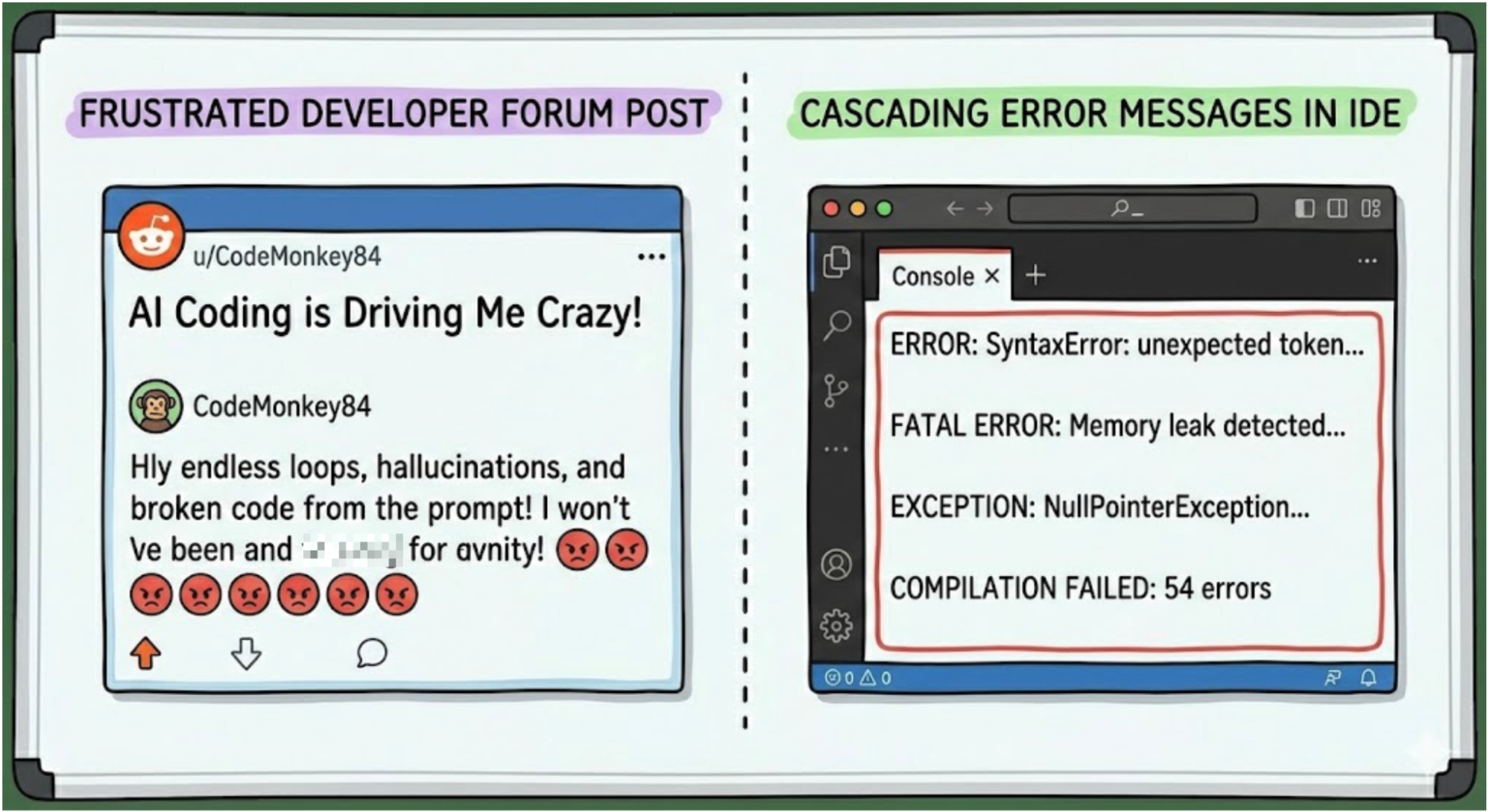
Figure 1: Putting a large prompt together and expecting AI to perfectly orchestrate is a recipe for disaster!

This is not the AI being dumb. It's the natural consequence of building without specifications. When you vibe code, your instructions become obsolete the moment code is generated. The code itself becomes the only source of truth for what the software does—and code is terrible at explaining why it does what it does. The intent behind decisions gets lost. The mental model that made everything make sense fades. You're left with a code base that works (sort of) but that nobody, including the AI, fully understands anymore.

This is why so many vibe-coded projects hit a wall around the three-month mark. The code base has grown beyond anyone's ability to hold it in their head. The AI's context window can only see fragments. You have no map to help you find your way back to a stable version.

Specificity is king

The developers having real success with AI coding tools aren't just vibing. They're specifying.

Spec-driven development flips the relationship between instructions and code. Instead of treating your prompts as throwaway tasks, you treat your specifications as the authoritative blueprint—the single source of truth that the code must conform to. When something breaks, you don't dive into the code to fix it. You refine the spec and regenerate.

This sounds like extra work, and initially it is. But consider what you gain. Your specifications become version-controlled documentation that actually stays current. You can collaborate with teammates at the spec level rather than arguing over code reviews. When you need to change something, you change it in one place rather than hunting through interconnected code paths hoping you don't break something else.

Most importantly, you maintain control. The AI becomes a powerful executor of your clearly expressed intent rather than an unpredictable collaborator making decisions you don't understand.

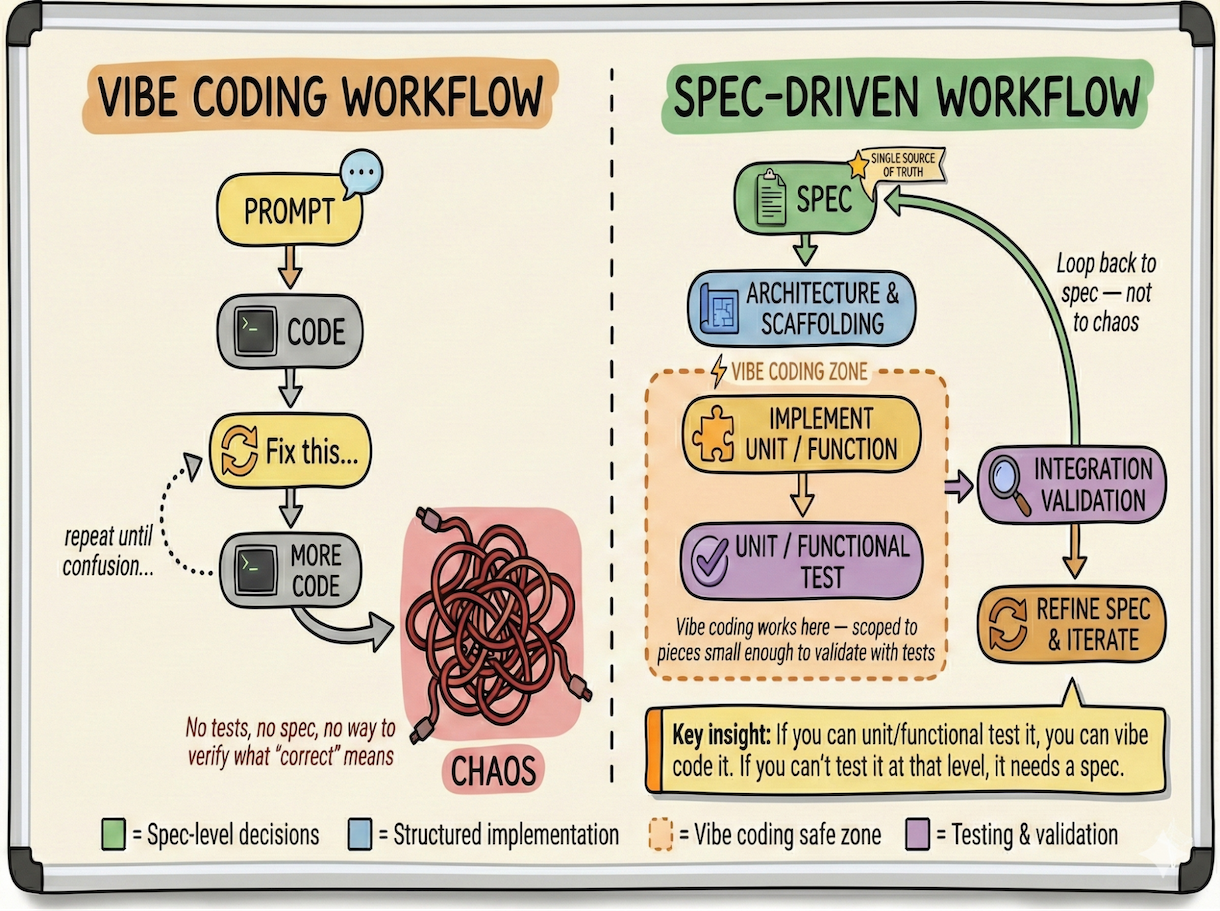
Spec-driven workflow
Figure 2: Specifying what you want in via a task spec yields better results overall. Vibe coding still has a place, but with a smaller controlled scope. 

Think about what a good specification actually does: it forces you to articulate what you want before you start building. The graphic above denotes the differences between the two workflows. Spec-driven development makes you consider edge cases, define constraints, and think through the user experience. These aren't bureaucratic hurdles—they're the exact things that separate software that works from software that sort of works until it doesn't.

The uncomfortable middle ground

Here's what the enthusiasts don't want to admit: you still need to be technical. You still need to understand how software works—architecture, dependencies, constraints, trade-offs. A specification written by someone who doesn't understand these things isn't a workable blueprint; it's a wish list.

The barrier to entry has lowered, but it hasn't disappeared. Vibe coding extends your reach; it doesn't replace your foundation. The developers getting ten times more productive aren't abandoning their expertise—they're using it in a new way.

Think of it like the shift from assembly language to high-level languages decades ago. We lost detailed understanding of how machines work. But we still needed to be technical. We still needed to understand computers. The abstraction changed; the requirement for competence didn't.

This creates an awkward reality for the "anyone can code now" narrative. Yes, anyone can generate code. But generating code and building sustainable software are not the same thing. The gap between a working demo and a production system remains vast, and AI doesn't bridge that gap automatically—it just makes the demo easier to reach.

What actually works

The most effective approach combines the efficiency of natural language with the rigor of explicit specifications. You can still vibe when exploring ideas or prototyping. But when you're building something that matters—something you'll need to maintain, debug, and extend—you need guardrails.

Notice where vibe coding still has a home in the spec-driven workflow: at the unit level. If you can write a unit or functional test to validate the output, the scope is small enough to vibe. If you can't test it at that level, you need a spec. This is what keeps you out of the whack-a-mole trap—each piece is small enough to verify in isolation before it joins the larger system.

Be specific about what you want. Be specific about how you want it done. Document your decisions. Define your constraints. Create acceptance tests that verify your specifications are actually implemented.

This isn't just theory anymore. The industry is catching on, and real tools are emerging to bridge the gap between vibing and building:

  • Amazon's Kiro
  • GitHub's Spec Kit
  • Codeplain
  • Tessl

Even GitHub's research arm explored this territory back in 2023 with SpecLang, an experimental project that used structured natural language to generate code. While it never shipped as a product, the ideas it pioneered are now showing up across the ecosystem.

The common thread? All of these projects recognize that the freewheeling nature of vibe coding doesn't scale. At some point, you need structure. You need something that persists beyond the chat window.

When you leave details unspecified, the AI fills in the gaps. Sometimes it fills them in brilliantly. Sometimes it fills them in differently every time you generate code, leading to what one researcher calls "functionality flickering"—that disorienting experience where your button is blue one day and green the next because you never specified which it should be.

The solution isn't to abandon vibe coding entirely. It's to recognize when you've moved past the prototyping phase and need to shift into a more disciplined mode. Use the vibes to explore. Use specifications to build.

The future is specific

Vibe coding isn't going away. It's too useful, too accessible, too aligned with how humans naturally think. But the developers who thrive won't be the ones who vibe hardest. They'll be the ones who learned that specificity is king.

The magic isn't in the vibes. It's in knowing exactly what you want and expressing it clearly enough that even an AI can't misinterpret it.

That's harder than it sounds. But it's also the skill that separates sustainable software from digital sandcastles waiting for the next prompt to wash them away.

The post The uncomfortable truth about vibe coding appeared first on Red Hat Developer.

Read the whole story
alvinashcraft
3 hours ago
reply
Pennsylvania, USA
Share this story
Delete

Using go fix to modernize Go code

1 Share

The Go Blog

Using go fix to modernize Go code

Alan Donovan
17 February 2026

The 1.26 release of Go this month includes a completely rewritten go fix subcommand. Go fix uses a suite of algorithms to identify opportunities to improve your code, often by taking advantage of more modern features of the language and library. In this post, we’ll first show you how to use go fix to modernize your Go codebase. Then in the second section we’ll dive into the infrastructure behind it and how it is evolving. Finally, we’ll present the theme of “self-service” analysis tools to help module maintainers and organizations encode their own guidelines and best practices.

Running go fix

The go fix command, like go build and go vet, accepts a set of patterns that denote packages. This command fixes all packages beneath the current directory:

$ go fix ./...

On success, it silently updates your source files. It discards any fix that touches generated files since the appropriate fix in that case is to the logic of the generator itself. We recommend running go fix over your project each time you update your build to a newer Go toolchain release. Since the command may fix hundreds of files, start from a clean git state so that the change consists only of edits from go fix; your code reviewers will thank you.

To preview the changes the above command would have made, use the -diff flag:

$ go fix -diff ./...
--- dir/file.go (old)
+++ dir/file.go (new)
-                       eq := strings.IndexByte(pair, '=')
-                       result[pair[:eq]] = pair[1+eq:]
+                       before, after, _ := strings.Cut(pair, "=")
+                       result[before] = after
…

You can list the available fixers by running this command:

$ go tool fix help
…
Registered analyzers:
    any          replace interface{} with any
    buildtag     check //go:build and // +build directives
    fmtappendf   replace []byte(fmt.Sprintf) with fmt.Appendf
    forvar       remove redundant re-declaration of loop variables
    hostport     check format of addresses passed to net.Dial
    inline       apply fixes based on 'go:fix inline' comment directives
    mapsloop     replace explicit loops over maps with calls to maps package
    minmax       replace if/else statements with calls to min or max
…

Adding the name of a particular analyzer shows its complete documentation:

$ go tool fix help forvar

forvar: remove redundant re-declaration of loop variables

The forvar analyzer removes unnecessary shadowing of loop variables.
Before Go 1.22, it was common to write `for _, x := range s { x := x ... }`
to create a fresh variable for each iteration. Go 1.22 changed the semantics
of `for` loops, making this pattern redundant. This analyzer removes the
unnecessary `x := x` statement.

This fix only applies to `range` loops.

By default, the go fix command runs all analyzers. When fixing a large project it may reduce the burden of code review if you apply fixes from the most prolific analyzers as separate code changes. To enable only specific analyzers, use the flags matching their names. For example, to run just the any fixer, specify the -any flag. Conversely, to run all the analyzers except selected ones, negate the flags, for instance -any=false.

As with go build and go vet, each run of the go fix command analyzes only a specific build configuration. If your project makes heavy use of files tagged for different CPUs or platforms, you may wish to run the command more than once with different values of GOARCH and GOOS for better coverage:

$ GOOS=linux   GOARCH=amd64 go fix ./...
$ GOOS=darwin  GOARCH=arm64 go fix ./...
$ GOOS=windows GOARCH=amd64 go fix ./...

Running the command more than once also provides opportunities for synergistic fixes, as we’ll see below.

Modernizers

The introduction of generics in Go 1.18 marked the end of an era of very few changes to the language spec and the start of a period of more rapid—though still careful—change, especially in the libraries. Many of the trivial loops that Go programmers routinely write, such as to gather the keys of a map into a slice, can now be conveniently expressed as a call to a generic function such as maps.Keys. Consequently these new features create many opportunities to simplify existing code.

In December 2024, during the frenzied adoption of LLM coding assistants, we became aware that such tools tended—unsurprisingly—to produce Go code in a style similar to the mass of Go code used during training, even when there were newer, better ways to express the same idea. Less obviously, the same tools often refused to use the newer ways even when directed to do so in general terms such as “always use the latest idioms of Go 1.25.” In some cases, even when explicitly told to use a feature, the model would deny that it existed. (See my 2025 GopherCon talk for more exasperating details.) To ensure that future models are trained on the latest idioms, we need to ensure that these idioms are reflected in the training data, which is to say the global corpus of open-source Go code.

Over the past year, we have built dozens of analyzers to identify opportunities for modernization. Here are three examples of the fixes they suggest:

minmax replaces an if statement by a use of Go 1.21’s min or max functions:

x := f()
if x < 0 {
    x = 0
}
if x > 100 {
    x = 100
}
x := min(max(f(), 0), 100)

rangeint replaces a 3-clause for loop by a Go 1.22 range-over-int loop:

for i := 0; i < n; i++ {
    f()
}
for range n {
    f()
}

stringscut (whose -diff output we saw earlier) replaces uses of strings.Index and slicing by Go 1.18’s strings.Cut:

i := strings.Index(s, ":")
if i >= 0 {
     return s[:i]
}
before, _, ok := strings.Cut(s, ":")
if ok {
    return before
}

These modernizers are included in gopls, to provide instant feedback as you type, and in go fix, so that you can modernize several entire packages at once in a single command. In addition to making code clearer, modernizers may help Go programmers learn about newer features. As part of the process of approving each new change to the language and standard library, the proposal review group now considers whether it should be accompanied by a modernizer. We expect to add more modernizers with each release.

Example: a modernizer for Go 1.26’s new(expr)

Go 1.26 includes a small but widely useful change to the language specification. The built-in new function creates a new variable and returns its address. Historically, its sole argument was required to be a type, such as new(string), and the new variable was initialized to its “zero” value, such as "". In Go 1.26, the new function may be called with any value, causing it to create a variable initialized to that value, avoiding the need for an additional statement. For example:

ptr := new(string)
*ptr = "go1.25"
ptr := new("go1.26")

This feature filled a gap that had been discussed for over a decade and resolved one of the most popular proposals for a change to the language. It is especially convenient in code that uses a pointer type *T to indicate an optional value of type T, as is common when working with serialization packages such as json.Marshal or protocol buffers. This is such a common pattern that people often capture it in a helper, such as the newInt function below, saving the caller from the need to break out of an expression context to introduce additional statements:

type RequestJSON struct {
    URL      string
    Attempts *int  // (optional)
}

data, err := json.Marshal(&RequestJSON{
    URL:      url,
    Attempts: newInt(10),
})

func newInt(x int) *int { return &x }

Helpers such as newInt are so frequently needed with protocol buffers that the proto API itself provides them as proto.Int64, proto.String, and so on. But Go 1.26 makes all these helpers unnecessary:

data, err := json.Marshal(&RequestJSON{
    URL:      url,
    Attempts: new(10),
})

To help you take advantage of this feature, the go fix command now includes a fixer, newexpr, that recognizes “new-like” functions such as newInt and suggests fixes to replace the function body with return new(x) and to replace every call, whether in the same package or an importing package, with a direct use of new(expr).

To avoid introducing premature uses of new features, modernizers offer fixes only in files that require at least the minimum appropriate version of Go (1.26 in this instance), either through a go 1.26 directive in the enclosing go.mod file or a //go:build go1.26 build constraint in the file itself.

Run this command to update all calls of this form in your source tree:

$ go fix -newexpr ./...

At this point, with luck, all of your newInt-like helper functions will have become unused and may be safely deleted (assuming they aren’t part of a stable published API). A few calls may remain where it would be unsafe to suggest a fix, such as when the name new is locally shadowed by another declaration. You can also use the deadcode command to help identify unused functions.

Synergistic fixes

Applying one modernization may create opportunities to apply another. For example, this snippet of code, which clamps x to the range 0–100, causes the minmax modernizer to suggest a fix to use max. Once that fix is applied it suggests a second fix, this time to use min.

x := f()
if x < 0 {
    x = 0
}
if x > 100 {
    x = 100
}
x := min(max(f(), 0), 100)

Synergies may also occur between different analyzers. For example, a common mistake is to repeatedly concatenate strings within a loop, resulting in quadratic time complexity—a bug and a potential vector for a denial-of-service attack. The stringsbuilder modernizer recognizes the problem and suggests using Go 1.10’s strings.Builder:

s := ""
for _, b := range bytes {
    s += fmt.Sprintf("%02x", b)
}
use(s)
var s strings.Builder
for _, b := range bytes {
    s.WriteString(fmt.Sprintf("%02x", b))
}
use(s.String())

Once this fix is applied, a second analyzer may recognize that the WriteString and Sprintf operations can be combined as fmt.Fprintf(&s, "%02x", b), which is both cleaner and more efficient, and offer a second fix. (This second analyzer is QF1012 from Dominik Honnef’s staticcheck, which is already enabled in gopls but not yet in go fix, though we plan to add staticcheck analyzers to the go command starting in Go 1.27.)

Consequently, it may be worth running go fix more than once until it reaches a fixed point; twice is usually enough.

Merging fixes and conflicts

A single run of go fix may apply dozens of fixes within the same source file. All fixes are conceptually independent, analogous to a set of git commits with the same parent. The go fix command uses a simple three-way merge algorithm to reconcile the fixes in sequence, analogous to the task of merging a set of git commits that edit the same file. If a fix conflicts with the list of edits accumulated so far, it is discarded, and the tool issues a warning that some fixes were skipped and that the tool should be run again.

This reliably detects syntactic conflicts arising from overlapping edits, but another class of conflict is possible: a semantic conflict occurs when two changes are textually independent but their meanings are incompatible. As an example consider two fixes that each remove the second-to-last use of a local variable: each fix is fine by itself, but when both are applied together the local variable becomes unused, and in Go that’s a compilation error. Neither fix is responsible for removing the variable declaration, but someone has to do it, and that someone is the user of go fix.

A similar semantic conflict arises when a set of fixes causes an import to become unused. Because this case is so common, the go fix command applies a final pass to detect unused imports and remove them automatically.

Semantic conflicts are relatively rare. Fortunately they usually reveal themselves as compilation errors, making them impossible to overlook. Unfortunately, when they happen, they do demand some manual work after running go fix.

Let’s now delve into the infrastructure beneath these tools.

The Go analysis framework

Since the earliest days of Go, the go command has had two subcommands for static analysis, go vet and go fix, each with its own suite of algorithms: “checkers” and “fixers”. A checker reports likely mistakes in your code, such as passing a string instead of an integer as the operand of a fmt.Printf("%d") conversion. A fixer safely edits your code to fix a bug or to express the same thing in a better way, perhaps more clearly, concisely, or efficiently. Sometimes the same algorithm appears in both suites when it can both report a mistake and safely fix it.

In 2017 we redesigned the then-monolithic go vet program to separate the checker algorithms (now called “analyzers”) from the “driver”, the program that runs them; the result was the Go analysis framework. This separation enables an analyzer to be written once then run in a diverse range of drivers for different environments, such as:

  • unitchecker, which turns a suite of analyzers into a subcommand that can be run by the go command’s scalable incremental build system, analogous to a compiler in go build. This is the basis of go fix and go vet.
  • nogo, the analogous driver for alternative build systems such as Bazel and Blaze.
  • singlechecker, which turns an analyzer into a standalone command that loads, parses, and type-checks a set of packages (perhaps a whole program) and then analyzes them. We often use it for ad hoc experiments and measurements over the module mirror (proxy.golang.org) corpus.
  • multichecker, which does the same thing for a suite of analyzers with a ‘swiss-army knife’ CLI.
  • gopls, the language server behind VS Code and other editors, which provides real-time diagnostics from analyzers after each editor keystroke.
  • the highly configurable driver used by the staticcheck tool. (Staticcheck also provides a large suite of analyzers that can be run in other drivers.)
  • Tricorder, the batch static analysis pipeline used by Google’s monorepo and integrated with its code review system.
  • gopls’ MCP server, which makes diagnostics available to LLM-based coding agents, providing more robust “guardrails”.
  • analysistest, the analysis framework’s test harness.

One benefit of the framework is its ability to express helper analyzers that don’t report diagnostics or suggest fixes of their own but instead compute some intermediate data structure that may be useful to many other analyzers, amortizing the costs of its construction. Examples include control-flow graphs, the SSA representation of function bodies, and data structures for optimized AST navigation.

Another benefit of the framework is its support for making deductions across packages. An analyzer can attach a “fact” to a function or other symbol so that information learned while analyzing the function’s body can be used when later analyzing a call to the function, even if the call appears in another package or the later analysis occurs in a different process. This makes it easy to define scalable interprocedural analyses. For example, the printf checker can tell when a function such as log.Printf is really just a wrapper around fmt.Printf, so it knows that calls to log.Printf should be checked in a similar manner. This process works by induction, so the tool will also check calls to further wrappers around log.Printf, and so on. An example of an analyzer that makes heavy use of facts is Uber’s nilaway, which reports potential mistakes resulting in nil pointer dereferences.

The process of “separate analysis” in go fix is analogous to the process of separate compilation in go build. Just as the compiler builds packages starting from the bottom of the dependency graph and passing type information up to importing packages, the analysis framework works from the bottom of the dependency graph up, passing facts (and types) up to importing packages.

In 2019, as we started developing gopls, the language server for Go, we added the ability for an analyzer to suggest a fix when reporting a diagnostic. The printf analyzer, for example, offers to replace fmt.Printf(msg) with fmt.Printf("%s", msg) to avoid misformatting should the dynamic msg value contain a % symbol. This mechanism has become the basis for many of the quick fixes and refactoring features of gopls.

While all these developments were happening to go vet, go fix remained stuck as it was back before the Go compatibility promise, when early adopters of Go used it to maintain their code during the rapid and sometimes incompatible evolution of the language and libraries.

The Go 1.26 release brings the Go analysis framework to go fix. The go vet and go fix commands have converged and are now almost identical in implementation. The only differences between them are the criteria for the suites of algorithms they use, and what they do with computed diagnostics. Go vet analyzers must detect likely mistakes with low false positives; their diagnostics are reported to the user. Go fix analyzers must generate fixes that are safe to apply without regression in correctness, performance, or style; their diagnostics may not be reported, but the fixes are directly applied. Aside from this difference of emphasis, the task of developing a fixer is no different from that of developing a checker.

Improving analysis infrastructure

As the number of analyzers in go vet and go fix continues to grow, we have been investing in infrastructure both to improve the performance of each analyzer and to make it easier to write each new analyzer.

For example, most analyzers start by traversing the syntax trees of each file in the package looking for a particular kind of node such as a range statement or function literal. The existing inspector package makes this scan efficient by pre-computing a compact index of a complete traversal so that later traversals can quickly skip subtrees that don’t contain any nodes of interest. Recently we extended it with the Cursor datatype to allow flexible and efficient navigation between nodes in all four cardinal directions—up, down, left, and right, similar to navigating the elements of an HTML DOM—making it easy and efficient to express a query such as “find each go statement that is the first statement of a loop body”:

    var curFile inspector.Cursor = ...

    // Find each go statement that is the first statement of a loop body.
    for curGo := range curFile.Preorder((*ast.GoStmt)(nil)) {
        kind, index := curGo.ParentEdge()
        if kind == edge.BlockStmt_List && index == 0 {
            switch curGo.Parent().ParentEdgeKind() {
            case edge.ForStmt_Body, edge.RangeStmt_Body:
                ...
            }
        }
    }

Many analyzers start by searching for calls to a specific function, such as fmt.Printf. Function calls are among the most numerous expressions in Go code, so rather than search every call expression and test whether it is a call to fmt.Printf, it is much more efficient to pre-compute an index of symbol references, which is done by typeindex and its helper analyzer. Then the calls to fmt.Printf can be enumerated directly, making the cost proportional to the number of calls instead of to the size of the package. For an analyzer such as hostport that seeks an infrequently used symbol (net.Dial), this can easily make it 1,000× faster.

Some other infrastructural improvements over the past year include:

  • a dependency graph of the standard library that analyzers can consult to avoid introducing import cycles. For example, we can’t introduce a call to strings.Cut in a package that is itself imported by strings.
  • support for querying the effective Go version of a file as determined by the enclosing go.mod file and build tags, so that analyzers don’t insert uses of features that are “too new”.
  • a richer library of refactoring primitives (e.g. “delete this statement”) that correctly handle adjacent comments and other tricky edge cases.

We have come a long way, but there remains much to do. Fixer logic can be tricky to get right. Since we expect users to apply hundreds of suggested fixes with only cursory review, it’s critical that fixers are correct even in obscure edge cases. As just one example (see my GopherCon talk for several more), we built a modernizer that replaces calls such as append([]string{}, slice...) by the clearer slices.Clone(slice) only to discover that, when slice is empty, the result of Clone is nil, a subtle behavior change that in rare cases can cause bugs; so we had to exclude that modernizer from the go fix suite.

Some of these difficulties for authors of analyzers can be ameliorated with better documentation (both for humans and LLMs), particularly checklists of surprising edge cases to consider and test. A pattern-matching engine for syntax trees, similar to those in staticcheck and Tree Sitter, could simplify the fiddly task of efficiently identifying the locations that need fixing. A richer library of operators for computing accurate fixes would help avoid common mistakes. A better test harness would let us check that fixes don’t break the build, and preserve dynamic properties of the target code. These are all on our roadmap.

The “self-service” paradigm

More fundamentally, we are turning our attention in 2026 to a “self-service” paradigm.

The newexpr analyzer we saw earlier is a typical modernizer: a bespoke algorithm tailored to a particular feature. The bespoke model works well for features of the language and standard library, but it doesn’t really help update uses of third-party packages. Although there’s nothing to stop you from writing a modernizer for your own public APIs and running it on your own project, there’s no automatic way to get users of your API to run it too. Your modernizer probably wouldn’t belong in gopls or the go vet suite unless your API is particularly widely used across the Go ecosystem. Even in that case you would have to obtain code reviews and approvals and then wait for the next release.

Under the self-service paradigm, Go programmers would be able to define modernizations for their own APIs that their users can apply without all the bottlenecks of the current centralized paradigm. This is especially important as the Go community and global Go corpus are growing much faster than the ability of our team to review analyzer contributions.

The go fix command in Go 1.26 includes a preview of the first fruits of this new paradigm: the annotation-driven source-level inliner, which we’ll describe in an upcoming companion blog post next week. In the coming year, we plan to investigate two more approaches within this paradigm.

First, we will be exploring the possibility of dynamically loading modernizers from the source tree and securely executing them, either in gopls or go fix. In this approach a package that provides an API for, say, a SQL database could additionally provide a checker for misuses of the API, such as SQL injection vulnerabilities or failure to handle critical errors. The same mechanism could be used by project maintainers to encode internal housekeeping rules, such as avoiding calls to certain problematic functions or enforcing stronger coding disciplines in critical parts of the code.

Second, many existing checkers can be informally described as “don’t forget to X after you Y!”, such as “close the file after you open it”, “cancel the context after you create it”, “unlock the mutex after you lock it”, “break out of the iterator loop after yield returns false”, and so on. What such checkers have in common is that they enforce certain invariants on all execution paths. We plan to explore generalizations and unifications of these control-flow checkers so that Go programmers can easily apply them to new domains, without complex analytical logic, simply by annotating their own code.

We hope that these new tools will save you effort during maintenance of your Go projects and help you learn about and benefit from newer features sooner. Please try out go fix on your projects and report any problems you find, and do share any ideas you have for new modernizers, fixers, checkers, or self-service approaches to static analysis.

Previous article: Go 1.26 is released
Blog Index

Read the whole story
alvinashcraft
3 hours ago
reply
Pennsylvania, USA
Share this story
Delete

Ultimate Angular Firebase Setup with AnalogJS

1 Share

Streamline your Angular setup with this build! Using Angular 20+, signals, AnalogJS, pure Firebase, Firestore Lite and clean injection tokens, we can get rolling with ease.

Angular has changed a lot in the last few years. We now are at Version 20. We can simplify the Angular setup with Firebase, and only add the minimum necessary packages and server infrastructure to get our app working in any environment.

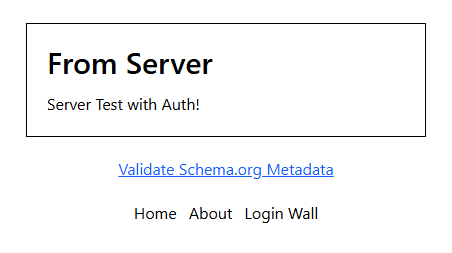
Screenshot 2025-10-21 202140.png

TL;DR

This app setup takes the best of Firebase setups to cover all your bases. You can fetch data purely on the server for good SEO, validate the schema meta data and have a safe “login wall” to prevent unauthorized user access on the client. No need for cookies, sessions or authorization on the server.

Remove ZoneJS

We do NOT need ZoneJS anymore. Signals make Angular faster and more responsive, and remove unnecessary bloat.

AnalogJS

Generate a new Analog component, or use an existing one.

app.config.ts

import {
  provideHttpClient,
  withFetch,
  withInterceptors,
} from '@angular/common/http';
import {
  ApplicationConfig,
  provideBrowserGlobalErrorListeners,
  provideZonelessChangeDetection
} from '@angular/core';
import { provideClientHydration, withEventReplay } from '@angular/platform-browser';
import { provideFileRouter, requestContextInterceptor } from '@analogjs/router';

export const appConfig: ApplicationConfig = {
  providers: [
    provideBrowserGlobalErrorListeners(),
    provideZonelessChangeDetection(), // <----- change
    provideFileRouter(),
    provideHttpClient(
      withFetch(),
      withInterceptors([requestContextInterceptor])
    ),
    provideClientHydration(withEventReplay()),
  ],
};

Here we change out the Zone provider for a Zoneless one.

npm uninstall zone.js

Also, remove any imports in the main.server.ts and in main.ts.

// Remove these lines
import 'zone.js/node';
import 'zone.js';

vite.config.ts

I also added an alias for @lib, services and @components. I changed the default public prefix for .env info from VITE_ to PUBLIC_, but this is optional. Feel free to change the preset to where you want to deploy.

/// <reference types="vitest" />

import { defineConfig } from 'vite';
import analog from '@analogjs/platform';
import tailwindcss from '@tailwindcss/vite';
import { resolve } from 'path';

// https://vitejs.dev/config/
export default defineConfig(() => ({
  build: {
    target: ['es2020'],
  },
  envPrefix: ['PUBLIC_'],
  resolve: {
    alias: {
      '@services': resolve(__dirname, './src/app/services'),
      '@components': resolve(__dirname, './src/app/components'),
      '@lib': resolve(__dirname, './src/app/lib')
    },
    mainFields: ['module']
  },
  plugins: [
    analog({
      ssr: true,
      static: false,
      nitro: {
        alias: {
          '@lib': resolve(__dirname, './src/app/lib'),
          '@services': resolve(__dirname, './src/app/services'),
          '@components': resolve(__dirname, './src/app/components'),
        },
        preset: 'vercel-edge'
      },
      prerender: {
        routes: [],
      },
    }),
    tailwindcss()
  ],
}));

Utility Functions

For many apps I use in Angular, I have created a few reusable utility functions.

import { TransferState, inject, makeStateKey } from "@angular/core";
import { ActivatedRoute } from "@angular/router";
import { map } from "rxjs";

export const useAsyncTransferState = async <T>(
    name: string,
    fn: () => T
) => {
    const state = inject(TransferState);
    const key = makeStateKey<T>(name);
    const cache = state.get(key, null);
    if (cache) {
        return cache;
    }
    const data = await fn() as T;
    state.set(key, data);
    return data;
};

export const useTransferState = <T>(
    name: string,
    fn: () => T
) => {
    const state = inject(TransferState);
    const key = makeStateKey<T>(name);
    const cache = state.get(key, null);
    if (cache) {
        return cache;
    }
    const data = fn() as T;
    state.set(key, data);
    return data;
};

export const injectResolver = <T>(name: string) =>
    inject(ActivatedRoute).data.pipe<T>(map(r => r[name]));

export const injectSnapResolver = <T>(name: string) =>
    inject(ActivatedRoute).snapshot.data[name] as T;
  • useAsyncTransferState – This allows the data to be fetched on the server once and hydrated to the browser. By default, the server would fetch the data, then the client would refetch the data. We don’t want extraneous reads in Firestore.
  • injectResolver and injectSnapResolver are helpers to add the resolver data to your component.

schema.service.ts

By default, you can inject Meta to add meta data. However, there is no default schema tool. I created a basic one.

import { Injectable, Inject } from '@angular/core';
import { DOCUMENT } from '@angular/common';

@Injectable({ providedIn: 'root' })
export class Schema {
    constructor(@Inject(DOCUMENT) private document: Document) { }

    /**
     * Adds or updates a JSON-LD script tag in <head>, similar to Title/Meta.
     */
    setSchema(data: Record<string, unknown>, id = 'jsonld-schema'): void {
        const json = JSON.stringify(data).replace(/</g, '\\u003c');

        // Avoid duplicates
        let script = this.document.head.querySelector<HTMLScriptElement>(
            `script#${id}[type="application/ld+json"]`
        );

        if (!script) {
            script = this.document.createElement('script');
            script.id = id;
            script.type = 'application/ld+json';
            this.document.head.appendChild(script);
        }

        script.textContent = json;
    }

    /** Optional cleanup */
    removeSchema(id = 'jsonld-schema'): void {
        const existing = this.document.getElementById(id);
        if (existing) {
            this.document.head.removeChild(existing);
        }
    }
}

Firebase

Next, install pure Firebase. DO NOT use @angular/fire, as it is built with ZoneJS in mind.

npm i firebase

ENV

Set up your .env file to have your firebase public API key available.

PUBLIC_FIREBASE_CONFIG={"apiKey":...."authDomain"...,...}

Next, create the Firebase Service file which will have your firebase sharing injection tokens.

import { isPlatformBrowser } from "@angular/common";
import { inject, InjectionToken, PLATFORM_ID } from "@angular/core";
import { FirebaseApp, getApp, getApps, initializeApp } from "firebase/app";
import { Auth, getAuth } from "firebase/auth";
import { doc, Firestore, getDoc, getFirestore } from "firebase/firestore";
import {
    getFirestore as getFirestoreLite,
    getDoc as getDocLite,
    doc as docLite
} from 'firebase/firestore/lite'

const firebase_config = JSON.parse(import.meta.env['PUBLIC_FIREBASE_CONFIG']);

export const FIREBASE_APP = new InjectionToken<FirebaseApp>(
    'firebase-app',
    {
        providedIn: 'root',
        factory() {
            return getApps().length
                ? getApp()
                : initializeApp(firebase_config);

        }
    }
);

export const FIREBASE_AUTH = new InjectionToken<Auth | null>(
    'firebase-auth',
    {
        providedIn: 'root',
        factory() {
            const platformID = inject(PLATFORM_ID);
            if (isPlatformBrowser(platformID)) {
                const app = inject(FIREBASE_APP);
                return getAuth(app);
            }
            return null;
        }
    }
);

export const FIREBASE_FIRESTORE = new InjectionToken<Firestore>(
    'firebase-firestore',
    {
        providedIn: 'root',
        factory() {
            const platformID = inject(PLATFORM_ID);
            const app = inject(FIREBASE_APP);
            if (isPlatformBrowser(platformID)) {
                return getFirestore(app);
            }
            return getFirestoreLite(app);
        }
    }
);

export const FIRESTORE_GET_DOC = new InjectionToken(
    'firestore-get-doc',
    {
        providedIn: 'root',
        factory() {
            const db = inject(FIREBASE_FIRESTORE);
            const platformID = inject(PLATFORM_ID);
            return async <T>(path: string) => {

                try {

                    const snap = isPlatformBrowser(platformID)
                        ? await getDoc(doc(db, path))
                        : await getDocLite(docLite(db, path));
                    if (!snap.exists()) {
                        throw new Error(`Document at path "${path}" does not exist.`);
                    }
                    return {
                        data: snap.data() as T,
                        error: null
                    };

                } catch (e) {
                    
                    return {
                        data: null,
                        error: e
                    };
                }
            }
        }
    }
);

Breakdown

  1. First, we import our firebase config and parse the JSON data so it can be read.
  2. firebase-app makes sure we initialize Firebase only once.
  3. firebase-auth will return null if on the server. We only need to use it on the browser.
  4. firebase-firestore has two versions. The Firestore Lite package at firebase/firestore/lite will be faster, does not require TCP and will run in any environment. This means if you deploy to Vercel Edge, Deno, Cloudflare or Bun, it will still work!
  5. firestore-get-doc is just a shortcut for us to get rid of the boilerplate of asynchronously fetching a document.

Authentication

We need an authentication service to handle login actions. This is only used on the client.

import {
    DestroyRef,
    InjectionToken,
    inject,
    isDevMode,
    signal
} from '@angular/core';
import {
    GoogleAuthProvider,
    User,
    onIdTokenChanged,
    signInWithPopup,
    signOut
} from 'firebase/auth';
import { FIREBASE_AUTH } from './firebase.service';

export interface userData {
    photoURL: string | null;
    uid: string;
    displayName: string | null;
    email: string | null;
};

export const USER = new InjectionToken(
    'user',
    {
        providedIn: 'root',
        factory() {

            const auth = inject(FIREBASE_AUTH);
            const destroy = inject(DestroyRef);

            const user = signal<{
                loading: boolean,
                data: userData | null,
                error: Error | null
            }>({
                loading: true,
                data: null,
                error: null
            });

            // server environment
            if (!auth) {
                user.set({
                    data: null,
                    loading: false,
                    error: null
                });
                return user;
            }

            // toggle loading
            user.update(_user => ({
                ..._user,
                loading: true
            }));

            const unsubscribe = onIdTokenChanged(auth,
                (_user: User | null) => {

                    if (!_user) {
                        user.set({
                            data: null,
                            loading: false,
                            error: null
                        });
                        return;
                    }

                    // map data to user data type
                    const {
                        photoURL,
                        uid,
                        displayName,
                        email
                    } = _user;
                    const data = {
                        photoURL,
                        uid,
                        displayName,
                        email
                    };

                    // print data in dev mode
                    if (isDevMode()) {
                        console.log(data);
                    }

                    // set store
                    user.set({
                        data,
                        loading: false,
                        error: null
                    });
                }, (error) => {

                    // handle error
                    user.set({
                        data: null,
                        loading: false,
                        error
                    });

                });

            destroy.onDestroy(unsubscribe);

            return user;
        }
    }
);

export const LOGIN = new InjectionToken(
    'LOGIN',
    {
        providedIn: 'root',
        factory() {
            const auth = inject(FIREBASE_AUTH);
            return () => {
                if (!auth) {
                    return null;
                }
                return signInWithPopup(
                    auth,
                    new GoogleAuthProvider()
                );
            };
        }
    }
);

export const LOGOUT = new InjectionToken(
    'LOGOUT',
    {
        providedIn: 'root',
        factory() {
            const auth = inject(FIREBASE_AUTH);
            return () => {
                if (!auth) {
                    return null;
                }
                return signOut(auth);
            };
        }
    }
);

Breakdown

  1. USER will use onIdTokenChanged to get the latest user state and set it to a signal that is updated in real time. You can check loading states or errors. It gets destroyed when the component is unmounted by using onDestroy.
  2. LOGIN is a callable function to login with the Google provider. It is meant to be called from a button on the client.
  3. LOGOUT is the logout method that destroys the session on the client. It is also meant to be called from the client only.

Layout

We can edit the app.ts file to get our layout.

import { Component } from '@angular/core';
import { RouterLink, RouterOutlet } from '@angular/router';

@Component({
  selector: 'app-root',
  imports: [RouterOutlet, RouterLink],
  template: `
  <div class="pt-5">
    <router-outlet />
  </div>  
  <nav class="flex gap-3 justify-center mt-5">
      <a routerLink="/">Home</a>
      <a routerLink="/about">About</a>
      <a routerLink="/wall">Login Wall</a>
  </nav>
  `,
})
export class AppComponent { }
  1. Home will display our login state and profile.
  2. About will display the About information from the server OR the client, whether or not we are logged in. It also populates the schema and meta tags so that it can be SEO friendly.
  3. Login Wall will ONLY work when a user is logged in. You do not need to load data directly from the server, as Firebase has Firebase Rules for that, and SEO is unnecessary behind a login wall.

Home

For the home component, we only need to inject the user and login tokens from our auth service.

home.component.ts

import { Component, inject } from '@angular/core';
import { ProfileComponent } from '@components/profile/profile.component';
import { LOGIN, USER } from '@lib/firebase/auth.service';

@Component({
  selector: 'app-home',
  standalone: true,
  imports: [ProfileComponent],
  templateUrl: './home.component.html'
})
export class HomeComponent {
  user = inject(USER);
  login = inject(LOGIN);
}

home.component.html

<div class="text-center">
    <h1 class="text-3xl font-semibold my-3">Analog Firebase App</h1>

    @if (user().loading) {

    <p>Loading...</p>

    } @else if (user().data) {

    <app-profile />

    } @else if (user().error) {

    <p class="text-red-500">Error: {{ user().error?.message }}</p>

    } @else {

    <button type="button" class="border p-2 rounded-md text-white bg-red-600" (click)="login()">
        Signin with Google
    </button>

    }
</div>

We display errors when necessary, and we show the app-profile component on success.

Profile

Because we are logged in already, we only need to show logout and user info.

profile.component.ts

import { Component, inject } from '@angular/core';
import { LOGOUT, USER } from '@lib/firebase/auth.service';

@Component({
  selector: 'app-profile',
  standalone: true,
  imports: [],
  templateUrl: './profile.component.html'
})
export class ProfileComponent {
  user = inject(USER);
  logout = inject(LOGOUT);
}

profile.component.html

<div class="flex flex-col gap-3 items-center">
    <h3 class="font-bold">Hi {{ user().data?.displayName }}!</h3>
    <img [src]="user().data?.photoURL" width="100" height="100" alt="user avatar" />
    <p>Your userID is {{ user().data?.uid }}</p>
    <button type="button" class="border p-2 rounded-md text-white bg-lime-600" (click)="logout()">
        Logout
    </button>
</div>

Buttons can only be called on the server.

About Data

Our About data is the key to SEO.

About Resolver

We need to force our Angular component to wait for our About data to be fetched. The correct place to do this is in an Angular Resolver, although you can use Pending Tasks in more complex situations.

about-data.resolver.ts

import { inject, isDevMode } from '@angular/core';
import { Meta, Title } from '@angular/platform-browser';
import { ResolveFn } from '@angular/router';
import { FIRESTORE_GET_DOC } from '@lib/firebase/firebase.service';
import { useAsyncTransferState } from '@lib/utils';
import { Schema } from './schema.service';

export type AboutDoc = {
    name: string;
    description: string;
};

export const aboutDataResolver: ResolveFn<AboutDoc> = async () => {

    return useAsyncTransferState('about', async () => {

        const getDoc = inject(FIRESTORE_GET_DOC);

        const meta = inject(Meta);
        const title = inject(Title);
        const schema = inject(Schema);

        const {
            data,
            error
        } = await getDoc<AboutDoc>('/about/ZlNJrKd6LcATycPRmBPA');

        if (error) {
            throw error;
        }

        if (!data) {
            throw new Error('No data found');
        }

        title.setTitle(data.name);
        meta.updateTag({
            name: 'description',
            content: data.description
        });
        schema.setSchema({
            '@context': 'https://schema.org',
            '@type': 'WebPage',
            name: data.name,
            description: data.description
        });

        if (isDevMode()) {
            console.log(data);
        }

        return data;
    });

};

This resolver uses all our utility files in one go. We fetch our Firestore document by providing the path, set the title, meta tag and schema before returning the data. We do this in a transfer state so that we only have to fetch the data once on the server. Bing!

about-data.component.ts

We inject our transfer data from the resolver and display it.

import { Component } from '@angular/core';
import { AboutDoc } from './about-data.resolver';
import { injectResolver } from '@lib/utils';
import { AsyncPipe } from '@angular/common';

@Component({
    selector: 'app-about-data',
    standalone: true,
    imports: [AsyncPipe],
    template: `
    @if (about | async; as data) {
    <div class="flex items-center justify-center my-5">
        <div class="border w-[400px] p-5 flex flex-col gap-3">
            <h1 class="text-3xl font-semibold">{{ data.name }}</h1>
            <p>{{ data.description }}</p>
        </div>
    </div>
    <p class="text-center">
        <a href="https://validator.schema.org/#url=https%3A%2F%2Fultimate-analog-firebase.vercel.app%2Fabout" target="_blank" class="text-blue-600 underline">Validate Schema.org Metadata</a>
    </p>
    }
    `
})
export default class AboutDataComponent {
    about = injectResolver<AboutDoc>('data');
}

We must import the AsyncPipe and add it to an @if statement. Then we can display our data. The server will wait.

Notice we use a standalone component here. Sometimes it is good to mix and match depending on readability or preference.

Login Wall

We do not want to fetch on the server, but on the client only. The resource directive gives us the perfect tools to handle loading and error states.

import { Component, inject, isDevMode, resource } from '@angular/core';
import { FIRESTORE_GET_DOC } from '@lib/firebase/firebase.service';
import { FirebaseError } from 'firebase/app';

export type WallDoc = {
    name: string;
    description: string;
};

@Component({
    selector: 'app-wall-data',
    standalone: true,
    imports: [],
    template: `
    @if (wall.isLoading()) {
    <div class="flex items-center justify-center my-5">
        <h1 class="text-3xl font-semibold">Loading...</h1>
    </div>
    } @else if (wall.status() === 'resolved') {
    <div class="flex items-center justify-center my-5">
        <div class="border w-[400px] p-5 flex flex-col gap-3">
            <h1 class="text-3xl font-semibold">{{ wall.value()?.name }}</h1>
            <p>{{ wall.value()?.description }}</p>
        </div>
    </div>
    } @else if (wall.status() === 'error') {
    <div class="flex items-center justify-center my-5">
        @if (wall.error()?.message === 'permission-denied') {
            <h1 class="text-3xl font-semibold">You must be logged in to view this!</h1>
        } @else {
            <h1 class="text-3xl font-semibold">An error occurred: {{ wall.error()?.message }}</h1>
        }
    </div>
    } @else {
    <div class="flex items-center justify-center my-5">
        <h1 class="text-3xl font-semibold">You must be logged in to view this!</h1>
    </div>
    }
    `
})
export default class WallDataComponent {

    getDoc = inject(FIRESTORE_GET_DOC);

    wall = resource({

        loader: async () => {

            const {
                data,
                error
            } = await this.getDoc<WallDoc>('/secret/tJKWxu0ls6R0RyH1Atpb');

            if (error) {

                if (error instanceof FirebaseError) {

                    if (error.code === 'permission-denied') {
                        throw new Error(error.code);
                    }

                    console.error(error);
                    throw error;
                }
            }

            if (!data) {
                throw new Error('No data returned');
            }

            if (isDevMode()) {
                console.log(data);
            }

            return data;
        }
    });
}
  • We fetch our document in resource({ loader: ... });.
  • We throw and error to use it in our template.
  • Our signals are:
    • wall.isLoading()
    • wall.status() === 'resolved'
    • wall.status() === 'error'
  • We check for the specific permission-denied error to show our not logged-in message.

Firebase Rules

For our login wall, we can create a Firestore Rule to prevent a document from being read unless the user is logged in. We could equally add roles, etc.

service cloud.firestore {

  match /databases/{database}/documents {
    match /{document=**} {
    
      match /secret/{document} {
      allow read: if request.auth != null;
      }
      
      ...

Final Thoughts

I firmly believe this is all you need for 99% of Firebase apps. I have written articles on Firebase Admin Setup and Service Worker with Firebase Lite if you want to go down that rabbit hole, but you really don’t need them.

You also really don’t need real-time data unless you’re building a chat app or using notifications, but that can be easily added.

This basic setup, using Angular 20+, signals, pure Firebase, Firestore Lite and clean injection tokens, should cover all your needs.

Repo: GitHub
Demo: Vercel Edge Functions

Read the whole story
alvinashcraft
3 hours ago
reply
Pennsylvania, USA
Share this story
Delete

Hashing vs Encoding vs Encrypting vs Signing

1 Share

On the surface, everyone knows the difference between hashing, encoding, and encrypting. We all know the tradeoffs between them and…

The post Hashing vs Encoding vs Encrypting vs Signing appeared first on Caseysoftware.
Read the whole story
alvinashcraft
3 hours ago
reply
Pennsylvania, USA
Share this story
Delete
Next Page of Stories