Sr. Content Developer at Microsoft, working remotely in PA, TechBash conference organizer, former Microsoft MVP, Husband, Dad and Geek.
163829 stories
·
33 followers

Win the Agentic Era, Together: Introducing the Docker Navigator Partner Program

1 Share

Over the past year, almost every conversation I’ve had with a partner has ended in the same place. Their customers are moving AI agents out of the lab and into production, and the moment they do, the question changes. It stops being “Can we build this?” and becomes “Can we trust it, secure it, and govern it?” The partners who can answer that second set of questions are the partners customers keep.

Today, we are launching the Docker Navigator Partner Program to help you become that partner. This post explains what we’ve built, why we built it around AI governance, and how you can get the most from it.

Why “Navigator”

AI adoption is not following a normal technology curve. Every team, every vendor, every model provider, and every hyperscaler is racing to ship agentic capability, and no single company sees the whole stack. Identity, observability, supply chain security, MCP gateways, models, and clouds are each building their piece. What enterprises are missing is a trusted, common layer that lets those pieces work together safely.

That’s Docker’s role. Docker is where agents, models, and tools actually run: vertically integrated where it matters, and horizontally open to everything our customers already use. We describe it as being the Trusted Navigator for the agentic era; the constant that helps customers make sense of a landscape moving faster than any one team can track.

Partners are how that promise reaches customers. Whether you build technology, run a cloud, deliver services, or sell through the channel, you extend our reach and turn the Docker platform into a complete, governable stack. So the program carries the same name, and its tiers describe the journey a partner takes with us.

Three tiers, one partner journey

Every partner in the Docker Navigator Partner Program is navigating the agentic era with Docker. The tiers mark how far along that journey you are, and the top tier carries the program’s name on purpose: it’s the title you earn when you have shown you can navigate it for customers.

  • Crew is where every partnership starts: signed, onboarded, portal profile complete, first opportunities registered.
  • Explorer partners are enabled and certified, actively selling and co-marketing AI governance solutions with us.
  • Navigator partners are our most strategic: co-selling with Docker, embedded in joint account plans, co-authoring reference architectures, and leading customers through the agentic era alongside us. A Navigator is a partner Docker would put in front of its own customers.

If you’re already a Docker partner, you enter the new program at the tier that matches your status today. Nothing is taken away, and your tier is protected until 30 April 2027 while we work with you on the requirements.

What you get for navigating with us

We designed the benefits around one principle: the more you invest in building a governed AI practice on Docker, the more Docker invests in you. At the top tier, that means:

  • a dedicated partner success manager and joint account planning with quarterly business reviews;
  • deal registrations protection;
  • priority access to betas and a dedicated product roadmap briefing each quarter;
  • co-funded marketing (MDF), joint campaigns, and co-published customer stories;
  • speaking slots at Docker events and a seat on our Partner Advisory Board.

The commercial model rewards what you bring:

  • Partner-sourced, registered deals earn the highest discount at every tier.
  • From launch until 31 January 2027, every approved AI Governance deal registration earns an additional 10 points on top of your tier discount through the AI Governance Growth Incentive, on deals that close by 30 April 2027.

If you’re working on an AI governance opportunity today, register it. Everything lives in one place: the new Docker Navigator Partner Portal, where you register deals, take the free Docker Partner Sales Certification, request MDF, download assets, and track your progress against your tier in real time.

The ecosystem is the product

No one wins the agentic era alone, and Docker has spent much of 2026 demonstrating our belief in a collaborative ecosystem and approach. For example, in September, Docker became a founding member of the Blueprint Alliance alongside Okta, AWS, CrowdStrike, Databricks, Google Cloud, Lovable, Proofpoint, Salesforce, ServiceNow, Wiz and Zscaler, with GE Appliances and World Central Kitchen serving as strategic advisors. Announced at Oktane in Las Vegas, the Alliance has agreed on a shared architecture for securing AI agents, built around four questions every enterprise is asking: Where are my agents? What can they do? What are they doing? How do I respond? Our part is the environment where agents execute: isolation, runtime governance, and a secure supply chain that extends trust beyond the model to the place the agent runs.

What our partners say

“In the agentic era, you can’t govern what you can’t see. Docker gives teams a secure, consistent runtime for AI agents, and Datadog gives them visibility into how those agents actually behave in production including the tool calls, the costs, the failure modes. Together, that’s a complete picture. The Docker Navigator Partner Program gives our joint partners a clear path to deliver it.“

Uday Tennety

Head of Technology Partnerships, Datadog

“AI agents are writing, containerizing, and shipping code faster than security teams can manually review. Snyk and Docker have spent years helping developers ship securely — and now we’re taking that further. Together, we’re giving teams the ability to run agents in isolated environments with security testing built in from the start, so every dependency, every generated artifact, and every tool an agent can reach is assessed before it ever touches production. The Docker Navigator Partner Program is how that gets to the broader ecosystem.“

Carey Stanton

SVP Business Development, Snyk

Watch: why Docker, and the market opportunity for partners (20 minutes)

Mat Velloso, our Chief Product Officer, and I recorded a 20-minute conversation for partners on why Docker sits where the agentic era is being decided, where the AI governance opportunity is opening up, and what it means for your business. It’s the fastest way to get your sales and technical teams on the same page. After you log in to the Docker Navigator Partner Portal, you can watch the recording here.

Three things to do this week

  • Log in to the Docker Navigator Partner Portal (https://partner.docker.com/) and complete your company profile.
  • Register the AI governance opportunities you’re already working on so they qualify for the incentive.
  • Book a session with your Docker partner manager to agree to your account plan for the first half of 2027.

Not yet a partner? Start at https://www.docker.com/partners/register/.

This is a new program for Docker, and we’re humble enough to know we won’t have everything perfect on day one. We want your feedback and input. Tell us what’s missing. We’ll listen, we’ll be open with you, and we’ll invest in your success.

Let’s win the agentic era, together.

Read the whole story
alvinashcraft
40 minutes ago
reply
Pennsylvania, USA
Share this story
Delete

AI agents need to be replaceable – without losing your work

1 Share
3D abstract illustration of illuminated purple and blue ribbon waves folding across a dark, textured field.

An agent receives approval to process a partial refund. It sends the request to a payment API, and the process crashes. Maybe the payment service completed the refund. Maybe the request never went through. A replacement agent spins up and finds an operation record marked dispatched with no outcome written.

This kind of ambiguity isn’t unique to agents. Any distributed worker crashing mid-mutation faces the same problem. But a conventional worker resumes a predetermined workflow from the last checkpoint. An agent does something more dangerous: it reasons on its own. Given the same customer request and no outcome record, it might come up with a different plan, pick different parameters, or decide to issue a new refund instead of continuing the one already approved.

“An agent does something more dangerous: it reasons on its own.”

If the original refund went through, a second attempt refunds the customer twice. The charge still has enough remaining balance to cover another partial refund, so nothing stops it.

The replacement must inherit the original operation, not reinterpret it.

The operation must outlive the agent

An agent’s process, its in-memory variables, its transient reasoning context: all disposable. The business operation is not. The refund, its approval, its parameters, its current status. A long-running agent can preserve useful state for as long as it runs. The requirement: no essential operation should depend on the original execution surviving.

Before dispatching the refund, the application commits a durable operation record to a transactional store. That record includes the approved amount, the applicable authorization, the idempotency key the application sends to the payment provider, the application’s operation identifier in the provider’s metadata, and a status.

“An agent’s process, its in-memory variables, its transient reasoning context: all disposable. The business operation is not.”

The status moves from created to dispatched as the request leaves, and to confirmed or failed only on a provider response. If the agent crashes, the replacement retrieves this record and its correlation identifiers. A record stuck in dispatched indicates a call was attempted, but the outcome was never written.

The replacement inherits the approved operation rather than regenerating it.

When the replacement needs to verify the outcome, it can list refunds against the original charge and match the operation identifier in the returned metadata.

But the durable record isn’t just context for the replacement. The application enforces it at the tool boundary: the dispatch layer validates every outbound request against the committed record. The agent can propose a next step, but only authorized operations with their original parameters and identity reach the provider. The model can’t redefine what was approved.

ClickHouse Managed Postgres holds the business data, including the authoritative operation record that defines what the replacement is allowed to do. Native CDC replicates that data into ClickHouse. Application telemetry ships to ClickStack and agent traces to Langfuse, both configured to use the same ClickHouse service as their backend database.

Because business data, application telemetry, and agent traces land in one database, tying an operation to the agent run that dispatched it and the failed HTTP call is a single-identifier query. Not a reconciliation across three tools.

Two conditions. The application has to propagate that identifier. The operation ID must appear in the Postgres row, in the Langfuse trace attributes, and in the service’s log context, because nothing correlates it for you. And the replacement reads the record from Postgres, not from the replicated copy. CDC runs with seconds of latency. The authoritative row is the one the tool boundary enforces.

System architecture diagram showing an Original Agent and Replacement Agent interacting through an Application Tool Boundary with ClickHouse Managed Postgres and a Payment Provider, with execution logs, traces, and CDC data syncing to ClickHouse for investigation.

Restarting execution isn’t safely resuming work

Durable execution frameworks like LangGraph and Temporal record execution progress and resume after a failure. Both recommend making side effects idempotent, because resuming doesn’t resolve one. If the refund completed while the step was still pending, the framework can restart the agent, but it can’t tell the replacement whether the payment provider committed the original request.

The durable operation record implements that idempotency guidance for an agent whose next step isn’t predetermined.

The idempotency key from the durable record connects the replacement to the original request. If the replacement retries with the same key, the provider can recognize the same operation rather than processing an independent refund. This holds even if the original agent’s in-flight request completed after the crash, or a worker assumed dead has resumed. AWS’s Builders’ Library formalizes this pattern: a caller-provided identifier recorded atomically with the mutation.

But retrying isn’t always safe. The outcome might stay unclear. Stripe documents that a 500 response on a mutation can still produce external effects. When the outcome is unknown, the replacement needs evidence to investigate.

Langfuse can show the previous agent’s tool invocation: a refund request dispatched with the recorded idempotency key. ClickStack can fill in the operational side: an outbound HTTP request to the payment service followed by a connection failure, narrowing the failure window. 

Both are available to the replacement directly. The Langfuse MCP server lets it query the previous agent’s trace by operation ID, and the ClickStack MCP server lets it search service events in the same window. Give the replacement the read tools only. It can narrow down what happened, but the tool boundary still controls what the replacement can do.

Neither trace proves the provider committed the refund. And an absent trace doesn’t prove the request was never sent, since Langfuse transmits traces asynchronously and a crash can prevent delivery. The payment provider remains the system of record for the external outcome. Execution telemetry narrows the investigation. It doesn’t replace authoritative confirmation.

Continue the work; don’t start over

The replacement has the durable record and, where the outcome was unclear, the execution evidence. Now it needs to act, but not by re-deciding what to do.

The replacement follows the recovery protocol the application defines, not its own judgment about the customer’s situation.

If the provider confirms the refund is complete, the replacement records the outcome and moves on. If the provider shows the refund is still pending or in progress, the replacement waits. Retrying would risk a duplicate. If the refund definitively failed with no external effect, the replacement revalidates preconditions before a new authorized attempt. If the outcome remains unclear, it escalates rather than guessing. A missing provider record doesn’t prove the refund was never processed. The provider may not have finalized the transaction.

“A stored approval is historical evidence, not current authority to act.”

Even after establishing the external outcome, the replacement has to verify that the world hasn’t changed. The refundable balance may have shifted. A human representative might have processed a separate refund through a different interface. The customer’s account status may have changed. Someone may have revoked the original authorization.

A stored approval is historical evidence, not current authority to act.

The real engineering question is whether a new agent can establish the work’s current objective, outstanding obligations, and uncertain effects, then continue safely without treating the predecessor’s recollections as authority.

The agent is disposable. The work isn’t.

The post AI agents need to be replaceable – without losing your work appeared first on The New Stack.

Read the whole story
alvinashcraft
40 minutes ago
reply
Pennsylvania, USA
Share this story
Delete

Apple raises the MacBook Neo’s student pricing again

1 Share

The MacBook Neo now starts at $649 on Apple's Education Store, up $150 from its initial $499 education starting price. As reported earlier by MacRumors, the student discount for the Neo received a $50 price bump in recent days, following a $100 price bump back in June.

Apple's budget MacBook is now just $50 off its regular $699 starting price for students, rather than the usual $100 discount. The now-$649 starting configuration includes 256GB of storage and 8GB of RAM, and doesn't include Touch ID.

The MacBook Neo's starting price was its biggest selling point when it launched in March, but that perk has been steadily eroding, largely du …

Read the full story at The Verge.

Read the whole story
alvinashcraft
40 minutes ago
reply
Pennsylvania, USA
Share this story
Delete

Junie Local became 70% faster on Mac M5

1 Share

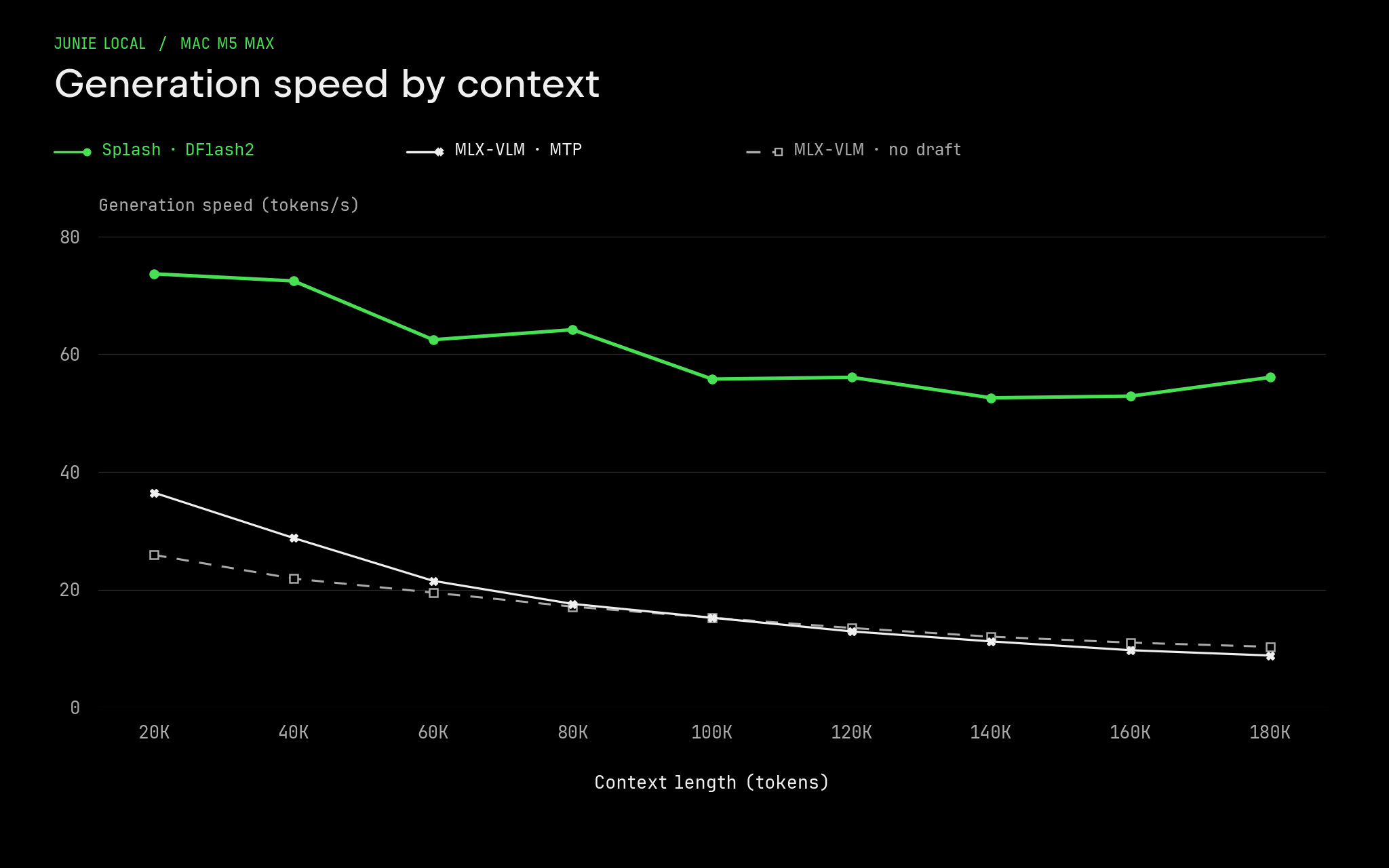
Junie Local now delivers ~70 tokens/s on M5 Max for coding tasks, up from ~40 tokens/s, with bursts up to 107 tokens/s. Two changes made this possible: the Splash inference engine and a new DFlash2 draft model.

Back in August, when we first released Junie Local for Mac M5, we spent a lot of time optimizing Junie and the MLX-VLM inference engine to achieve the maximum possible (at that time) performance. But two months is apparently a very long period at the current pace of LLM development. During this time, new, exciting ways to speed up inference were released by the community. We looked at and tested all of them, then picked the most promising parts to include in Junie Local.

In September, Inco AI released its Splash engine, built around the Qwen models. Focusing on just a couple of models lets Splash do what a general-purpose engine can’t: every decode step verifies eight drafted tokens at once, and attention over the context costs an order of magnitude less per position, so decode speed barely drops as context grows. The prefill, though, was on par with our optimized MLX-VLM engine. Since we had already taught MLX-VLM to use int8 operations on M5 chips, we ported the same optimization to Splash. In this release, Splash replaces MLX-VLM as Junie Local’s inference engine.

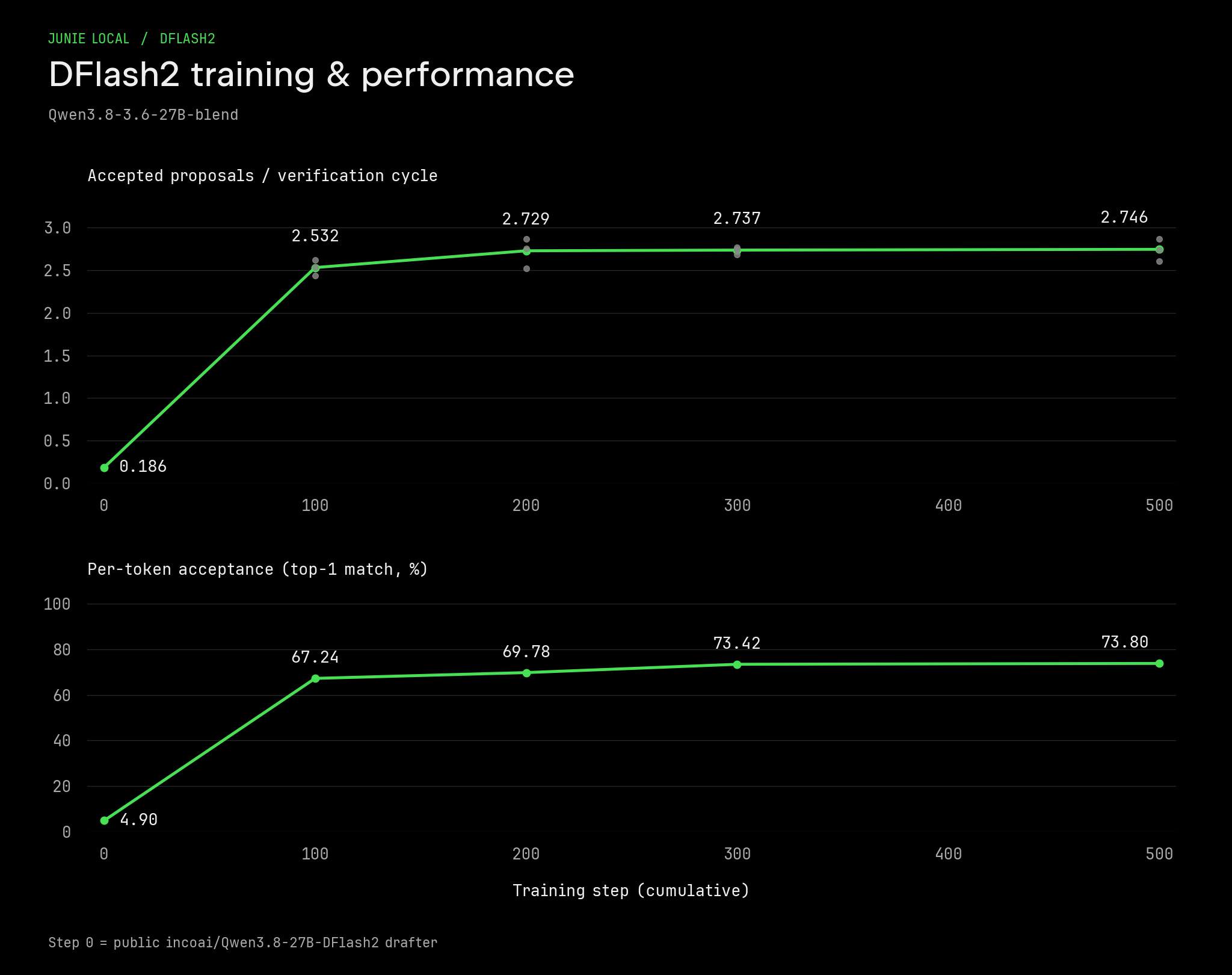
But a good engine is only part of the equation. We also needed a model-drafter that would enable more efficient speculative decoding. When using a speculator, acceptance rate defines the decode speed. A low acceptance rate could make decoding even slower.

Out of the box, Splash uses the DFlash2 drafter model for Qwen 3.8-27B. But Qwen 3.8 has a slight issue – it tends to overthink a lot. So the whole win of the generation speed is killed by the enormous amount of thinking tokens that need to be generated. 

To address this problem, we previously released the Qwen3.8-3.6-27B-blend, which is more capable than Qwen 3.6 yet uses only 30% more tokens. And in this release, we are also including the DFlash2 draft model for Qwen3.8-3.6-27B-blend.

DFlash-based models are fast but very sensitive to in-domain distribution: acceptance rate on familiar tasks is higher, so the agent will work faster on familiar tasks and slower on unfamiliar ones.

To train this DFlash2 model, we generated a diverse set of agentic coding trajectories by running the Junie Local harness inside our internal coding environment with Qwen3.8-3.6-27B-blend. We then took the Qwen 3.8 DFlash2 draft model as a starting checkpoint and fine-tuned it with SpecForge on those coding trajectories. This way, our DFlash2 drafter delivers the highest speed and acceptance rate when you use it to code with Junie Local.

What surprised us was that you don’t need many trajectories to fine-tune a drafter. It took us just ~1 million generated tokens (with ~71M tokens read) to match Inco’s acceptance rate! As a side bonus, we also created a DFlash2 drafter for Qwen 3.6, trained in a similar fashion

And this acceptance rate, together with the Splash engine, pays off: compared to the previous MTP + MLX-VLM approach, we have ~ 2x improvement.

Combining all these improvements together, in this release we:

  • improved the generation speed from ~40 t/s to ~70 t/s
  • got 850 t/s → 1200 t/s prefill improvement
  • reduced memory consumption: on 100k context, we need ~ 24 GB of RAM

And starting with this release, you can use it on M4 Macs and newer with 64GB of RAM.

Please note that on M4, prefill is approximately 4 times slower than on M5. It means that loading the system prompt and other context will be slow.

How to upgrade

Run junie update to upgrade Junie to the latest version, then launch the CLI. Once you’re inside Junie, run /local and press ctrl + r to update the inference engine.

If you don’t have Junie yet, you can install Junie and the local model by running:

curl -fsSL https://junie.jetbrains.com/install.sh | bash -s -- --local-model

You can find both DFlash2 drafters on HuggingFace:

Read the whole story
alvinashcraft
41 minutes ago
reply
Pennsylvania, USA
Share this story
Delete

Junie Eco Mode

1 Share

Not every step of a coding task needs the smartest model in the world.

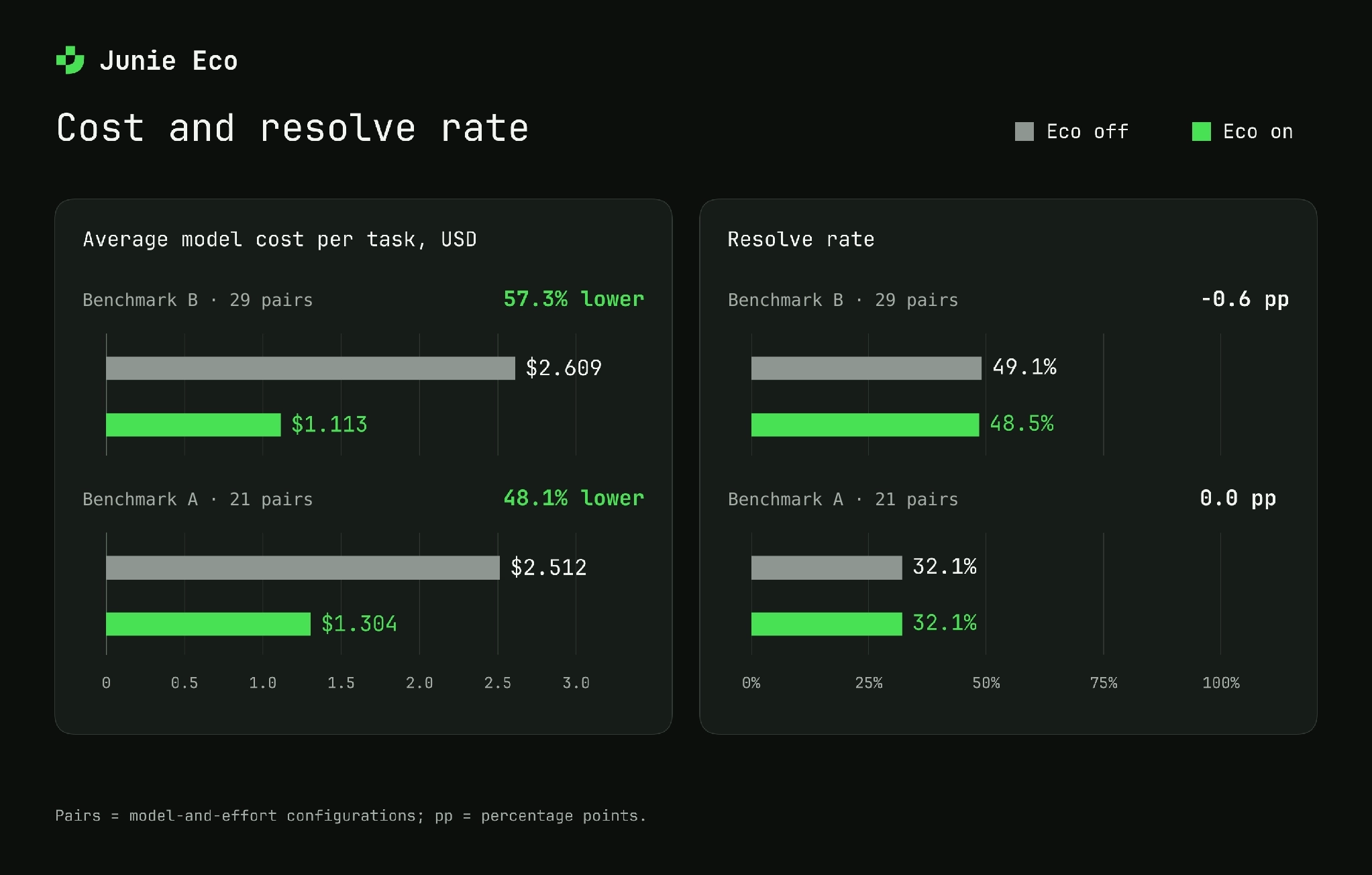
Junie Eco Mode uses your selected model to investigate a coding task and create a plan, then hands implementation and testing to a lower-cost model. In two internal benchmarks, this approach reduced average model cost per task by 48% and 57%, while average resolve rates changed by less than one percentage point.

Watch any AI coding agent work on a task and you’ll see it moves in small steps. It opens a file, searches the project, makes an edit, runs the tests, reads an error message, fixes a missing line, runs the tests again. That’s simply what writing software looks like, and experienced engineers work the same way. Only a handful of those steps call for hard judgment, understanding the request, finding the right place in the code, deciding on an approach. The rest is execution, carrying out a decision that has already been made.

Yet, coding agents usually run one AI model for the whole task. If that’s the smartest, most expensive model available, you pay its premium price for every single step, including the twentieth “run the tests again”.

Think about how a building gets built. You hire an architect to design it, not to lay every brick. The architect makes the hard decisions, writes them down, and a construction crew does the building.

Eco mode brings that idea to Junie. The model you chose (Opus, Fable, Grok, GPT) acts as the architect, it studies the code and writes a plan. A much cheaper model acts as the builder, it takes the plan and does the actual work. In our latest internal benchmarks, Eco mode cut average model cost per task by about half: 57% on benchmark B and 48% on benchmark A. Average resolve rates across the tested configurations changed by less than one percentage point.

Eco mode is currently available to JetBrains Air EAP users in IDEs: in IntelliJ IDEA 2026.3 Beta, with other IDEs’ Betas to follow, and in 2026.2 versions of JetBrains IDEs. It is generally available in the Junie CLI starting with version 26.10.20. Eco mode is on by default for supported model-and-effort configurations.

How Junie Eco mode works

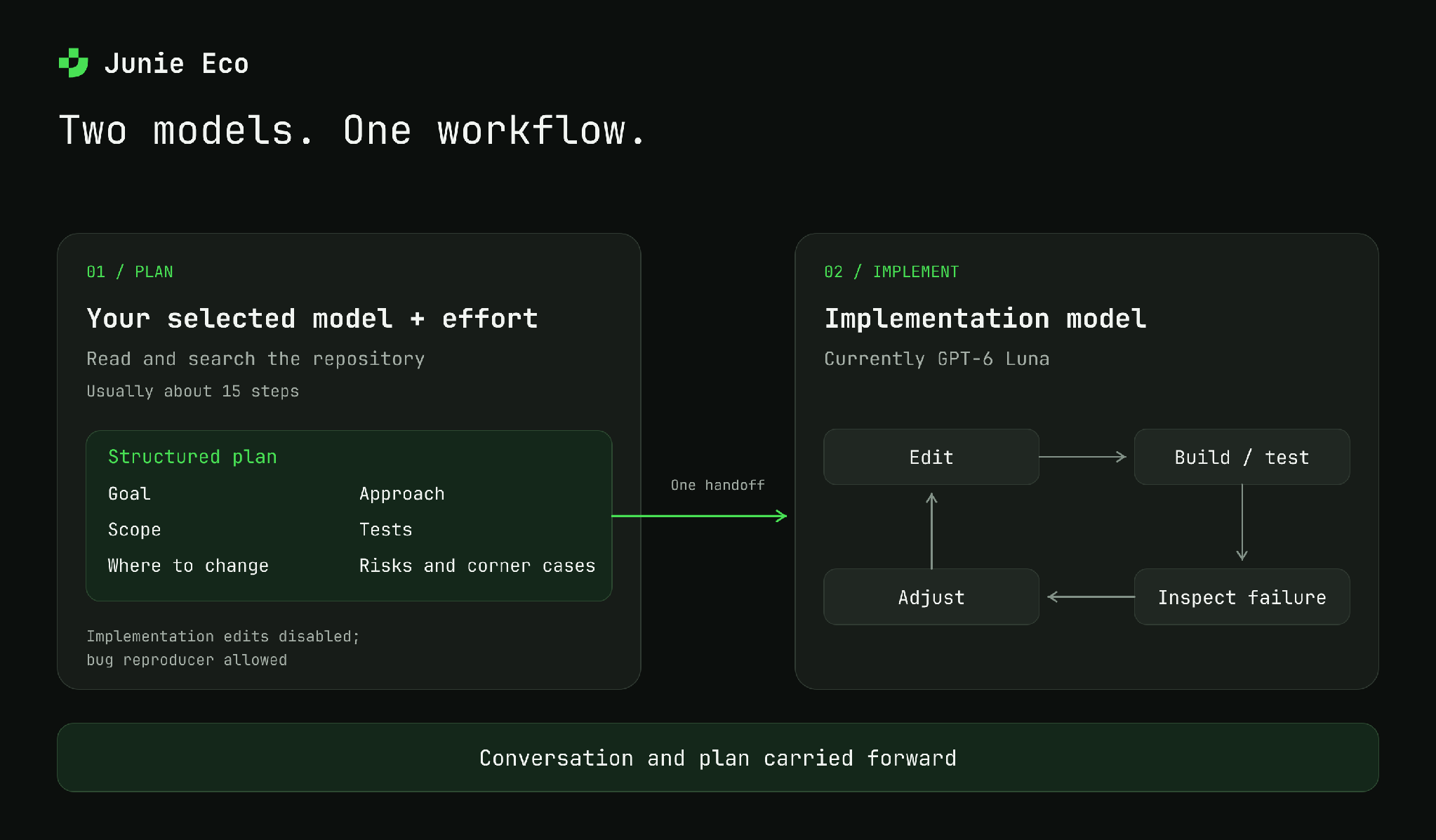
Eco mode splits a coding task into two parts and gives each part to the model that suits it best.

Step 1: the architect makes a plan. When you ask Junie to change your code, it first hands the task to the model you chose, at the effort level you chose. In this phase the model is only allowed to look: it reads and searches the code but doesn’t change anything. (The one exception: if you reported a bug, it may write a small test that shows the bug happening.) It already knows everything you’ve discussed with Junie so far, so you never have to repeat yourself. It’s built to be quick, usually about 15 steps, and it stops as soon as it knows what to change and how.

The result is a short plan with a fixed structure:

  • Goal: what the change should achieve
  • Scope: what is in and what is out
  • Where to change: the specific files and parts of the code
  • Approach: how to make the change
  • Tests: how to check that it works
  • Risks and corner cases: what could go wrong

Step 2: the builder follows the plan. Junie then hands the same conversation, plan included, to a much cheaper model (currently GPT-6 Luna). The builder does the long, hands-on part: it edits files, runs the build and the tests, fixes what breaks, and finishes the task.

Junie investigates with your selected model, then hands the conversation and structured plan to a lower-cost model for implementation.

This works because of how the cost of a task adds up. Planning takes only a few steps, but it needs good judgment. Building takes many steps, and most of them just follow the plan. With Eco mode, you pay premium prices only for the part that needs premium judgment.

Why not just pick a model for each task?

The obvious alternative is to look at each request and guess up front whether it’s hard (use the expensive model) or easy (use the cheap one). We don’t think that works well:

  • You can’t tell how hard a task is from the request alone. “Fix the test that sometimes fails” might be a one-line fix or a week-long investigation. Guessing up front means deciding before anyone has looked at the code. Eco mode has the smart model look first.
  • Every task still gets top-quality thinking. The cheap model never decides what to build. It only carries out decisions the smart model has already made.
  • The handoff is a written plan, not a guess. Because the plan always has the same structure, the builder starts out knowing which files to touch, how to test the change, and what to watch out for.

One handoff per task

Some tools let a cheap model “call a smarter friend” for advice whenever it gets stuck. Each of those calls means re-sending a big chunk of the conversation to the expensive model, and that adds up quickly. Eco mode hands off once, from architect to builder, and never switches back and forth. That keeps things simple and cheap.

When Eco mode stays out of the way

Eco mode only steps in where it’s likely to help:

  • Only for tasks that require code changes. The planning step runs only when your task calls for a code change you intend to keep. Questions, explanations, setting up a project, “run this and tell me what happens”, all of these stay with your chosen model from start to finish.
  • Off where it doesn’t save money. Eco mode is unavailable in /remote sessions and with certain model-and-effort combinations, including Opus 5.5 at low effort and Sonnet 5.5.

Benchmark results

For each tested model-and-effort configuration, we ran the same tasks with Eco off and on. Our latest evaluation covered two internal benchmarks: benchmark B (29 paired configurations) and benchmark A (21 paired configurations). These are configuration counts, not task counts. Each pair compares Eco with the same model-and-effort baseline.

Both benchmarks consist entirely of real-world tasks of varying complexity drawn from private repositories. Benchmark B covers a broad range of private repositories of different sizes and project contexts. Benchmark A includes tasks from very large repositories, whose scale makes many tasks significantly more challenging.

Resolve rate is the share of benchmark tasks marked as successfully resolved by the evaluation. We report model cost per task and resolve rate averaged across the tested configurations.

Model cost and resolve rate

Latest internal evaluation. Averages across 29 model-and-effort pairs on benchmark B and 21 on benchmark A. Results vary by model and workload.

On benchmark B, average model cost per task fell from \$2.61 to \$1.11 (57.3%), while the average resolve rate moved from 49.1% to 48.5%, a decrease of 0.6 percentage points.

On benchmark A, average model cost per task fell from \$2.51 to \$1.30 (48.1%). Average resolve rates round to 32.1% both with and without Eco.

Individual configurations can show larger changes in resolve rate. The percentages for cost reduction are calculated from the more precise values shown in the chart; dollar amounts in the text are rounded to cents.

Examples from evaluation

The following examples come from an evaluation on 100 real coding tasks from benchmark B. In that evaluation, Eco reduced the model cost per task by approximately 63% for Opus 5.5 at max effort.

SetupResolve rateModel cost per task
Opus 5.5 (max)55%$4.91
Opus 5.5 (max) + Eco56%$1.81
Fable 5.1 (high)53%$3.17
Fable 5.1 (high) + Eco52%$1.38
Grok 4.7 (high)46%$3.37
Grok 4.7 (high) + Eco52%$1.70
Opus 5.5 (xhigh)55%$1.80
Opus 5.5 (xhigh) + Eco53%$0.70
GPT-5.6 Sol (high)43%$1.16
GPT-5.6 Sol (high) + Eco42%$0.58

Try it

Eco mode is available in:

  • JetBrains Air in IDEs: In 2026.2 versions of JetBrains IDEs and in IntelliJ IDEA 2026.3 EAP starting with the Beta build, with other IDEs’ 2026.3 EAP builds to follow.
  • Junie CLI: Generally available in version 26.10.20 and later.

In these environments, Eco mode is on by default for Opus 5, Opus 5.5 (medium effort and above), Fable 5.1, Grok 4.5 / 4.6 / 4.7, GPT-5.6 Sol, GPT-6 Sol, GPT-5.6 Terra, and GPT-6 Astra. You can turn Eco off whenever you want one model to handle the entire task.

Use the model picker to turn Eco on or off. Pick the model you trust to do the thinking, and Eco mode will take care of the rest.

One model per task is becoming a thing of the past

The smartest AI models keep getting better, but still come at a higher cost. Meanwhile, cheap models have quietly become good enough to do most of the hands-on work, as long as someone tells them exactly what to do. We don’t think the future of AI coding assistants is a single model, or a system that guesses one model up front. It’s a team where each part of the job goes to the model best suited for it.

Eco mode is our first step in that direction. Try it on your real work and tell us where it works well and where it falls short.

Read the whole story
alvinashcraft
42 minutes ago
reply
Pennsylvania, USA
Share this story
Delete

Are You Getting Your Money’s Worth From AI?

1 Share

The following article was originally published on James Shore’s Successful Software blog and is being republished here with the author’s permission.

Software development has emerged as the biggest beneficiary of AI automation. One CIO I talked to recently, with 170 people in his organization, measured a 2.1x increase in productivity from AI.

That productivity came at a cost. His top users of AI each spent $21,000 on tokens per month. Another engineering leader spends six to eight thousand dollars per engineer per month.

This is not a trivial amount of money. Eventually, it has to come from somewhere, and it will probably come from your personnel budget. Now we’re talking about real consequences for real people’s lives. But there are also real business consequences for not acting.

If you’re going to make those choices—and somebody is going to—they need to be good ones. So you need to know more than the costs; you need to know the benefits too. Are you getting a good return on your investment in AI? Is there another way of using AI that would be better?

How do you know what you’re getting? Anecdotal reports abound, but the reasoning behind those anecdotes are often, to put it politely, not ideal. Some claims are outright fiction.

Given the stakes, that’s a problem.

In this essay series, I’ll show you how to assess the impact of AI on software development in your organization. It’s in four parts plus an epilogue:

  1. Why, and what not to do (this essay) 
  2. Measuring delivery speed 
  3. Measuring and modeling unintended consequences 
  4. Modeling and forecasting business outcomes 
  5. Epilogue: Notes for your CFO

Why you need to quantify impact

Engineering leaders everywhere are feeling pressure to do more with AI. But which approach is best? There are a lot of people with strident opinions about what to do, but not a lot of consensus, and even less hard data.

Even if there were hard data, it’s not one-size-fits-all. A solution that works best for an internal IT development shop isn’t necessarily the one that works best for a startup, and the approach that’s best for a new product isn’t necessarily the one that’s best for a crafty legacy system.

Faster approaches aren’t necessarily better, either. If you get twice as much done per person, but spend so much money on tokens that you have to cut your staff in half, have you actually seen any ROI? You might actually be better off with a more modest speed boost if it keeps your costs down.

You can’t make these trade-offs from a gut feeling alone. In a famous METR study, engineers thought AI made them 49% faster than it actually did.1 You have to measure impact to know what you’re actually getting.

Don’t neglect costs

Costs are much easier to measure than impact, but they’re not without their own challenges. The biggest one is subsidies. In the fight to gain market share, big AI firms are offering substantial discounts. One engineering leader told me each team member was spending thousands of dollars in tokens at the cost of a $200 subscription. Anthropic and OpenAI are constantly offering discounts and other promotions. At some point, these subsidies will end, and prices will go up.

Or will they? Open-weight models and local inference are exerting downward pressure on token costs. Dedicated inference chips could make tokens cheaper. Routers promise to direct your prompts to the cheapest model for the job. Models could require fewer tokens to accomplish the same task as they become more capable. All of these factors could actually cause prices to go down.

When you calculate ROI, don’t assume today’s costs are the ones you should model. Whether you think prices will go up, down, or remain the same, make your assumptions explicit, and consider modeling both optimistic and pessimistic scenarios.

One more wrinkle: Adopting AI isn’t a matter of flipping a switch. People will need time to learn how to apply it. As with any big shift, change management isn’t to be underestimated. Productivity often goes down during a big change before it goes up. This adds costs too, and means early measurements can be misleading.

Thinking for the long term

Part 2 of this series shows how to measure delivery speed. That’s only part of the picture. If you produce twice as many features, but double your maintenance costs, your team’s overall productivity spikes, then drops like a rock.

Engineer burnout is a concern too. An engineering leader using spec-driven development told me, “Every team is reporting burnout.” I’ll state the obvious: Burned out people don’t produce great work. They don’t push back when they should, they don’t report problems, and eventually they leave, taking valuable institutional knowledge with them.

Part 3 shows how to measure these unintended consequences of AI use, including techniques you can use to forecast future problems.

Finally, delivering software value faster is the point. Doubling your bug-fix rate isn’t going to yield the same results as doubling your rate of competitive new features. For that matter, delivering poorly thought-out features “just because we can” could actually make your product worse.

Part 4 shows how to model, forecast, and measure business outcomes.

Don’t measure lines of code

First, what not to do: Don’t take the easy way out.

First on the no-go list: lines of code. Engineering leaders have known for more than half a century that lines of code don’t correspond to productivity. All else being equal, a feature implemented in 1,000 lines of code will be cheaper to maintain and less bug-prone than a feature implemented in 10,000 lines of code.

AI is notorious for its verbosity. If you measure lines of code, you’re measuring slop, not productivity. Don’t do that. Please.

Don’t measure pull requests either

Pull requests (PRs) are nearly as bad. They’re checkpoints where an engineer asks for their code to be reviewed, and they’re 100% arbitrary. An engineer (or AI) can choose to make a 10-line pull request or a 10,000-line pull request. It can be a feature, a bug fix, or just a tiny code improvement. There’s no inherent correlation between number of pull requests and productivity.

It’s true that engineers will generally produce PRs that are consistent and logical. So, in a sense, a stream of PRs does reflect a certain pace of development, and an increase in PRs can reflect an increase in productivity.

But AI upends that status quo. It produces massive amounts of code very quickly, which can overwhelm engineers’ ability to keep up. Without rigorous engineer oversight, PRs no longer reflect a consistent pace of development, which means that PR counts are no longer a reliable metric.

And, of course, when people think PRs are being used to measure productivity, they’ll be tempted to game the system and produce more PRs than they really need to.

Measure approaches, not people

That brings us to Goodhart’s Law: “Once a measure becomes a target, it ceases to be a good measure.” My favorite book on this topic is Robert D. Austin’s Measuring and Managing Performance in Organizations:

Gradually, measures fall (or, more accurately, are pushed) out of synchronization with true performance, as workers succumb to pressures to take shortcuts. Measured performance trends upward; true performance declines sharply. In this way, the measurement system becomes dysfunctional.

—Robert D. Austin

Don’t establish a performance measurement program and leave it running. Instead, use these metrics to determine how well a particular approach to AI is working. You can repeat the measurements periodically, but whatever you do, don’t use them to measure the performance of teams or individuals. Measure the approach, learn from it, and stop measuring.

Enough about what not to do. In this series, we’re going to quantify AI’s impact, and we’re going to do it right. It starts with measuring delivery speed. That’s next, in part 2.


Footnote

  1. Participants rated themselves as 20% faster, but were measured as being 19% slower. This study was published prior to the big uplift in coding capability that started with Anthropic’s Opus 4.5, so you shouldn’t take it to mean that AI isn’t capable. But you should take it to mean productivity self-assessments aren’t the way to go. ↩︎


Read the whole story
alvinashcraft
42 minutes ago
reply
Pennsylvania, USA
Share this story
Delete
Next Page of Stories