Log in

Joe and Tamás look back at what happened in 2025, and where we are heading in 2026. See you all next year with exciting new guests in the next season!
Download audio: https://media.transistor.fm/18449db2/1206ded0.mp3

|
Sr. Content Developer at Microsoft, working remotely in PA, TechBash conference organizer, former Microsoft MVP, Husband, Dad and Geek.
|
Joe and Tamás look back at what happened in 2025, and where we are heading in 2026. See you all next year with exciting new guests in the next season!


Welcome to the latest digest of news from the Swift project.
Each edition, we share updates that we hope will be useful to you whether you’re writing code with Swift or contributing to the language as a whole, and we start with an introduction from this edition’s guest contributor:
As we near the end of the year, it’s a time for reflection and gratitude. We’re profoundly grateful for the energy, creativity, and dedication of our community: the hundreds of contributors who submit code to improve Swift, those who create and steward ecosystem packages with thoughtfulness, and the developers building remarkable things with this language.
Indeed, it has been a monumental twelve months for Swift as an open source project.
From its relatively humble roots as an open source project, starting with a simple blog post ten years ago this month, the Swift project now comprises over 70 repositories, with hundreds of contributors every week bringing fresh perspectives, performance improvements, and tooling enhancements to the ecosystem.
The release of Swift 6.2 brings more approachable concurrency with defaults that align with a philosophy of progressive disclosure: making advanced features available when you need them, but keeping them out of your way when you don’t. Swift 6.2 also adds WebAssembly support, deep C++ interoperability, and improved memory safety features.
This year proved that Swift truly runs everywhere, across a variety of platforms and use cases:
- Embedded: Embedded Swift is rapidly evolving, moving from experimental to practical use cases, with significant updates targeted for the upcoming 6.3 release.
- Android: The workgroup is making strides with daily snapshot builds and end-to-end demos, bringing native Swift development closer to reality on Android devices.
- Windows: Support is maturing fast, with richer tooling via the VS Code extension and a growing library of packages that support Windows out of the box.
- BSD: The preview of Swift on FreeBSD support is now available for FreeBSD 14.3 and later, and will be featured in a FOSDEM 2026 talk about Porting Swift to FreeBSD.
- AI: The ecosystem is evolving quickly, with MLX providing a Swift-friendly API for machine learning on Apple Silicon, and numerous packages from Hugging Face for Swift development.
- Server: Backend development remains a major growth area. At the recent AWS re:Invent conference, Amazon announced integrated support for Swift in Amazon Linux and adoption of the AWS Lambda Runtime, signaling that the cloud is ready for Swift’s memory safety and speed.
And of course, Swift remains the unrivaled language of choice for building apps across all Apple platforms, whether you’re building an app or a game for iPhone, iPad, Mac, Apple Watch, Apple TV, or Apple Vision Pro!
So thank you, once more, on behalf of all of us working on Swift: there would be no Swift community without you!
— Tim Sneath
To end this milestone year, let’s take a look at some of the things that caught our attention this month.
Get ready for FOSDEM, the world’s largest independently run open source conference, taking place in Brussels in late January / early February. The Swift community will be there, with a Pre-FOSDEM Community Event. The Call for Proposals is open for short talk submissions through January 5th, 2026 (23:59 CET).
Outside of the pre-conference event, Swift talks will appear in several FOSDEM devrooms including Containers, BSD, LLVM, and SBOMs. Hope to see you there!
In case you missed it, here are several recent blog posts you’ll want to check out:
As this month’s guest contribution shared, Swift continues to expand to new platforms. Here are a few recent examples from the community:
The Swift project adds new language features to the language through the Swift Evolution process. These are some of the proposals currently under discussion or recently accepted for a future Swift release.
Under Active Review:
--coverage-format option would allow generating HTML reports alongside or instead of JSON, enabling visual inspection in CI systems and faster feedback during development.Recently completed:
@inlinable attribute in Swift allows function definitions to be visible to callers, enabling optimizations like specialization and inlining. This proposal introduces explicit control over whether a function generates a callable symbol and makes its definition available for optimization purposes.Editor Note: With this update, we’re going to take a break from the blog for the next couple of weeks. Wishing everyone a restful end to 2025!
November 2025 was a busy month for Microsoft Copilot Studio, marked by major announcements at Microsoft Ignite 2025 and a wave of new features now rolling out to makers.
The post What’s new in Microsoft Copilot Studio: November 2025 appeared first on Microsoft 365 Blog.
The HTTP PATCH method applies partial modifications to a resource identified by a specific URI. PATCH addresses a common API design need: updating specific fields without replacing entire resources.
When you only need to update part of a resource, such as changing a user’s email address or adjusting a product price, the HTTP PATCH method is the best fit. Introduced in RFC 5789, PATCH applies partial updates to an existing resource, making it more efficient than PUT for targeted updates.
This guide explains what the PATCH method is, how it differs from PUT and POST, and how to implement PATCH requests effectively with Postman.
PATCH /api/users/12345 HTTP/1.1
Content-Type: application/json

{
  "role": "Senior Developer"
}
The server updates only the role field and leaves all other properties unchanged:
HTTP/1.1 200 OK
Content-Type: application/json

{
  "id": "12345",
  "name": "Patia Ostman",
  "email": "p.ostman@example.com",
  "role": "Senior Developer"
}Understanding when to use PATCH, PUT, and POST is fundamental to RESTful API design.
| Method | Purpose | Data sent | Idempotent? | Typical use case |
|---|---|---|---|---|
| PATCH | Partial update | Only changed fields | Sometimes* | Update specific fields on a resource Example: PATCH /users/123 |
| PUT | Full replacement | Complete resource | Yes | Replace entire resource Example: PUT /users/123 |
| POST | Create or action | New resource data | No | Create new resources or trigger actions Example: POST /users |
*PATCH is not inherently idempotent, but many APIs design PATCH requests to be idempotent when possible.
PATCH: send only what changes
PATCH /api/users/12345 HTTP/1.1
Content-Type: application/json

{
  "email": "newemail@example.com"
}
Result: Only the email field is updated.
PUT: send everything
PUT /api/users/12345 HTTP/1.1
Content-Type: application/json

{
  "id": "12345",
  "name": "Patia Ostman",
  "email": "newemail@example.com",
  "role": "Developer"
}
Result: The entire resource is replaced. If you omit any fields, they might be removed or reset to default values.
PATCH is powerful, but it isn’t always the right choice.
Avoid PATCH when:
You intend to replace the entire resource (use PUT instead).
Updates are inherently non-idempotent (consider POST for action-based changes).
Your API contract requires full validation of all fields on every update.
The resource does not yet exist (return 404 and use POST to create).
APIs typically support PATCH using one of two formats: merge-based updates or operation-based updates.
A merge patch sends a JSON object containing only the fields to update:
PATCH /api/users/12345
Content-Type: application/merge-patch+json

{
  "email": "updated@example.com",
  "role": "Manager"
}
This approach is simple and intuitive, but it can be ambiguous for nested objects and null values.
JSON Patch (RFC 6902) provides precise control using an array of operations:
PATCH /api/users/12345 Content-Type: application/json-patch+json [ { “op”: “replace”, “path”: “/email”, “value”: “new@example.com” }, { “op”: “add”,
PATCH /api/users/12345
Content-Type: application/json-patch+json

[
  { "op": "replace", "path": "/email", "value": "new@example.com" },
  { "op": "add", "path": "/phone", "value": "+1-555-0123" },
  { "op": "remove", "path": "/temporary_field" }
]
Available operations:
add → Add a new field or array element
remove → Delete a field
replace → Update an existing field
move → Move a value to a different location
copy → Copy a value to a new location
test → Verify a value before applying operations
Success responses:
200 OK → Update succeeded, returns the updated resource
204 No Content → Update succeeded with no response body
202 Accepted → Update accepted for asynchronous processing
Error responses:
400 Bad Request → Invalid patch format or data
401 Unauthorized → Authentication required
403 Forbidden → Insufficient permissions
404 Not Found → Resource doesn’t exist
409 Conflict → Update conflicts with the current resource state
422 Unprocessable Entity → Valid JSON, but semantically incorrect
Idempotency means that applying the same request multiple times produces the same result as applying it once. This property is crucial for safely handling network retries.
PATCH is not inherently idempotent, but many APIs design PATCH requests to behave idempotently for reliability and safe retries.
Idempotent PATCH example:
PATCH /api/users/12345

{
  "email": "consistent@example.com"
}
Sending this request multiple times results in the same final state.
Non-idempotent PATCH example:
PATCH /api/products/789

{
  "inventory_adjustment": -5  // Subtract 5 from inventory
}
Each request subtracts 5 inventory, resulting in a different final state.
Use absolute values instead of relative changes:
 Non-idempotent:
{ "views": "+1" } Idempotent:
{ "views": 1501 }For operations that require relative updates, use dedicated POST endpoints for actions rather than PATCH for modifications.
PATCH is ideal for targeted updates across many domains.
User profile updates
PATCH /api/users/profile
{ "bio": "API enthusiast and developer advocate" }
E-commerce inventory
PATCH /api/products/789
{ "price": 29.99, "inventory": 47 }
Application settings
PATCH /api/settings
{ "theme": "dark", "notifications": true }
Task management
PATCH /api/tasks/456
{ "status": "completed", "completed_at": "2024-11-24T14:30:00Z" }
Content publishing
PATCH /api/articles/789
{ "status": "published", "featured": true }Postman makes it easy to test PATCH endpoints and verify partial update behavior.
Click New → HTTP Request.
Select PATCH from the method dropdown.
Enter the endpoint URL: https://api.example.com/users/12345
Add headers:
Content-Type: application/json
Authorization: Bearer your_token
Add the request body:
{
  "email": "newemail@example.com"
}
Click Send to see the response.
Create multiple requests to verify that only the specified fields change.
Test 1: Update email only
{ "email": "test1@example.com" }Test 2: Update role only
{ "role": "Manager" }Send a GET request after each PATCH to confirm other fields remain unchanged.
Verify PATCH responses automatically:
pm.test("Status code is 200", function () {
    pm.response.to.have.status(200);
});

pm.test("Email was updated", function () {
    const jsonData = pm.response.json();
    pm.expect(jsonData.email).to.eql("newemail@example.com");
});

pm.test("Other fields unchanged", function () {
    const jsonData = pm.response.json();
    pm.expect(jsonData.name).to.exist;
});Follow these guidelines to build reliable PATCH endpoints.
Prefer absolute field values over incremental updates.
Clearly specify which fields can be modified and which cannot.
PATCH /api/users/{id}

Patchable fields:
- email (string, valid email format)
- role (string: "user", "admin", "manager")
- preferences (object)

Protected fields (cannot be patched):
- id, created_at, username
Validate all fields first and apply updates only if all validations pass.
// Validate all fields first
if (patch.email && !isValidEmail(patch.email)) {
  return 400;
}

if (patch.role && !validRoles.includes(patch.role)) {
  return 400;
}

// Only apply if all validations pass
applyPatch(resource, patch);Differentiate between omitted fields (leave unchanged) and explicit null values (clear the field).
After a successful PATCH, return the complete updated resource so clients can confirm changes.
Because PATCH modifies existing data, strong security controls are essential.
Always verify the caller’s identity and ensure their permissions are valid. Make sure that users can only modify resources they own or have permission to edit.
Never allow PATCH to modify system-managed or security-critical fields, such as id, created_at, password_hash, or permission flags.
Treat PATCH data like any user input. Validate types, formats, and ranges to prevent injection attacks and data corruption.
PATCH requests often contain sensitive data. Always use HTTPS to encrypt data in transit.
Prevent abuse by limiting PATCH requests per user or IP address.
Treating PATCH like PUT. Don’t require all fields in a PATCH request. Send only what needs to change.
Creating resources with PATCH instead of POST. Return 404 Not Found when trying to PATCH non-existent resources. Use POST to create resources.
Allowing updates to immutable fields. Protect system-managed fields from modification through clear validation rules.
Ignoring dependencies between related fields. Some fields depend on others. Validate these relationships before applying changes.
Skipping transport security. Even with proper authentication, always use HTTPS to encrypt PATCH requests and protect sensitive data.
| Question | Answer |
|---|---|
| When should you use PATCH? | When you need to update specific fields on an existing resource without replacing it entirely. |
| When should you use PUT? | When replacing an entire resource. |
| Is PATCH idempotent? | Not inherently idempotent, but well-designed PATCH implementations should strive for idempotency. |
| Can PATCH create resources? | No. PATCH modifies existing resources. Use POST to create new resources. |
| How are null values handled? | It depends on the implementation. Typically, explicit nulls clear a field; omitted fields remain unchanged. |
| Which Content-Type should I use? | Use application/json for simple merges,application/json-patch+json for RFC 6902 operations. |
The HTTP PATCH method is primarily used to express what changes should be made to a resource without resending its entire state. When PATCH requests are clearly scoped, validated upfront, and designed to behave predictably, they reduce accidental data loss and make APIs easier to evolve over time. Used this way, PATCH becomes a powerful tool for building APIs that scale without breaking clients.
The post HTTP PATCH Method: Partial Updates for RESTful APIs appeared first on Postman Blog.
This article is part of C# Advent 2025, big thanks to Matthew Groves for organizing it again!
DOOM. A legendary game still etched in the hearts of many of us as the first person shooter that defined a generation. Released in 1993 by id Software, just a year after Wolfenstein 3D, it remains one of the most influential and revolutionary games of all time.
Running on the low-powered devices of its era, DOOM overcame significant technical challenges to deliver exceptional performance. John Carmack, the lead programmer behind the game, developed a groundbreaking 3D rendering engine that pushed MS-DOS computers to their very limits. The journey behind DOOM is chronicled in several fascinating books that I wholeheartedly recommend.

Then Game Engine Black Book: Wolfenstein 3D and Game Engine Black Book: DOOM by Fabien Sanglard analyze the source code of the game engine of Wolfenstein 3D and DOOM games in microscopic detail and provide explanations of every trick that was used to make them a reality. These books are very technical, but very inspirational - they show how very different software development was in 1990s - with extremely limited performance characteristics of PCs it was vital to write the code in a smart and efficient way. Note - while reading the Wolfenstein book is not strictly required to understand the Doom follow-up, it still provides many fascinating insights on which the Doom engine built upon, so it is worth reading both books in order.

Because DOOM has become such a phenomenon in the world of IT, porting the game to run on virtually anything that even just remotely resembles a computer has become a Internet meme. People ran DOOM on office printers, fax machines, ultrasound machines, watches, calculators, and even on a pregnancy test!
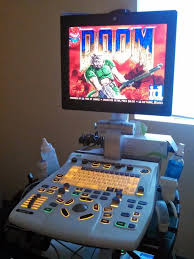

In fact, there is a whole website dedicated to all the ways you can run DOOM - canitrundoom.org!

UnoDoom would not be possible without a rich lineage of open-source project that made its creation very easy. First, the original source code of DOOM is available on GitHub and has already been forked 17.6 thousand times at the time of writing!
In 2019, Nobuaki Tanaka started building a C# port of DOOM dubbed Managed Doom, which is also available on GitHub and still actively developed. Later on Nick Kovalsky forked Managed Doom to run on .NET MAUI. This work is also available on GitHub as Doom.Mobile.
Thanks to the hard work of all these amazing developers, I was able to simply fork Doom.Mobile and start creating UnoDoom itself.
Because the idea to create the port of DOOM to Uno Platform came to my mind very late in December, I knew that I needed to progress fast to be able to release this blogpost in time for my C# Advent entry. Luckily, Uno Platform provides the most productive ecosystem of tools to build cross-platform apps and it became so much better during 2025!
First, we released Skia Rendering backend, which allows all targets to render the same pixel-perfect UI without compromises. In addition, we added SKCanvasElement, which is a control that provides a hardware accelerated Skia canvas to draw content. Because it is fully cross-platform, it is the ideal target for the rendering of UnoDoom.
Finally, in lockstep with the .NET 10 release, we also announced Uno Platform Studio 2.0 with Uno Platform MCP and App MCP. With these new MCPs, AI Agents can not only understand Uno Platform app development much better, but they can also actually start your application and interact with it by injecting pointer/keyboard input and taking screenshot - this way the agent is able to see the results of its work and validate and improve its changes.
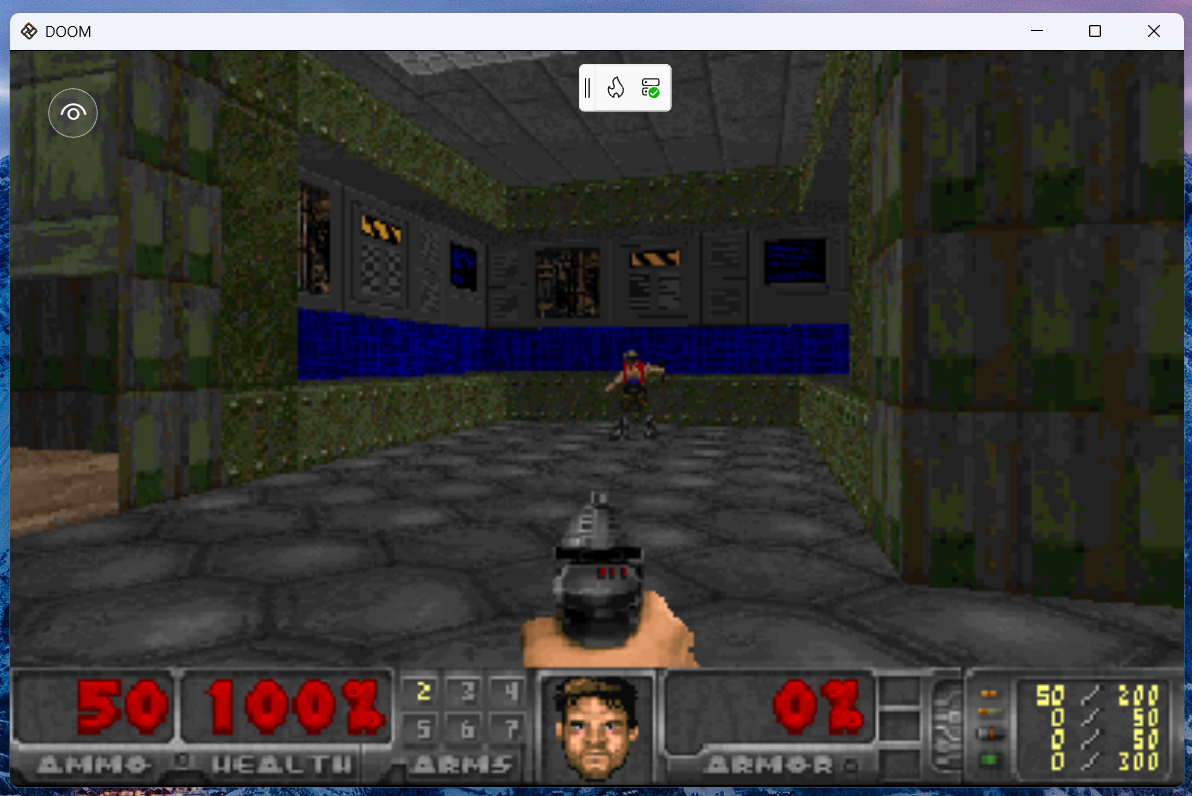
Starting with the Doom.Mobile repository, I fired up Visual Studio Code with GitHub Copilot, and prompted Claude Opus 4.5 to analyze the MAUI implementation and create an equivalent Uno Platform application with the help of Uno Platform MCP and App MCP. It took quite a bit of time, but the agent was able to port quite a bit of the MAUI-specific code to Uno Platform and finally produce a working app that it launched on desktop and confirmed DOOM loaded up to its main menu! The resulting state can be seen in this commit.
The rendering portion of the resulting game uses SkCanvasElement and draws the rendered output from ManagedDoom onto a SKBitmap that is then output onto the canvas.
Frankly I was quite pleasantly surprised! The game was already working after a single prompt and playable with keyboard input!
Next step was to validate whether the game runs on the other Uno Platform targets. Unfortunately, here we hit a problem. During game initialization, the game locates and loads the .wad file, that provides the game assets including graphics and levels. While this worked well on desktop, where file system access is not limited, it failed on other targets which can't access arbitrary file paths. Time to roll up the sleeves and dive into the code!
The repository comes with an open-source .wad file, which comes as a content file with the game. On non-desktop targets, we first need to read it from the application package files and copy it into local storage, where it is then normally accessible via a file path:
See the related commit here. And voilá! The game now runs on non-desktop targets, even in the browser! Try it out here!
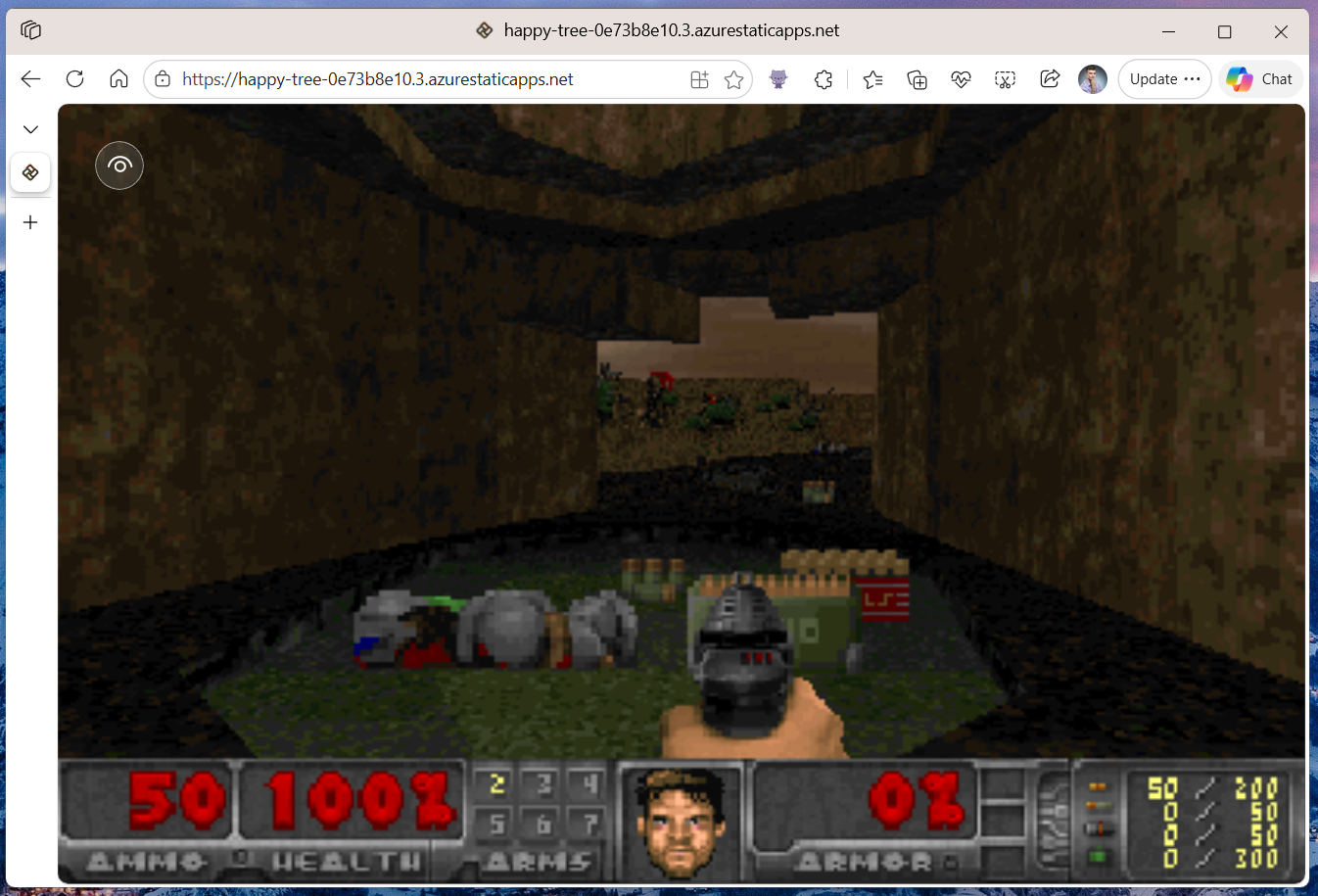
Playing the game on mobile devices which are not equipped with a physical keyboard would be a bit problematic... So we need some kind of touch input support!
First, I used the agent again to generate a suitable UI for touch inputs:
This user control handles pointer events in the code behind and checks for pointer positions to forward the input to Managed DOOM's input handling:
Especially the virtual joysticks handling is quite interesting, as it requires some sin and cos math. The agent originally didn't get these right so the movement was quite unexpected, but in the end it was just a Pi/2 difference in both axes!
By overlying this XAML-based semi-transparent control on top of the game canvas, user is now able to control the game even on mobile devices!
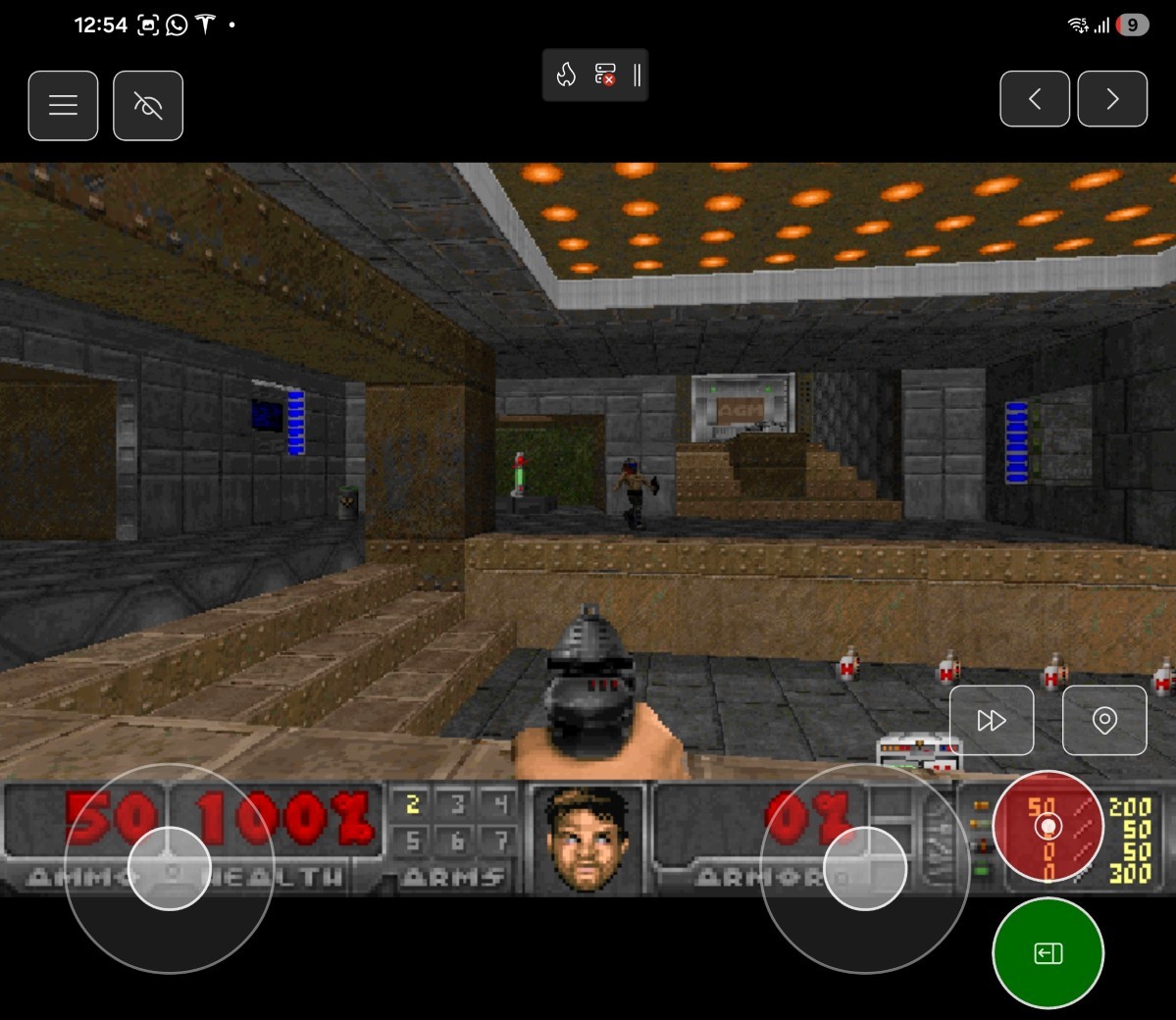
One of my favorite unexpected APIs in Uno Platform is definitely the cross-platform Gamepad API support. After adding this API to your app, you can connect your Xbox or PlayStation controller and get real-time readings from it! Here is a short excerpt from the implementation:
For more info see the related commit.
You can checkout the source code on my GitHub. Feel free to clone, fork, contribute, and make PRs!
The WebAssembly version of UnoDoom is deployed on Azure Static Web Apps and you can try it here. You can run this in your browser on a PC, on a phone, or even... in a Tesla!

The current version of UnoDoom is very basic and rough. I will continue improving it and cleaning up the code and improving its performance, and adding the missing features including sounds and music. Follow this blog for future posts on these improvements!
Augment Code Review's retrieval engine pulls the exact set of files and relationships necessary for the model to reason about cross-file logic, API contracts, concurrency behavior, and subtle invariants, putting Augment 10 pts above the competition on combined recall (55%) and precision (65%). Check out Augment Code Review and catch real bugs without spamming your PRs!
Use WorkOS Radar in your app for real-time protection against bots, fraud, and free trial abuse. Radar uses device fingerprinting and advanced behavioral signals, like unknown devices, geo blocking, and impossible travel to keep your customers safe! Explore WorkOS Radar now.
Real-time updates are no longer a "nice-to-have" feature. Most modern UI applications expect live data streams of some kind from the server. For years, the go-to answer in the .NET ecosystem has been SignalR. While SignalR is incredibly powerful, it's nice to have other options for simpler use cases.
With the release of ASP.NET Core 10, we finally have a native, high-level API for Server-Sent Events (SSE). It bridges the gap between basic HTTP polling and full-duplex WebSockets via SignalR.
SignalR is a powerhouse that handles WebSockets, Long Polling, and SSE automatically, providing a full-duplex (two-way) communication channel. However, it comes with a footprint: a specific protocol (Hubs), a required client-side library, and a need for "sticky sessions" or a backplane (like Redis) for scaling.
SSE is different because:
text/event-stream content type. No custom protocols.The beauty of the .NET 10 SSE API is its simplicity.
You can use the new Results.ServerSentEvents to return a stream of events from any IAsyncEnumerable<T>.
Because IAsyncEnumerable represents a stream of data that can arrive over time,
the server knows to keep the HTTP connection open rather than closing it after the first "chunk" of data.
Here's a minimal example of an SSE endpoint that streams order placements in real-time:
app.MapGet("orders/realtime", (
	ChannelReader<OrderPlacement> channelReader,
	CancellationToken cancellationToken) =>
{
	// 1. ReadAllAsync returns an IAsyncEnumerable
	// 2. Results.ServerSentEvents tells the browser: "Keep this connection open"
	// 3. New data is pushed to the client as soon as it enters the channel
	return Results.ServerSentEvents(
        channelReader.ReadAllAsync(cancellationToken),
        eventType: "orders");
});
When a client hits this endpoint:
Content-Type: text/event-stream header.Channel, the IAsyncEnumerable yields that item,
and .NET immediately flushes it down the open HTTP pipe to the browser.It's an incredibly efficient way to handle "push" notifications without the overhead of a stateful protocol.
I'm using a Channel here as a means to an end.
In a real application, you might have a background service
that listens to a message queue (like RabbitMQ or Azure Service Bus)
or a database change feed, and pushes new events into the channel for connected clients to consume.
The simple endpoint we just built is great, but it has one weakness: it's missing resilience.
One of the biggest challenges with real-time streams is connection drops.
By the time the browser automatically reconnects, several events might have already been sent and lost.
To solve this, SSE has a built-in mechanism: the Last-Event-ID header.
When a browser reconnects, it sends this ID back to the server.
In .NET 10, we can use the SseItem<T>
type to wrap our data with metadata like IDs and retry intervals.
By combining a simple in-memory OrderEventBuffer with the Last-Event-ID provided by the browser, we can "replay" missed messages upon reconnection:
app.MapGet("orders/realtime/with-replays", (
	ChannelReader<OrderPlacement> channelReader,
	OrderEventBuffer eventBuffer,
	[FromHeader(Name = "Last-Event-ID")] string? lastEventId,
	CancellationToken cancellationToken) =>
{
	async IAsyncEnumerable<SseItem<OrderPlacement>> StreamEvents()
	{
		// 1. Replay missed events from the buffer
		if (!string.IsNullOrWhiteSpace(lastEventId))
		{
			var missedEvents = eventBuffer.GetEventsAfter(lastEventId);
			foreach (var missedEvent in missedEvents)
			{
				yield return missedEvent;
			}
		}

		// 2. Stream new events as they arrive in the Channel
		await foreach (var order in channelReader.ReadAllAsync(cancellationToken))
		{
			var sseItem = eventBuffer.Add(order); // Buffer assigns a unique ID
			yield return sseItem;
		}
	}

	return TypedResults.ServerSentEvents(StreamEvents(), "orders");
});
Server-Sent Events is built on top of standard HTTP.
Because it is a standard GET request, your existing infrastructure "just works":
Authorization header.HttpContext.User to extract a User ID and filter the stream.
You only send a user the data that belongs to them.Here's an example of an SSE endpoint that streams only the orders for the authenticated user:
app.MapGet("orders/realtime", (
	ChannelReader<OrderPlacement> channelReader,
	IUserContext userContext, // Injected context containing user metadata
	CancellationToken cancellationToken) =>
{
	// The UserId is extracted from the JWT access token by the IUserContext
	var currentUserId = userContext.UserId;

	async IAsyncEnumerable<OrderPlacement> GetUserOrders()
	{
		await foreach (var order in channelReader.ReadAllAsync(cancellationToken))
		{
			// We only yield data that belongs to the authenticated user
			if (order.CustomerId == currentUserId)
			{
				yield return order;
			}
		}
	}

	return Results.ServerSentEvents(GetUserOrders(), "orders");
})
.RequireAuthorization(); // Standard ASP.NET Core Authorization
Note that when you write a message to a Channel it's broadcast to all connected clients.
This isn't ideal for per-user streams.
You'll probably want to use something more robust for production.
On the client side, you don't need to install a single npm package.
The browser's native EventSource API handles the heavy lifting, including the "reconnect and send Last-Event-ID" logic we discussed above.
const eventSource = new EventSource('/orders/realtime/with-replays');

// Listen for the specific 'orders' event type we defined in C#
eventSource.addEventListener('orders', (event) => {
  const payload = JSON.parse(event.data);
  console.log(`New Order ${event.lastEventId}:`, payload.data);
});

// Do something when the connection opens
eventSource.onopen = () => {
  console.log('Connection opened');
};

// Handle generic messages (if any)
eventSource.onmessage = (event) => {
  console.log('Received message:', event);
};

// Handle errors and reconnections
eventSource.onerror = () => {
  if (eventSource.readyState === EventSource.CONNECTING) {
    console.log('Reconnecting...');
  }
};
SSE in .NET 10 is the perfect middle ground for simple, one-way updates like dashboards, notification bells, and progress bars. It's lightweight, HTTP-native, and easy to secure using your existing middleware.
However, SignalR remains the robust, battle-tested choice for complex bi-directional communication or massive scale requiring a backplane.
The goal isn't to replace SignalR, but to give you a simpler tool for simpler jobs. Choose the lightest tool that solves your problem.
That's all for today. Hope this was helpful.