Sr. Content Developer at Microsoft, working remotely in PA, TechBash conference organizer, former Microsoft MVP, Husband, Dad and Geek.
151093 stories
·
33 followers

Exploring Gemma 4: The Future of Local AI Models

1 Share

Recently, Deepmind unveiled Gemma 4, the highly anticipated successor to the popular Gemma 3 model lineup. We’re excited to explore its performance when run locally, especially using vLLM at full capacity. As we delve into its capabilities, we’ll also share insights on setting up your own local AI environment to test Gemma 4’s prowess.

Based on content from Digital Spaceport

Technical Setup

For those eager to replicate our setup, we recommend checking out the Hermes OpenwebUI Setup guide and the 8 GPU Rack build video for detailed instructions. Here’s a list of hardware essentials we used:

  • GPUs: 3090 24GB, 5060Ti 16GB, 4090 24GB
  • Motherboard: MZ32-AR0
  • CPU: AMD EPYC 7702
  • RAM: 256GB DDR4 DIMMs
  • Power Supplies: Corsair HX1500i, Seasonic PRIME PX1600
  • Riser Cables and Rack: x16 PCIe Risers, PCIe3 x1 USB risers, Plastic Rack

Visit Digital Spaceport for a comprehensive DIY guide.

Exploring Gemma 4’s Features

Gemma 4 introduces several enhancements, including support for up to 140 languages and a context window of up to 256. Models range from lightweight variants like E2B and E4B, optimized for low-end hardware, to the most robust 31B model. One standout feature is its ability to handle diverse AI tasks with impressive reasoning and multimodality, even on smaller models.

Benchmarking and Performance

The improved context window prevents quality deterioration, a significant upgrade from its predecessor. Notably, tests showed exceptional performance jumps in MMLU and code evaluation scenarios, indicating a considerable leap compared to the Gemma 3 series. While we’re still conducting nuanced benchmark testing, early results are promising.

The Ethical Dimension

In exploring AI capabilities, ethical considerations remain paramount. One of our tests posed a classic ethical dilemma, where Gemma 4 demonstrated commendable reasoning, albeit with some limitations around inherent safety protocols. This scenario underscores the need for continual improvements in AI ethics training, ensuring comprehensive self-governance in complex situations.

Conclusion

Gemma 4 represents a promising stride in local AI deployment, offering versatility and power across various configurations. Whether you’re looking to harness its capabilities for coding tasks or exploring its safety features, Gemma 4’s versatility holds immense potential for both hobbyists and professionals.

To stay updated with our latest AI explorations, consider supporting us through membership, Patreon, or purchasing via our affiliate links. For more details on the Gemma 4 model and associated resources, visit the links provided.

Read the whole story
alvinashcraft
7 hours ago
reply
Pennsylvania, USA
Share this story
Delete

Are Employers Using Your Data To Figure Out the Lowest Salary You'll Accept?

1 Share
MarketWatch looks at "surveillance wages," pay rates "based not on an employee's performance or seniority, but on formulas that use their personal data, often collected without employees' knowledge." According to Nina DiSalvo, policy director at labor advocacy group Towards Justice, some systems use signals associated with financial vulnerability — including data on whether a prospective employee has taken out a payday loan or has a high credit-card balance — to infer the lowest pay a candidate might accept. Companies can also scrape candidates' public personal social-media pages, she said... A first-of-its-kind audit of 500 labor-management artificial-intelligence companies by Veena Dubal, a law professor at University of California, Irvine, and Wilneida Negrón, a tech strategist, found that employers in the healthcare, customer service, logistics and retail industries are customers of vendors whose tools are designed to enable this practice. Published by the Washington Center for Equitable Growth, a progressive economic think tank, the August 2025 report... does not claim that all employers using these systems engage in algorithmic wage surveillance. Instead, it warns that the growing use of algorithmic tools to analyze workers' personal data can enable pay practices that prioritize cost-cutting over transparency or fairness... Surveillance wages don't stop at the hiring stage — they follow workers onto the job, too. The vendors that provide such services also offer tools that are built to set bonus or incentive compensation, according to the report. These tools track their productivity, customer interactions and real-time behavior — including, in some cases, audio and video surveillance on the job. Nearly 70% of companies with more than 500 employees were already using employee-monitoring systems in 2022, such as software that monitors computer activity, according to a survey from the International Data Corporation. "The data that they have about you may allow an algorithmic decision system to make assumptions about how much, how big of an incentive, they need to give to a particular worker to generate the behavioral response they seek," DiSalvo said. The article notes that Colorado introduced the "Prohibit Surveillance Data to Set Prices and Wages Act" to ban companies from setting pay rates with algorithms that use payday-loan history, location data or Google search behavior for algorithmically set. Thanks to long-time Slashdot reader sinij for sharing the article.

Read more of this story at Slashdot.

Read the whole story
alvinashcraft
7 hours ago
reply
Pennsylvania, USA
Share this story
Delete

New Copilot for Windows 11 includes a full Microsoft Edge package, uses more RAM

1 Share

There’s a new version of Copilot rolling out on Windows 11, and it dumps native code (WinUI) in favor of web components. This was expected based on our previous findings, but to our surprise, it actually ships with a full-blown version of Microsoft Edge.

I can’t tell if Microsoft is really losing the AI race, but at this point, it’s quite obvious that the company hasn’t managed to build a solid Copilot experience for Windows or stick with one approach for more than a quarter.

This latest version replaces the native app, which itself replaced the WebView version, which replaced the PWA, which replaced the Copilot that once lived in a sidebar.

Copilot in the Microsoft Store

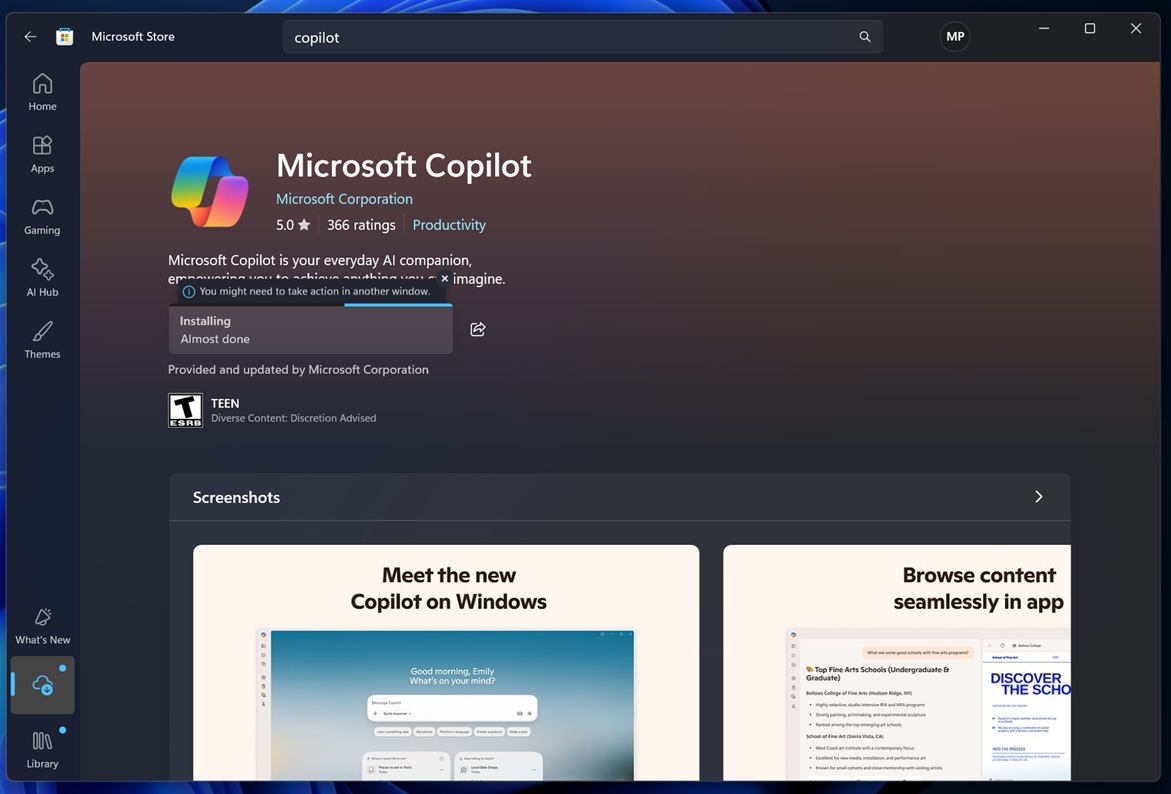
If you don’t have the new Copilot yet, go to the Microsoft Store and search for Copilot. You’ll find a new listing called “Microsoft Copilot,” and it shows a download button even when Copilot is already installed on your PC.

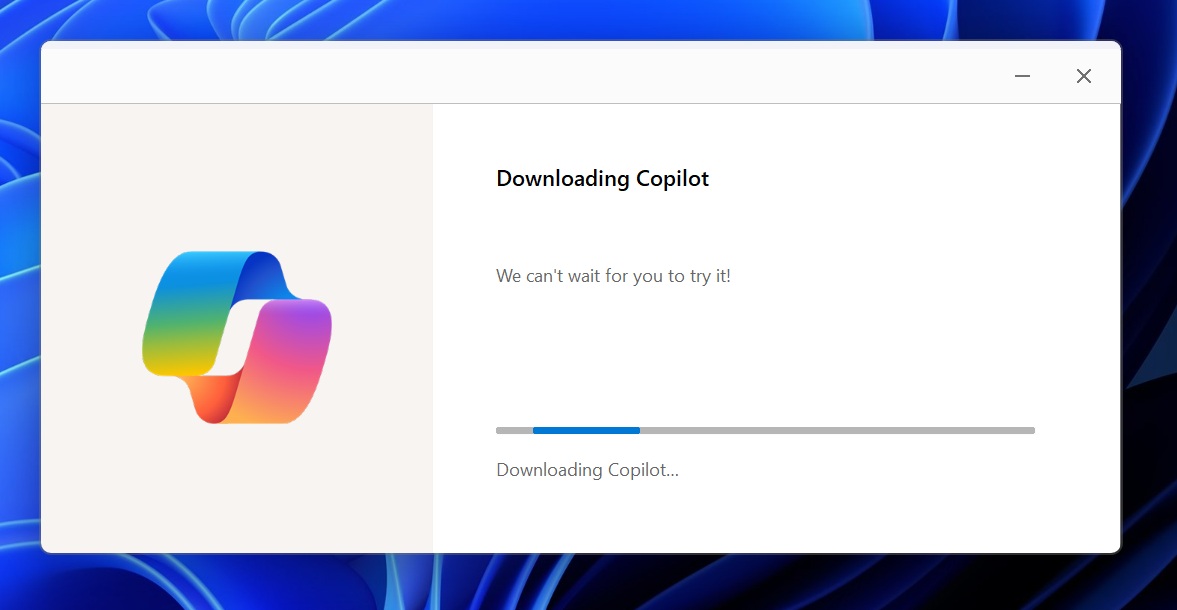
If you hit the Download button, you’ll notice it completes almost instantly. That’s because it isn’t downloading the Copilot app itself. Instead, it’s downloading a Copilot installer, similar to how the Microsoft Edge installer works.

Copilot using Edge installer

The Store even warns that you need to take action in another window, which makes it clear that the Copilot download is no longer handled directly by the Microsoft Store. You might have noticed a similar pattern for Microsoft Teams.

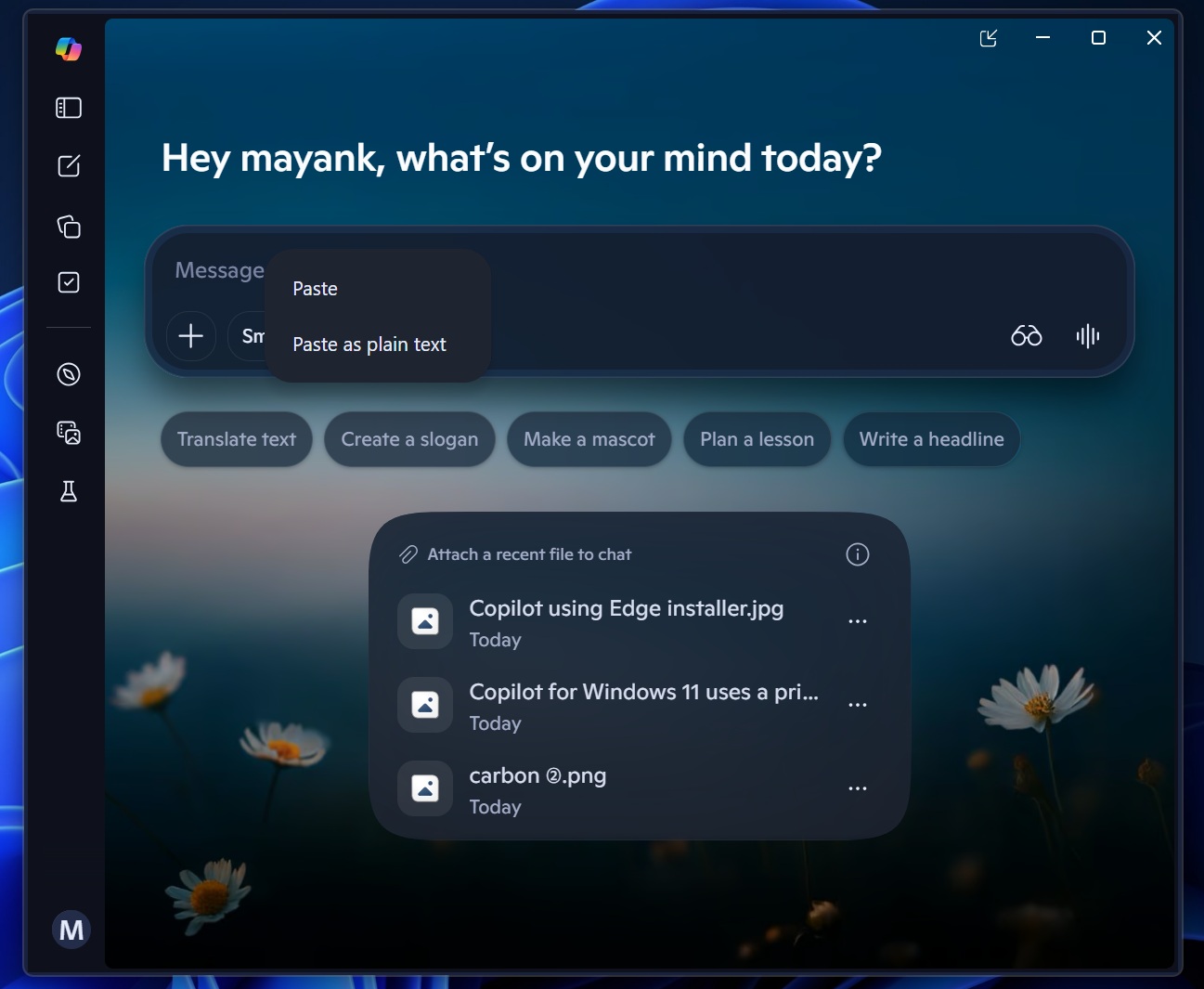
After the update is installed, the old native Copilot app, built on the WinUI framework, automatically disappears from the Start menu and other places, as the new Copilot takes over.

Copilot new app on Windows 11

I opened this new Copilot, and it looks exactly like the web version (web.copilot.com). It’s actually a lot smoother and almost feels native. However, there are some caveats, such as high RAM usage, which is quite upsetting as it undermines Microsoft’s recent efforts to revive Windows.

Copilot’s new version is a resource hog, a hybrid version that ships with its own Edge browser

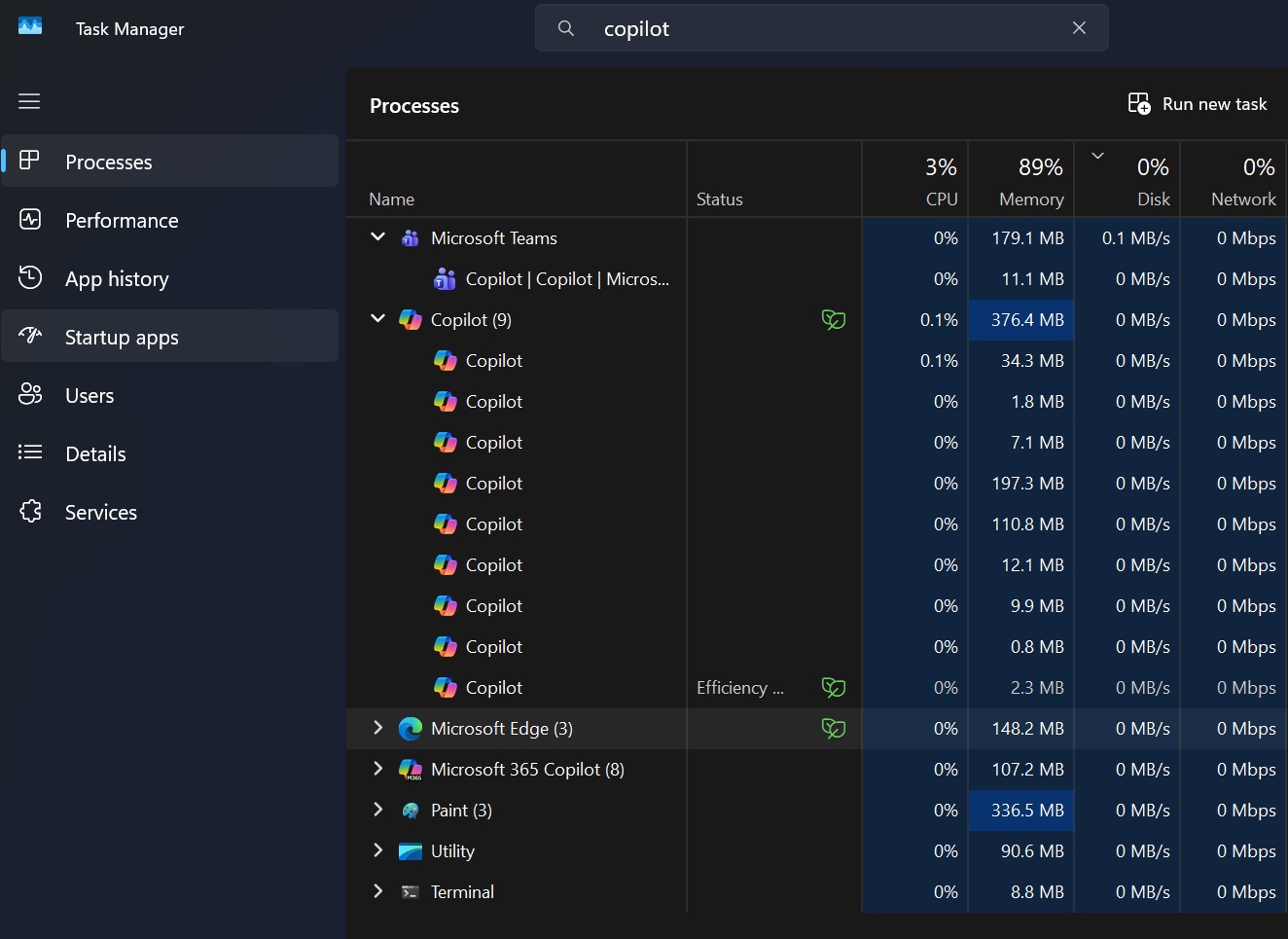
In our tests, Windows Latest observed that Copilot uses up to 500MB of RAM in the background, and it also reaches up to 1GB of RAM when you begin to interact with it. On the other hand, native Copilot used to have less than 100MB of RAM usage.

Copilot in Task Manager

This made me curious , so I looked into how the new “web-based” Copilot app is different, and it turns out that it is a hybrid web app with a rebranded/forked Edge instance running as a dedicated app in a WebView2 container.

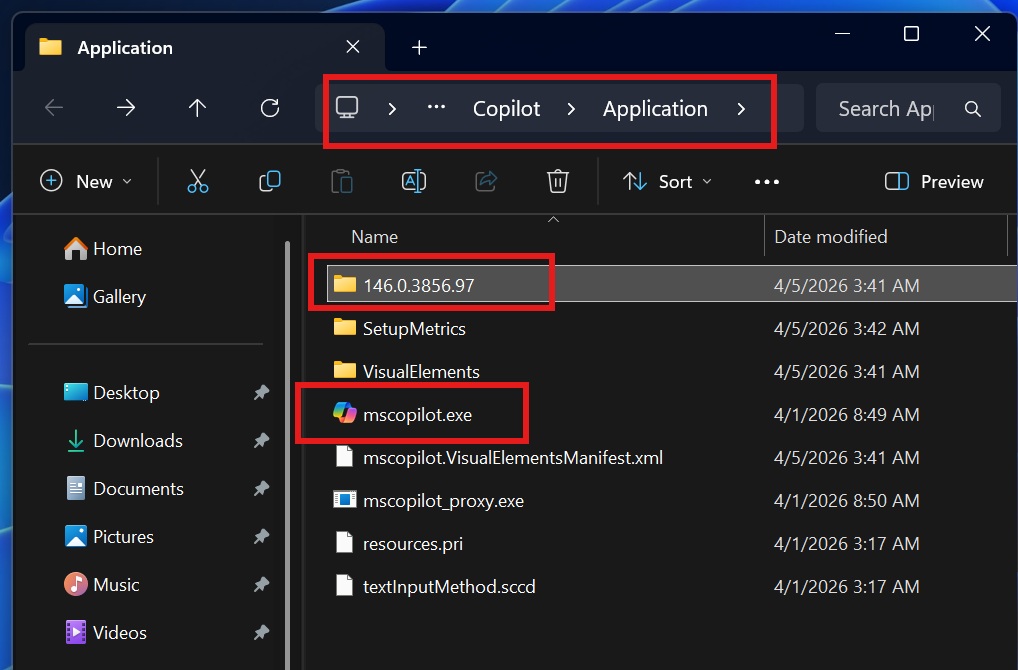
MIcrosoft Edge package in Copilot app

As you can see in the above screenshot, Copilot’s installation folder literally has a 146.0.3856.97 folder, which is a complete Microsoft Edge installation. The size of the Edge folder is approx 850 MB.

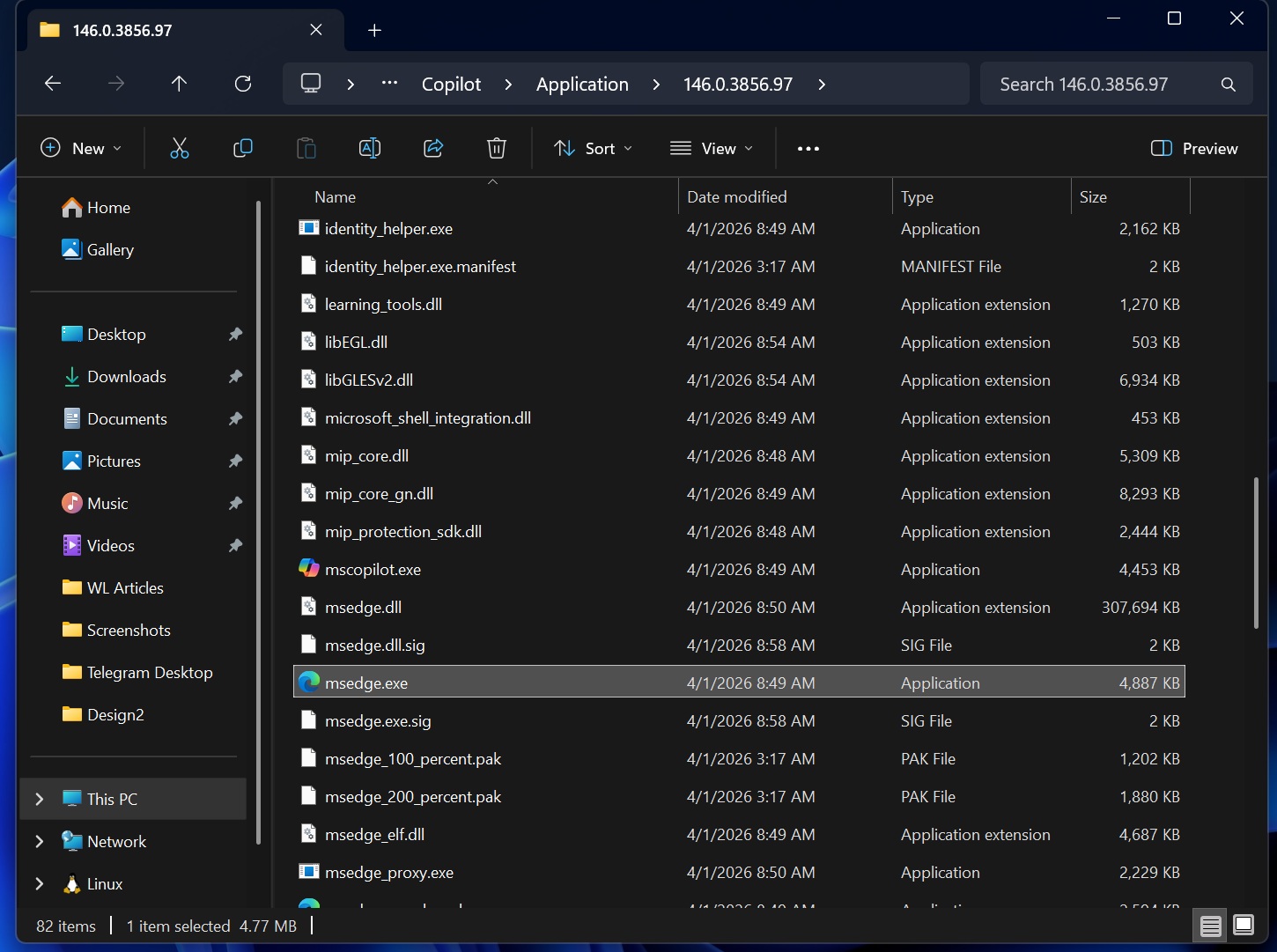
It contains all Edge binaries, including msedge.exe, msedge.dll, msedge_elf.dll, ffmpeg.dll, libGLESv2.dll, Vulkan/SwiftShader, WidevineCDM, etc. Also, Windows Latest observed that msedge.dll inside the new Copilot app package is 315 MB, which confirms it’s a full Chromium browser engine.

msedge.exe in Copilot app package

If it were a standard WebView2 or Progressive Web App, it would have relied on the existing Edge integration in Windows 11 instead of shipping with its own Edge fork.

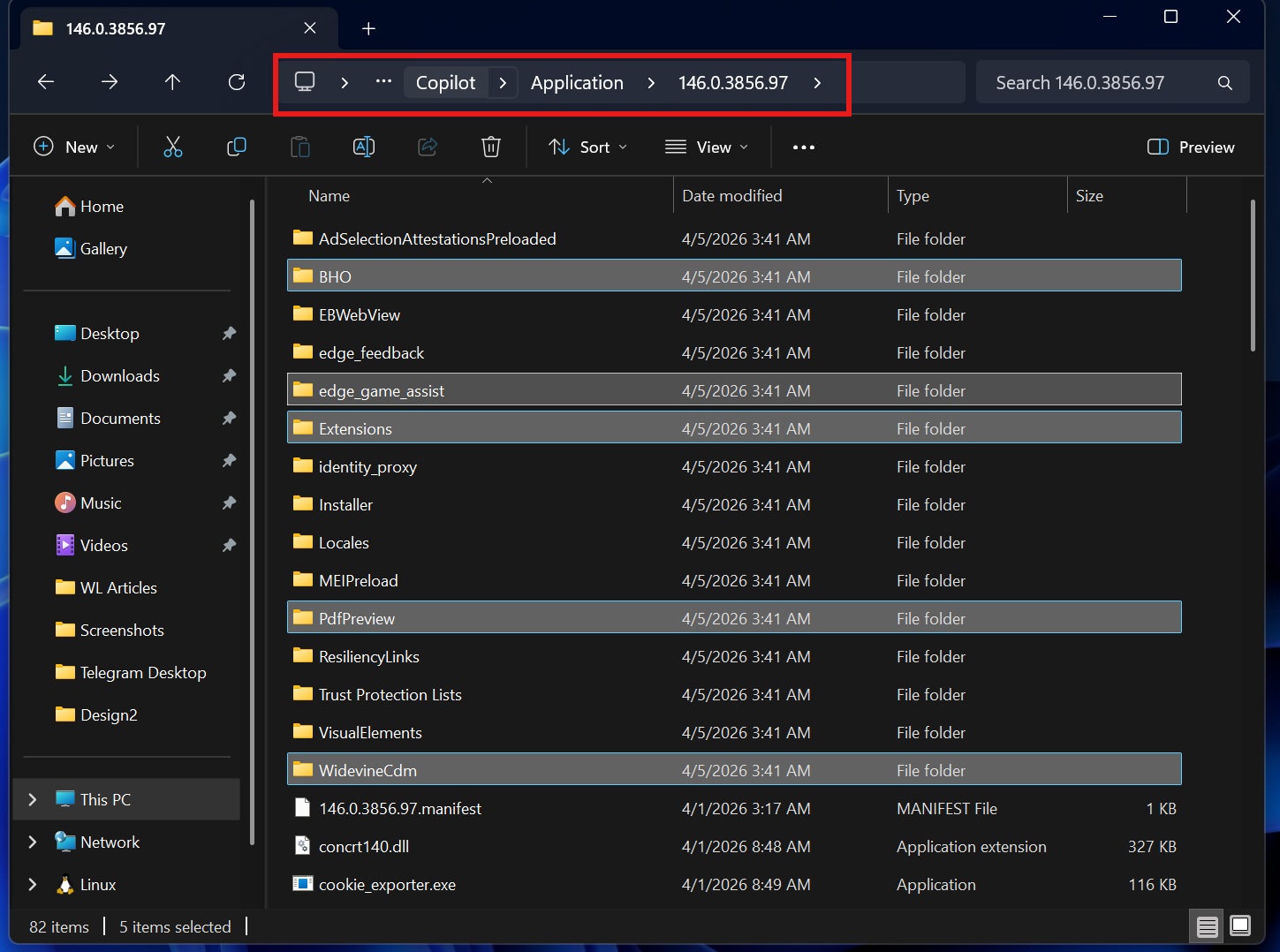
I also found Edge subsystems in Copilot’s package, including Browser Helper Objects, Trust Protection Lists/, PdfPreview/, Extensions/, edge_feedback/, edge_game_assist/, and DRM.

MS edge features in Copilot

Interestingly, Windows 11’s new Copilot app has both WebView2 and full browser capabilities. My source is an msedgewebview2.exe in the package, along with multiple .dll files, including EmbeddedBrowserWebView.dll, which means there’s a bundled WebView2 runtime with Microsoft Edge.

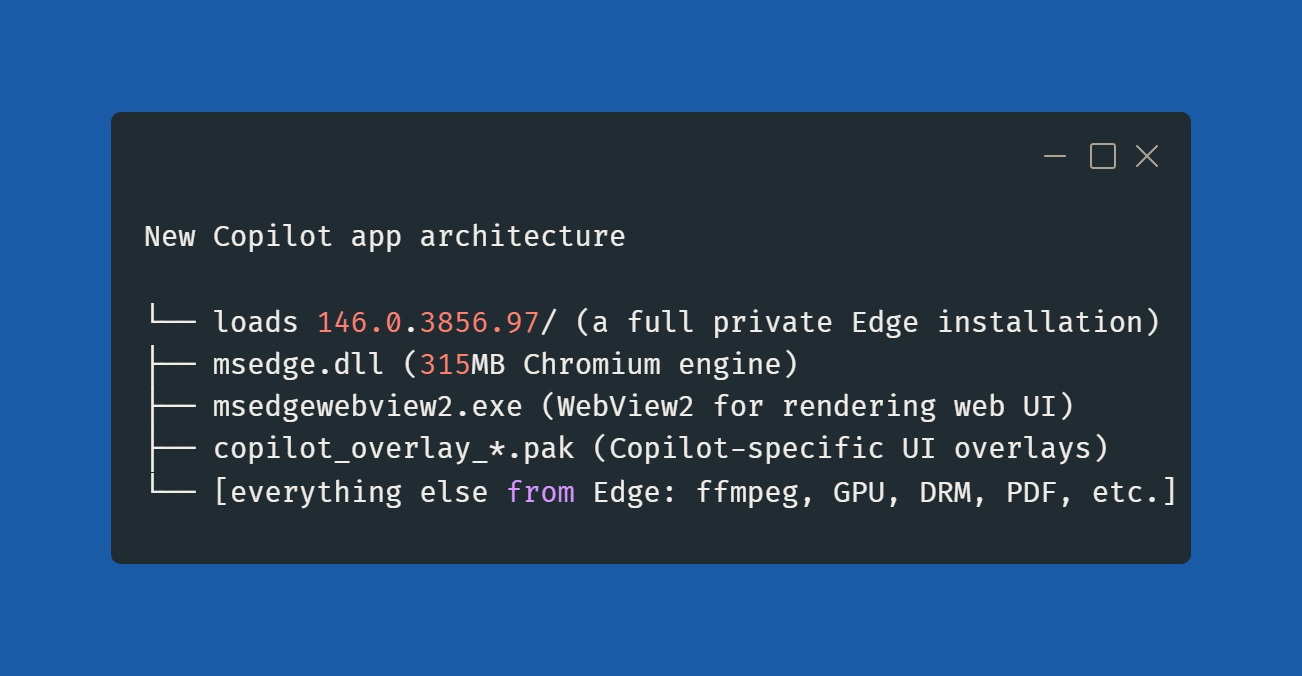
Copilot for Windows 11 uses a private Edge copy
Image Courtesy: WindowsLatest.com

This new Copilot is an interesting app, and that might also explain why it feels faster than typical web apps or PWAs. It’s because Microsoft ships a private copy of Edge inside the Copilot app, includes a custom launcher (mscopilot.exe), and the Copilot UI itself is a web app rendered via WebView2.

Regardless, even if it passes as a good web app, we don’t need any of those on Windows 11 at this point. Windows 11 is already bloated with web apps, PWAs, and Electron. What do you think? Let me know in the comments below.

The post New Copilot for Windows 11 includes a full Microsoft Edge package, uses more RAM appeared first on Windows Latest

Read the whole story
alvinashcraft
7 hours ago
reply
Pennsylvania, USA
Share this story
Delete

Three New MAI Models

1 Share

Microsoft announced three new first‑party MAI models this week, all available through Foundry. The releases cover transcription, voice generation, and image creation through Microsoft Foundry and the MAI Playground.

The transcription model (MAI‑Transcribe‑1) focuses on accuracy across a broad set of languages while running faster and cheaper than the usual options. The voice model (MAI‑Voice‑1) generates natural speech from very small samples. The model can produce a full minute of audio in about a second, and it does so with unusually efficient GPU use. If you want to check it out, try it in Copilot Audio Expressions.

MAI‑Image‑2 also improves image generation speed across Copilot and Foundry, delivering roughly twice the performance while keeping quality in line with previous models. Just ask Copilot (web or Windows) to generate an image and it will use MAI‑Image‑2 where available.

Microsoft is also pricing these models well below the usual market rates. Transcription at thirty‑six cents per hour is roughly a 40 to 60 percent savings compared to the typical dollar‑per‑hour services. Voice generation at twenty‑two dollars per million characters comes in at about half the cost of most high‑quality TTS models. Image output at thirty‑three dollars per million tokens is often 70 percent cheaper than comparable offerings from the major providers. The MAI lineup is clearly positioned as the lower‑cost option.

What stands out is not any single capability, but the shift in direction. Microsoft is building more of its own stack rather than betting everything on OpenAI. That shift, I assume, has deeper implications for cost, direction, and long‑term strategy. Even more significantly, each model was built by small team about 10 and tuned for efficiency, which seems to be the through‑line of this entire effort. Suggesting that high‑quality models no longer require massive research groups.

A weathered metal sign mounted on a yellow brick wall reads *School Bus Exit* with a right‑pointing arrow beneath the text.

As a note, I do work at Microsoft, but I am not part of the team that develops these models.

Read the whole story
alvinashcraft
7 hours ago
reply
Pennsylvania, USA
Share this story
Delete

How to Build a Personal Context MCP

1 Share
From: AIDailyBrief
Duration: 20:20
Views: 1,391

Why context is the core bottleneck for agentic AI adoption in enterprises, with data readiness, access, and portability as decisive factors. Presentation of a Personal Context Portfolio: modular markdown files (identity, roles, projects, tools, communication style, domain knowledge, decision log) as a machine-readable, portable context package. Demonstration of practical tooling and deployment patterns, including Context Hub, CLI-based context sharing, MCP server setup, and common troubleshooting lessons.

The AI Daily Brief helps you understand the most important news and discussions in AI.
Subscribe to the podcast version of The AI Daily Brief wherever you listen: https://pod.link/1680633614
Get it ad free at http://patreon.com/aidailybrief
Learn more about the show https://aidailybrief.ai/

Read the whole story
alvinashcraft
12 hours ago
reply
Pennsylvania, USA
Share this story
Delete

BONUS #NoEstimates, Throughput, and the Superstition of Project Management With Felipe Engineer-Manriquez

1 Share

BONUS: Why Your Plan Is Lying to You — #NoEstimates, Throughput, and the Superstition of Project Management

This episode is a cross-post from The EBFC Show, Felipe Engineer-Manriquez's podcast exploring Lean and Agile in construction. In this conversation, Felipe interviews Vasco about the #NoEstimates movement, throughput-based planning, and why traditional project management is still stuck in the middle ages of managing creative work.

The Human Side of Scrum That the Scrum Guide Doesn't Cover

"When you go into a daily meeting and you start looking at the people in that room, maybe they are the exact same people that were there yesterday, but the team is totally different. Somebody might have had a bad night's sleep, somebody might have had an argument with their spouse. These are human beings. These are not machines that you can just distribute work to."


Vasco's path to agile coaching started with a realization that most practitioners eventually reach: the problems in software development aren't technological. They're about people — getting agreements, sharing information at the right time, making the collective brain of a team actually function. The Scrum Guide gives you organizing principles — how many meetings, who's in them — but it says almost nothing about the real-time feedback cycle between humans that makes or breaks a team. That's why the Scrum Master role exists: to be the lubricant for human interactions, to break down complex ideas into items the collective mind can process. It's the piece that makes Scrum work, and it's the piece that's hardest to teach.

From Project Manager to #NoEstimates — The Bet That Changed Everything

"The PM wanted 15 items per sprint, and the team said 'yeah, we can do 15.' I said, this is not gonna happen. The team had been delivering between five and eight items per sprint. I said, I'm gonna be positive — I'm gonna say seven. And no surprise, by the end of the sprint, they delivered seven."


Vasco started as a project manager — and not the easy certification kind. He went through IPMA, which means six months of training, a four-hour written exam, and an expert interview, just for the entry level. Planning and estimating was the job. Then he ran his first Scrum project, specifically to prove it couldn't work. By the second month, he couldn't understand how anything else could work. The team delivered something to show every single sprint — something that never happened with traditional project management. The turning point came when he made a bet with a product manager: the PM needed 15 items per sprint, the team committed to 15, but historical throughput was 5-8 items. Reality delivered seven. That moment crystallized the #NoEstimates insight: we can't fight reality, but we can choose which seven items to deliver.

Reality Is a Bitch — Why Linear Predictive Planning Fails

"Never believe the plan. Or as in Scarface — never get high on your own supply. It's so unbelievable how project managers still today believe their freaking plans."


At Nokia, Vasco managed a program of 500 people across 100 teams on four continents. No way to get everyone in a room. So he tracked system-level throughput — features delivered to integration per week. Six months into a twelve-month project, the data said they'd be at least six months late. He told the program manager: cut scope now. The program manager did what every PMI-trained program manager does — sent an email asking all 100 teams if they'd deliver on time. Every single team said yes. Nobody wants to be first to admit they're late. Twelve months in, they discovered they were six months late. The project got canceled. 500 people, millions of euros, all because somebody believed the plan. Linear predictive planning is useful for exploring what might be possible if nothing goes wrong. It is not reality. The only tool that reflects reality is throughput — the number of items completed per unit of time.

Earned Value Management — George Orwell at His Best

"It's not earned, it's spent. It's not value, it's cost. It's not management, it's just observation. Monty Python could not have come up with a better name."


Felipe shares a story that mirrors the absurdity: an industrial project with a dedicated 35-person earned value management department. Before the meeting even started, the department head announced, "Let's all acknowledge that earned value management is more an art than a science." Their charts were made up, the contractor's charts were made up, and the goal of the meeting was to agree that the project would finish on time — regardless of what any data said. This is where traditional project management ends up when it disconnects from throughput: a $30 million scope addition with zero additional time, defended by charts that a mediocre attorney can invalidate in the first week of litigation. Felipe knows — he spent a year being cross-examined by forensic schedulers whose full-time job is proving that construction schedules are fiction.

One Small Experiment to Test #NoEstimates

"Never convince anyone. Convince yourself. Once you're convinced, whatever other people say, it doesn't really matter because you're not gonna take them seriously anyway."


Here's how to validate throughput-based planning with your own data: take the last 10 sprints (or periods). Calculate the average throughput and control limits from the first five. Then check whether the next five sprints fall within that range. They will. If you're in software and using Jira, you already have this data. You don't need anyone's permission. You don't need to change anything. Just look at what your team actually delivers versus what they planned to deliver. The gap between those two numbers is the gap between superstition and reality.

About Felipe Engineer-Manriquez

Felipe Engineer-Manriquez is a best-selling author, international keynote speaker, Project Delivery Services Director at The Boldt Company, host of The EBFC Show podcast, and a proven construction change-maker implementing Lean and Agile practices on projects from millions to billions of dollars worldwide. He is a Registered Scrum Trainer™ (RST), Registered Scrum Master™ (RSM), and recipient of the Lean Construction Institute Chairman's Award. His book Construction Scrum is the first practical guide for applying Scrum in construction.


You can link with Felipe Engineer-Manriquez on LinkedIn.


Download audio: https://traffic.libsyn.com/secure/scrummastertoolbox/20260404_Felipe_Engineer_BONUS.mp3?dest-id=246429
Read the whole story
alvinashcraft
12 hours ago
reply
Pennsylvania, USA
Share this story
Delete
Next Page of Stories