 Log in

The Boox Go 10.3 Lumi (Gen 2) and ReMarkable Paper Pure have the same sized display, but they're very different. Here's where they each excel.

|
Sr. Content Developer at Microsoft, working remotely in PA, TechBash conference organizer, former Microsoft MVP, Husband, Dad and Geek.
|

Pennsylvania, USA


Microsoft Threat Intelligence has uncovered an active supply chain attack involving malicious npm packages registered under organizational scopes that mirror real internal corporate namespaces, employing dependency confusion technique to deploy an obfuscated reconnaissance payload.
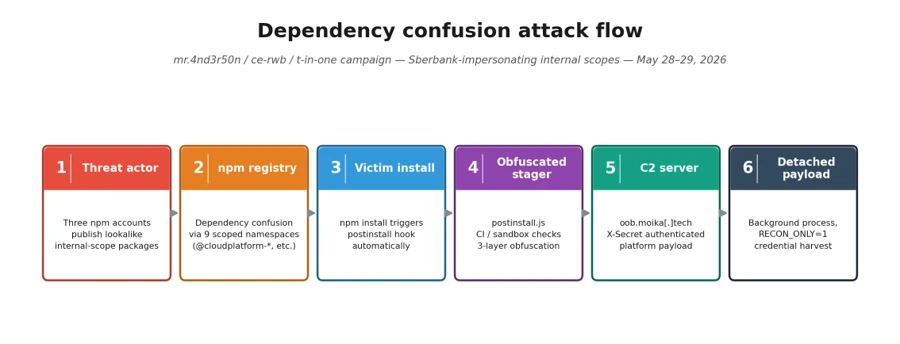
On May 28 and May 29, 2026, a threat actor operating under three maintainer aliases mr.4nd3r50n (mr.4nd3r50n@yandex[.]ru), ce-rwb (ogvanta@yandex[.]ru), and t-in-one (t-in-one@yandex[.]ru) published malicious packages across two publishing bursts. The packages impersonate internal corporate packages across nine different organizational scopes using a dependency confusion technique, and several spoof internal enterprise infrastructure URLs (GitHub Enterprise, Jira, documentation portals) in their package.json to appear legitimate. Once installed, the packages download and execute an obfuscated reconnaissance payload from an attacker-controlled command-and-control (C2) server.
All packages in the cluster ship the same heavily obfuscated postinstall stager and connect to the same C2 endpoint, a ~17 KB JavaScript dropper used for for environment fingerprinting and credential reconnaissance. The payload runs silently during npm install and operates in “reconnaissance-only” mode, collecting system information, hostnames, environment variables, and developer context. The architecture includes a RECON_ONLY flag that can be toggled server-side for full exploitation in follow-on attacks. Based on our investigation and feedback to the npm team these repos and users were taken down.
Key capabilities observed in the campaign include automatic execution through npm lifecycle hooks, obfuscator.io-style anti-analysis techniques, platform-specific payload delivery (Windows, macOS, Linux), continuous integration and continuous delivery (CI/CD) environment detection and bypass, cache-based deduplication to evade repeated-execution monitoring, and a two-phase attack design (reconnaissance now, exploitation later).
Attack chain overview
The campaign spans dozens of scoped packages published under three npm maintainer accounts that our forensic analysis attributes to a single operator (detailed in the Attribution section below). The attack proceeds through:
- Publication of dependency confusion packages under three actor identities across nine organizational scopes
- Automatic payload execution through a postinstall hook during npm install
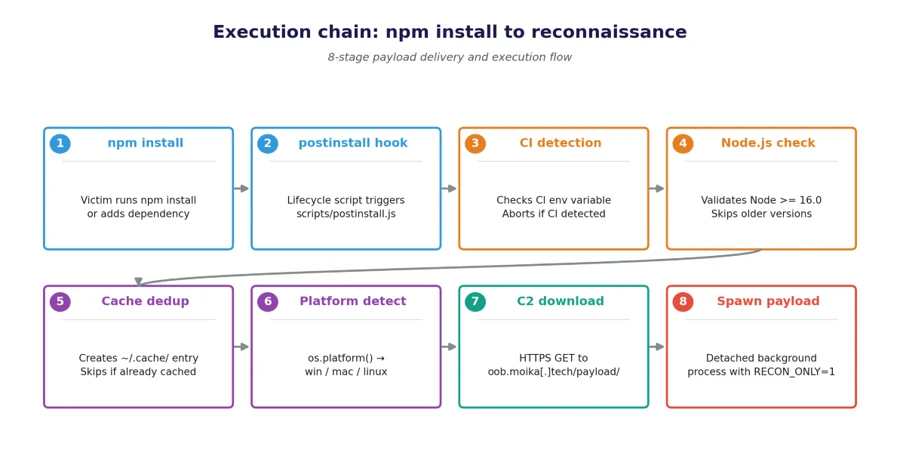
- Execution chain: npm install → postinstall → scripts/postinstall.js (obfuscated) → HTTPS GET to C2 → write payload to tmpdir → spawn detached process
- Environment reconnaissance with credentials and context exfiltration using environment variables passed to the spawned payload
The lure: Dependency confusion and spoofed internal metadata
The actor adopted three social-engineering techniques designed to drive installs through misconfigured package managers or developer trust transference:
Namespace squatting
The attacker registered packages under organizational scopes that mirror real internal corporate namespaces: @cloudplatform-single-spa, @wb-track, @data-science, @ce-rwb, @payments-widget, @travel-autotests, @t-in-one, @capibar.chat, and @sber-ecom-core. Package names like svp-baas, enterprise, monitoring, ssh-keys, shared-front, payments-widget-sdk, add_application_service_token, ui-kit, and sberpay-widget target specific internal services — the last of which directly impersonates Sberbank’s SberPay payment widget.
Spoofed enterprise metadata
Every package sets its package.json homepage, repository, bugs, and author fields to fabricated but realistic-looking internal infrastructure URLs. For example:
- Repository: git+https://github[.]cloudplatform-single-spa[.]io/platform/svp-baas.git
- Homepage: https://docs[.]cloudplatform-single-spa[.]io/platform/svp-baas
- Bugs: https://jira[.]cloudplatform-single-spa[.]io/projects/PLATFORM
- Author: Cloudplatform-Single-Spa Platform Engineering <platform@cloudplatform-single-spa[.]io>
These URLs follow the pattern of enterprise GitHub, Jira, and documentation portals, lending an air of legitimacy designed to evade casual inspection during code review.
Inflated version numbers
mr.4nd3r50n uses version 100.100.100, an absurdly high version number designed to win npm’s server resolution against any real internal package version. ce-rwb uses a more realistic 3.5.22 to blend in with legitimate release histories. t-in-one mixes both tactics: the ten @t-in-one packages ship at 5.7.1, while @capibar.chat/ui-kit (99.5.7) and @sber-ecom-core/sberpay-widget (99.5.8) use inflated numbers — and both of the latter scopes were pre-staged with 99.0.7 releases on 2026-05-04, weeks before the main bursts.
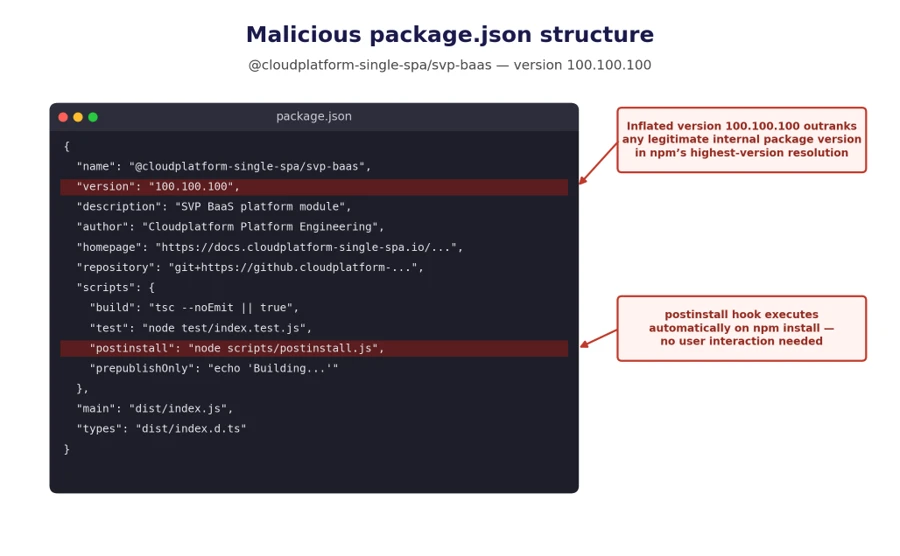
npm install. Version 100.100.100 ensures the malicious package wins dependency resolution over any real internal version.Execution: npm lifecycle hook abuse
Every package in the cluster declares an automatic install-time hook in package.json:
"scripts": {
    "build": "tsc --noEmit || true",
    "test": "node test/index.test.js",
    "postinstall": "node scripts/postinstall.js",
    "prepublishOnly": "echo 'Building...'"
}
The malicious code executes the moment a victim runs npm install; no require() from victim code is needed. The build and test scripts are cosmetic, designed to make the package appear to have a legitimate development workflow.
Stager: Obfuscated JavaScript dropper
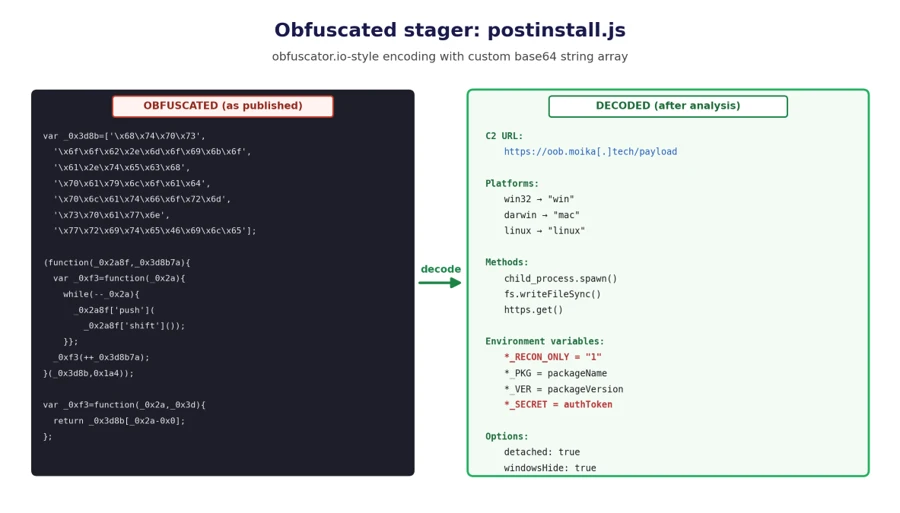
scripts/postinstall.js is approximately 7 KB of heavily obfuscated JavaScript using obfuscator.io-style techniques:
- String array encoding: All meaningful strings (URLs, function names, environment variable keys) are stored in a rotated array and decoded at runtime through a custom Base64 variant
- Control flow flattening: Logic branches are obscured through computed dispatch tables
- Dead code injection: Anti-analysis noise makes manual review prohibitively time-consuming
- Self-defending code: Anti-tampering checks detect modifications to the obfuscated code
Execution flow: from npm install to detached payload
The deobfuscated execution flow proceeds through eight distinct stages:
- CI detection bypass: The stager checks for the CI environment variable (or scope-specific equivalents like CLOUDPLATFORM_SINGLE_SPA_NO_TELEMETRY). If detected, execution silently aborts. This avoids triggering alerts in monitored CI/CD pipelines where security tooling is more likely to detect anomalous behavior.
- Node.js version validation: The stager verifies process.versions.node >= 16.0. Older Node.js versions are skipped, likely because the payload depends on modern APIs.
- Cache deduplication: A cache directory is created at ~/.cache/<scope>_init/ (for example, ~/.cache/._cloudplatform-single-spa_init/). The stager generates a hash key from the package name, version, and project root path. If a cache entry exists and hasn’t expired, the stager exits. This prevents the payload from re-running on every npm install in the same project, reducing the chance of detection through repeated network connections.
- Project root detection: The stager walks up the directory tree from process.cwd() looking for package.json, yarn.lock, or .git to identify the project root. This context is incorporated into the cache key and passed to the payload.
- Platform detection: os.platform() determines the target OS variant (win32 → win, darwin → mac, default → linux).
- Payload download: An HTTPS GET request is made to the C2 server at https://oob.moika[.]tech/payload/<platform> with a 30-second timeout. The response is a binary payload.
- Payload drop: The downloaded binary is written to os.tmpdir() as a .js file (for example, /tmp/._cloudplatform-single-spa_init.js).
- Detached execution: Payload spawned as an independent background process with .unref() to outlive npm install.
Reconnaissance mode and two-phase design
The environment variables passed to the spawned payload reveal a deliberate two-phase attack architecture:
| Variable | Purpose |
| *_RECON_ONLY | Set to “1” by default; limits payload to reconnaissance |
| *_PKG | Identifies which internal package triggered the execution |
| *_VER | Package version for campaign tracking |
| *_SECRET | Hard-coded authentication token for C2 communication |
The RECON_ONLY flag is hard-coded to “1” in the current campaign, indicating the attacker is in Reconnaissance — collecting environment information, hostnames, installed packages, and developer context. The architecture supports a Full exploitation mode where the flag can be toggled server-side to enable data exfiltration, credential theft, or backdoor installation on previously fingerprinted targets.
This two-phase design is sophisticated: it minimizes the risk of detection during initial deployment while building a target inventory for selective, high-value exploitation later.
Threat actor attribution
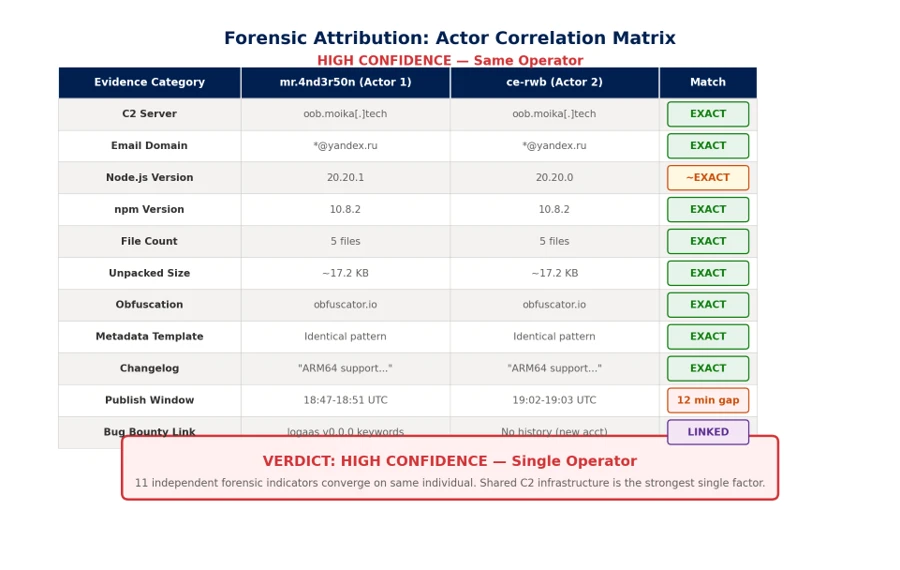
Forensic analysis of npm registry metadata across every package in the cluster provides high-confidence evidence that the three accounts (mr.4nd3r50n, ce-rwb, and t-in-one) are operated by the same individual. The single strongest piece of evidence is a shared hardcoded authentication value, l95HdDaz3kQx1Zsg3WxH6HvKANf51RY1, sent as the X-Secret HTTP header on every outbound C2 request from every package in all three accounts.
Identical C2 infrastructure
Both accounts’ payloads connect to the exact same C2 server: https://oob.moika[.]tech/payload. Sharing offensive infrastructure across “separate” personas is the strongest single indicator of a single operator. Maintaining separate C2 servers would be trivial, so using the same one indicates the shared infrastructure supports our assessment that the activity is associated with a single operator.
Same publishing toolchain
mr.4nd3r50n’s early versions (v99.99.99) were published with Node.js 20.20.1 / npm 10.8.2. ce-rwb’s packages were published with Node.js 20.20.0 / npm 10.8.2. t-in-one’s @t-in-one packages were published with Node.js 20.20.1 / npm 10.8.2 — matching mr.4nd3r50n exactly. The minor variance across the three accounts suggests the same machine at slightly different patch levels, or a small set of machines configured from the same provisioning script.
Identical package template generator
Both actors use the exact same templating system for generating fake package metadata:
- Author: “<Scope-Name> Platform Engineering” <platform@<scope>.io>
- Repository: git+https://github.<scope>.io/platform/<pkg>.git
- Documentation: https://docs.<scope>.io/platform/<pkg>
- Issue tracker: https://jira.<scope>.io/projects/PLATFORM
- README: Identical structure including a fake “Telemetry” disclaimer and the same changelog entries (“Added ARM64 support”, “Improved error handling”, “Updated TypeScript types”)
This level of template consistency, down to identical changelog entries across every package, including the @t-in-one README that points developers at a fabricated internal registry at npm.t-in-one[.]io with matching docs.t-in-one[.]io and jira.t-in-one[.]io references — indicates a single automated package generator.
Temporal correlation: 12-minute gap
mr.4nd3r50n published 26 packages between 18:47–18:51 UTC on May 28. ce-rwb published 7 packages between 19:02–19:03 UTC on May 28 — a 12-minute gap consistent with one person completing one publishing batch, switching npm accounts, and starting the next. t-in-one returned the following day, publishing 10 @t-in-one packages between 09:01:56 and 09:02:39 UTC on May 29 (a 43-second automated burst), with the @capibar.chat and @sber-ecom-core republishes following minutes later. The ~14-hour overnight gap between ce-rwb and t-in-one, paired with the unchanged C2 host and identical X-Secret, indicates the same operator returning to expand the campaign rather than a separate group.
Bug bounty to malware pipeline
The @cloudplatform-single-spa/logaas package reveals a critical piece of the actor’s history:
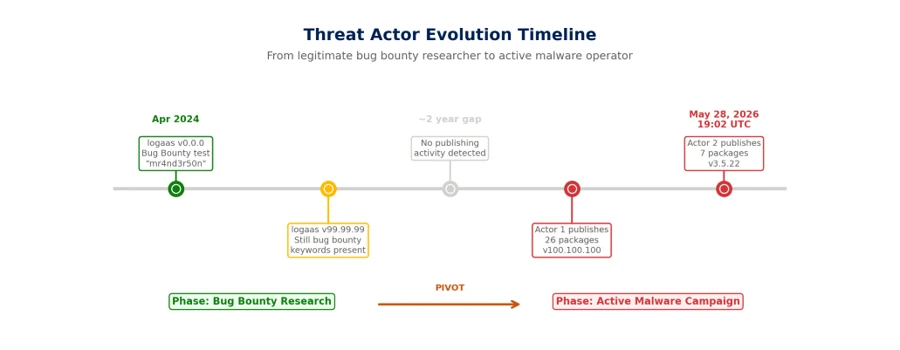
- v0.0.0 (April 10, 2024): Published with keywords [“Bugbounty”, “mr4nd3r50n”] and description “BugBounty testing by mr4nd3r50n” using Node.js 21.7.1 / npm 10.5.0
- v99.99.99 (June 5, 2024): Same bug bounty markers, same toolchain
- v99.99.100 (May 28, 2026, 18:47 UTC): First appearance of the malicious obfuscated payload, upgraded to Node.js 24.8.0 / npm 11.6.0
- v100.100.100 (May 28, 2026, 18:50 UTC): Final malicious version
This timeline shows mr.4nd3r50n began as a bug bounty researcher probing npm dependency confusion in April 2024 followed by the malicious packages observed in this campaign.y approximately two years later. The ce-rwb account has no prior publishing history, suggesting it was created specifically for the May 2026 campaign as a secondary persona to broaden the attack surface across additional organizational scopes.
Affected packages
mr.4nd3r50n — 26 packages (all version 100.100.100)
All packages use the scope @cloudplatform-single-spa:
| Package | Description |
| svp-baas | Database/Backend-as-a-Service |
| enterprise | Enterprise platform |
| vpn | VPN service |
| monitoring | Monitoring platform |
| dataplatform-trino | Trino data platform |
| marketplace-gigachat | GigaChat marketplace |
| support | Support tools |
| svp-s3-storage | S3 storage service |
| ml-ai-agents-agent | ML/AI agents |
| ssh-keys | SSH key management |
| security-groups | Security groups |
| employees | Employee directory |
| cp-api-gw | API gateway |
| base-static-page | Static page framework |
| administration | Administration panel |
| ml-ai-agents-agent-system | AI agent system |
| arenadata-db | ArenaData database |
| business-solutions | Business solutions |
| dataplatform-metastore | Data metastore |
| cloud-dns | Cloud DNS |
| dataplatform | Data platform |
| datagrid | Data grid |
| floating-ips | Floating IP management |
| cnapp-ui | CNAPP security UI |
| svp-interfaces | SVP interfaces |
| logaas | Logging-as-a-Service |
ce-rwb — 7 packages (all version 3.5.22)
| Package | Scope Targeted |
| @wb-track/shared-front | WB-Track (warehouse/logistics tracking) |
| @data-science/llm | Data Science / LLM platform |
| @ce-rwb/ce-tools-editor-admin | CE-RWB internal editor tools |
| @ce-rwb/ce-tools-editor-render | CE-RWB internal editor tools |
| @ce-rwb/ce-tools-editor-core | CE-RWB internal editor tools |
| @payments-widget/payments-widget-sdk | Payments processing SDK |
| @travel-autotests/npm-proto | Travel platform test protobuf |
t-in-one — 12 packages (May 29 wave)
t-in-one returned on May 29 with a third npm account, t-in-one (t-in-one@yandex[.]ru), and expanded the campaign across three previously unused scopes. The ten @t-in-one package names are deliberately credential- and token-themed so they read as internal auth modules; @capibar.chat/ui-kit is a textbook dependency confusion artifact against an internal UI kit; and @sber-ecom-core/sberpay-widget directly impersonates Sberbank’s SberPay payment widget — making the campaign’s financial-sector targeting explicit. Unlike the May 28 wave, the May 29 stager ships a three-layer-obfuscated postinstall (~13 KB) and adds a functional T_IN_ONE_NO_TELEMETRY kill switch and a run-once marker directory at ~/.cache/._t-in-one_init/. The C2 host, payload endpoints, and hardcoded X-Secret value are identical to the May 28 wave.
| Package | Scope Targeted |
| @t-in-one/add_application | T-in-one — credential/auth module |
| @t-in-one/add_app_middleware_token | T-in-one — credential/auth module |
| @t-in-one/get_application_hid | T-in-one — credential/auth module |
| @t-in-one/form_product_token | T-in-one — credential/auth module |
| @t-in-one/application_id_storage_key_token | T-in-one — credential/auth module |
| @t-in-one/only_difference_payload | T-in-one — credential/auth module |
| @t-in-one/prefill_credit_data_token | T-in-one — credential/auth module |
| @t-in-one/prefill_bundle_data_token | T-in-one — credential/auth module |
| @t-in-one/add_application_tid | T-in-one — credential/auth module |
| @t-in-one/add_application_service_token | T-in-one — credential/auth module |
| @capibar.chat/ui-kit | Capibar Chat — internal UI kit |
| @sber-ecom-core/sberpay-widget | Sberbank — impersonation of SberPay payment widget |
Mitigation and protection guidance
Microsoft recommends the following mitigations to reduce the impact of this threat:
- Review dependency trees for direct or transitive usage of any of the nine affected scoped packages (@cloudplatform-single-spa, @wb-track, @data-science, @ce-rwb, @payments-widget, @travel-autotests, @t-in-one, @capibar.chat, @sber-ecom-core).
- Identify systems that installed or built any of the affected package versions on or after May 28, 2026, including the pre-staged @capibar.chat/ui-kit 99.0.7 and @sber-ecom-core/sberpay-widget 99.0.7 releases from 2026-05-04.
- Pin known-good package versions where possible and avoid automatic dependency upgrades for the affected scopes until validation is complete.
- Disable pre- and post-installation script execution by ensuring you run npm install with –ignore-scripts (or by setting npm config set ignore-scripts true globally).
- Rotate credentials, tokens, npm access tokens, CI/CD secrets, and cloud credentials that might have been exposed on affected developer workstations or CI/CD runners.
- Scope-lock internal npm registries by configuring .npmrc so that all nine targeted scopes resolve exclusively to your private registry and never fall back to the public npm registry.
- Block egress to oob.moika[.]tech and the lure domains npm.t-in-one[.]io, docs.t-in-one[.]io, and jira.t-in-one[.]io at proxy, firewall, and DNS layers.
- Audit CI/CD logs for unexpected outbound network connections, script execution, or suspicious package lifecycle activity tied to the affected scopes.
- Review npm package lockfiles (package-lock.json, yarn.lock, pnpm-lock.yaml), build logs, and artifact provenance for evidence of compromised package versions.
- Audit ~/.cache/ directories and os.tmpdir() for dropped .js payloads matching the pattern ._<scope>_init.js (e.g., ._cloudplatform-single-spa_init.js, ._wb-track_init.js, ._t-in-one_init.js) and the run-once marker directory ~/.cache/._t-in-one_init/.
- Hunt for outbound HTTP requests carrying the header value X-Secret: l95HdDaz3kQx1Zsg3WxH6HvKANf51RY1 — its presence is a high-fidelity indicator of compromise across all three operator accounts.
- Enable cloud-delivered protection in Microsoft Defender Antivirus or equivalent antivirus protection.
- Use Microsoft Defender XDR to investigate suspicious activity across endpoints, identities, cloud apps, and developer environments.
- Use Microsoft Defender Vulnerability Management to search for affected scoped packages across your estate.
How Microsoft Defender helps
Microsoft Defender Antivirus detects and blocks the obfuscated postinstall stager and the detached recon payload on access. During reproduction in our analysis environment, the dropped ._<scope>_init.js stager was automatically quarantined the moment the package tarball was extracted to disk, preventing the C2 beacon to oob.moika[.]tech and blocking the platform-specific second-stage download. Microsoft Defender for Endpoint provides additional behavior-based coverage for the npm lifecycle script-abuse and detached child-process patterns observed in this campaign.
Microsoft Defender XDR Detections
Microsoft Defender XDR customers can refer to the list of applicable detections below. Microsoft Defender XDR coordinates detection, prevention, investigation, and response across endpoints, identities, email, and apps to provide integrated protection against attacks like the threat discussed in this blog. Customers with provisioned access can also use Microsoft Security Copilot in Microsoft Defender to investigate and respond to incidents, hunt for threats, and protect their organization with relevant threat intelligence.
| Tactic | Observed activity | Microsoft Defender coverage |
| Execution | Suspicious script execution during npm install or package lifecycle activity tied to the affected scopes | Microsoft Defender Antivirus – Trojan:JS/ObfusNpmJs.SA Microsoft Defender for Endpoint – Suspicious Node.js process behavior – Suspicious detached child process spawned with windowsHide=true – Suspicious file creation in temporary directory by Node.js binary |
| Defense Evasion | Three-layer-obfuscated postinstall.js (obfuscator.io + custom base64 + integer-shuffle string table) and install-time kill switch (T_IN_ONE_NO_TELEMETRY) | Microsoft Defender Antivirus – Trojan:JS/ObfusNpmJs Microsoft Defender for Endpoint – Suspicious obfuscated JavaScript execution – Anomalous environment variable usage in npm lifecycle script |
| Credential Access | Reconnaissance and potential harvesting of environment variables, tokens, and developer secrets via the detached payload | Microsoft Defender for Endpoint – Credential access attempt – Suspicious cloud credential access by npm-spawned process – Environment variable enumeration indicative of credential access Microsoft Defender for Cloud – Possible command injection to exfiltrate credentials from a build pipeline |
| Command and Control | Outbound HTTPS connections from build systems or developer machines to oob.moika[.]tech carrying the hardcoded X-Secret header | Microsoft Defender for Endpoint – Connection to a custom network indicator – Suspicious outbound connection from Node.js process to low-reputation domain |
| Persistence | Run-once marker directory at ~/.cache/._t-in-one_init/ and ._<scope>_init.js payloads dropped in os.tmpdir() and launched with detached: true | Microsoft Defender for Endpoint – Suspicious persistence file creation in user cache directory – Detached Node.js process surviving parent npm install exit |
Microsoft Security Copilot
Microsoft Security Copilot is embedded in Microsoft Defender and provides security teams with AI-powered capabilities to summarize incidents, analyze files and scripts, summarize identities, use guided responses, and generate device summaries, hunting queries, and incident reports.
Customers can also deploy AI agents, including the following Microsoft Security Copilot agents, to perform security tasks efficiently:
- Threat Intelligence Briefing agent
- Phishing Triage agent
- Threat Hunting agent
- Dynamic Threat Detection agent
Security Copilot is also available as a standalone experience where customers can perform specific security-related tasks, such as incident investigation, user analysis, and vulnerability impact assessment. In addition, Security Copilot offers developer scenarios that allow customers to build, test, publish, and integrate AI agents and plugins to meet unique security needs.
Microsoft Defender XDR Threat analytics
Microsoft Defender XDR customers can reference the Threat analytics report for this campaign in the Microsoft Defender portal at https://security.microsoft.com/threatanalytics3 for the latest indicators, recommended actions, and mitigation status across their estate.
Advanced hunting
The following sample queries let you search for a week’s worth of events. To explore up to 30 days of raw data, go to the Advanced Hunting page > Query tab, and update the time range to Last 30 days.
Hunt for suspicious npm lifecycle script execution involving the affected scopes.
Searches for Node.js and npm activity involving install lifecycle behavior and references to the nine affected scoped packages.
DeviceProcessEvents
 | where FileName in~ ("node.exe", "npm.cmd", "npm.exe", "npx.cmd", "npx.exe")
 | where ProcessCommandLine has_any ("preinstall", "postinstall", "install")
 | where ProcessCommandLine has_any (
     "@cloudplatform-single-spa", "@wb-track", "@data-science",
     "@ce-rwb", "@payments-widget", "@travel-autotests",
     "@t-in-one", "@capibar.chat", "@sber-ecom-core")
 | project Timestamp, DeviceName, FileName, ProcessCommandLine,
           InitiatingProcessFileName, InitiatingProcessCommandLine,
           AccountName
Hunt for affected package versions in software inventory.
Searches device software inventory for any installed packages from the affected scopes.
DeviceTvmSoftwareInventory
 | where SoftwareName has_any (
     "cloudplatform-single-spa", "wb-track", "data-science",
     "ce-rwb", "payments-widget", "travel-autotests",
     "t-in-one", "capibar.chat", "sber-ecom-core")
 | project DeviceName, OSPlatform, SoftwareVendor, SoftwareName,
           SoftwareVersion
Hunt for outbound C2 activity to oob.moika[.]tech.
Searches for any device network connection to the campaign C2 host.
DeviceNetworkEvents
 | where Timestamp > ago(7d)
 | where RemoteUrl has "oob.moika.tech"
    or RemoteUrl has_any ("npm.t-in-one.io", "docs.t-in-one.io",
                          "jira.t-in-one.io")
 | project Timestamp, DeviceName, RemoteUrl, RemoteIP, RemotePort,
           InitiatingProcessFileName, InitiatingProcessCommandLine,
           AccountName
Hunt for suspicious outbound activity from Node.js processes.
Searches for network connections initiated by Node.js or npm processes referencing the affected scopes or node_modules paths.
DeviceNetworkEvents
 | where InitiatingProcessFileName in~ ("node.exe", "npm.exe", "npx.exe")
 | where InitiatingProcessCommandLine has_any (
     "@cloudplatform-single-spa", "@wb-track", "@data-science",
     "@ce-rwb", "@payments-widget", "@travel-autotests",
     "@t-in-one", "@capibar.chat", "@sber-ecom-core", "node_modules")
 | project Timestamp, DeviceName, RemoteUrl, RemoteIP,
           InitiatingProcessFileName, InitiatingProcessCommandLine,
           AccountName
Hunt for dropped stager payloads in temp and cache directories.
Searches device file events for the ._<scope>_init.js payload pattern and the May 29 run-once marker directory.
DeviceFileEvents
 | where Timestamp > ago(7d)
 | where FileName matches regex @"^\._.*_init\.js$"
    or FolderPath has_any (
         ".cache/._cloudplatform-single-spa_init",
         ".cache/._wb-track_init",
         ".cache/._t-in-one_init")
 | project Timestamp, DeviceName, FolderPath, FileName, ActionType,
           InitiatingProcessFileName, InitiatingProcessCommandLine
Hunt for the campaign-wide X-Secret header in outbound HTTP traffic.
Searches for outbound web traffic carrying the hardcoded X-Secret value used by all three operator accounts (requires TLS decryption or proxy logging that captures request headers or bodies).
DeviceNetworkEvents
 | where Timestamp > ago(7d)
 | where AdditionalFields has "l95HdDaz3kQx1Zsg3WxH6HvKANf51RY1"
    or RemoteUrl has "oob.moika.tech"
 | project Timestamp, DeviceName, RemoteUrl, RemoteIP, AdditionalFields,
           InitiatingProcessFileName, InitiatingProcessCommandLine
Hunt for affected dependency references in developer directories.
Searches for package manifest or lockfile activity referencing the affected scoped packages.
DeviceFileEvents
 | where FileName in~ ("package.json", "package-lock.json", "yarn.lock",
                       "pnpm-lock.yaml", ".npmrc")
 | where FolderPath has_any ("node_modules", "src", "repo", "workspace")
 | where AdditionalFields has_any (
     "@cloudplatform-single-spa", "@wb-track", "@data-science",
     "@ce-rwb", "@payments-widget", "@travel-autotests",
     "@t-in-one", "@capibar.chat", "@sber-ecom-core")
 | project Timestamp, DeviceName, FolderPath, FileName,
           InitiatingProcessFileName, InitiatingProcessCommandLine
Indicators of Compromise (IOC)
Actor and network IOCs
| Indicator | Type | Description |
| mr.4nd3r50n | npm maintainer | Threat actor (mr.4nd3r50n) — 26 packages, May 28 wave |
| ce-rwb | npm maintainer | Threat actor (ce-rwb) — 7 packages, May 28 wave |
| mr.4nd3r50n@yandex[.]ru | mr.4nd3r50n contact email | |
| ogvanta@yandex[.]ru | ce-rwb contact email | |
| t-in-one | npm maintainer | Threat actor (t-in-one) — 12 packages across @t-in-one, @capibar.chat, @sber-ecom-core, May 29 wave |
| t-in-one@yandex[.]ru | t-in-one contact email | |
| l95HdDaz3kQx1Zsg3WxH6HvKANf51RY1 | Shared secret | Hardcoded X-Secret HTTP header value sent on every outbound C2 request from all three accounts — single-operator attribution marker |
| npm.t-in-one[.]io | Lure domain | Fabricated internal-registry hostname referenced in @t-in-one README to lend legitimacy |
| docs.t-in-one[.]io / jira.t-in-one[.]io | Lure domain | Fabricated documentation and issue-tracker hostnames in @t-in-one package metadata |
| `oob.moika[.]tech` | Domain | C2 server for payload delivery |
| `https://oob.moika[.]tech/payload/win` | URL | Windows payload endpoint |
| `https://oob.moika[.]tech/payload/mac` | URL | macOS payload endpoint |
| `https://oob.moika[.]tech/payload/linux` | URL | Linux payload endpoint |
File and environment IOCs
| Indicator | Type | Description |
| `scripts/postinstall.js` | Filename | Obfuscated stager (~7 KB) |
| `._cloudplatform-single-spa_init.js` | Filename | Dropped payload in tmpdir |
| `._wb-track_init.js` | Filename | Dropped payload (ce-rwb variant) |
| `~/.cache/._cloudplatform-single-spa_init/` | Directory | Cache/dedup directory |
| `~/.cache/._wb-track_init/` | Directory | Cache/dedup directory (ce-rwb) |
| `*_RECON_ONLY=1` | Env var | Reconnaissance mode flag |
| `*_PKG` | Env var | Package name identifier |
| `*_VER` | Env var | Package version identifier |
| `*_SECRET` | Env var | C2 authentication token |
| ._t-in-one_init.js | Filename | Dropped payload in tmpdir — t-in-one (May 29 wave) |
| ~/.cache/._t-in-one_init/ | Directory | Run-once marker directory used by the May 29 stager for per-host deduplication |
| T_IN_ONE_NO_TELEMETRY | Env var | Functional install-time kill switch honored by the May 29 obfuscated stager (the May 28 *_NO_TELEMETRY variables are README fiction only) |
| X-Secret: l95HdDaz3kQx1Zsg3WxH6HvKANf51RY1 | HTTP header | Hardcoded authentication header sent on every outbound C2 request from all three accounts |
References
- https://www.npmjs.com/~mr.4nd3r50n — npm maintainer profile (26 packages)
- https://www.npmjs.com/~ce-rwb — npm maintainer profile (7 packages)
- https://www.npmjs.com/~t-in-one — npm maintainer profile (12 packages across @t-in-one, @capibar.chat, @sber-ecom-core)
Learn more
For the latest security research from the Microsoft Threat Intelligence community, check out the Microsoft Threat Intelligence Blog.
To get notified about new publications and to join discussions on social media, follow us on LinkedIn, X (formerly Twitter), and Bluesky.
To hear stories and insights from the Microsoft Threat Intelligence community about the ever-evolving threat landscape, listen to the Microsoft Threat Intelligence podcast.
Review our documentation to learn more about our real-time protection capabilities and see how to enable them within your organization.
- Microsoft 365 Copilot AI security documentation
- How Microsoft discovers and mitigates evolving attacks against AI guardrails
- Learn more about securing Copilot Studio agents with Microsoft Defender
- Evaluate your AI readiness with our latest Zero Trust for AI workshop.
- Learn more about Protect your agents in real-time during runtime (Preview)
- Explore how to build and customize agents with Copilot Studio Agent Builder
The post Malicious npm packages abuse dependency confusion to profile developer environments appeared first on Microsoft Security Blog.
Pennsylvania, USA

Apple is reportedly working to shrink Google's Gemini models enough to power parts of a long-delayed AI-enhanced Siri on iPhones. But despite Apple's best efforts to run the AI locally, "the iPhone's Gemini makeover will lean heavily on Google and Nvidia in the cloud," reports Ars Technica. That could complicate Apple's privacy-first AI messaging, especially if more complex Siri requests are routed through Google infrastructure and Nvidia's encrypted cloud-computing platform. Ars Technica reports: After inking the Google deal, Apple apparently got to work distilling Google's giant cloud-based Gemini models. Distillation is a process in which a small, less resource-intensive model learns to mimic a large, expensive one. With enough time, this can reliably transfer useful capabilities while pruning less important weights from the model. That may enable Siri to handle some tasks with private local compute, but a cloud component looks inevitable.
Processing users' AI data in the cloud could be a problem for Apple. At WWDC, the company will probably promote its years of experience designing chips and how well that positions it for AI. However, The Information claims that Apple has struggled to even get Google's massive undistilled Gemini models running on its custom Private Cloud Compute infrastructure, which is built on on M-series Mac chips.
When the smarter Siri rolls out, it will probably route more complex tasks to Google's cloud infrastructure instead of Apple's, but it won't be running on Google TPUs. Apple has reportedly signed a deal with Nvidia to use its Confidential Computing platform for this purpose. Confidential Computing keeps data encrypted on Nvidia GPUs while it's being processed in the cloud, which could help Apple claim it's still sensitive to user privacy concerns. It might even retain its own Private Cloud Compute branding for the system.
The iPhone probably won't tell you which version of Gemini is handling individual Siri requests. Device makers designing hybrid systems that rely on local and cloud-based AI like to talk about making the experience feel "seamless." There might be clues, though.


Read more of this story at Slashdot.
Pennsylvania, USA

Windows 11 has just rolled out a new feature that allows two or more apps to use your camera, ending the one-app-at-a-time camera lock. This change is included with Windows 11 KB5089573 (May 2026 optional update), and it’ll roll out to everyone with the June 2026 Patch Tuesday.
Right now, Windows 11 does not allow two apps to use your camera at the same time, so if you open Teams and Zoom, only the app that you launched first will have access to your webcam. That also means if Microsoft Teams has access to your camera and you’d like to record yourself using OBS while joining a video call, OBS would not see you.
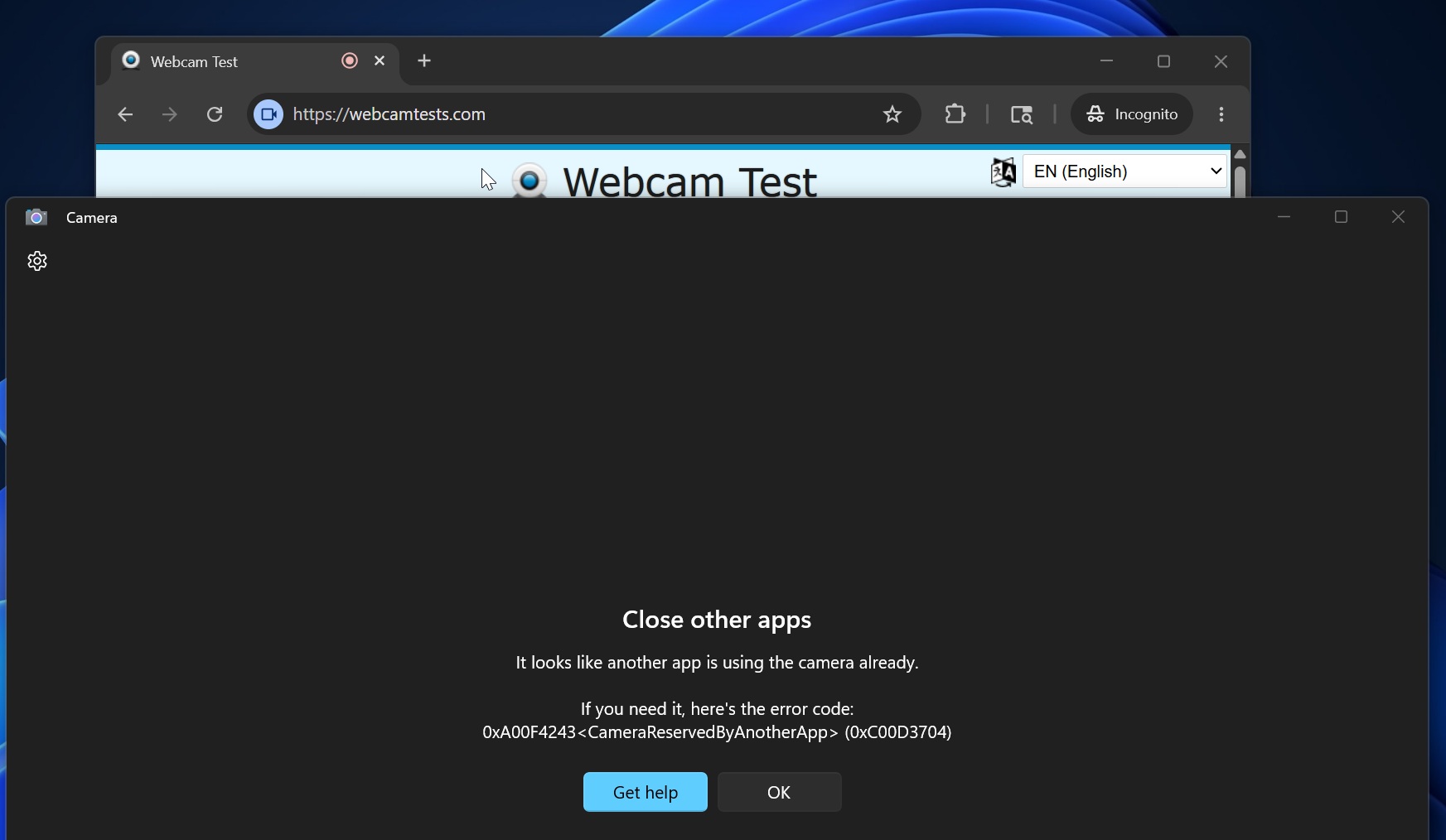
In the above example, I’ve opened the camera in a web-based camera test tool, and I’ve also opened the Windows Camera app. In this case, the Windows Camera app itself does not have access to the webcam hardware, and it displays an error that clearly states you should close other apps using your camera.
“It looks like another app is using the camera already. If you need it, here’s the error code: (0xC00D3704),” the error reads.
Thankfully, that decades-old restriction is finally being removed with Windows 11 KB5089573 (Build 26200.8524+), and all your apps can now access the camera at the same time.
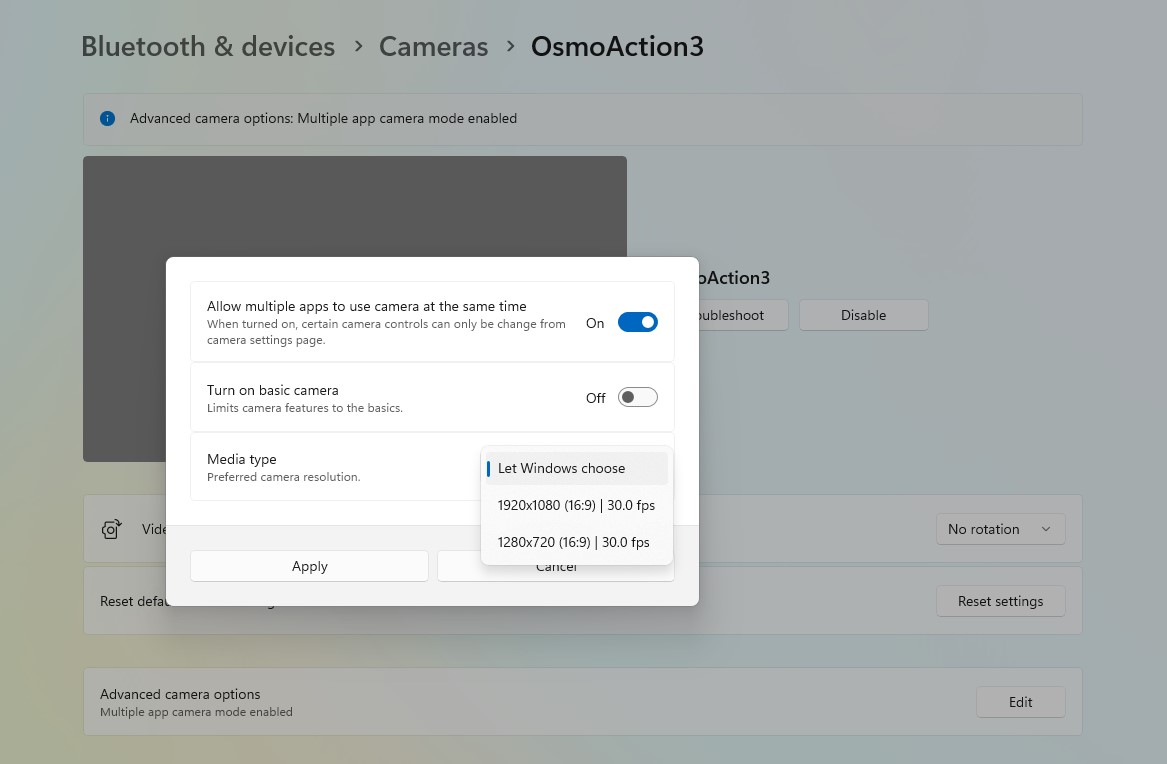
If multi-camera mode isn’t working out of the box for you, make sure you turn on the feature from Settings > Bluetooth & devices > Cameras, and then select the camera you use. Finally, scroll down, and you’ll find a toggle to edit advanced settings. Click “Edit” and turn on “Let multiple apps use your camera.”
Multi-camera mode is a great addition to Windows, but it’s not the only change rolling out today.
Microsoft says it’ll make Windows Camera more reliable, and some changes are already shipping
When Microsoft confirmed it’s working on a major Windows update that improves nearly every aspect of Windows 11, it also told us that the camera experience would become more reliable.
At the time, Microsoft admitted that cameras can disappear from Windows or stop working reliably during meetings. The company also noted that audio issues remain common, with microphones or speakers sometimes failing to work properly. These problems still affect some users, and Microsoft has made it clear that it plans to address them.
“More reliable camera and audio connections to increase your productivity at work and play,” the company said.
Most camera issues in Windows are largely due to drivers. For example, when my Spectre’s camera disappeared overnight, and I assumed it was due to a Windows update, it wasn’t until I reinstalled the camera driver that I realised it was HP’s fault after all.
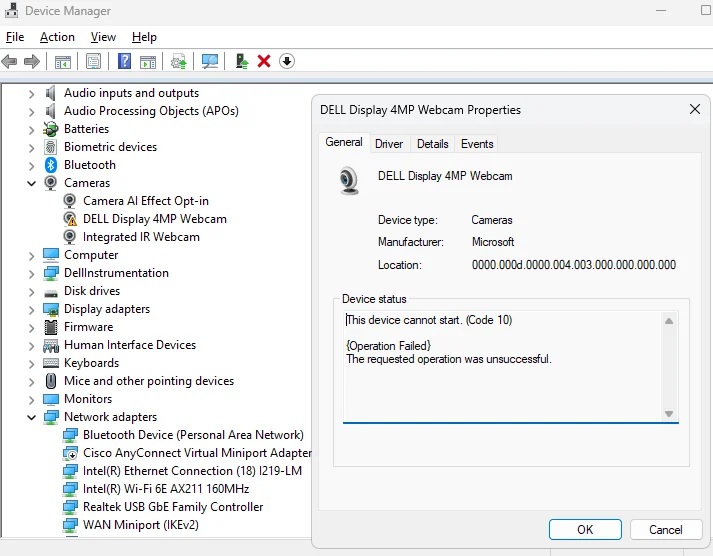
With the May 2026 optional update, Microsoft has added a new feature that allows you to figure out whether a broken camera is caused by Windows or a hardware failure. It’s called “Basic Camera.”
When you turn it on, Windows falls back to Microsoft’s basic driver and settings to run your camera, and if the camera works, it means the issue is due to the OEM’s driver.
It’s worth noting that these two changes are gradually rolling out alongside other improvements like a user-friendly name in Windows Setup and a Low Latency Profile for faster performance.
The post Microsoft is killing the one-app-at-a-time camera limit in Windows 11 with new Multi-App mode appeared first on Windows Latest
Pennsylvania, USA
Every day, your applications process thousands of emails, transcripts, and documents containing sensitive information—names, phone numbers, medical details. Manually identifying and protecting this data doesn't scale. Here's how the latest PII (Personally Identifiable Information) detection capabilities within Azure Language in Foundry tools can help you automate privacy protection across text, conversations, and healthcare scenarios
At Microsoft Build, we’re announcing new and updated capabilities in Azure Language in Foundry Tools designed to help developers work with sensitive information across text, conversations, documents, and healthcare-related text scenarios.
At a glance, these updates include:
- A generally available (GA) Text PII API with additional redaction options and updates to detection behavior
- New preview releases for Text PII and Conversational PII
- New Microsoft Foundry playgrounds to help teams explore and evaluate capabilities before integrating APIs
- Expanded support for a wider range of text and conversational scenarios
With Azure Language in Foundry Tools, organizations can help identify and manage sensitive information in textual content, transcripts, and documents, and analyze healthcare-related text for use cases such as privacy workflows, data processing, and downstream application scenarios.
|
Azure Language in Foundry Tools Capability |
Best for |
Example inputs |
|
Text PII |
Detecting and redacting sensitive information in written text |
Emails, forms, support tickets, notes |
|
Conversational PII |
Redacting sensitive information in multi-speaker or spoken-language transcripts |
Call transcripts, meetings, chat-style dialog |
|
Text Analytics for Health |
Extracting and structuring medical information from healthcare text |
Clinical notes, patient summaries, medical reports |
New Microsoft Foundry playgrounds for easy product testing
We’re introducing several Microsoft Foundry playground experiences that allow teams to explore language capabilities, review outputs, and assess how the APIs may fit into their workflows before production use.
- Text PII redaction Playground
- Conversational PII redaction Playground
- Text Analytics for Health Playground
These playgrounds are intended to support hands-on experimentation and evaluation in a controlled environment.
Image 1: Screenshot of Text Analytics for Health Playground in action.
Updated Text PII API (GA – 2026-05-01)
The GA Text PII API includes updates across new supported entity types and additional configuration options that allow developers to tailor how sensitive information is processed.
Customer customization features now generally available:
- Anonymization: Support for `syntheticReplacement` redaction policy enables masking detected PII entities with synthetic replacement values. For example, "John Doe received a call from 424-878-9193" can be transformed into "Sam Johnson received a call from 401-255-6901."
- Optional type validation controls: Ability to disable entity type validation to bypass strict validation when operational efficiency is prioritized over data integrity checks.
- Confidence threshold configuration: Ability to set a minimum confidence score threshold to control which entities appear in the output based on detection confidence.
- Specify values to exclude from PII output
- Use entity synonyms for tailored PII detection
These options provide more flexibility for adapting PII processing to specific application requirements.
Preview releases
Text PII (Preview)
The latest preview introduces support for additional entity categories and broader coverage across scenarios. New entities include Password, PIN code, Zip code, and Airport code. For a full list, see our public docs.
Conversational PII (Preview)
For transcript and dialogue-based use cases, our Conversational PII redaction service is optimized for spoken-language patterns such as interruptions, filler words, speaker turns, and incomplete sentences that are common in transcripts and calls. Preview updates extend support for spoken-language patterns such as interruptions, speaker turns, and conversational structure.
Updates include:
- A new Conversational PII model (2026-04-15-preview)
- A new Conversational PII API (2026-11-15-preview), expanding on model capabilities
Additional supported entities include GitHub account identifiers, credit card expiration dates, and zip codes. For a full list, see our public docs.
These preview updates expand the range of supported inputs and scenarios for conversational data processing.
Summary of API and Model version updates
|
Azure Language in Foundry Tools Capability |
Release |
Status |
What’s new |
|
Text PII |
2026-05-01 |
GA |
Additional configuration options and updates across supported entities |
|
Text PII |
2026-04-15-preview |
Preview |
Expanded entity support |
|
Conversational PII |
2026-04-15-preview |
Preview |
Updates to conversational handling and entity coverage |
|
Conversational PII |
2026-11-15-preview |
Preview |
API updates building on model changes |
Get started
- Explore language playgrounds in Microsoft Foundry
- Try the latest GA and preview APIs for Text PII and Conversational PII
- Review documentation for detailed entity lists, versioning, and usage guidance
As with all preview features, capabilities are subject to change. Outputs generated by AI systems should be evaluated and validated for your specific use cases.
Start building privacy-aware applications today — explore the playgrounds, try the APIs, and share your feedback in the comments below.
Pennsylvania, USA
Anthropic releases Claude Opus 4.8 with improved honesty, stronger self‑verification, and multi‑agent dynamic workflows for large code tasks. Benchmark scores narrow versus OpenAI's GPT‑5.5 while debate grows over harness quality and real‑world tradeoffs. Headlines also cover Kirkland & Ellis's half‑billion internal AI platform, OpenAI's GPT‑5.5 Instant update, Cognition's $1B round, and Anthropic's Mythos preview and soaring valuation.
The AI Daily Brief helps you understand the most important news and discussions in AI.
Subscribe to the podcast version of The AI Daily Brief wherever you listen: https://pod.link/1680633614
Get it ad free at http://patreon.com/aidailybrief
Learn more about the show https://aidailybrief.ai/

Pennsylvania, USA
Next Page of Stories