An anonymous reader quotes a report from Wired: Security researcher Dor Zvi and his team at the cybersecurity firm he cofounded, RedAccess, analyzed thousands of vibe-coded web applications created using the AI software development tools Lovable, Replit, Base44, and Netlify and found more than 5,000 of them that had virtually no security or authentication of any kind. Many of these web apps allowed anyone who merely finds their web URL to access the apps and their data. Others had only trivial barriers to that access, such as requiring that a visitor sign in with any email address. Around 40 percent of the apps exposed sensitive data, Zvi says, including medical information, financial data, corporate presentations, and strategy documents, as well as detailed logs of customer conversations with chatbots.
"The end result is that organizations are actually leaking private data through vibe-coding applications," says Zvi. "This is one of the biggest events ever where people are exposing corporate or other sensitive information to anyone in the world." Zvi says RedAccess' scouring for vulnerable web apps was surprisingly easy. Lovable, Replit, Base44, and Netlify all allow users to host their web apps on those AI companies' own domains, rather than the users'. So the researchers used straightforward Google and Bing searches for those AI companies' domains combined with other search terms to identify thousands of apps that had been vibe coded with the companies' tools.
Of the 5,000 AI-coded apps that Zvi says were left publicly accessible to anyone who simply typed their URLs into a browser, he found close to 2,000 that, upon closer inspection, seemed to reveal private data: Screenshots of web apps he shared with WIRED -- several of which WIRED verified were still online and exposed -- showed what appeared to be a hospital's work assignments with the personally identifiable information of doctors, a company's detailed ad purchasing information, what appeared to be another firm's go-to-market strategy presentation, a retailer's full logs of its chatbot's conversations with customers, including the customers' full names and contact information, a shipping firm's cargo records, and assorted sales and financial records from a variety of other companies. In some cases, Zvi says, he found that the exposed apps would have allowed him to gain administrative privileges over systems and even remove other administrators. In the case of Lovable, Zvi says he also found numerous examples of phishing sites that impersonated major corporations, including Bank of America, Costco, FedEx, Trader Joe's, and McDonald's, that appeared to have been created with the AI coding tool and hosted on Lovable's domain. "Anyone from your company at any moment can generate an app, and this is not going through any development cycle or any security check," Zvi says. "People can just start using it in production without asking anyone. And they do."
At some point you look across your repos and realize you've got some sort of split personality problem. Half your projects are on main, the other half are still on master, and every time you touch a pipeline, clone a repo, or write documentation, you have to stop and remember which one you're dealing with. You know it's not broken, it's just inconsistent enough to be a persistent low-grade annoyance. I recently went through this myself and thought about adding this to my blog as a way to help...
AI companies have been hell-bent on creating coding agents that use computers like humans: Clicking buttons, scrolling through pages, and moving cursors around desktops. The promise is obvious, but the execution remains clunky.
The goal is to enable agents to operate software the same way people do, especially inside web apps and enterprise tools that lack clean APIs or integrations.
However, those systems can still feel cumbersome, often monopolizing browser sessions and working through tasks one screen at a time. That’s the problem OpenAI is now trying to tackle with a new Chrome extension for Codex.
Introduced on Thursday, the Codex Chrome extension lets agents operate directly inside a user’s live browser session, giving them access to signed-in websites, multiple tabs, and authenticated workflows without fully taking over the desktop.
The extension connects Chrome to the Codex app on Windows and macOS, allowing agents to interact with tools such as Gmail, Salesforce, LinkedIn, and internal web apps using the user’s existing browser state, cookies, and logged-in sessions.
Beyond screenshot-and-click agents
The launch builds on OpenAI’s “computer use” capabilities introduced in Codex in April. That allowed agents to operate desktop apps and browsers in the background while users continued working elsewhere on their machines.
However, OpenAI is now drawing a clearer distinction between generalized computer-use systems and a more browser-focused approach.
“OpenAI is drawing a clearer distinction between generalized computer-use systems and a more browser-focused approach.”
Previously, Codex largely relied on either structured plugins or broader computer-use tooling when interacting with browser workflows. Plugins remained the preferred route because they allowed Codex to work directly with services such as Slack, Gmail, and GitHub without manually navigating their interfaces.
Plugins in Codex
But many workflows still live inside full web applications, internal dashboards, or authenticated browser sessions that agents cannot easily access through integrations alone.
In a demo video accompanying the launch, OpenAI developer experience lead Dominik Kundel said the new extension avoids the traditional “screenshot, reason, move the mouse” loop common in many computer-use systems, where agents repeatedly analyze what’s visible on-screen before deciding where to click next.
While Codex could already operate Chrome through OpenAI’s existing computer-use functionality, it effectively treated the browser like any other desktop application, interacting with it visually one step at a time. The new extension instead connects Codex directly into Chrome itself, allowing it to work across multiple tabs, logged-in sessions, and browser tasks in parallel.
That difference matters because much of modern software work increasingly happens inside browser-based SaaS tools, internal dashboards, and authenticated enterprise apps that often lack clean APIs or structured integrations.
“Sometimes there is no plugin, or there is one, but the thing you need is only available in the full web app,” Kundel says. “And sometimes the context is actually the existing logged-in Chrome session. This is what the Chrome extension is for.”
“Sometimes the context is actually the existing logged in Chrome session. This is what the Chrome extension is for.”
Chrome and Codex come together
The Chrome extension is installed through the Codex app itself. Users first open Codex, navigate to the Plugins section, and add the Chrome plugin, which then guides them through connecting Chrome and approving the required browser permissions.
Installing the Chrome extension in Codex
Once installed, Codex can invoke Chrome directly from prompts such as: “@Chrome open Salesforce and update the account from these call notes,” or “summarize the feedback and sentiment from community forum comments.”
While OpenAI says Codex’s existing in-app browser remains better suited to localhost testing and frontend development tasks, the Chrome extension is designed for workflows that depend on a user’s live browser context and the full capabilities of Chrome itself. In the demo, Kundel showed Codex researching sentiment around product launches across multiple tabs simultaneously, identifying recurring feedback and pain points before compiling the results into a spreadsheet.
What should we work on?
The extension is designed to sit between Codex’s structured plugins and its broader computer-use tooling. OpenAI says Codex can switch dynamically between integrations, Chrome, and its own in-app browser depending on the workflow, using direct plugins where possible before falling back to browser interaction when tasks require authenticated sessions or full web interfaces.
One of the key aspects of the extension is that it doesn’t commandeer the user’s active browsing session; instead, it groups Codex activity into its own isolated Chrome tabs. That allows agents to continue researching, navigating, and compiling information in the background while users keep working elsewhere in the browser.
Isolated Chrome tabs
This deeper browser integration also requires more permissions than a typical chatbot interaction.
According to OpenAI’s documentation, the extension may request access to browsing history, tab groups, downloads, bookmarks, website data, debugger functionality, and communication with native applications.
The company says Codex asks for confirmation before interacting with new websites unless users explicitly disable those prompts. It also notes that browser tasks can expose sensitive context because page content, authenticated sessions, and browsing activity may become part of the information Codex uses while completing tasks.
Access all areas
The launch lands amid a wider push toward browser-native agents across the AI industry — and increasingly, the browser session itself is emerging as the key battleground.
Anthropic has been moving in the same direction. Its Claude Chrome extension, which has been in beta since August, gives Claude Code the same ability to operate inside a user’s existing browser session — accessing authenticated apps, working across tabs, and handling workflows that lack clean API integrations. The company also expanded Claude Code and Claude Cowork with broader computer-use capabilities on macOS earlier this year. Meanwhile, French AI startup HCompany recently launched HoloTab, a browser agent that navigates websites in Chrome without requiring site-specific integrations.
And so a clear pattern emerges: agents moving closer to where work actually happens. Not operating computers from the outside in, but working inside the applications, the sessions, the contexts where modern work already lives.
Hello Windows Insiders,
We continue to expand the rollout of the new WIP changes to those channels already announced. We have not yet begun moving Insiders in Canary 29500 Series Channel or Beta Channel to the new WIP experience just yet, although we expect this to happen in the coming weeks.
As a reminder, if you are in the Beta Channel and looking for best continuity of all existing features, we encourage you to consider moving to the Dev Channel prior to taking the new Beta experience. See the WIP changes rollout blog for more information.
New builds this week
Today we are releasing new Windows 11 Insider Preview Builds. As a reminder, all Insiders can find the release notes for your device based on the new channel system, even if you haven’t moved yet. This is to make finding build information as easy as possible during the transition. See your channel release notes here:
For those on other specific build versions, here are today’s new builds and release notes:
Experimental (26H1) – Including former Canary 28000 series: Build 28020.2075
Experimental (Future Platforms) – Including Canary 29500 series: Build 29585.1000
As a reminder, you can always find your build number in the watermark on bottom right-hand corner of your desktop.
Notable new features:
[Touchpad]
Release channel: Experimental
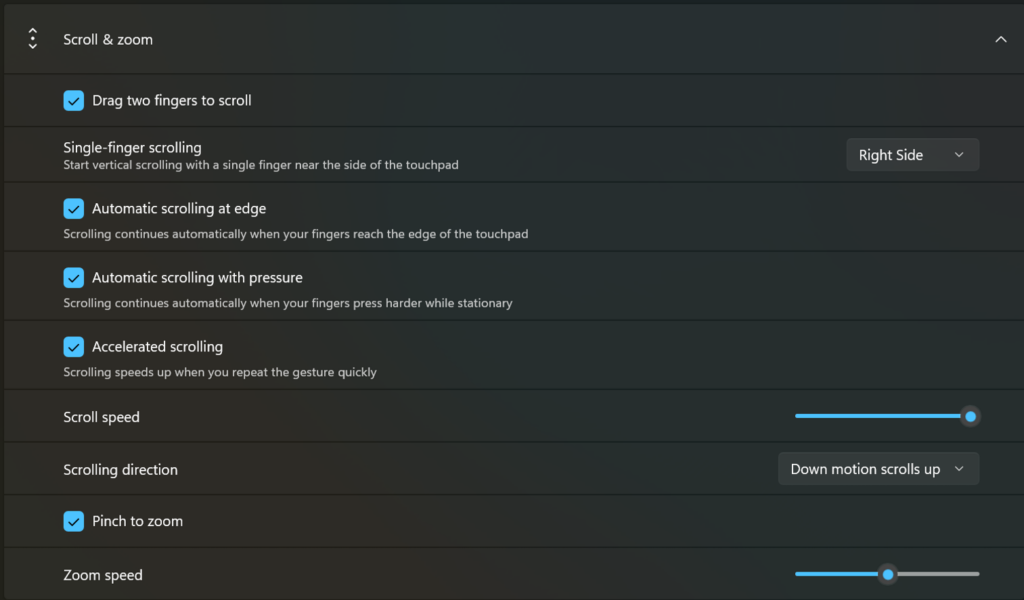
We’re adding new gesturing-related functionality to precision touchpads in Settings. The new features should be widely available across applications, with the exception that WinUI3-based UI requires new WinAppSDK versions for complete functionality - we're in the process of bringing the necessary changes to versions 1.8 and 2.0.
Scroll / zoom speed: control the baseline speed for these gestures
Automatic scrolling: scrolling continues indefinitely without lifting your fingers. Activate by either bringing your fingers near the edge of the touchpad while scrolling, or holding them still and pressing harder (requires hardware support).
Accelerated scrolling: repeatedly scrolling increases their speed, allowing quick traversal of long documents.
Single-finger scrolling: perform a vertical scroll with a single finger starting from the left or right side of the touchpad.
[caption id="attachment_178947" align="alignnone" width="1024"] Touchpad improvements bring new gesture capabilities including automatic scrolling, gesture speed controls, accelerated scrolling, and optional single-finger scrolling support.[/caption]
[EDU Licensing]
Release channel: ExperimentalBeta ChannelFree upgrade path to Windows 11 Pro Education for K-12
Windows Insiders in K–12 education environments can now experience a seamless upgrade path from Windows 11 Home to Windows 11 Pro Education edition—at no additional cost. This enables educational organizations to procure Windows 11 Home devices, upgrade them to Windows 11 Pro Education, and bring devices under school management.
See release notes for more information.
Thanks,
Stephen and the Windows Insider Program team
Feature: mode handler APIs for plan approval and rate-limit recovery
Applications can now register callbacks for exitPlanMode.request and autoModeSwitch.request from the Copilot runtime, giving full control over plan-mode transitions and automatic model switching after rate-limit events. (#1228)
Python emits logs via stdlib logging under copilot.* loggers at DEBUG level. Rust uses tracing structured fields; wire up a tracing_subscriber as usual.
Feature: enableSessionTelemetry session option
A new enableSessionTelemetry option on SessionConfig and ResumeSessionConfig lets applications explicitly enable or disable the runtime's internal session telemetry. (#1224)
bugfix: [C#] session-event enums are now string-backed readonly structs, preventing deserialization failures when the runtime adds new enum values (#1226)
bugfix: [Rust] binary tool result resource blobs now default to application/octet-stream when mimeType is absent (#1222)
 Log in






 Touchpad improvements bring new gesture capabilities including automatic scrolling, gesture speed controls, accelerated scrolling, and optional single-finger scrolling support.[/caption]
