
Sr. Content Developer at Microsoft, working remotely in PA, TechBash conference organizer, former Microsoft MVP, Husband, Dad and Geek.
159334 stories
·
33 followers

VLC blames Windows 11 bug for slow performance, defends open source and calls out Microsoft

1 Share

VLC can take 33 seconds to start playing an MP3 on some Windows PCs, and VideoLAN, the developers behind the open-source media player, says a Microsoft Defender bug is to blame.

Jonathan Blow, the game designer and programmer behind Braid and The Witness, said he had finally switched from VLC to Microsoft’s Media Player because the former had become painfully slow, then used the moment to declare that “a large sector of open source software is in a truly embarrassing place now.”
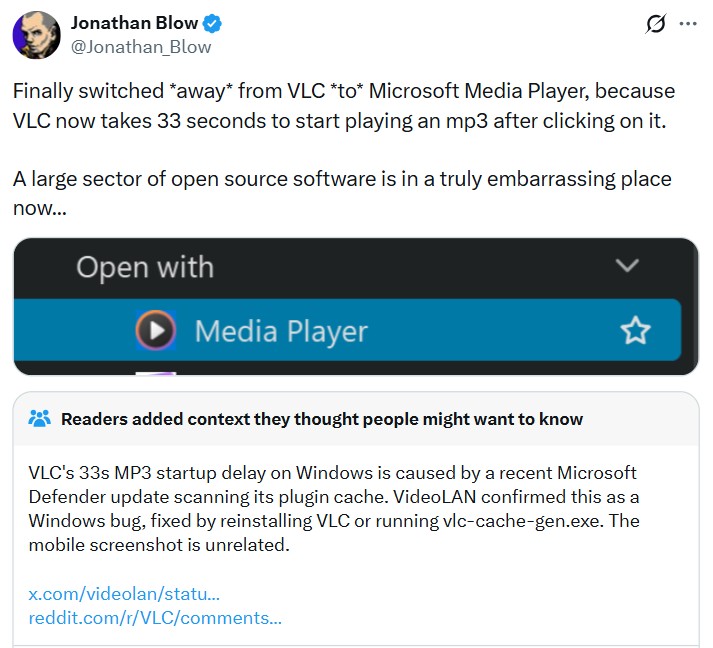
Jonathan Blow X post criticizing VLC

VideoLAN couldn’t let this criticism slide and accused Microsoft, saying a Windows 11 Defender update was interfering with VLC’s plugin cache. However, we checked VLC’s bug reports and found several users on Windows 10 and Windows 11 describing the same startup problem.
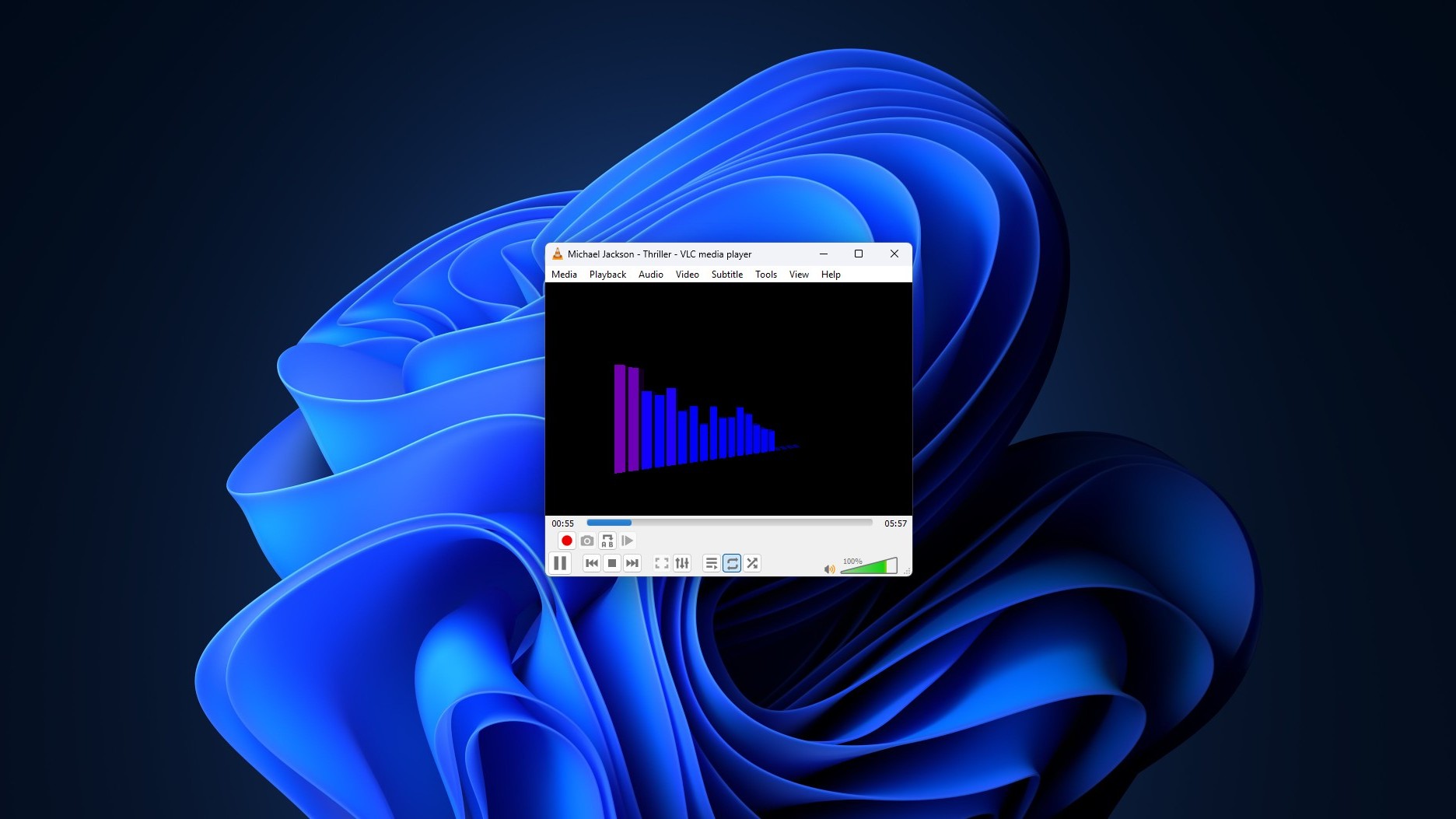
VLC playing MP3 file

VLC says Microsoft Defender is behind the 33-second delay

Note that the criticism is for MP3 files and not videos, which is what VLC is typically associated with. I have already sold my soul to streaming services like Spotify, and didn’t have any experience of a delay like this despite using VLC every other day.

But for those of you who use VLC to listen to music and have experienced a 33-second delay, the supposed reason is VLC’s plugin cache.

But why VLC needs a plugin cache in the first place?

This was Blow’s follow-up question to VLC, and it piqued my interest as well, because why does a media player need a cache at all just to play one MP3?
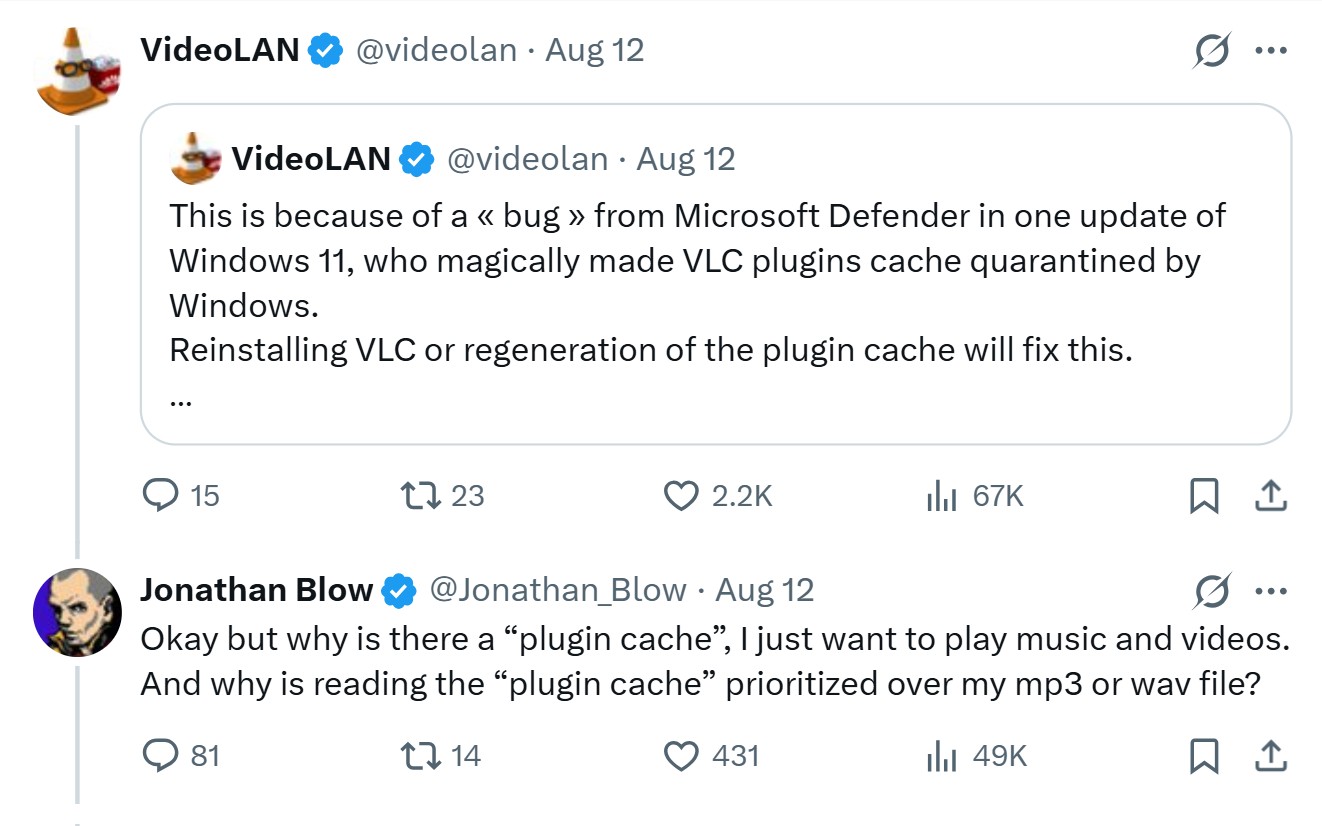
Why VLC has a plugin cache

Well, as it turns out, VLC is built almost completely out of plugins, codecs, demuxers, input and output modules are all loaded on demand instead of coded into one binary. All of these are listed in a file named plugins.dat.

The cache exists so it doesn’t have to re-scan the whole plugins folder every time you open a media file. It’s a reasonable design, but becomes a single point of failure when something, Defender or otherwise, gets between VLC and that file.

VLC also includes vlc-cache-gen.exe, which can regenerate the cache, and doing so or reinstalling VLC should fix the problem, according to the organization.
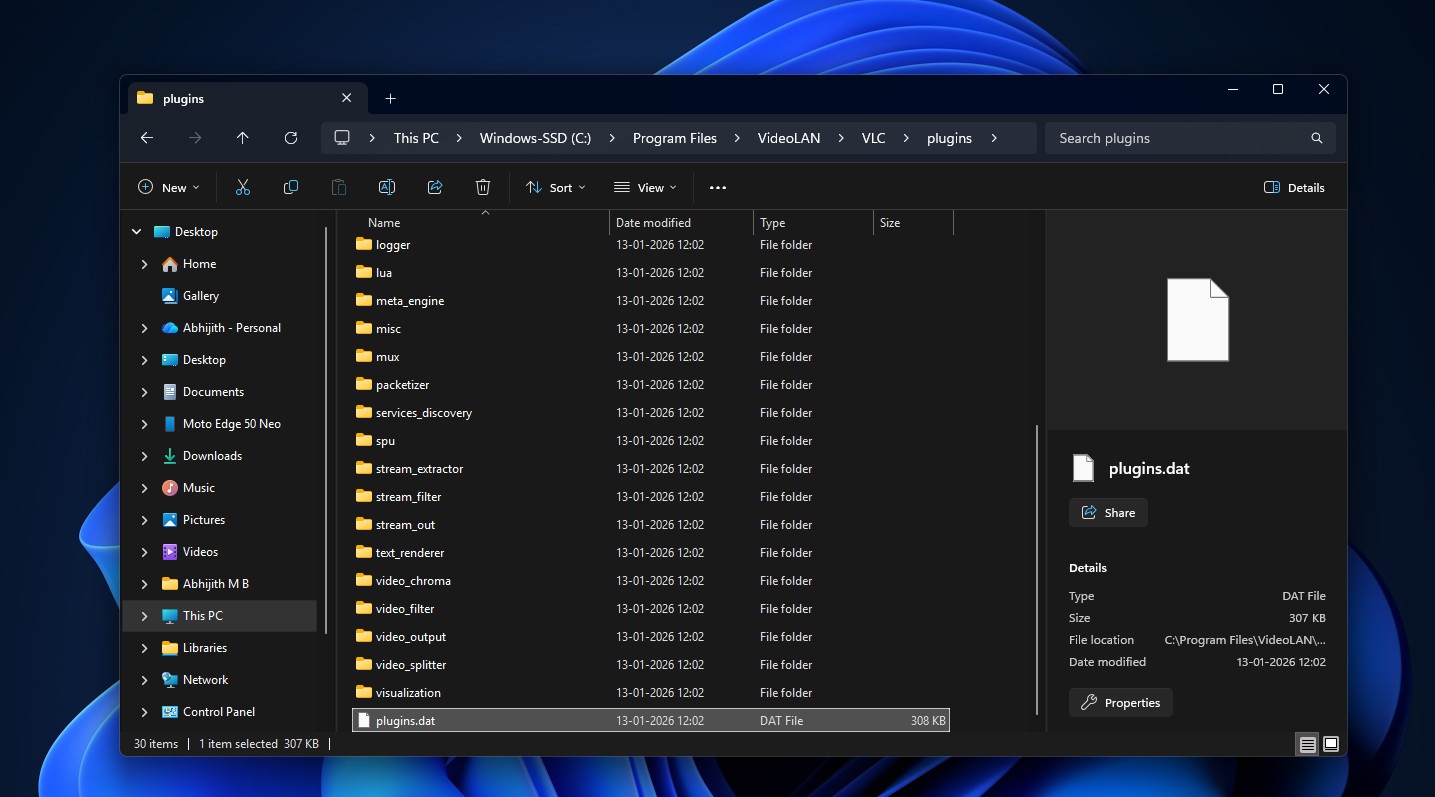
Plugins cache file in VLC

Here’s the thing, though. I went looking through VLC’s public issue tracker instead of taking either side’s word for it, and I found that the picture is a lot less clean.

VLC’s bug report shows this isn’t just a Windows 11 problem

Slow VLC startups on Windows are not new. Forum threads on this complaint go back well over a year. One user on Windows 10 described a 24 second delay that vanished as soon as VLC had been opened once, then came back after the PC sat idle for a while.

On VLC’s tracker, one user said swapping out a Qt plugin didn’t fix anything, but regenerating plugins.dat did. Another Windows 11 user running a Ryzen 9 9800X3D and 32GB of DDR5, hardly a machine that should struggle to open an MP3, said refreshing the cache solved it too. Multiple people confirmed the same workaround on their machines.

The original bug reporter pushed back on regenerating the cache, though. He said plugins.dat already existed on both of his affected machines, and when he swapped in a known-good cache file, the startup delay went away. It’s a meaningfully different failure mode than the missing cache, which is why VLC’s maintainers reopened the issue and kept digging into how the cache and Windows Defender interact.
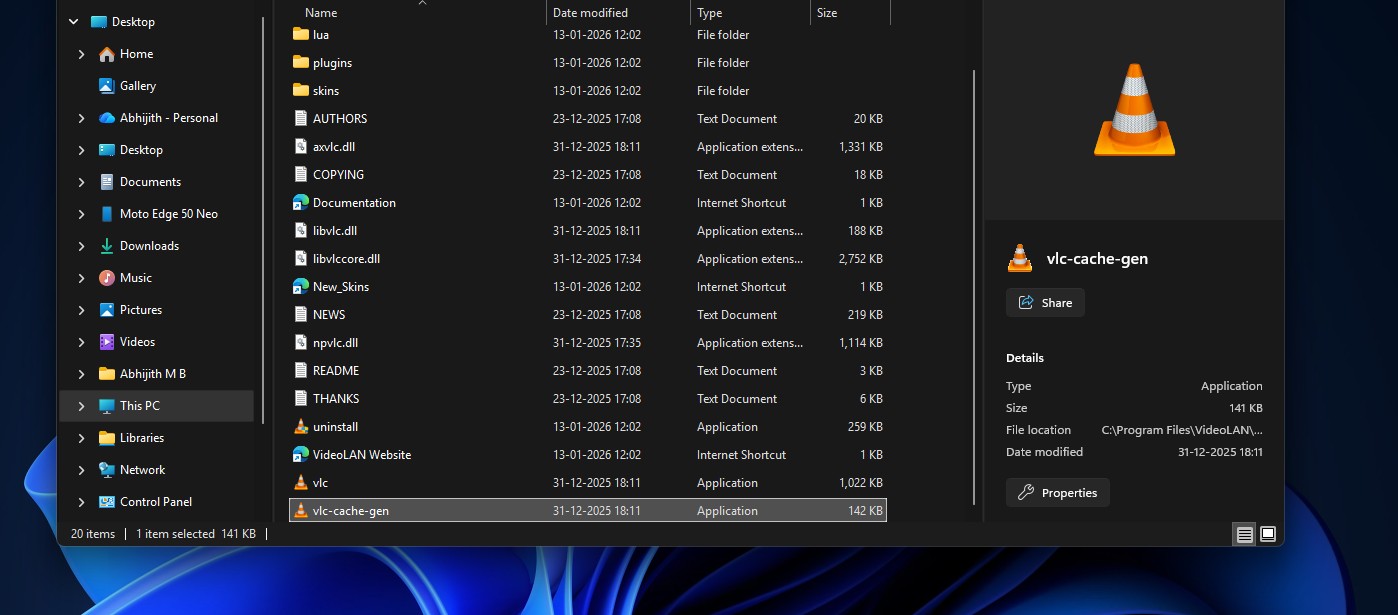
VLC cache generator

One VLC developer eventually came to the same conclusion as VideoLAN’s tweet, that the slowdown looks like it’s caused by Windows Defender regardless of what state the plugin cache is in. Another had marked the whole thing “fixed” earlier because regenerating the cache seemed to solve it for them. Both were right, for different users. Some people found that excluding the whole VLC folder from Defender worked when excluding just vlc.exe didn’t, which tells you Defender is involved here somewhere for real, even if nobody’s pinned down the mechanism yet.

So no, this isn’t a made-up excuse. But it’s also not the one that got flattened on social media saying Microsoft broke open source.

How to fix VLC when it takes forever to start on Windows

If VLC suddenly takes 10, 20, or 30 seconds to open, try these steps before disabling Microsoft Defender:

  • Regenerate VLC’s plugin cache with vlc-cache-gen.exe from the VLC installation folder, targeting the plugins directory.
  • Reinstall VLC using the official installer so the plugin cache is generated again.

Several users have reported that regenerating the cache fixes the problem, while others found that excluding the VLC folder restored instant startup. The results are not identical for everyone, which is another reason not to treat one workaround as universal.

Calling open source embarrassing is a bit too easy

Blow’s not wrong that waiting half a minute to play an MP3 on a modern PC is absurd. Where he loses me is turning one bug into a verdict on open source software as a category. VLC has a real cache problem its own developers are still working through, and VideoLAN also has real evidence accusing Defender.
VideoLAN is a non-profit organization

However, there’s some irony in what Blow switched to, as well. Windows Latest has already looked at Microsoft’s Media Player and found it’s the slower, heavier option, taking noticeably longer to open a video than VLC does, using around 377MB of RAM at idle, and still choking on formats like HEVC that VLC opens without a second thought.
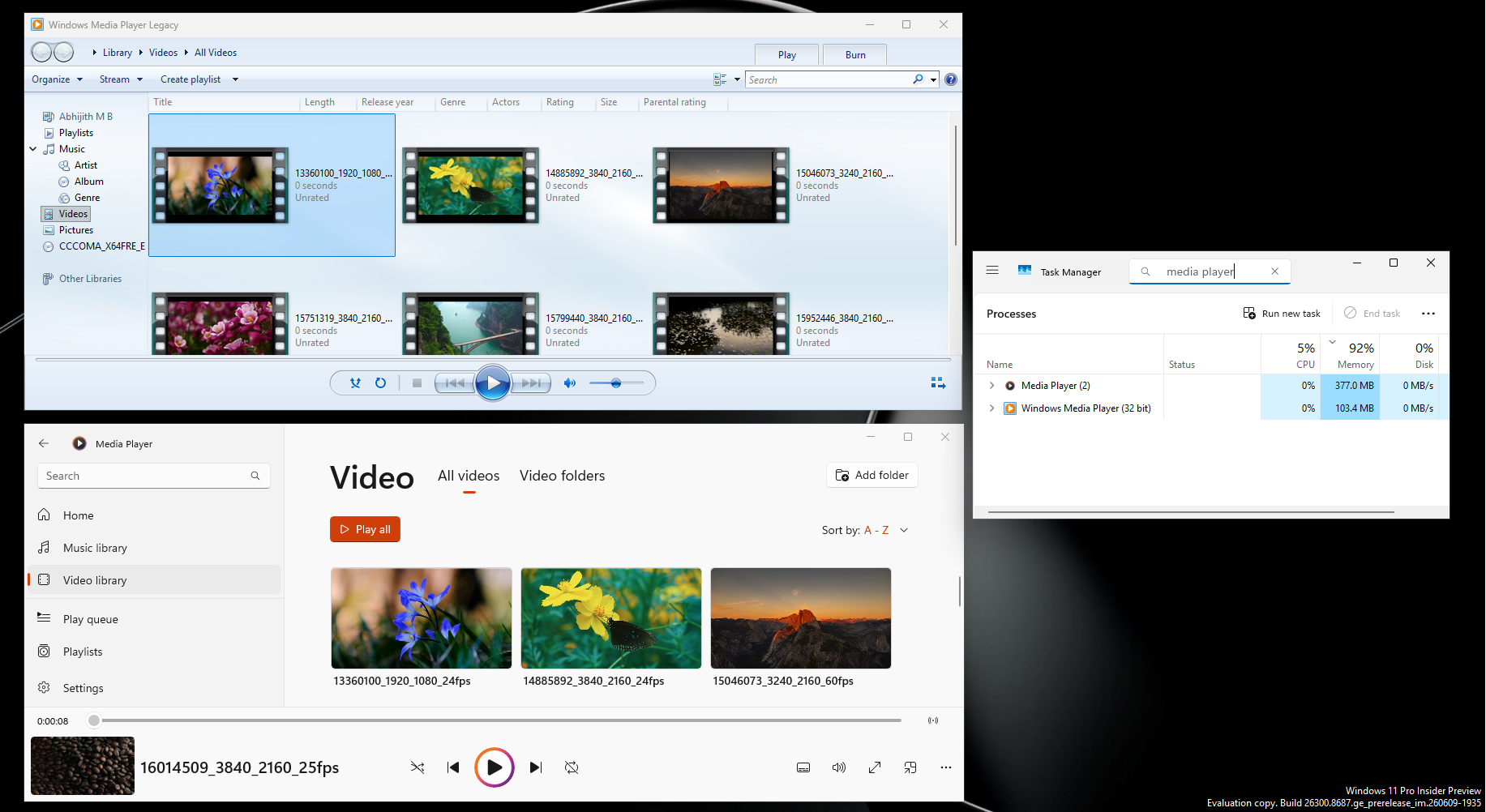
Windows Media Player RAM usage when compared with Legacy

Either way, VLC has to work around whatever Windows throws at it, especially considering that it isn’t the only good media player in the market.

If you want a faster open-source player, try mpv

We would not tell everyone to abandon VLC because of this bug, especially when yours truly still uses it to this day. But if you are already looking for something lighter, mpv is worth trying.

mpv player

mpv is a free, open-source media player with a deliberately minimal interface and a strong focus on performance and flexibility. It is less friendly for beginners than VLC, and the UI may take time getting used to, but that simplicity is also part of the appeal.

For most people, VLC is the easier recommendation because it gives you a familiar interface and almost every playback option in one place. But after a 33-second wait to play an MP3, nobody can blame a Windows user for trying something else.

The post VLC blames Windows 11 bug for slow performance, defends open source and calls out Microsoft appeared first on Windows Latest

Read the whole story
alvinashcraft
11 minutes ago
reply
Pennsylvania, USA
Share this story
Delete

Dell XPS 13 Review: Move Over, Neo

1 Share
It’s amazing how few compromises Dell made to get the new XPS 13 down to $700, but I strongly recommend the $900 model, which comes with 16 GB of RAM.
Read the whole story
alvinashcraft
12 minutes ago
reply
Pennsylvania, USA
Share this story
Delete

Windows device recovery in 2026: A guide for IT pros

1 Share

Windows device recovery is fundamentally stronger today than it was a year ago. Thanks to your feedback, you have a comprehensive set of tools available to help you restore user productivity quickly. From automated, cloud-based fixes to full device rebuilds, let's explore the newest recovery tools that keep you in control while helping you address a broad range of scenarios:

Existing solutions—such as Get Help troubleshooters, Uninstall updates, Reset this PC, System Restore, and the command prompt in WinRE—remain available and continue to serve specific roles. To learn more about these tools, please visit their respective documentation.

Windows device recovery: scenarios and solutions

The following framework summarizes how to choose the right recovery approach for your scenario. The scenarios appear roughly in order from more common to less common and we highlight the newer tools alongside the other alternatives.

Scenario

Solution

Tools

Individual device issues after an update

User reinstalls the current Windows version (or if needed, go back to previous version) if the PC can boot. User uninstalls the update if the PC cannot boot or issues persist beyond 10 days. For some known issues listed on the Microsoft 365 admin center, IT can use Known Issue Rollback.

Reinstall the current version of Windows
Go Back
Uninstall a Windows Update
Use Group Policy to deploy a Known Issue Rollback

A single malfunctioning component (audio, networking, printing, etc.)

User runs targeted diagnostics and remediation for the affected components.

Get Help troubleshooters[1]

Recent, isolated issue or widespread device issue

User (sometimes under IT supervision) rolls back the system to its exact state from a past point in time. Requires a recent restore point.

New! Point-in-time restore for Windows

Persistent device issues after targeted recovery attempts (unknown cause)

User reinstalls Windows while removing apps and settings. Optionally, keep user files.

Reset this PC

Deep OS corruption

User (sometimes under IT supervision) initiates clean OS install that downloads a target Windows image and device drivers and applies it to the device for a fresh start.

New! Cloud rebuild (preview)
Create a recovery drive
Manufacturer-created recovery media

Hardware failure or device unavailability (lost, stolen, or isolated during a security investigation)

IT provisions a temporary Cloud PC. Settings, documents, and managed apps are restored on a new device. Recommended for immediate user productivity.

New! Windows 365 Reserve

A mass-scale outage affecting boot (rare)

When a device repeatedly fails to boot and enters WinRE, it automatically checks for and applies a Microsoft-provided fix from Windows Update. No user action is required.

New! Quick machine recovery

Each recovery scenario has at least one tool that can be used to remediate the device. In practice, start with the least disruptive, fastest option and reach for a heavier tool only when the situation calls for it.

Recovery scenarios: meet the newest solutions

Now let's do a more detailed walkthrough of the scenarios you can address using the newest recovery tools.

Mass scale outage: Quick machine recovery

When Microsoft identifies a mass scale outage that prevents devices from booting, we become your first line of defense. Microsoft develops, validates, and publishes a targeted fix that quick machine recovery delivers directly to affected devices.

How it works:

  1. The device fails to boot and enters Windows Recovery Environment (WinRE).

  2. Microsoft identifies, builds, and publishes a remediation package.

  3. WinRE establishes a network connection.

  4. The device scans Windows Update, downloads, and applies the remediation package automatically.

  5. The device restarts safely to Windows.

Availability: Generally available on Windows 11, version 24H2 and later. Enabled by default on Windows Home. For managed Pro, Enterprise, and Education devices, you can enable quick machine recovery through policy.

Prerequisites: Enable the feature and ensure devices will be able to connect to a supported network. To learn more about WinRE requirements, see the WinRE documentation.

Impact to data: None

Alternative solutions: Startup Repair remains the first automatic response to boot failures. Quick machine recovery builds on Startup Repair by adding cloud-based remediation when local repair is not sufficient.

Additional capabilities for best results: Recovery CSP

Recent, isolated issue or widespread disruption: Point-in-time restore

Most disruptions aren't mass-scale outages. A single device or group of devices can break due to a bad application installation, an incompatible driver, or a misconfigured setting. If quick machine recovery doesn't have a fix yet, point-in-time restore lets you roll the entire device back to a previous state in minutes. Here's how it works.

Point-in-time restore automatically captures comprehensive restore points of the full system state (the OS, applications, settings, and local files) at a configurable frequency and retention[2]. The default is every 24 hours. Restore points use the Volume Shadow Copy Service (VSS) and are stored locally for up to 72 hours.

  1. When a disruption occurs, initiate restoration from WinRE. (BitLocker recovery key is required)

  2. Select a restore point. The device rolls back to that exact state.

The entire process typically completes in a matter of minutes. The goal is to return the device to a stable state without requiring advanced troubleshooting.

Availability: Available on Windows 11 Home, Pro, and Enterprise, version 25H2 and later. Remote management capabilities are planned for a future release.

Prerequisites: Enable the feature and configure it for your environment using the Recovery CSP and back up local files to the cloud.

Impact to data: Point-in-time restore is a comprehensive rollback. Any local changes made after the selected restore point, including files, settings, passwords, certificates, and keys, will be lost. Data stored in cloud services like OneDrive is not affected.

Alternative solutions: System Restore provides event-triggered or manual restore points for system files and settings. Point-in-time restore modernizes this concept with automatic, comprehensive restore points (including local user files), strict retention policies, and a path toward remote management.

Additional capabilities for best results: OneDrive for work or school (for cloud storage to minimize data loss).

Deep OS corruption: Cloud rebuild

There are two main reasons to “start from scratch.” Sometimes a device is too deeply corrupted for a targeted fix or rollback to resolve the issue. Whether the OS is corrupted or drivers are in conflict, the system might be beyond restoration. If you've already tried quick machine recovery and point-in-time restore, start fresh with a clean operating system. Another reason to start fresh is for planned resets. You might want to reset devices for purposes of compliance, hygiene, or reuse by new users.

Cloud rebuild (preview) restores a Windows 11 PC to a clean, last known good state by performing a full operating system reinstallation from the cloud. Unlike Reset your PC, Cloud rebuild downloads both the target Windows image and the device drivers from Windows Update. This way, the device can come back fully functional without custom images, USB media, or physical access to the device. Here's how it works.

  1. Start a Cloud rebuild from the “Troubleshoot” menu in WinRE. Do this directly on the device.

  2. The device downloads a clean Windows OS, matching the device's current Windows release, edition, and language. It also downloads and applies the latest monthly security update.

  3. The device downloads all required system drivers directly from Windows Update.

  4. The system disk is formatted and Windows is installed fresh, landing the device in the out-of-box experience (OOBE).

  5. If enrolled in Windows Autopilot, the device is automatically provisioned during OOBE. It also re-enrolls in your management environment with the right policies, apps, and configurations provisioned on the device.

  6. If configured, Windows settings backup and restore (formerly Windows Backup for Organizations) restores the user's Windows settings and Microsoft Store app list. OneDrive for work or school then restores their files. This way, the user returns to a device that feels familiar, not factory fresh.

Availability: Available to Windows Insiders enrolled in the Experimental channel. Designed for cloud-managed, Intune-enrolled devices. Coming soon is the ability for IT Admins to customize the rebuild and initiate it remotely from their MDM.

Prerequisites: Before initiating Cloud rebuild, confirm that the target device meets the prerequisites listed in the Cloud rebuild documentation.

Impact to data: High. As the system disk is formatted during this process, all apps and data are lost.

Alternative solutions: Create a recovery drive or use manufacturer-created recovery media.

Additional capabilities for best results: Windows settings backup and restore, Windows Autopilot, Microsoft Intune, OneDrive for work or school (for cloud storage to prevent file loss)

Hardware failure or device unavailability: Windows 365 Reserve

If the hardware itself is the problem, no software recovery tool can help. This scenario occurs with a failed storage drive, damaged motherboard, or a device that simply won't power on. Other scenarios include devices that are lost, stolen, isolated during a security investigation, or otherwise unavailable during a broader incident. In these cases, the priority shifts from fixing the device to unblocking the user.

While you resolve the hardware issue, consider investing in Windows 365 Reserve for a fast, temporary solution. While point-in-time restore and cloud rebuild (preview) focus on restoring the affected physical device, Windows 365 Reserve helps maintain secure user productivity. Here's how it works.

  1. Provision a Cloud PC to give the user immediate, temporary access to a full Windows desktop from any device. You can use existing Microsoft Intune policies or create a new provisioning setup beforehand.

  2. (Optional but recommended) Enforce OneDrive cloud storage to help ensure that users' files are available. Additionally, Windows settings backup and restore can re-apply their personalized settings (desktop layout, accessibility preferences, language settings, and more) so they can pick up right where they left off.

  3. Users sign in with work credentials to the Windows App or web portal on any device and connect to their Cloud PC. They immediately access a clean, cloud-isolated Windows environment with corporate apps, settings, and security policies already applied to stay productive.

  4. Users can track their access using the Windows App or web portal. You can use Intune to monitor licensing and usage as well as to deprovision Cloud PCs.

Availability: Available on supported Windows 11 Enterprise devices. Designed for cloud-managed, Intune-enrolled devices.

Prerequisites: Requires an active Windows 365 Reserve license managed through Microsoft Intune. Preconfigure Windows 365 Reserve Cloud PC.

Impact to data: None

Alternative solution: New or replacement device is always an option to unblock the user. Provide a new device and use Windows Autopilot for zero-touch provisioning. The device enrolls in your management environment, receives policies and apps, and is ready for the user without manual IT setup.

Additional capabilities for best results: Microsoft Intune, OneDrive for work or school (for cloud storage to prevent file loss), Windows settings backup and restore, Windows Autopilot

Get started today

Device disruptions come in many shapes. A misconfigured policy can render thousands of PCs unbootable overnight. A user accidentally modifying critical system settings can disrupt a single laptop. An aging device can have a random hardware failure and simply stop cooperating. That's why this tiered recovery framework includes a series of tools designed for a specific class of problem. New and pre-existing tools as well as supporting capabilities, work together to give your IT team a clear path to recovery.

Here's what you can do right now to prepare your organization:

  • Use Microsoft Intune as a centralized management platform for recovery and resiliency capabilities. Through Intune, you can configure and deploy the policy settings exposed through Windows CSPs, including settings for quick machine recovery, point-in-time restore, cloud rebuild, Windows Autopilot, and Windows settings backup and restore. Enable quick machine recovery on your managed devices via the Recovery CSP. Configure Wi-Fi credentials, scanning intervals, and test the experience using test mode before production deployment.

  • Test point-in-time restore. Explore the settings locally and via the Recovery CSP, perform a test restore, and share your feedback through Feedback Hub.

  • Enable Windows settings backup and restore to streamline device transitions. Use Intune to enable backup and restore policies to preserve user settings: accessibility preferences, personalization, language and regional settings, and the list of installed Microsoft Store apps. When a device is reset, rebuilt, or replaced, these settings are automatically restored during the out-of-box experience (OOBE) or first sign-in for Microsoft Entra hybrid joined devices and Cloud PCs.

  • Configure OneDrive for work or school for your organization. Cloud file storage helps ensure that user documents, photos, and other files are continuously synced and protected. Whether you roll back a device with point-in-time restore, rebuild it from scratch, or replace it entirely, cloud-synced files remain accessible and unaffected. This is especially important with point-in-time restore, where local files are reverted to the restore point state. To begin, enable Known Folder Move regardless of which recovery path you use. It syncs the latest file state with its versions down to your device when connected to the cloud.

  • Configure Microsoft 365 Backup for point-in-time recovery to protect all OneDrive accounts, mailboxes, and SharePoint sites. That way, you can roll back malicious or accidental data modifications and deletions. The combination of OneDrive with Microsoft 365 Backup provide file protection beyond the device itself and are a recommended resiliency plan.

  • Set up Windows Autopilot profiles for zero-touch device provisioning. Autopilot automatically enrolls devices in your management environment, applies policies, and installs apps during OOBE. After a cloud rebuild or on a new replacement device, Autopilot helps get users back to productivity on a fully configured and compliant device without requiring manual IT intervention.

Solutions to device recovery challenges

Windows recovery is no longer a single tool or a last resort– it's a comprehensive framework designed to match the right solution to every scenario. Whether you're defending against the next widespread outage or helping a single user get back to work, these capabilities work together to reduce downtime, minimize data loss, and keep your organization productive.

This blog reflects the current state of Windows recovery capabilities at the time of publication. As new features and improvements become available, the accompanying Windows device recovery framework documentation will be updated to provide the latest guidance, feature availability, and deployment recommendations. If you are a consumer, please visit Recovery options in Windows on Microsoft Support.

For additional strategies to prevent, respond to, and recover from endpoint disruptions, see the Windows Resiliency e-book.


[1] When live assistance is needed and the device can boot, Intune customers can use Remote Help so support staff can securely troubleshoot a managed device with the user. Quick Assist remains available for everyone who needs remote assistance.

[2] You can configure restore point frequency and retention on systems running Enterprise editions of Windows.


Continue the conversation. Find best practices. Bookmark the Windows Tech Community. Looking for support? Visit Windows on Microsoft Q&A.

Read the whole story
alvinashcraft
13 minutes ago
reply
Pennsylvania, USA
Share this story
Delete

Updates to GPT-chat-latest in Microsoft Foundry

1 Share

GPT-chat-latest in Microsoft Foundry is built on GPT-5.6 Sol, bringing focused responses, improved factual reliability, and consistent behavior to conversational applications without requiring developers to select a newly named model endpoint. This update gives developers access to the latest chat model improvements for advanced, natural, multimodal, and context-aware experiences while preserving an existing integration path for testing updated model behavior.

What is new?

Receive concise, relevant answers. GPT-chat-latest is now designed to respond more directly, use tighter formatting, and avoid superfluous details. For quick questions, applications can return concise answers with the context users need. For more involved tasks, including multi-step planning, research, and writing, the model can provide fuller responses while keeping the main recommendation clear. These response improvements are part of the latest GPT-5.6 Sol update.

Improved factual reliability. GPT-chat-latest is designed to make fewer mistakes when a response depends on dates, numbers, sources, rules, or assumptions. This can help developers create conversational experiences grounded in the context supplied to the application. Teams should validate the improvement with representative prompts and factuality criteria before deployment.

Built on GPT-5.6 Sol. GPT-chat-latest combines consistent behavior across straightforward questions and deeper tasks with GPT-5.6 Sol’s frontier reasoning capabilities for complex, multi-step work.

What this means for developers

Applications using GPT-chat-latest can benefit from these model improvements without requiring developers to select GPT-5.6 Sol by name. Because the underlying model can change as the endpoint is updated, teams should evaluate application behavior against their own prompts, data, tools, safety requirements, and quality thresholds before moving changes into production.

Use cases

Use GPT-chat-latest when a conversational application needs both direct, well-structured answers and advanced reasoning. It is a strong fit for workloads where the model must interpret detailed context, follow multiple constraints, and adjust response depth to the task, while giving developers an ongoing path to evaluate the latest chat model behavior through a stable endpoint.

  • Customer support and self-service: Help users troubleshoot issues, understand product information, and navigate multi-step processes with direct answers grounded in approved knowledge sources.
  • Planning and knowledge work: Break down complex objectives, reconcile constraints, and create detailed plans, briefs, or recommendations.
  • Multimodal conversational experiences: Build applications that combine text and image context to answer questions, analyze visual information, and support richer interactions.

Use GPT-chat-latest

Use GPT-5.6 Sol

Multi-turn assistants and customer-facing chat experiences that need natural conversation and consistent responses.

Harder problems that benefit from more deliberate reasoning across multiple steps.

Interactive experiences where users need quick back-and-forth clarification and task completion.

Tasks involving multiple constraints, such as policy interpretation, detailed requirements, or long-horizon plans.

Retrieval-augmented generation applications where the model decides when to retrieve information and synthesizes grounded answers.

Offline or low-tool scenarios where the primary value comes from deeper reasoning over the context provided.

Pricing

Model

Input ($/1M tokens)

Cached input ($/1M tokens)

Output ($/1M tokens)

GPT-chat-latest

$5$0.50$30


GPT-chat-latest is billed through your Azure subscription based on the deployment option and token usage. Standard deployments use pay-as-you-go pricing for input and output tokens, while provisioned throughput offers reserved capacity for workloads that need more predictable performance and costs. Pricing can vary by agreement, region, currency, and deployment type. Review the Azure OpenAI pricing page or use the Azure pricing calculator for current rates that apply to your configuration.

Get started

GPT-chat-latest in Microsoft Foundry, gives developers access to more focused responses, improved factual reliability, more consistent behavior, and advanced reasoning all without searching for a new model. Start by testing representative prompts and validating the updated model behavior against your application requirements.

  1. Try GPT-chat-latest in the Microsoft Foundry.
  2. Review the Chat Completions documentation for current implementation guidance before updating an application.


Read the whole story
alvinashcraft
13 minutes ago
reply
Pennsylvania, USA
Share this story
Delete

Cumulative Update #8 for SQL Server 2025 RTM

1 Share

The 8th cumulative update release for SQL Server 2025 RTM is now available for download at the Microsoft Downloads site. Please note that registration is no longer required to download Cumulative updates.
To learn more about the release or servicing model, please visit:

Starting with SQL Server 2017, we adopted a new modern servicing model. Please refer to our blog for more details on Modern Servicing Model for SQL Server

Read the whole story
alvinashcraft
13 minutes ago
reply
Pennsylvania, USA
Share this story
Delete

Threat Modeling and Post Quantum Cryptography

1 Share

By Michael Howard (Azure Security PQC) and Simone Curzi (Azure Data Platform Security)

The transition to post-quantum cryptography (PQC) introduces a new challenge: organizations must first understand where cryptography is used before they can assess its suitability in a post-quantum world. Cryptographic functionality may be implemented through operating system libraries such as CNG, SymCrypt, or OpenSSL, third-party dependencies, frameworks, or application code. As quantum-resistant algorithms become necessary, organizations need to identify these usages, determine the algorithms involved, and plan migrations where required.

Building a complete cryptographic inventory is difficult. Automated discovery and code scanning can identify many dependencies, but they often miss architectural assumptions, platform-provided capabilities, indirect dependencies, and design-level controls. This article shows how threat modeling can uncover those gaps and contribute findings to a PQC migration inventory.

What is Threat Modeling?

This article assumes a basic familiarity with threat modeling. Readers who are new to the topic should refer to the Threat Modeling Manifesto, the works of Adam Shostack, Brook S. E. Schoenfield, Izar Tarandach, and Matthew J. Coles, (and dare we say, the authors of this post!), as well as the extensive online training and documentation available. Our focus here is on a specific application of threat modeling: helping organizations build a more complete cryptographic inventory to support PQC migration.

Pulling out the Crypto

At first glance, threat modeling and cryptography seem to operate at different levels. Threat modeling focuses on system design, while cryptography is often viewed as an implementation detail. As a result, cryptographic controls typically appear in a threat model as mitigations: data is encrypted in transit, encrypted at rest, or signed to provide integrity and authenticity. The specific implementation details are often omitted.

For example, threat models rarely record which protocol versions and algorithms are used, whether they originate from operating system libraries such as CNG, SymCrypt, or OpenSSL, from third-party dependencies, or from custom code. Details such as cryptographic key sizes, cipher suites, block modes, or signature algorithms are also frequently absent.

At the same time, threat modeling often captures information that is highly valuable for PQC migration.

A good threat modeler asks where cryptography is used, which assets and trust boundaries it protects, how keys are managed, and which components provide the capability. Each answer should be followed by questions such as: How is it implemented? Which operating-system, library, cloud, hardware, or custom-code dependency provides it? What assumptions and external dependencies does the design rely on?

These questions often reveal information that would otherwise remain undocumented, helping organizations build a more complete understanding of their cryptographic dependencies and better prepare for PQC migration.

By asking a small number of additional, low-level questions during the threat-modeling process, organizations can close much of the gap between a threat model and a cryptographic inventory. Here are some examples:

  • Which cryptographic algorithms are used?
  • What key sizes or security parameters are configured?
  • Which protocols, protocol versions and cipher suites are in use?
  • Are cryptographic functions provided by the operating system, third-party libraries, cloud services, or custom code?
  • Are RSA or elliptic-curve algorithms used for key exchange, certificates, or digital signatures?
  • Can the cryptographic implementation be upgraded or replaced without significant architectural changes?
  • Are there external dependencies whose migration to PQC is controlled by another party?
  • How long must the protected data remain confidential or trustworthy, and is it exposed to harvest-now-decrypt-later risk?
  • Where are keys generated, provisioned, stored, distributed, backed up, recovered, rotated, revoked, and destroyed?
  • Which identities, authentication flows, authorization decisions, or trust anchors depend on public-key cryptography?
  • Are certificates, certificate chains, PKI services, code-signing systems, tokens, or firmware-update mechanisms quantum-vulnerable?
  • Are secrets or keys protected by TPMs, HSMs, secure enclaves, smart cards, or other hardware, and can that hardware support PQC?
    Note: PQC migrations are often constrained by hardware platforms whose firmware, key formats, or cryptographic APIs may not yet support post-quantum algorithms.
  • Does the system use cryptography in file formats, databases, backups, logs, messages, APIs, queues, or inter-service protocols?
  • Are cryptographic algorithms, parameters, or protocol versions hard-coded, negotiated, configured, or controlled by policy?
  • Can algorithms and key formats be changed independently, or are they tightly coupled to schemas, APIs, storage formats, or hardware?
  • Could an attacker force use of a weaker algorithm, legacy protocol, non-PQC path, or insecure compatibility mode?
  • Who owns each cryptographic dependency?

The questions we have listed here are far from being exhaustive, but they represent a good starting point.

But is it PQC?

Ok, so now we have our list of cryptographic algorithms or protocols used in your solution, now you must look at each algorithm to determine if it is quantum resistant, and if not, determine the replacement.

Here is a quick cheat sheet summarizing Microsoft’s most recent migration recommendations.

Current Scenario
Current Algorithm/Protocol
PQ Algorithm/Protocol

Network traffic

TLS 1.2

TLS 1.3 (required foundation)

Network traffic

TLS 1.3 with classical key agreement (Elliptic Curve)

TLS 1.3 hybrid (Elliptic Curve + ML-KEM)

Key establishment

RSA/ECDH/DH

ML-KEM

Data at Rest Bulk Encryption

Anything that is not AES256

AES256

Asymmetric Key Wrapping

RSA/ECC

Use an ML-KEM-based key establishment mechanism or wrap with a symmetric key already established through a PQ-safe mechanism.

Symmetric Key Wrapping

AES128

AES256

Hashing

<= SHA256

SHA384

Digital Signature

RSA/ECC

ML-DSA or SLH-DSA or composite signatures


A note on TLS 1.3 – you must use TLS 1.3 to support post-quantum hybrid key establishment. Prior versions of TLS do not support PQC.

The biggest band-for-the-buck PQC improvement is to move TLS 1.2 to TLS 1.3 and support hybrid groups; you can learn more at a previous post here.

We must also add a note related to SHA256: this hash algorithm is still a suitable option at the time of writing and is still used by some PQC algorithms like SLH‑DSA. The recommendation to migrate to SHA384 is aligned with Microsoft’s most recent internal guidance for PQC and is based on the need to adopt stronger algorithms offering superior security for longer.

Short, Worked Example

Some people are more visual, so let’s look at a small section of a worked example.

The following diagram represents a system that accepts job requests and allows users to retrieve their status. The front-end validates each request and submits a job definition to an enterprise queue shared with other applications. The back-end retrieves and executes the job, updating a status repository that the front-end queries on behalf of the user. The job-execution logic is omitted because it is not relevant to this example.

A threat modeler should begin by clarifying the assets and required security properties. The job definition may require confidentiality, integrity, origin authentication, authorization, and protection against replay.

The status information may have similar requirements. Because the queue is shared, the threat modeler should also understand the isolation and authorization guarantees provided by the queue rather than assuming either that they are sufficient or that they are inadequate.

For the enqueue and dequeue flows, initial questions might include:

  • Which identities do the front-end and back-end use?
  • Which identities are authorized to enqueue, dequeue, or inspect messages?
  • What isolation guarantees does the enterprise queue provide?
  • What protocol and minimum version protect each connection?
  • Which cryptographic key-establishment and authentication algorithms are negotiated?
  • How does each client perform server certificate validation, including server identity, key usage, validity dates, issuer, certificate signature etc?
  • Which public-key and signature algorithms are used throughout the certificate chain?
  • Who owns the TLS endpoint, certificates, issuing PKI, and migration of those dependencies?

For the worked example, the threat model must record both the minimum protocol version and the negotiated key-establishment group.

A TLS 1.3 connection is post-quantum resilient only when it uses a supported PQ or hybrid group, such as x25519_MLKEM768; the corresponding cipher-suite configuration, such as TLS_AES_256_GCM_SHA384, should also be captured.

The threat modeler should then examine protection of the queued job definition. Infrastructure-level cryptography may protect the queue’s storage without necessarily providing application-specific confidentiality, integrity, origin authentication, or isolation from other authorized queue clients. Whether additional application-level protection is needed depends on the security requirements and the guarantees provided by the queue.

If the back end must verify job origin independently of the queue, the design needs an appropriate authenticity mechanism. This might be a digital signature or, where the trust model permits shared secrets, a message authentication code. If confidentiality from other queue clients or operators is required, application-level cryptography may also be necessary.

Once a cryptographic control is identified in the worked example, the threat modeler should record the details that are specific to that control: the algorithm and parameters, the exact content protected, the implementation provider, the message format, replay handling, separation of key purposes, algorithm and key-version metadata, quantum-vulnerability status, and required confidentiality or trust lifetime.

The resulting information should be added to the cryptographic inventory together with the protected asset, security objective, implementation provider, dependency owner, quantum-vulnerability status, and migration constraints. Contradictory or incomplete answers should be investigated because they may reveal either a security weakness or a dependency that has not yet been assigned a migration owner.

You might use a table like the following one to track your findings.

Asset

Job Definition

Objective

Integrity / Origin Authentication

Algorithm

ECDSA P-256

Implementation

OpenSSL

Owner

Team X

PQ Status

Vulnerable

Migration Target

ML-DSA

A Note on PaaS

If your solution uses PaaS components like Azure SQL DB, Azure Front Door, Azure Storage and you are relying on their security features, then the implementation and operation of PQC-capable cryptography is generally the responsibility of the provider under the Shared Responsibility Model, although customers remain responsible for understanding their dependencies and adopting platform capabilities where required. Your own client-side platforms should embrace crypto-agility so they can move to new crypto algorithms as needed in case algorithms show weakness over time. You can read more about crypto-agility here.

Summary

PQC readiness begins with knowing where cryptography is used, what it protects, who owns it, and which dependencies constrain its replacement with PQC algorithms. Threat modeling complements automated discovery and code analysis by exposing design-level controls, trust relationships, and assumptions that those techniques can miss. Feeding these findings into a maintained cryptographic inventory helps organizations identify migration risks earlier and adapt their systems with greater confidence.

Thanks

We’d like to thank the following for their review and comments on this post:

-          Jack Richins – Microsoft PQC team


Read the whole story
alvinashcraft
14 minutes ago
reply
Pennsylvania, USA
Share this story
Delete
Next Page of Stories