Sr. Content Developer at Microsoft, working remotely in PA, TechBash conference organizer, former Microsoft MVP, Husband, Dad and Geek.
152828 stories
·
33 followers

TransformConf: a New Conference on AI in Software Development

1 Share

TransformConf, a new event focused on how AI is transforming software development, is coming in 2026!

Save the date: September 15–16, London, UK. Early bird tickets are already available!


AI is revolutionizing software development – that much barely needs saying. AI is already a daily tool for 85% of developers, and 68% expect AI proficiency to become a non-negotiable part of job descriptions within the next few years (according to the State of Developer Ecosystem Report 2025).

At JetBrains, we leverage it every day. AI is changing how we write, review, and ship code. We build AI-powered products like AI Assistant and Junie, train models like Mellum, and create frameworks like Koog so others can build their own AI agents.

While everyone’s talking about AI, the conversations vary wildly, from doomsday scenarios to starry-eyed optimism, and everything in between. TransformConf is our attempt to create space for practical discussions. We want you to bring home more than cool merch – we want you to leave with insights you can immediately apply to your work.

Since 2017, we’ve organized KotlinConf, the biggest yearly Kotlin event and a true celebration of the community. We know how impactful offline events can be. Our hope is that TransformConf becomes the place to discuss AI in software development in a way that impacts both today and tomorrow, a community where you feel at home, and a source of development and inspiration.

Key details

The first TransformConf will take place September 15–16, 2026, at Tobacco Dock in London, UK.

Who is it for?

Anyone who is building AI, using AI tools, integrating AI into their products, platforms, and workflows, or preparing to do so. Developers are always at the heart of everything we do, so expect an engineering focus, but we also want to see ML researchers and engineers, DevOps specialists, technical leaders, architects, developer experience and productivity engineers, and anyone on product teams working with AI in production.

What to expect?

Two days in London, packed with educational talks, peer discussions, booth meetings, professional reflection, and some fun activities. We’re planning 45-minute and 15-minute talks across three parallel tracks. The program will cover these practical and forward-looking topics:

  • Building, deploying, and maintaining AI systems end to end
  • Aligning AI development across disciplines
  • Advanced modeling and training techniques
  • Developer education and techniques in an AI-driven landscape
  • Long-term changes to programming, teams, and the software industry
  • Separating myths from reality, addressing ethics, compliance, and long-term impact
  • Rethinking developer productivity and human-AI collaboration

How do I stay in touch?

If TransformConf is something you’re interested in, subscribe to our newsletter for updates on speakers, the program, tickets, and more. 

What about speaking and partnership opportunities?

The call for speakers is open! Check out the details and apply here. If you’re interested in partnership opportunities, contact us here.

See you in September in London!

The JetBrains team

Read the whole story
alvinashcraft
1 hour ago
reply
Pennsylvania, USA
Share this story
Delete

The Language Test That Reveals True Team Ownership | Mohini Kissoon

1 Share

Mohini Kissoon: The Language Test That Reveals True Team Ownership

Read the full Show Notes and search through the world's largest audio library on Agile and Scrum directly on the Scrum Master Toolbox Podcast website: http://bit.ly/SMTP_ShowNotes.


"When I see my team taking ownership of their work, taking ownership of the Scrum events, asking questions, challenging each other constructively without waiting for me—that's when I know I've done my job." - Mohini Kissoon


Mohini defines success for Scrum Masters through three distinct lenses. First, she looks for teams that take ownership—of their work, of the Scrum events, of asking questions and challenging each other constructively without waiting for her to intervene. When she can observe from the sidelines while the team self-manages, she knows she has shaped the right conditions for them to thrive. 

Second, success means having metrics that demonstrate improvement over time: team happiness, flow, and how individuals have grown in their roles. These metrics aren't just for the team—they're for sharing with leadership to show the positive impact created. 

Third, and perhaps most importantly, success is about creating psychological safety where team members feel comfortable disagreeing, engaging in healthy conflict, and being creative without taking things personally. 

One powerful indicator Mohini uses is the language of the team: do they say "their sprint goal" or "our sprint goal"? This subtle shift from passive to possessive language reveals the true level of ownership the team has developed. It's an easy thing to observe but often missed by Scrum Masters.


Self-reflection Question: Listen carefully in your next sprint planning or daily scrum—does your team use "we" and "our" language, or do they speak about the work as something external to them?

Featured Retrospective Format for the Week: Timeline Retrospective

Mohini finds herself returning to the Timeline retrospective more than any other format, especially when a team has been going through something complex—a difficult sprint, a major release, or a quarterly review with a working group. The format helps people pause and reflect on what has happened before jumping into "what do we change next?" In a physical room, she draws a line on the whiteboard and invites people to add sticky notes for key moments that stood out during the period. In virtual settings, she uses a digital whiteboard. The moments can be good, bad, confusing, or stressful—anything significant. The exercise starts silently, giving everyone space to think without being influenced. Then the team walks through the timeline chronologically, sharing stories behind their notes. 

What makes this format powerful is that it creates shared understanding before asking for solutions. Team members often realize that others experienced the same event differently. However, Mohini warns that the timeline can feel overwhelming when you see all the stickies on the board. The key is to build a bridge before jumping to actions: have the team identify patterns, vote on items to discuss further, and only then derive concrete actions from the prioritized items.


[The Scrum Master Toolbox Podcast Recommends]

🔥In the ruthless world of fintech, success isn't just about innovation—it's about coaching!🔥

Angela thought she was just there to coach a team. But now, she's caught in the middle of a corporate espionage drama that could make or break the future of digital banking. Can she help the team regain their mojo and outwit their rivals, or will the competition crush their ambitions? As alliances shift and the pressure builds, one thing becomes clear: this isn't just about the product—it's about the people.


🚨 Will Angela's coaching be enough? Find out in Shift: From Product to People—the gripping story of high-stakes innovation and corporate intrigue.


Buy Now on Amazon


[The Scrum Master Toolbox Podcast Recommends]


About Mohini Kissoon


Mohini is an Agility Lead with over eight years of experience as a Scrum Master. She is passionate about building high-performing, self-managing teams that delight customers. Mohini improves flow and collaboration across systems, meets teams where they are, and co-creates environments enabling adaptability, meaningful interactions, and continuous improvement and learning.


You can link with Mohini Kissoon on LinkedIn.


Download audio: https://traffic.libsyn.com/secure/scrummastertoolbox/20260115_Mohini_Kissoon_Thu.mp3?dest-id=246429
Read the whole story
alvinashcraft
2 hours ago
reply
Pennsylvania, USA
Share this story
Delete

Britain Awards Wind Farm Contracts That Will Power 12 Million Homes

1 Share
The UK government has awarded guaranteed electricity prices to offshore wind projects totaling 8.4 GW in a bid to revive wind development, attract nearly $30 billion in private investment, and stabilize energy costs. The New York Times reports: On Wednesday, the British government said that it would provide guaranteed electricity prices for a group of wind farms off England, Scotland and Wales that would, once built, provide power for 12 million homes. The 8.4 gigawatts, a power capacity measure, that won support is the largest amount that has been achieved in an auction in Britain. The government said that these wind farms could lead to 22 billion pounds, or almost $30 billion, in private investment. The government holds regular auctions, roughly on an annual basis. Results have been improving after a failed auction in 2023 that produced no bids from developers. The government almost doubled its original budget for the recent auction to about 1.8 billion pounds per year. To encourage renewable energy sources like offshore wind, Britain offers a price floor to provide certainty for investors. The average floor, or strike price, from the auction on Wednesday was about 91 pounds, or $122 per megawatt-hour, in 2024 prices, up about 11 percent from the last auction. Over the past year the wholesale price for electricity in Britain was on average about 79 pounds, according to Drax Electric Insights, a market analysis website. The bulk of the planned wind farms that won price supports will be off eastern England. Support will also go to wind farms off Scotland and Wales. The British government wants at least 95 percent of the country's electricity generation to come from clean sources by 2030. Political consensus for ambitious climate goals is eroding in Britain, but the government of Prime Minister Keir Starmer believes that an enormous bet on clean energy, especially offshore wind, is necessary to protect consumers from volatile fossil fuel prices.

Read more of this story at Slashdot.

Read the whole story
alvinashcraft
4 hours ago
reply
Pennsylvania, USA
Share this story
Delete

Join our free livestream series on building agents in Python

1 Share

Join us for a new 6‑part livestream series where we explore the foundational concepts behind building AI agents in Python using the Microsoft Agent Framework.

This series is for anyone who wants to understand how agents work—how they call tools, use memory and context, and construct workflows on top of them. Over two weeks, we’ll dive into the practical building blocks that shape real agent behavior.

You’ll learn how to:

🔧 Register and structure tools
🔗 Connect local MCP servers
📚 Add context with database calls
🧠 Add memory for personalization
📈 Monitor agent behavior with OpenTelemetry
✅ Evaluate the quality of agent output

Throughout the series, we’ll use Python for all live examples and share full code so you can run everything yourself. You can also follow along live using GitHub Models and GitHub Codespaces.

👉 Register for the full series.

Spanish speaker? ¡Tendremos una serie para hispanohablantes! Regístrese aquí

In addition to the live streams, you can also join Join the Microsoft Foundry Discord to ask follow-up questions after each stream.

If you are brand new to generative AI with Python, start with our 9-part Python + AI series, which covers topics such as LLMs, embedding models, RAG, tool calling, MCP, and will prepare you perfectly for the agents series.


To learn more about each live stream or register for individual sessions, scroll down:

Python + Agents: Building your first agent in Python

24 February, 2026 | 6:30 PM - 7:30 PM (UTC) Coordinated Universal Time

Register for the stream on Reactor

In the first session of our Python + Agents series, we’ll kick things off with the fundamentals: what AI agents are, how they work, and how to build your first one using the Microsoft Agent Framework. We’ll start with the core anatomy of an agent, then walk through how tool calling works in practice—beginning with a single tool, expanding to multiple tools, and finally connecting to tools exposed through local MCP servers. We’ll conclude with the supervisor agent pattern, where a single supervisor agent coordinates subtasks across multiple subagents, by treating each agent as a tool. Along the way, we'll share tips for debugging and inspecting agents, like using the DevUI interface from Microsoft Agent Framework for interacting with agent prototypes.

Python + Agents: Adding context and memory to agents

25 February, 2026 | 6:30 PM - 7:30 PM (UTC) Coordinated Universal Time

Register for the stream on Reactor

In the second session of our Python + Agents series, we’ll extend agents built with the Microsoft Agent Framework by adding two essential capabilities: context and memory. We’ll begin with context, commonly known as Retrieval‑Augmented Generation (RAG), and show how agents can ground their responses using knowledge retrieved from local data sources such as SQLite or PostgreSQL. This enables agents to provide accurate, domain‑specific answers based on real information rather than model hallucination. Next, we’ll explore memory—both short‑term, thread‑level context and long‑term, persistent memory. You’ll see how agents can store and recall information using solutions like Redis or open‑source libraries such as Mem0, enabling them to remember previous interactions, user preferences, and evolving tasks across sessions. By the end, you’ll understand how to build agents that are not only capable but context‑aware and memory‑efficient, resulting in richer, more personalized user experiences.

Python + Agents: Monitoring and evaluating agents

26 February, 2026 | 6:30 PM - 7:30 PM (UTC) Coordinated Universal Time

Register for the stream on Reactor

In the third session of our Python + Agents series, we’ll focus on two essential components of building reliable agents: observability and evaluation. We’ll begin with observability, using OpenTelemetry to capture traces, metrics, and logs from agent actions. You'll learn how to instrument your agents and use a local Aspire dashboard to identify slowdowns and failures. From there, we’ll explore how to evaluate agent behavior using the Azure AI Evaluation SDK. You’ll see how to define evaluation criteria, run automated assessments over a set of tasks, and analyze the results to measure accuracy, helpfulness, and task success. By the end of the session, you’ll have practical tools and workflows for monitoring, measuring, and improving your agents—so they’re not just functional, but dependable and verifiably effective.

Python + Agents: Building your first AI-driven workflows

3 March, 2026 | 6:30 PM - 7:30 PM (UTC) Coordinated Universal Time

Register for the stream on Reactor

In Session 4 of our Python + Agents series, we’ll explore the foundations of building AI‑driven workflows using the Microsoft Agent Framework: defining workflow steps, connecting them, passing data between them, and introducing simple ways to guide the path a workflow takes. We’ll begin with a conceptual overview of workflows and walk through their core components: executors, edges, and events. You’ll learn how workflows can be composed of simple Python functions or powered by full AI agents when a step requires model‑driven behavior. From there, we’ll dig into conditional branching, showing how workflows can follow different paths depending on model outputs, intermediate results, or lightweight decision functions. We’ll introduce structured outputs as a way to make branching more reliable and easier to maintain—avoiding vague string checks and ensuring that workflow decisions are based on clear, typed data. We'll discover how the DevUI interface makes it easier to develop workflows by visualizing the workflow graph and surfacing the streaming events during a workflow's execution. Finally, we'll dive into an E2E demo application that uses workflows inside a user-facing application with a frontend and backend.

Python + Agents: Orchestrating advanced multi-agent workflows

4 March, 2026 | 6:30 PM - 7:30 PM (UTC) Coordinated Universal Time

Register for the stream on Reactor

In Session 5 of our Python + Agents series, we’ll go beyond workflow fundamentals and explore how to orchestrate advanced, multi‑agent workflows using the Microsoft Agent Framework. This session focuses on patterns that coordinate multiple steps or multiple agents at once, enabling more powerful and flexible AI‑driven systems. We’ll begin by comparing sequential vs. concurrent execution, then dive into techniques for running workflow steps in parallel. You’ll learn how fan‑out and fan‑in edges enable multiple branches to run at the same time, how to aggregate their results, and how concurrency allows workflows to scale across tasks efficiently. From there, we’ll introduce two multi‑agent orchestration approaches that are built into the framework. We’ll start with handoff, where control moves entirely from one agent to another based on workflow logic, which is useful for routing tasks to the right agent as the workflow progresses. We’ll then look at Magentic, a planning‑oriented supervisor that generates a high‑level plan for completing a task and delegates portions of that plan to other agents. Finally, we'll wrap up with a demo of an E2E application that showcases a concurrent multi-agent workflow in action.

Python + Agents: Adding a human in the loop to agentic workflows

5 March, 2026 | 6:30 PM - 7:30 PM (UTC) Coordinated Universal Time

Register for the stream on Reactor

In the final session of our Python + Agents series, we’ll explore how to incorporate human‑in‑the‑loop (HITL) interactions into agentic workflows using the Microsoft Agent Framework. This session focuses on adding points where a workflow can pause, request input or approval from a user, and then resume once the human has responded. HITL is especially important because LLMs can produce uncertain or inconsistent outputs, and human checkpoints provide an added layer of accuracy and oversight. We’ll begin with the framework’s requests‑and‑responses model, which provides a structured way for workflows to ask questions, collect human input, and continue execution with that data. We'll move onto tool approval, one of the most frequent reasons an agent requests input from a human, and see how workflows can surface pending tool calls for approval or rejection. Next, we’ll cover checkpoints and resuming, which allow workflows to pause and be restarted later. This is especially important for HITL scenarios where the human may not be available immediately. We’ll walk through examples that demonstrate how checkpoints store progress, how resuming picks up the workflow state, and how this mechanism supports longer‑running or multi‑step review cycles. This session brings together everything from the series—agents, workflows, branching, orchestration—and shows how to integrate humans thoughtfully into AI‑driven processes, especially when reliability and judgment matter most.

Read the whole story
alvinashcraft
4 hours ago
reply
Pennsylvania, USA
Share this story
Delete

Advanced Function Calling and Multi-Agent Systems with Small Language Models in Foundry Local

1 Share

Advanced Function Calling and Multi-Agent Systems with Small Language Models in Foundry Local

In our previous exploration of function calling with Small Language Models, we demonstrated how to enable local SLMs to interact with external tools using a text-parsing approach with regex patterns. While that method worked, it required manual extraction of function calls from the model's output; functional but fragile.

Today, I'm excited to show you something far more powerful: Foundry Local now supports native OpenAI-compatible function calling with select models. This update transforms how we build agentic AI systems locally, making it remarkably straightforward to create sophisticated multi-agent architectures that rival cloud-based solutions. What once required careful prompt engineering and brittle parsing now works seamlessly through standardized API calls.

We'll build a complete multi-agent quiz application that demonstrates both the elegance of modern function calling and the power of coordinated agent systems. The full source code is available in this GitHub repository, but rather than walking through every line of code, we'll focus on how the pieces work together and what you'll see when you run it.

What's New: Native Function Calling in Foundry Local

As we explored in our guide to running Phi-4 locally with Foundry Local, we ran powerful language models on our local machine. The latest version now support native function calling for models specifically trained with this capability.

The key difference is architectural. In our weather assistant example, we manually parsed JSON strings from the model's text output using regex patterns and frankly speaking, meticulously testing and tweaking the system prompt for the umpteenth time 🙄. Now, when you provide tool definitions to supported models, they return structured tool_calls objects that you can directly execute.

Currently, this native function calling capability is available for the Qwen 2.5 family of models in Foundry Local. For this tutorial, we're using the 7B variant, which strikes a great balance between capability and resource requirements.

Quick Setup

Getting started requires just a few steps. First, ensure you have Foundry Local installed. On Windows, use

winget install Microsoft.FoundryLocal

, and on macOS, use

bash brew install microsoft/foundrylocal/foundrylocal

You'll need version 0.8.117 or later.

Install the Python dependencies in the requirements file, then start your model. The first run will download approximately 4GB:

foundry model run qwen2.5-7b-instruct-cuda-gpu

If you don't have a compatible GPU, use the CPU version instead, or you can specify any other Qwen 2.5 variant that suits your hardware. I have set a DEFAULT_MODEL_ALIAS variable you can modify to use different models in utils/foundry_client.py file.

Keep this terminal window open. The model needs to stay running while you develop and test your application.

Understanding the Architecture

Before we dive into running the application, let's understand what we're building. Our quiz system follows a multi-agent architecture where specialized agents handle distinct responsibilities, coordinated by a central orchestrator.

The flow works like this: when you ask the system to generate a quiz about photosynthesis, the orchestrator agent receives your message, understands your intent, and decides which tool to invoke. It doesn't try to generate the quiz itself, instead, it calls a tool that creates a specialist QuizGeneratorAgent focused solely on producing well-structured quiz questions. Then there's another agent, reviewAgent, that reviews the quiz with you.

The project structure reflects this architecture:

quiz_app/ ├── agents/ # Base agent + specialist agents ├── tools/ # Tool functions the orchestrator can call ├── utils/ # Foundry client connection ├── data/ ├── quizzes/ # Generated quiz JSON files │── responses/ # User response JSON files └── main.py # Application entry point

The orchestrator coordinates three main tools: generate_new_quiz, launch_quiz_interface, and review_quiz_interface. Each tool either creates a specialist agent or launches an interactive interface (Gradio), handling the complexity so the orchestrator can focus on routing and coordination.

How Native Function Calling Works

When you initialize the orchestrator agent in main.py, you provide two things: tool schemas that describe your functions to the model, and a mapping of function names to actual Python functions. The schemas follow the OpenAI function calling specification, describing each tool's purpose, parameters, and when it should be used.

Here's what happens when you send a message to the orchestrator:

The agent calls the model with your message and the tool schemas. If the model determines a tool is needed, it returns a structured tool_calls attribute containing the function name and arguments as a proper object—not as text to be parsed. Your code executes the tool, creates a message with "role": "tool" containing the result, and sends everything back to the model. The model can then either call another tool or provide its final response.

The critical insight is that the model itself controls this flow through a while loop in the base agent. Each iteration represents the model examining the current state, deciding whether it needs more information, and either proceeding with another tool call or providing its final answer. You're not manually orchestrating when tools get called; the model makes those decisions based on the conversation context.

Seeing It In Action

Let's walk through a complete session to see how these pieces work together. When you run python main.py, you'll see the application connect to Foundry Local and display a welcome banner:

Now type a request like "Generate a 5 question quiz about photosynthesis." Watch what happens in your console:


The orchestrator recognized your intent, selected the generate_new_quiz tool, and extracted the topic and number of questions from your natural language request. Behind the scenes, this tool instantiated a QuizGeneratorAgent with a focused system prompt designed specifically for creating quiz JSON. The agent used a low temperature setting to ensure consistent formatting and generated questions that were saved to the data/quizzes folder.

This demonstrates the first layer of the multi-agent architecture: the orchestrator doesn't generate quizzes itself. It recognizes that this task requires specialized knowledge about quiz structure and delegates to an agent built specifically for that purpose. 

Now request to take the quiz by typing "Take the quiz." The orchestrator calls a different tool and Gradio server is launched. Click the link to open in a browser window displaying your quiz questions. This tool demonstrates how function calling can trigger complex interactions—it reads the quiz JSON, dynamically builds a user interface with radio buttons for each question, and handles the submission flow.

After you answer the questions and click submit, the interface saves your responses to the data/responses folder and closes the Gradio server. The orchestrator reports completion:

The system now has two JSON files: one containing the quiz questions with correct answers, and another containing your responses. This separation of concerns is important—the quiz generation phase doesn't need to know about response collection, and the response collection doesn't need to know how quizzes are created. Each component has a single, well-defined responsibility.

Now request a review. The orchestrator calls the third tool:

A new chat interface opens, and here's where the multi-agent architecture really shines. The ReviewAgent is instantiated with full context about both the quiz questions and your answers. Its system prompt includes a formatted view of each question, the correct answer, your answer, and whether you got it right. This means when the interface opens, you immediately see personalized feedback:


The Multi-Agent Pattern

Multi-agent architectures solve complex problems by coordinating specialized agents rather than building monolithic systems. This pattern is particularly powerful for local SLMs. A coordinator agent routes tasks to specialists, each optimized for narrow domains with focused system prompts and specific temperature settings. You can use a 1.7B model for structured data generation, a 7B model for conversations, and a 4B model for reasoning, all orchestrated by a lightweight coordinator. This is more efficient than requiring one massive model for everything.

Foundry Local's native function calling makes this straightforward. The coordinator reliably invokes tools that instantiate specialists, with structured responses flowing back through proper tool messages. The model manages the coordination loop—deciding when it needs another specialist, when it has enough information, and when to provide a final answer.

In our quiz application, the orchestrator routes user requests but never tries to be an expert in quiz generation, interface design, or tutoring. The QuizGeneratorAgent focuses solely on creating well-structured quiz JSON using constrained prompts and low temperature. The ReviewAgent handles open-ended educational dialogue with embedded quiz context and higher temperature for natural conversation. The tools abstract away file management, interface launching, and agent instantiation, the orchestrator just knows "this tool launches quizzes" without needing implementation details.

This pattern scales effortlessly. If you wanted to add a new capability like study guides or flashcards, you could just easily create a new tool or specialists. The orchestrator gains these capabilities automatically by having the tool schemas you have defined without modifying core logic. This same pattern powers production systems with dozens of specialists handling retrieval, reasoning, execution, and monitoring, each excelling in its domain while the coordinator ensures seamless collaboration.

Why This Matters

The transition from text-parsing to native function calling enables a fundamentally different approach to building AI applications. With text parsing, you're constantly fighting against the unpredictability of natural language output. A model might decide to explain why it's calling a function before outputting the JSON, or it might format the JSON slightly differently than your regex expects, or it might wrap it in markdown code fences. Native function calling eliminates this entire class of problems. The model is trained to output tool calls as structured data, separate from its conversational responses. 

The multi-agent aspect builds on this foundation. Because function calling is reliable, you can confidently delegate to specialist agents knowing they'll integrate smoothly with the orchestrator. You can chain tool calls—the orchestrator might generate a quiz, then immediately launch the interface to take it, based on a single user request like "Create and give me a quiz about machine learning." The model handles this orchestration intelligently because the tool results flow back as structured data it can reason about.

Running everything locally through Foundry Local adds another dimension of value and I am genuinely excited about this (hopefully, the phi models get this functionality soon). You can experiment freely, iterate quickly, and deploy solutions that run entirely on your infrastructure. For educational applications like our quiz system, this means students can interact with the AI tutor as much as they need without cost concerns. 

Getting Started With Your Own Multi-Agent System

The complete code for this quiz application is available in the GitHub repository, and I encourage you to clone it and experiment. Try modifying the tool schemas to see how the orchestrator's behavior changes. Add a new specialist agent for a different task. Adjust the system prompts to see how agent personalities and capabilities shift.

Think about the problems you're trying to solve. Could they benefit from having different specialists handling different aspects? A customer service system might have agents for order lookup, refund processing, and product recommendations. A research assistant might have agents for web search, document summarization, and citation formatting. A coding assistant might have agents for code generation, testing, and documentation.

Start small, perhaps with two or three specialist agents for a specific domain. Watch how the orchestrator learns to route between them based on the tool descriptions you provide. You'll quickly see opportunities to add more specialists, refine the existing ones, and build increasingly sophisticated systems that leverage the unique strengths of each agent while presenting a unified, intelligent interface to your users.

In the next entry, we will be deploying our quizz app which will mark the end of our journey in Foundry and SLMs these past few weeks. I hope you are as excited as I am!

Thanks for reading.


Read the whole story
alvinashcraft
4 hours ago
reply
Pennsylvania, USA
Share this story
Delete

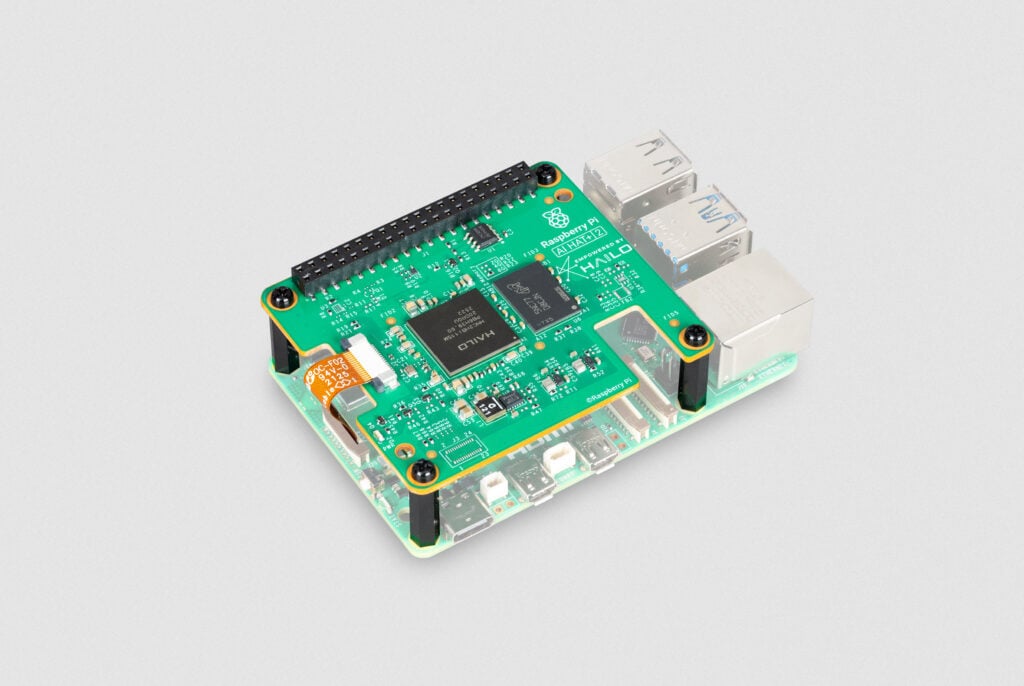
Introducing the Raspberry Pi AI HAT+ 2: Generative AI on Raspberry Pi 5

1 Share

A little over a year ago, we introduced the Raspberry Pi AI HAT+, an add-on board for Raspberry Pi 5 featuring the Hailo-8 (26-TOPS variant) and Hailo-8L (13-TOPS variant) neural network accelerators. With all AI processing happening directly on the device, the AI HAT+ delivered true edge AI capabilities to our users, giving them data privacy and security while eliminating the need to subscribe to expensive cloud-based AI services.

While the AI HAT+ provides best-in-class acceleration for vision-based neural network models, including object detection, pose estimation, and scene segmentation (see it in action here), it lacks the capability to run the increasingly popular generative AI (GenAI) models. Today, we are excited to announce the Raspberry Pi AI HAT+ 2, our first AI product designed to fill the generative AI gap.

Unlock generative AI on your Raspberry Pi 5

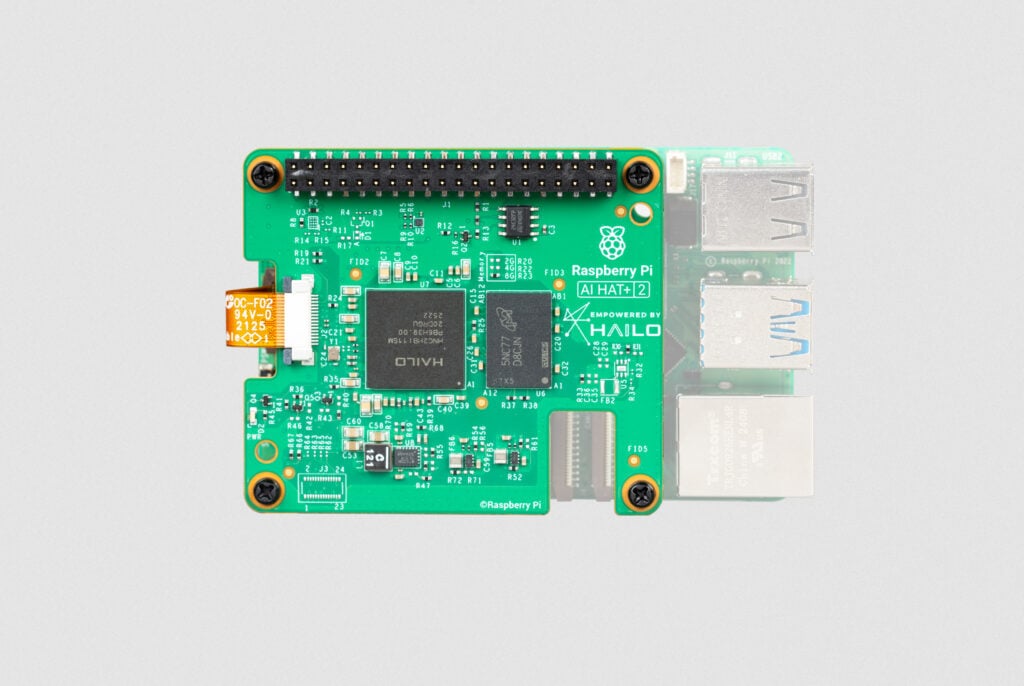
Featuring the new Hailo-10H neural network accelerator, the Raspberry Pi AI HAT+ 2 delivers 40 TOPS (INT4) of inferencing performance, ensuring generative AI workloads run smoothly on Raspberry Pi 5. Performing all AI processing locally and without a network connection, the AI HAT+ 2 operates reliably and with low latency, maintaining the privacy, security, and cost-efficiency of cloud-free AI computing that we introduced with the original AI HAT+.

Unlike its predecessor, the AI HAT+ 2 features 8GB of dedicated on-board RAM, enabling the accelerator to efficiently handle much larger models than previously possible. This, along with an updated hardware architecture, allows the Hailo-10H chip to accelerate large language models (LLMs), vision-language models (VLMs), and other generative AI applications.

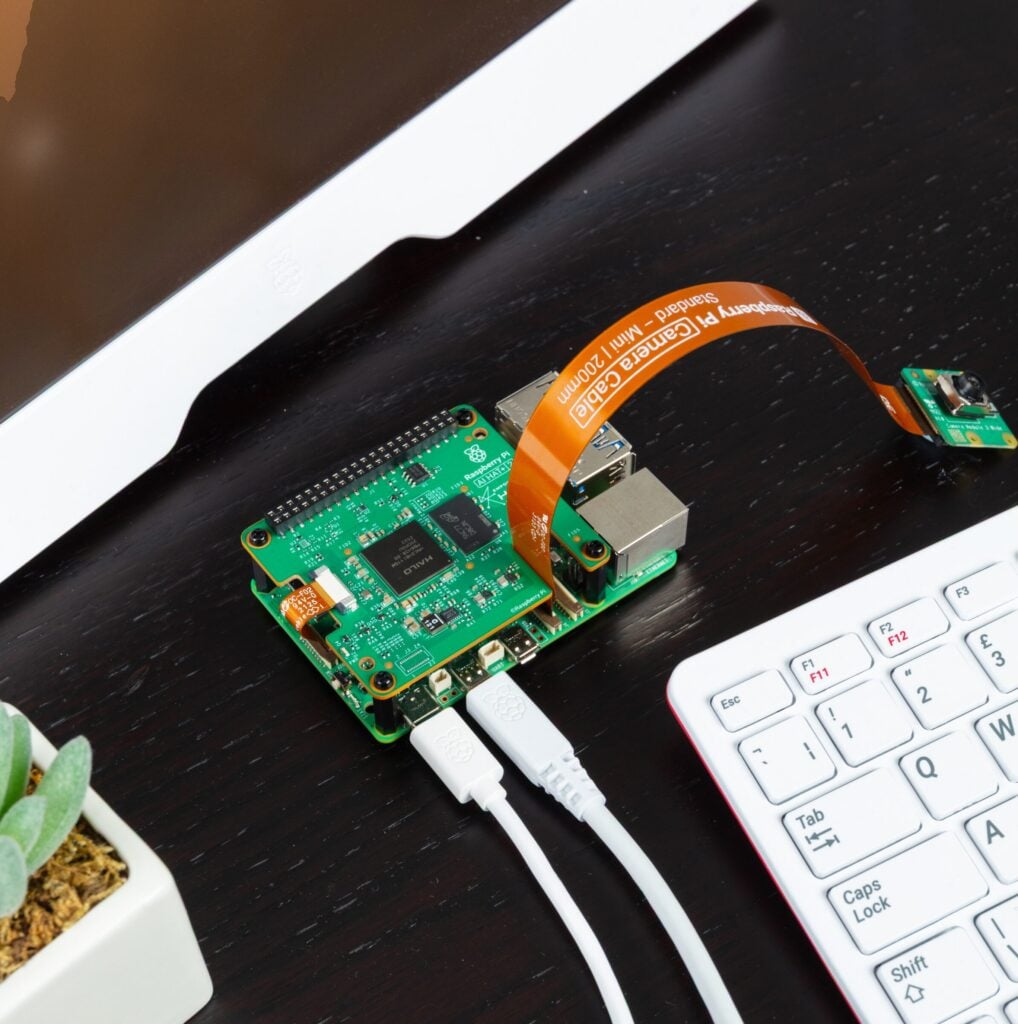
For vision-based models — such as Yolo-based object recognition, pose estimation, and scene segmentation — the AI HAT+ 2’s computer vision performance is broadly equivalent to that of its 26-TOPS predecessor, thanks to the on-board RAM. It also benefits from the same tight integration with our camera software stack (libcamera, rpicam-apps, and Picamera2) as the original AI HAT+. For users already working with the AI HAT+ software, transitioning to the AI HAT+ 2 is mostly seamless and transparent.

Some example applications

The following LLMs will be available to install at launch:

ModelParameters/size
DeepSeek-R1-Distill1.5 billion
Llama3.21 billion
Qwen2.5-Coder 1.5 billion
Qwen2.5-Instruct 1.5 billion
Qwen21.5 billion

More (and larger) models are being readied for updates, and should be available to install soon after launch.

Let’s take a quick look at some of these models in action. The following examples use the hailo-ollama LLM backend (available in Hailo’s Developer Zone) and the Open WebUI frontend, providing a familiar chat interface via a browser. All of these examples are running entirely locally on a Raspberry Pi AI HAT+ 2 connected to a Raspberry Pi 5.

The first example uses the Qwen2 model to answer a few simple questions:

The next example uses the Qwen2.5-Coder model to perform a coding task:

This example does some simple French-to-English translation using Qwen2:

The final example shows a VLM describing the scene from a camera stream:

Fine-tune your AI models

By far the most popular examples of generative AI models are LLMs like ChatGPT and Claude, text-to-image/video models like Stable Diffusion and DALL-E, and, more recently, VLMs that combine the capabilities of vision models and LLMs. Although the examples above showcase the capabilities of the available AI models, one must keep their limitations in mind: cloud-based LLMs from OpenAI, Meta, and Anthropic range from 500 billion to 2 trillion parameters; the edge-based LLMs running on the Raspberry Pi AI HAT+ 2, which are sized to fit into the available on-board RAM, typically run at 1–7 billion parameters. Smaller LLMs like these are not designed to match the knowledge set available to the larger models, but rather to operate within a constrained dataset.

This limitation can be overcome by fine-tuning the AI models for your specific use case. On the original Raspberry Pi AI HAT+, visual models (such as Yolo) can be retrained using image datasets suited to the HAT’s intended application — this is also the case for the Raspberry Pi AI HAT+ 2, and can be done using the Hailo Dataflow Compiler.

Similarly, the AI HAT+ 2 supports Low-Rank Adaptation (LoRA)–based fine-tuning of the language models, enabling efficient, task-specific customisation of pre-trained LLMs while keeping most of the base model parameters frozen. Users can compile adapters for their particular tasks using the Hailo Dataflow Compiler and run the adapted models on the Raspberry Pi AI HAT+ 2.

Available to buy now

The Raspberry Pi AI HAT+ 2 is available now at $130. For help setting yours up, check out our AI HAT guide.

Hailo’s GitHub repo provides plenty of examples, demos, and frameworks for vision- and GenAI-based applications, such as VLMs, voice assistants, and speech recognition. You can also find documentation, tutorials, and downloads for the Dataflow Compiler and the hailo-ollama server in Hailo’s Developer Zone.

The post Introducing the Raspberry Pi AI HAT+ 2: Generative AI on Raspberry Pi 5 appeared first on Raspberry Pi.

Read the whole story
alvinashcraft
4 hours ago
reply
Pennsylvania, USA
Share this story
Delete
Next Page of Stories