Sr. Content Developer at Microsoft, working remotely in PA, TechBash conference organizer, former Microsoft MVP, Husband, Dad and Geek.
149952 stories
·
33 followers

What’s new in Svelte: December 2025

1 Share

Just in time for the end of the year, there’s a new Svelte Society Website! It brings a whole new experience. Instead of just being a site with static resources, it now serves a dynamic feed of all the latest Svelte content out there. Videos, libraries, events, etc.

Instead of opening PRs to add libraries and packages you can now just submit them on the website. If you find an interesting package, head on over and submit it. Logged in users also have the ability to like and save content. So be sure to try it out and share your feedback!

There’s a bunch of updates to SvelteKit and a showcase to cover, so lets dive in...

What’s new in Svelte & SvelteKit

  • hydratable API is a low-level API to coordinate hydration between the server and client (svelte@5.44.0, Docs, #17154)
  • print converts a Svelte AST node back into Svelte source code. It is primarily intended for tools that parse and transform components using the compiler’s modern AST representation (svelte@5.45.0, Docs, #16188)
  • File uploads can now be streamed inside form remote functions allowing form data to be accessed before large files finish uploading (kit@2.49.0, Docs, #14775)
  • (Minor) Breaking Changes in kit@2.48.8:
    • invalid now must be imported from @sveltejs/kit (#14768)
    • The submitter option was removed from the experimental form validate() method. It will now always use the default submitter (#14762)
  • Svelte CLI:
    • Links are now wrapped with resolve() to follow best practices (sv@0.9.14, Docs, #754)
    • npx sv create now supports a new argument --add to add add-ons to the project in the same command (sv@0.10.0, #695)
    • The new --no-dir-check option in sv create will, even if the folder is not empty, suppress all directory check prompts (sv@0.9.15, #785)

For a full list of changes - including all the important bugfixes that went into the releases this month - check out the Svelte compiler’s CHANGELOG and the Svelte Kit / Adapter CHANGELOGs.


Community Showcase

Apps & Sites built with Svelte

  • Apple’s new web-based App Store is built with Svelte! This adds onto the other Apple products spotted using Svelte in the wild - including Apple Music and Apple Podcasts
  • Aphex is a modern, open source headless CMS built with SvelteKit
  • ShareNhac lets you and your friends watch videos and listen to music together in sync, without any ad interruptions
  • starterindex is a curated list of top boilerplates to help you start your next project (which is great because we stopped putting “starter” repos in the Svelte newsletter over a year ago)
  • PGPlayground helps any backend engineer quickly prototype and validate fixes or changes to their schema without leaving the browser
  • Design Tokens App is a web-based editor and converter to manage design tokens, visualize them in a tree structure, and export them as CSS variables or JSON format
  • Multi is a coding agent for VS Code
  • Gardenjs provides a centralized platform for developers to create, test, and present UI components and pages in isolation
  • bookemoji is a tool to showcase, collaborate, and develop the technical aspects of user interfaces - an alternative to StoryBook.js or Histoire in your favorite tech stack

Learning Resources

Libraries, Tools & Components

  • better-svelte-email lets you render emails in Svelte with first-class Tailwind support
  • svelte-number-format is a lightweight and reactive number input component that is now available as a stable v1.0 release
  • chain-enhance lets you sequentially chain multiple SvelteKit form actions with deep-merged data propagation, type-safe results, reactive progress tracking, and automatic file-safety
  • svelte-socket is a WebSocket wrapper for Svelte 5 using runes
  • @edgeone/sveltekit lets you deploy your SvelteKit app to Tencent Cloud EdgeOne Pages to provide lightning-fast speeds in China while maintaining excellent performance worldwide
  • Davia is an open-source tool designed for AI coding agents to generate interactive internal documentation for your codebase
  • svelte-ui-kit provides an easy to use, customizable button component with smooth hover animations - inspired by shadcn/ui style
  • Svelte AI Elements is a component registry built on top of shadcn-svelte that provides production-ready components designed for building AI-powered applications
  • sveltekit-api-gen automatically generates OpenAPI 3.0 specifications from your SvelteKit server endpoints using JSDoc @Swagger annotations
  • Rune Scroller provides “enchanting” scroll animations for Svelte 5, built with native performance and zero dependencies
  • vite-plugin-sveltekit-decorators, a plugin that automatically decorates SvelteKit functions, now supports remote functions
  • svelte-breakpoint-badge is a lightweight Svelte component that displays the current Tailwind CSS breakpoint during development

That’s it for this month! Let us know if we missed anything on Reddit or Discord.

Until next time 👋🏼!

Read the whole story
alvinashcraft
26 minutes ago
reply
Pennsylvania, USA
Share this story
Delete

Is Using Command Line AI an Option for Helping You Code?

1 Share

Earlier today, I got curious and asked myself, “How well would using command line AI work for programming?”

I’ve used various IDEs to test how well their AI functions could work with creating programs of different types, but I’d not tried doing the same thing from the command line.

Today, I decided to change that.

Here’s what I discovered.

The Tools I Used

For this test, I worked on Pop!_OS Linux with the Ollama AI and a specific model that is geared toward coding. You don’t have to use Linux. As long as your OS works with Ollama, you’ll be good to go.

Speaking of which …

Installing Ollama

If you’re using either macOS or Windows, installing Ollama is as easy as downloading the installer file for your OS from the official Ollama site and running it.

With Linux, you simply have to run the following command:

Once Ollama has been installed, you’ll then need to download a programming-centric AI model. For me, I used qwen3-coder. To use that model, you have to first pull it with the command:

This model is roughly 15GB, so give it plenty of time to download.

When the download finishes, you then need to run the model with:

You should now find yourself at the Ollama prompt, ready to get to work.

Creating the First Program

What I decided to do was ask qwen3-coder to create a Python program that would accept user input for name, age, email and phone number and save the data to a file.

The specific query was:

It took qwen3-coder no time to start generating code. What it came up with was quite long and looked like this:

I copied the above code to a file named ai_input.py and ran it with the command:

To my surprise, it ran flawlessly.

Next, I decided to test it further by querying:

I was certain qwen3-coder would fail at this point. Sure, it might generate some code, but there’s no way it would get this right.

It took roughly the same amount of time for the model to spit out the new code, which looked like this:

That’s a lot of code, and surely it would error out, right?

It did.

However, the error was simply because the program couldn’t find tkinter. I installed it with:

I reran the code, and to my shock, the graphical user interface (GUI) opened (Figure 1).

Figure 1: My new Python GUI app works surprisingly well.

I could type input, save it, type more input, save it and keep going until I clicked Exit.

I decided to throw it for another look and ran another follow-up query:

Qwen3-coder went to work and spit out more code. I saved the output, ran it, and found that (once again) the app was successful.

Ruh roh. This time the program errored out with:

So, I ran another query informing qwen3-coder about the error to see if it could fix it. It went to work and believed it found the error. After it produced the new code: rinse, wash, repeat.

This time, the code was considerably longer (not sure why) and, according to qwen3-coder, this is what was fixed:

  • Fixed the button creation syntax** — Added the missing closing parenthesis and proper styling.
  • Added the missing save_information method** — This was causing the error since it was referenced but not defined.
  • Added proper file saving functionality** — The save button now actually saves data to a file.
  • Fixed the lambda binding** — Made it properly formatted.
  • Added proper error handling** — For file operations.
  • Fixed the method call** — Made sure all method references are properly defined.

This time, the code ran fine. Although the background of the app wasn’t pink, the background for all the fields was.

Picking at nits.

The important thing here is that the Ollama command line AI tool was successful at what I’d asked it to do. Even with an error, I was able to do follow-up queries to resolve issues and even improve the code.

Does that mean you can stop learning the craft of programming and rely solely on AI? I wouldn’t. Because I know enough about Python, I am better capable of using the tool to either create something new or learn new concepts for the language.

Of course, your mileage may vary.

The post Is Using Command Line AI an Option for Helping You Code? appeared first on The New Stack.

Read the whole story
alvinashcraft
26 minutes ago
reply
Pennsylvania, USA
Share this story
Delete

Links For You (11/30/25)

1 Share

Once again I'm here, sharing links, and apologizing for the lack of content this month, although I did publish seven times, and I think I had some good demos, so maybe I should just stop worrying about it? ;) As I've hinted recently, I am no longer on the job market! I haven't said where yet as I wanted to get a few weeks under my belt to ensure things were going to be ok. I'm not going to lie, my last role (and quick lay off) really messed me up a bit. That being said, I feel relatively safe now, and really like what both my role and my coworkers, so I figure it's time to share!

My new role is a Senior Developer Evangelist for Webflow. Webflow has a web-based designer for creating and managing web sites, and while the primary tool is focused on designers and business-type users, the platform has multiple different developer-centric endpoints. As someone who has been working on the web for an incredibly long time, I look at visual/web-based tools like this with a bit of skepticism. They've come a long way since the days of Dreamweaver 1.0, but I still worry about not having direct access to code. One of the really cool things about Webflow is all the ways a developer can extend and work with the platform itself. I feel like our Designer can cover 90% of most people's needs, and the extensions available to coders easily cover the rest. I'm also beyond excited to be working on a web-platform centric product. I love APIs, but I haven't had an opportunity to work directly with web sites like this for a while. And with that, on with the links!

Build a Router

First up is a cool post on jshof.dev where he makes use of URLPattern (read more about that here on MDN) to create a web component based router. It's a great little experiment and another example of how useful web components are in the platform.

Helping Seniors with AI

Next is a book by an old friend of mine, "How Seniors Learn AI" (as an FYI, that's an affiliate link). The author, Dan Wilson, is someone I've known for probably two decades now. He's a darn good educator and a darn good person as well. This book is meant to help introduce AI to senior citizens and provide useful guides to help them make use of it in their day to day lives. My assumption is that most of my readers don't need this book, but I'd bet you know someone who does.

Advent of Code 2025

It's that time of year - my favorite time of year - Advent of Code is back! I've shared this site now for probably ten years, but for those of you who aren't aware, the Advent of Code is a yearly coding challenge that presents two holiday-themed puzzles per day. Usually the second challenge is a slight variation of the first so it doesn't take too much time. Difficulty ranges from pretty easy to more complex as the days go on, and usually I get about ten days done before I tap out, but it's always fun to take a stab at it. Oh... and I just saw on the site they've gone from 24 days of challenges to 12, so maybe this year I'll actually finish.

Just For Fun

Yall know I'm a big fan of covers, so how about a rather conventional cover from a rather unconventional band, Ninja Sex Party:

Play Video

Read the whole story
alvinashcraft
26 minutes ago
reply
Pennsylvania, USA
Share this story
Delete

31 Writing Prompts For December 2025

1 Share

Writers Write shares writing prompts and writing resources. Use these writing prompts for December 2025 to get you writing.

Hello Writer

This month, we are wrapping it all up. In 2023, we focused on building habits, beating procrastination and improving discipline. In 2024, we worked on our novels and improved our craft. This year, we are taking a closer look at editing, specifically self-editing. It is an essential skill every writer needs to master, but man, being objective and cutting down your own work is hard.

Along with a short editing lesson, you will also receive your monthly prompts as usual. Editing is definitely second-draft stuff. Use the prompts to free write, THEN try to apply the editing suggestions. This is optional.

If this is your first time using prompts, you can learn more about freewriting here.

Editing Checklist

Our first post was about when to edit. Once you have fixed the story stuff, it’s time to move down to the line level. This is a short list that will help you tackle the most basic elements.

Putting it all together:

o   Is this a first or second draft? We only edit after we’ve written.
o   Evaluate your sentences.
o   Check sentence length.
o   Find and evaluate adverbs.
o   Have you used strong verbs?
o   Find and evaluate adjectives.
o   Have you used specific nouns?
o   Find and evaluate modifiers, qualifiers and intensifiers.
o   Check and evaluate punctuation.
o   Check spelling.
o   Check style.

Homework

Use the prompt to freewrite. Once you are done with the first draft, use this list to edit your work.

31 Writing Prompts For December 2025

Download your prompts here: 31 Writing Prompts For December 2025

Do you want a daily prompt?

If you would rather have a free daily writing prompt from us, sign up here: Join Our Newsletter

Make the most of your writing prompts. Read How To Use Writing Prompts

Happiness
Mia

by Mia Botha

Looking for more prompts?

  1. 30 Writing Prompts For November 2025
  2. 31 Writing Prompts For October 2025
  3. 30 Writing Prompts For September 2025
  4. 31 Writing Prompts For August 2025
  5. 31 Writing Prompts For July 2025
  6. 30 Writing Prompts For June 2025
  7. 31 Writing Prompts For May 2025
  8. 30 Writing Prompts For April 2025
  9. 31 Writing Prompts For March 2025
  10. 28 Writing Prompts For February 2025

Top Tip: Find out more about our workbooks and online courses in our shop.

The post 31 Writing Prompts For December 2025 appeared first on Writers Write.

Read the whole story
alvinashcraft
27 minutes ago
reply
Pennsylvania, USA
Share this story
Delete

Microsoft says Copilot on Windows 11 is getting “Bye” command, MS 365 Copilot coming to Chrome as an extension

1 Share

Microsoft confirmed that it’s testing a “Bye” phrase for Copilot on Windows 11, particularly Microsoft 365 Copilot, which is pre-installed on all PCs, regardless of whether you’ve a subscription or not. Microsoft 365 Copilot is also coming to Google Chrome as an extension, as if Copilot inside Edge was not enough.

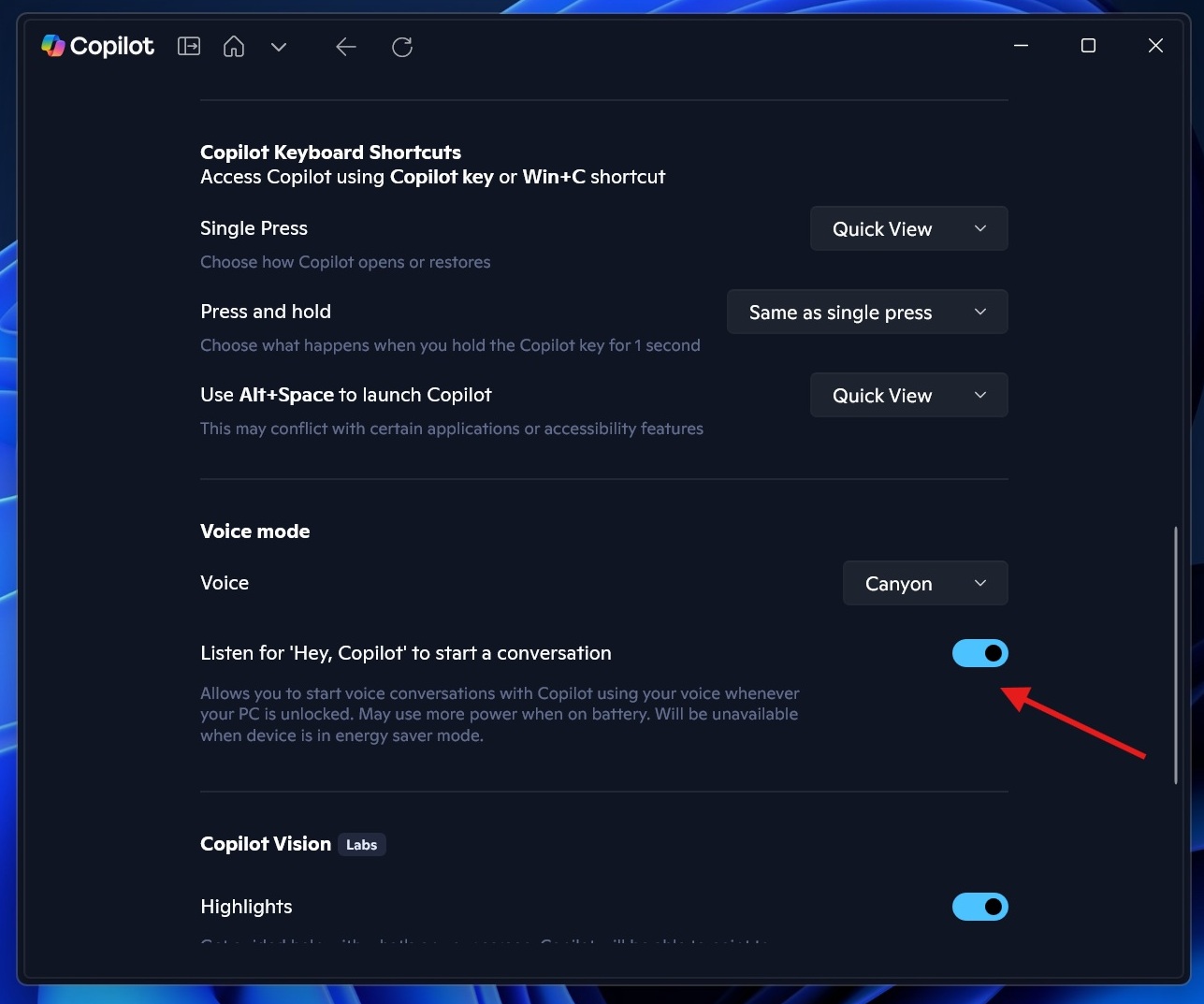
Up until now, you could only use “Hey Copilot” to open Copilot on Windows 11, but what if you want to end the session? You need to manually drag the cursor and click the ‘X’ icon, but that changes with the ‘Bye Copilot‘ phrase.

Hey Copilot voice setting

In an update to the Microsoft 365 roadmap, the Windows giant confirmed that it’s testing the ‘Bye’ phrase for Copilot.

In our tests, Windows Latest observed that ‘Bye Copilot’ already works on our production PCs, so it’s likely the feature has already rolled out to some users.

In the roadmap, Microsoft also says “Bye Copilot” is coming to the Microsoft 365 Copilot app. It’s only a matter of time until these phrases are universally applied across the operating system. If you’re in a voice mode interaction with Copilot, you will be able to say “Bye Copilot” to exit the conversation.

“Now users can close a voice session on Windows by simply saying bye or goodbye when they want to close the voice session,” Microsoft noted in a roadmap update.

Microsoft is saying that the feature could create a ‘hands-free’ experience for AI Windows and eventually AI Agents.

“This, paired with ‘Hey Copilot’ wake word, provides them with a complete hands-free experience for voice in Microsoft 365 Copilot on Windows devices,” Microsoft confirmed.

This is part of a bigger plan, which is to turn Windows into an agentic OS, whether you like it or not. The feature will begin rolling out to everyone in December 2025 for all PCs that have Copilot and the Microsoft 365 Copilot app installed. A subscription is not required to say ‘goodbye’ to Copilot.

What might the future of Windows look like?

When we connect the dots, we actually see where Windows is heading.

Copilot operator
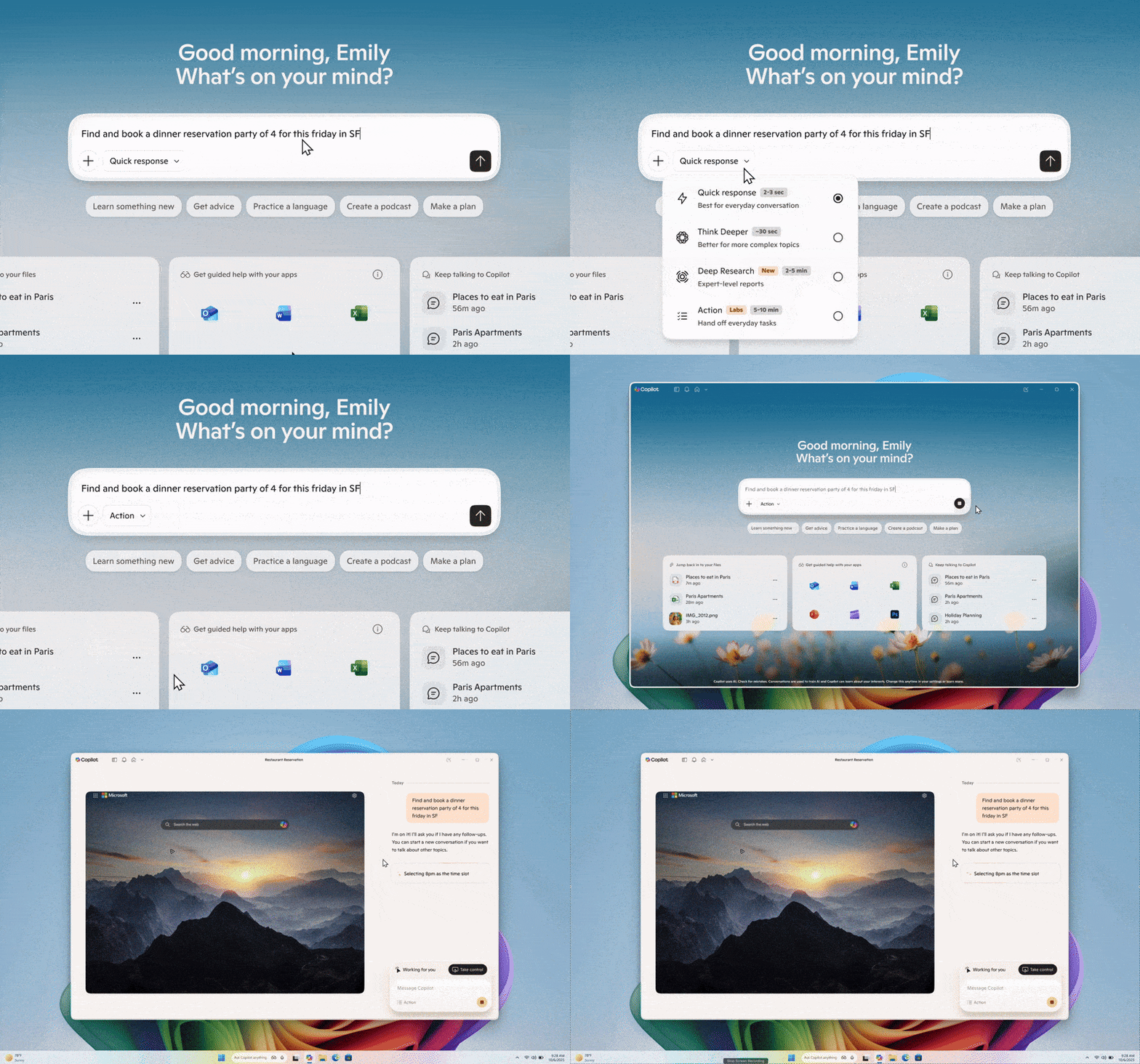
Copilot Actions using Agent Workspace on Windows 11

At some point, you’ll be able to say Hey Copilot to open Copilot and start a conversation where you can also trigger Copilot Action. Copilot Actions starts performing tasks on your PC by accessing your personal files and folders. For example, it’ll be able to browse the Downloads folder in File Explorer, read a selected PDF, then create a presentation.

Once the ‘action’ is completed, you can say “Goodbye” to end the session.

Microsoft 365 Copilot is coming to Google Chrome

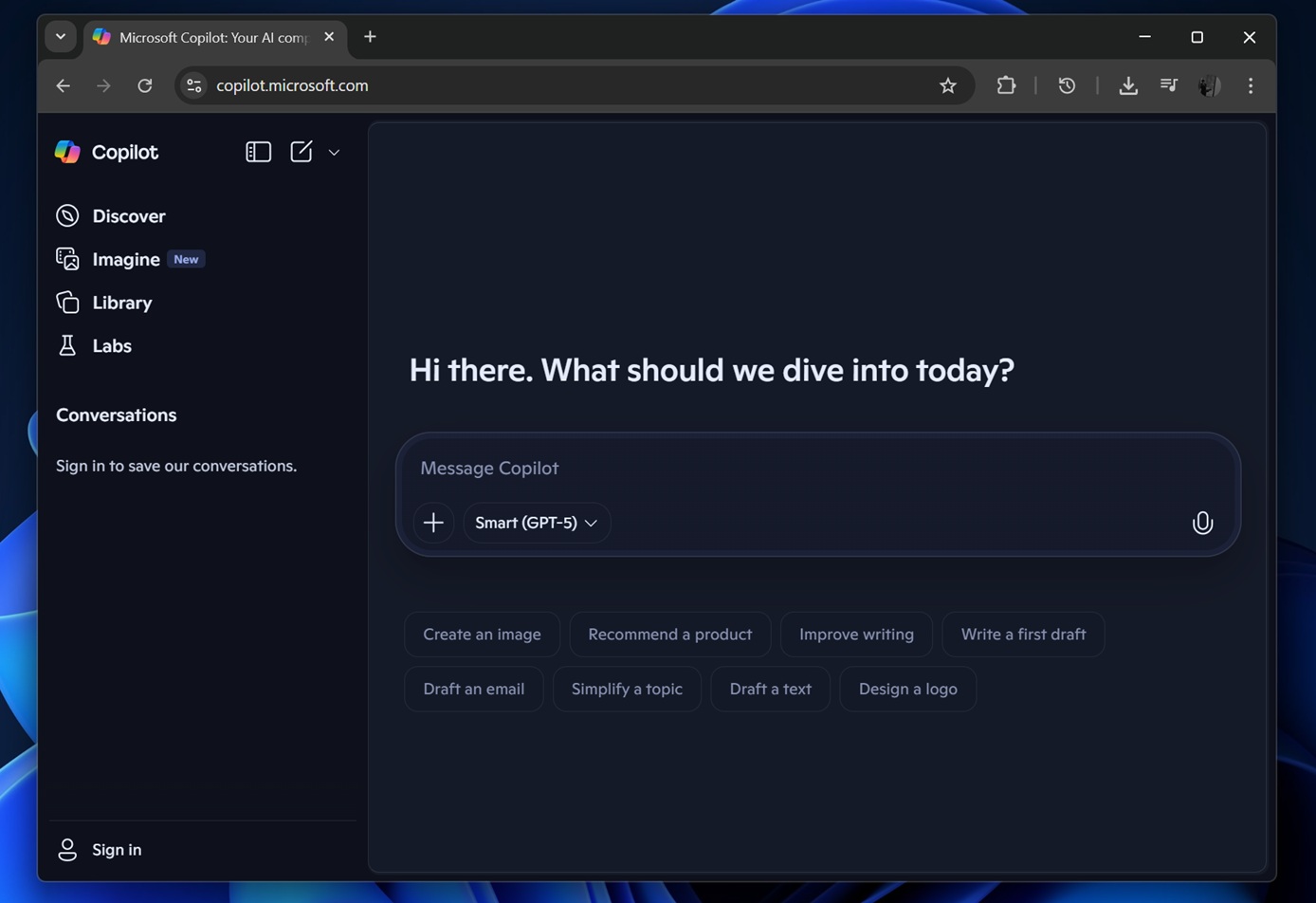
Copilot in Google Chrome

If you want to use Copilot in Google’s browser, you need to rely on the web version, but that might not be the best experience.

Microsoft is now building a new extension for Chrome called ‘Microsoft 365 Copilot’, and it brings Copilot Chat as well as Copilot Search directly into the browser.

We don’t know if it’ll be integrated in the browser’s address bar, as Microsoft’s extensions have previously tried to change the default search engine in Chrome. But you’ll be able to access Copilot chat from the extension menu. If you’re part of an organization, Microsoft says you can also access enterprise content.

Initially, Copilot’s extension for Chrome will be limited to asking questions, summarising webpages and offering access to AI-powered search. All of that suggests the extension will have read access to the website you are viewing, but we don’t know if it’ll also require access to browsing history.

The post Microsoft says Copilot on Windows 11 is getting “Bye” command, MS 365 Copilot coming to Chrome as an extension appeared first on Windows Latest

Read the whole story
alvinashcraft
7 hours ago
reply
Pennsylvania, USA
Share this story
Delete

Amazon Tells Its Engineers: Use Our AI Coding Tool 'Kiro'

1 Share
"Amazon suggested its engineers eschew AI code generation tools from third-party companies in favor of its own ," reports Reuters, "a move to bolster its proprietary Kiro service, which it released in July, according to an internal memo viewed by Reuters." In the memo, posted to Amazon's internal news site, the company said, "While we continue to support existing tools in use today, we do not plan to support additional third party, AI development tools. "As part of our builder community, you all play a critical role shaping these products and we use your feedback to aggressively improve them," according to the memo. The guidance would seem to preclude Amazon employees from using other popular software coding tools like OpenAI's Codex, Anthropic's Claude Code, and those from startup Cursor. That is despite Amazon having invested about $8 billion into Anthropic and reaching a seven-year $38 billion deal with OpenAI to sell it cloud-computing services..."To make these experiences truly exceptional, we need your help," according to the memo, which was signed by Peter DeSantis, senior vice president of AWS utility computing, and Dave Treadwell, senior vice president of eCommerce Foundation. "We're making Kiro our recommended AI-native development tool for Amazon...." In October, Amazon revised its internal guidance for OpenAI's Codex to "Do Not Use" following a roughly six month assessment, according to a memo reviewed by Reuters. And Claude Code was briefly designated as "Do Not Use," before that was reversed following a reporter inquiry at the time. The article adds that Amazon "has been fighting a reputation that it is trailing competitors in development of AI tools as rivals like OpenAI and Google speed ahead..."

Read more of this story at Slashdot.

Read the whole story
alvinashcraft
7 hours ago
reply
Pennsylvania, USA
Share this story
Delete
Next Page of Stories